






 Why Trust Us?
ToProxyLab has been testing proxy services since 2025. We pay for most plans ourselves, and when a provider gives us test traffic we say so in the review — free traffic buys a place in the testing queue, nothing else. Every provider goes through the same speed, uptime and fraud-score checks, and we publish the real numbers, including the bad ones. A rating cannot be bought. Learn who we are and how we review proxies.
Why Trust Us?
ToProxyLab has been testing proxy services since 2025. We pay for most plans ourselves, and when a provider gives us test traffic we say so in the review — free traffic buys a place in the testing queue, nothing else. Every provider goes through the same speed, uptime and fraud-score checks, and we publish the real numbers, including the bad ones. A rating cannot be bought. Learn who we are and how we review proxies.
A rep from ippeak.com reached out and offered to let me test their proxies and give an honest take on their IP quality. Content and fresh entries for our shortlist of sane proxy providers are always welcome, so why not, I figured. As part of the deal they handed me a promo code for 2 GB of free traffic.
Let me get this out of the way. The fact that the traffic was free doesn’t sway the verdict. The provider isn’t buying my loyalty. All they’re buying is my word that I’ll run their proxies through every test honestly. I screenshot every step and keep the logs, so any number in this review can be double-checked – just message me.
This time they pitched me not the regular residential proxies but their premium line. Prices start at $0.6 per GB on the big packages. Fine. If it’s premium, then I’ll judge it like premium. Let’s see what the tests say.
Location as usual is the US. And separately I ran proxy pools through my VPS – from 50 to 400 IPs for quality, residential match, and a bulk speed check. Full methodology is here: how we test proxies.
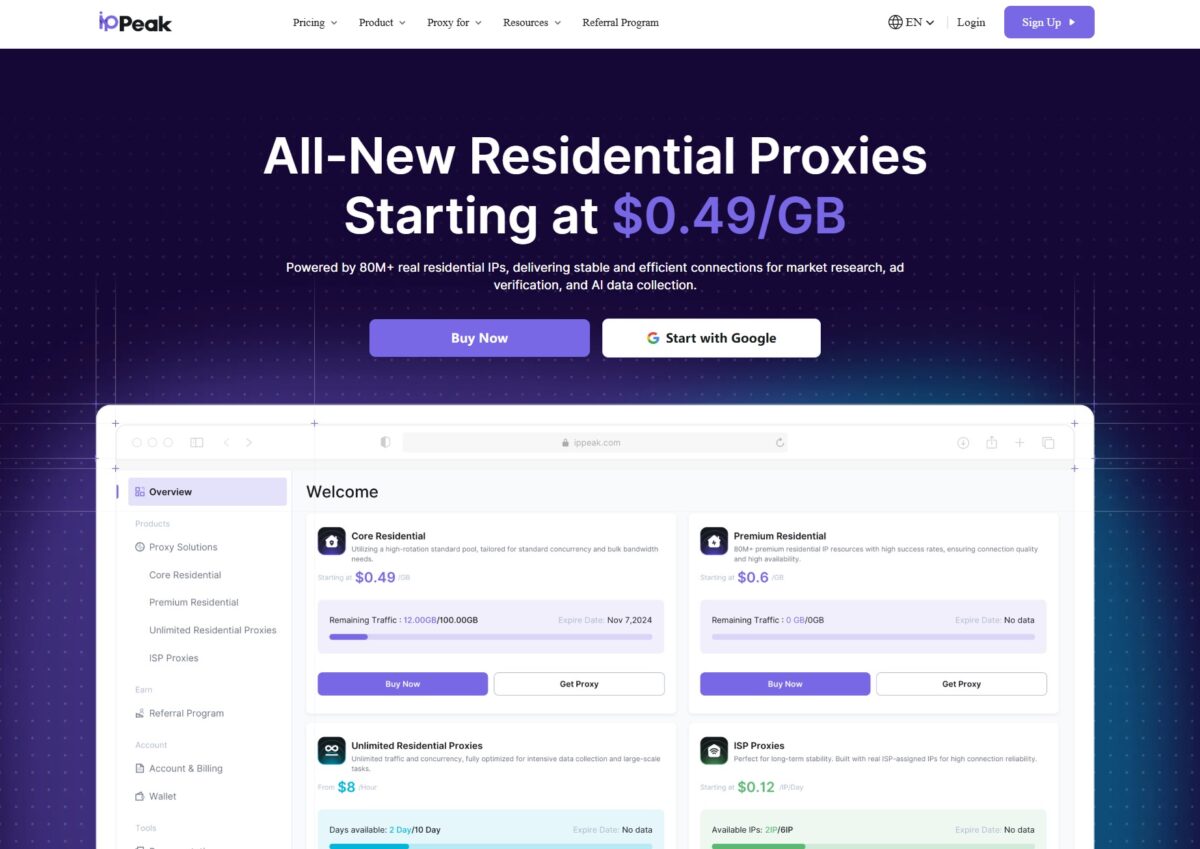
So what is this service anyway
IPPeak positions itself as a provider of residential and ISP proxies at competitive prices. The pitch – 80M+ real residential IPs, 195+ regions, 99.9% uptime SLA. On G2 they brag about city-level IP selection, real-time network health monitoring, and a 0.5-second average connection speed. Sounds nice. Marketing is marketing, though, so we’ll check it by hand.
The product line splits into four chunks. Core Residential – a cheap standard pool from $0.49/GB. Premium Residential – the one I’m testing, 80M+ premium IPs from $0.6/GB. Unlimited Residential – unlimited traffic billed by bandwidth. And ISP Proxies – static residential from $0.12 per IP per day.
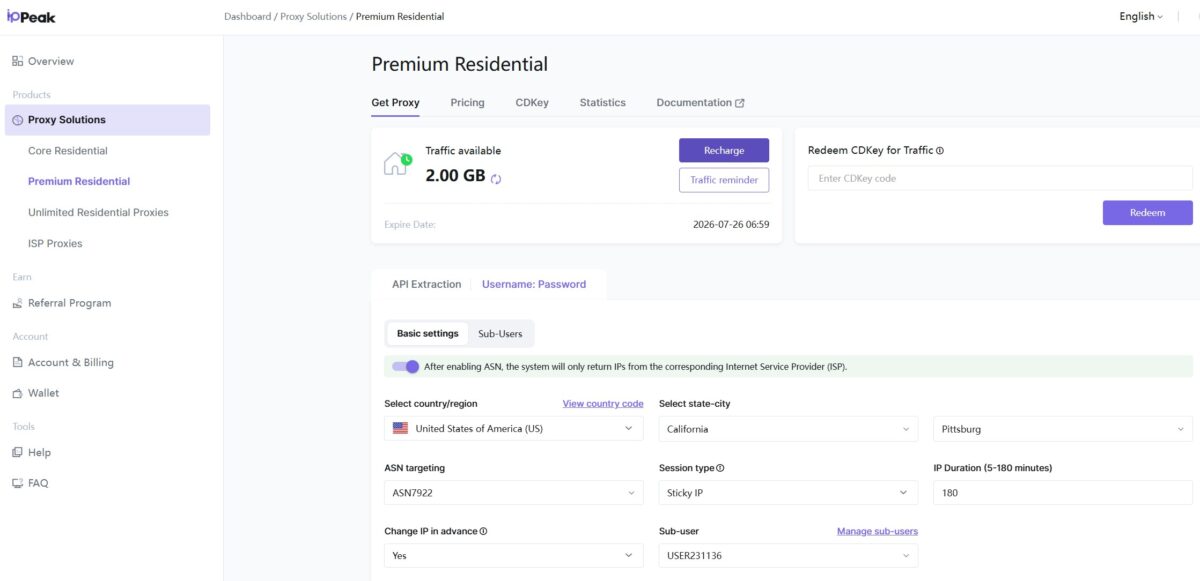
The interface is surprisingly clean. Products on the left, the proxy builder in the middle. A toggle up top for API Extraction / Username:Password. You get targeting by country, state, city, ASN, session type (Sticky/Rotating), and session length from 5 to 180 minutes. The “Change IP in advance” toggle and the sub-users manager are a nice touch.
Now ASN targeting – that’s a strong one. Not everyone has it. You can pin the output to a specific provider, say AS7922 (Comcast). For antidetect work where you need a believable ISP, this is gold.
Generating proxies and the first connection
The premium line builds a string in this format:
USER231136-zone-custom-region-US-asn-ASN7922-st-California-city-Pittsburg-session-151948…
Host global.rrp.apexae.top, port 10000. HTTP, SOCKS4, SOCKS5, and SSH are supported. The username carries the whole config – region, ASN, city, session. The approach is standard, used by pretty much every major provider (Bright Data, Smartproxy, IPRoyal). The handy part is you can change parameters right in the login, no trip to the dashboard needed.
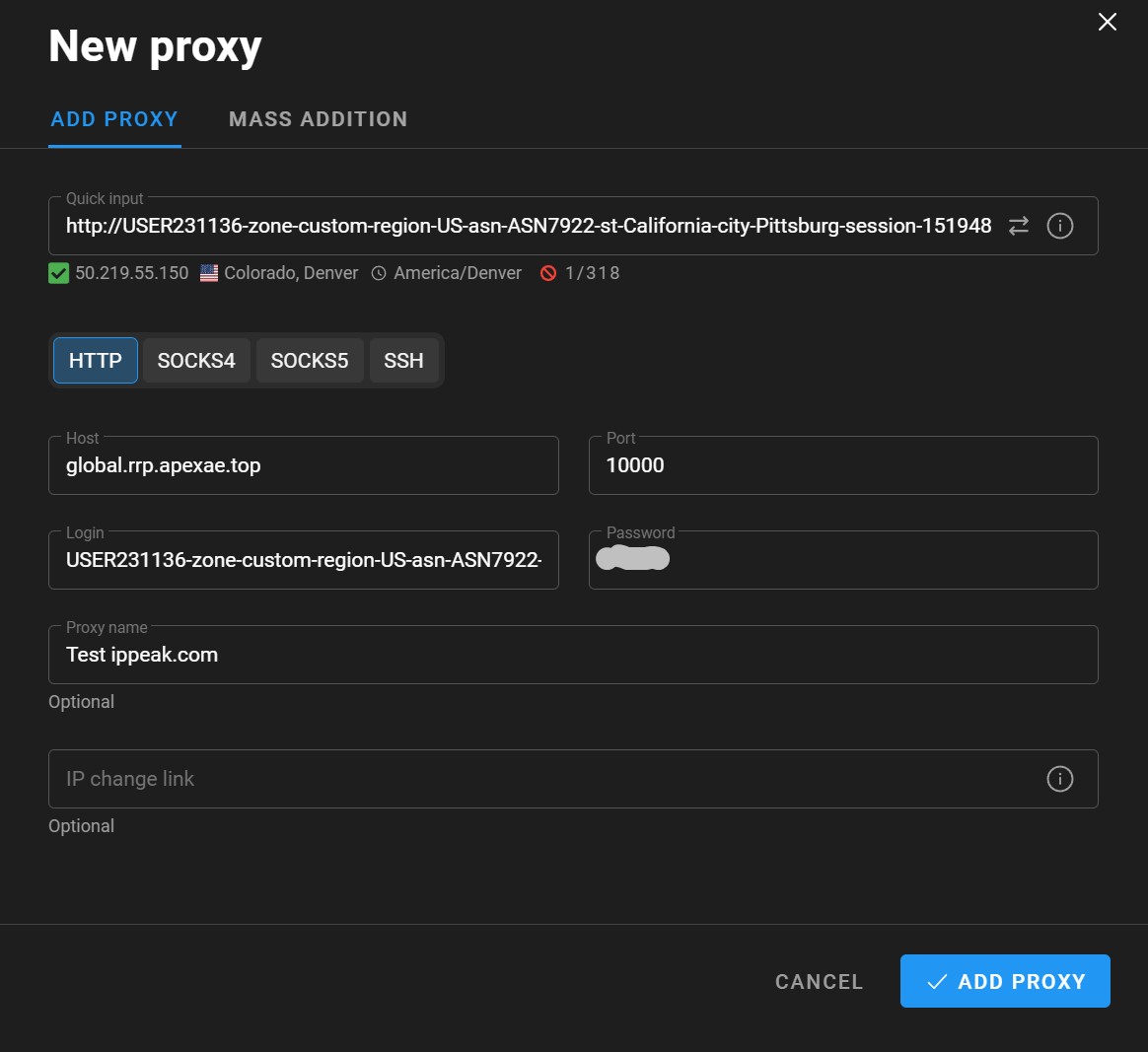
Dropped the string into the antidetect browser. Quick input parsed it itself, checked that it was alive, and gave me the green check. The IP came right up – Colorado, Denver, timezone America/Denver. No fuss. That’s a plus.
After that I locked in a single sticky IP and started running it through all the quality tests.
The IP under the microscope
The main test IP – 73.229.115.43.
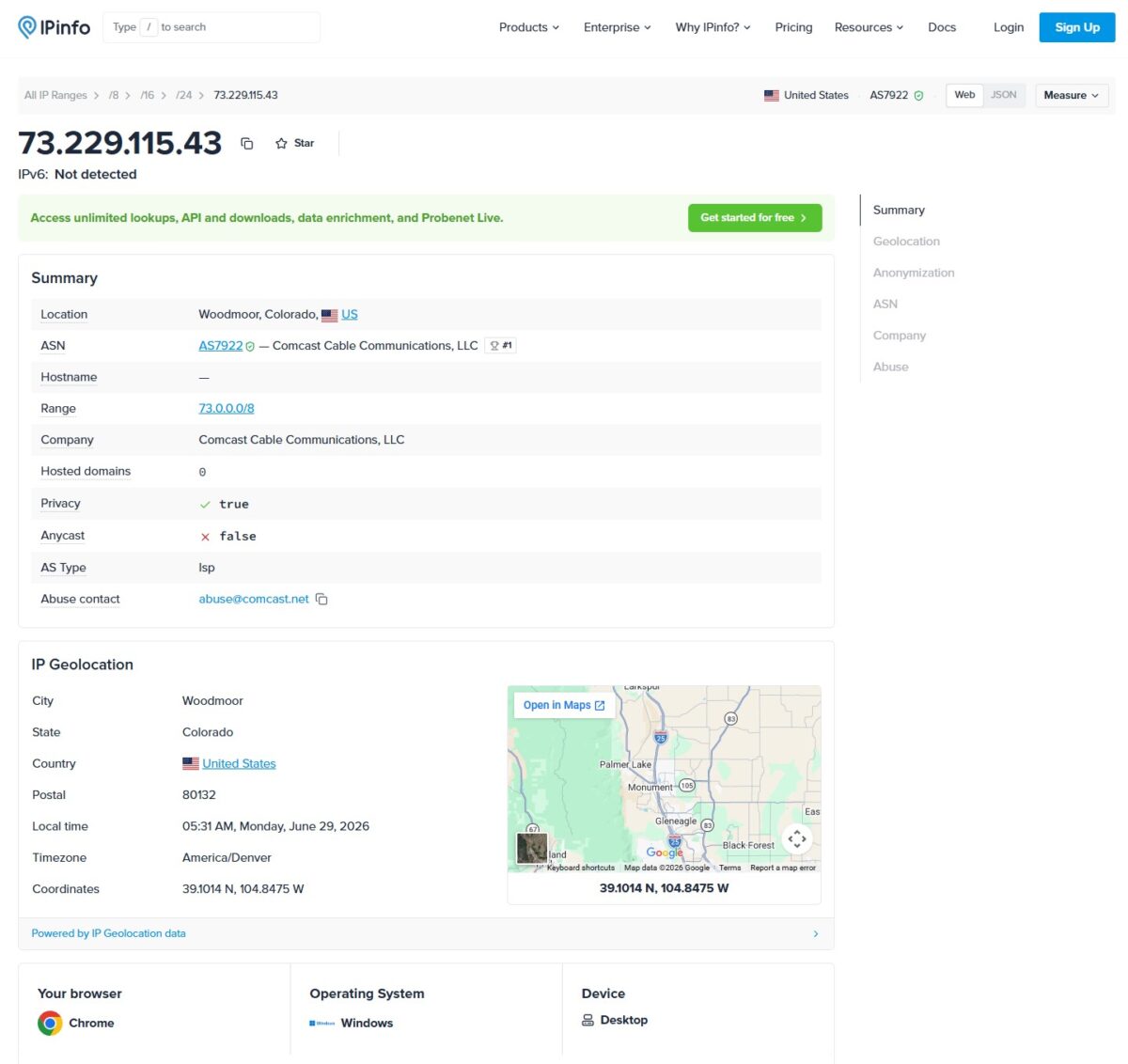
IPinfo showed the big one – it’s a real Comcast IP. AS7922, AS Type isp, hosted domains zero (meaning no sites are parked on the IP, a sign of a clean residential), abuse contact points to comcast.net. AS7922 is the largest ISP network in the US, top-1 by number of IPs. Per bgp.tools, it’s a 29-year-old network peering with 244 others. So the IP sits in a real home cable network, not in some shady hosting.
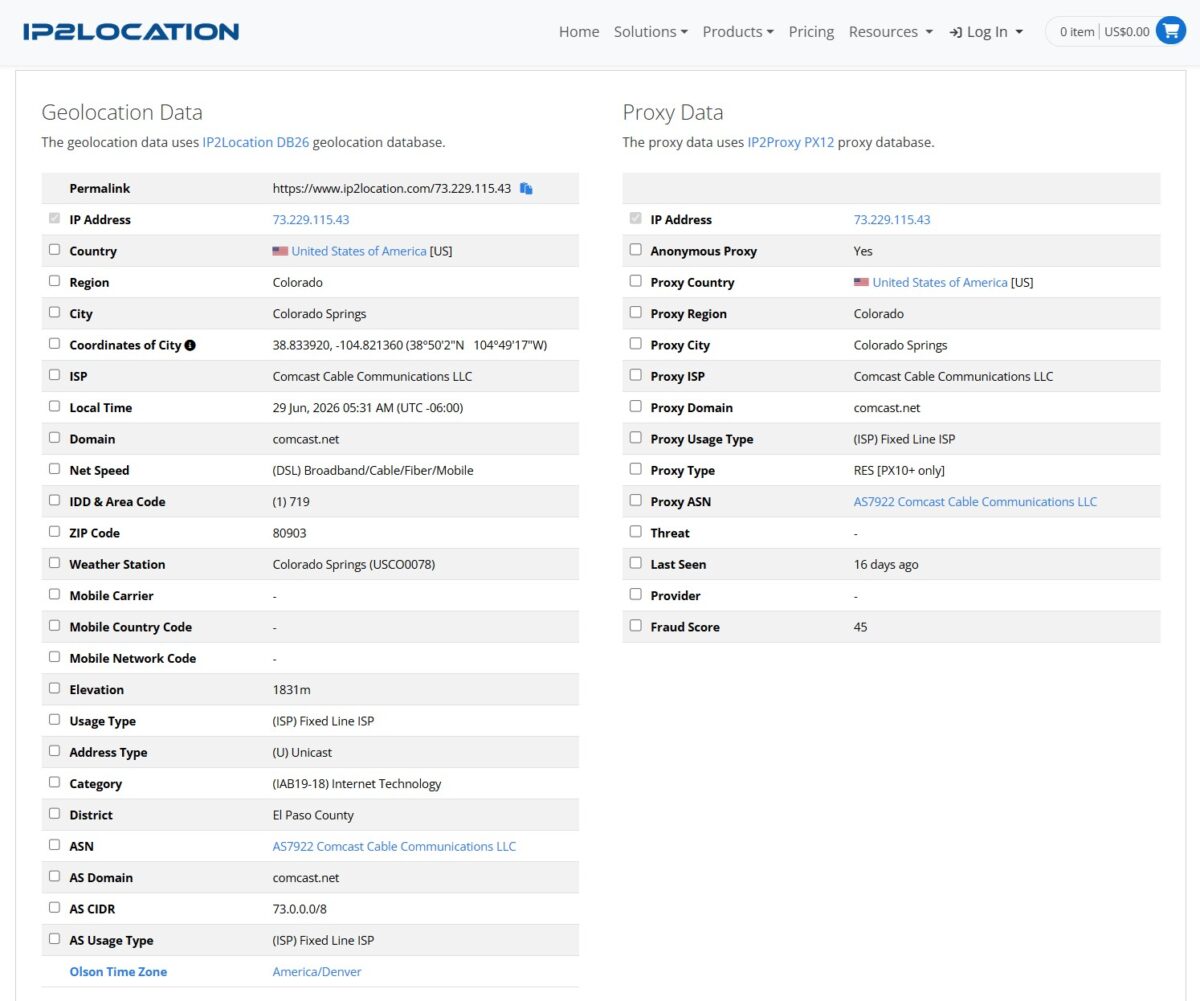
IP2Location confirmed Fixed Line ISP, Colorado Springs, ZIP 80903, El Paso County. But there’s a catch in the Proxy Data block: Anonymous Proxy = Yes, Proxy Type = RES, Fraud Score 45. So IP2Proxy does see this address as a residential proxy. Last Seen – 16 days ago. To be fair: a truly “virgin” IP is rare in residential networks, addresses cycle between customers. 45 out of 100 is a middling gray zone. Not criminal, but not spotless either.
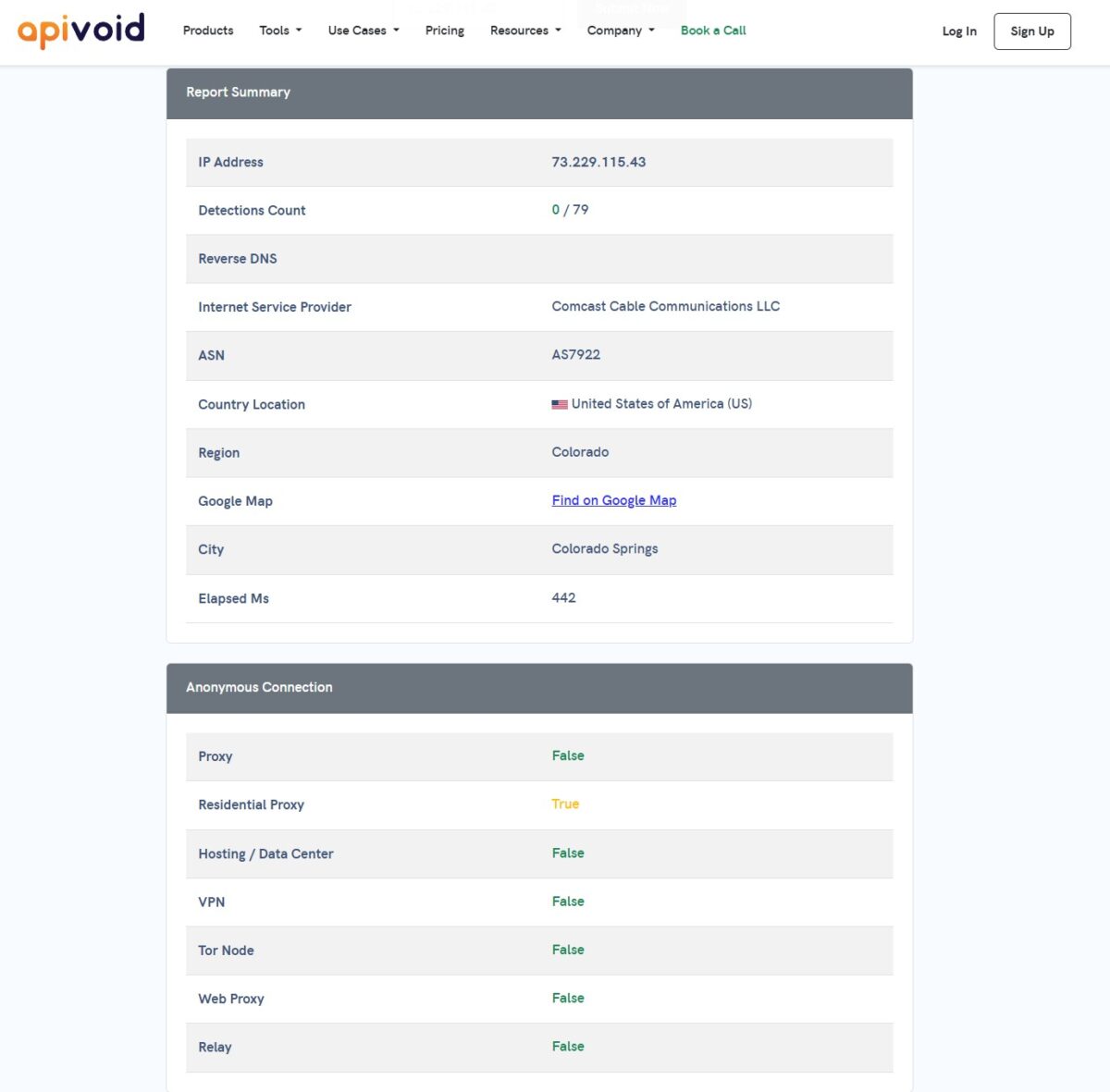
APIVoid painted a pretty picture – 0 detections out of 79 reputation checks. But in the Anonymous Connection block it honestly flagged “Residential Proxy: True”. It’s worth understanding the difference: 0/79 on reputation means the IP hasn’t shown up in spam databases or threat blacklists. The Residential Proxy flag isn’t a death sentence – it just states that the address routes through a residential proxy network. For most tasks that’s normal.
Antidetect and fingerprints
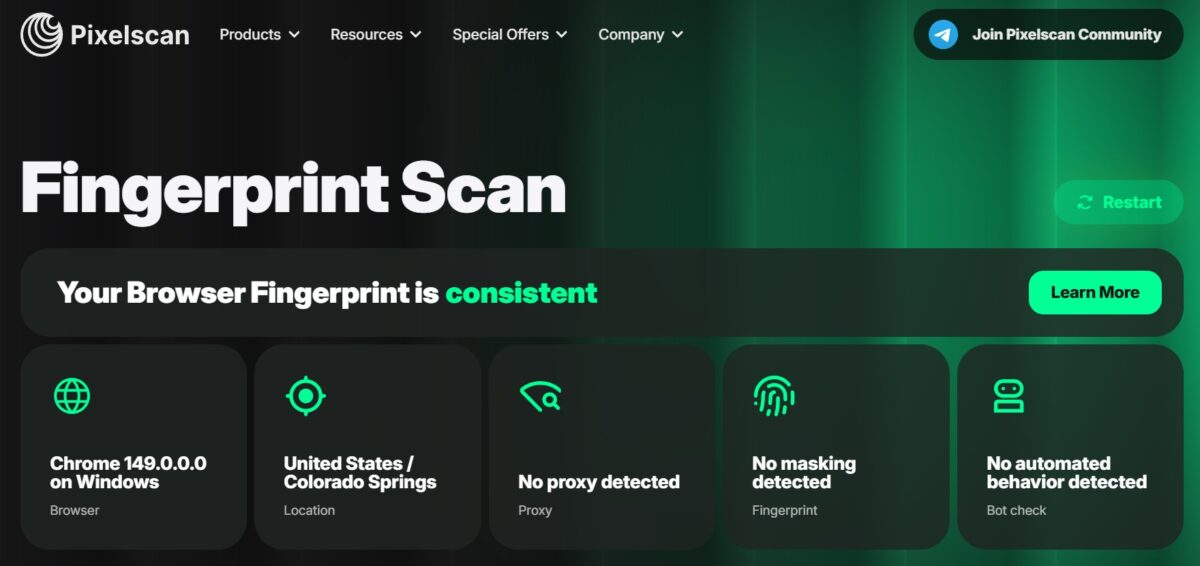
Pixelscan – and this one is serious. The fingerprint is consistent. “No proxy detected.” No masking, no automated behavior. The geolocation by IP and by browser lined up – Colorado Springs in both. That means the proxy doesn’t blow its cover to anti-fraud systems at the fingerprint level. For working with marketplaces, social media, and other places with tough detection – exactly what you want.
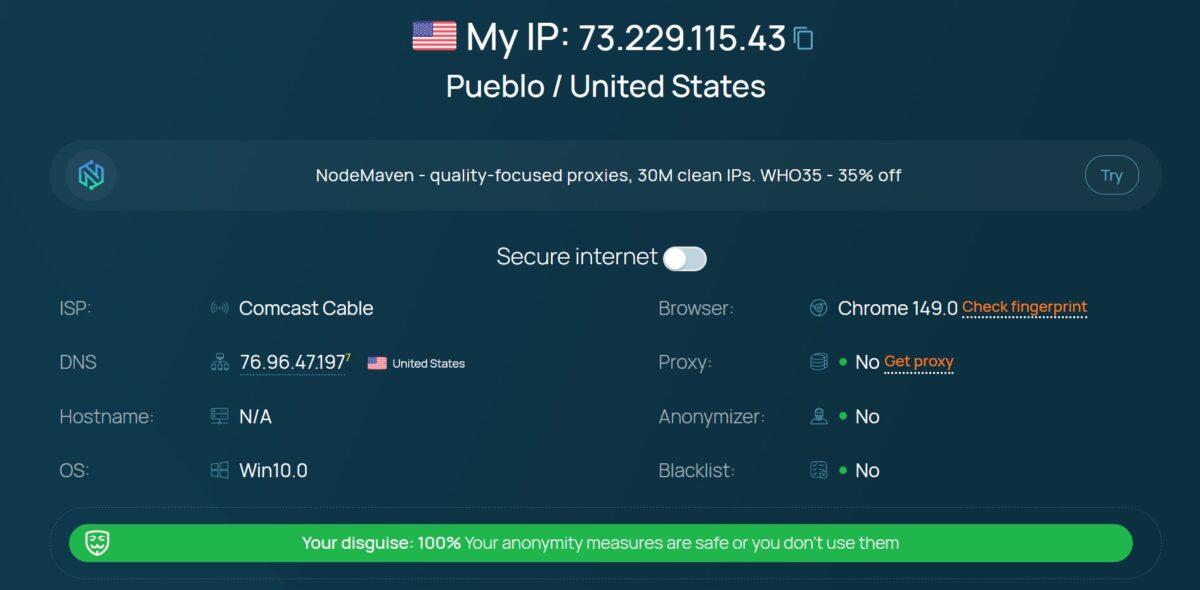
Whoer sealed it – disguise 100%, proxy not visible, anonymizer not visible, clean on blacklists. Browser and system are in sync.
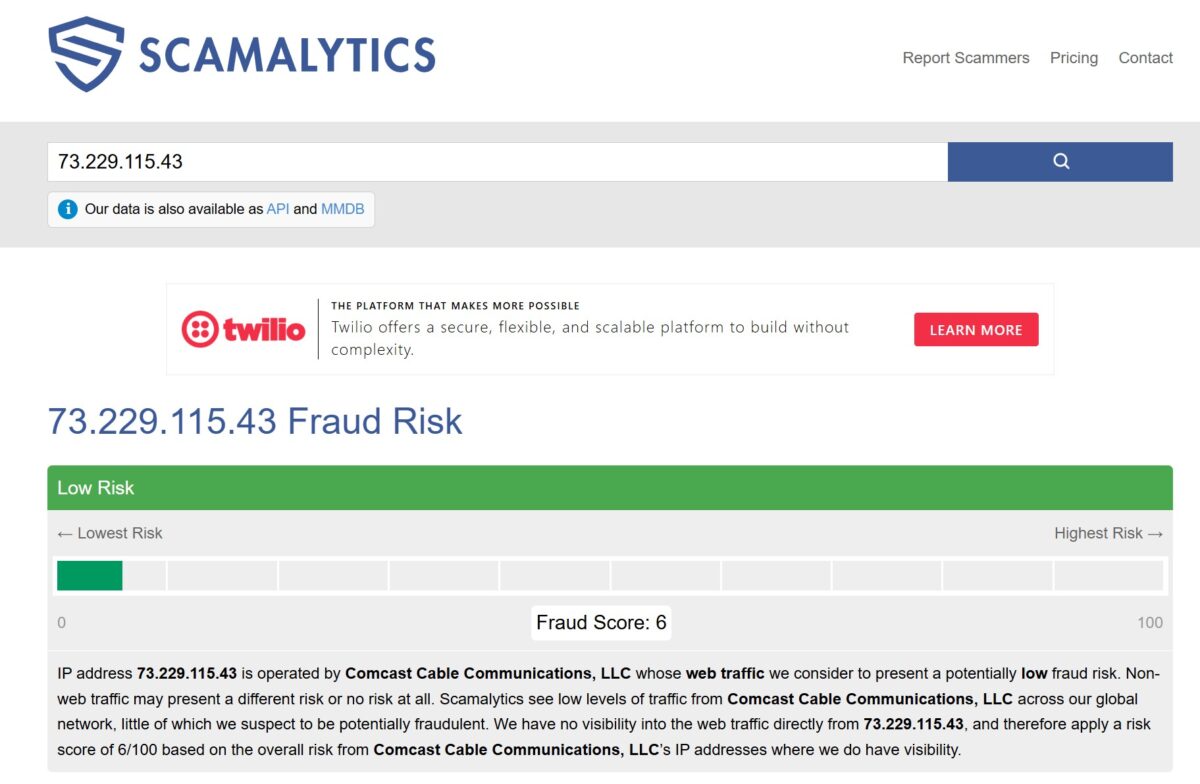
Scamalytics gave it 6 out of 100 – Low Risk. There’s a gap with IP2Location (45/100), and that’s normal – different databases count differently. Scamalytics looks at the reputation of the whole ASN, IP2Proxy looks at the specific address and the fact it’s being used as a proxy. The truth is somewhere in the middle: the IP is more clean than dirty, but not sterile.
Leaks: WebRTC and DNS
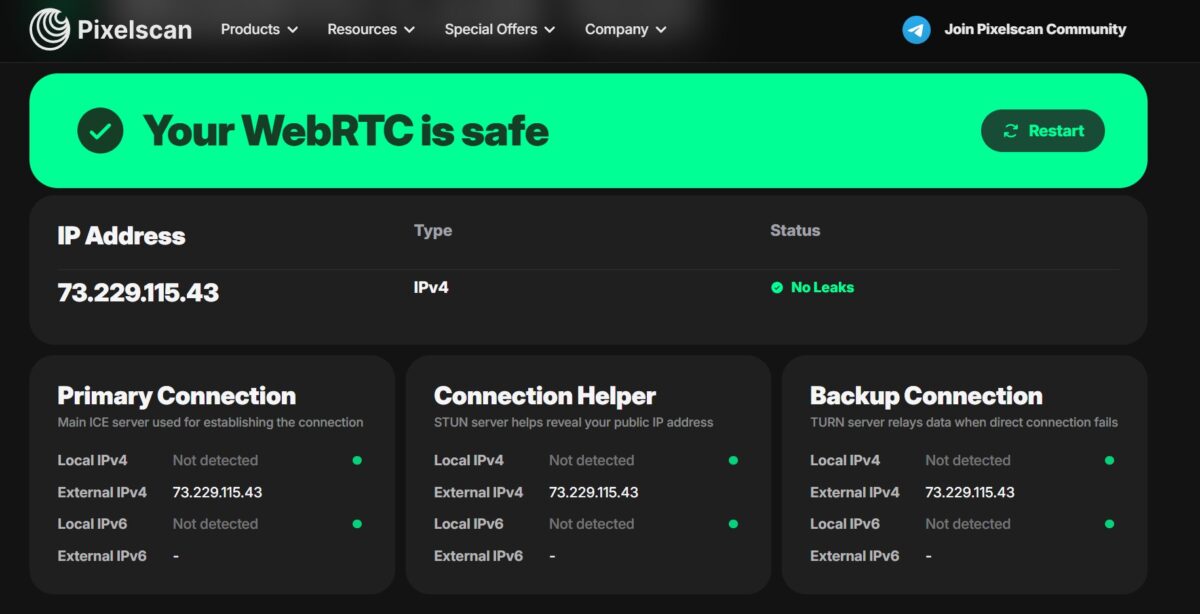
WebRTC – clean. The local IP doesn’t leak, the external one matches the proxy address everywhere, no IPv6 detected. None of the three ICE points (Primary, Helper, Backup) leaks the real address. That knocks out one of the most common ways to get deanonymized right off the bat.
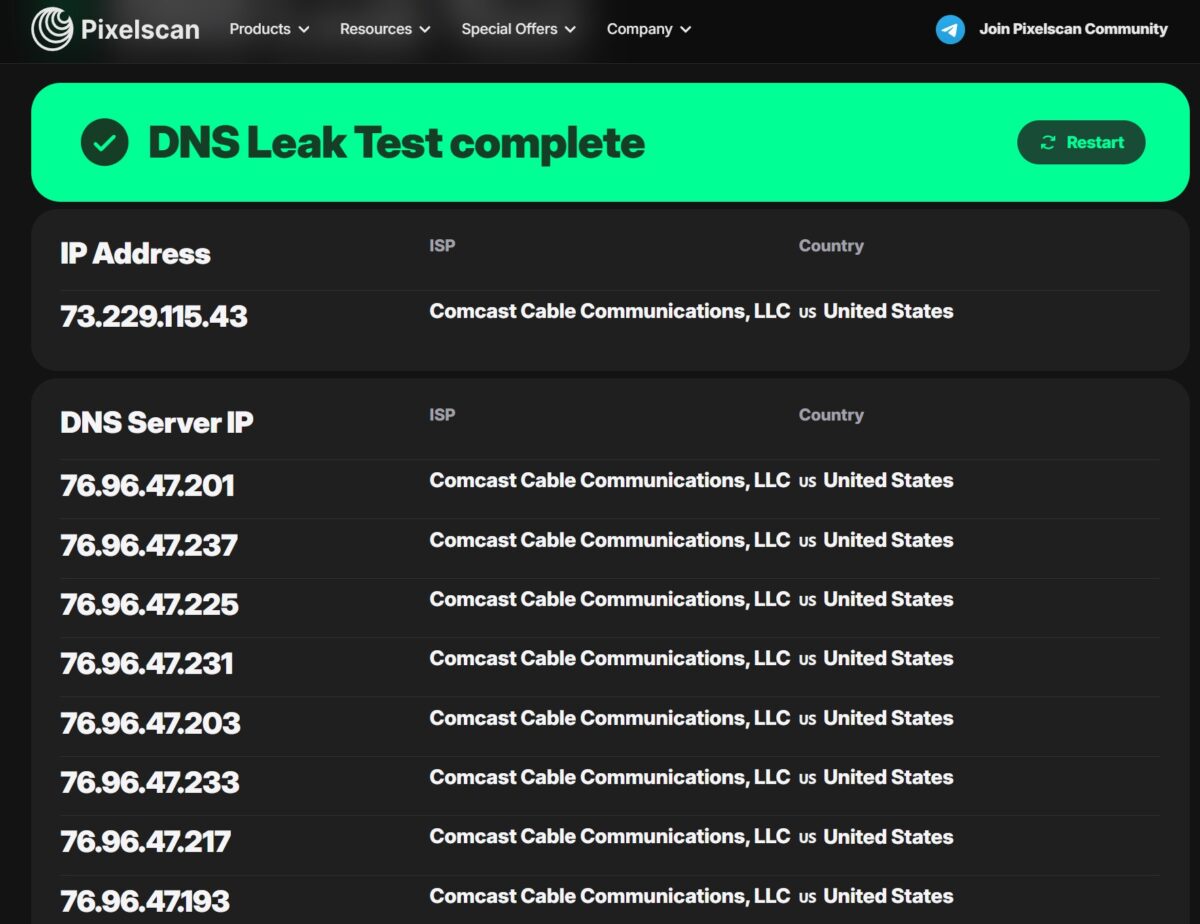
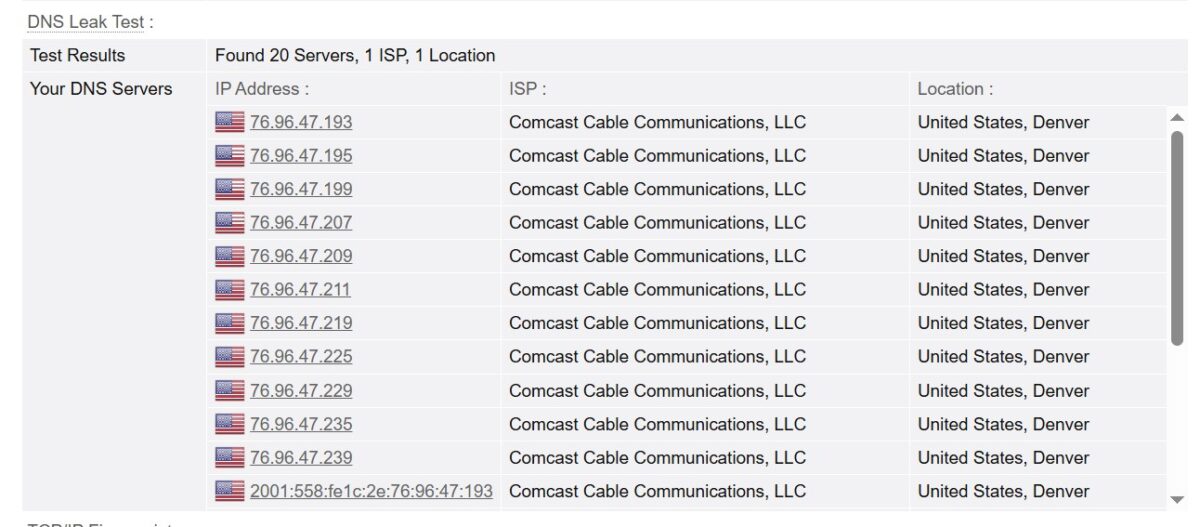
DNS – clean here too, and that matters. All 20 DNS servers belong to Comcast, one location, one ISP, US. No leak to a third-party resolver (the way traffic loves to spill onto Google or Cloudflare). DNS, IP, and ASN are all aligned – meaning from the site’s point of view the requests come from a real American cable subscriber. A perfect picture.
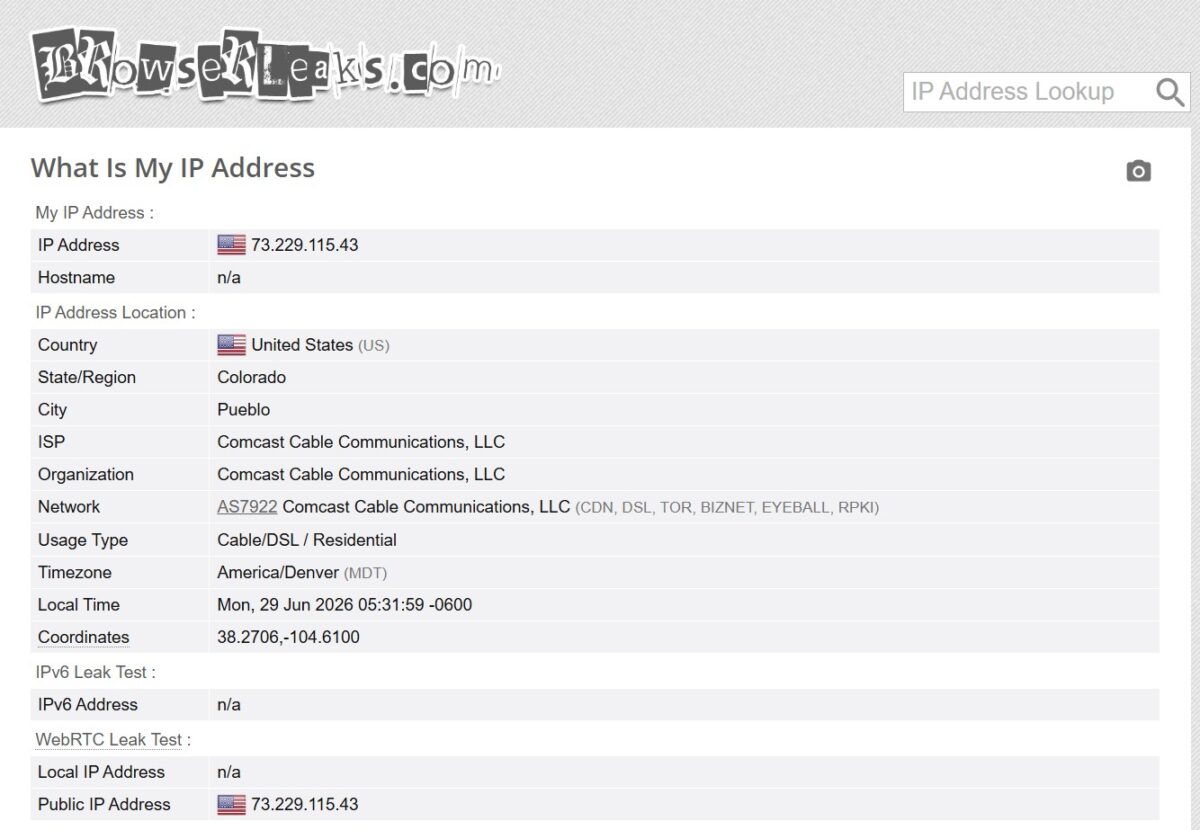
BrowserLeaks confirmed the usage type – Cable/DSL / Residential. No IPv6 (good, no v6 leak), WebRTC doesn’t show the local address.
Blacklist check
And here’s the first fly in the ointment.
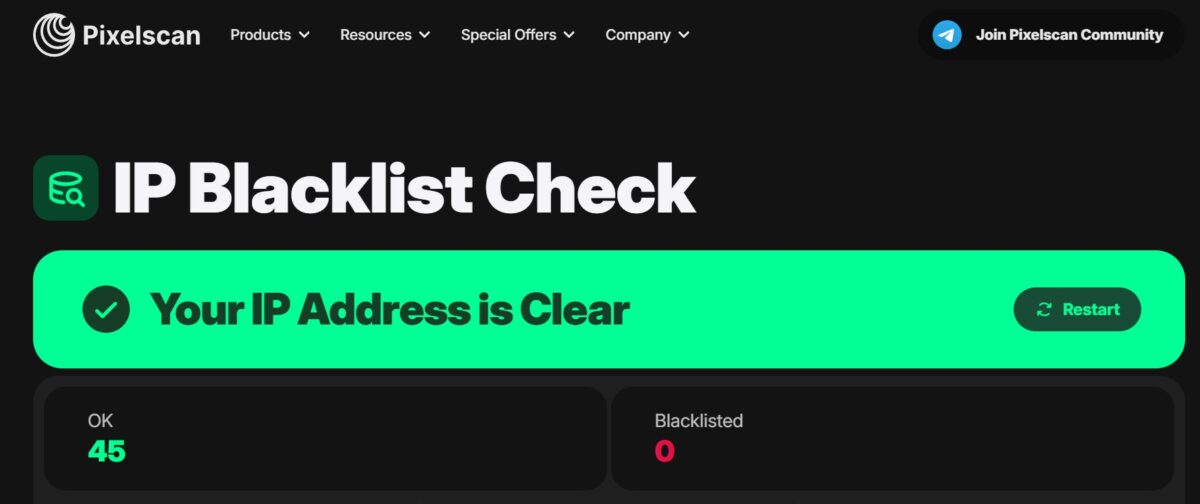
Pixelscan said the IP is clean – 45 OK, 0 on blacklists. But I never trust a single source, so I ran it through MXToolbox.
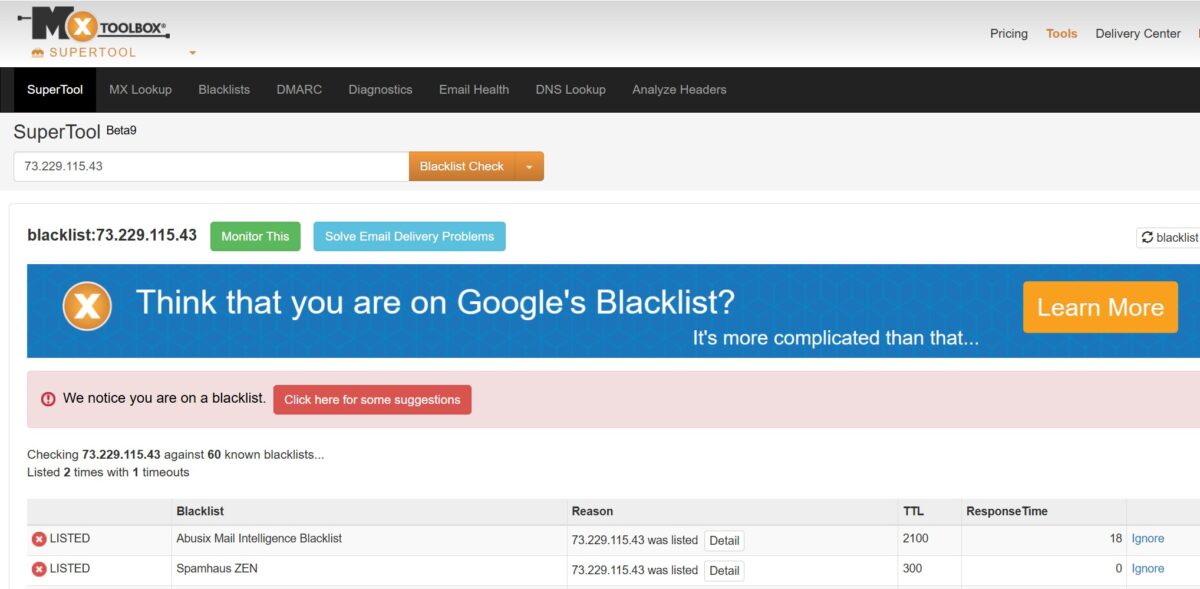
MXToolbox told a different story – the IP is listed on two: Abusix Mail Intelligence and Spamhaus ZEN. Before you clutch your chest, let’s break down what that means.
Spamhaus ZEN includes the PBL – the Policy Block List. It’s not a list of spammers. It’s a list of IP ranges that shouldn’t be sending mail directly to mx servers. Meaning every home subscriber on Comcast, AT&T, Spectrum is on it by default. That’s the whole point. It does not mean the IP is dirty for web tasks. Reddit, Instagram, Amazon, Google, eBay look at the ASN, hostname, and fraud score, not the PBL.
The practical takeaway is simple. For scraping, social media, marketplaces, SEO, ad verification – this blacklist is no obstacle at all. But for sending email straight through the proxy – forget it. Residential proxies aren’t made for mailing, and IPPeak is no exception here, it’s a trait of every residential network.
Speed
Here’s the most interesting and most debatable part.
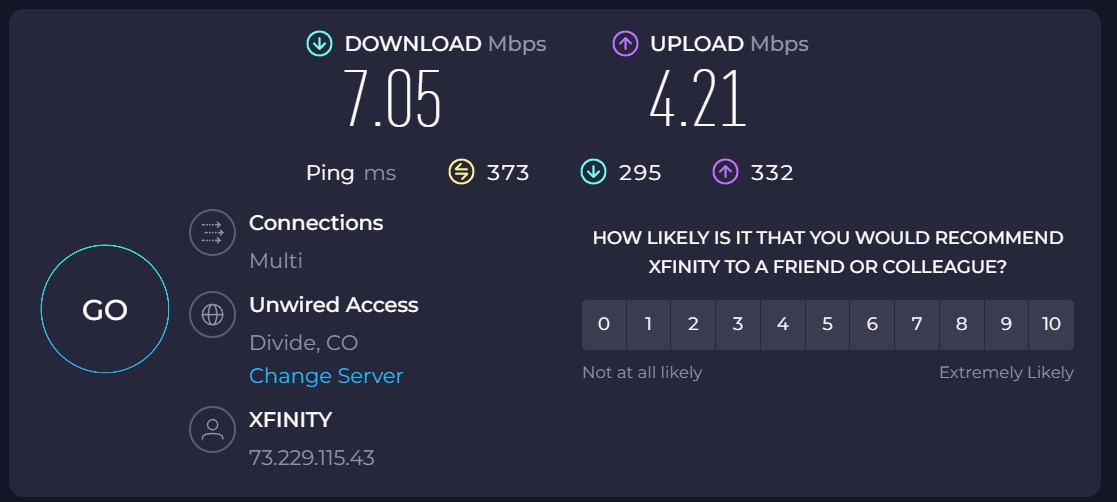
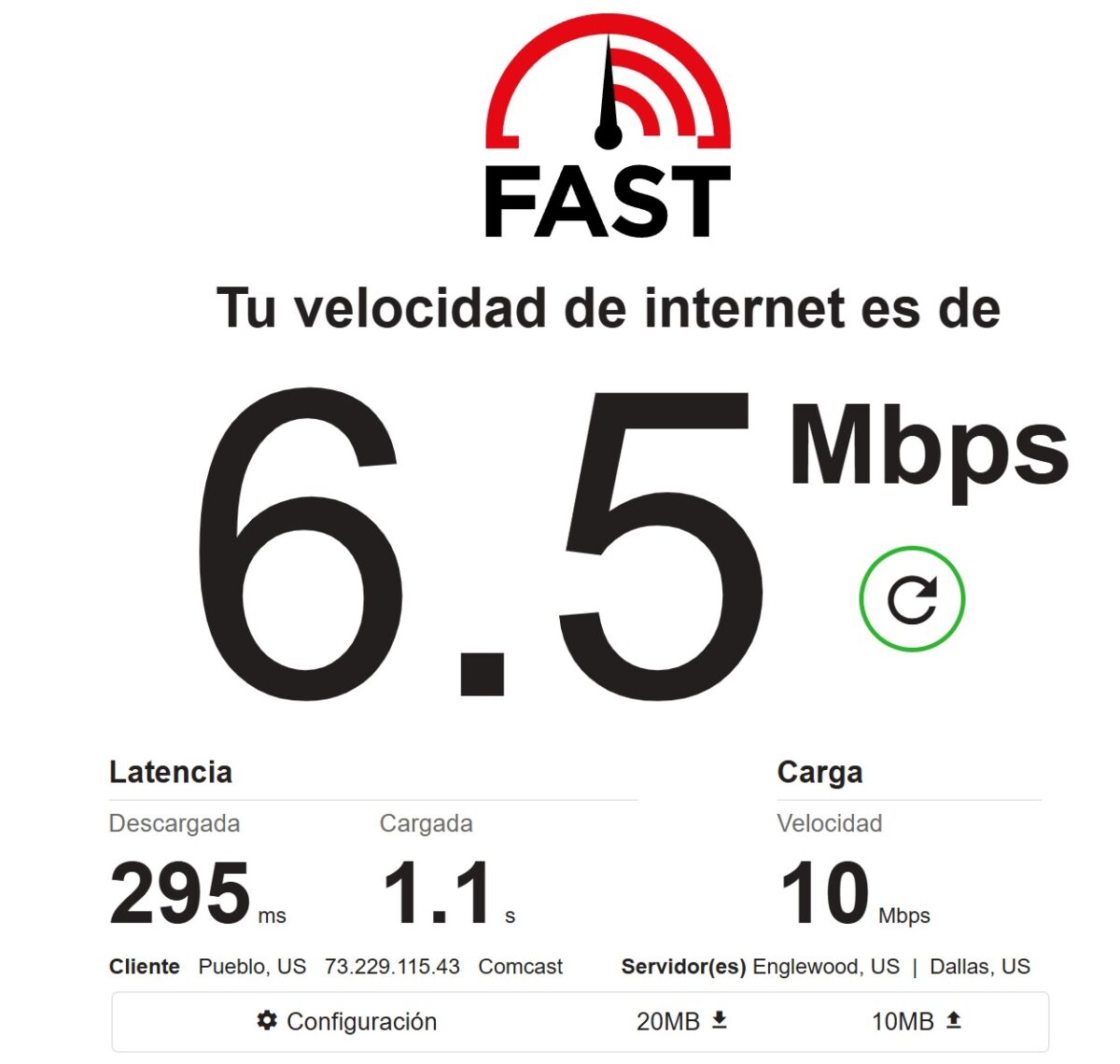
Speedtest gave 7.05 Mbps down, 4.21 up, ping 373 ms. Fast.com – 6.5 Mbps download, 10 Mbps upload, latency 295 ms. Honestly? That’s slow. For a premium line it’s downright slow.
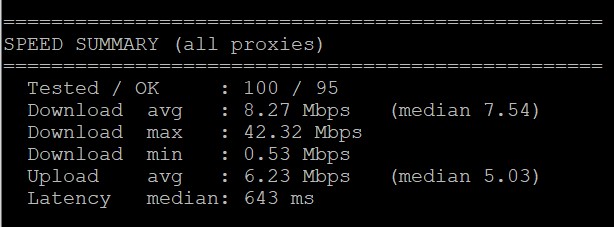
But a single measurement is a lottery – I just happened to hit one slow exit. So I ran a pool of 100 proxies. The picture evened out, but not by much: average download 8.27 Mbps (median 7.54), max a whopping 42 Mbps, min 0.53. Average upload 6.23. Median latency – 643 ms. The spread is huge: from half a meg to forty. So some IPs fly, but the “typical” proxy gives you 7-8 Mbps.
For comparison, Floppydata pushed 27-37 Mbps, NodeMaven – around 9. IPPeak is closer to NodeMaven, i.e. the low end. For scraping text, SEO, checking search results, working with accounts – this is plenty. For downloading heavy content or video – no.
Median latency of 643 ms is normal for residentials – not fast, but workable. Won’t cut it for high-frequency tasks and sniping.
Pool quality and stability: the main test
Speed is only half the battle. What matters more is how many of the pool’s proxies are actually alive and how truly residential they are. I ran 400 proxies through my VPS script.
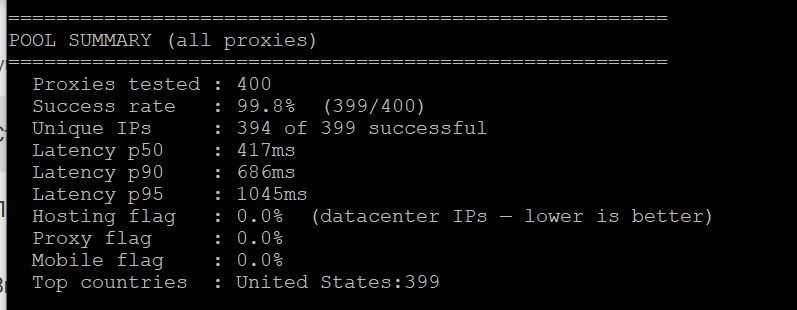
And this is the strongest result in the whole review. Success rate 99.8% – out of 400 proxies exactly one dropped. Unique IPs – 394 out of 399, so almost no duplicates, the pool is genuinely wide. Latency p50 – 417 ms, p95 – 1045 ms, which is very solid for residential.
But the main thing is the three flags at the bottom. Hosting flag 0.0% means not a single IP came back as a datacenter one. Proxy flag 0.0%, Mobile flag 0.0%. And all 399 successful ones sit in the US, exactly as ordered. So the pool is honest residential American IPs with no hosting mixed in. That’s exactly what you pay for in the premium line. Here IPPeak delivers on the pitch in full.
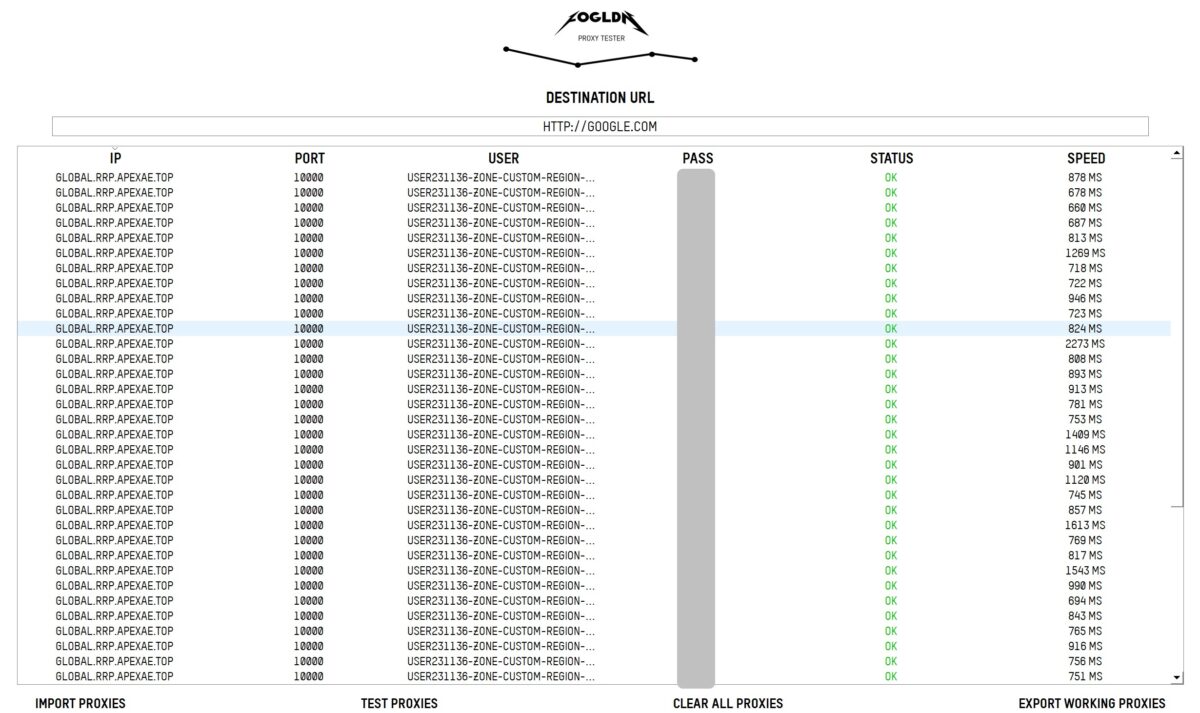
FOGLDN drove it home – dozens of proxies to google.com, status OK on all. Most responses 700-950 ms, a few spikes up to 2273 ms. No failures. Google lets them in without a CAPTCHA.
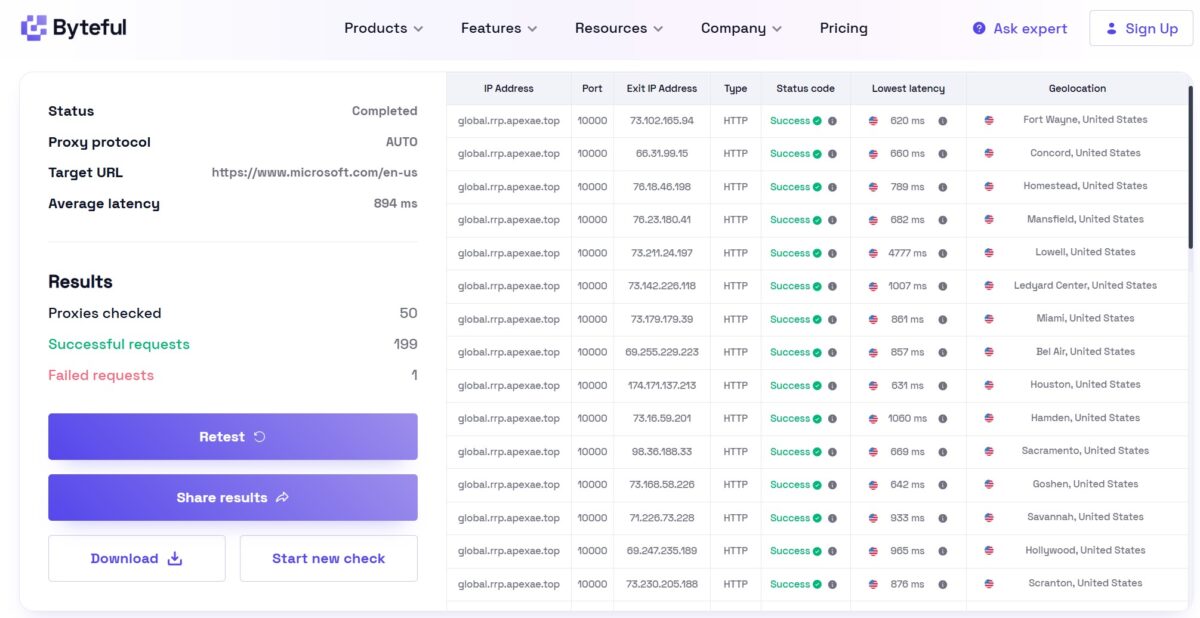
Byteful confirmed it on microsoft.com: 50 proxies, 199 successful requests, 1 fail. Average latency 894 ms. And notice the Geolocation column – the cities are scattered all over the country: Fort Wayne, Concord, Miami, Houston, Sacramento, Bel Air, Savannah, Scranton. That’s a real geographic spread of a residential network, not three server racks in one datacenter.
Checking geolocation of individual IPs
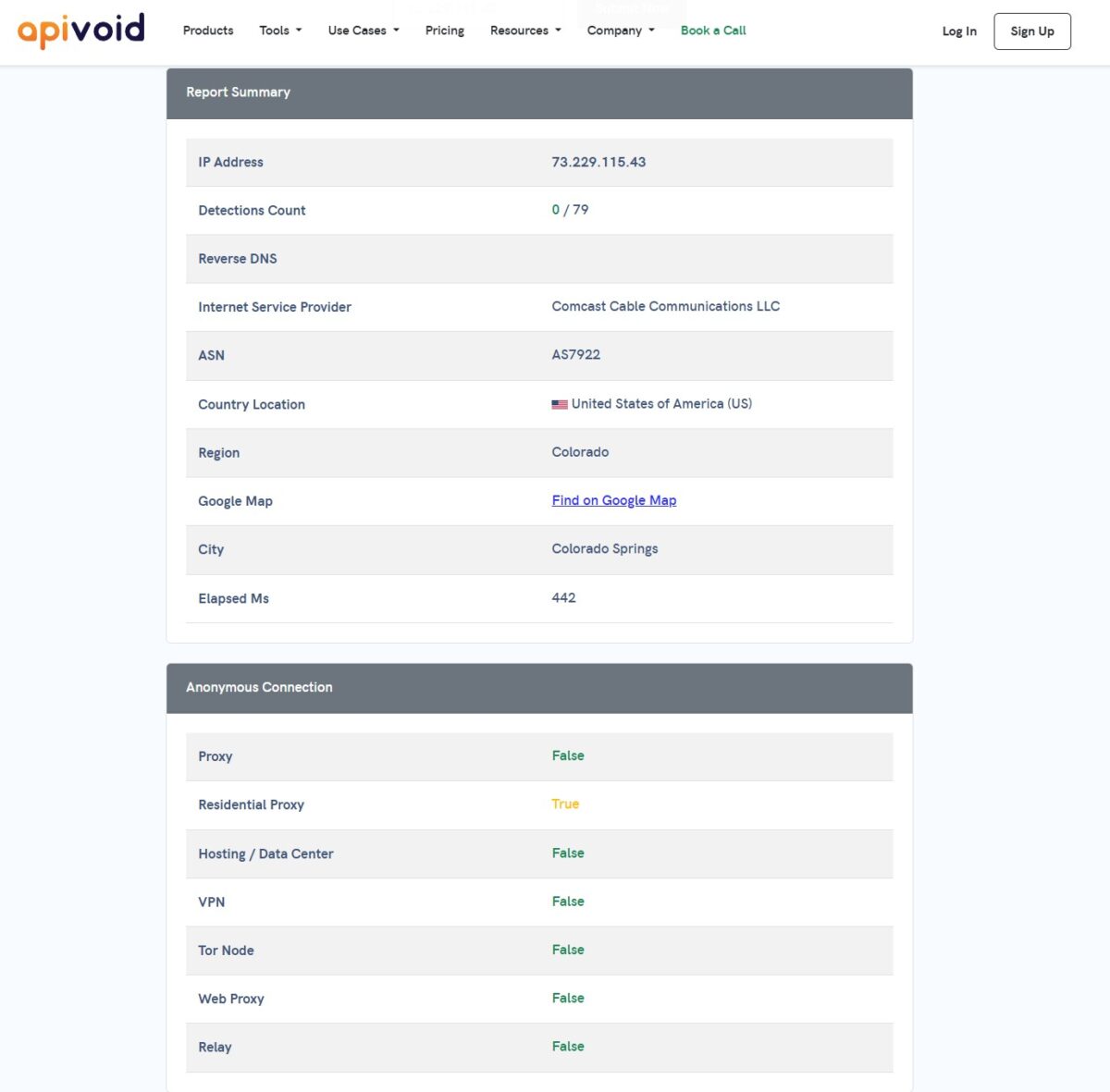
A separate check showed: VPN flag No, geolocation Pueblo/Colorado, timezone America/Denver, accuracy 50 km. Everything lines up, the IP looks like a live cable subscriber from Colorado.
A curious bit: different databases give different cities for the same IP – Colorado Springs (APIVoid, IP2Location, Pixelscan), Pueblo (Scamalytics, BrowserLeaks), Woodmoor (IPinfo). That’s normal for residentials, geo databases disagree within a state. What matters is that country, state, ASN, and timezone always match. City-level mismatch between geo databases is an age-old story, and IPPeak has nothing to do with it.
Pricing
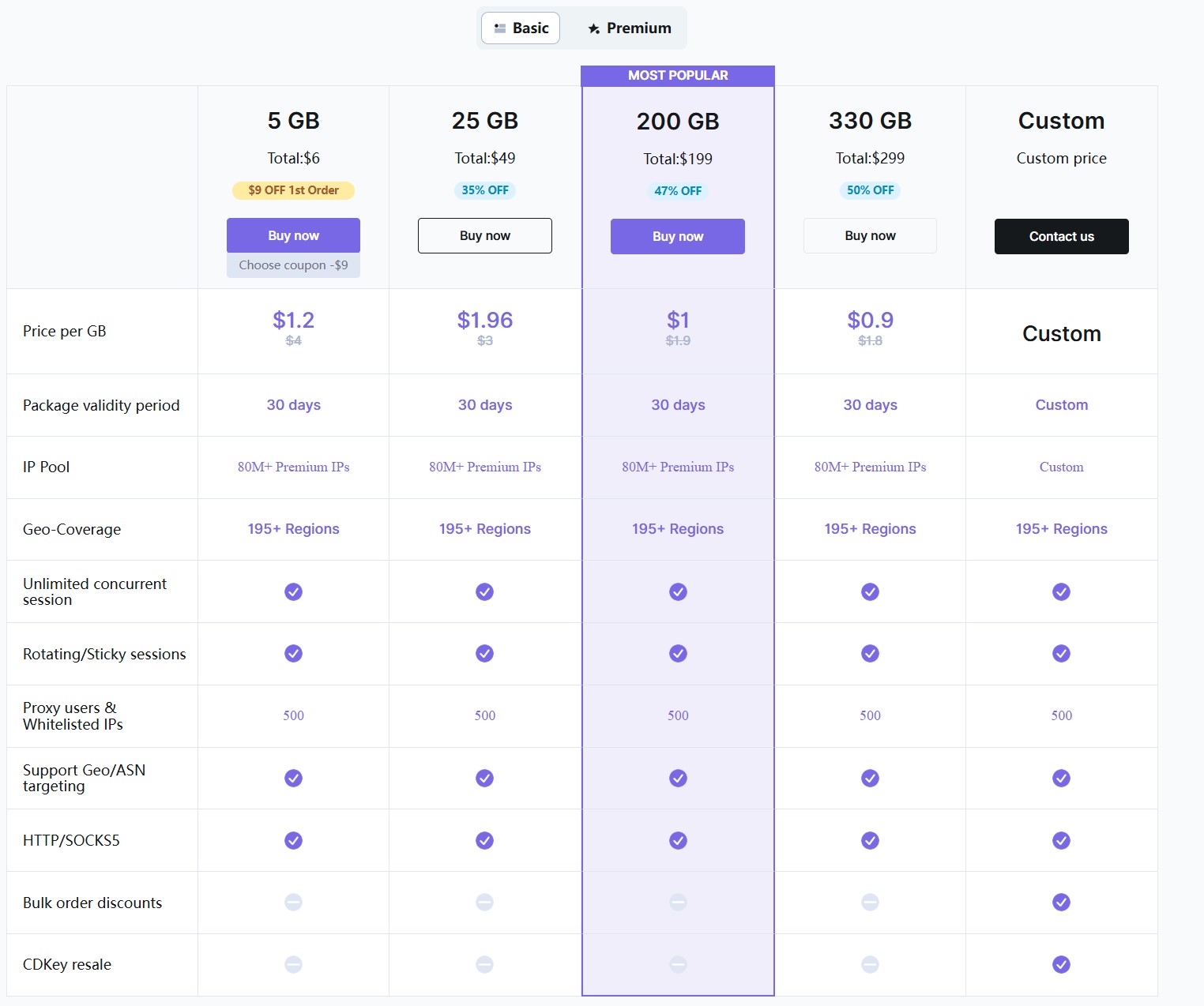
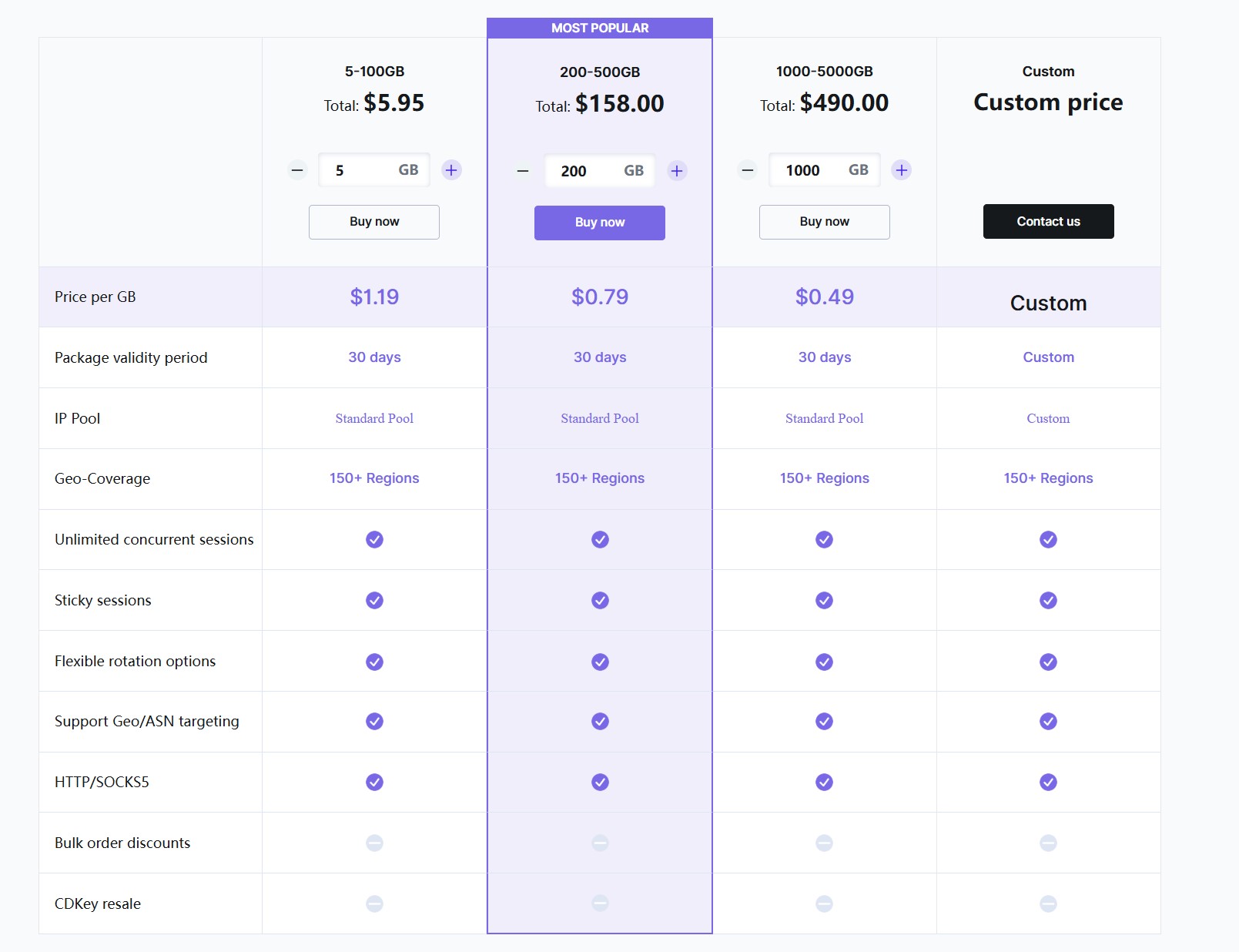
Here’s how the prices break down. Premium starts at $1.2/GB on 5 GB and drops to $0.9/GB on 330 GB. Core is cheaper – from $1.19 down to $0.49/GB on a thousand gigs. The $0.6 and $0.49 advertised on the homepage are really about the biggest packages.
At first glance there’s an oddity in the premium tiers: the 25 GB package works out to $1.96/GB, more than 5 GB at $1.2/GB. I dug in – turns out it’s a first-timer promo. The starter 5 GB Premium sells for $6 instead of $15 ($9 off your first purchase), which is why the per-gig price looks lower. After the first purchase the price reverts to the original $15 and the tiers line up properly. So it’s not a botched price, it’s a promo hook for your first run – and honestly, it’s a fair one, a newcomer really does get a cheaper trial.
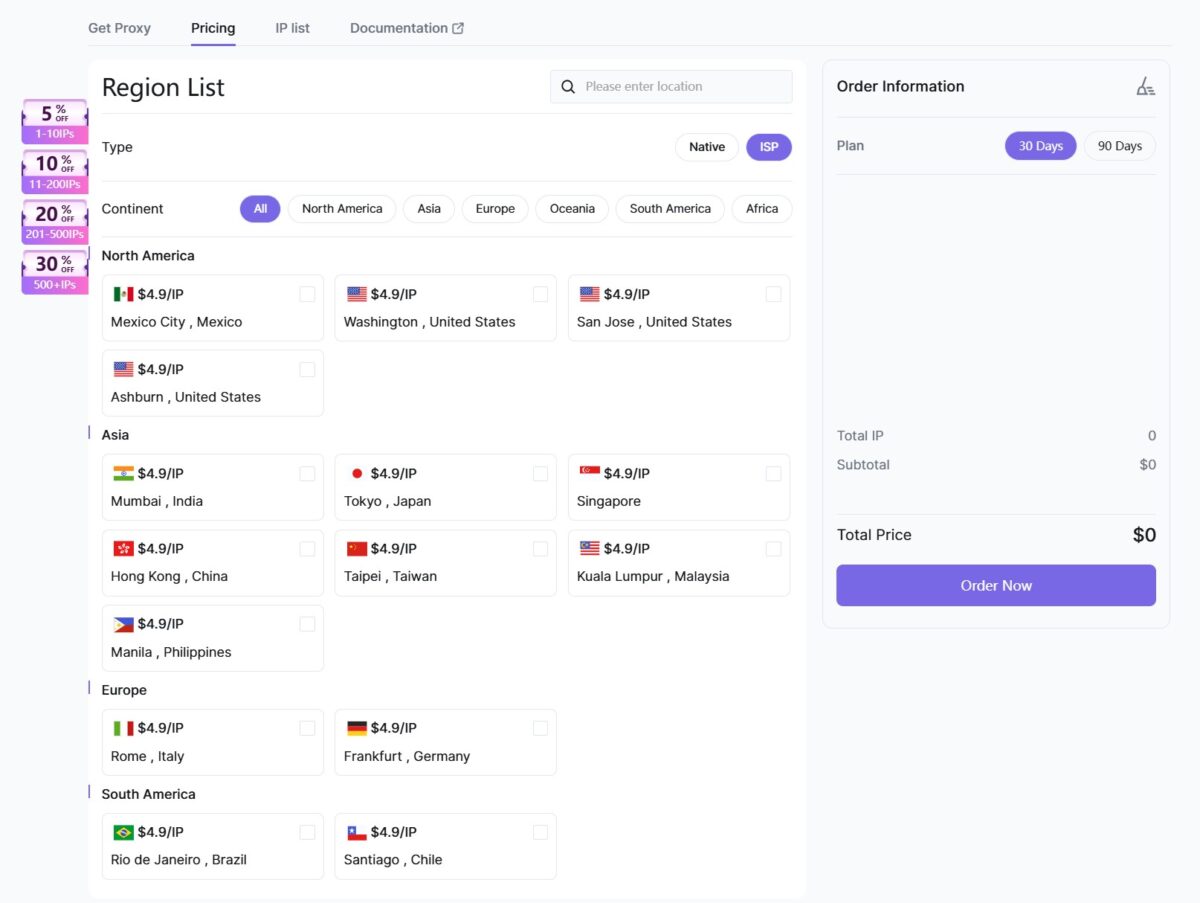
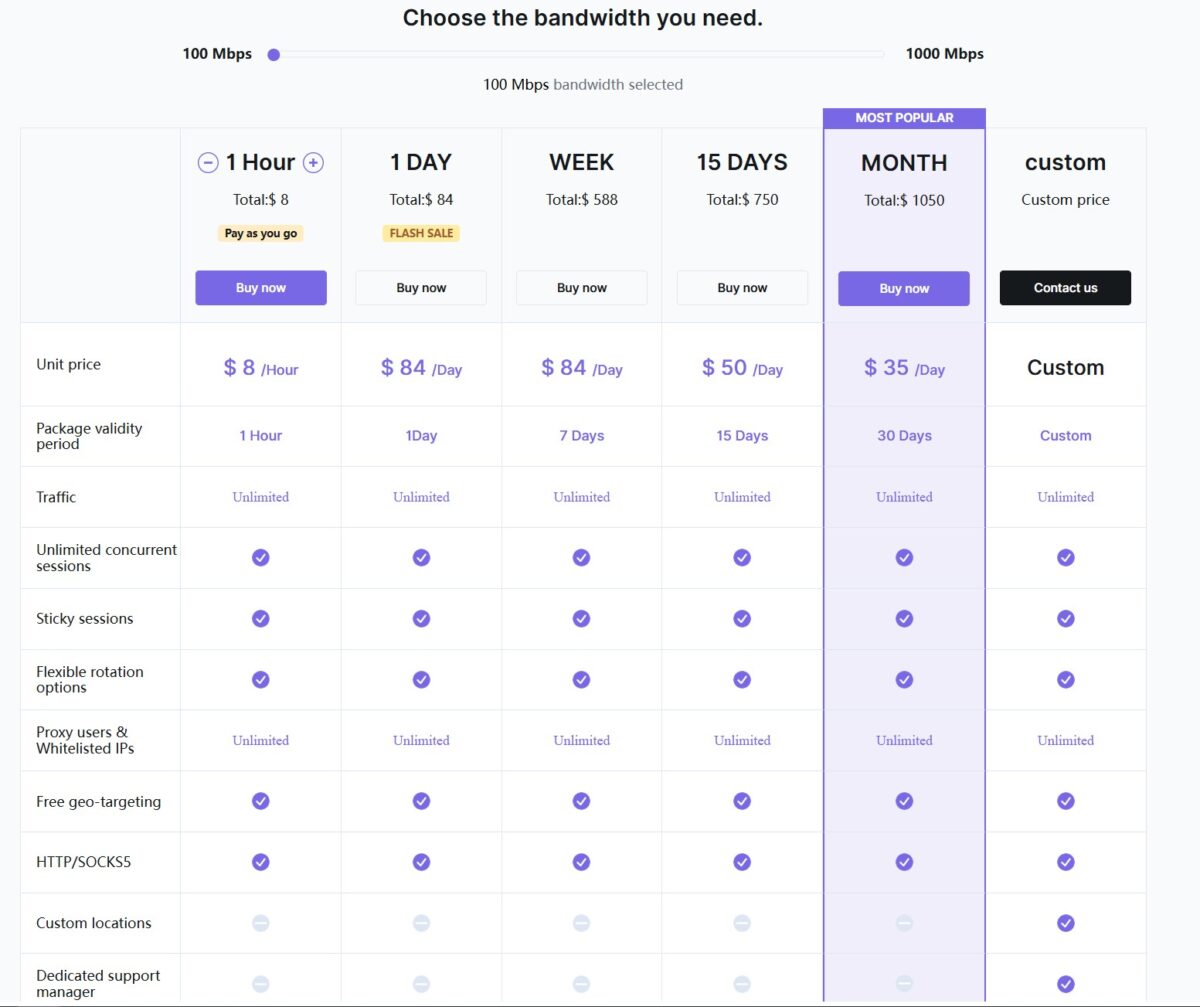
There are also ISP proxies at $4.9 per static IP and an unlimited bandwidth-based plan – from $8/hour to $1050/month for 100 Mbps. The unlimited one is interesting for anyone burning terabytes who doesn’t want to count gigabytes.
How does this look against the market? Premium at $0.9-1.2/GB is cheaper than the giants (Bright Data ~$3.5, Oxylabs ~$3.5), on par with Smartproxy/Decodo, and pricier than Floppydata ($1) and IPRoyal ($1.75). Core at $0.49 is already aggressively cheap. The pricing is fair.
Payment
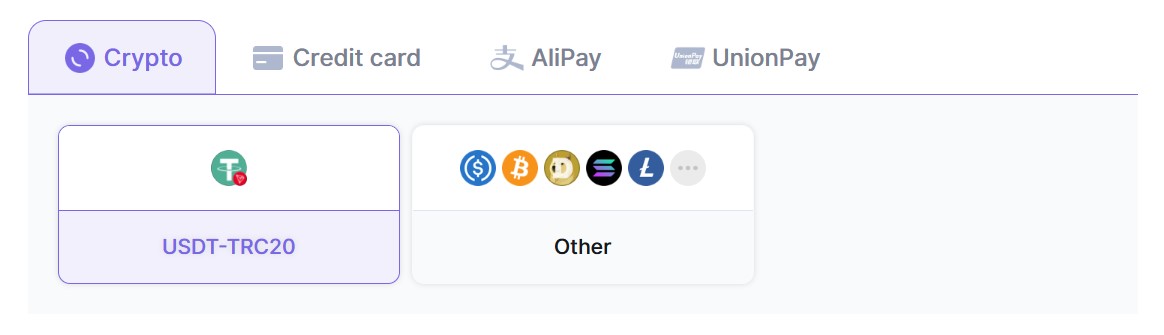
You can pay by card, crypto (USDT-TRC20, BTC, ETH and a bunch more), AliPay, and UnionPay. Crypto without KYC is a plus for anyone who cares about privacy. The presence of AliPay/UnionPay hints at a strong Asian audience.
Trustpilot and reputation
The service is on Trustpilot, reviews mostly about global coverage and scraping. It’s also on G2 and Crozdesk. Not hundreds of reviews, the service is fairly young. I wouldn’t draw conclusions from aggregators alone – there’s fake stuff and real cases both. My tests back up the reputation: the network works, the IPs are real.
Summary table
| Parameter | Result | Score |
|---|---|---|
| Download / Upload | 7-8 Mbps / 5-6 Mbps (pool medians) | 3/5 |
| Latency (pool p50) | 417 ms | 4/5 |
| Success Rate (400 proxies) | 99.8% (399/400) | 5/5 |
| Hosting / Proxy / Mobile flag | 0.0% / 0.0% / 0.0% | 5/5 |
| Pool uniqueness | 394 of 399 | 5/5 |
| Fraud Score | 6/100 Scamalytics, 45/100 IP2Location | 4/5 |
| IP Reputation (APIVoid) | 0/79 detections | 5/5 |
| Blacklists | Spamhaus ZEN + Abusix (PBL, for email) | 3/5 |
| ISP Type | Residential, AS7922 Comcast | 5/5 |
| Proxy Detection (Pixelscan) | No proxy detected, consistent | 5/5 |
| WebRTC Leak | No Leak | 5/5 |
| DNS Leak | None, all DNS = Comcast | 5/5 |
| Geo Targeting | Country + state + city + ASN | 5/5 |
| Sticky Session | up to 180 minutes | 4/5 |
| FOGLDN / Byteful | OK on all, 1 fail out of 250 | 5/5 |
| Price | $0.9-1.2/GB Premium, $0.49 Core | 4/5 |
| Overall | ~4.4/5 |
- genuine residential – real Comcast, AS7922, Fixed Line ISP, hosted domains 0, abuse contact on comcast.net;
- top-tier pool on the bulk test – 400 proxies, 99.8% success rate, 394 unique IPs out of 399, all in the US;
- zero hosting mixed in – Hosting flag 0.0%, Proxy flag 0.0%, Mobile flag 0.0% across the 400 pool;
- low fraud score – 6/100 on Scamalytics, 0/79 reputation detections on APIVoid;
- proxy stays hidden – Pixelscan “No proxy detected”, fingerprint consistent, Whoer disguise 100%;
- WebRTC fully closed, the real IP doesn’t leak – key for multi-accounting;
- DNS with no leak to a foreign provider, all 20 resolvers inside the Comcast network;
- ASN targeting – you can pin the output to a specific ISP, far from a given elsewhere;
- flexible geo targeting: country + state + city + ASN, session up to 180 minutes;
- Quick input parses the string itself and checks the IP is alive when importing into an antidetect browser;
- FOGLDN and Byteful – OK on all, 1 fail out of ~250 requests, Google lets them in without a CAPTCHA;
- fair pricing – Premium from $0.9/GB, Core from $0.49/GB, cheaper than Bright Data and Oxylabs;
- payment by card, crypto without KYC, AliPay, and UnionPay;
- 195+ regions and a claimed 80M+ IPs, cities spread across the country (Miami, Houston, Scranton, Sacramento).
- slow for a “premium” – pool median 7-8 Mbps download, 5-6 upload, some exits drop to 0.53 Mbps;
- middling latency – p50 417 ms on the pool, 643 ms median on the speed test, no good for HFT and sniping;
- Spamhaus ZEN + Abusix – IP on the PBL, no good for sending email directly through the proxy (a flaw of all residentials);
- IP2Location flags the address as a Residential Proxy with a 45/100 fraud score – disagrees with Scamalytics;
- city targeting drifts across the metro area – geo databases give Colorado Springs / Pueblo / Woodmoor for one IP;
- huge speed spread within the pool – from 0.53 to 42 Mbps, no consistency;
- host infrastructure on global.rrp.apexae.top – an opaque domain name, raises branding questions;
- young brand – not many reviews, barely shows up in r/proxies, reputation not settled yet;
- no real-world tests of Cloudflare/Google CAPTCHA or the actual sticky session lifetime in this round.
Overall impression
Honestly, I was bracing for a catch from the word “premium,” because that word loves to dress up a plain pool with a markup. No catch here. The pool really is premium-grade when it comes to cleanliness.
The main result of the review is the 400-proxy test. 99.8% success rate, 0% hosting, 0% datacenter, 394 unique IPs out of 399, all in the US. That’s what you buy premium residentials for. The network hands out real home Comcast addresses that pass Pixelscan, Whoer, don’t blow their cover as proxies at the fingerprint level, and don’t leak over WebRTC or DNS. ASN targeting is the cherry on top – a lot of competitors just don’t have it.
Where it sags. Speed. 7-8 Mbps medians are fine for text tasks, too little for heavy traffic. From a “premium” I’d want 20+. Latency is middling. Spamhaus ZEN – but that’s the PBL, a shared flaw of all residentials, not critical for web tasks, though the proxies are no good for email mailing (like any residential). The odd 25 GB price that threw me at first turned out to be a first-timer promo, not a screw-up – so I’m taking that complaint back.
Who should buy it. SEO and scraping search results, working with accounts on social media and marketplaces, ad verification, data collection, multi-accounting through antidetect – great fit. Especially if ISP believability matters, ASN targeting is genuinely useful here.
Who shouldn’t. Anyone downloading terabytes of video or running high-frequency tasks with a strict latency SLA. And anyone who wants to send mail straight through the proxy – that’s just not what residentials are for.
For price-to-IP-quality it’s solid. I’d put it at 4.4 out of 5. Docked mainly for speed. The IP quality itself raises no questions – the network is real, clean, and it works.
This isn’t a full breakdown of every feature, the review will be updated. Logs and screenshots are saved, I’m happy to double-check any number on request.
Targeting down to city and ASN, sticky sessions up to 180 minutes
Residential traffic from $0.49/GB
residential (Core and Premium), unlimited, static ISP proxies + flexible geo/ASN targeting