





 Why Trust Us?
ToProxyLab has been testing proxy services since 2025. We pay for most plans ourselves, and when a provider gives us test traffic we say so in the review — free traffic buys a place in the testing queue, nothing else. Every provider goes through the same speed, uptime and fraud-score checks, and we publish the real numbers, including the bad ones. A rating cannot be bought. Learn who we are and how we review proxies.
Why Trust Us?
ToProxyLab has been testing proxy services since 2025. We pay for most plans ourselves, and when a provider gives us test traffic we say so in the review — free traffic buys a place in the testing queue, nothing else. Every provider goes through the same speed, uptime and fraud-score checks, and we publish the real numbers, including the bad ones. A rating cannot be bought. Learn who we are and how we review proxies.
NodeMaven kept showing up everywhere. Competitor rankings. Review sites. Reddit threads where people argue about which residential pool actually works for Reddit itself (meta, I know). After the third or fourth mention, you start wondering if it’s actually good or just has a loud marketing team.
So I bought a trial and spent a week with it.
The job was specific. US residential proxies for running a handful of Reddit accounts, working on social platforms that sniff IPs hard, and the occasional SEO task – checking how a local business ranks in a specific Virginia ZIP, that kind of thing. Reddit is the worst of the bunch. It hates datacenter IPs. It hates anything that smells like a script. The proxies had to be clean, stable, and able to hold one session long enough to actually do something.
I went in expecting to be unimpressed. Spoiler: I was wrong.
First impressions: site, dashboard, status page
The tagline is “The First Proxy Service with Performance Guarantee.” Bold claim. They promise 95% undetectable IPs. G2 sits at 4.7. Niche aggregators give them 5.0 and 4.9. Trial starts at $3.50, which for the premium tier is basically a sandwich.
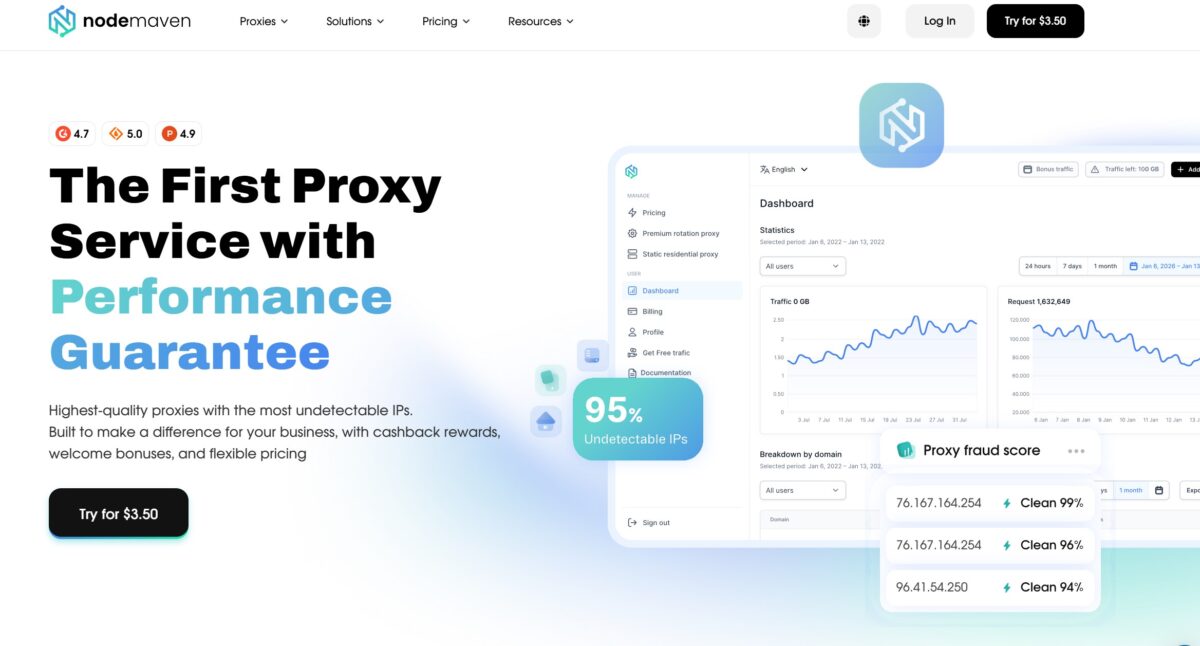
On the homepage there’s a live widget showing Fraud Scores for live IPs. “Clean 99%”. “Clean 96%”. “Clean 94%”. It’s marketing, sure. But it’s also a flex – those scores actually held up when I ran my own checks against Scamalytics later. Putting your fraud-score numbers on the front page is the kind of move you only make when you’re confident.
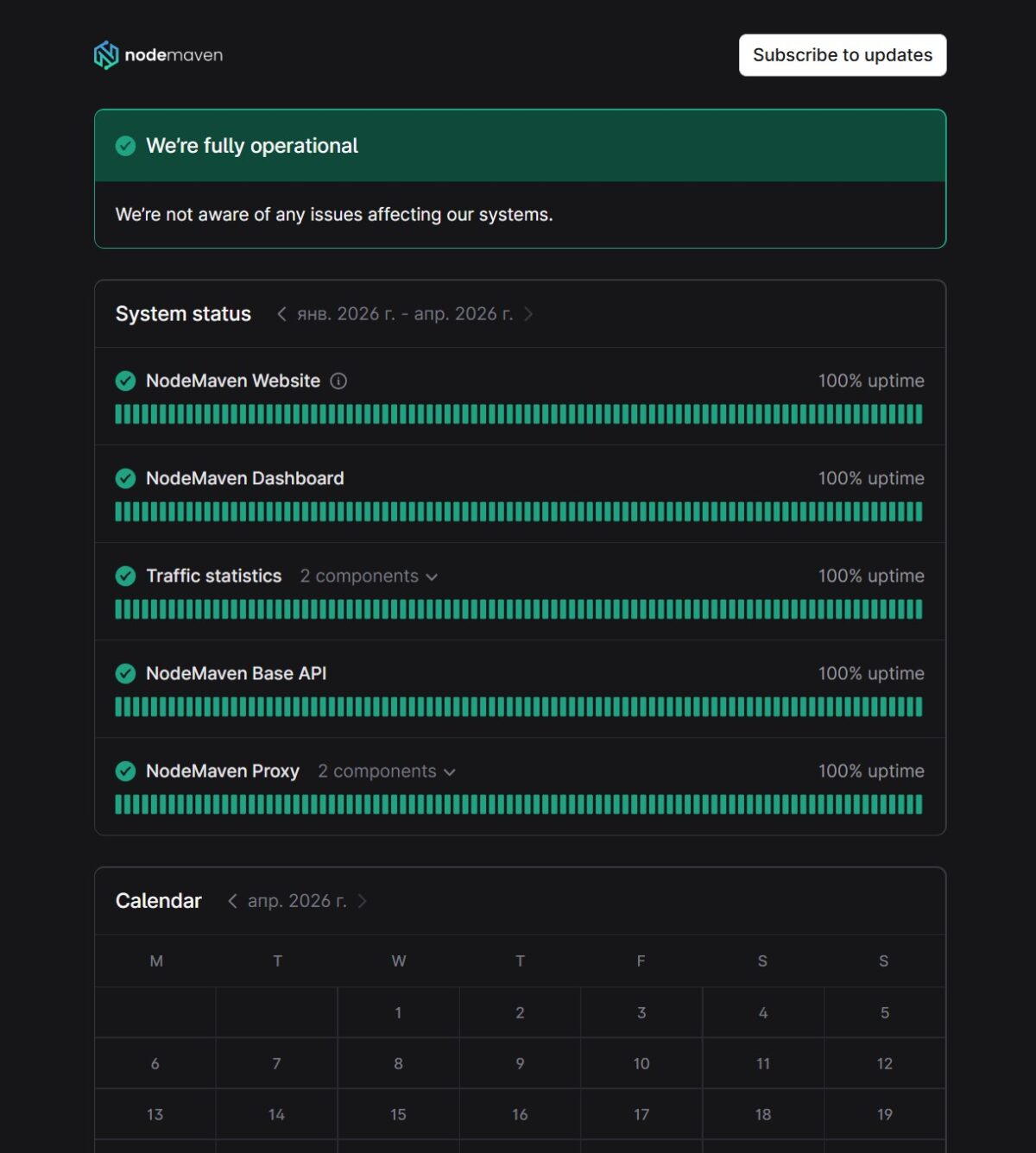
Then I checked their status page. Five components – Website, Dashboard, Traffic statistics, Base API, Proxy. All green from January 2026 through April 2026. 100% uptime. Four months isn’t a long history. But it’s something.
Dashboard is clean. Left menu has Pricing, Premium Rotating Proxy, Static Residential Proxy, Billing, Profile, Documentation. Nothing else. The graphs were empty because I hadn’t burned a single megabyte yet. They threw in 2 GB free, which was plenty for what I had planned.
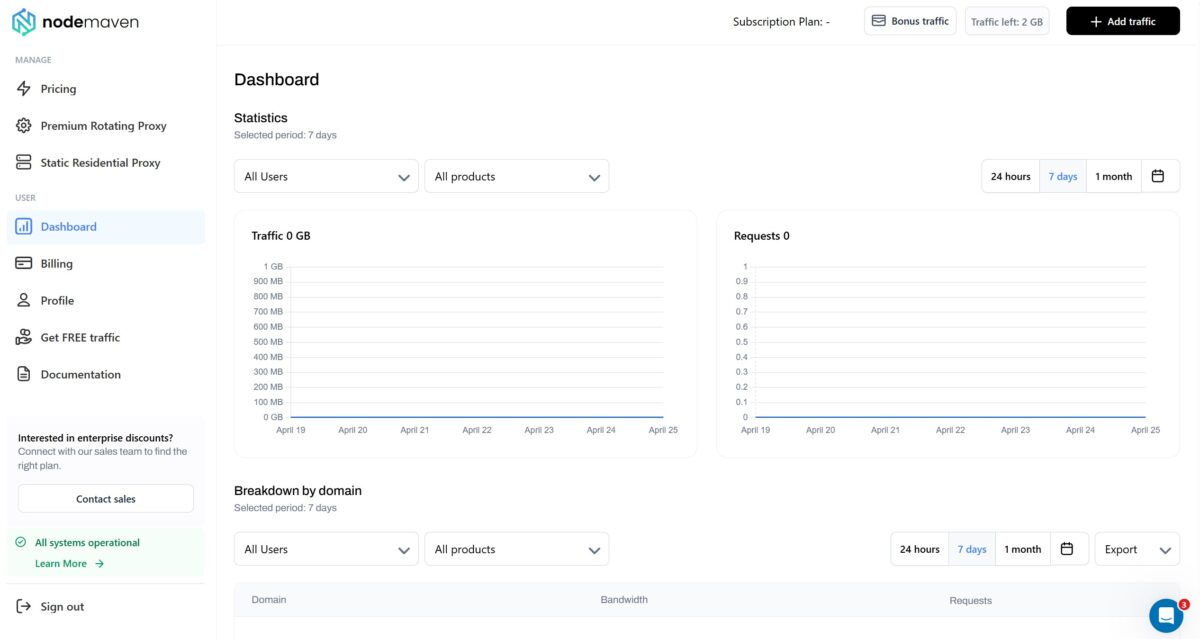
Bottom of the page shows “All systems operational.” Tiny detail. Saves a click.
Proxy setup: where they actually earn their money
The configurator is step-by-step. And every step feels like someone actually thought about it.
- Step 1. Pick the type. Residential (30M+ IPs) or Mobile (295K+ IPs). I went residential. For Reddit and social, that’s enough.
- Step 2. IP version. Mixed IPv4/IPv6 or IPv4 only. I picked IPv4. Some anti-fraud systems still get weird about IPv6.
- Step 3. Location. This is where you can tell their engineers know what they’re doing. United States, Virginia, Richmond. Each parameter has an availability tag – High, Medium. You can pick the ISP – Random, T-Mobile USA, Verizon Fios, Comcast Cable. And the part I actually got excited about: ZIP targeting. Pin to a specific ZIP code.
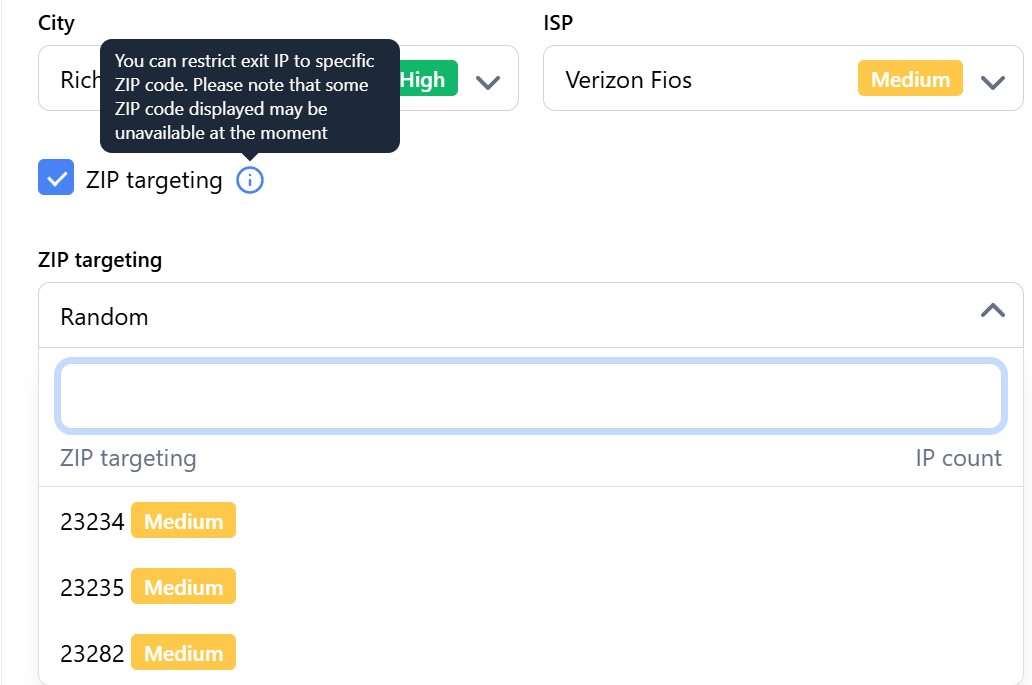
For SEO this is gold. Local Google rankings change based on the ZIP your IP comes from. If I want to see how a pizza place ranks for someone two streets over, I can pull an IP from that exact ZIP. Most competitors either don’t offer this or hide it behind enterprise plans.
- Step 4. Session type. Sticky or Rotating. I picked Sticky with the “Keep IP as long as possible (Super sticky sessions)” option. They advertise up to 7 days. Proxyway’s benchmark says about 60% of sessions hold longer than 15 minutes, around 38% longer than 25. Good enough for warming a Reddit account without it tripping alarms.
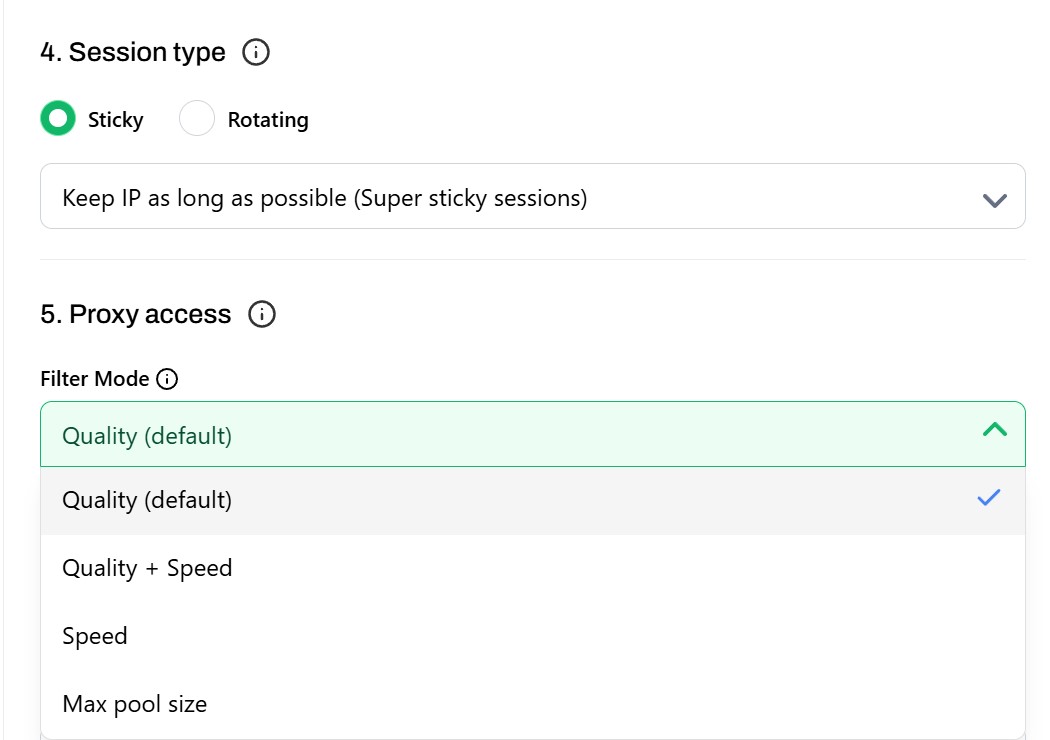
- Step 5. Filter Mode. Quality (default), Quality + Speed, Speed, Max pool size. I left it on Quality. Clean IPs were the priority, not raw speed.
- Step 6. Generator. One click and I had ready strings:
gate.nodemaven.com:8080:lian16325_gmail_com-country-us-zip-23235-sid-ed447...
gate.nodemaven.com:8080:lian16325_gmail_com-country-us-zip-23235-sid-0e9e4a...
gate.nodemaven.com:8080:lian16325_gmail_com-country-us-zip-23235-sid-e6b8b9...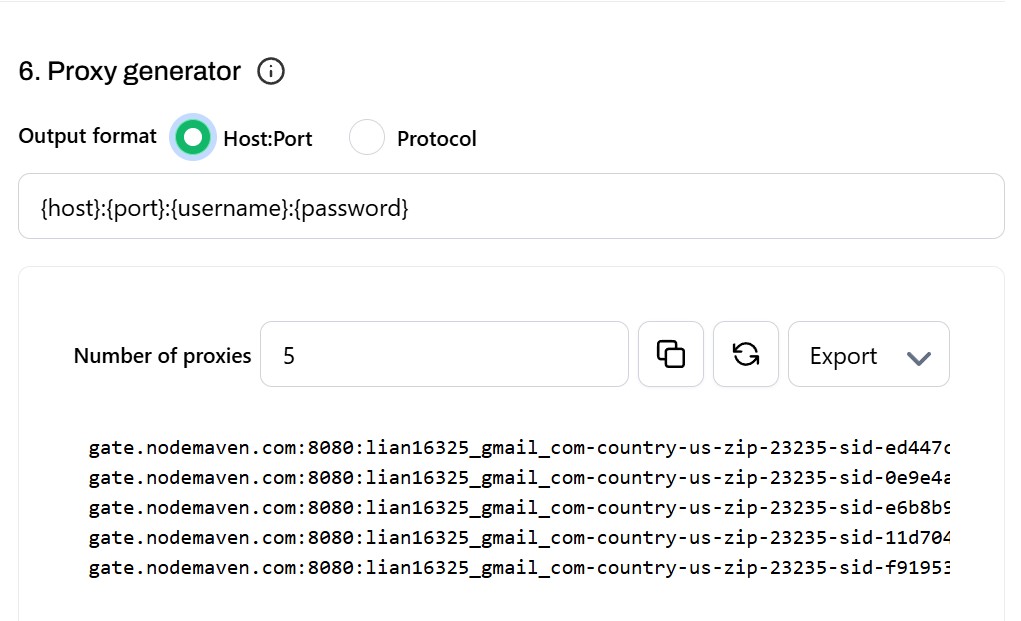
Each line gets its own session ID. Five separate sticky sessions, one login. Useful when you’re juggling multiple accounts on the same location but need different IPs.
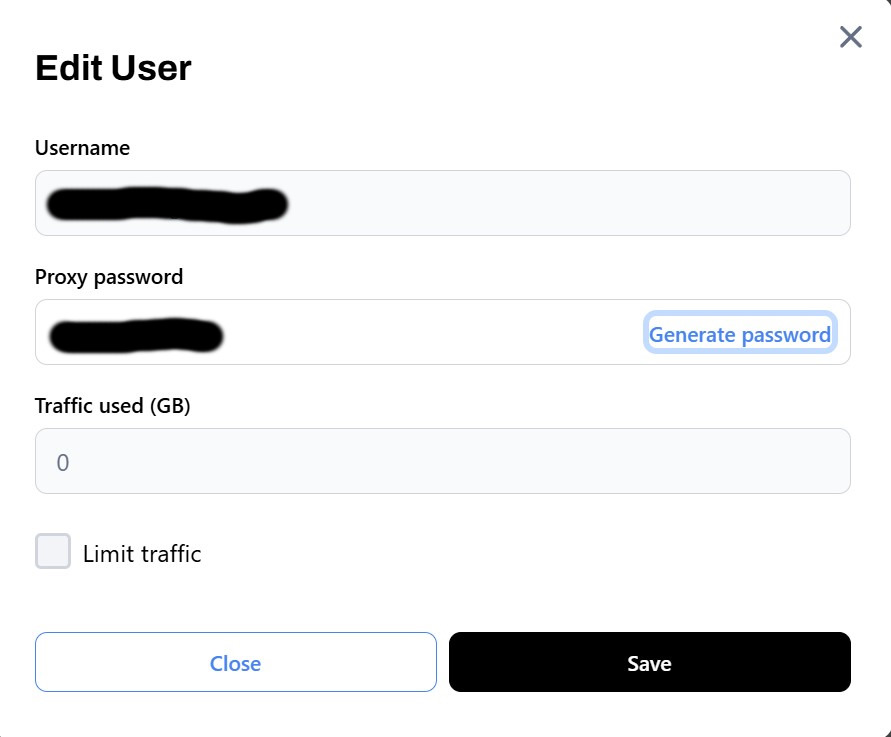
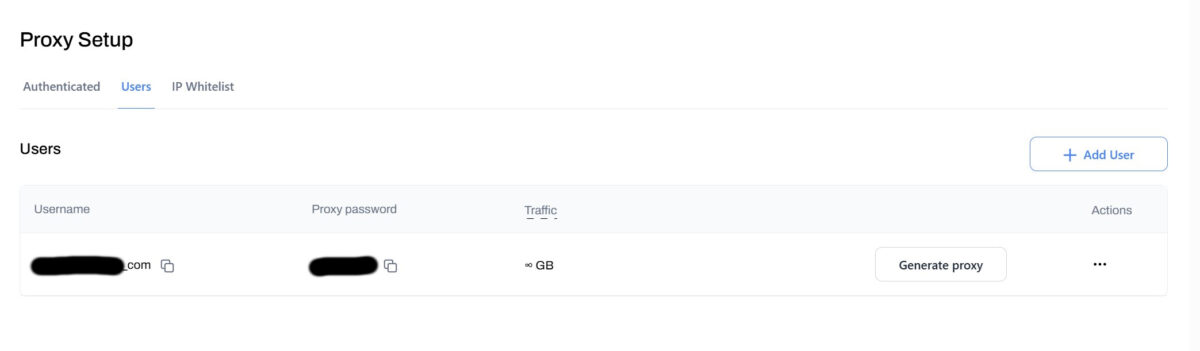
Another thing I liked – sub-users. Spin up a separate login with its own password and traffic cap. I have a guy on my team I can hand 10 GB to without worrying he’ll torch the whole package on something dumb.
Plugging it into Dolphin Anty
I used Dolphin Anty with default fingerprint settings. Add proxy through “New proxy”, protocol SOCKS5, host gate.nodemaven.com, port 1080. Login looks like toproxylab-country-us-zip-23224-ipv4-true-sid-90ce6.... All targeting parameters are baked into the username itself.
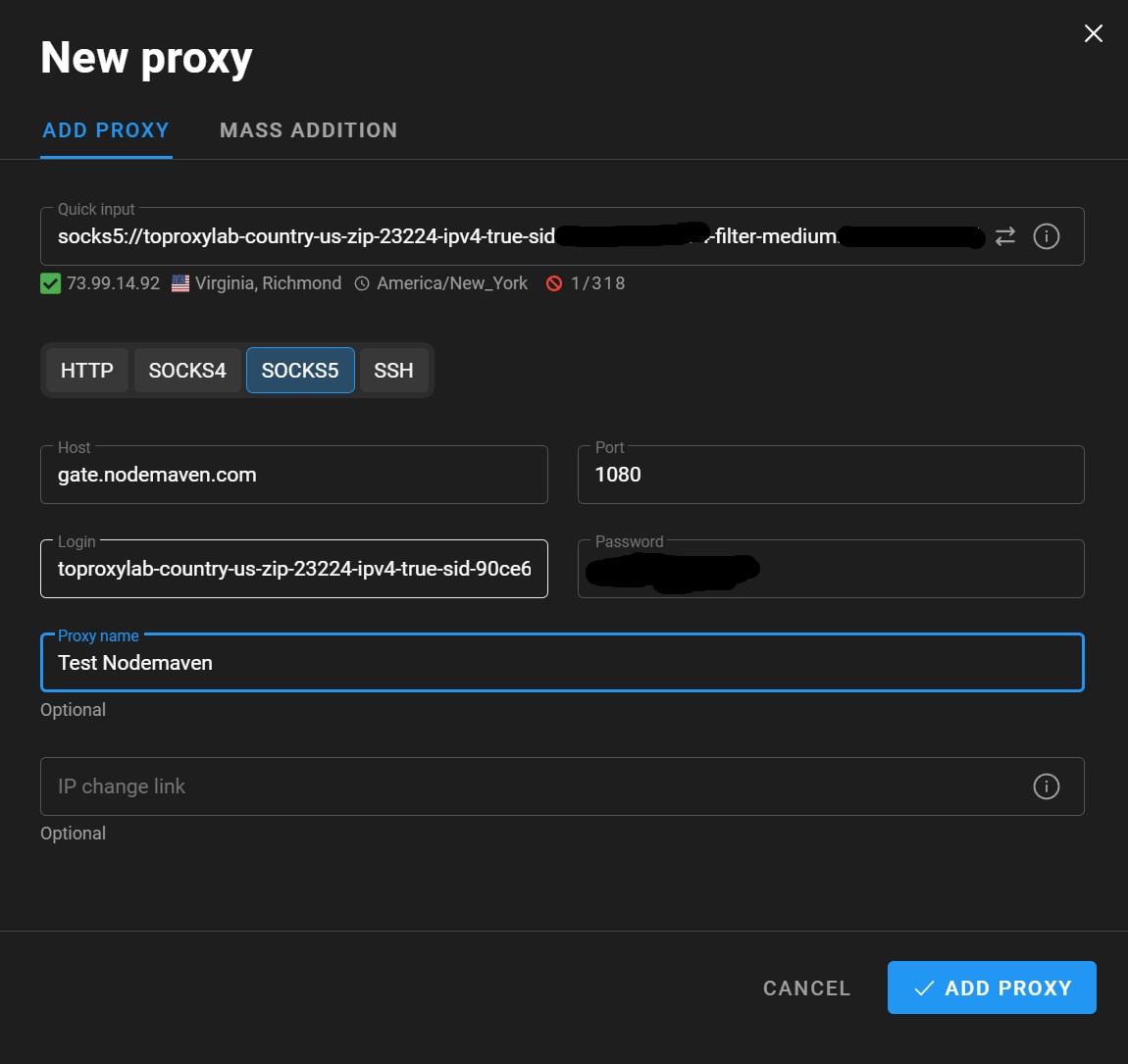
Dolphin validated on add: IP 73.99.14.92, Virginia, Richmond, timezone America/New_York.
When I actually launched the profile, the IP was already different. 160.19.2.242. That’s normal for residential networks – new IP at session init. Profile ACTIVE, SOCKS5, gateway correct.

SOCKS5 support here isn’t just a checkbox. It runs at the session layer, passes UDP, and for scraping it’s almost always the better choice over HTTP proxies.
IP tests: what third-party tools said
Now the fun part. I ran 160.19.2.242 through a dozen different checks.
Geolocation
IPinfo.io: Chester, Virginia, US. ASN AS19919. Operator VA SkyWire, LLC. Hostname fw.leasing.mola.vaskywire.net. Hosted domains – 0. That last one matters. Datacenter IPs usually have dozens of domains parked on them. This one has nothing. AS Type came back as ISP. So IPinfo calls it an internet provider, not hosting.
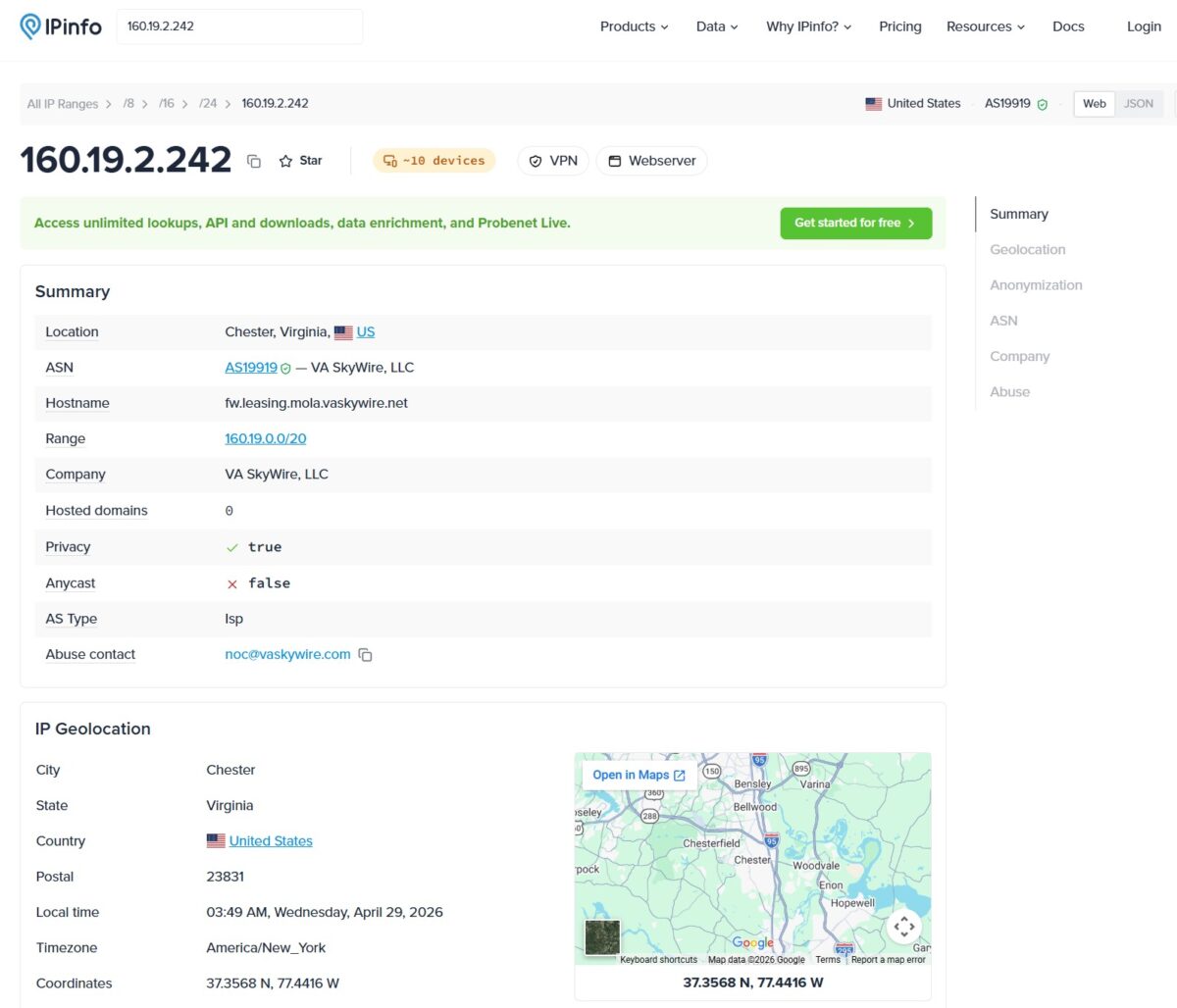
IPinfo did slap “~10 devices”, “VPN” and “Webserver” badges next to the IP. Their heuristic is noisy. Same badges show up on regular home routers with a few phones connected. Don’t read too much into it.
IP2Location: same story. Chester, Virginia, ZIP 23831, ISP VA Skywire LLC, Net Speed DSL/Broadband/Cable/Fiber/Mobile. Usage Type Fixed Line ISP.
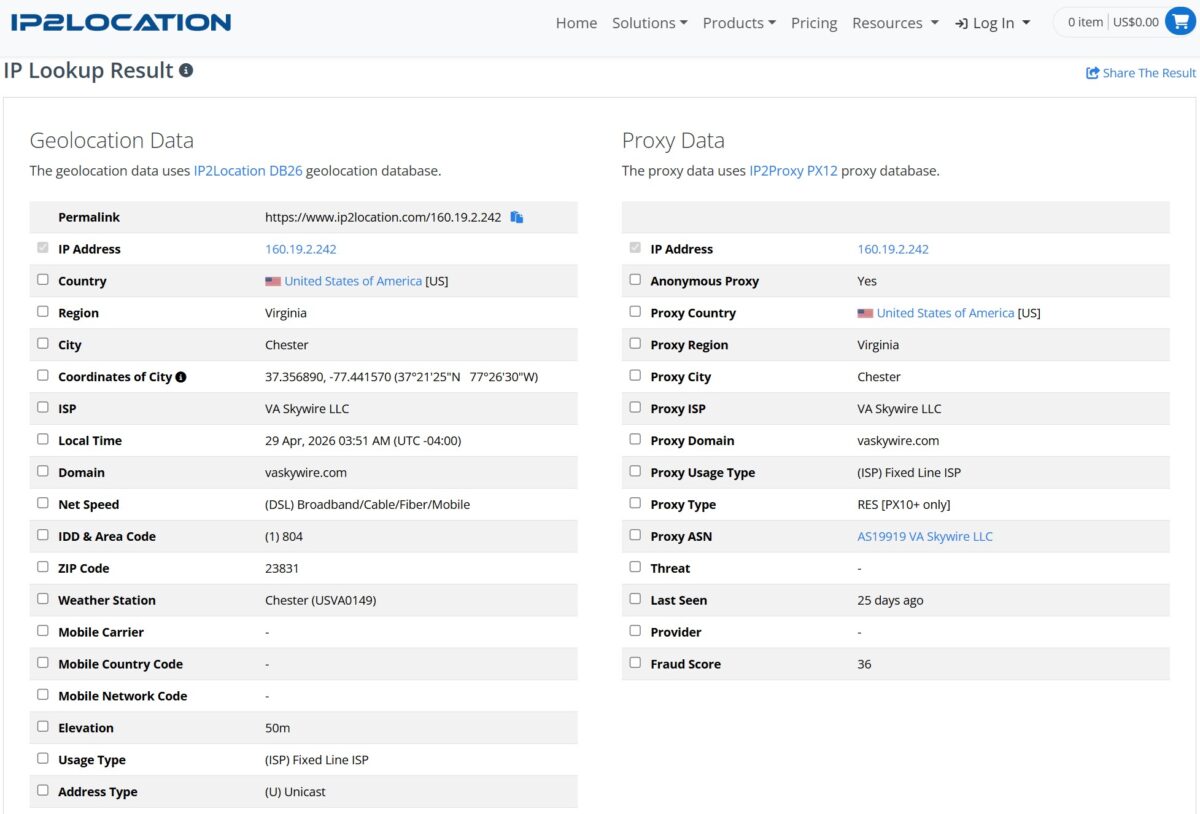
Their Proxy Data tab flags “Anonymous Proxy = Yes”, “Proxy Type = RES (residential)”, Fraud Score 36/100. So they know it’s a proxy. They just classify it as residential, not datacenter.
This trips up beginners a lot. People see “Anonymous Proxy = Yes” and panic. Don’t. Specialized databases like IP2Proxy catalog every known proxy pool, residential included. The label is normal. What you actually care about is whether the IP gets tagged as datacenter or VPN. It didn’t.
Anonymity check
apivoid.com’s connection-type checker:
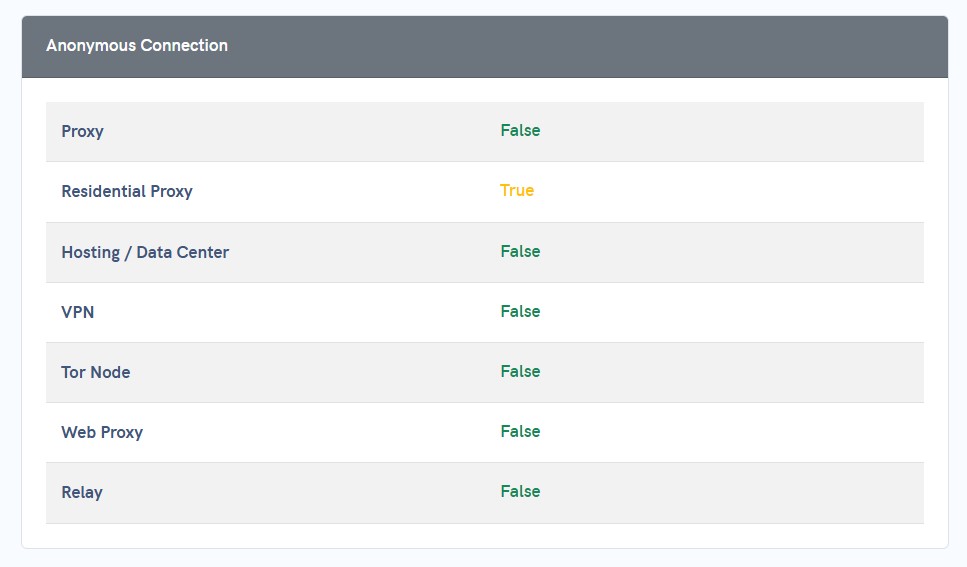
Reads as plain home internet. Not an anonymizer. Exactly what Reddit and Instagram want to see.
Pixelscan: the one that actually matters
Pixelscan has been my go-to for years. If it says “consistent” – I trust the IP.
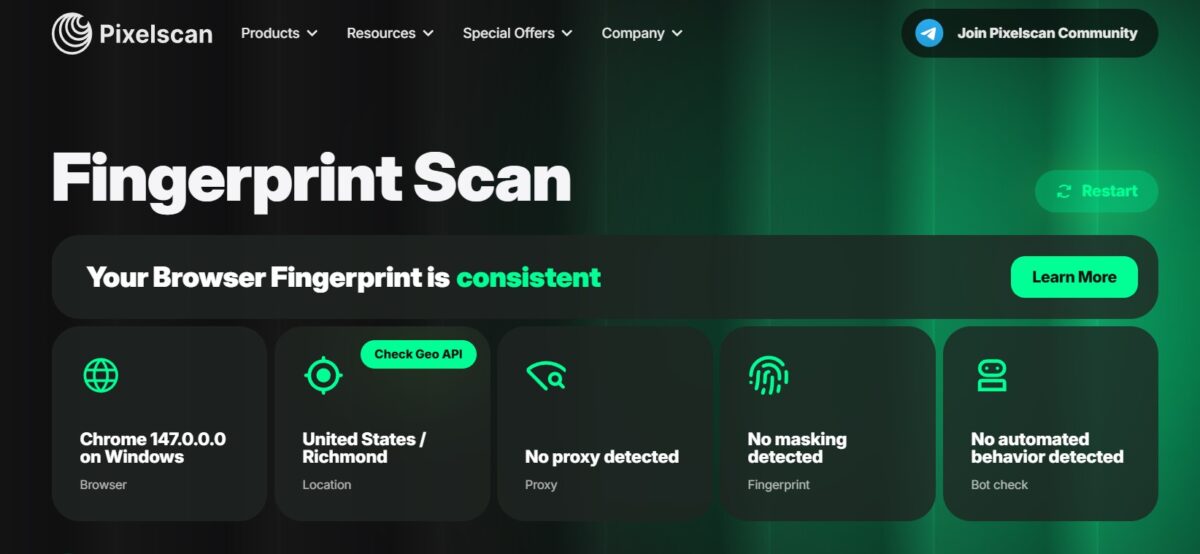
All five blocks green. Browser fingerprint consistent. No proxy detected. Behavioral patterns natural. This is rare. Most cheap proxy services die on the “Proxy detected” line.
Fraud Score
Scamalytics is brutal. They flag almost everything. NodeMaven’s IP scored 0 out of 100. Lowest possible.
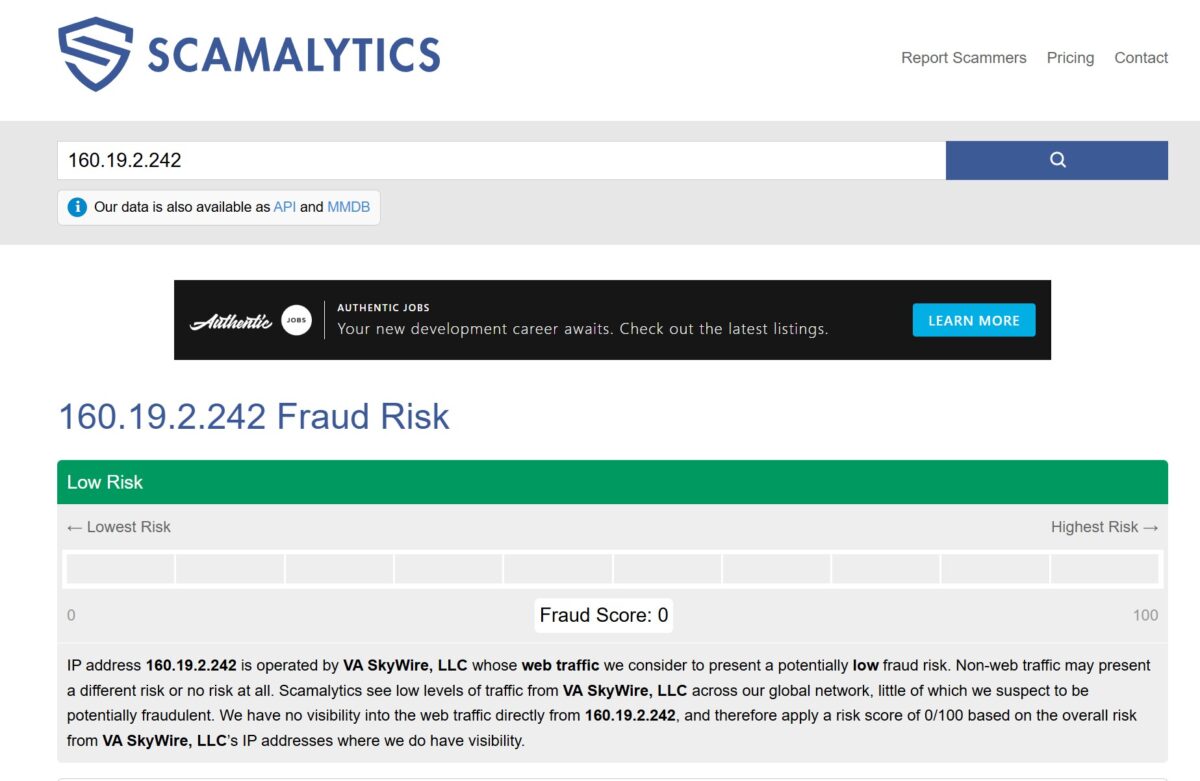
They add a footnote about non-web traffic potentially carrying different risk, but the headline is Low Risk. For ad accounts, payment verification, financial services – this number can be the difference between an account that survives and one that gets banned in three days.
IP2Location came back with 36/100. Different scoring algorithm, different result. Don’t worry about the gap, it’s normal.
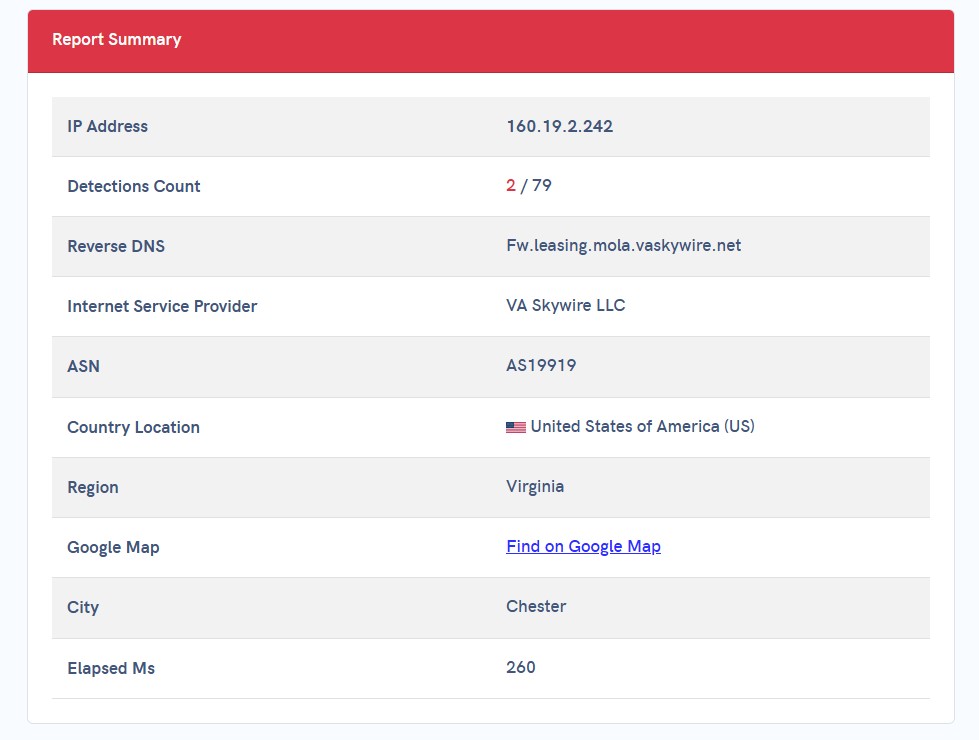
One more pass through apivoid.com‘s reputation check: 2 detections out of 79 sources. So 77 reputation databases see nothing wrong with this IP.
Where it stumbled: blacklists
Not everything was clean. Time to be honest.
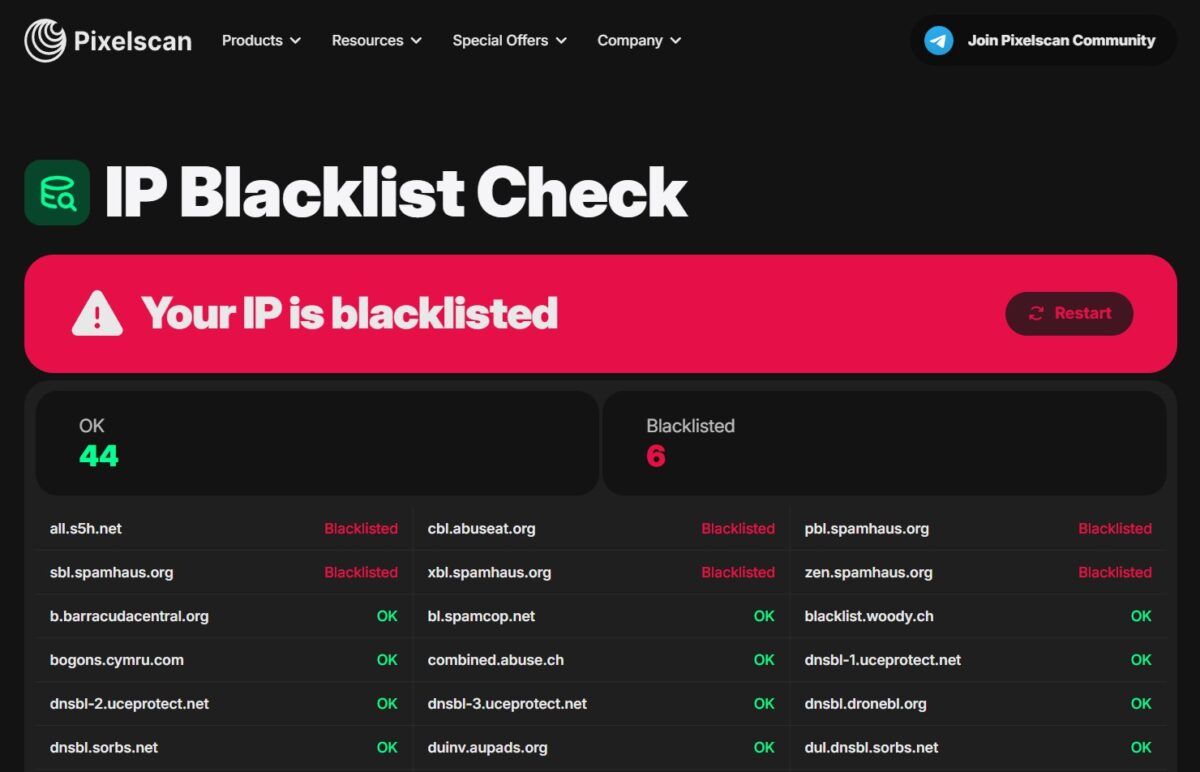
Pixelscan IP Blacklist Check verdict: “Your IP is blacklisted.” Out of 50 databases – 44 OK, 6 listed. All six are Spamhaus or Spamhaus-adjacent: all.s5h.net, cbl.abuseat.org, pbl.spamhaus.org, sbl.spamhaus.org, xbl.spamhaus.org, zen.spamhaus.org.
Cross-checked through MXToolbox: 61 databases tested, 1 listing (s5h.net). The mismatch with Pixelscan is just because Pixelscan counts Spamhaus zones separately.
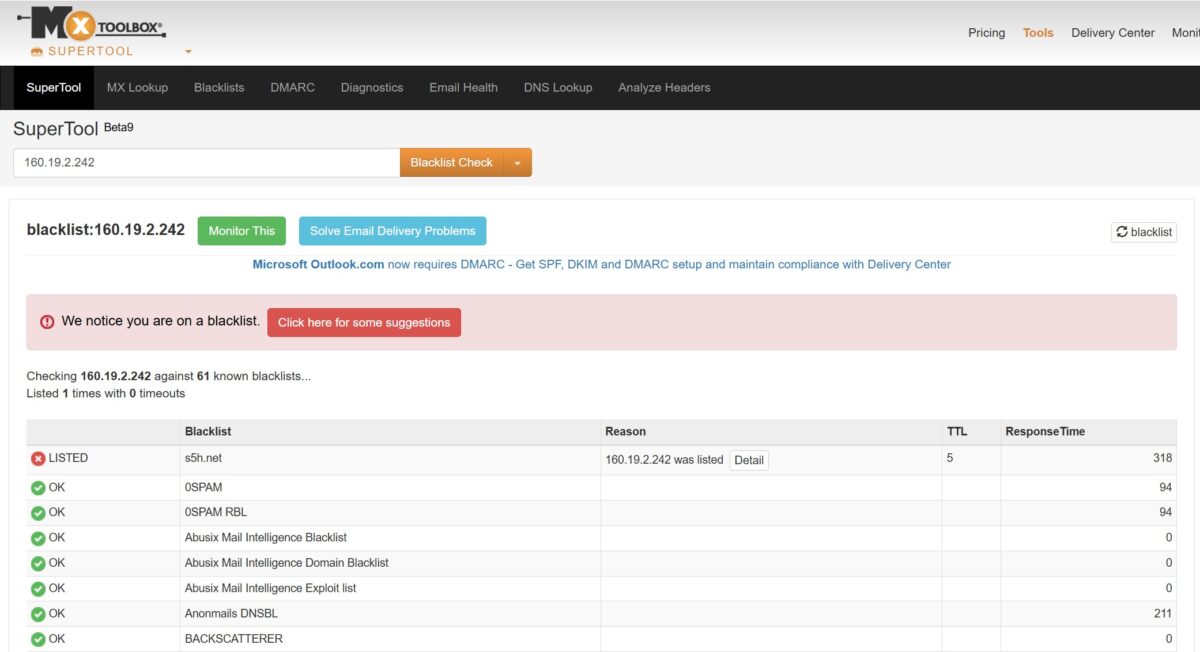
So what does this mean in real life? Spamhaus PBL is a list of IPs whose own operators say “don’t trust this for direct mail.” Almost every home and mobile IP on Earth ends up there. That’s expected for residential. If an IP were squeaky clean across every mail database, it would almost certainly be a datacenter address pretending to be residential.
For Reddit, Instagram, Google scraping – Spamhaus listings don’t exist. Social platforms and search engines don’t check mail blacklists. But if you wanted to send email through these proxies? Forget it. Won’t work.
Real-world test: Google, Cloudflare, CAPTCHAs
Numbers are nice. What I really wanted to know: will I see a CAPTCHA when I actually start working?
Opened Google US in Dolphin Anty. First search query – reCAPTCHA. One click, no buses, no traffic lights, done. Then I worked actively for 20 minutes. Clicking through results, opening sites, running a dozen more searches. Zero CAPTCHAs after the first one. That doesn’t happen with most residential pools. Google usually starts asking “are you human” every 5-10 queries.
Then I went down my list of nasty anti-bot sites:
- ChatGPT. Logged in, used it for 10 minutes, no Cloudflare Challenge. For anyone trying to use OpenAI through proxies, that’s huge – Cloudflare Bot Management nukes datacenter IPs on contact.
- G2.com. Browsed review pages. No checks. No delays. Nothing.
- Trustpilot. Same. No “Verifying you are human” interstitials, no 5-second wait.
Honestly, this is the part that sold me. CAPTCHAs aren’t an annoyance. They’re an automation killer. Each one means either manual work or paying a third-party CAPTCHA solver. Across the whole test I hit one. On Google. Right at the start. After that, silence.
Speed and latency
Three runs through Fast.com:
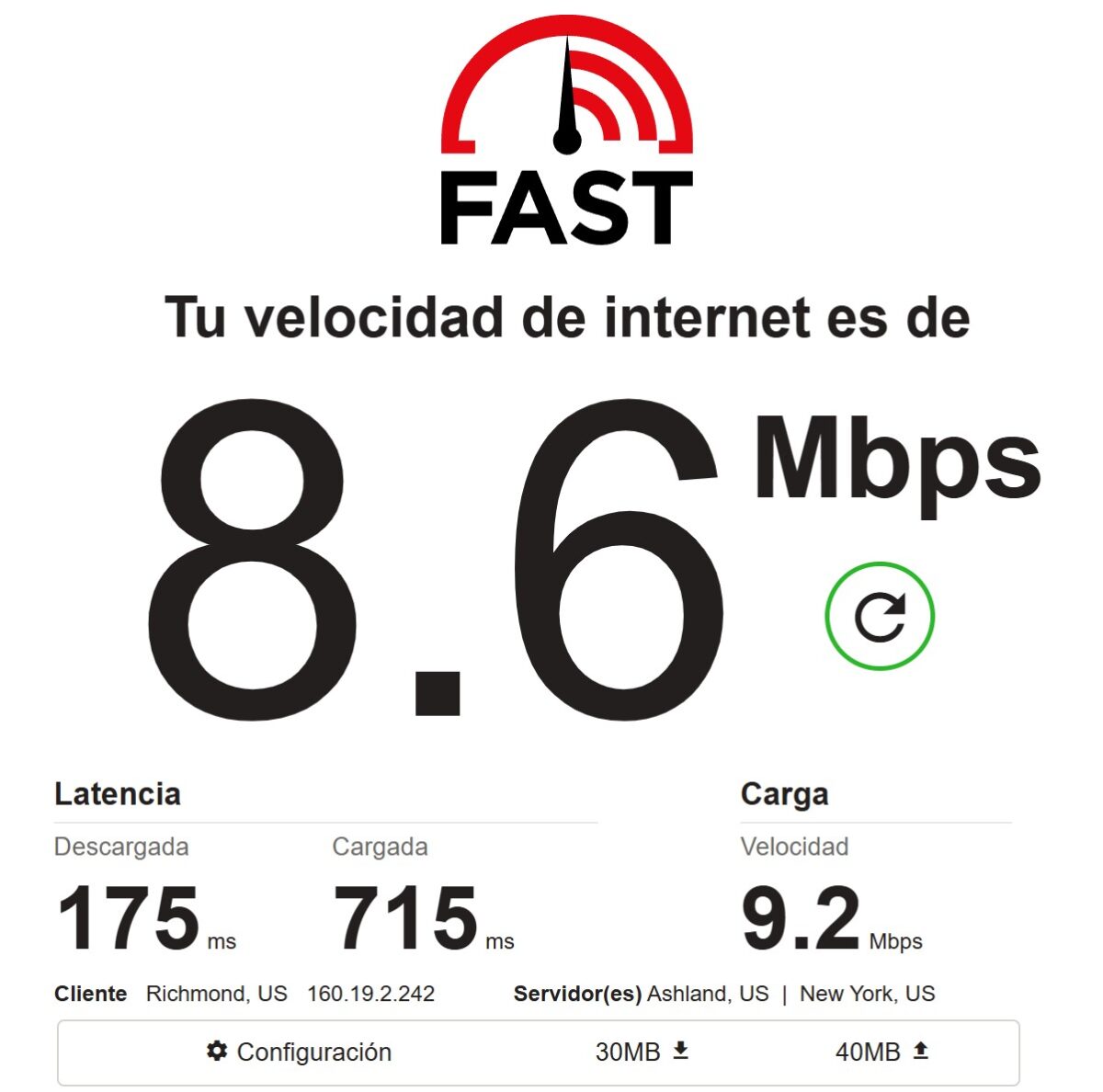
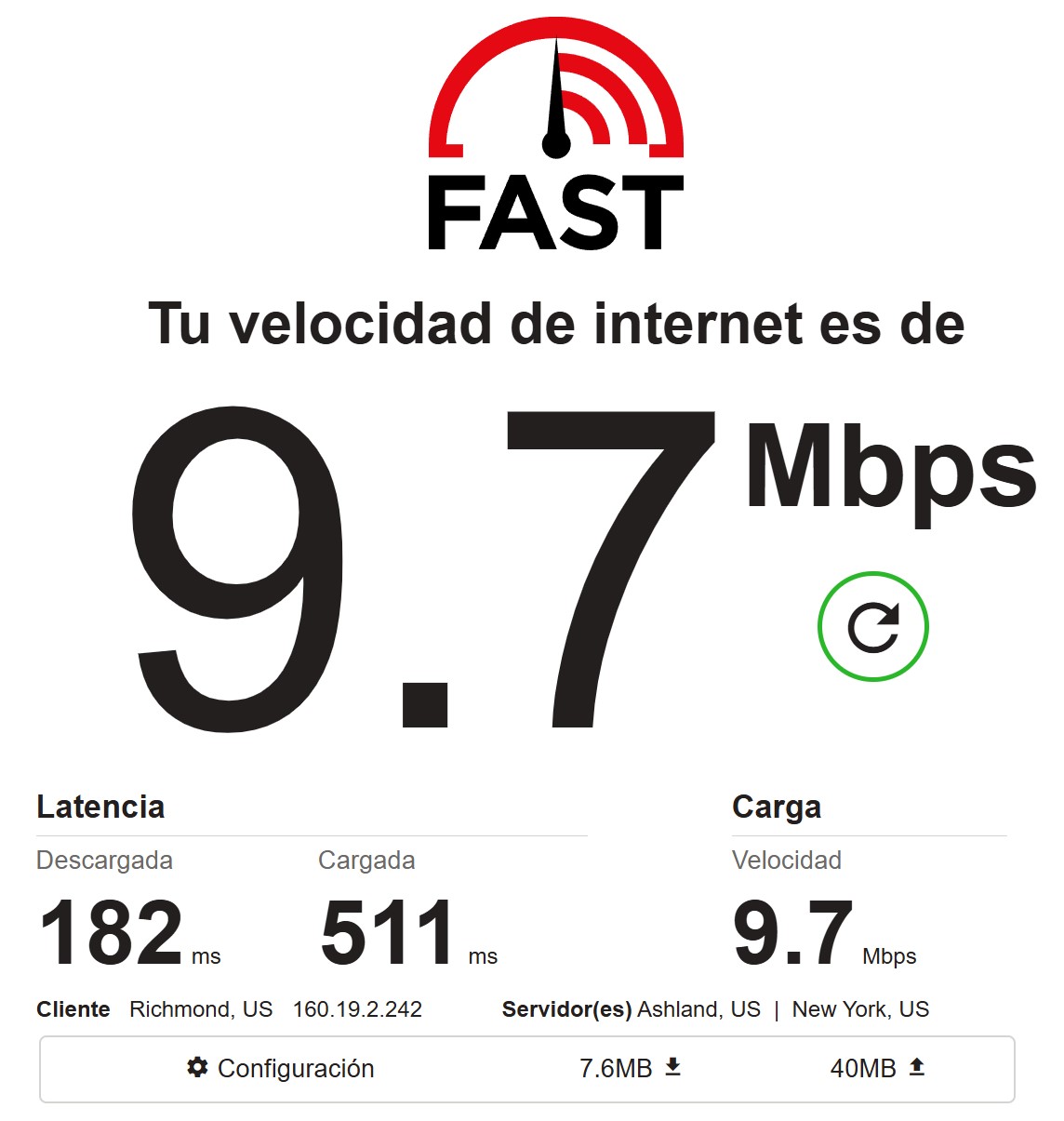
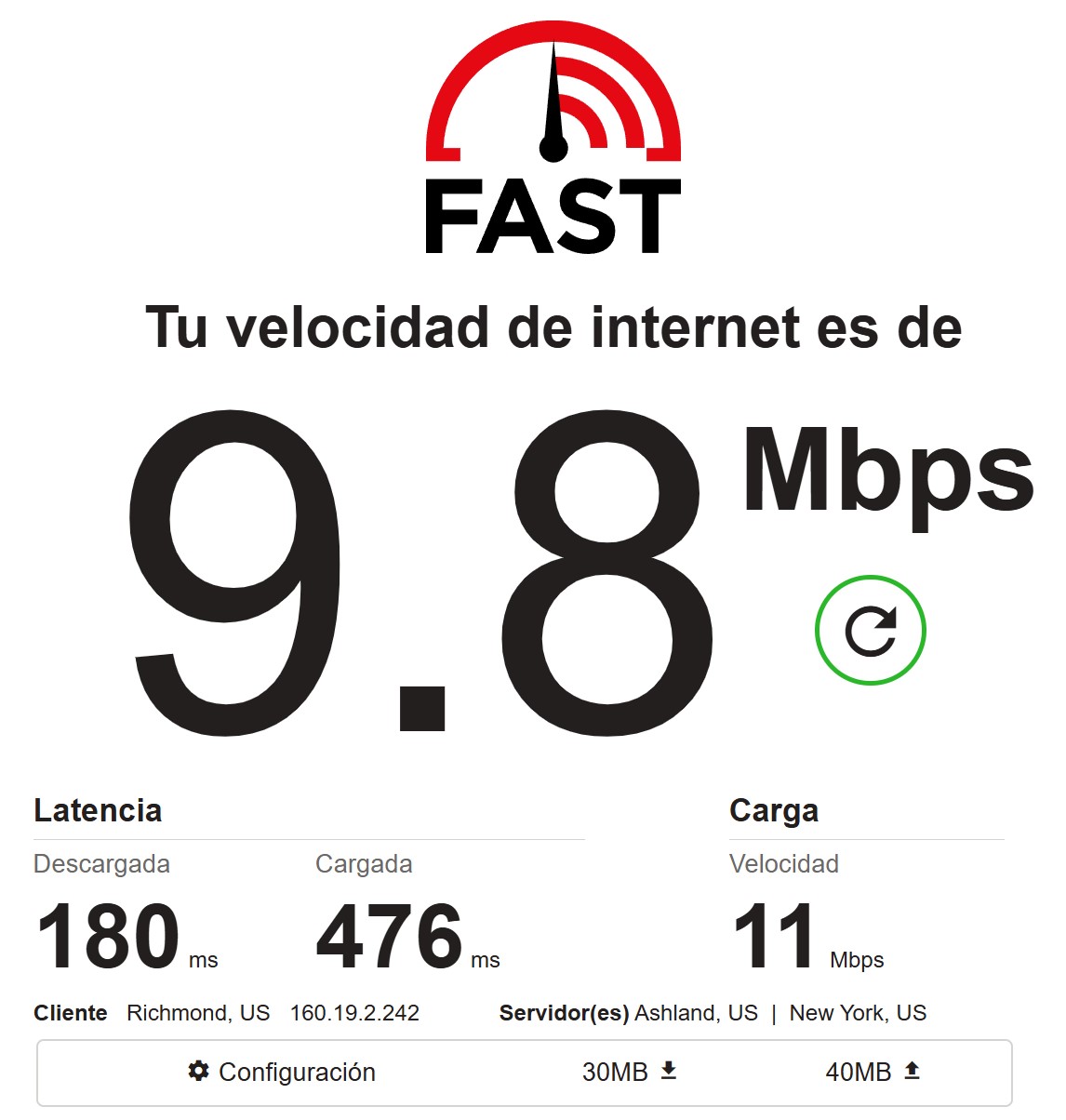
Average: ~9.4 Mbps down, ~10 Mbps up, download latency 175-182 ms, upload latency 476-715 ms.
Speed is mid. Not terrible, not great. Residential proxies are slower than datacenter by design – traffic is going through somebody’s actual home connection. For bulk scraping, 10 Mbps is thin. For account work and SEO, it’s plenty.
Download latency around 180 ms is fine for working from Europe to a US IP. Upload latency jumps a lot, which is normal – US home internet usually has a tight upstream pipe.
Live connection tests
Byteful Proxy Test – two runs against microsoft.com over SOCKS5:
- Run one: 634 ms average, 4/4 successful
- Run two: 740 ms, 4/4
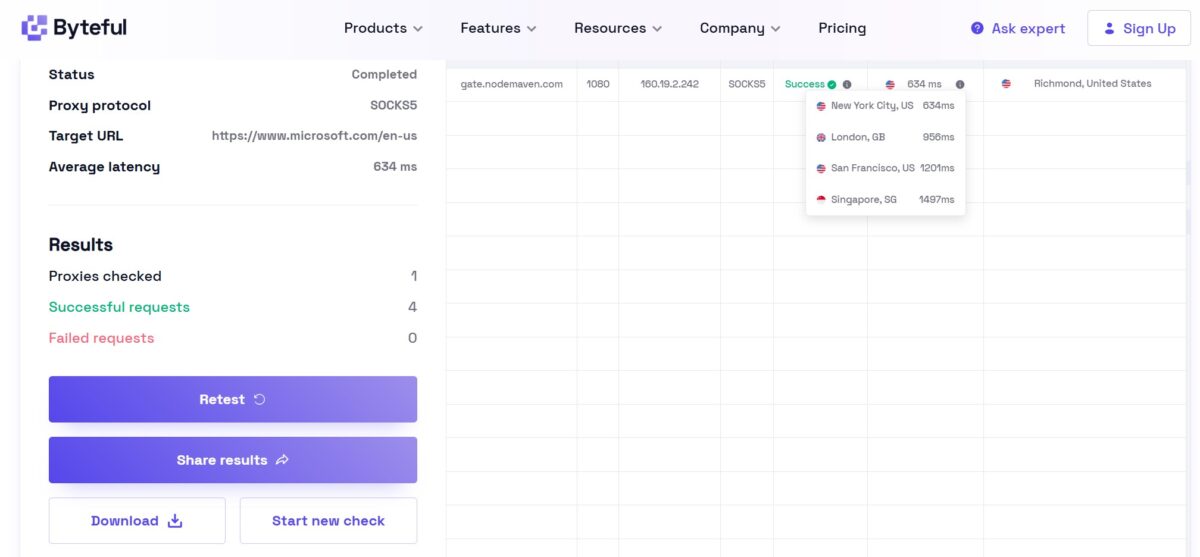
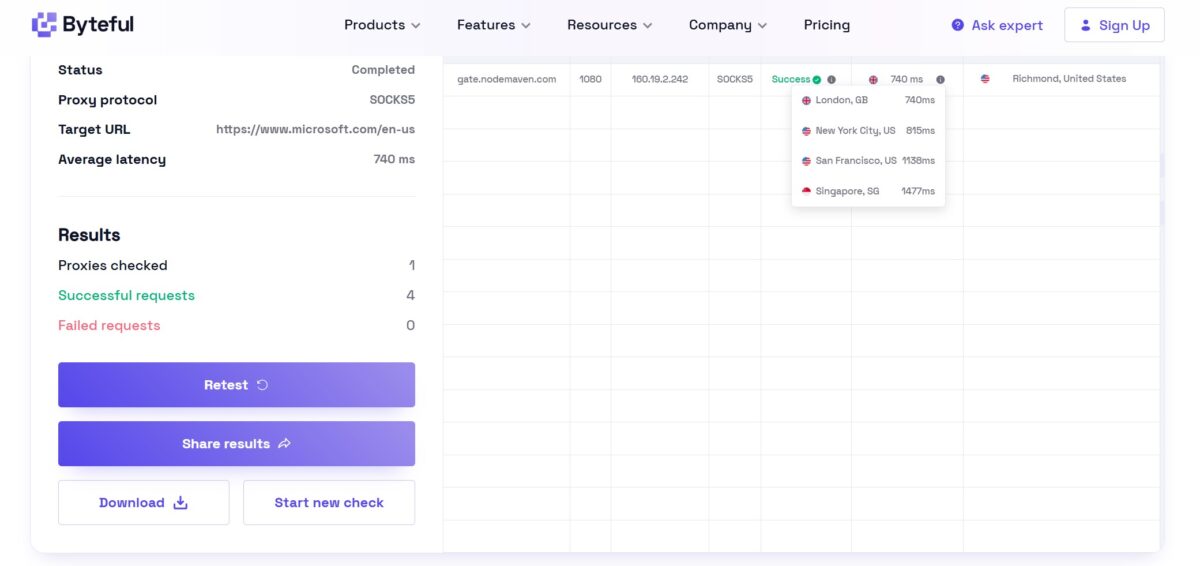
Geographic spread is what you’d expect. New York: 634-815 ms. London: 740-956 ms. San Francisco: 1138-1201 ms. Singapore: 1477-1497 ms. Closer to Virginia, faster response. Physics.
Then the bulk test through FOGLDN Proxy Tester. 25+ proxy strings, target google.com, all Status OK.
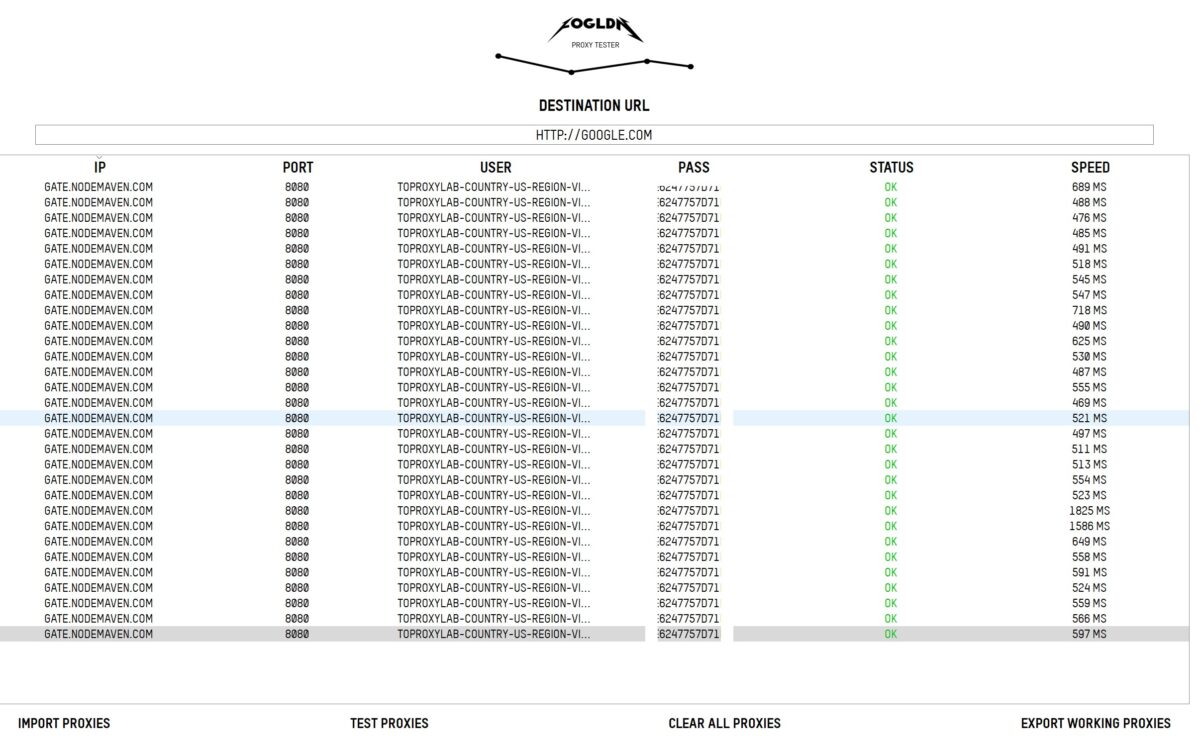
Speeds ranged from 469 to 1825 ms, most clustered around 470-600 ms. Two outliers – 1825 and 1586 ms. Two slow connections out of 25. 8% slow. Normal for a P2P-style network.
Leaks
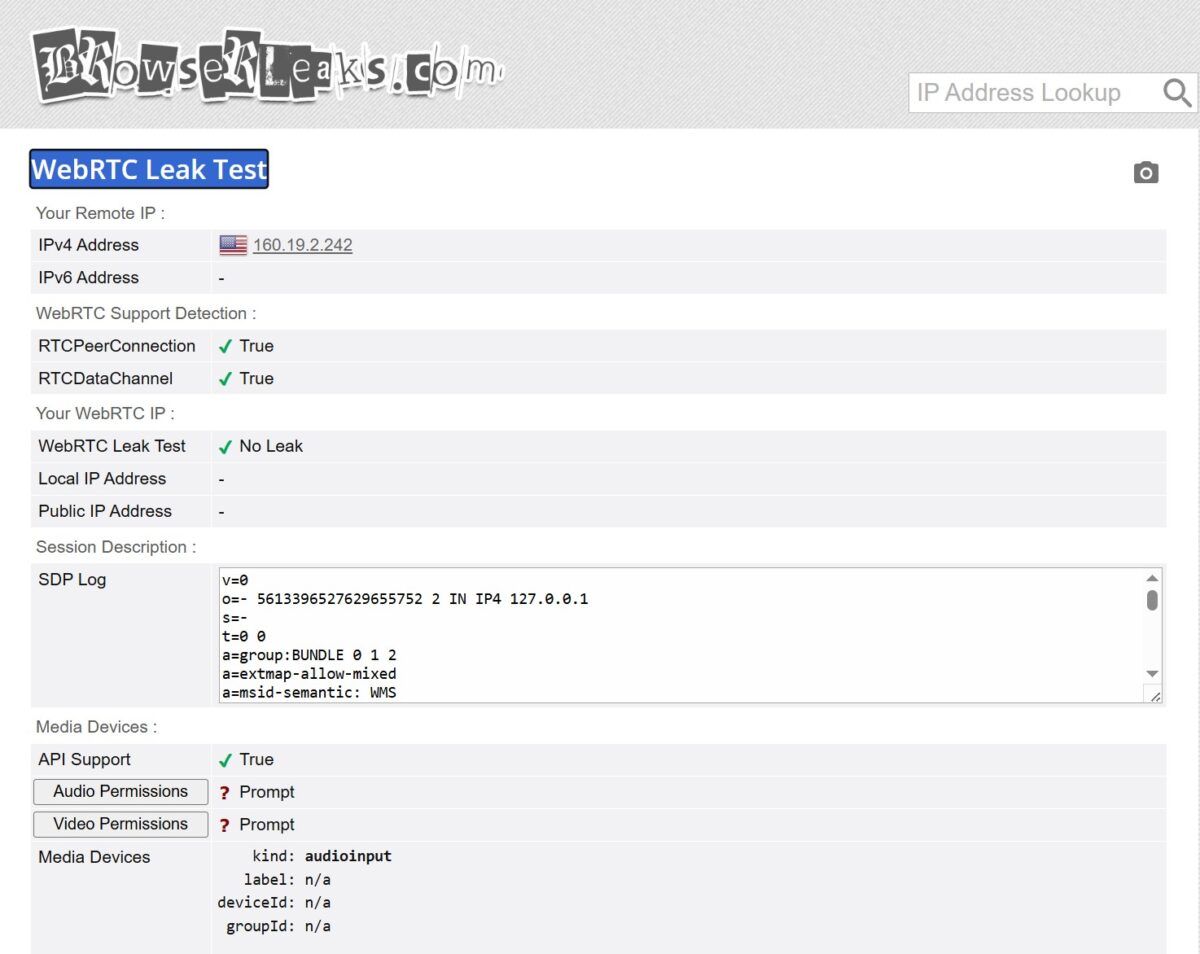
WebRTC: clean. Local IP and Public IP both hidden. RTCPeerConnection and RTCDataChannel work. No leak.
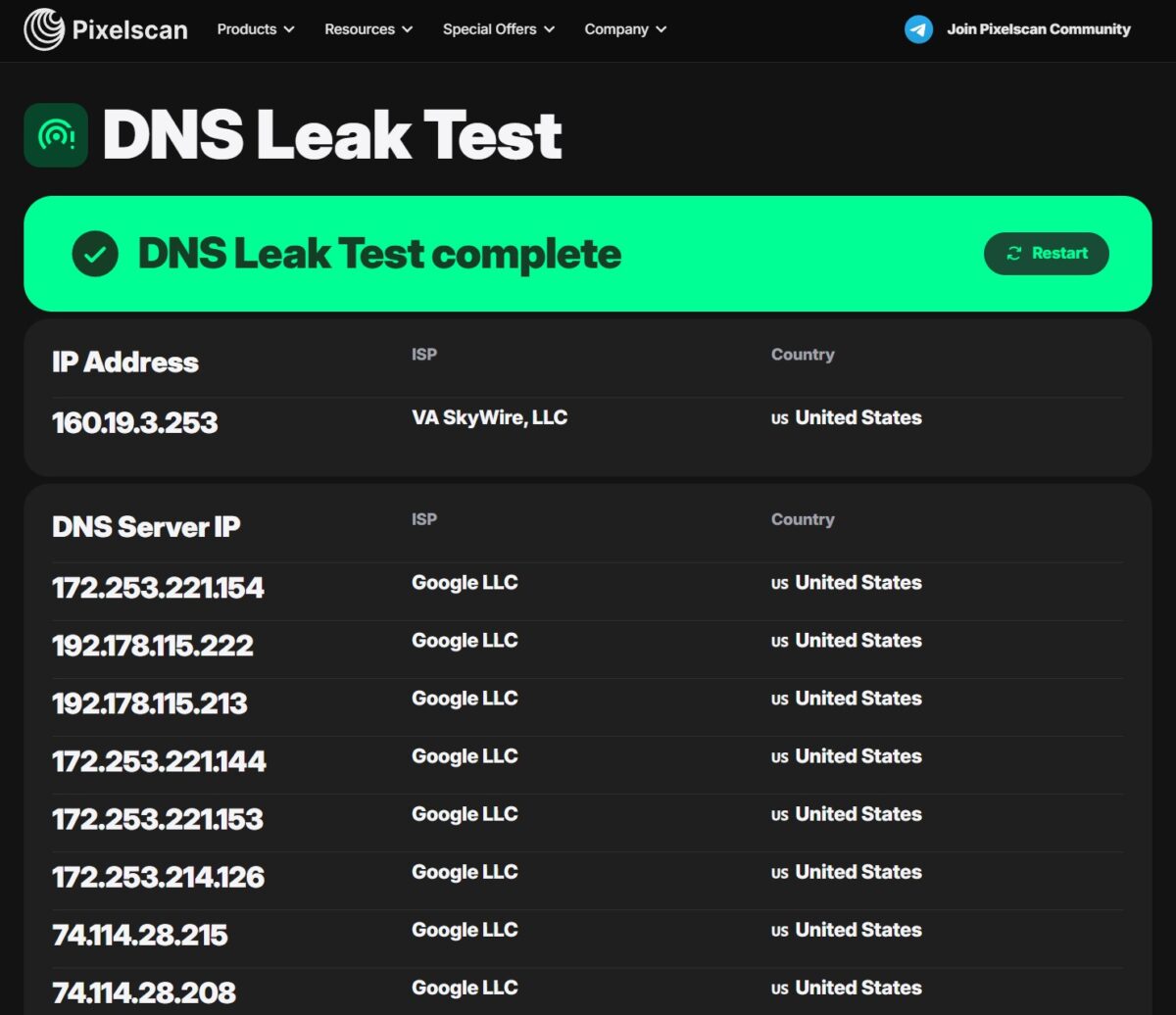
DNS is messier. Pixelscan said all 8 DNS servers belong to Google LLC (US). No trace of the real client ISP. Looks perfect.
Then BrowserLeaks dug deeper and caught one VA SkyWire server (162.245.128.128, Richmond) sitting in the list of 47 DNS servers. So one DNS query slipped through the proxy ISP instead of Google.
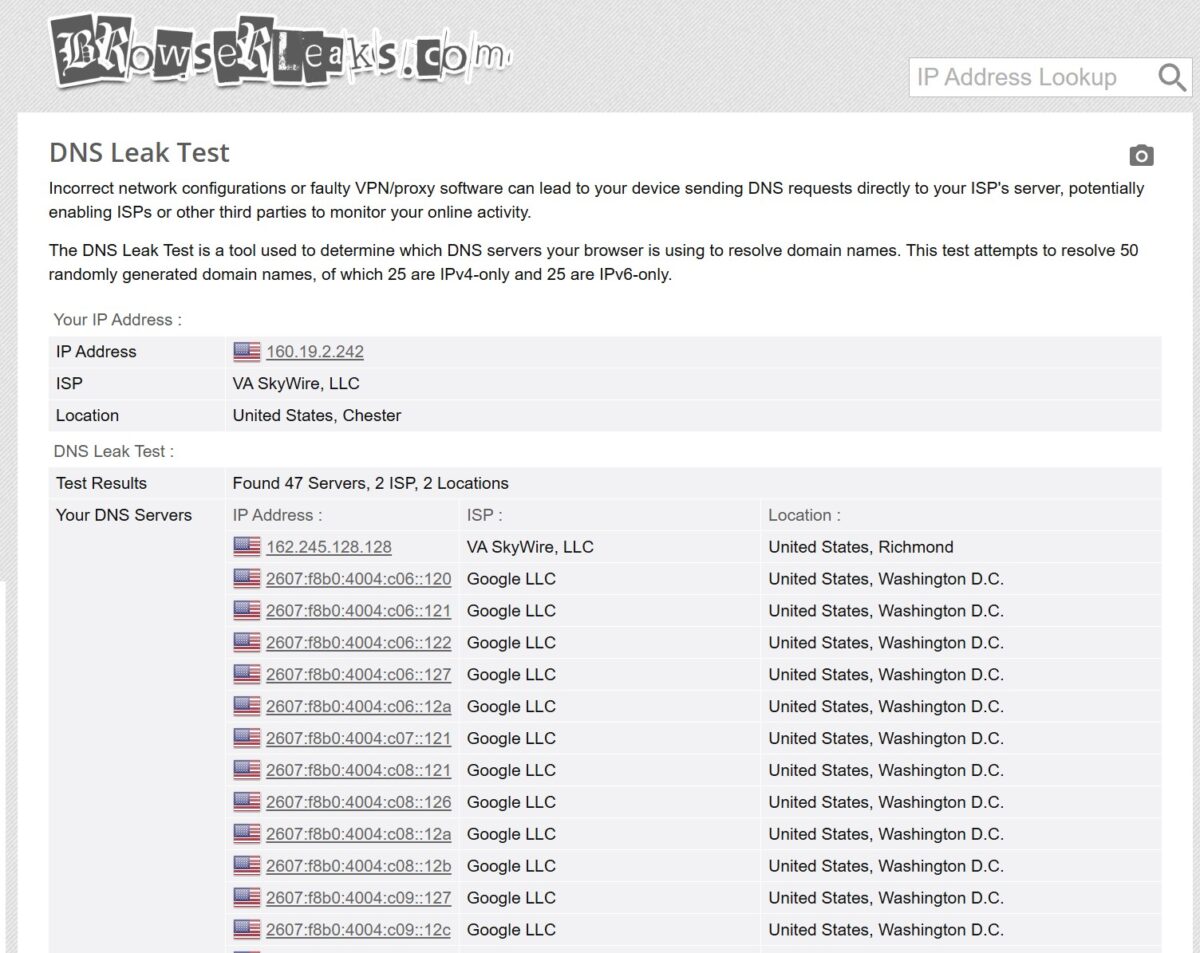
This is a micro-leak. In practice it means an anti-fraud system might occasionally see a DNS query coming from the same ASN as the IP and conclude “user and DNS provider are the same company.” Which is normal for a home user. So it’s not a critical problem. But it’s not perfect either.
Another quirk – BrowserLeaks read the TCP/IP fingerprint as Android. The browser was Chrome 147 on Windows.
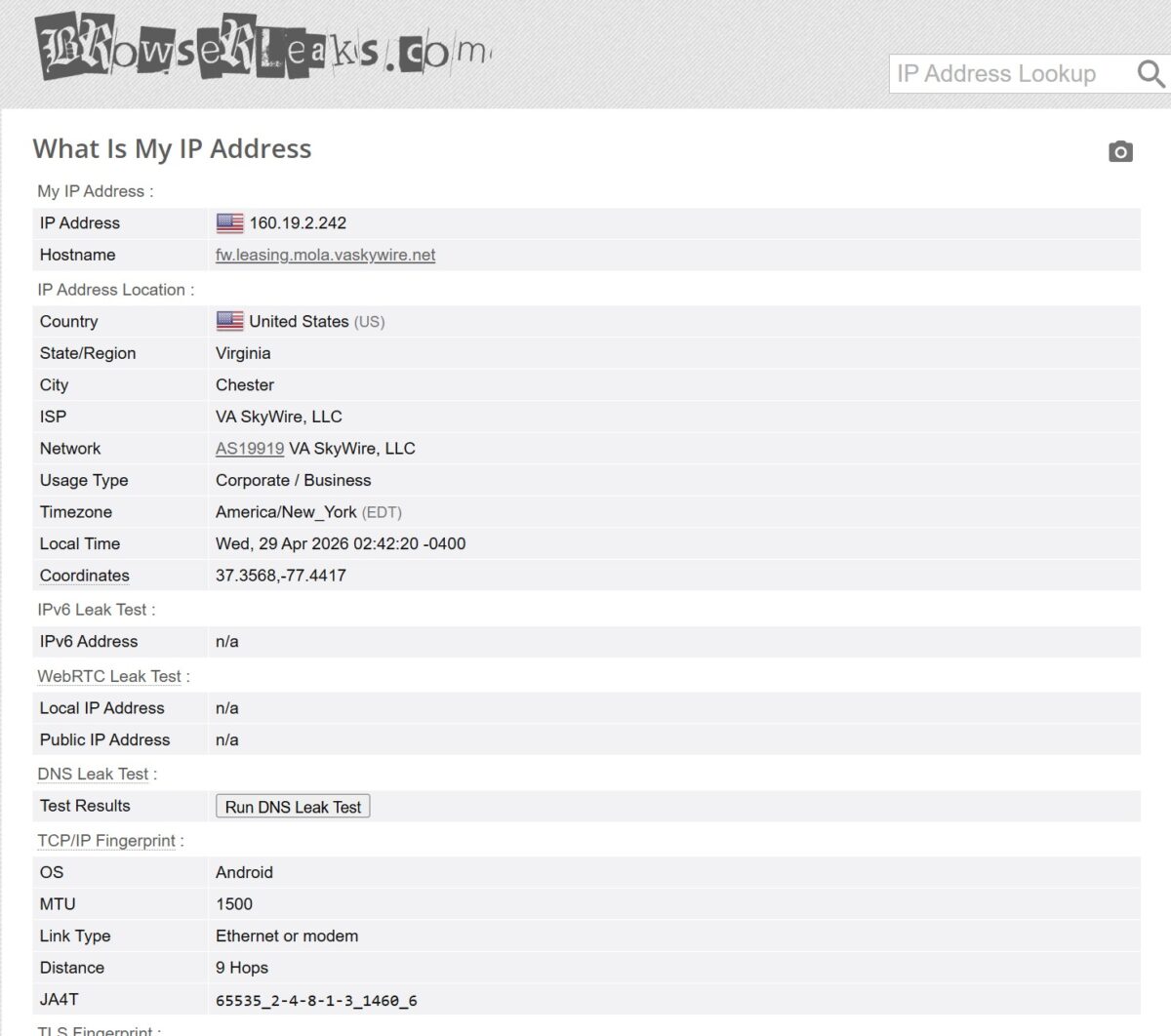
Mismatch. Happens because NodeMaven routes through mobile peers, and the TCP stack keeps the Android device’s signature. On most sites this is invisible. Server-side anti-bot logic looks at User-Agent and JS fingerprint. Not TCP. But systems like Cloudflare Bot Management can absolutely catch it. If you’re working with the meanest sites out there, keep this in mind.
Pricing and how it stacks against the competition
NodeMaven sits in the premium mid-market. About $3.80/GB on subscriptions starting at $35/month. PAYG is around $4.44/GB.
Pricier than Smartproxy/Decodo (~$2.20/GB) or IPRoyal (~$1.75/GB at volume). Cheaper and far more accessible than Bright Data or Oxylabs ($8/GB at entry plus KYC and corporate paperwork).
What’s the extra money buying? Filtering. NodeMaven runs every IP through their IP Quality Filter before serving it to you. They claim 95% come back clean. Based on my week with them, that’s probably real – every IP I pulled passed Pixelscan and Scamalytics.
If you care about price per gig and you have time to filter trash IPs yourself, look at IPRoyal or Decodo. If you want IPs that just work the first time, NodeMaven is worth it.
Nice perk – traffic rollover. Unused gigabytes carry to the next month if you renew. Most competitors burn unused traffic at the end of the cycle. Pro-rated refund too, if you cancel.
Payment
Cards (Visa, Mastercard, Amex). Wire transfers. 10+ cryptocurrencies – BTC, ETH, USDT, Solana and others.

Crypto with no KYC is a big deal if you care about privacy or live somewhere where international card payments are a coin flip. Oxylabs makes you climb to corporate tier just to pay in crypto. Here it’s standard.
Head-to-head: Oxylabs, IPRoyal, NetNut
Numbers in a vacuum are meaningless. So I lined NodeMaven up against three services I tested earlier: Oxylabs, IPRoyal, NetNut. Same conditions, same US location, same Dolphin Anty, default settings.
| Parameter | NodeMaven | Oxylabs | IPRoyal | NetNut |
|---|---|---|---|---|
| Pool type (tested) | Residential | Datacenter (free) | Residential | Residential (Direct ISP) |
| Pool size | 30M+ | 100M+ | 32M+ | 85M+ |
| Sticky session (claimed) | up to 7 days | 30 minutes | up to 24 hours | Sticky/Rotating |
| Download speed | 8.6-9.8 Mbps | 10-12 Mbps | 15-20 Mbps | 5.9-7.8 Mbps |
| Download latency | 175-182 ms | 258-260 ms | average | 301-306 ms |
| Fraud Score (Scamalytics) | 0/100 | 50-100/100 | low | 12-16/100 |
| Blacklist (MXToolbox) | 1/61 | Spamhaus ZEN | present | 2/61 |
| Proxy detection (Pixelscan) | No proxy detected | Detected | – | Your IP looks good |
| ISP Type | Residential ISP | Corporate/Hosting | Residential | Residential (Cox, AT&T) |
| Success Rate (my test) | 100% (FOGLDN) | 100% (5 IPs) | – | 85.71% |
| Starting price | $3.50 / trial | $0 (5 IPs free) | from $1.75/GB | $99/month |
| Pay-As-You-Go | Yes | Yes ($8/GB) | Yes | No |
| Entry barrier | low | medium (KYC) | low | high ($99+) |
| SOCKS5 support | Yes | Yes | Yes | Yes |
| ZIP targeting | Yes | Yes | Limited | Yes |
The takeaways.
Oxylabs on free datacenter IPs loses on cleanliness. Fraud Score 50-100 kills any login flow. Their residential is much better but starts at $4/GB and demands KYC.
IPRoyal is cheaper per gig and the non-expiring traffic is appealing. But pool quality is a lottery. From my own testing, IPRoyal eats CAPTCHAs on Reddit and Gmail.
NetNut is a different animal. B2B-only, $99/month minimum, KYC. Their Direct ISP architecture sounds great on paper. In practice my Success Rate was 85.71% with shaky latency. And they lock out individuals and small teams completely.
NodeMaven slots into the gap. Pool quality on par with the corporate options (Fraud Score 0, no Cloudflare blocks), no KYC, $3.50 to start.
What Reddit and Trustpilot say
Trustpilot: 4.1 out of 5, almost a hundred reviews. 81% gave 5 stars, 11% gave 1. Classic proxy industry split. Either it works for you and you love it, or something broke and you’re furious.
The thing reviewers keep mentioning: support. Telegram, Slack, WhatsApp, 24/7. In a business where every minute of broken proxies costs money, that matters more than people give it credit for.
Negatives: occasional complaints about static ISP proxies (not residential) being unstable, and lack of granular subnet filtering. There were data-leak accusations, but in the antidetect world those usually trace back to a misconfigured browser, not the provider.
Reddit is split. Some long, glowing reviews. Others calling them an “aggressive marketer” and “mediocre reseller.” Where’s the truth? Closer to the first version, based on what I saw. Resellers usually give themselves away with bad Fraud Scores and IP-pool overlap with other services. NodeMaven didn’t show either.
The strongest argument against the “reseller” label is what the tests actually showed: Pixelscan saw no proxy, Scamalytics returned 0/100, and three separate databases classified the IP as a residential ISP rather than hosting. Resellers reselling someone else’s tired pool don’t produce those numbers.
Final scoreboard
| Metric | Result | Score |
|---|---|---|
| Download Speed | 8.6-9.8 Mbps | 3/5 |
| Latency | 175-182 ms (download), 476-715 ms (upload) | 4/5 |
| IP Quality (Fraud Score) | 0/100 Scamalytics, 36/100 IP2Location | 5/5 |
| Blacklists | 1/61 MXToolbox, 6/50 Pixelscan (Spamhaus only) | 4/5 |
| Geo Detection | Virginia, Richmond – accurate | 5/5 |
| Proxy Detection | Not detected as proxy (Pixelscan) | 5/5 |
| ISP Type | Residential (VA SkyWire, AS19919) | 5/5 |
| WebRTC Leak | No Leak | 5/5 |
| DNS Leak | 1 ISP server out of 47 (micro-leak) | 4/5 |
| Success Rate (FOGLDN, 25+ requests) | 100% | 5/5 |
| Cloudflare Challenge (ChatGPT, G2, Trustpilot) | Never triggered | 5/5 |
| Google CAPTCHA | Once at start, then 20 minutes clean | 4/5 |
| Sticky session | up to 7 days (claimed), stable | 5/5 |
| ZIP targeting | Down to the postal code | 5/5 |
Overall: 4.7/5
- Fraud Score 0/100 on Scamalytics. Best result among the services I’ve tested;
- Pixelscan doesn’t see a proxy. Browser fingerprint comes back consistent;
- Residential classification confirmed by IPinfo, IP2Location, BrowserLeaks;
- Zero Cloudflare Challenges across ChatGPT, G2, Trustpilot;
- Google threw one CAPTCHA in 20 minutes of active work;
- ZIP targeting in 150+ US locations, accurate to the postal code;
- Sticky sessions up to 7 days;
- 30M+ residential IPs, 295K+ mobile, 190+ countries;
- SOCKS5 and HTTP(S), built-in integrations with Multilogin, Dolphin Anty, AdsPower;
- Traffic Rollover – unused traffic carries forward;
- Crypto with no KYC: BTC, ETH, USDT, Solana, 10+ more;
- $3.50 trial, no mandatory subscription;
- 100% Success Rate across 25+ FOGLDN requests;
- 24/7 support on Telegram, Slack, WhatsApp.
- 8.6-9.8 Mbps download. Too slow for heavy scraping;
- $3.80/GB is pricier than Smartproxy/Decodo ($2.20) and IPRoyal ($1.75);
- Spamhaus listings – dead end for email;
- TCP/IP fingerprint says Android while browser says Windows;
- Micro DNS leak – 1 server out of 47 routes through the proxy ISP;
- Per user reviews, static ISP proxies sometimes drop connections.
Does it fit my use cases?
Reddit. Yes. Fraud Score 0/100, Pixelscan can’t see a proxy, residential confirmed, no Cloudflare hits across the test sites. Sticky sessions long enough to safely warm accounts. Buy it.
Instagram, Facebook, anything with serious anti-fraud. Yes, but pair it with an antidetect browser. NodeMaven integrates with Multilogin, Dolphin Anty, AdsPower, GoLogin out of the box.
SEO and US local SERP checks. Yes. ZIP targeting works. Google barely noticed me. Pinpoint local checks are exactly what this thing was built for.
Email. No. Spamhaus listings. Don’t even try.
Bulk scraping. Probably not. 9-10 Mbps and $3.80/GB makes the math ugly. Get Decodo or IPRoyal.
Walked in skeptical. Walked out wrong. On pool quality, NodeMaven plays in the same league as Oxylabs and NetNut, but without the KYC paperwork and with a $3.50 entry point. For Reddit, social, and local SEO – it nails what I need.
Not flawless. Tiny DNS leak. TCP fingerprint reads Android when the browser is Windows. Speed is mid. Spamhaus listings rule out email. But for the “residential proxies for tough sites” category, it earns the price tag. Of the four services I’ve tested, this is the best balance of price, quality, and accessibility right now.
Final score: 4.7/5
Next on the list – their static ISP proxies and the mobile pool. Given how the residential pool went, I’m expecting good things. I’ll update this review as I get more time with them.
Residential proxies with cashback
from $2.20/GB
Sticky sessions up to 7 days