





 Why Trust Us?
ToProxyLab has been testing proxy services since 2025. We pay for most plans ourselves, and when a provider gives us test traffic we say so in the review — free traffic buys a place in the testing queue, nothing else. Every provider goes through the same speed, uptime and fraud-score checks, and we publish the real numbers, including the bad ones. A rating cannot be bought. Learn who we are and how we review proxies.
Why Trust Us?
ToProxyLab has been testing proxy services since 2025. We pay for most plans ourselves, and when a provider gives us test traffic we say so in the review — free traffic buys a place in the testing queue, nothing else. Every provider goes through the same speed, uptime and fraud-score checks, and we publish the real numbers, including the bad ones. A rating cannot be bought. Learn who we are and how we review proxies.
Hidemium markets itself as a budget-friendly antidetect browser with a built-in AI assistant, native automation tools, and support for thousands of profiles. It’s a Vietnamese product that’s been actively pushing into international markets. But how well does it actually work for ad accounts, multi-accounting, and affiliate marketing? I installed Hidemium, tested it on Windows 10, and here’s what I found.
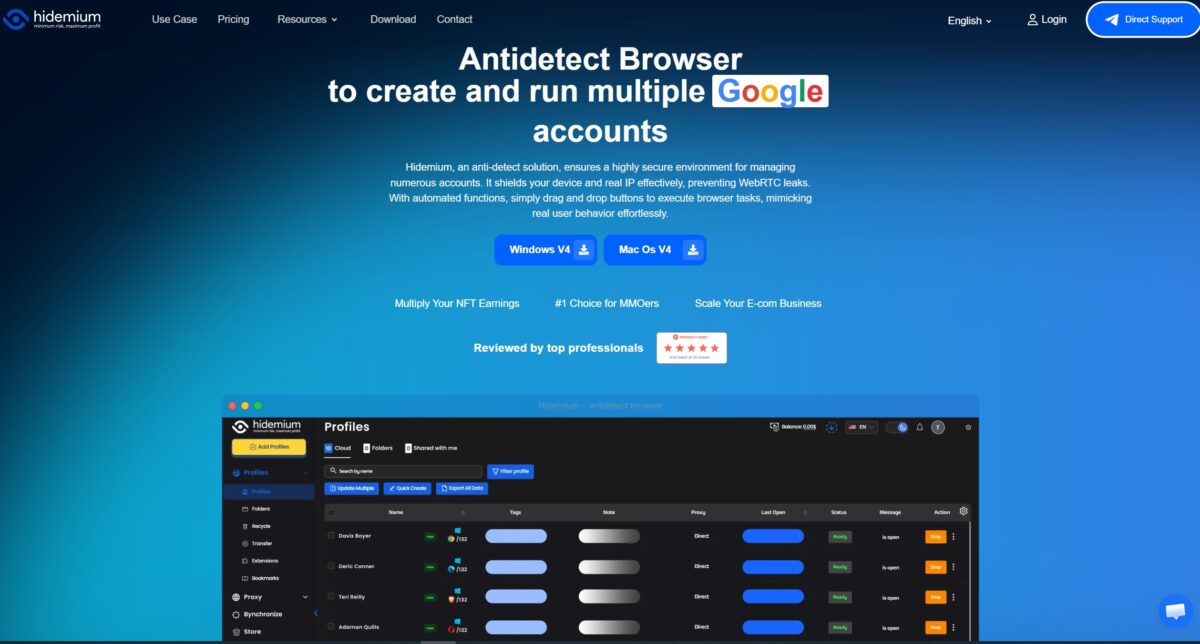
Key specs at a glance:
| Feature | Details |
|---|---|
| Automation | Prompt Script AI — no-code script builder |
| Fingerprint database | Millions of configs based on real devices |
| Free plan | 5 profiles forever, no credit card required |
| Supported OS | Windows 10+, macOS 12+, Linux, Android |
| Payment methods | PayPal, crypto, bank transfer (ACB Bank) |
| Browser engines | Chrome, Opera, Edge, Brave, Yandex, Safari, Chromium |
| API | Local API (Puppeteer, Selenium, Playwright) |
| Lifetime license | ~$700 one-time for unlimited local profiles |
Who it’s for:
- affiliate marketers juggling lots of accounts;
- SMM managers working across multiple platforms;
- teams that need automation and scripting;
- anyone looking for a free antidetect browser to get started.
Who might want to look elsewhere:
- users who prefer Dolphin Anty’s clean, minimal interface;
- anyone who doesn’t want to spend time manually tweaking settings;
- teams that need instant English-language support.
Red flags right away:
- crashes on first launch if your Windows username contains Cyrillic characters;
- proxy import only works with single pipe-delimiter format;
- the interface feels cluttered compared to Dolphin Anty;
- the beta AI assistant only responds in Vietnamese.
Hidemium isn’t just another Chromium clone with separate profiles. Let’s break it all down step by step.
What Is Hidemium
Hidemium was built by a Vietnamese team and originally targeted Asian markets (Vietnam, Indonesia, Philippines), though it’s been expanding westward over the past year. The browser creates isolated profiles with unique fingerprints on top of Chromium. Each profile gets its own cookies, local storage, proxy settings, and hardware parameters.
According to the developer, Hidemium has over 36,000 users who’ve created more than 10 million profiles. On Trustpilot, according to Multilogin’s research, Hidemium has virtually no reviews, and there’s just one on G2. That tells me the core user base is concentrated in the Vietnamese and Asian markets, where feedback flows through Telegram and Facebook groups instead.
Installation and First Launch
Installation takes about 3 minutes. Download the installer from hidemium.io, run it, register an account with your email. System requirements are modest: Windows 10+ or macOS 12+, at least 4 CPU cores and 8 GB of RAM.
But here’s the first surprise. When I launched it on Windows 10 with a Cyrillic username (e.g., C:\Users\Алексей), the browser threw an error and couldn’t create the profile working directories.
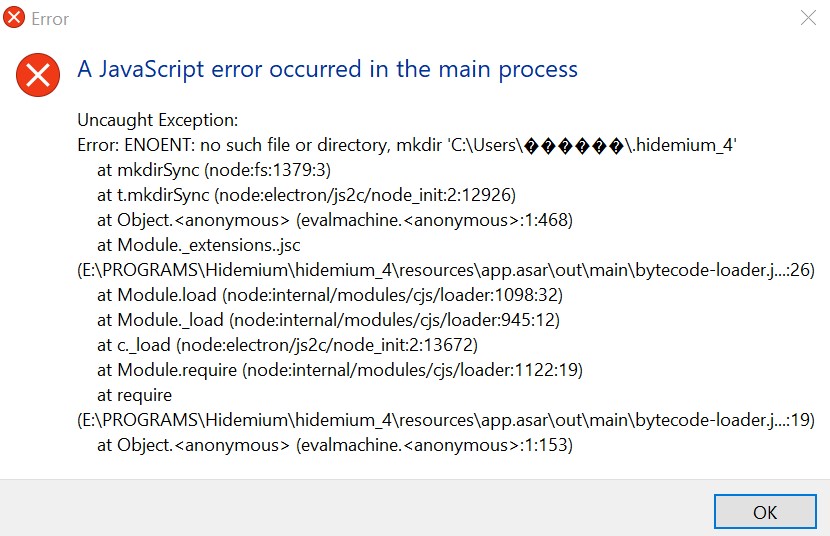
Fix: create a new Windows user with a Latin-character name (e.g., C:\Users\Alex). After that, Hidemium launched without issues. The devs clearly never tested the product on systems with Cyrillic file paths, which pretty much confirms the browser’s Asian-and-English-first focus.
Once you’re past that, you land on the main dashboard. The free plan gives you 5 permanent profiles. On first login, the system offers up to 1,000 temporary profiles for a 3-day trial.
Interface and Navigation
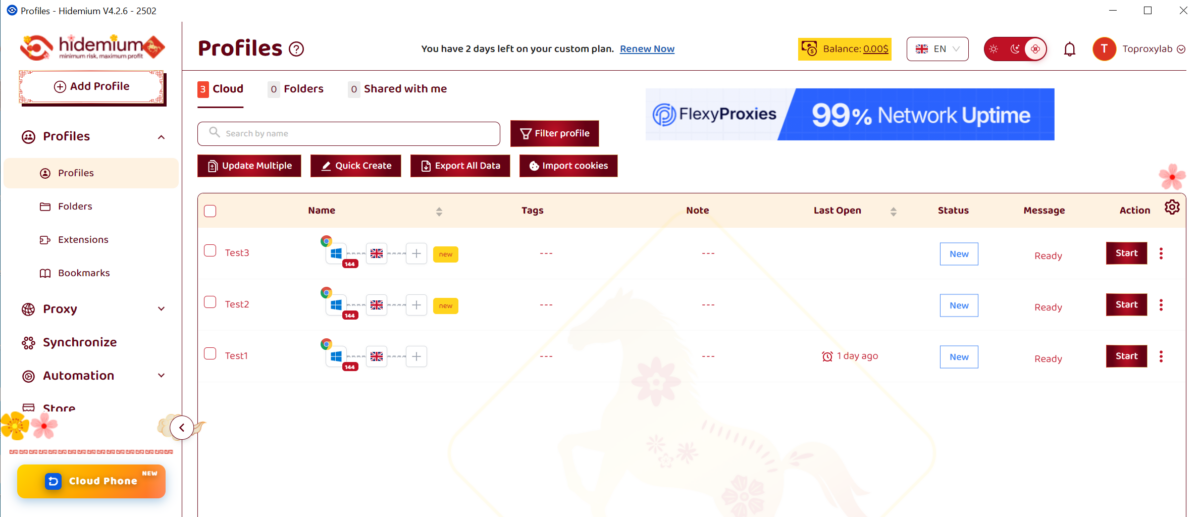
Hidemium’s interface is functional but busy. If you’re used to Dolphin Anty’s minimalism, this will feel like a lot. The left panel has sections for profiles, folders, proxies, automation, script marketplace, and settings. The top bar shows your current plan, profile count, and balance.
The profile workspace lets you organize profiles into folders, add tags, and sort by status. Each profile has a context menu: launch, edit, clone, export cookies, run CookieRobot (automated cookie farming).
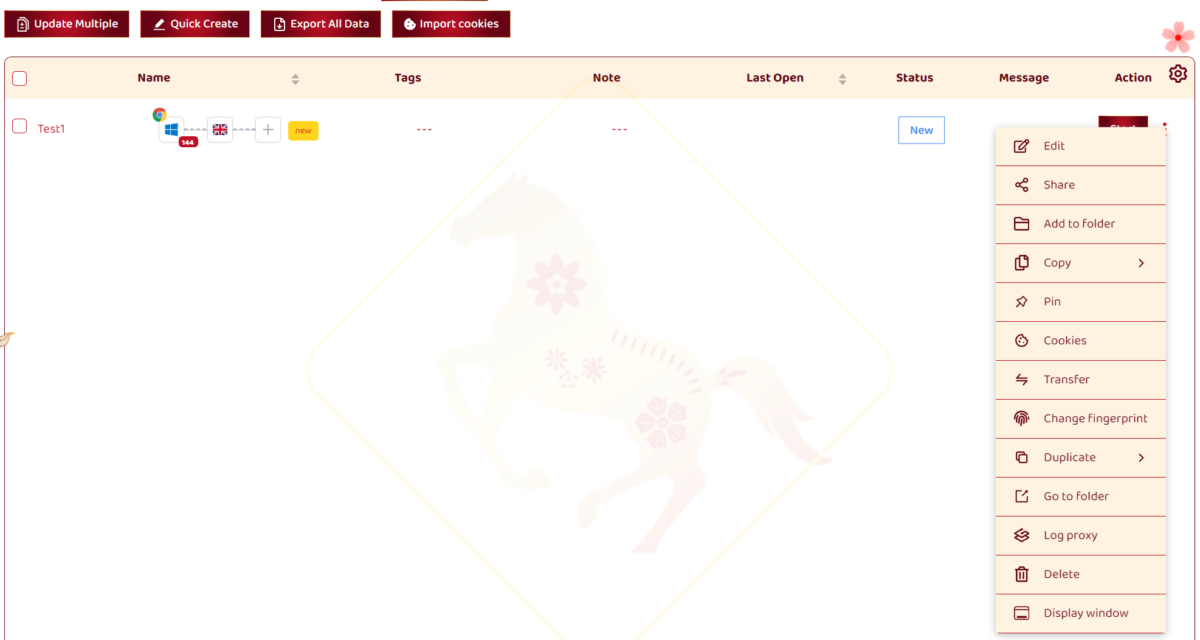
Honestly, the interface reminds me more of BitBrowser or AdsPower than the “Western-feeling” Dolphin Anty or GoLogin. Lots of elements, lots of buttons, but everything serves a purpose. You get used to it within an hour.
Creating a Profile
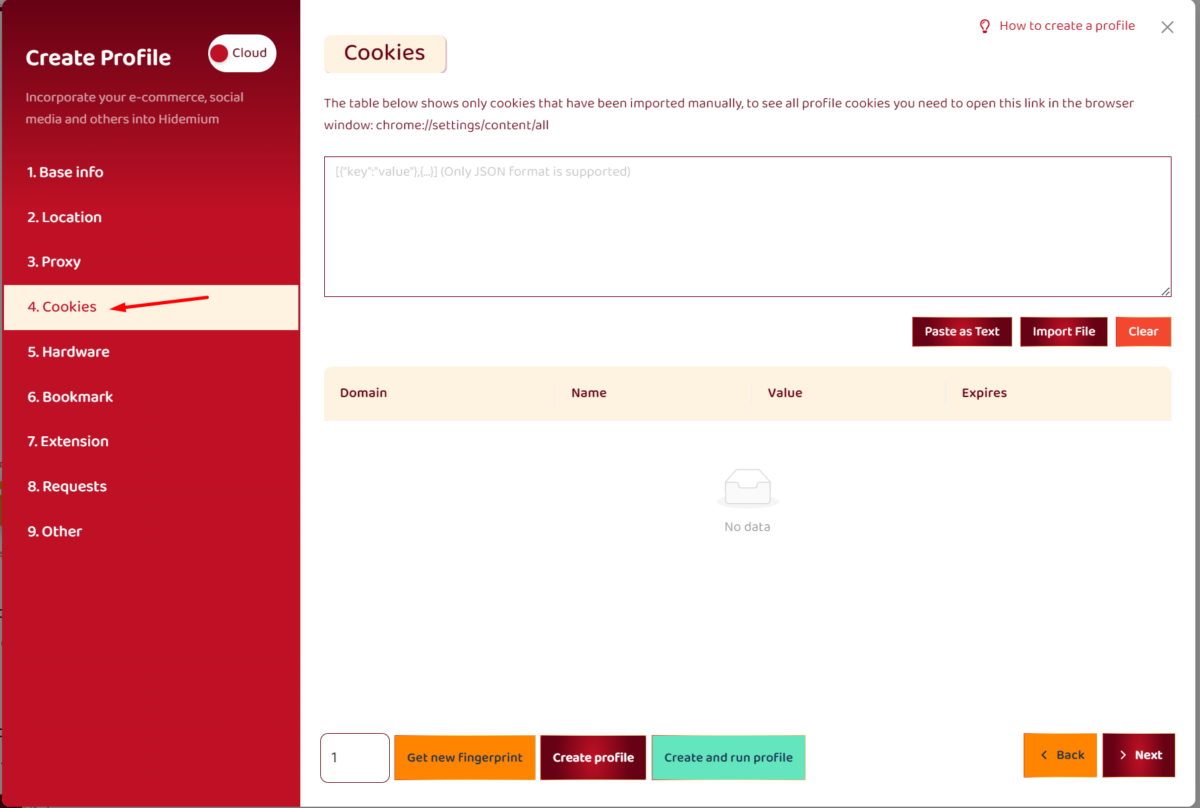
Profile creation walks you through several tabs: Base Info, Proxy, Cookie, Hardware, Bookmarks, Extensions, MAC Address. Each tab offers granular control.
Base Info
This is where you set the profile name, operating system (Windows, macOS, Linux, Android, iOS), browser, User Agent version, and start page. The developers recommend matching the profile OS to your actual system — otherwise anti-fraud checks will catch the mismatch.
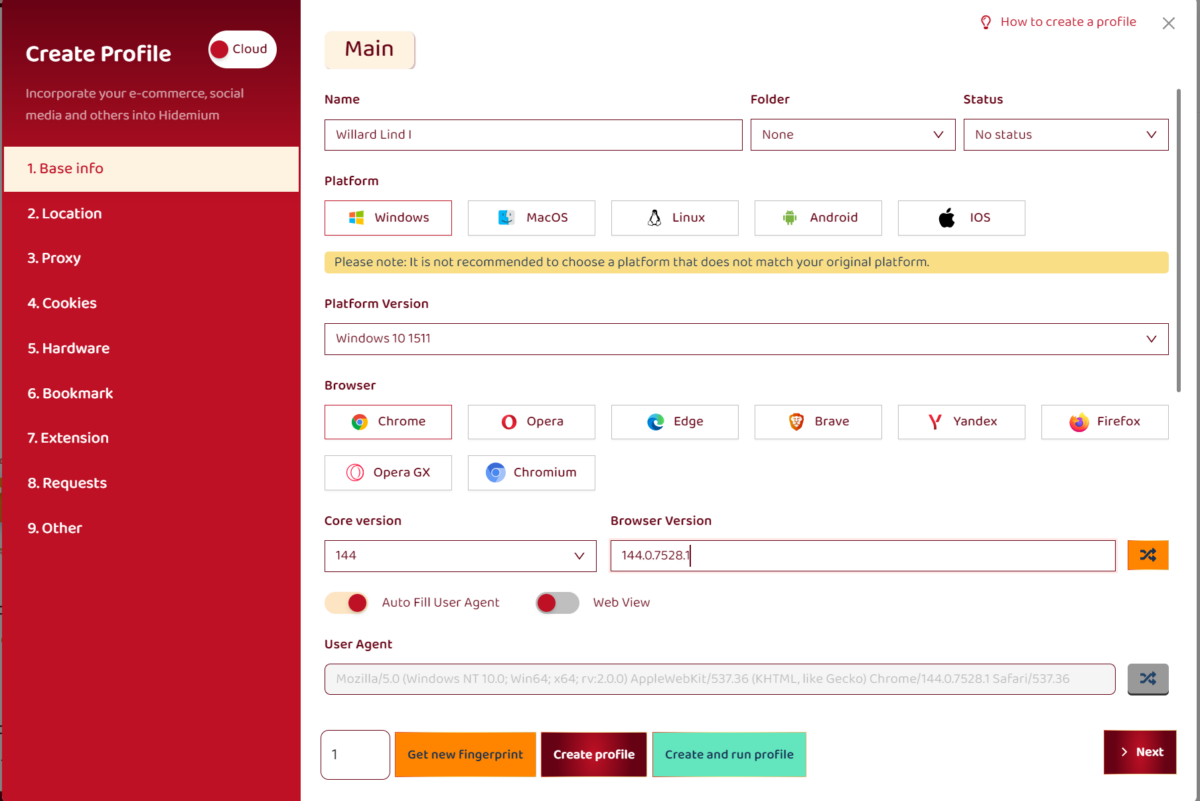
Worth noting: paid plans unlock full parameter customization, including OS emulation (Android/iOS from the desktop app), which is handy for testing mobile site versions. The free plan is limited to Chrome on Windows/Linux/Mac only.
Proxy
Hidemium supports HTTP, SOCKS4, SOCKS5, and SSH proxies. There’s a built-in proxy manager for importing, testing, and assigning proxies to profiles.
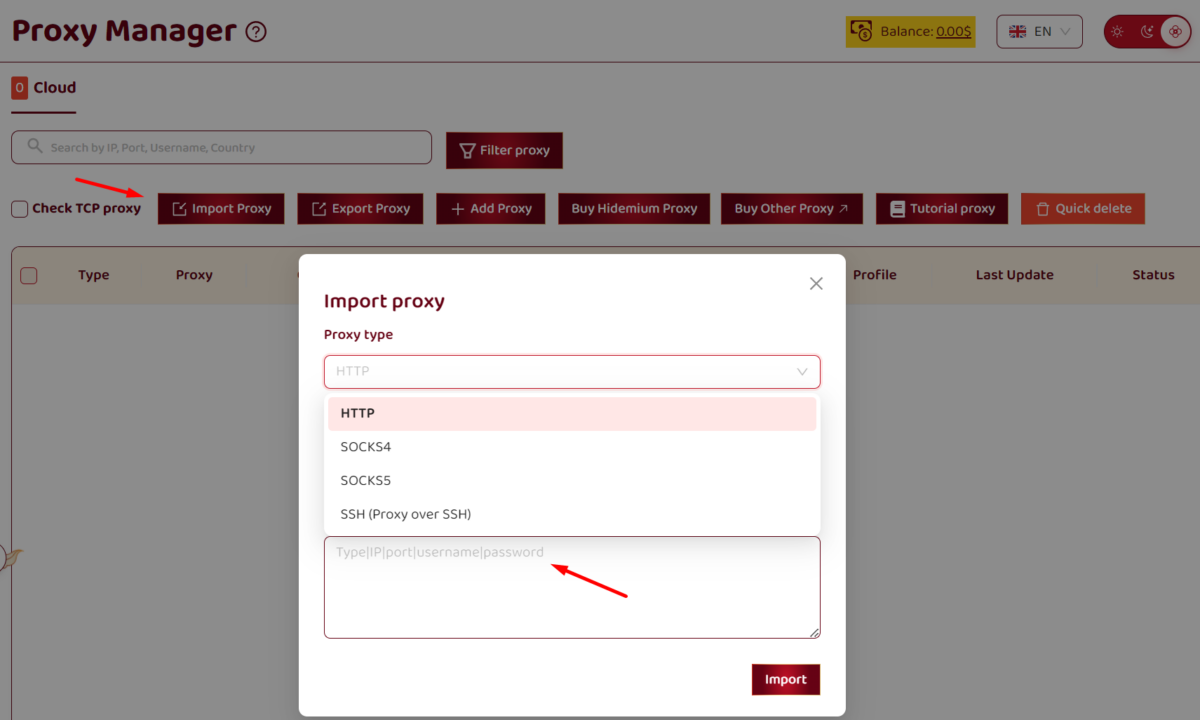
One major limitation: proxy import only accepts a single pipe-delimiter format like host:port|login|password. If your proxies are in login:password@host:port or host:port:login:password format, you’ll have to convert them manually or write a script. Dolphin Anty and GoLogin handle more formats out of the box.
Hardware
The paid version unlocks full hardware parameter customization: CPU cores, RAM size, screen resolution, GPU, Device Memory, Speech Voices. You can set specific values or choose Random to let the system pull data from its real-device fingerprint database.
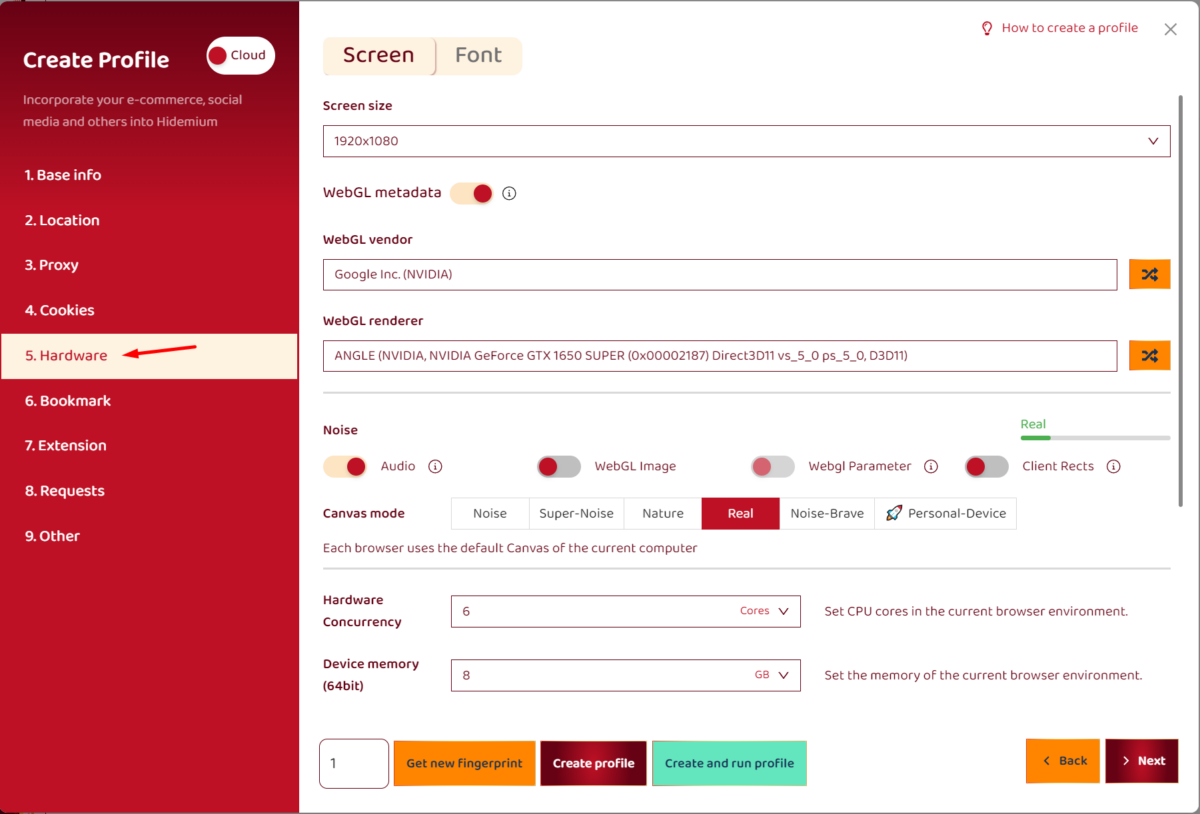
The free plan gives you access to 10,000 fingerprint configurations. Advanced bumps that to 10,000,000. Premium and Business plans have no limit.
Cookies and Extensions
You can import cookies from a file or paste them in JSON format. There’s also CookieRobot, which automatically visits a list of websites to “warm up” a profile by accumulating cookies and browsing history. Super handy for prepping accounts before running ads.
Chrome extensions install the usual way: via CRX file or from a directory. The Extensions tab lets you preload extensions into a profile before its first launch.
Proxy Manager
There’s a dedicated Proxy section in the left panel with a full-featured proxy manager. Here you can:
- import proxies from a text file;
- check their status and geolocation;
- assign proxies to specific profiles;
- group them by provider or project.
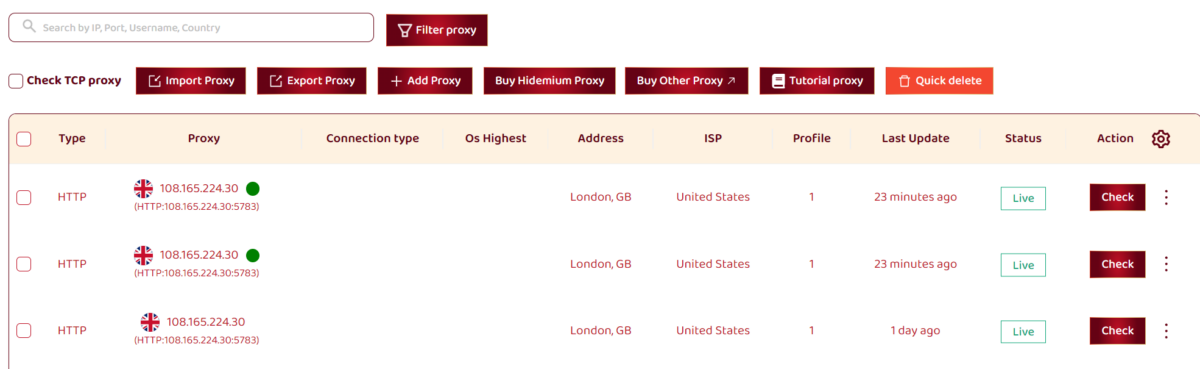
Hidemium throws in 500 MB of free proxy traffic with your first paid plan purchase, plus daily free ISP proxies. I didn’t test the quality of those freebies, but for any serious work I’d recommend bringing your own trusted proxies.
Anonymity Testing: Fingerprint Checks
The big question: how well does Hidemium mask your browser fingerprint? To find out, I ran a series of tests.
Test 1: iphey.com
iphey.com checks a bunch of browser parameters and gives you a verdict: Trusted, Suspicious, or Unreliable.
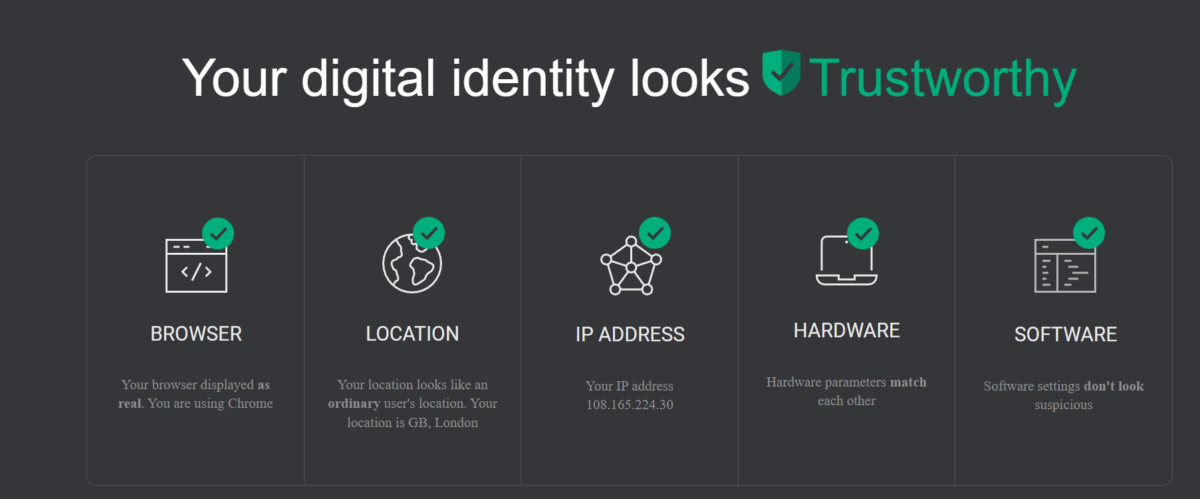
With default profile settings, the result depends on how you’ve configured things. If the profile OS matches your real system and the proxy is set up correctly (timezone and language auto-fill from the IP), iphey usually shows Trusted. But if there’s an OS mismatch or WebRTC isn’t configured right, you can drop to Suspicious.
Test 2: Pixelscan
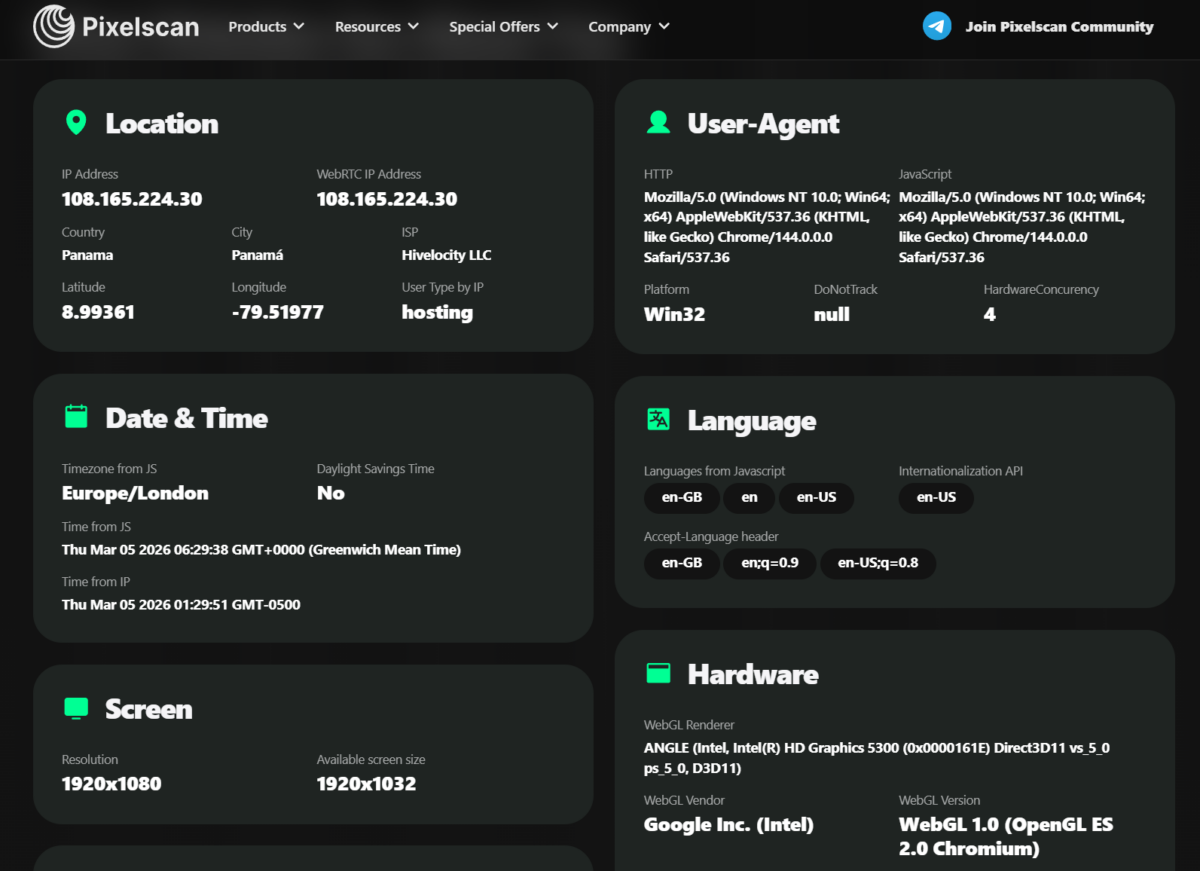
Pixelscan checks Canvas fingerprint, WebGL, fonts, and proxy. When configured properly, Hidemium generally passes without any masking detected. Canvas randomization runs at the engine level rather than through JS injections, which makes it more reliable.
Test 3: BrowserLeaks (WebRTC)
WebRTC is a critical parameter. If it’s misconfigured, your real IP leaks right through — even with a proxy running.
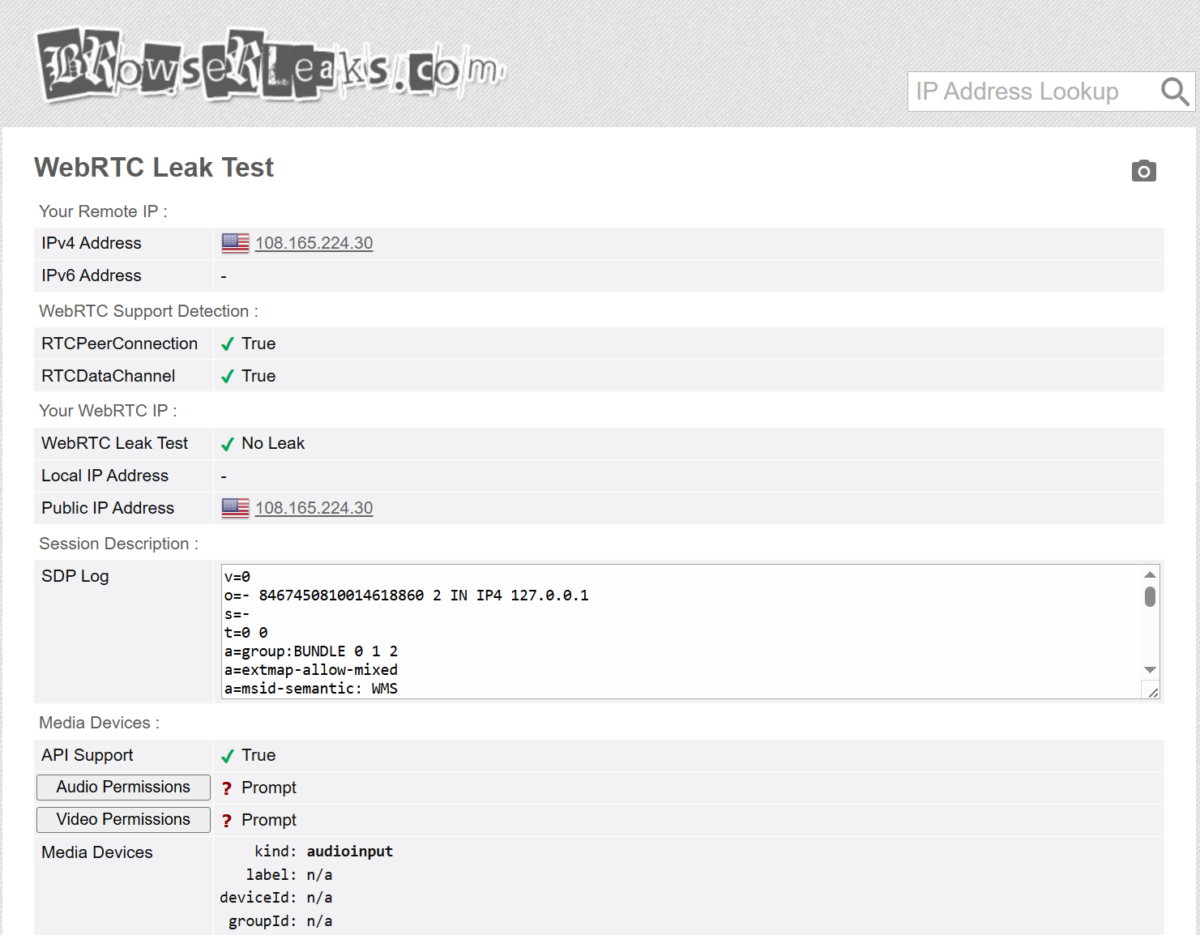
Hidemium’s WebRTC settings are in the profile configuration. I recommend setting it to Block or Replace (which substitutes the proxy IP for your real one). The default mode doesn’t always fully hide your real IP, so manual tweaking is a must.
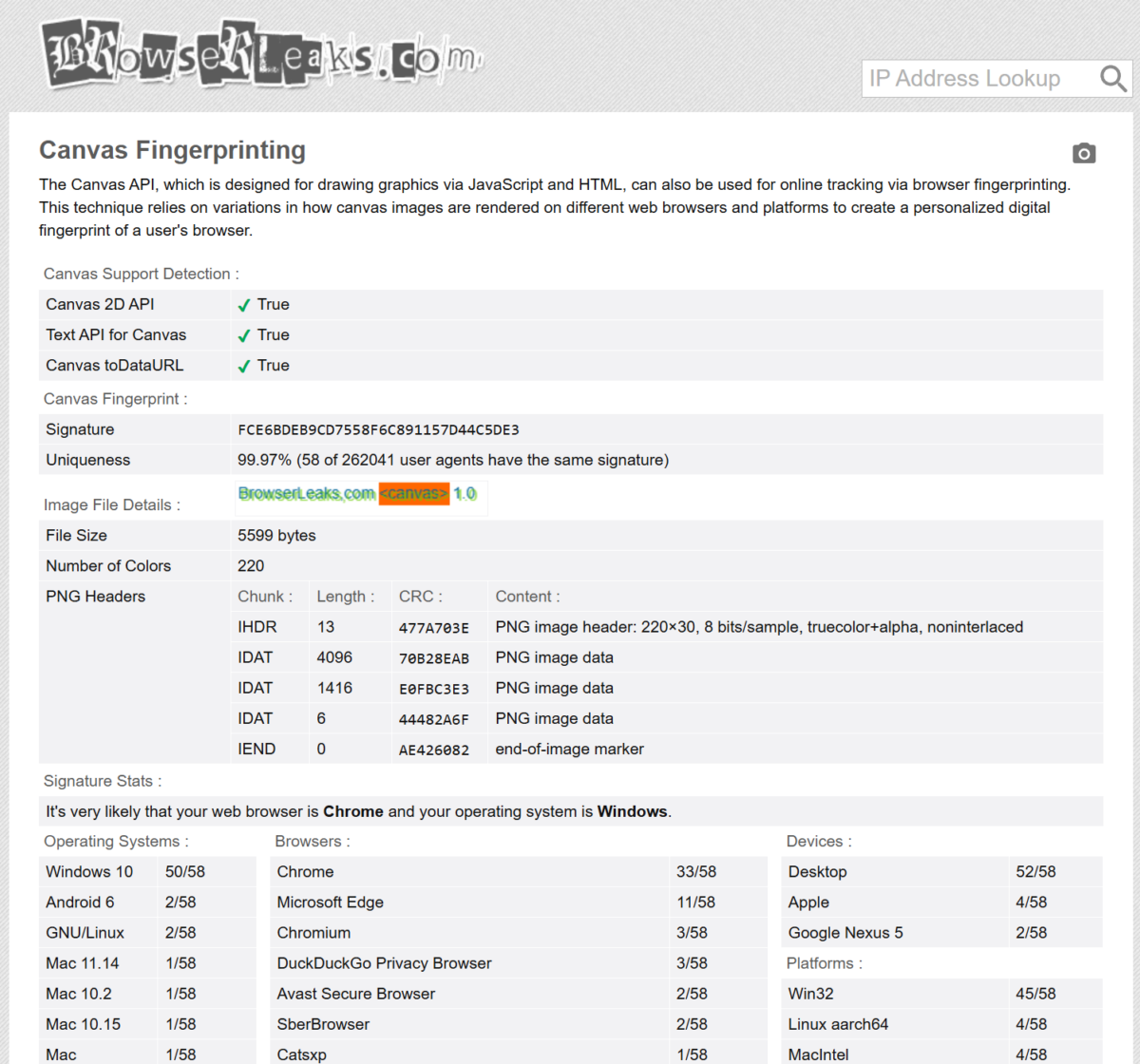
Test 4: Canvas Fingerprint
Canvas randomization is enabled by default and operates at the Chromium engine level. Each profile generates a unique Canvas hash. This is one of Hidemium’s strong points — randomization happens through rendering modifications, not JS injections (which are way easier to detect).
Test 5: Whoer.net
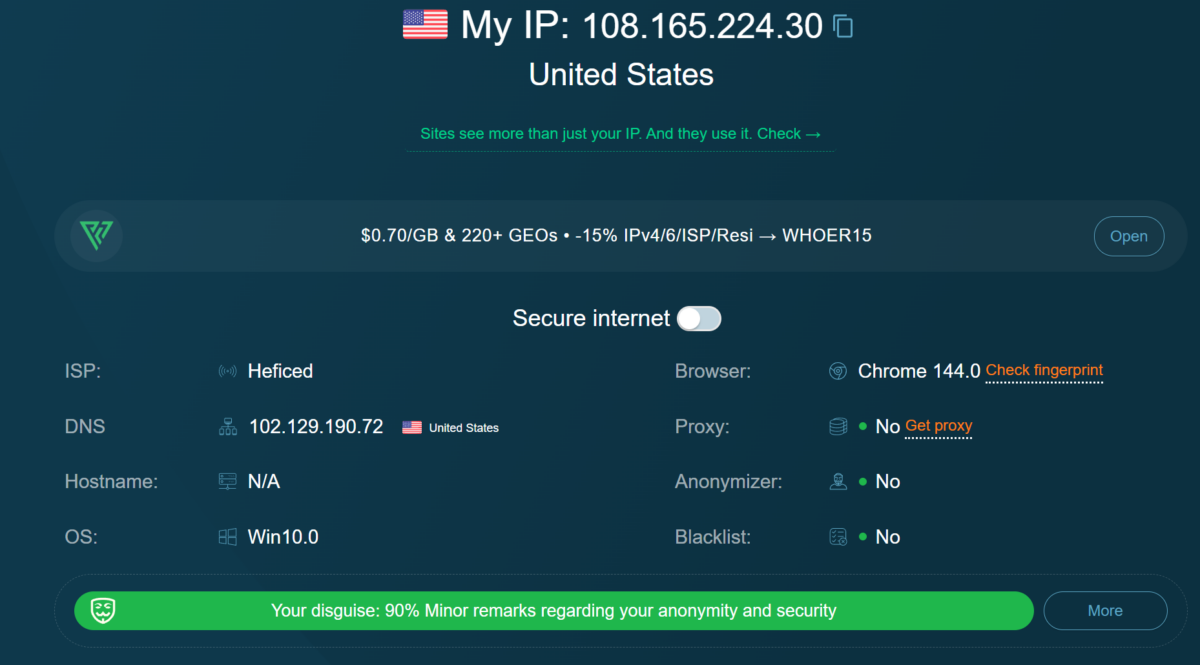
With a properly configured proxy and matching timezone, whoer.net shows Disguise 100%, Proxy: No, Anonymizer: No. That’s exactly what you need for working with ad accounts.
Castle.io Research: Can Hidemium Be Detected?
In May 2025, Castle.io (an anti-fraud solutions provider) published a detailed technical breakdown of how Hidemium modifies browser fingerprints. Here are the key takeaways:
Hidemium injects JavaScript through its own Chrome extension (loaded from the install directory, not the Chrome Web Store). The script runs at document_end — after the DOM is built but before subresources load. This gives it enough time to modify APIs before any detection scripts kick in.
Depending on the OS selected in the profile, Hidemium deletes certain window and navigator properties. For example, on macOS it removes navigator.share, navigator.canShare, and objects like BarcodeDetector, ReportBody, CSPViolationReportBody. The problem? In real Chrome 134+ on macOS, these properties exist. Their absence creates a detectable fingerprint inconsistency.
Castle.io proposed a JS-based detection test: if a browser claims to be Chrome 88+ on macOS but is missing BarcodeDetector, ReportBody, and navigator.share all at once, there’s a high probability it’s Hidemium.
This matters. Basic checkers like whoer.net and even pixelscan won’t catch it. But advanced anti-fraud systems (Facebook, Google) theoretically could. Hidemium gets regular updates, and the devs may fix these inconsistencies, but at the time of my testing the issue was still there.
Automation and Prompt Script AI
One of Hidemium’s standout features — and something most competitors don’t offer — is built-in automation with an AI assistant.
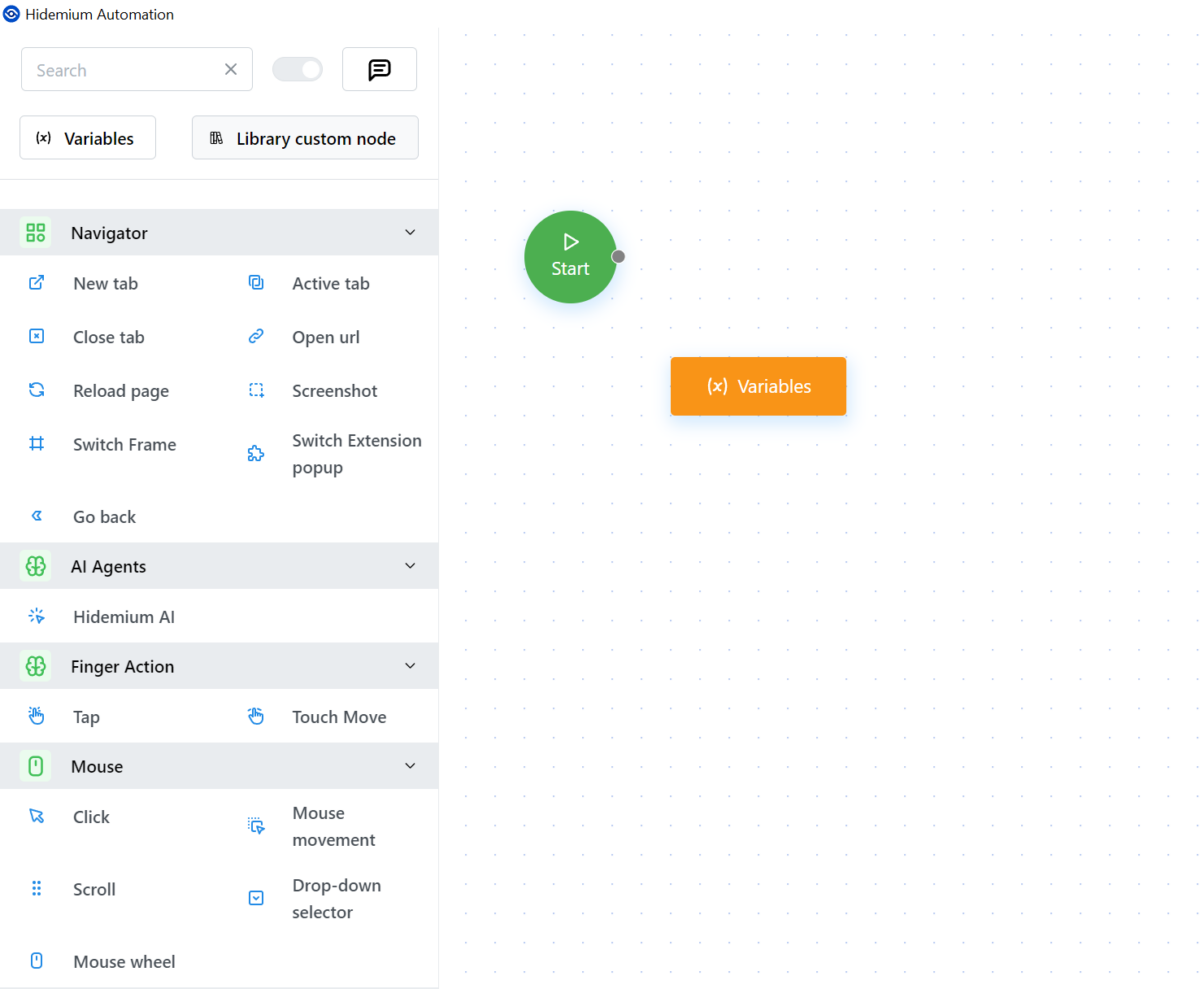
Visual Script Builder
Hidemium comes with a visual drag-and-drop script builder. No coding required — you can chain together actions like: open URL, click an element, fill a field, take a screenshot, wait, move to the next profile.
Prompt Script AI
This is a unique feature: you describe a task in plain text (e.g., “go to facebook.com, click Create Account, fill in the fields”), and the AI generates an automation script. It’s currently in beta. The AI responds in Vietnamese (you’ll need a translator), and the results aren’t always spot-on, but the concept is very promising.
Paid plans unlock external AI models: Anthropic, OpenAI, Gemini. The free plan only gets Hidemium’s built-in AI.
Script Marketplace
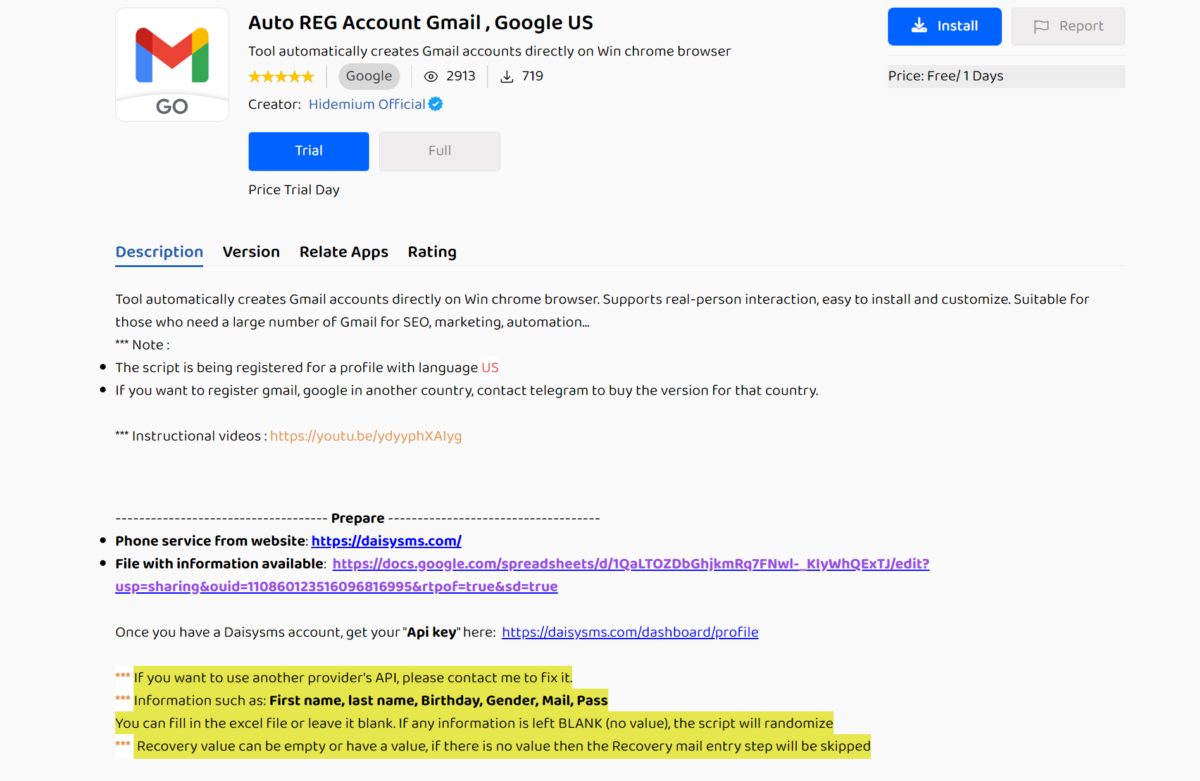
There’s a marketplace of pre-built scripts: Gmail account registration, profile warm-up, auto-posting, and other templates. Some are free, some are paid. Quality varies, but it’s a decent starting point for customization.
API
Hidemium provides a local API for integration with Puppeteer, Selenium, and Playwright. The API runs via localhost (port 54345 or 8000). Documentation exists, but according to feedback on Reddit and from Multilogin’s review, it’s less thorough than what GoLogin or Dolphin Anty offer.
Pricing and Plans
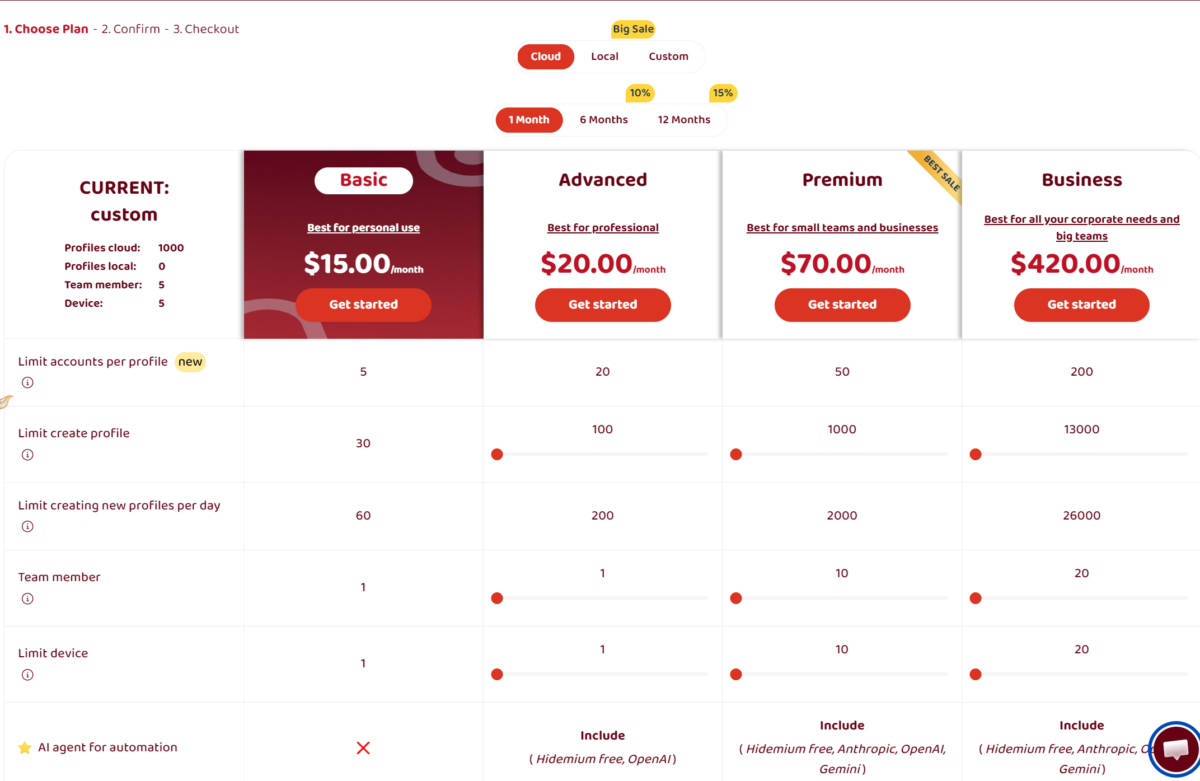
Hidemium offers both Cloud and Local versions. Cloud profiles are stored on Hidemium’s servers and sync across devices. Local keeps everything on your machine.
Cloud Plans (Monthly / Annual Billing):
| Browser | Cost per 100 profiles | Cost per 1,000 profiles | Free plan |
| Hidemium (Cloud) | ~$20/mo | ~$70/mo | 5 profiles |
| Dolphin Anty | $89/mo | $159/mo | 5 profiles |
| GoLogin | $49/mo | $99/mo (for 300 profiles) | No (7-day trial only) |
| Multilogin | ~$99/mo | ~$199/mo | No |
| BitBrowser | $15/mo | ~$60/mo | 10 profiles |
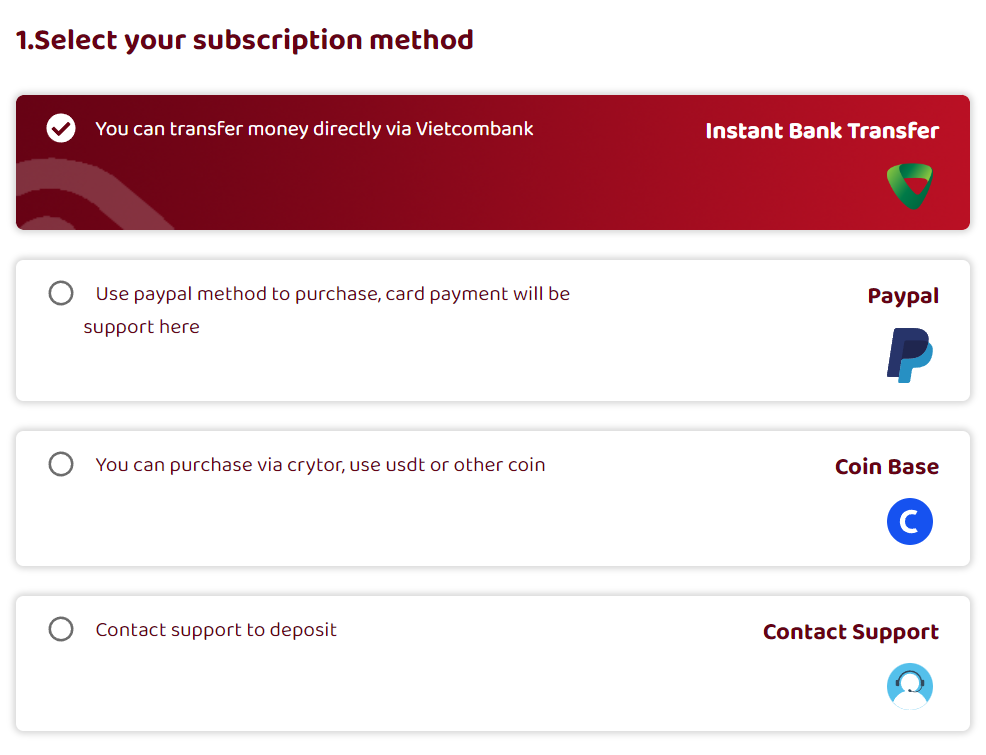
Payment is available via PayPal, cryptocurrency, and bank transfer (ACB Bank, Vietnam).
Price Comparison With Competitors
| Browser | 100 profiles | 1,000 profiles | Free plan |
|---|---|---|---|
| Hidemium (Cloud) | ~$20/mo | ~$70/mo | 5 profiles |
| Dolphin Anty | $89/mo | $159/mo | 10 profiles |
| GoLogin | $49/mo | $99/mo (300 profiles) | No (7-day trial) |
| Multilogin | ~$99/mo (100) | ~$199/mo | No |
| BitBrowser | $15/mo | ~$60/mo | 10 profiles |
At first glance, Hidemium looks pricier than Dolphin Anty and GoLogin. But there’s a catch: Hidemium bundles automation, an AI assistant, and Puppeteer integration into every paid plan. Competitors often charge extra for automation features.
There are also Local Lifetime licenses (around $700 according to Reddit) that could pay for themselves long-term.
Team Collaboration
Hidemium supports teamwork: you can share profiles with team members at different permission levels. Entire profile folders can be transferred. The Premium plan allows up to 10 members and 10 devices; Business goes up to 20.
Cloud sync works smoothly. Profiles created on one device show up on another after logging in. Cookies and settings carry over.
Security
As of this writing, Hidemium has no publicly known data breaches — unlike BitBrowser (2023 leak) and Dolphin Anty (2022 data breach). That said:
- The Trustpilot page is empty (0 reviews).
- There’s been no public security audit.
- The company is registered in Vietnam, which doesn’t offer the same regulatory safeguards as EU jurisdictions.
- Cloud profiles are stored on the developer’s servers, and users have no control over encryption.
My recommendation: if you’re working with valuable accounts or crypto wallets, use the Local version. Don’t store seed phrases or passwords in extensions inside Hidemium profiles. Use a standalone password manager instead.
- Prompt Script AI and visual automation. Describe a task in plain text, get a working script. The drag-and-drop builder lets you chain actions together without writing a single line of code. Dolphin Anty, GoLogin, and Multilogin don’t have anything like this.
- CookieRobot. A built-in tool for automatically warming up profiles: feed it a list of sites, the robot visits them, accumulates cookies and browsing history. Saves hours of manual work before launching ad accounts.
- Free plan forever. 5 permanent profiles with no time limit. On first login you also get 1,000 temporary profiles for a 3-day test drive. Plenty for getting started, and no credit card needed.
- Canvas randomization at the engine level. Not a JS injection (which is easy to detect), but actual rendering modifications inside Chromium. Each profile produces a unique Canvas hash, confirmed by BrowserLeaks tests.
- Deep fingerprint customization on paid plans. Full control over CPU, RAM, GPU, Device Memory, Speech Voices, screen resolution. Premium and Business plans offer unlimited configs pulled from a real-device database.
- Android/iOS emulation from the desktop app. You can create a profile that identifies as a mobile device — useful for testing mobile site versions and apps.
- Pre-built script marketplace. Templates for Gmail registration, profile warm-up, auto-posting. Some are free, some paid. A solid jumping-off point for building your own workflows.
- Team collaboration with cloud sync. Profiles and folders can be shared across team members with different permission levels. Up to 20 members and 20 devices on the Business plan.
- Lifetime license for local profiles. According to BlackHatWorld users, a one-time Local Lifetime purchase for ~$700 gives you unlimited local profiles with no monthly fees.
- Multiple browser engines per profile. Chrome, Opera, Edge, Brave, Yandex, Safari, Opera GX, Chromium. Most competitors limit you to Chrome/Firefox.
- Crashes on Windows with a Cyrillic username. The browser can’t create working directories if the path contains Cyrillic characters (C:\Users\Алексей). The fix is to create a new Windows user with a Latin name. A serious bug for users with non-Latin characters in their Windows usernames that the devs haven’t fixed.
- Proxy import limited to a single pipe-delimiter format. If your proxies are in login:password@host:port or host:port:login:password format, you’ll need to convert them manually. Dolphin Anty and GoLogin handle more formats out of the box.
- Cluttered interface. Too many buttons, sections, and tabs. Compared to Dolphin Anty’s or GoLogin’s minimalism, it feels overwhelming. You adjust within an hour, but the first impression isn’t great.
- AI assistant only works in Vietnamese. Understandable for a beta, but unacceptable for a product that claims to be international. You’ll need a translator to make sense of the AI’s responses.
- Detectable via JS analysis (Castle.io research, May 2025). Hidemium deletes navigator.share, navigator.canShare, BarcodeDetector, and other properties that should exist in real Chrome 88+. Advanced anti-fraud systems could potentially flag this.
- Incomplete API documentation. There’s a Postman collection, but for complex Puppeteer/Selenium integrations the docs fall short. BlackHatWorld users describe the API as “slow and not fully baked yet.”
- Hidemium’s website copies GoLogin’s design. GoLogin has publicly accused Hidemium of plagiarizing their marketing materials and site structure. That raises questions about originality and trustworthiness.
- Nearly empty Trustpilot page. 3.7/5.0 with a handful of reviews. Just 1 review on G2. For a product claiming 36,000+ users, that’s suspiciously little independent feedback.
- Vague refund policy. According to GoLogin, refunds are handled “on a case-by-case basis,” leaving users without clear guarantees.
Final Scores
| Category | Score |
|---|---|
| Fingerprinting | 4/5 |
| WebRTC | 3/5 |
| Canvas | 4/5 |
| Interface | 3/5 |
| Proxy manager | 3/5 |
| Security | 3/5 |
| Pricing | 3/5 |
| API & automation | 5/5 |
| Support | 3/5 |
| Default settings | 4/5 |
Overall: 3.5/5
Alternatives
If Hidemium doesn’t check all your boxes:
For the cheapest cost per profile: BitBrowser ($15 for 100 profiles).
For a clean interface and Russian-language support: Dolphin Anty.
For the most reliable fingerprinting: Multilogin.
For flexibility and pay-as-you-go pricing: GoLogin.
The Verdict
Hidemium is an antidetect browser that excels at automation but stumbles on usability for Western users. The AI assistant, visual script builder, template marketplace, and full API make it appealing if you’re building automated workflows. But the cluttered interface, Cyrillic path bug, limited proxy import format, and Vietnamese-only AI bot create friction from the start.
If you’re willing to invest time in setup and your work demands automation with dozens or hundreds of profiles, Hidemium deserves a look. If you value simplicity and quick onboarding, Dolphin Anty or GoLogin would be a safer bet.