





 Why Trust Us?
ToProxyLab has been testing proxy services since 2025. We pay for most plans ourselves, and when a provider gives us test traffic we say so in the review — free traffic buys a place in the testing queue, nothing else. Every provider goes through the same speed, uptime and fraud-score checks, and we publish the real numbers, including the bad ones. A rating cannot be bought. Learn who we are and how we review proxies.
Why Trust Us?
ToProxyLab has been testing proxy services since 2025. We pay for most plans ourselves, and when a provider gives us test traffic we say so in the review — free traffic buys a place in the testing queue, nothing else. Every provider goes through the same speed, uptime and fraud-score checks, and we publish the real numbers, including the bad ones. A rating cannot be bought. Learn who we are and how we review proxies.
Proxys.io is a Russian proxy service that’s been around since 2016. Over the years, it’s grown from a niche provider into an all-in-one solution for affiliate marketers, SMM specialists, and digital marketers. The service positions itself as a “middle ground” option – somewhere between budget providers with questionable quality and premium giants like Bright Data and Oxylabs.
What sets Proxys.io apart is that you can buy proxies individually without being forced into bulk packages. This makes it much easier to get started for solo entrepreneurs and small teams who don’t need hundreds of IP addresses.

Who it’s for:
- affiliate marketers (Facebook, Google Ads, TikTok);
- SMM specialists managing multiple accounts;
- web scrapers and SEO professionals;
- marketers doing geo-targeted research.
- in business since 2016 – a time-tested service;
- accepts crypto payments (USDT TRC20);
- flexible per-IP purchasing;
- 24/7 customer support.
- poorly translated English interface (some parts still in Russian);
- static proxy speed capped at 7-10 Mbps;
- support chatbot is pretty useless (more on that later).
Proxy Types and Product Lineup
Proxys.io offers a full range of proxy solutions, which is a nice advantage over competitors that only specialize in one type.
1. Datacenter IPv4 Static IPs from data centers. You keep the same address for your entire rental period. Prices start at ~$1.35/month per IP. Good for e-commerce, payment systems, and betting sites.
2. IPv6 Proxies The cheapest option – starting at $0.13 per address. They work through tunneling (IPv4 entry node, IPv6 exit node). Perfect for scraping Google and bulk actions on Instagram/Facebook.
3. Mobile Proxies (4G/LTE/5G) The premium tier. These use real carrier SIM cards with dynamic IP rotation. Starting at ~$40/month for unlimited bandwidth. Highest trust level for social media platforms.
4. Residential Proxies This is what I tested for this review. Real user IPs from ISP providers. You can pay per GB (starting at $1.5/GB) or a flat rate from ~$3.60/month. Ideal for bypassing sophisticated anti-bot systems.
Pricing Breakdown
| Proxy Type | Starting Price | Details | Best For |
|---|---|---|---|
| Dedicated IPv6 | ~$0.13/mo | Drops to $0.10 when buying 250+ | Google scraping, bulk social media actions |
| Shared IPv4 | ~$0.67/mo | Up to 3 users per IP | Testing, low-security websites |
| Dedicated IPv4 | ~$1.35-1.47/mo | Price varies by country | Amazon, eBay, PayPal, betting |
| Residential | ~$3.60/mo or $1.5/GB | Real user IPs | Anti-bot bypass, anonymous browsing |
| Mobile | ~$40 | Unlimited bandwidth, rotation | Affiliate marketing, TikTok/Instagram multi-accounting |
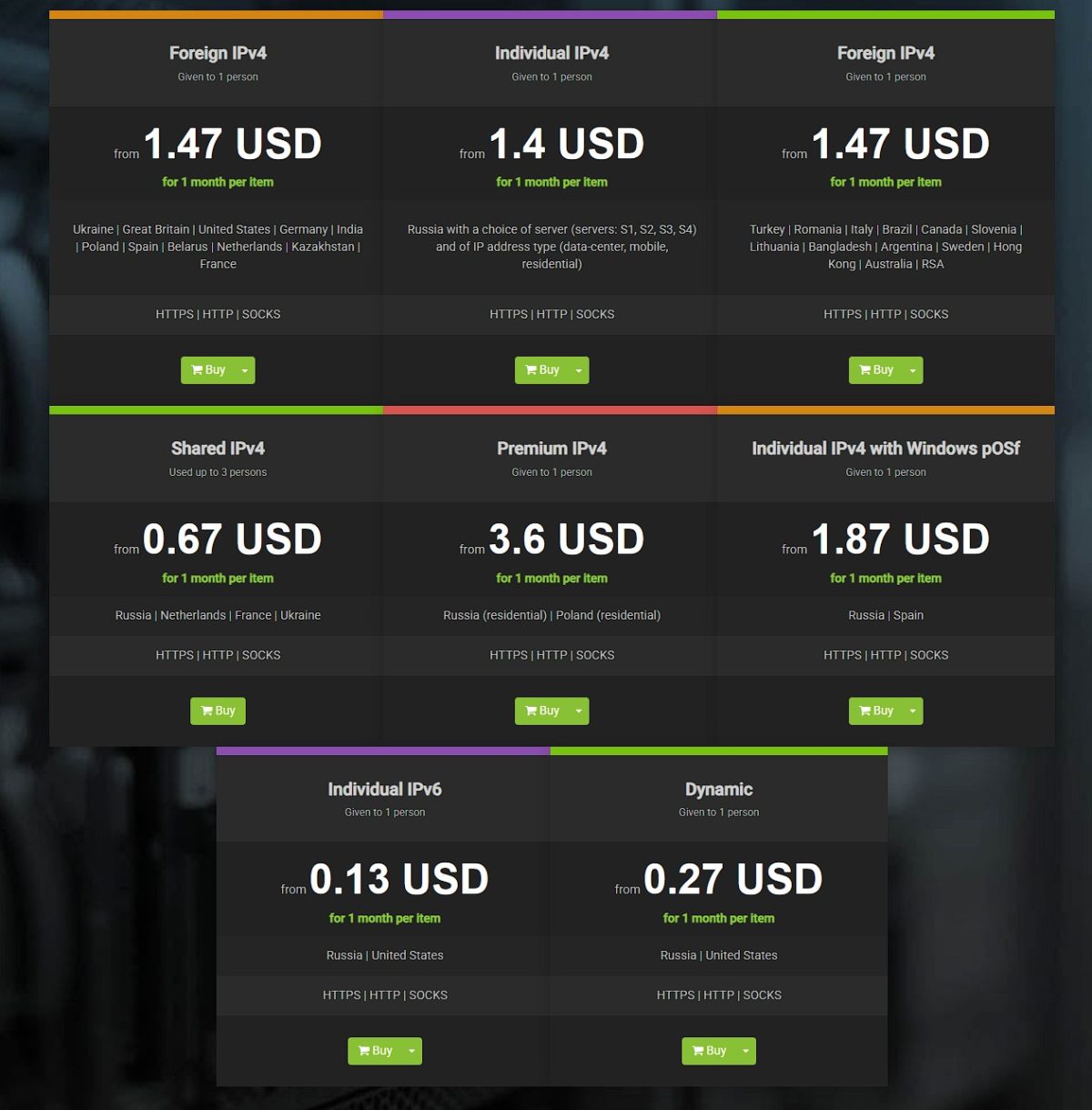
How it stacks up: Compared to Proxy6 (IPv6 from $0.06), Proxys.io is pricier for short-term use, but often wins on subnet quality. Proxy-Seller has similar pricing but offers more flexible mobile proxy configuration. Premium solutions (Bright Data, Oxylabs) charge per gigabyte and get expensive fast at high volumes.
My Real Experience: Testing US Residential Proxies (Brooklyn)
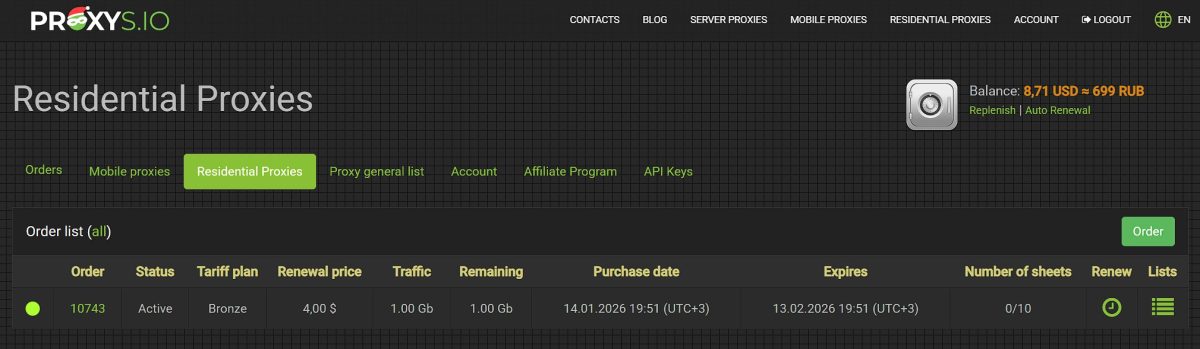
For this review, I purchased residential proxies on the Bronze plan (1 GB traffic, $4.00).
First Attempt: Epic Fail
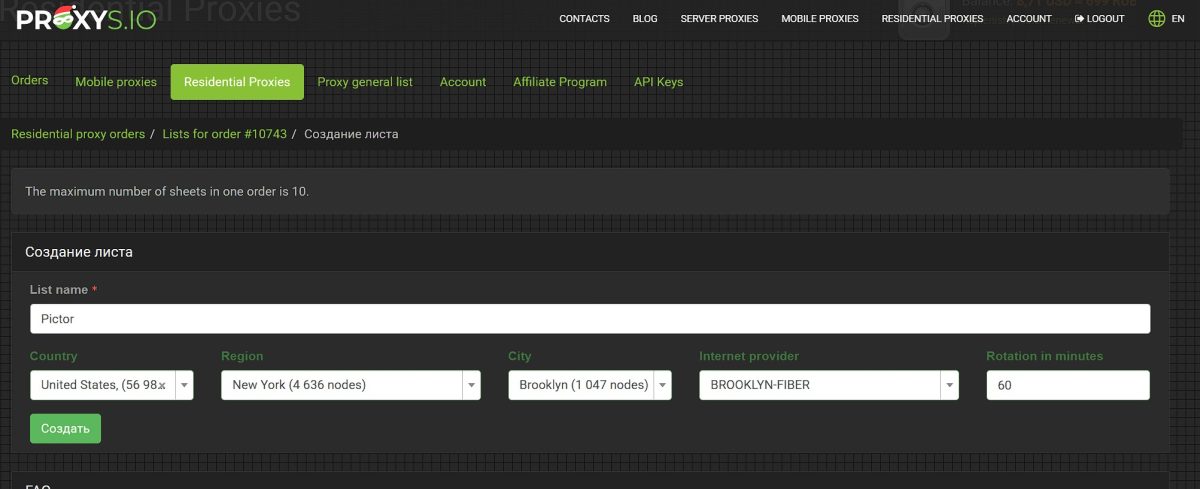
After purchasing, I created a proxy list with these settings:
- country: United States;
- region: New York;
- city: Brooklyn;
- rotation: 60 minutes.
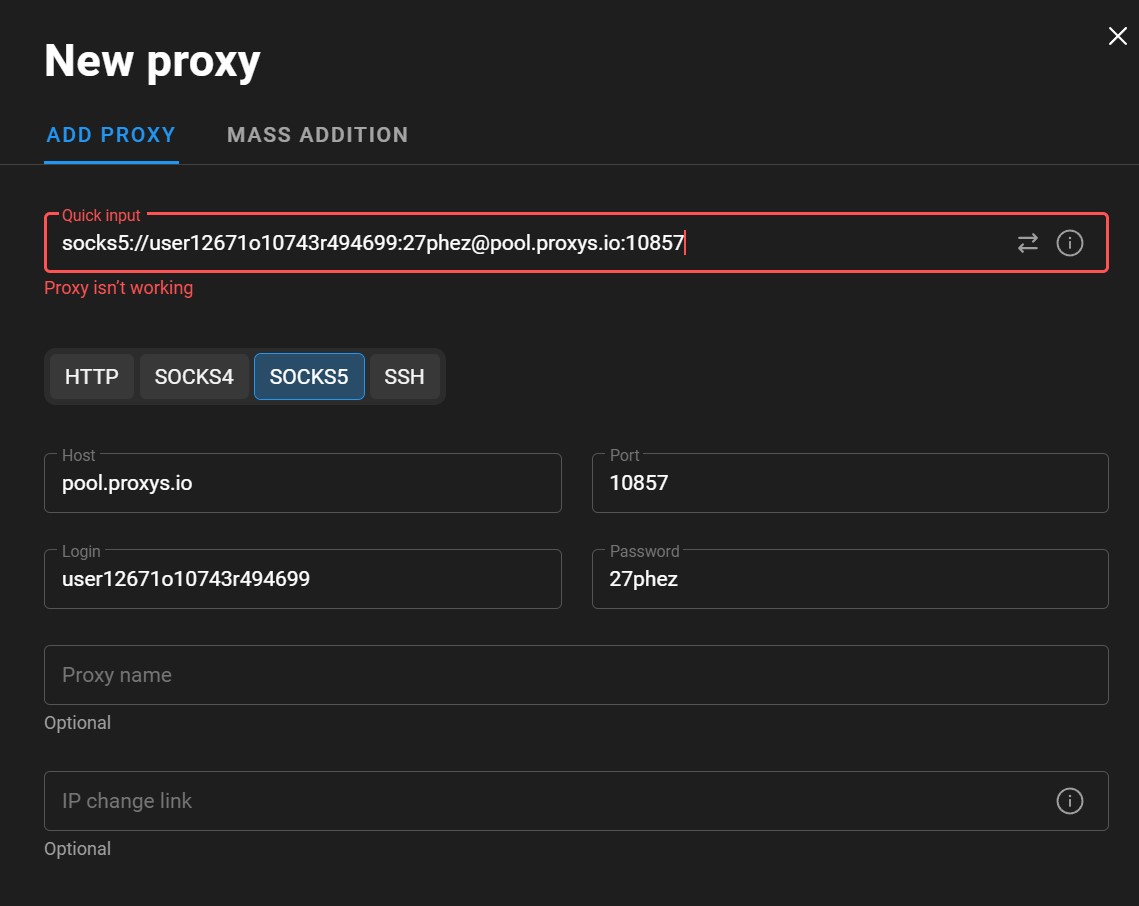
I tried connecting the proxy in the Dolphin{anty} antidetect browser. Result – proxy not working, connection failed.
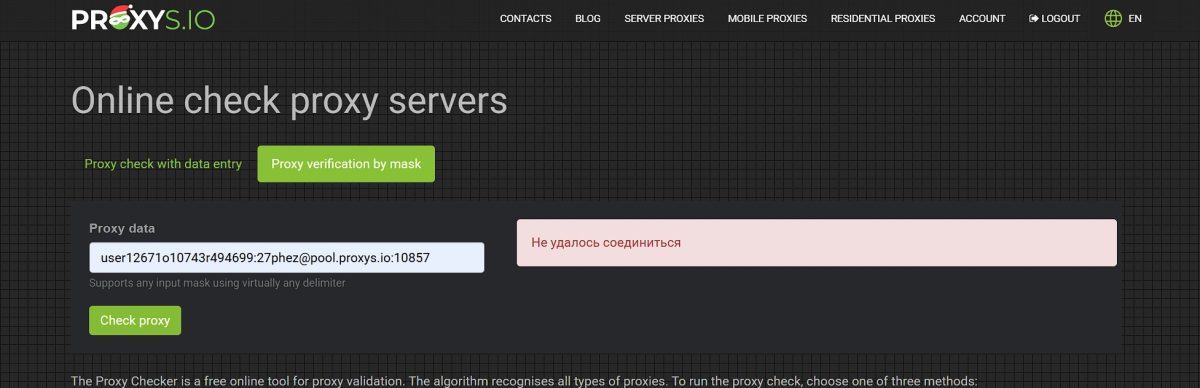
Testing on Proxys.io’s own checker confirmed the issue: “Connection failed”.
Dealing with Support: A Test of Patience
I reached out via live chat. And that’s when the fun began…
First up was the “Roxy AI” bot. I’ll be honest – it was painful. The bot runs on basic scripts and completely fails to understand context.
Here’s roughly how it went:
- Me: Proxy won’t connect
- Bot: Please send a screenshot of the error
- Me: Sends screenshot from Dolphin
- Bot: What’s not working?
- Me: THE PROXY WON’T CONNECT
- Bot: I need a screenshot for diagnostics…
This loop repeated about five times. The bot kept asking “What’s not working?” while completely ignoring my screenshots and explanations. 20 minutes of useless back-and-forth before it finally transferred me to a human.
The Human Agent Saves the Day
Once agent Valeria took over, the issue was resolved in a couple of minutes. Turns out the problem was selecting a specific ISP provider (BROOKLYN-FIBER).
Support’s recommendation:
“Try creating a new list without selecting a provider. Also, if less than 5 minutes have passed since creating the list, give it some time. Sometimes the system needs a moment to save your data.”
I created a new proxy list:
- country: United States;
- region: New York;
- city: Brooklyn;
- provider: not selected.
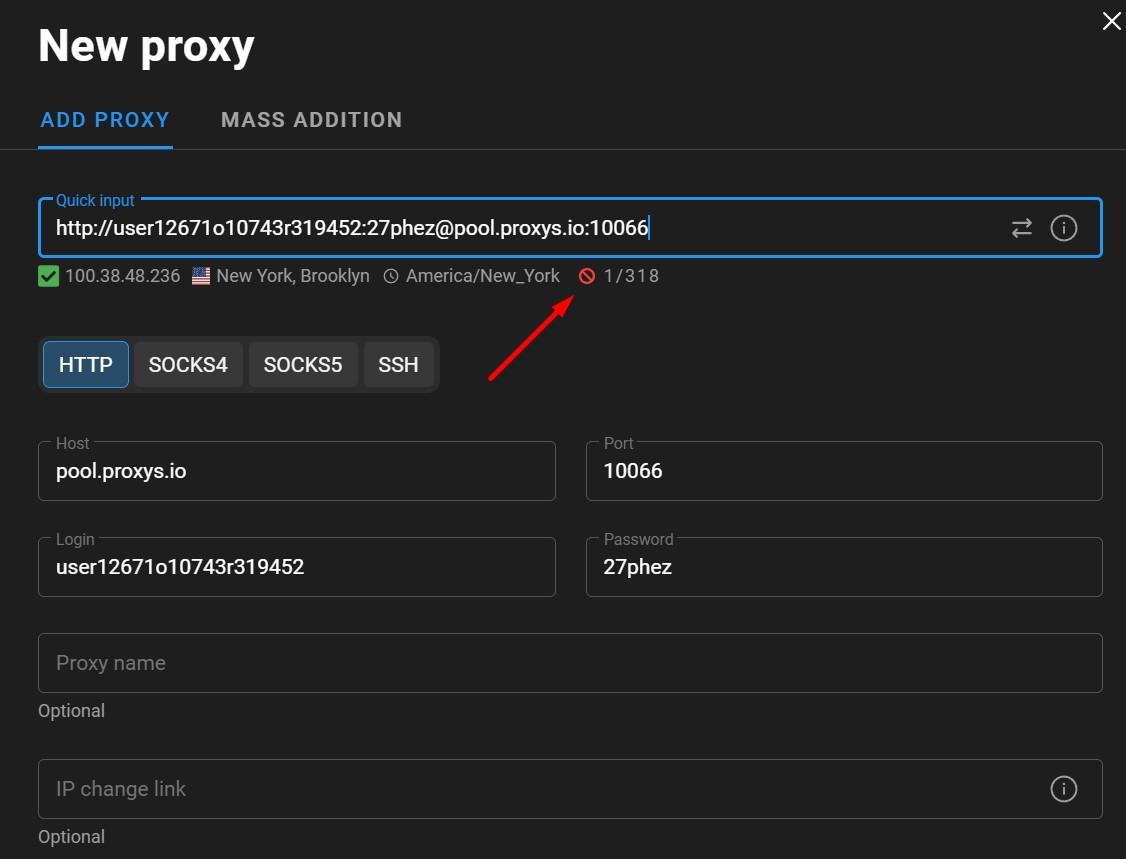
After that, the proxy worked. Connection successful!
Support takeaways:
- human agents are competent and resolve issues quickly;
- the “Roxy AI” bot is useless and wastes your time;
- pro tip: type “operator” or “human agent” right away to skip the bot.
Full Proxy Testing: Benchmarks and Results
After getting connected, I ran comprehensive tests on the Brooklyn residential proxy (IP: 100.38.48.236).
Test 1: Connection Speed
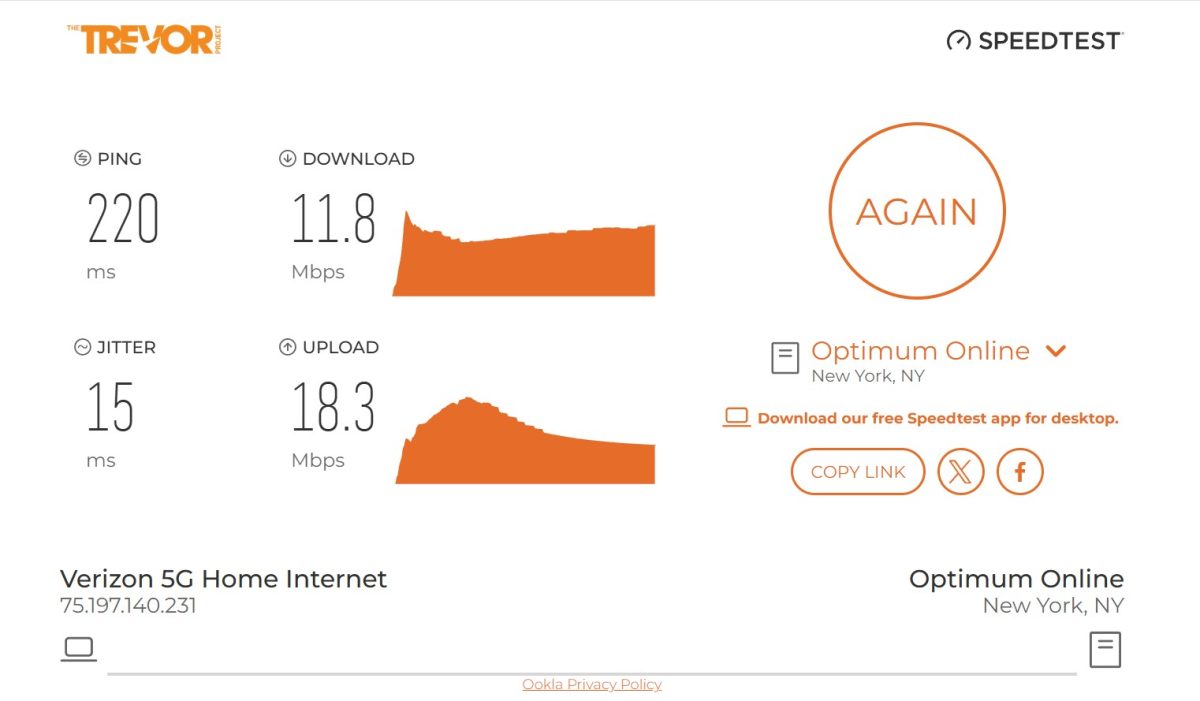
Speedtest (via Ookla)
| Metric | Value |
|---|---|
| Download | 11.8 Mbps |
| Upload | 18.3 Mbps |
| Ping | 220 ms |
| Jitter | 15 ms |
Download speed of 11.8 Mbps is perfectly acceptable for a residential proxy. It’s actually higher than the stated 7-10 Mbps limit for datacenter proxies, which makes sense since residential proxies use real users’ connections.
Fast.com (Netflix Speed Test)
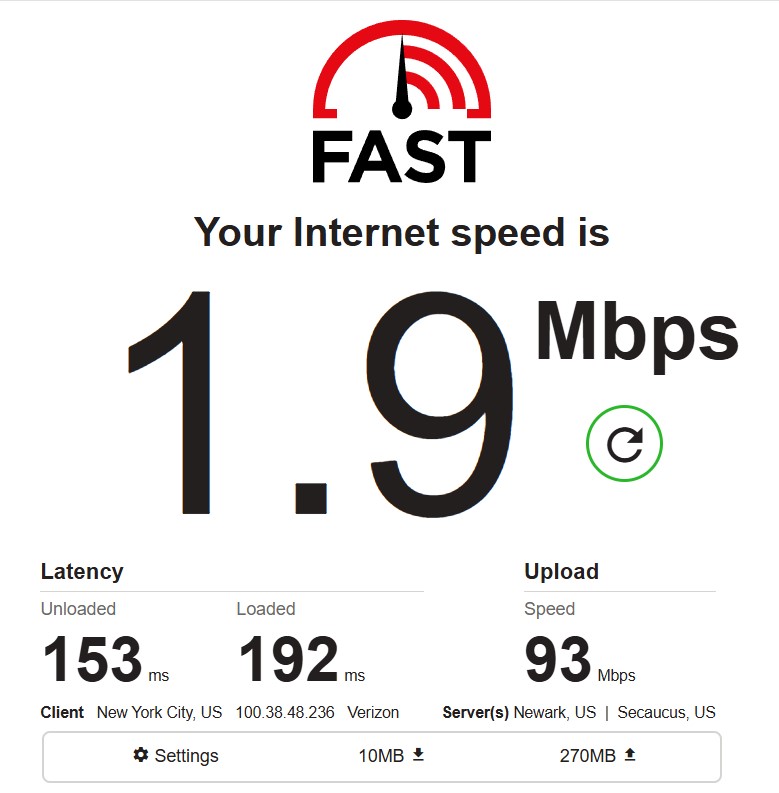
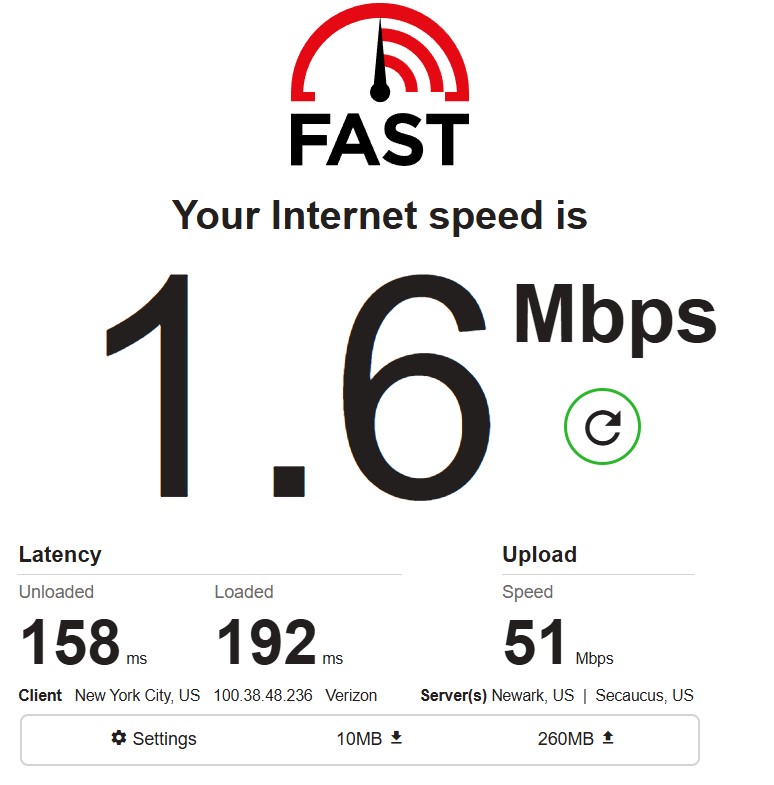
| Test | Download | Upload | Latency (unloaded) | Latency (loaded) |
|---|---|---|---|---|
| #1 | 1.9 Mbps | 93 Mbps | 153 ms | 192 ms |
| #2 | 1.6 Mbps | 51 Mbps | 158 ms | 192 ms |
Fast.com tests showed much lower download speeds (~1.6-1.9 Mbps). This is because Fast.com specifically measures Netflix streaming performance, and residential proxies aren’t optimized for heavy media content. Not enough for 4K streaming, but plenty for web browsing and API work.
Test 2: Latency
I tested latency to two different servers to get a fair picture.
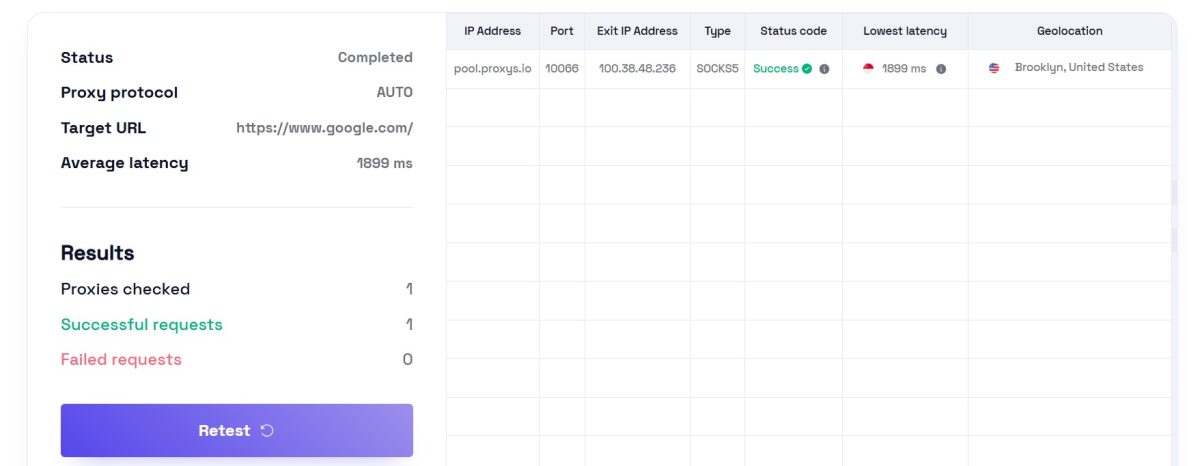
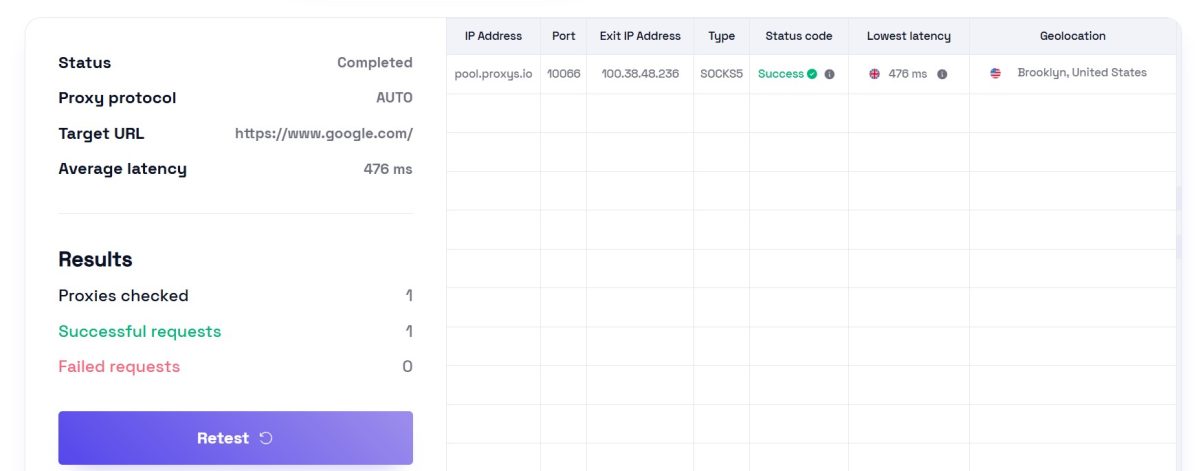
| Server | Latency | Status | Geolocation |
|---|---|---|---|
| Singapore | 1899 ms | Success | Brooklyn, United States |
| Canada | 476 ms | Success | Brooklyn, United States |
There’s quite a spread here. Almost 2 seconds to Singapore – expected given the distance from Brooklyn. 476 ms to Canada is more reasonable for a neighboring country. Fine for scraping and social media work, but not for interactive stuff like streaming or gaming.
Test 3: IP Quality and Fraud Score
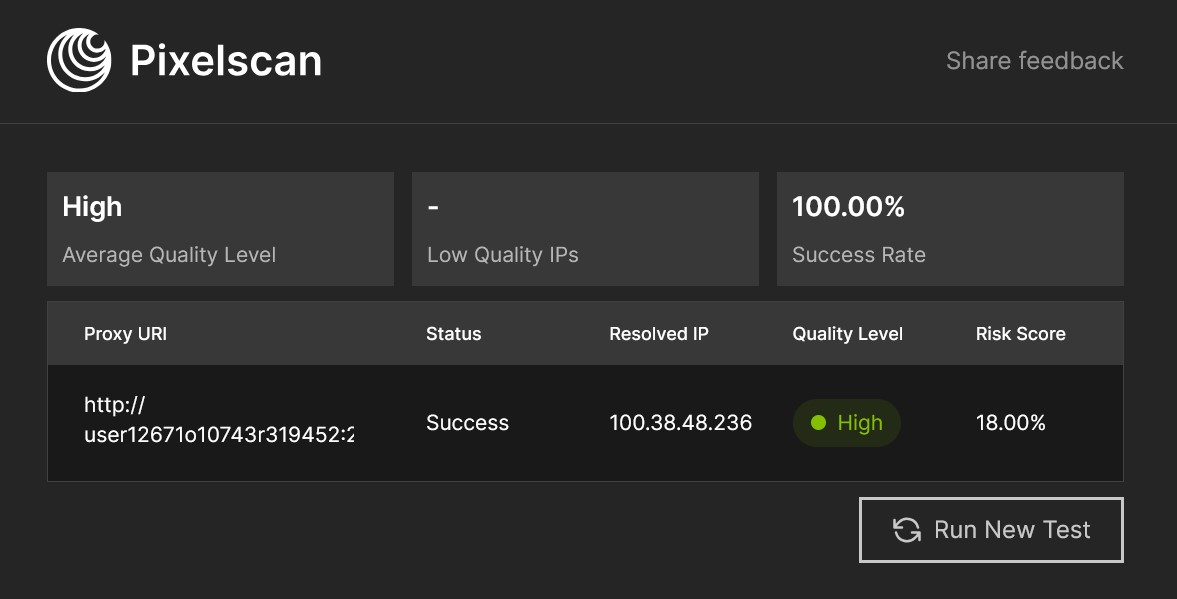
| Metric | Value |
|---|---|
| Quality Level | High |
| Risk Score | 18.00% |
| Success Rate | 100% |
| Low Quality IPs | – |
Excellent results! Pixelscan rates the IP as high quality with a low risk score of 18%. This means the address isn’t flagged in spam databases and has a solid reputation.
Scamalytics – Fraud Risk Assessment
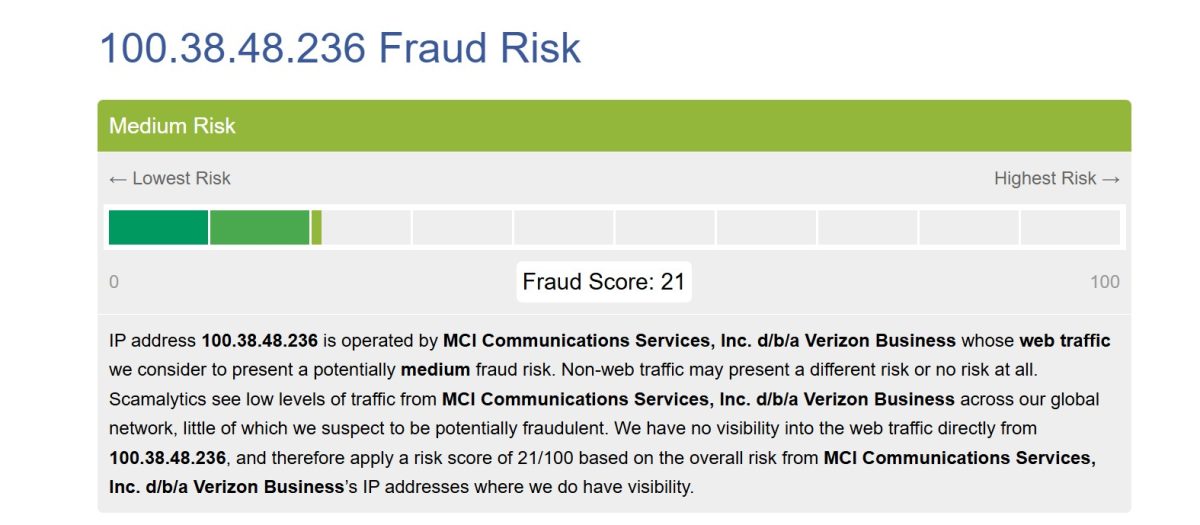
| Metric | Value |
|---|---|
| Fraud Score | 21/100 (Medium Risk) |
| ISP | MCI Communications Services / Verizon Business |
| Risk Level | Potentially medium fraud risk |
Fraud Score of 21 out of 100 is acceptable. Scamalytics classifies it as “medium risk,” but that’s based on the overall reputation of Verizon’s ASN (autonomous system), not this specific IP.
Test 4: Blacklist Check
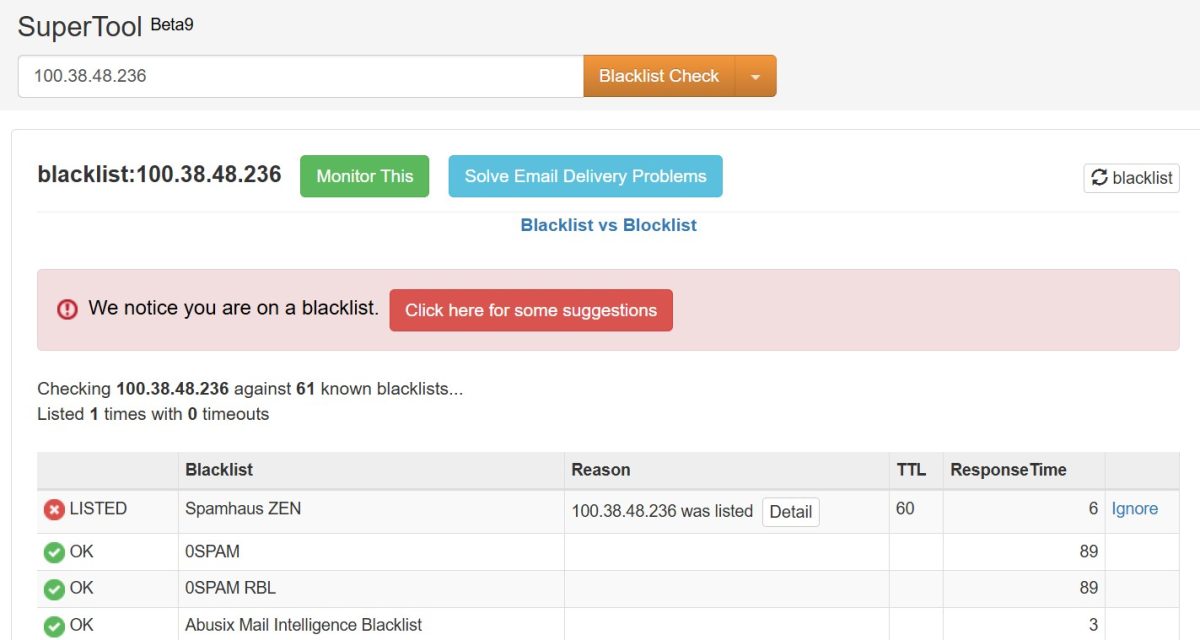
| Result | Details |
|---|---|
| Blacklists checked | 61 |
| Listed | 1 (Spamhaus ZEN) |
| Clear | 60 |
The IP is on one blacklist – Spamhaus ZEN. Not a big deal for web browsing and social media, but could cause problems if you’re sending emails.
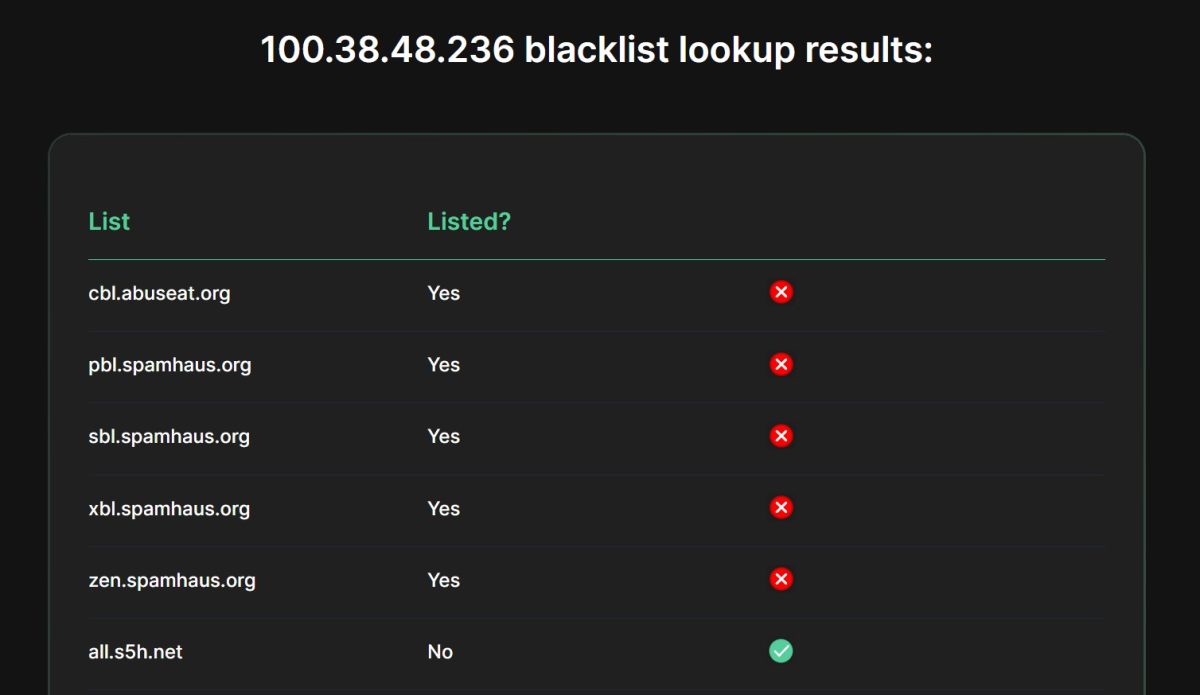
| Blacklist | Status |
|---|---|
| cbl.abuseat.org | Listed |
| pbl.spamhaus.org | Listed |
| sbl.spamhaus.org | Listed |
| xbl.spamhaus.org | Listed |
| zen.spamhaus.org | Listed |
| all.s5h.net | Clear |
The IP shows up on several Spamhaus lists. Here’s the thing though – this doesn’t mean the proxy is bad. Spamhaus PBL (Policy Block List) includes all dynamic and residential IP addresses by default since they’re not meant for direct email sending. For web browsing, scraping, and social media work, this is completely irrelevant.
Test 5: Geolocation and ISP Detection
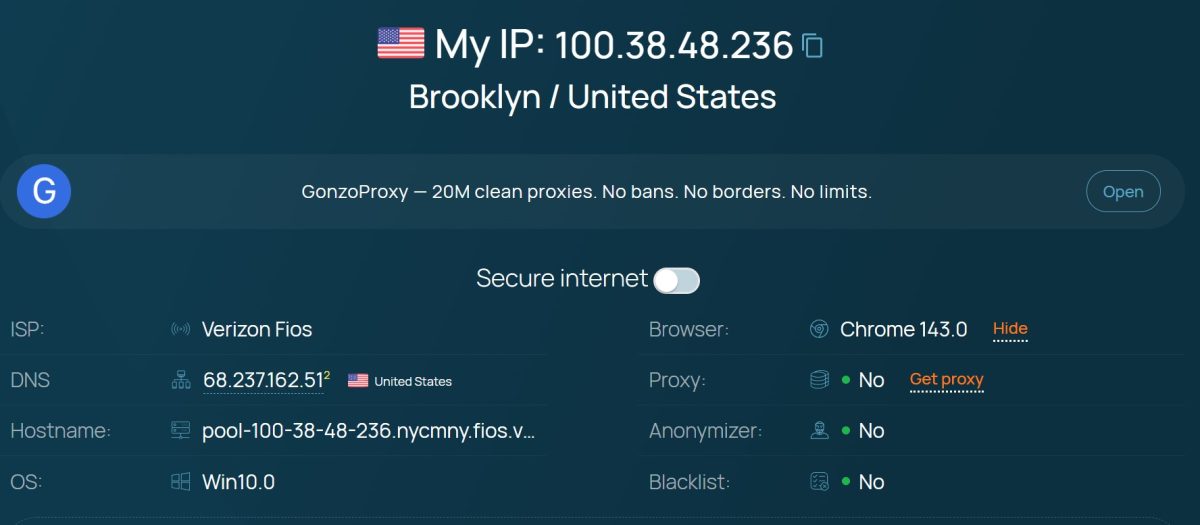
| Metric | Value |
|---|---|
| IP Address | 100.38.48.236 |
| Location | Brooklyn, United States |
| ISP | Verizon Fios |
| Proxy detected | No |
| Anonymizer | No |
| Blacklist | No |
Key point: the proxy isn’t detected as a proxy! The site shows “Proxy: No”, “Anonymizer: No”. This is the ideal result for a residential IP – it looks like regular home internet.
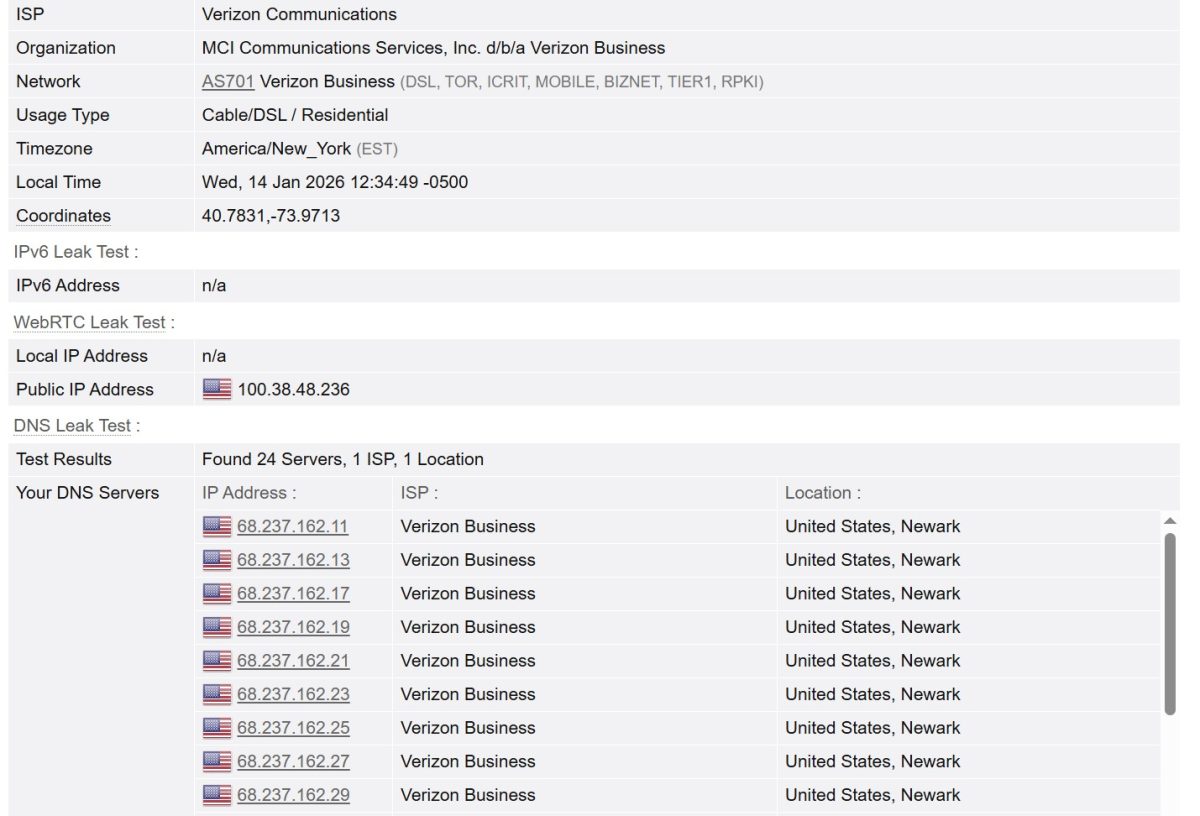
| Metric | Value |
|---|---|
| ISP | Verizon Communications |
| Organization | MCI Communications Services, Inc. d/b/a Verizon Business |
| Network | AS701 Verizon Business |
| Usage Type | Cable/DSL / Residential |
| Timezone | America/New_York (EST) |
| Local Time | Wed, January 14, 2026 12:34:49 -0500 |
| Coordinates | 40.7831, -73.9713 |
The proxy correctly shows up as a residential Verizon Fios IP from Brooklyn. Usage type “Cable/DSL / Residential” – exactly what you need for maximum trust.
Test 6: Fingerprint and Masking
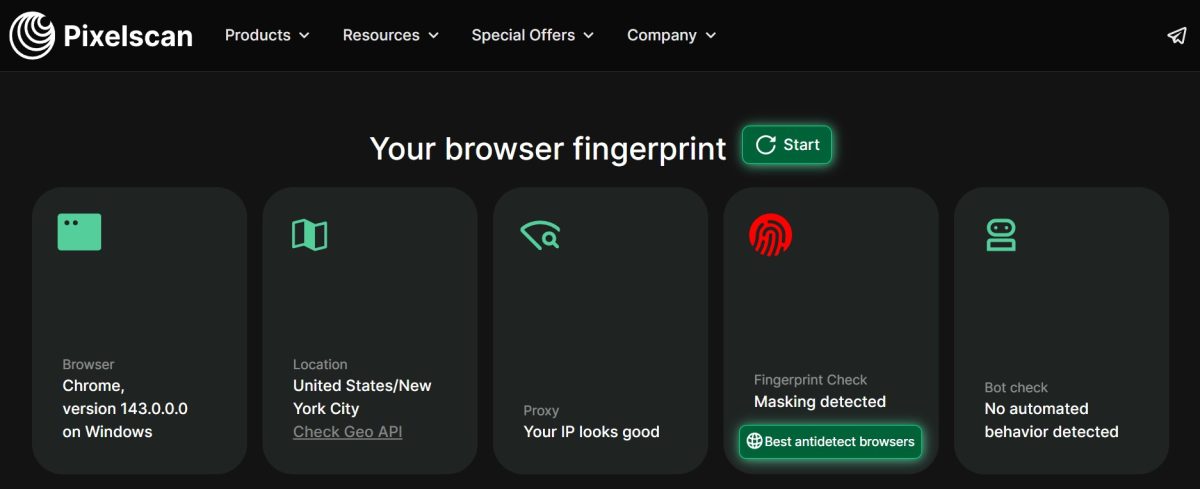
| Metric | Result |
|---|---|
| Browser | Chrome 143.0 on Windows |
| Location | United States / New York City |
| Proxy Check | Your IP looks good |
| Fingerprint Check | Masking detected |
| Bot Check | No automated behavior detected |
Interesting finding: Pixelscan detected fingerprint masking. This is due to using an antidetect browser, not the proxy quality. The IP itself “looks good” – no issues detected.
Test Results Summary
| Metric | Result | Score |
|---|---|---|
| Download Speed | 11.8 Mbps (Speedtest) / 1.6-1.9 Mbps (Fast.com) | 3/5 |
| Latency | 476 ms (Canada) / 1899 ms (Singapore) | 3/5 |
| IP Quality | High (Pixelscan) | 5/5 |
| Fraud Score | 18-21% (low/medium) | 4/5 |
| Blacklists | 1/61 (Spamhaus – not critical for web) | 4/5 |
| Geo Detection | Brooklyn, NY – accurate | 5/5 |
| Proxy Detection | Not detected as proxy | 5/5 |
| ISP Type | Residential (Verizon Fios) | 5/5 |
Interface and Usability
The Proxys.io dashboard follows a minimalist design. Navigation is straightforward: tabs for “Orders,” “Mobile Proxies,” “Residential Proxies,” “General Proxy List,” “Account,” “Affiliate Program,” and “API Keys.”
What I liked:
- instant proxy delivery after payment (just a few seconds);
- easy export in antidetect browser-friendly formats;
- can create up to 10 proxy lists per order;
- built-in proxy checker.
What I didn’t like:
- sloppy English translation – switching to English leaves some UI elements in Russian, like “Создание листа” instead of “Create list” and “Ротация в минутах” instead of “Rotation in minutes” – pretty unprofessional for an international service;
- no real-time traffic usage stats;
- mobile site has limited functionality.
Payment Methods
Proxys.io accepts a wide variety of payment options.
Crypto:
- Bitcoin (BTC);
- Ethereum (ETH);
- USDT (Tether) – TRC20 and ERC20;
- Litecoin (LTC).
Fiat payments:
- Visa / Mastercard (including Russian cards);
- QIWI;
- Perfect Money;
- Alipay (for Chinese customers);
- WebMoney.
Crypto support is a big plus for affiliate marketers and webmasters in 2026, especially given sanctions and issues with traditional bank transfers.
Refund Policy
Proxys.io offers a 24-hour money-back guarantee, which puts it ahead of many competitors:
- Proxy6: no refunds on shared proxies at all;
- many shady sellers: no refunds period;
- Proxys.io: refund via support within 24 hours.
Important: refunds are available if the proxies are technically defective or don’t work for your stated purpose (as long as that purpose doesn’t violate their terms).
Affiliate Program
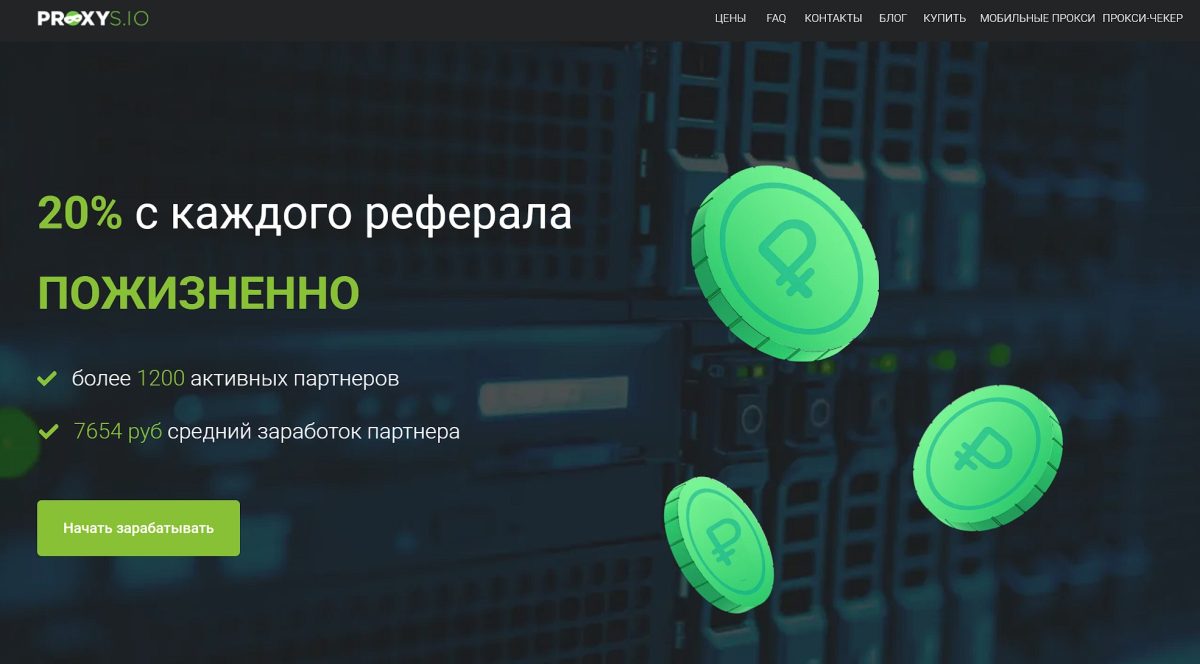
Proxys.io has an affiliate program with solid terms:
| Parameter | Value |
|---|---|
| Commission | 20% lifetime on referral spending |
| Minimum withdrawal | $50 |
| Payout methods | USDT (TRC20), WebMoney, Capitalist, Push.House |
Crypto payouts (USDT TRC20) are a nice perk for webmasters.
Use Cases: What’s Proxys.io Good For?
Recommended for:
1. Affiliate Marketing (Facebook, TikTok, Google Ads) Go with mobile or residential proxies. Static datacenter IPv4s often end up on social media graylists.
2. SMM and Multi-accounting (Instagram, TikTok) Mobile proxies with rotation are perfect here thanks to CGNAT and mimicking real smartphone user behavior.
3. SEO Scraping (Google, Yandex) IPv6 proxies at $0.13 are your best bet. Google handles IPv6 well and bans them less frequently.
4. E-commerce (seller account management) Static IPv4s work great for Amazon Seller and eBay since the IP stays consistent.
Use with caution for:
5. Streaming and 4K content The 7-10 Mbps cap on datacenter proxies makes heavy video streaming tough. Fine for Full HD, not for 4K.
6. Sneaker bots (Nike, Supreme) Speed matters for copping limited drops. Better to look at specialized providers (Smartproxy, NetNut).
Not recommended for:
7. Email sending IPs may be on Spamhaus PBL, which will get your emails blocked.
8. Enterprise-scale scraping (terabytes of data) For that kind of volume, you need premium solutions with millions of IPs (Bright Data, Oxylabs).
Competitor Comparison
| Feature | Proxys.io | Proxy6 | Proxy-Seller | Bright Data |
|---|---|---|---|---|
| Segment | Mid-Market | Budget | Mid-Enterprise | Enterprise |
| IPv4 price | ~$1.40/mo | ~$1.50/mo, $0.35/wk | ~$1.50-2.00/mo | $/GB |
| IPv6 price | ~$0.13 | ~$0.06-0.25 | ~$0.15 | Included in pool |
| Refunds | 24 hours | None on Shared | 24 hours | 3-14 days |
| Support | 24/7 (bot + agents) | Tickets | 24/7 | Premium |
| Standout feature | Versatility | Cheap weekly plans | Mobile proxy config | Millions of IPs |
When to choose Proxys.io:
- you want an all-in-one provider;
- crypto payments matter to you;
- mid-range budget, looking for price/quality balance;
- managing 10-50 social media accounts.
When to look elsewhere:
- Proxy6 – for short-term tasks and maximum savings;
- Bright Data/Oxylabs – for enterprise needs with 99.9% SLA.
Pros and Cons: The Verdict
- versatility: all proxy types under one roof;
- flexibility: buy per-IP without forced bundles;
- crypto: full BTC, ETH, USDT support;
- 24-hour money-back guarantee;
- quality residential IPs: undetected as proxies, low fraud scores;
- competent human support agents.
- terrible support chatbot: wastes time, doesn’t understand context;
- 7-10 Mbps speed cap on datacenter proxies – outdated in 2026;
- poorly translated English interface;
- some provider combinations don’t work;
- no real-time usage stats.
Final Thoughts
Proxys.io in 2026 remains a solid mid-tier option in the proxy market. It’s not trying to be a premium provider, but it gets the job done for affiliate marketers, SMM specialists, and small teams.
The residential proxies performed well: quality IPs from Verizon Fios, accurate geolocation, no proxy detection. Speed and latency are within normal range for this type of product.
The main headache is the support chatbot, which turns simple questions into a frustrating ordeal. Pro tip: ask for a human agent right away.
Who I’d recommend it to:
- affiliate marketers with a $50-500/month proxy budget;
- SMM folks managing 10-50 accounts;
- anyone who needs crypto payment options.
Who should look elsewhere:
- enterprise clients needing 99.9% SLA;
- tasks requiring 1 Gbps connections.
Final score: 3.5/5
The service works, the proxies are quality, the prices are competitive. Docking a point for the useless chatbot and sloppy translation. Half a point off for the speed limitations. For its price range – a solid choice.
Free trial: 2 hours of full access to test quality
IPv6 from $0.13 / IPv4 from $1.35
Country/city/carrier selection