





 Why Trust Us?
ToProxyLab has been testing proxy services since 2025. We pay for most plans ourselves, and when a provider gives us test traffic we say so in the review — free traffic buys a place in the testing queue, nothing else. Every provider goes through the same speed, uptime and fraud-score checks, and we publish the real numbers, including the bad ones. A rating cannot be bought. Learn who we are and how we review proxies.
Why Trust Us?
ToProxyLab has been testing proxy services since 2025. We pay for most plans ourselves, and when a provider gives us test traffic we say so in the review — free traffic buys a place in the testing queue, nothing else. Every provider goes through the same speed, uptime and fraud-score checks, and we publish the real numbers, including the bad ones. A rating cannot be bought. Learn who we are and how we review proxies.
After IPRoyal killed a bunch of my Reddit accounts with their mobile proxies, I decided to take a systematic approach to choosing a provider. Proxy-Seller has been around for a while—they’ve been operating since 2014 and claim to have a pool of 20+ million residential IPs. I bought 1 GB of traffic and ran it through every test I could think of. Here’s what I found.
About Proxy-Seller
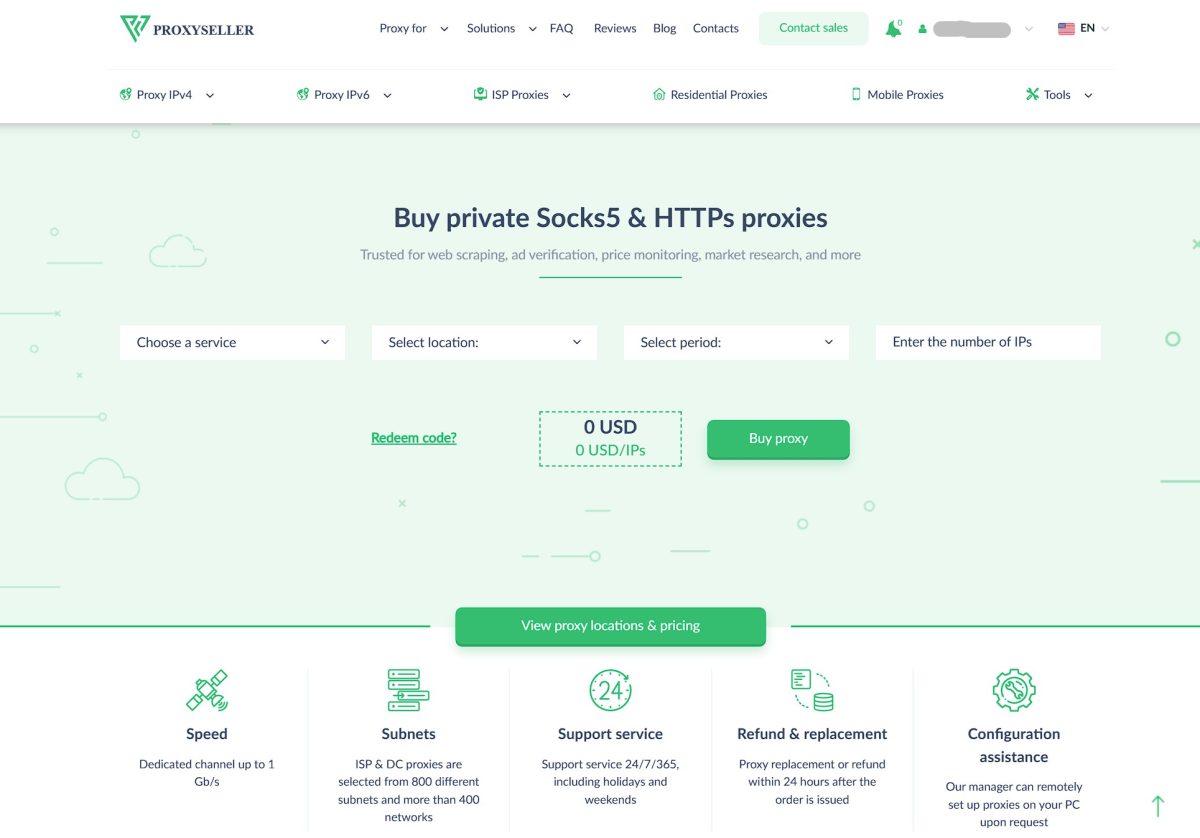
Proxy-Seller (operates through proxy-seller.com and proxy-seller.io) positions itself as a universal proxy solutions provider. Over 10+ years in the market, they’ve grown from selling server IPs to a full-fledged platform offering residential, mobile, ISP, and datacenter proxies.
Key specs for residential proxies:
| Parameter | Value |
|---|---|
| IP Pool | 20+ million |
| Coverage | 220+ countries and regions |
| Protocols | HTTP, HTTPS, SOCKS5 |
| Billing Model | Pay-as-you-go |
| Rotation | On request or static |
Residential Proxy Pricing
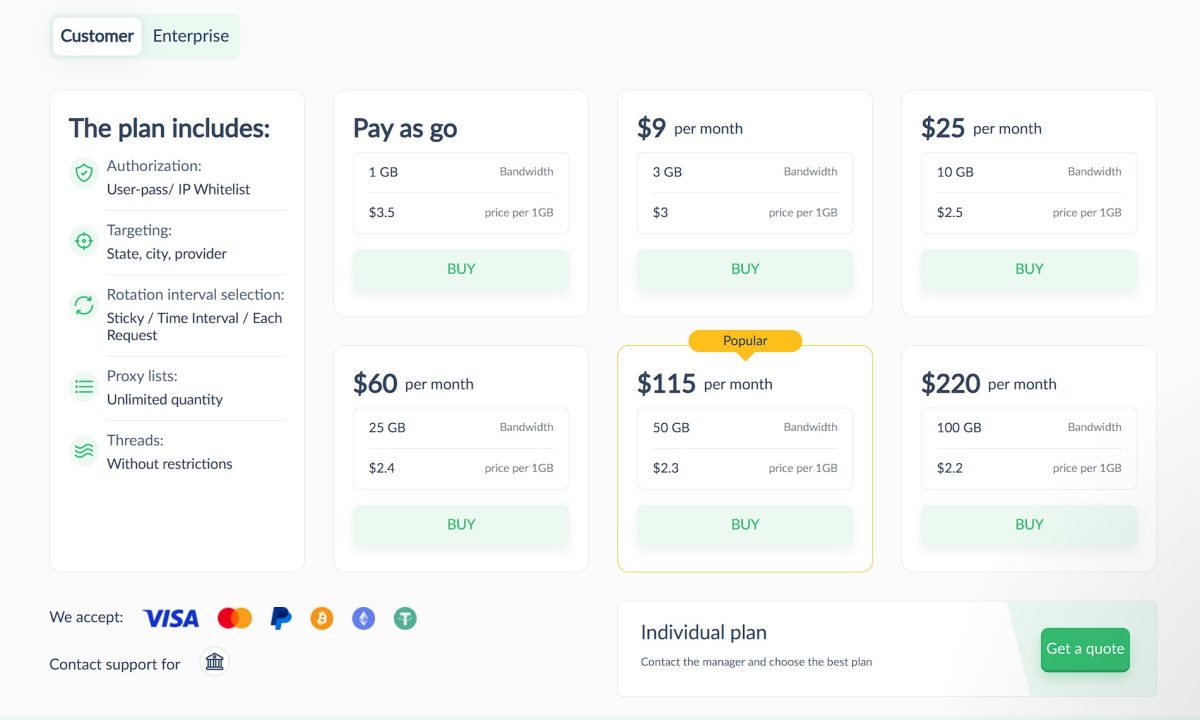
Residential proxy pricing starts at $3.5 per gigabyte. It’s a pay-as-you-go model with no mandatory monthly subscription, which is great if you have irregular workloads.
Price Comparison with Competitors
| Provider | Price per 1 GB | Billing Model | Minimum Payment |
|---|---|---|---|
| Proxy-Seller | from $3.5 | Pay-as-you-go | No subscription |
| SOAX | ~$3.60 | Subscription | $99/mo |
| Smartproxy | $2.20 – $7.00 | Subscription | from $50/mo |
| IPRoyal | $1.75 – $7.00 | Pay-as-you-go | Depends on volume |
| Bright Data | $5.04+ | Subscription | $500+ |
Proxy-Seller sits in the mid-range price segment. Not the cheapest option, but nowhere near Bright Data’s premium tier either. The main advantage over SOAX and Smartproxy is no mandatory monthly subscription.
Test Setup
For full reproducibility, here’s the exact configuration I used for testing:
| Parameter | Value |
|---|---|
| Antidetect Browser | Dolphin{anty} |
| Browser Version | Current as of January 2026 |
| Profile OS | Windows 10 |
| WebRTC | Altered (spoofed to proxy IP) |
| Canvas | Noise |
| WebGL | Noise |
| Timezone | Auto (based on proxy IP) |
| Geolocation | Auto (based on proxy IP) |
| Languages | es-CO, es, en |
Heads up: Pixelscan showed “Masking detected” in my tests—that’s the antidetect browser Dolphin being flagged, not the proxy itself. If you use a different antidetect browser or a regular browser with a proxy extension, your fingerprint test results will differ.
Dashboard and Proxy Setup
Right after payment, you get a dashboard in the orders section with a nice visual traffic usage bar.
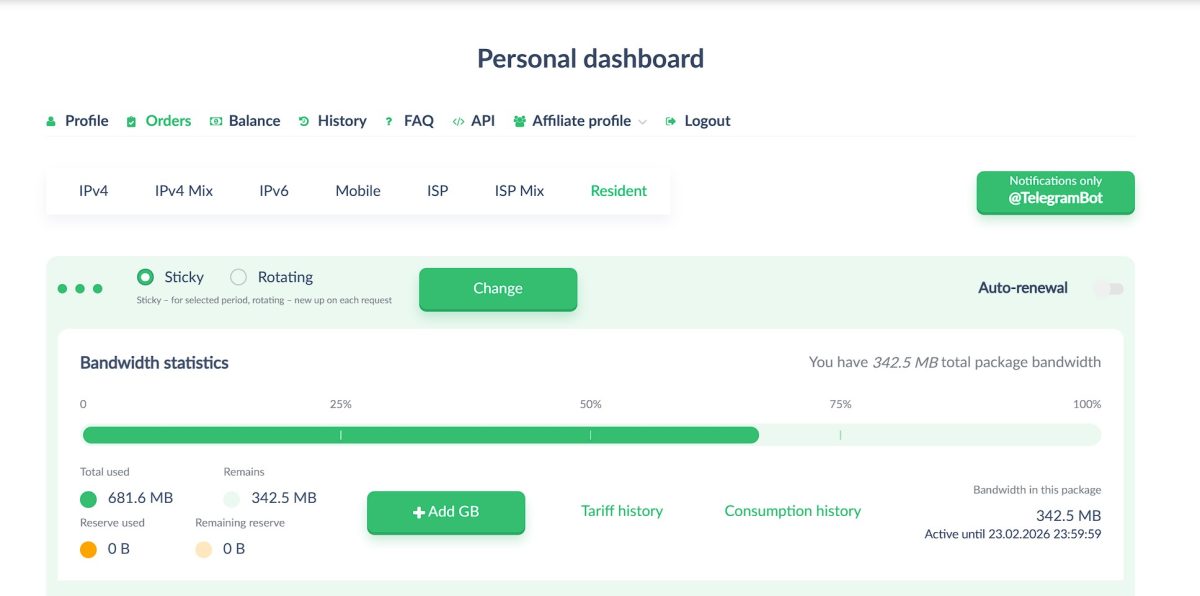
Quick tip: there’s an Auto-renewal checkbox enabled by default on the right side. Turn it off right away, or you might blow through your limits and get charged automatically.
The interface lets you choose your proxy type:
| Rotation Type | Description | Use Case |
|---|---|---|
| General | Standard rotation | Parsing, scraping |
| Sticky | IP stays the same for the session (static) | Login forms, sign-ups |
| Rotating | IP changes with every request | Mass data collection |
Generating a Proxy List
For my test, I set up the following parameters: static (Sticky), login/password authentication, file format, South America region.
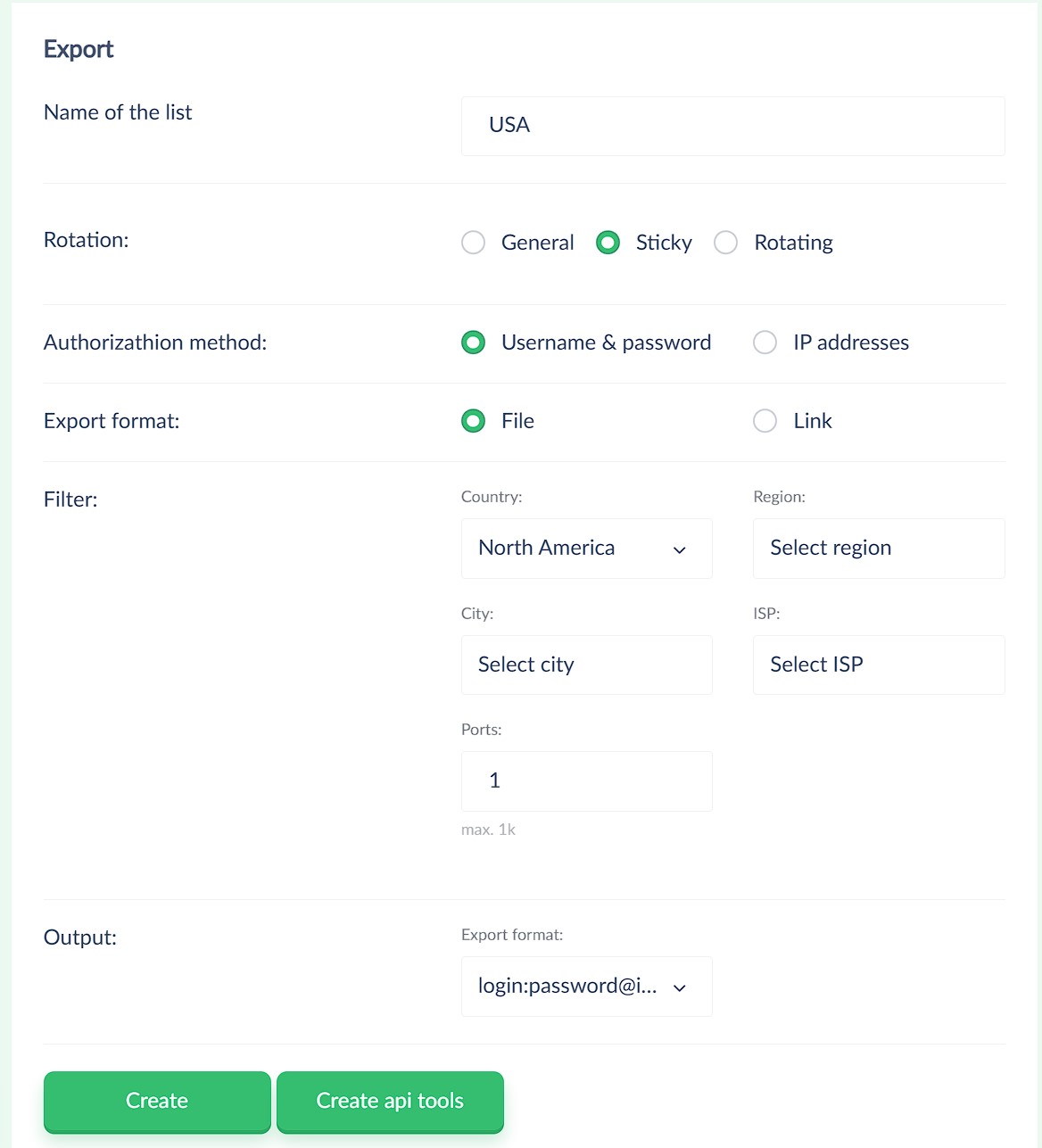
And here’s the first major downside: for popular regions (North America, Europe, South America), you can’t select a specific country and city from the dropdown menu. The Region, City, and ISP fields stay grayed out. This level of targeting is only available for less popular locations.
This is a dealbreaker for me: farming Reddit accounts requires proxies specifically from New York, not just “somewhere in North America.” Make sure to test this before buying in bulk.
Proxy Testing
First, I checked the proxy in Dolphin{anty}. The browser showed ACTIVE status, SOCKS5 protocol, geolocation Colombia/Bogota, IP 190.90.154.72. Not found in any spam lists (score of 0).

IP Details
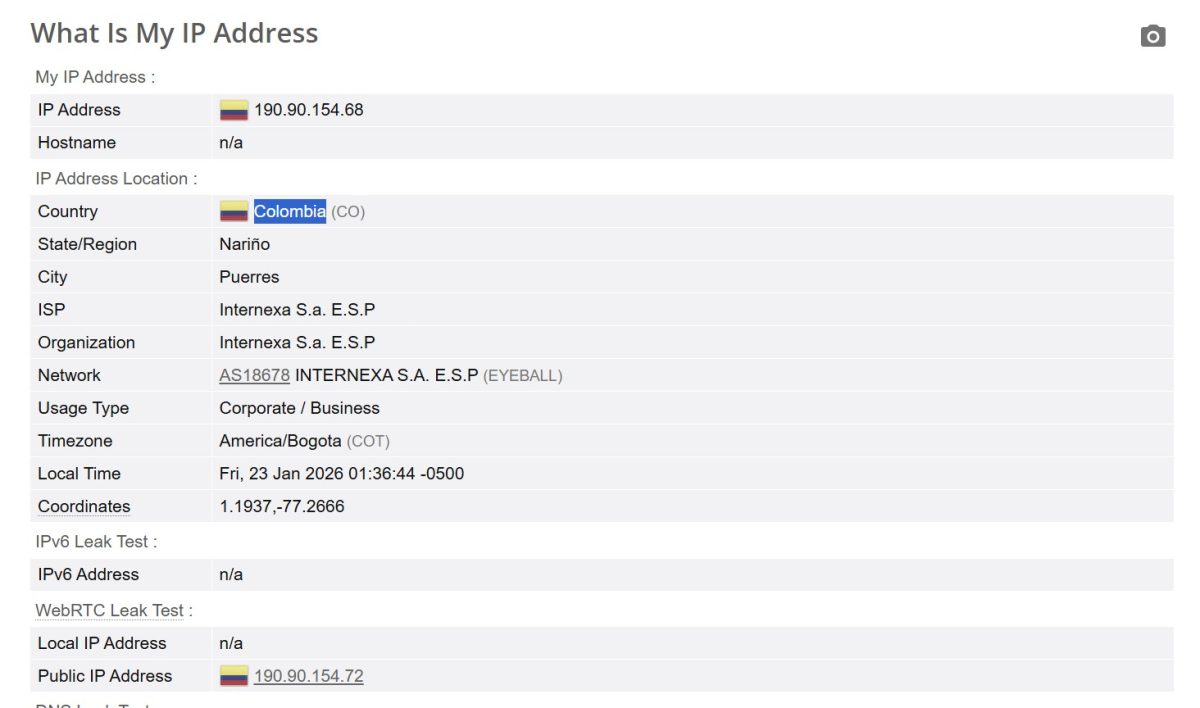
Detailed info on the IP I got:
| Parameter | Value |
|---|---|
| IP Address | 190.90.154.68 |
| Country | Colombia (CO) |
| State/Region | Nariño |
| City | Puerres |
| ISP | Internexa S.a. E.S.P |
| Organization | Internexa S.a. E.S.P |
| Network (ASN) | AS18678 INTERNEXA S.A. E.S.P (EYEBALL) |
| Usage Type | Corporate / Business |
| Timezone | America/Bogota (COT) |
What “Corporate / Business” Usage Type Actually Means
Pay attention to the Usage Type line. Instead of the expected “Residential” or “ISP,” we’re seeing “Corporate / Business.” Let me explain why this matters if you’re new to this.
Anti-fraud systems use databases (MaxMind, IP2Location, etc.) that classify every IP by usage type. When a system sees “Corporate,” it knows you’re connecting from a company office or business network, not from someone’s home.
For Facebook, Google, or YouTube, this isn’t a big deal—plenty of people browse from work. But picky sites with strict anti-fraud measures react differently. Ticketmaster, Nike SNKRS, Reddit during account registration—they might instantly ban you or demand extra verification. The logic is simple: regular users don’t register accounts from corporate networks.
If you specifically need “Residential” type for your use case, this is a serious drawback. Always check a test IP at browserleaks.com or iplocation.net before buying in bulk.
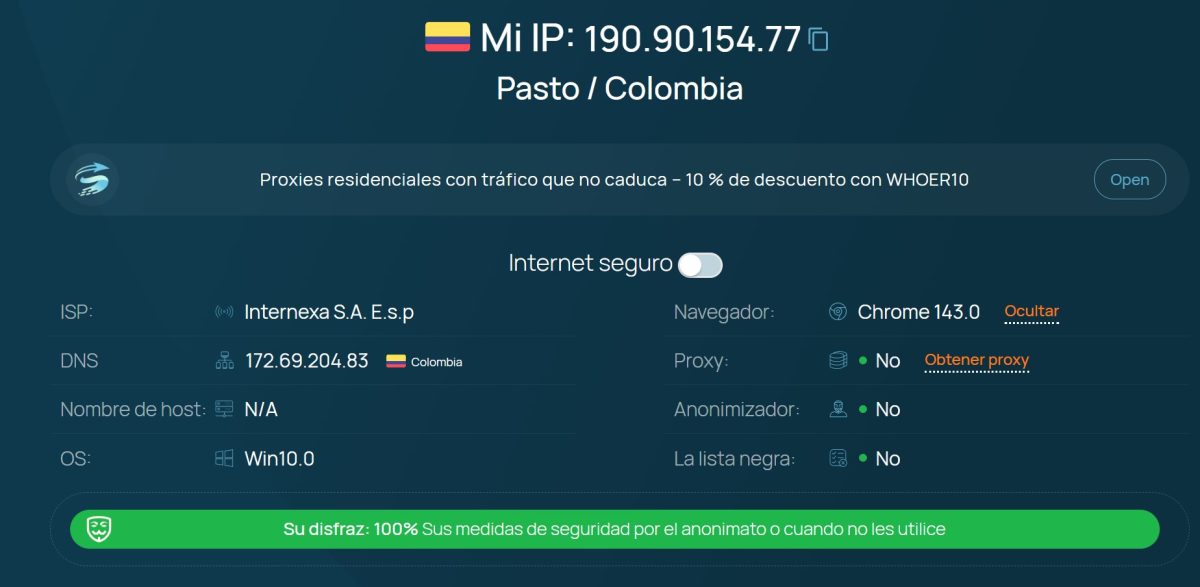
Whoer.net test:
Excellent results here. IP 190.90.154.77, location Pasto, Colombia. ISP identified as Internexa S.A. E.s.p. Most importantly: “Su disfraz: 100%” (your disguise: 100%). Proxy not detected, anonymizer not detected, not in any blacklists.
Connection Type Check
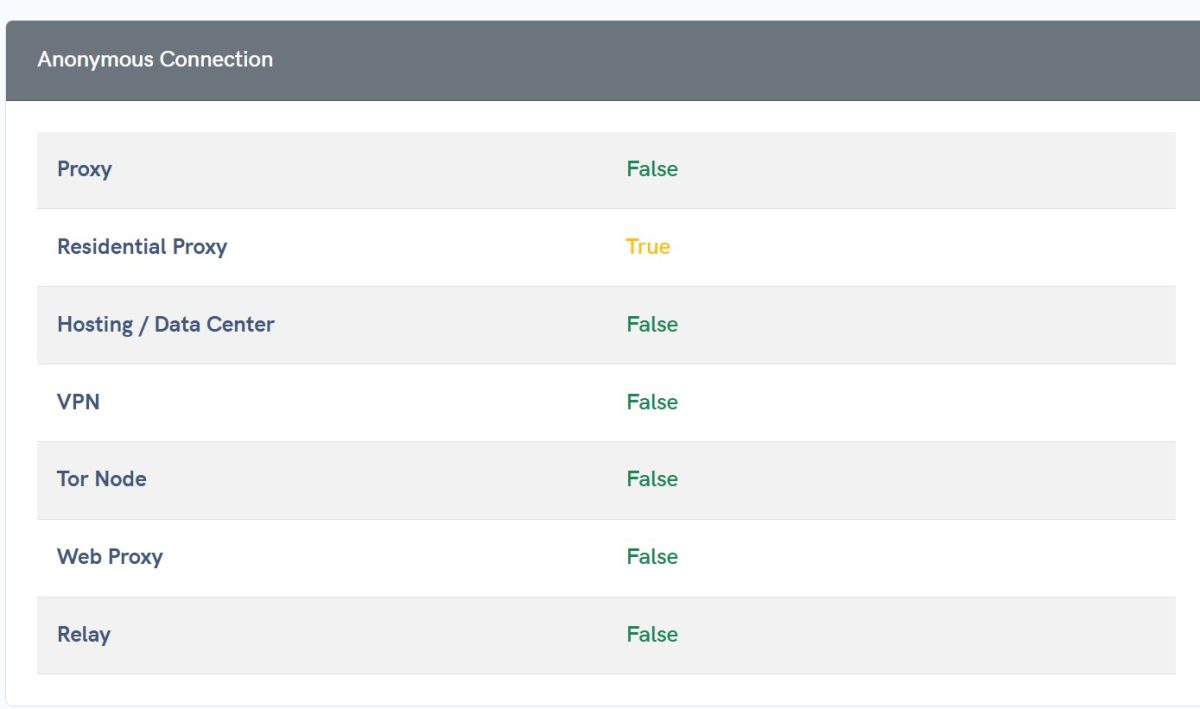
Interesting thing here: APIVoid identifies the connection as Residential Proxy, while BrowserLeaks shows Corporate. Different databases give different results. In reality, anti-fraud systems typically use multiple sources at once, and if even one flags a suspicious type, it can affect your trust score.
DNS Leak Test
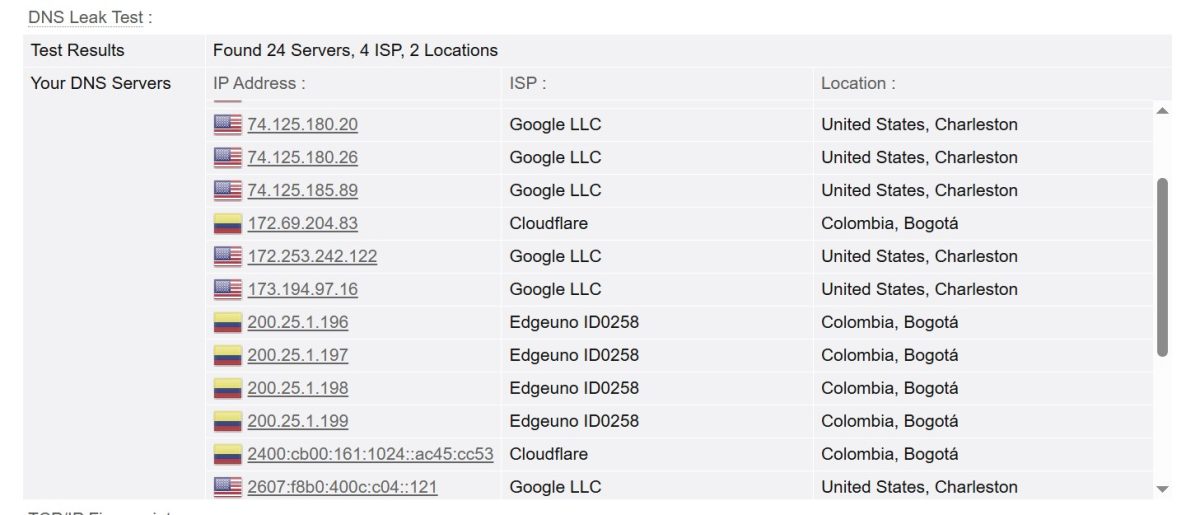
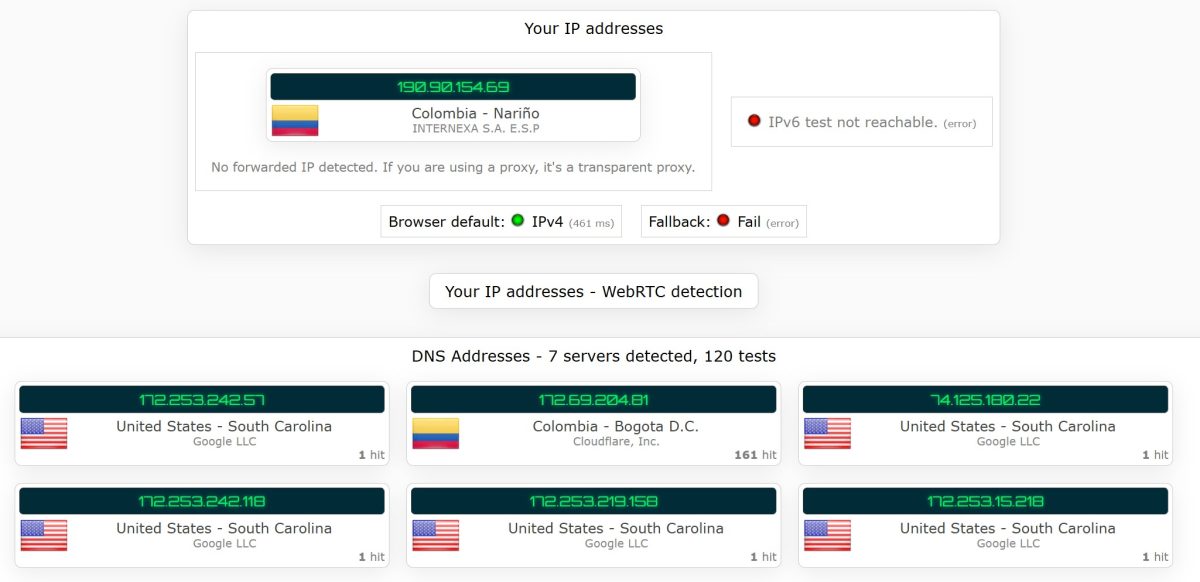
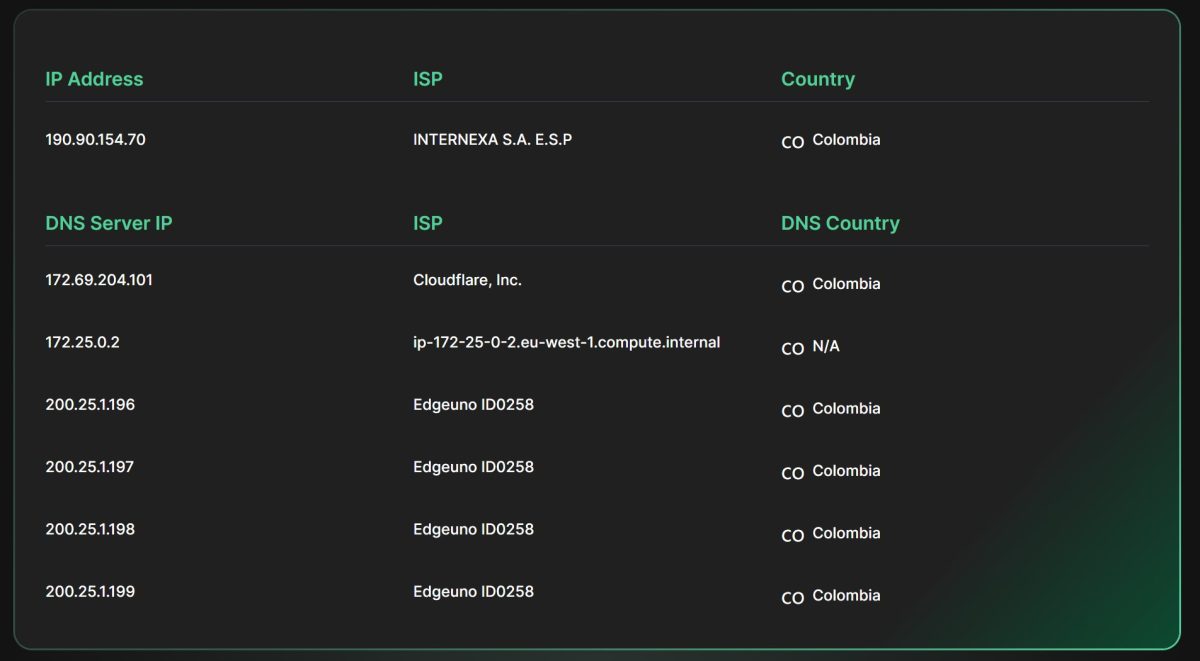
Now here’s where things get ugly—this is the biggest issue I found with Proxy-Seller. I tested with three services and compiled the results:
| Testing Service | DNS Servers Found | Server Locations | Leak? |
|---|---|---|---|
| BrowserLeaks | 24 (from 4 providers) | USA (Google LLC, Charleston) + Colombia (Cloudflare, Edgeuno) | Yes |
| IPLeak.net | 7-83 (extended test) | USA (Google LLC, South Carolina) + Colombia (Cloudflare, Bogota) | Yes |
| Pixelscan | Multiple | Colombia (Edgeuno) + 1× N/A (eu-west-1.compute.internal) | Partial |
Why DNS Leaks Are a Big Deal
Picture this: you visit a website through a Colombian IP, the site sees you’re from Bogota. But when your browser makes a DNS request (converts a domain name to an IP address), that request goes to Google servers in the US. The anti-fraud system sees a mismatch: “User appears to be in Colombia, but their DNS queries are going through America. Suspicious.”
Advanced protection systems (Cloudflare, PerimeterX, Akamai) can detect this. Result: captcha, block, or flagged account. Two out of three services showed a leak—that’s a red flag.
Can You Fix DNS Leaks Yourself?
There are a few options:
- Option one: manually set DNS in your antidetect browser settings. Dolphin{anty} and other antidetects (GoLogin, Multilogin) let you specify a custom DNS server. You can use a DNS from the same country as your proxy. For Colombia, that could be a local provider or regional Cloudflare.
- Option two: configure DNS at the system or router level. But this affects all traffic, not just specific browser profiles.
- Option three: use DoH (DNS over HTTPS) tied to the target region.
Here’s the bad news though: if the leak happens on the provider’s proxy gateway side, you’re out of luck. The proxy server resolves DNS through its own servers, and users can’t control that. Based on the test results (DNS queries going through Google US even with a Colombian IP), this problem is on Proxy-Seller’s end.
WebRTC Leak Test
BrowserLeaks WebRTC:
| Parameter | Value |
|---|---|
| Remote IPv4 | 190.90.154.68 |
| Remote IPv6 | – |
| WebRTC Leak Test | No Local IP Leak |
| Local IP Address | – |
| Public IP Address | 190.90.154.72 |
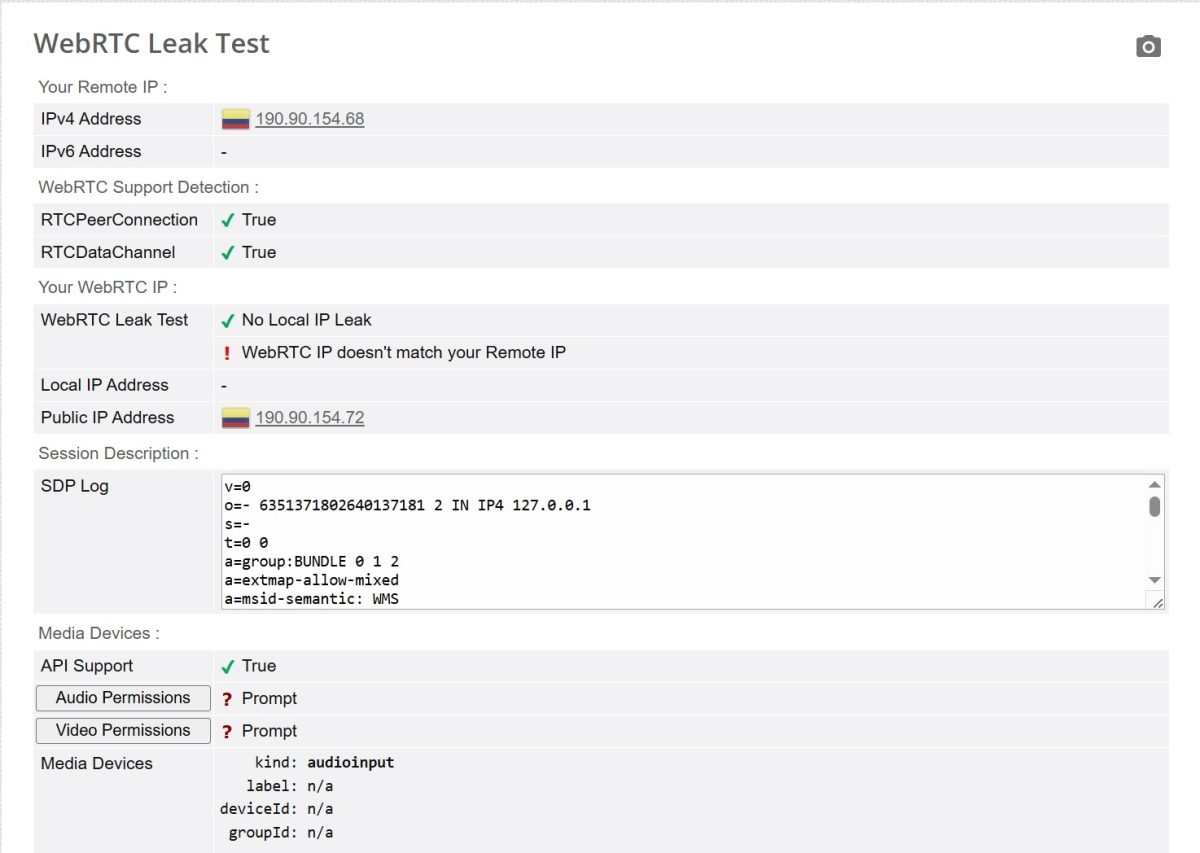
One small catch: the test shows “WebRTC IP doesn’t match your Remote IP.” Remote IP is 190.90.154.68, while Public IP via WebRTC is 190.90.154.72. These are different addresses in the same subnet, which could be due to rotation or how the residential pool works. Not critical for most tasks, but worth keeping in mind.
Scam and Spam Database Checks
Scamalytics:
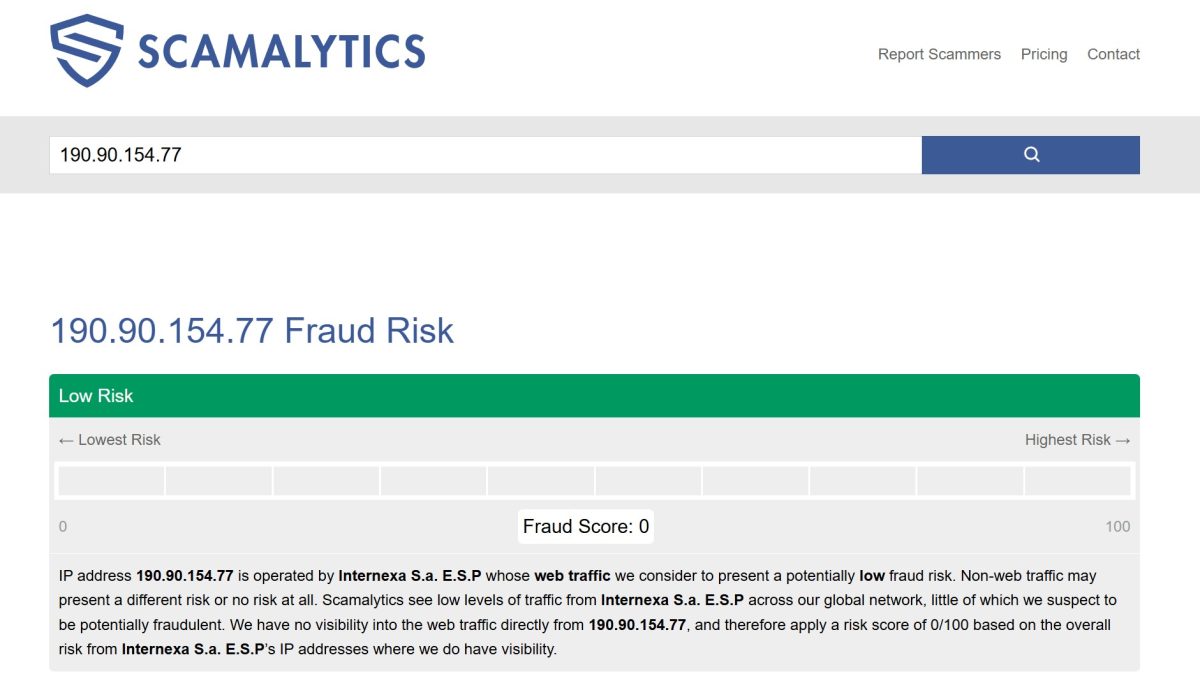
Excellent results. Fraud Score: 0 out of 100. Low Risk. IP belongs to Internexa S.a. E.S.P, web traffic from this address is considered low risk.
MXToolbox (email spam database check):
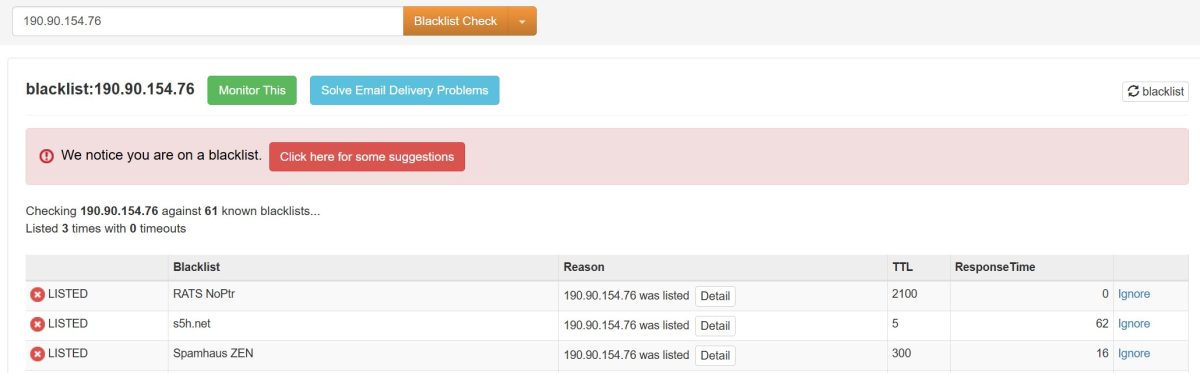
IP 190.90.154.76 checked against 61 known blacklists. Result: Listed 3 times with 0 timeouts.
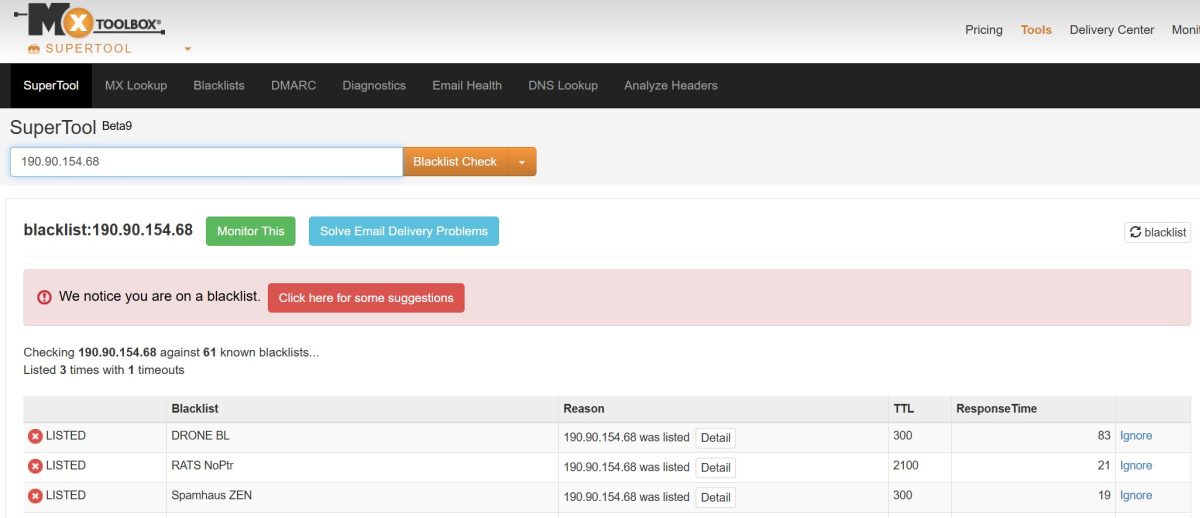
Another IP from the pool (190.90.154.68) is also on 3 blacklists: DRONE BL, RATS NoPtr, Spamhaus ZEN.
Not a big deal for social media work and scraping, but if you’re planning to use these proxies for email marketing, these IPs won’t cut it.
Pixelscan IP Blacklist Checker:
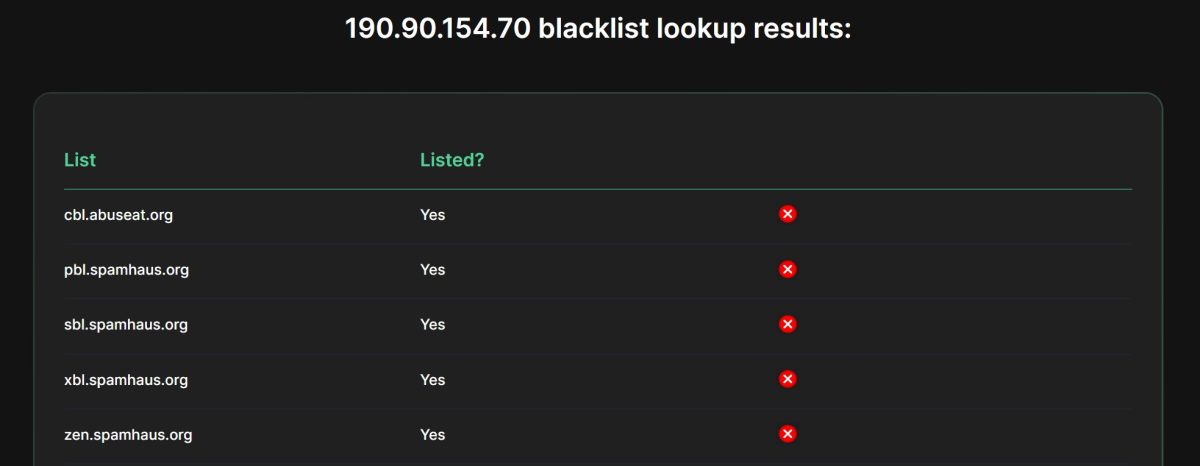
A more detailed check showed presence on 5 spam lists:
Bot Detection Test
Pixelscan Bot Detection:
Result: “Your results: Human Detected.” The system identified behavior as human.
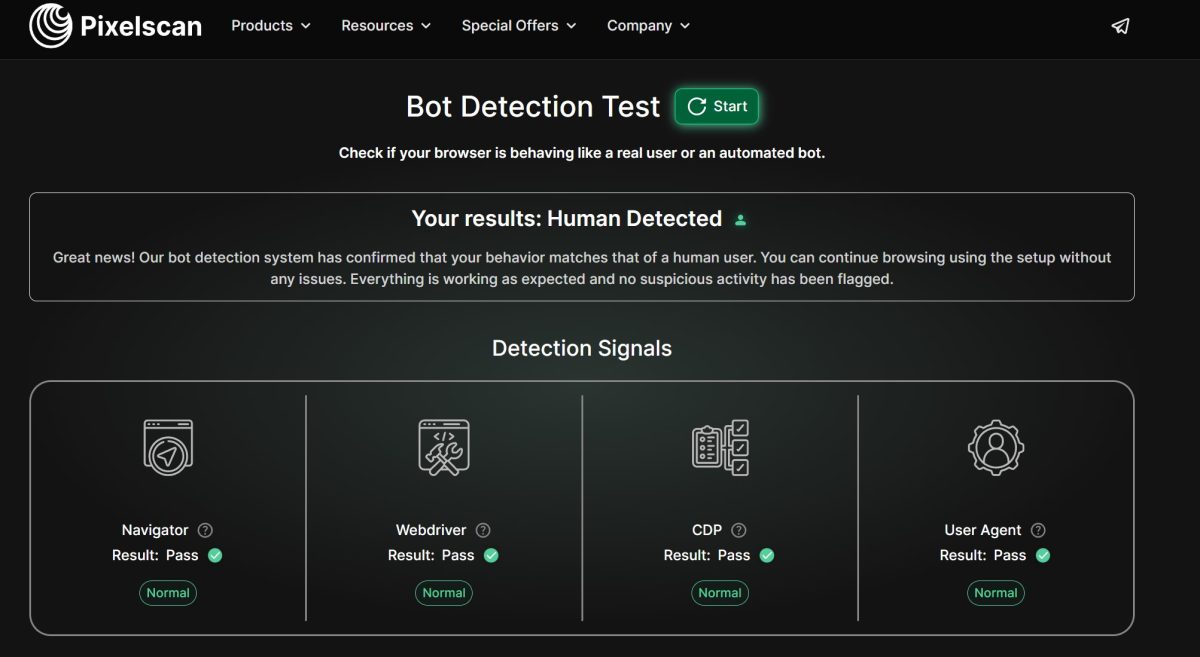
All four detection signals passed successfully. The proxy isn’t flagged as a bot or automated system.
Browser Fingerprint
Pixelscan Fingerprint:
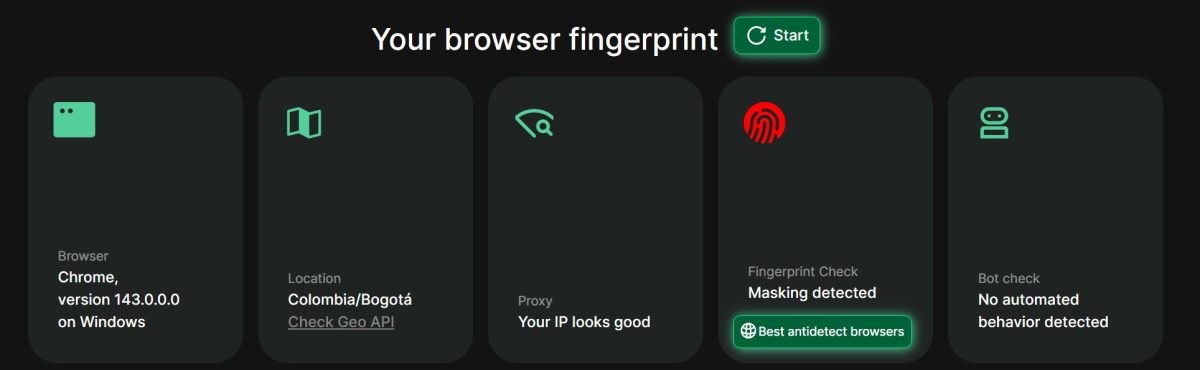
Important: Fingerprint Check shows “Masking detected.” This is Dolphin{anty} antidetect browser being flagged, not a proxy issue. You won’t see this warning with a regular browser using a proxy extension. Doesn’t affect proxy quality itself.
Speed Test
Fast.com:
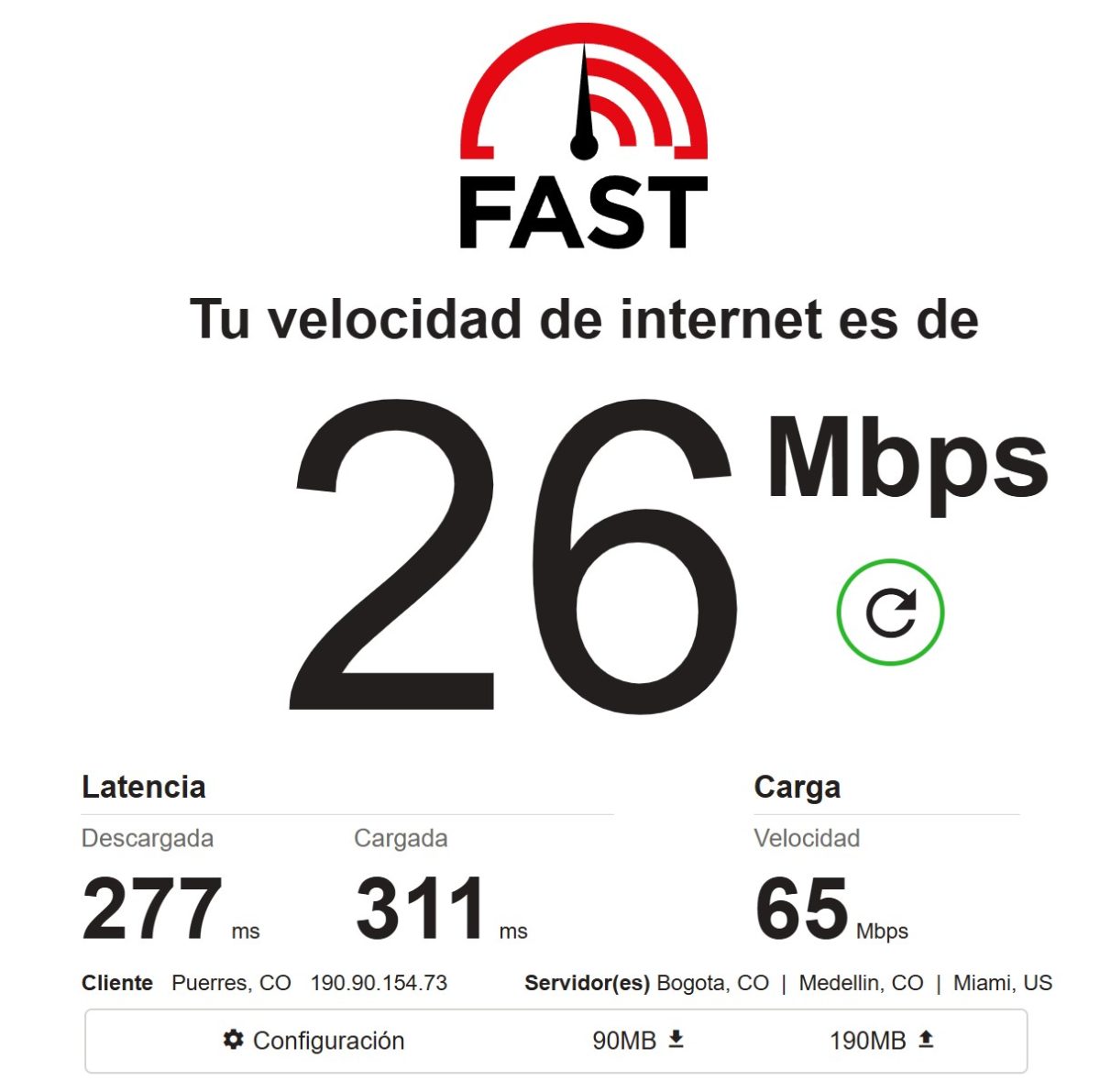
26 Mbps download speed—decent for residential proxies. Remember, traffic goes through an actual end user’s device, so don’t expect datacenter speeds. Latency of 277-311 ms is on the high side, but acceptable for tasks that don’t need real-time response.
FOGLDN ProxyTester:
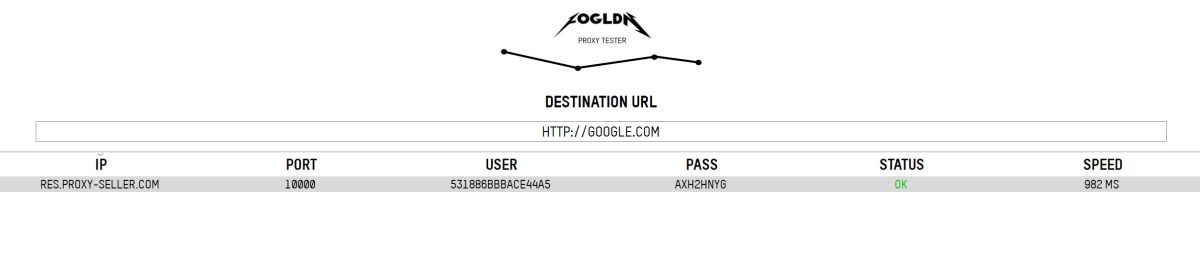
982 ms response time to Google. Proxy works consistently.
Latency From Different Regions
PingProxies.com:
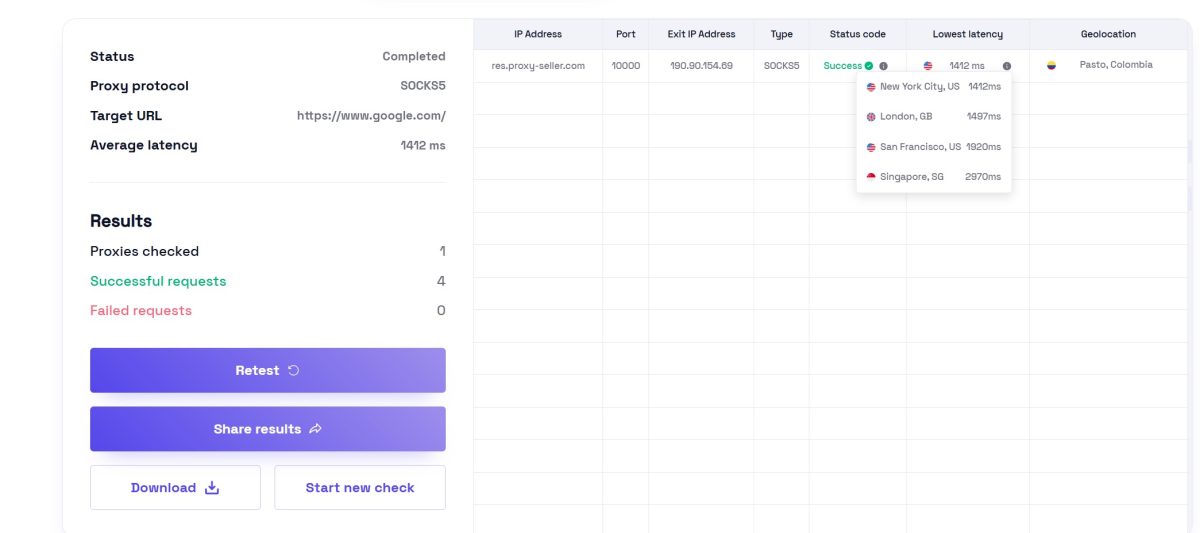
Latency from different parts of the world:
| Location | Latency |
|---|---|
| New York City, US | 1412 ms |
| London, GB | 1497 ms |
| San Francisco, US | 1920 ms |
| Singapore, SG | 2970 ms |
Average latency of 1412 ms. That’s a lot, especially to Singapore (almost 3 seconds). Fine for scraping, but you’ll definitely feel it during interactive browsing.
Real-World Testing: Practical Use Cases
Technical tests are fine, but the real question is: how do these proxies hold up in the field? I ran a few experiments.
Case 1: Reddit Account Registration
My main use case is farming Reddit accounts. Tried registering 5 accounts through Proxy-Seller (South America region, Sticky IP).
| Attempt | Result | Notes |
|---|---|---|
| Account 1 | Success | Registration went through, email verified |
| Account 2 | Success | No issues |
| Account 3 | Shadowbanned after 2 days | Account banned after first posts |
| Account 4 | Phone verification required | Asked for phone number during registration |
| Account 5 | Success | Running stable |
Result: 3 out of 5 accounts survived (60%). For comparison, with quality residential proxies that have clean Usage Type, I usually get 80-90% survival rate. I suspect the Corporate usage type and DNS leak are tanking the trust score during registration.
Case 2: Google Scraping (1000 Requests)
Ran a simple Google SERP scraper using Rotating proxies. 1000 requests with 3-5 second intervals.
| Metric | Result |
|---|---|
| Total requests | 1000 |
| Successful (200 code) | 923 (92.3%) |
| Captcha | 54 (5.4%) |
| Timeout/error | 23 (2.3%) |
| Traffic used | ~180 MB |
Result: 92.3% success rate—solid numbers. These proxies work well for Google scraping. Captchas mostly popped up when I pushed the request rate too hard.
Case 3: Instagram (Profile Viewing)
Tested Instagram browsing with Dolphin{anty} + Sticky proxies. Task: viewing public profiles without logging in.
Result: Worked without any issues. Browsed around 200 profiles over 2 hours, no blocks or captchas. For scraping public Instagram data, these proxies get the job done.
Case 4: Nike SNKRS Test
Checked if Nike SNKRS would let these proxies through (known for brutal anti-fraud).
Result: Fail. Trying to add items to cart resulted in endless loading and redirects to the homepage. Classic sign of detection. Likely a combo of Corporate usage type + DNS mismatch.
Takeaway from practical tests: Proxy-Seller handles scraping and content browsing well. Acceptable for account registration on lenient platforms. For finicky services (Nike, Ticketmaster, Reddit with city targeting)—I’d pass.
Test Results Summary
| Test | Service | Result | Rating |
|---|---|---|---|
| IP Detection | BrowserLeaks | Colombia, Nariño, Puerres | OK |
| ISP Detection | Multiple | Internexa S.A. E.S.P | OK |
| Usage Type | BrowserLeaks | Corporate / Business | Issue |
| Proxy Type | APIVoid | Residential Proxy: True | OK |
| Anonymity | Whoer.net | 100% masking | Excellent |
| DNS Leak | BrowserLeaks + IPLeak.net | USA servers detected | Issue |
| DNS Leak | Pixelscan | Mostly clean | OK |
| WebRTC Leak | BrowserLeaks | No Local IP Leak | OK |
| Fraud Score | Scamalytics | 0/100 | Excellent |
| Email Blacklists | MXToolbox + Pixelscan | 3-5 lists | Bad |
| Bot Detection | Pixelscan | Human Detected | Excellent |
| Speed Download | Fast.com | 26 Mbps | Normal |
| Speed Upload | Fast.com | 65 Mbps | Good |
| Latency | Fast.com | 277-311 ms | Average |
| Response Time | FOGLDN | 982 ms | Average |
| Global Latency | PingProxies | 1412-2970 ms | Bad |
| Reddit registration | Practical test | 60% survival | Average |
| Google scraping | Practical test | 92.3% success | Good |
| Nike SNKRS | Practical test | Blocked | Fail |
Proxy Types at Proxy-Seller
Beyond residential, they offer a full product lineup:
| Proxy Type | Price | Features | Use Case |
|---|---|---|---|
| IPv6 Datacenter | from $0.16/IP | Cheapest, not supported everywhere | Social media account farms |
| IPv4 Datacenter (Dedicated) | $1.00-$2.50/IP | High speed, easily detected | Simple website scraping, gaming |
| IPv4 Datacenter (Shared) | $0.60-$0.70/IP | Up to 3 users per IP | Low-budget projects |
| ISP (Static Residential) | $1.00-$3.00/IP | Residential trust + datacenter speed | Marketplaces, banking |
| Residential | from $3.5/GB | 20M+ pool, rotation | SEO, SMM, scraping |
| Mobile 4G/5G | $30-80/mo | Maximum trust, CGNAT | Affiliate marketing, Instagram, TikTok |
Proxy-Seller vs Competitors
| Feature | Proxy-Seller | Proxy6 | SOAX | IPRoyal |
|---|---|---|---|---|
| Residential model | Pay-as-you-go | N/A | Subscription $99+ | Pay-as-you-go |
| Residential price | $3.5/GB | – | $3.60/GB | $1.75-7/GB |
| Lowest IPv6 price | $0.16/each | $0.04/3 days | N/A | $0.14/each |
| Residential pool | 20M+ | – | 155M+ | 32M+ |
| Protocols | HTTP(S)+SOCKS5 | HTTP(S)+SOCKS5 | HTTP(S)+SOCKS5 | HTTP(S)+SOCKS5 |
| Support | 24/7 Live Chat | Tickets | Personal manager | 24/7 Chat |
| City-level geotargeting | Limited | Yes | Yes | Yes |
| Tools | Checker, Scanner | Checker | Dashboard | Checker |
Proxy-Seller falls behind competitors when it comes to geotargeting accuracy for popular regions. That’s a significant minus for tasks where specific location matters.
Free Tools
The site has utilities available without registration:
| Tool | Function |
|---|---|
| Proxy Checker | Bulk proxy list validation |
| Port Scanner | Open port checking |
| IP Trace | Packet route tracing |
| Speed Test | Proxy speed testing |
| IPv6 Validator | IPv6 address verification |
Developer API
For automation, there’s a REST API with full management capabilities: purchasing, renewal, list retrieval, IP rotation. Documentation at docs.proxy-seller.com with examples in Python, PHP, JavaScript, and Go.
Support
Available 24/7 via live chat. Trustpilot rating around 4.4/5. Refund policy: 24 hours for non-working IP replacement, 72 hours for full refund on major issues.
Pros and Cons
- Pay-as-you-go model;
- Large IP pool;
- SOCKS5 support;
- High anonymity score;
- Low Fraud Score;
- Not detected as bot;
- 24/7 support;
- Strong scraping results (92%+ success).
- Can’t select city for popular regions;
- DNS leak (US servers with Colombian IP);
- Usage Type: Corporate/Business;
- Presence on email spam lists;
- High latency (1400+ ms);
- Doesn’t work with picky services (Nike, Ticketmaster).
Who Should Use Proxy-Seller
| Task | Recommended Type | Good Fit? |
|---|---|---|
| Scraping and SEO | Residential with rotation | Yes |
| SMM (legit accounts) | ISP or IPv4 Dedicated | Yes |
| Reddit farming with city targeting | Residential | No (no city selection, Corporate usage type) |
| Email marketing | Any | No (blacklists) |
| Affiliate marketing | Mobile proxies | Yes |
| Mass registration on picky sites | Residential | No (DNS leak, Corporate type) |
| Mass registration on lenient sites | IPv6 | Yes |
Final Verdict and Recommendations
Proxy-Seller offers a working product in the mid-range price segment. Their proxies pass basic anonymity tests, don’t get flagged as bots, and have zero fraud scores. The no-subscription billing model is convenient for occasional use.
However, I discovered serious issues for tasks requiring clean checks across the board: DNS leaking through American servers while using a Colombian IP, and Usage Type classified as Corporate instead of Residential.
I recommend Proxy-Seller for:
- Search engine and website scraping – 92%+ success rate, solid IP rotation;
- SEO monitoring – rank checking, SERP analysis;
- Working with lenient social platforms – Instagram (viewing), Facebook (basic tasks);
- Testing and small projects – pay-as-you-go model lets you try without commitment.
I don’t recommend Proxy-Seller for:
- Reddit, Twitter, TikTok account farming – 60% survival rate, needs city-level targeting;
- Nike SNKRS, Ticketmaster, Supreme – blocked due to Corporate type and DNS leak;
- Email marketing – IPs are on spam lists;
- Tasks requiring precise geotargeting – can’t select specific cities in popular regions.
Alternatives for My Use Cases
For Reddit farming with specific city targeting, I’ll be testing:
- Bright Data – pricey, but has precise city-level targeting and clean Usage Type;
- SOAX – claims city targeting, need to verify DNS leak situation;
- Oxylabs – premium segment with solid reputation for demanding tasks.
Proxy replacement or refund within 24-72 hours
from $3.5/GB (residential)
speeds up to 1 Gbps
mobile 4G/5G, residential, ISP, IPv4, IPv6