





 Why Trust Us?
ToProxyLab has been testing proxy services since 2025. We pay for most plans ourselves, and when a provider gives us test traffic we say so in the review — free traffic buys a place in the testing queue, nothing else. Every provider goes through the same speed, uptime and fraud-score checks, and we publish the real numbers, including the bad ones. A rating cannot be bought. Learn who we are and how we review proxies.
Why Trust Us?
ToProxyLab has been testing proxy services since 2025. We pay for most plans ourselves, and when a provider gives us test traffic we say so in the review — free traffic buys a place in the testing queue, nothing else. Every provider goes through the same speed, uptime and fraud-score checks, and we publish the real numbers, including the bad ones. A rating cannot be bought. Learn who we are and how we review proxies.
I’ve been testing proxy services and anonymity tools since 2016. Over the years I’ve tried dozens of antidetect browsers, but my go-to workhorse for the past 5 years has been Dolphin Anty. I recently tested MostLogin, and now I’ve finally gotten around to BitBrowser — which has been aggressively grabbing market share with rock-bottom prices and a free plan with 10 profiles.
BitBrowser is developed by HongKong Bit-Internet Technology Limited. The product was originally built for the Asian market (China, Pakistan, India), but in recent years it’s been pushing hard into the Western audience. The browser positions itself as a budget alternative to Multilogin and GoLogin for multi-accounting, affiliate marketing, e-commerce, and crypto tasks.
For this review, I installed BitBrowser on a Windows 10 laptop, created a profile with a real US-based HTTP proxy, ran it through all the major anonymity checkers, and broke down every single setting. Some of the results surprised me — and not always in a good way.
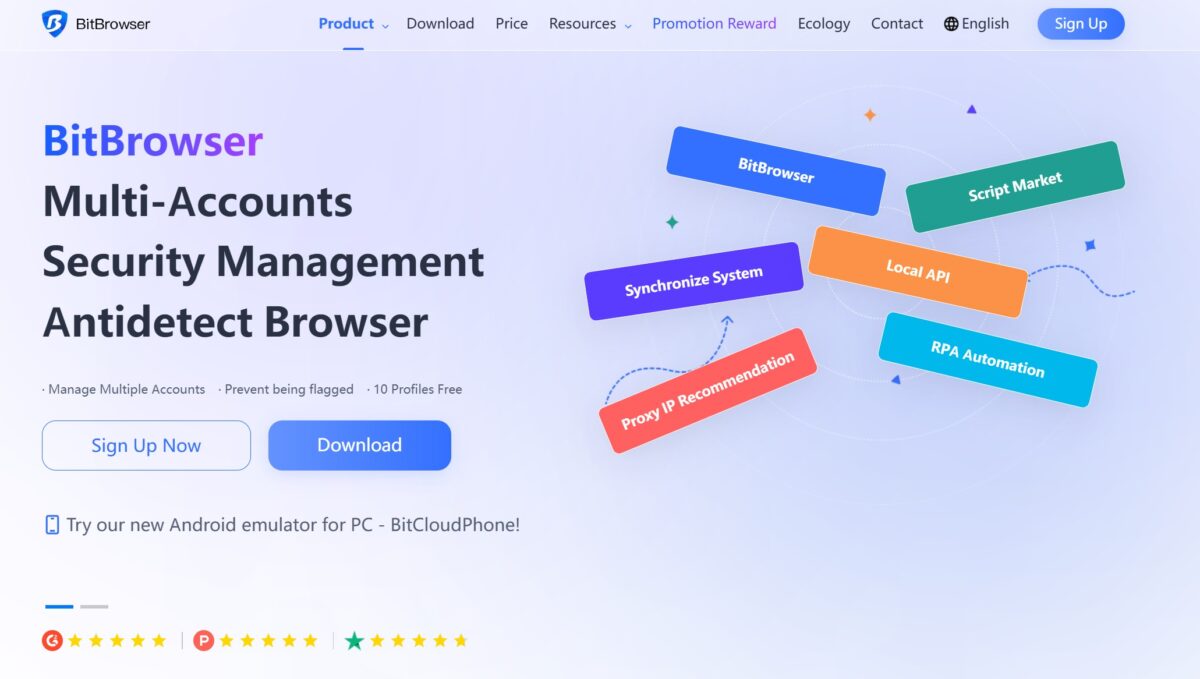
BitBrowser at a Glance
| Free plan | 10 profiles forever (with limitations) |
| Paid plans | Starting at $10/month for 50 profiles |
| Dual engine | Chromium (BitBrowser) and Firefox (BitFox) |
| RPA automation | Built-in visual builder and script marketplace |
| Cloud emulator | Android (BitCloudPhone) |
| API | Local, with Selenium, Puppeteer, and Playwright support |
| Platforms | Windows 10+ and macOS 12+ |
Who it’s for:
- Affiliate marketers on a tight budget;
- Crypto hunters (airdrops, multi-wallet setups);
- Beginners getting into multi-accounting;
- Automation enthusiasts who need a free API.
Who it’s NOT for:
- Large agencies with strict SLA requirements;
- Anyone who prioritizes data security (there was a serious breach in 2023);
- Users who expect quality English-language support.
Installation and First Launch
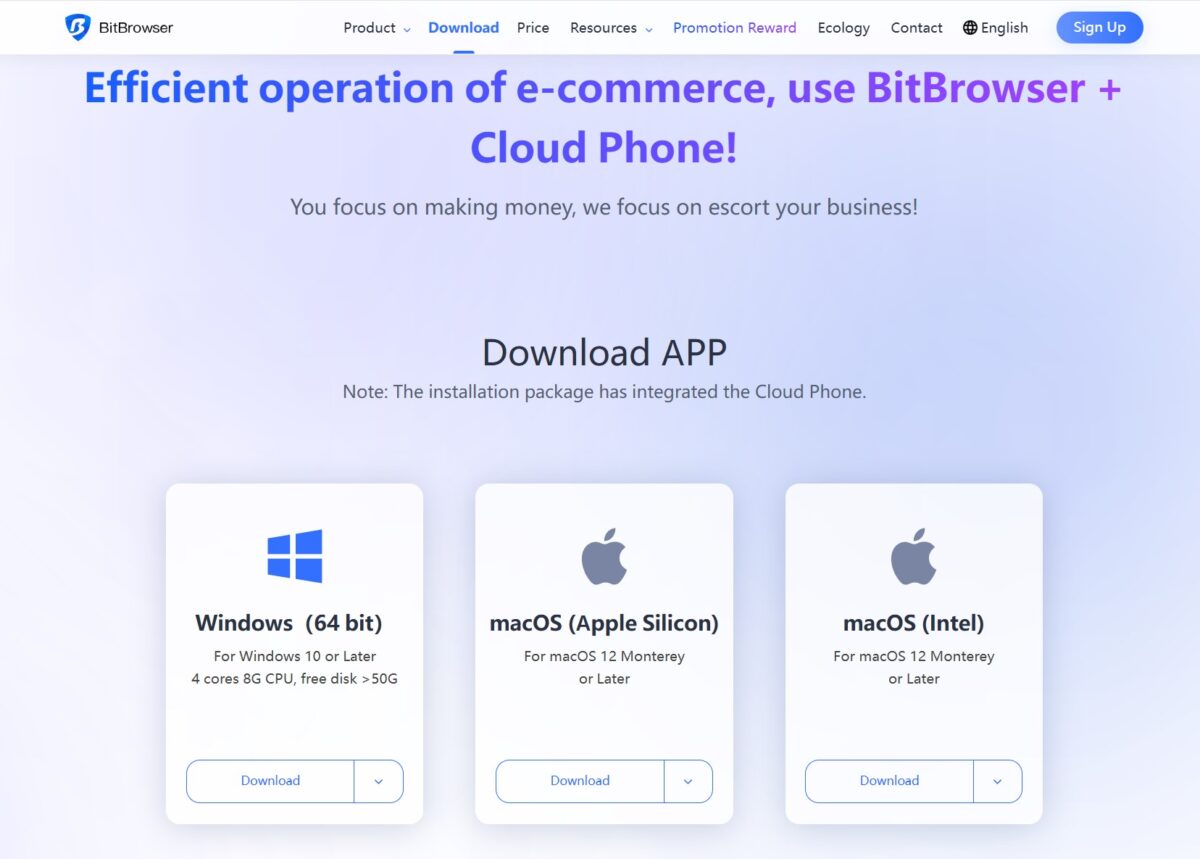
Download and installation took about 3 minutes. The download page offers three options: Windows (64-bit), macOS (Apple Silicon), and macOS (Intel). Minimum requirements for Windows: 4 cores, 8 GB RAM, 50 GB free disk space.
After installation, the first launch immediately shows a warning popup for free users.
The gist: a free account can only be used on one device, and running it on virtual machines is prohibited. If you try to register multiple free accounts, all of them will be banned.
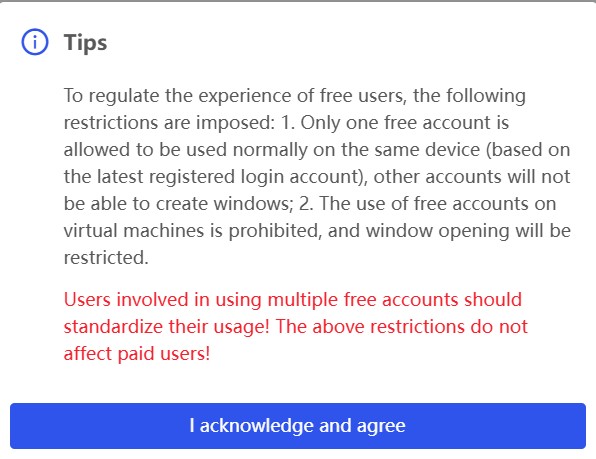
This matters: BitBrowser is strict about free plan abuse. There are complaints on Trustpilot from users who got banned for “suspicious activity” and were essentially forced to upgrade to a paid plan to regain access to their data.
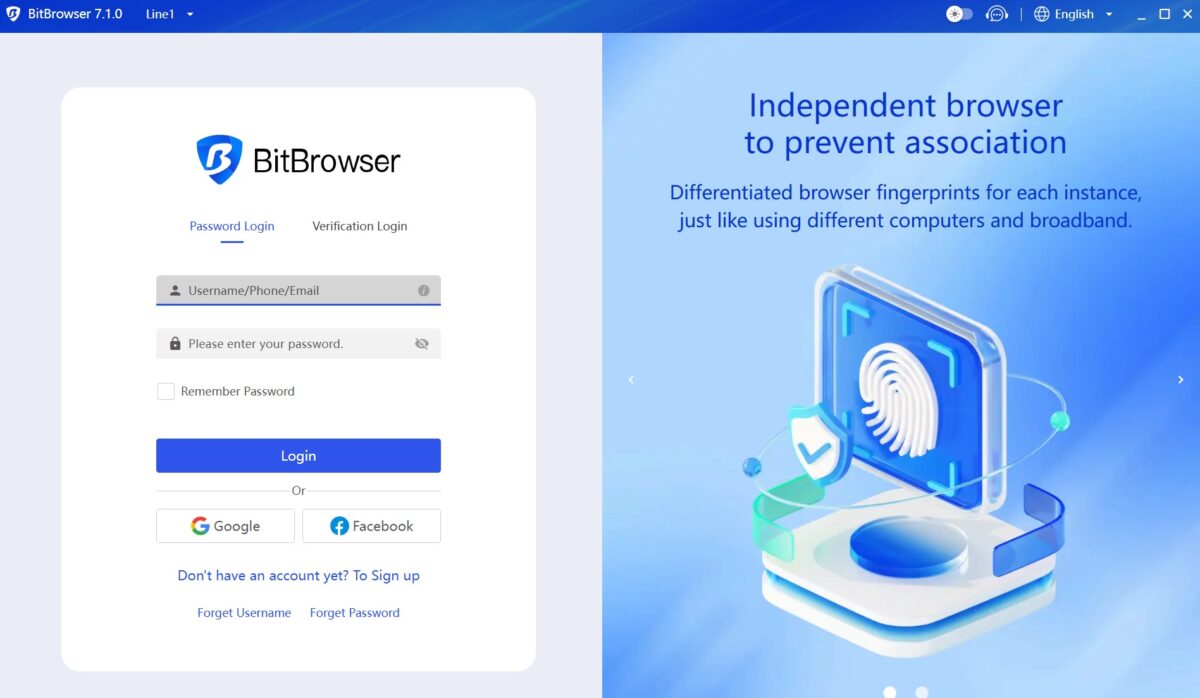
The login screen is standard: password or verification code, plus sign-in via Google or Facebook.
Interface and Dashboard
Once you log in, you land on the main screen. Version at the time of testing: BitBrowser 7.1.0. The interface is noticeably busier than Dolphin Anty. The top bar immediately hits you with promotional blocks: Synchronize System, Proxy IP, Chuhai2345 (cross-border resources), Script Market.
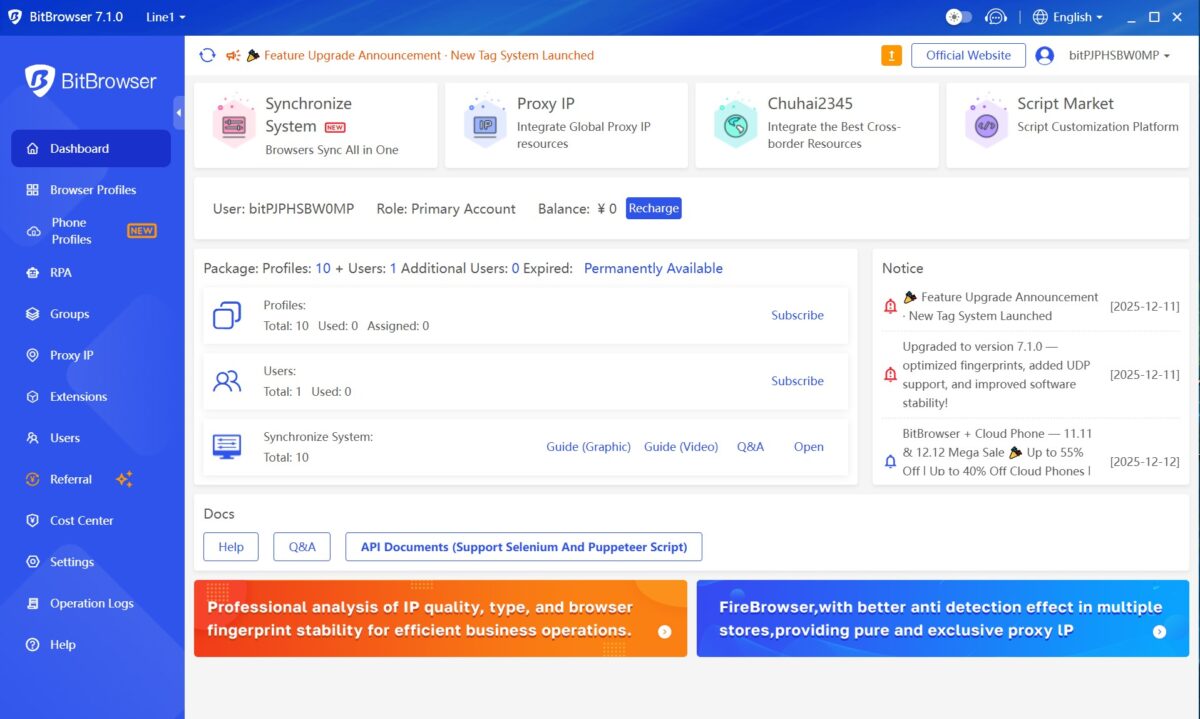
The dashboard shows:
- Current plan: 10 profiles (free), “Permanently Available”;
- Balance: 0 CNY (yes, the internal currency is in Chinese yuan);
- Profile count: 10 total, 0 used;
- User count: 1 (team features are locked on the free plan);
- Synchronize System: 10 slots (for syncing actions across profile windows).
The left menu includes: Browser Profiles, Phone Profiles, RPA, Groups, Proxy IP, Extensions, Users, Referral, Cost Center, Settings, Operation Logs, Help.
The sidebar is packed compared to Dolphin Anty’s minimalist approach. You’ve got a referral program, an extension marketplace, RPA automation, cloud phones — all crammed in. For a power user, this is actually a plus (everything in one place), but a beginner might feel overwhelmed.
Notice the “Kernel update detected” block at the top of the screen. BitBrowser lets you download different Chromium kernel versions: from 130 to 140. This is a handy feature — you can create profiles with different Chrome versions, which adds fingerprint diversity when running large-scale account farms.
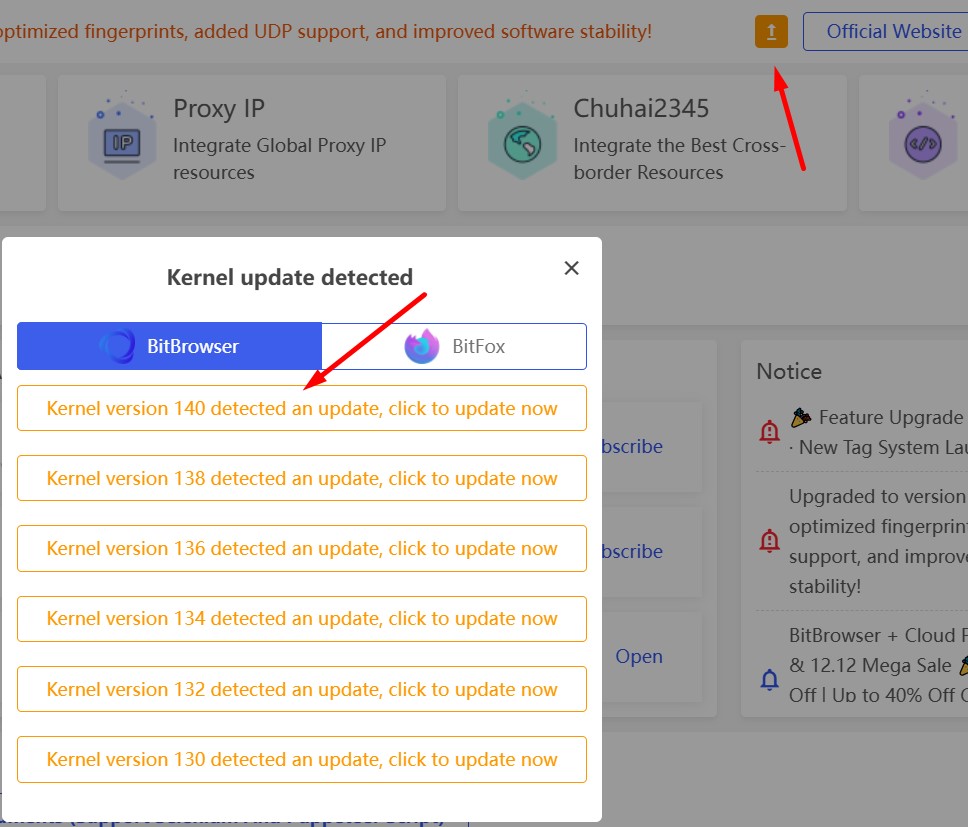
You’ll also see two tabs here: BitBrowser (Chromium) and BitFox (Firefox). The dual-engine architecture lets you create profiles on both rendering engines — something most competitors don’t offer. In practice, this means you can mix Firefox profiles into your account farm for a more natural-looking browser distribution. However, the Synchronize System (window sync) only works with Chrome profiles — Firefox isn’t supported.

Profile Creation: Every Setting Explained
Click “+ Add” on the Browser Profiles tab. The profile creation window opens with several sections: Basic, Fingerprint, Proxy, Preference.
Basic Section

Fields:
- Name — profile name (up to 50 characters);
- Tags — organizational tags (similar to tags in Dolphin Anty);
- Group — profile group;
- Platform — target platform selection;
- Username/Password — credentials for the target site (stored within the profile);
- Duplicate Validation — checks for duplicate usernames;
- Multi-open settings — allow or block running the same profile simultaneously;
- 2FA Key — two-factor authentication key;
- Remark — notes field, up to 500 characters.
The Platform dropdown has presets for popular sites: Facebook, TikTok, Instagram, X.com, WhatsApp, LinkedIn, Tinder, YouTube, Amazon, PayPal, Google, AliExpress, Alibaba, Vinted, eBay, Lazada, Mail.com, Outlook, and more.
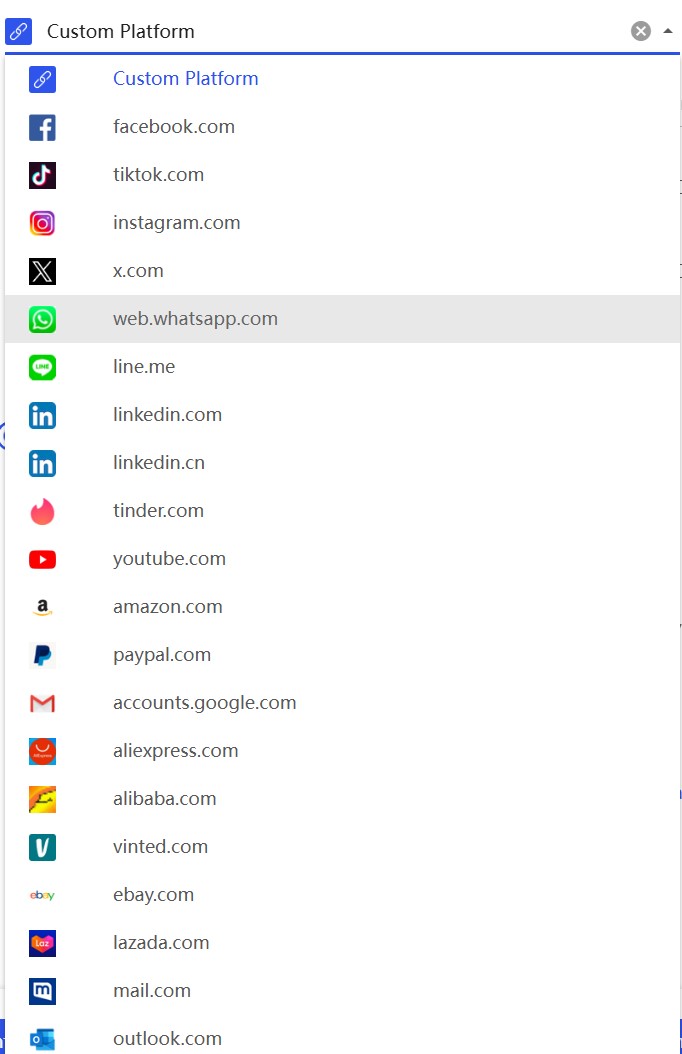
It’s a nice organizational feature. Dolphin Anty has similar presets under “Platforms,” but BitBrowser’s list is more extensive. In practice, the platform selection only affects profile categorization and possibly some default parameters — it doesn’t change the actual fingerprint.
Fingerprint Section
This is where things get interesting. BitBrowser gives you granular control over dozens of parameters.
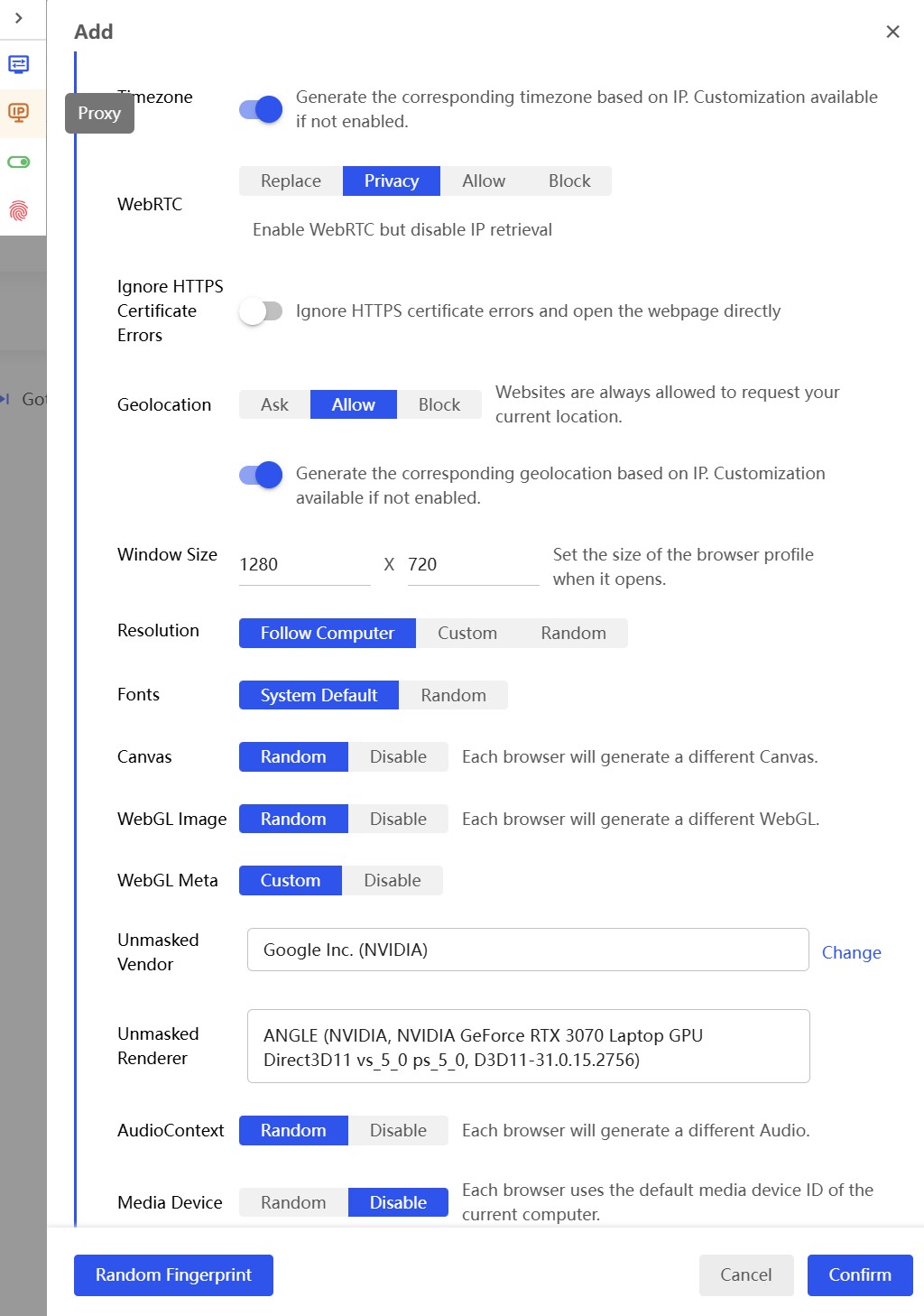
Timezone — auto-generated based on proxy IP. This one’s set up correctly, leave it on.
WebRTC — four modes: Replace, Privacy, Allow, Block.
- Replace — substitutes the proxy IP for the real one (recommended for most tasks);
- Privacy — enables WebRTC but blocks IP retrieval (middle ground);
- Allow — exposes your real IP (dangerous!);
- Block — disables WebRTC entirely.
The default is Privacy. For account farming, I’d recommend Replace: WebRTC stays functional (which looks natural), but it reports the proxy IP instead of your real one.
Geolocation — three options: Ask, Allow, Block. With the auto-detect toggle on, geolocation is pulled from the proxy IP. That’s the correct behavior.
Window Size — defaults to 1280×720. My advice: set it to 1920×1080 — it’s the most common screen resolution worldwide and draws less attention.
Resolution — Follow Computer, Custom, Random. The default is Follow Computer, meaning the browser reports your actual monitor resolution. For proper anonymity, switch to Custom and set a value matching your Window Size. Otherwise, checkers will spot the mismatch.
Fonts — System Default or Random. The default is System Default, which exposes your real system fonts. This is one of the most reliable fingerprinting identifiers. Switch to Random.
Canvas — Random or Disable. Default is Random. Each profile generates a unique Canvas hash. Good.
WebGL Image — Random or Disable. Default is Random. Good.
WebGL Meta — Custom or Disable. This is where the GPU vendor and renderer are set. By default, it uses your actual GPU data (in my case: Google Inc. (NVIDIA), ANGLE (NVIDIA, NVIDIA GeForce RTX 3070 Laptop GPU Direct3D11)). For basic masking this is fine, but if you’re creating lots of profiles, you’ll want to vary this.
AudioContext — Random or Disable. Default is Random. Good.
Media Device — Random or Disable. Default is Disable! This is a mistake in the default settings. Having zero media devices looks suspicious — any normal computer has at least an audio output. Switch to Random.
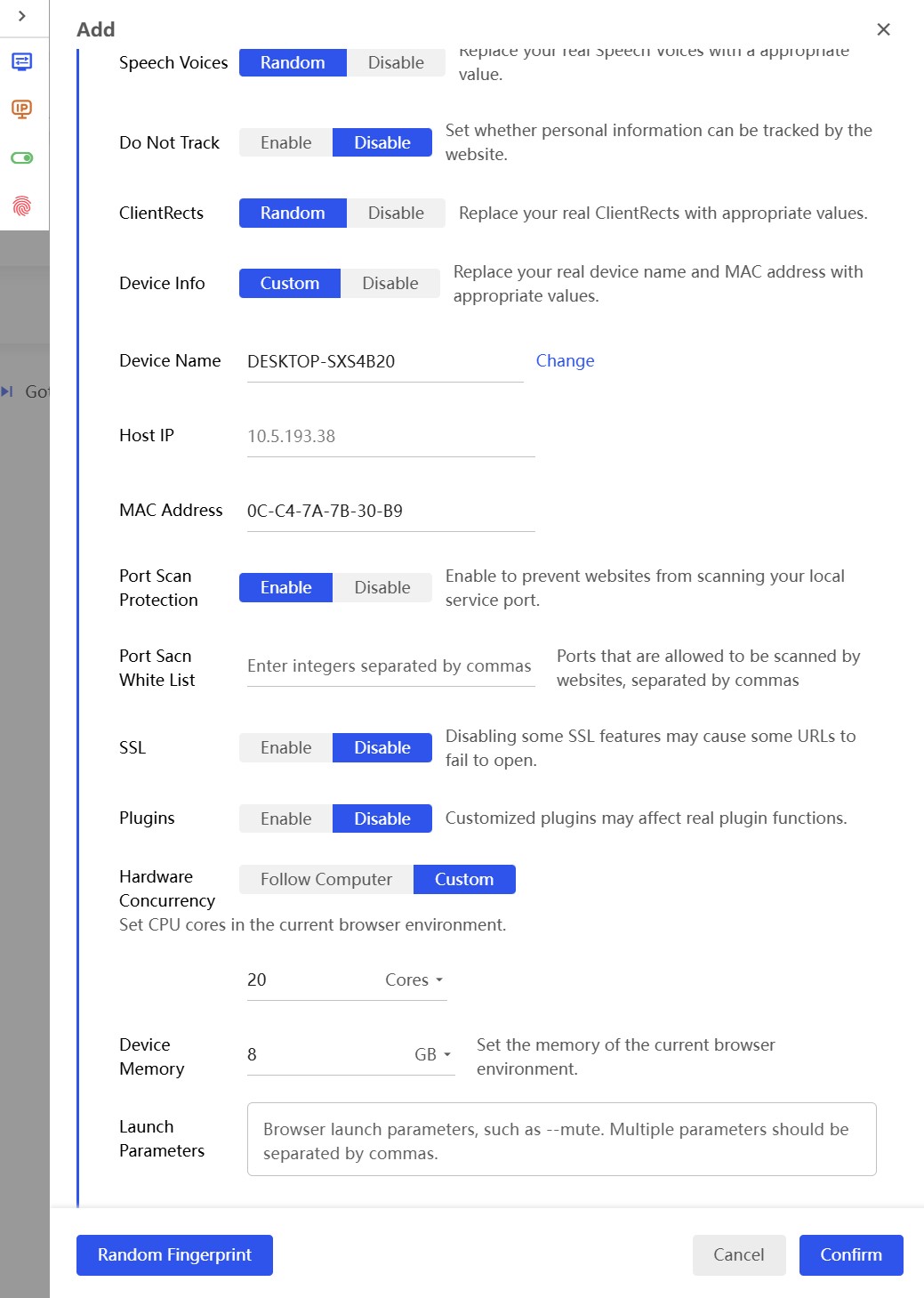
Speech Voices — Random or Disable. Default is Random. It generates voice engines typical for the target OS.
Do Not Track — Enable or Disable. Default is Disable. Correct — most real users don’t turn DNT on.
ClientRects — Random or Disable. Default is Random. ClientRects is used for sub-pixel rendering — one of the more advanced fingerprinting methods.
Device Info — Custom or Disable. Generates a device name (DESKTOP-XXXXXXX), local IP, and MAC address. By default, random values are generated with a Change button to regenerate them.
Port Scan Protection — Enable or Disable. Default is Enable. Blocks websites from scanning your ports. Keep it on.
SSL — Enable or Disable. Default is Disable. Turns off certain SSL features that can be used for fingerprinting.
Plugins — Enable or Disable. Default is Disable.
Hardware Concurrency — Follow Computer or Custom. Default is Custom, set to 20 cores. Heads up: 20 cores means a server CPU or a high-end desktop. For a regular Reddit or Facebook user, set this to 4 or 8 cores. Checkers flag this kind of thing.
Device Memory — default is 8 GB. A reasonable value, leave it as is.
Proxy Section
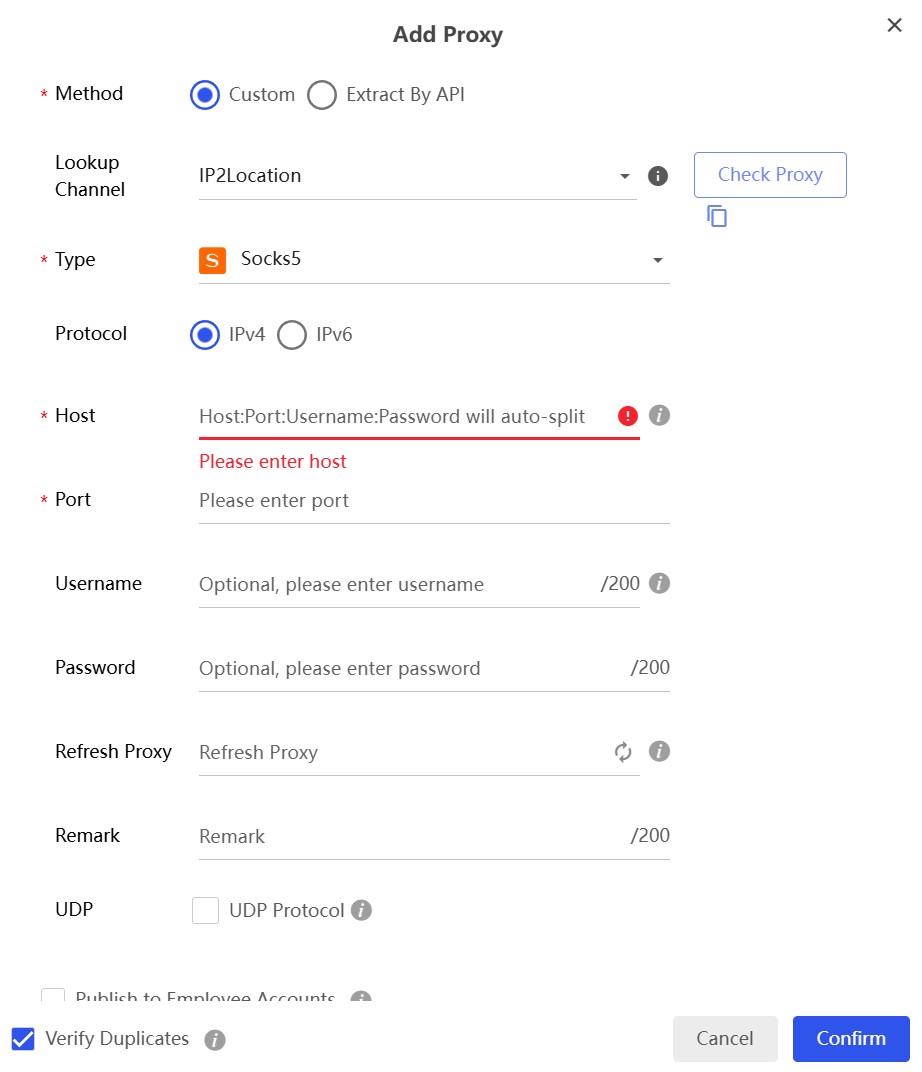
BitBrowser offers three ways to attach a proxy:
- Custom — manually enter host, port, username, password;
- Extract By API — automatically fetch IPs through the provider’s API;
- Proxy Management — select from the built-in proxy manager.
Supported protocols: HTTP, HTTPS, SOCKS5, SSH.
The proxy manager lives in a separate section (Proxy IP in the left menu). You can add proxies ahead of time and then assign them to profiles. There’s a built-in proxy checker with geolocation detection.
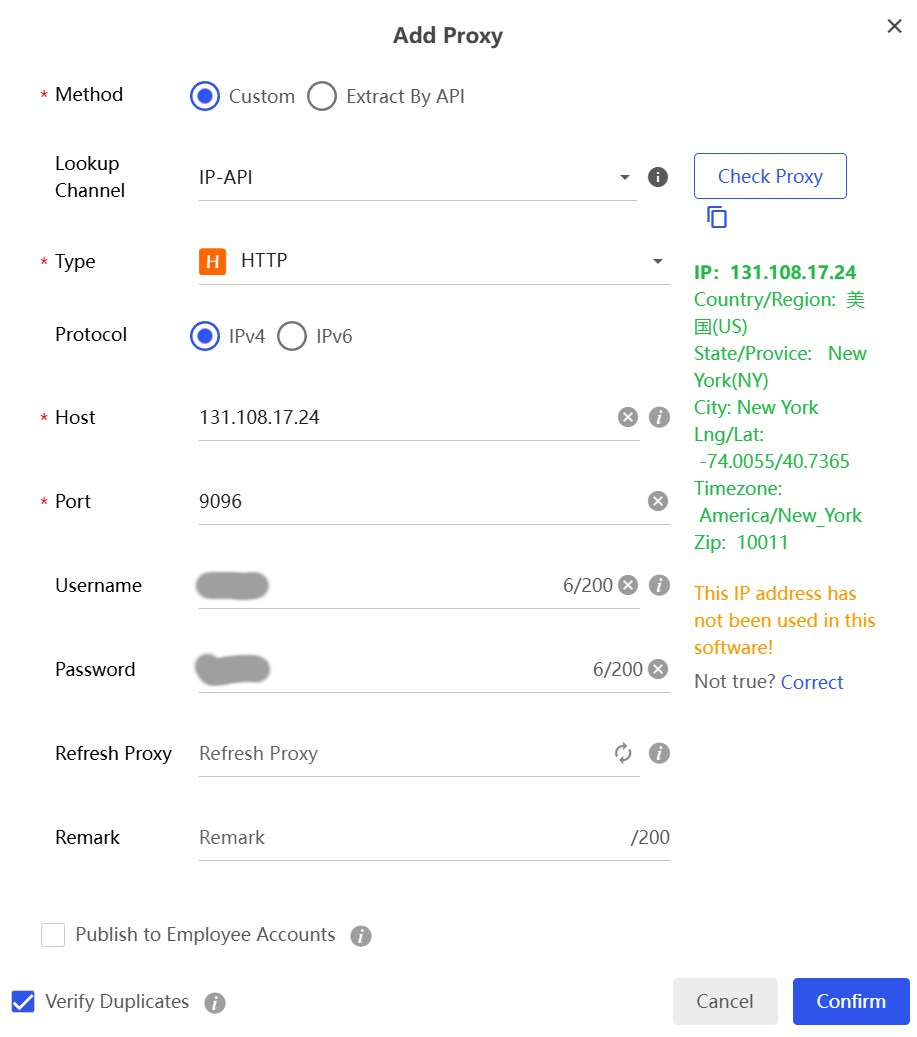
The proxy add window shows the check results: IP, country, state, city, coordinates, timezone, and ZIP code. There’s also a note saying “This IP address has not been used in this software!” — telling you this IP isn’t assigned to any other profiles. A useful feature for avoiding accidental IP overlap between accounts.
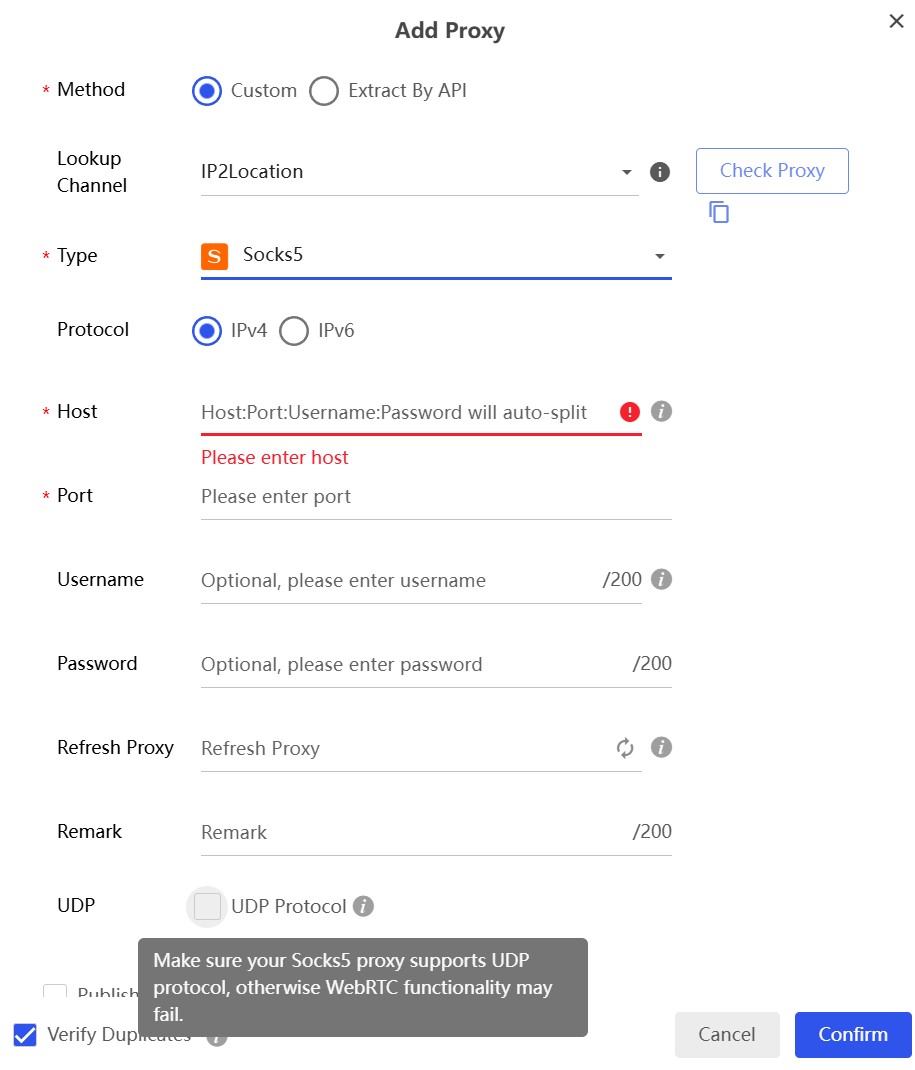
For SOCKS5 proxies, there’s a UDP Protocol checkbox. This is important: if you’re using WebRTC in Replace mode, the proxy needs to support UDP traffic. Without it, WebRTC substitution won’t work properly.
Proxy input format: you can paste the entire string into the Host field as Host:Port:Username:Password, and the browser will auto-parse it into the correct fields. Handy for bulk imports.
Sync/Cache Section
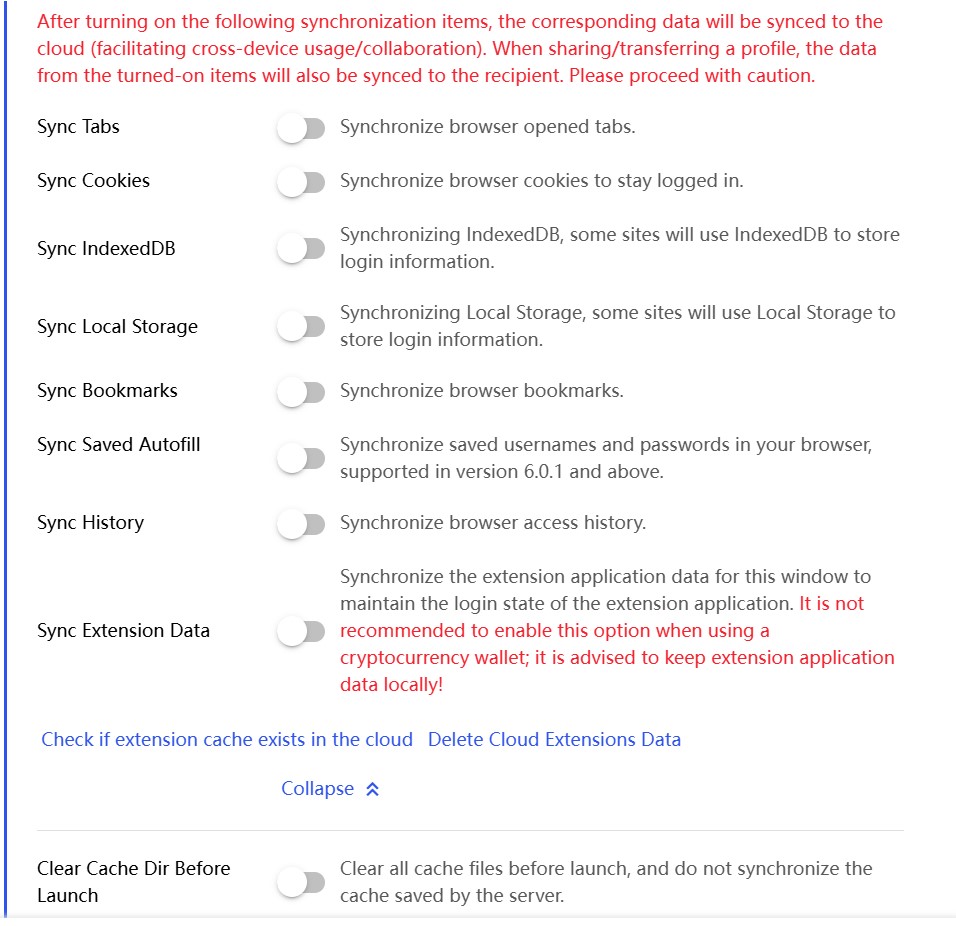
Sync Tabs and Sync Cookies — enabled by default. Data syncs to BitBrowser’s cloud, and there’s a red-text warning right in the interface about it. Given the data breach in August 2023 (more on that below), I’d recommend turning sync off for any profiles with sensitive accounts.
Clear Cache Dir Before Launch — clears the cache every time you start the profile. For account farming, leave this off — you need cookies and cache to persist between sessions.
Random Fingerprint Before Launch — regenerates the fingerprint every time you start the profile. Absolutely do not enable this for farming! The site will see the “same user” logging in from different devices and ban the account.
Disable GPU — when toggled on, it actually enables GPU hardware acceleration (confusing name, I know). Keep it on for Canvas and WebGL to work correctly.
Memory Saver — frees up memory from inactive tabs. Useful when running 10+ profiles at once.
Preference Section
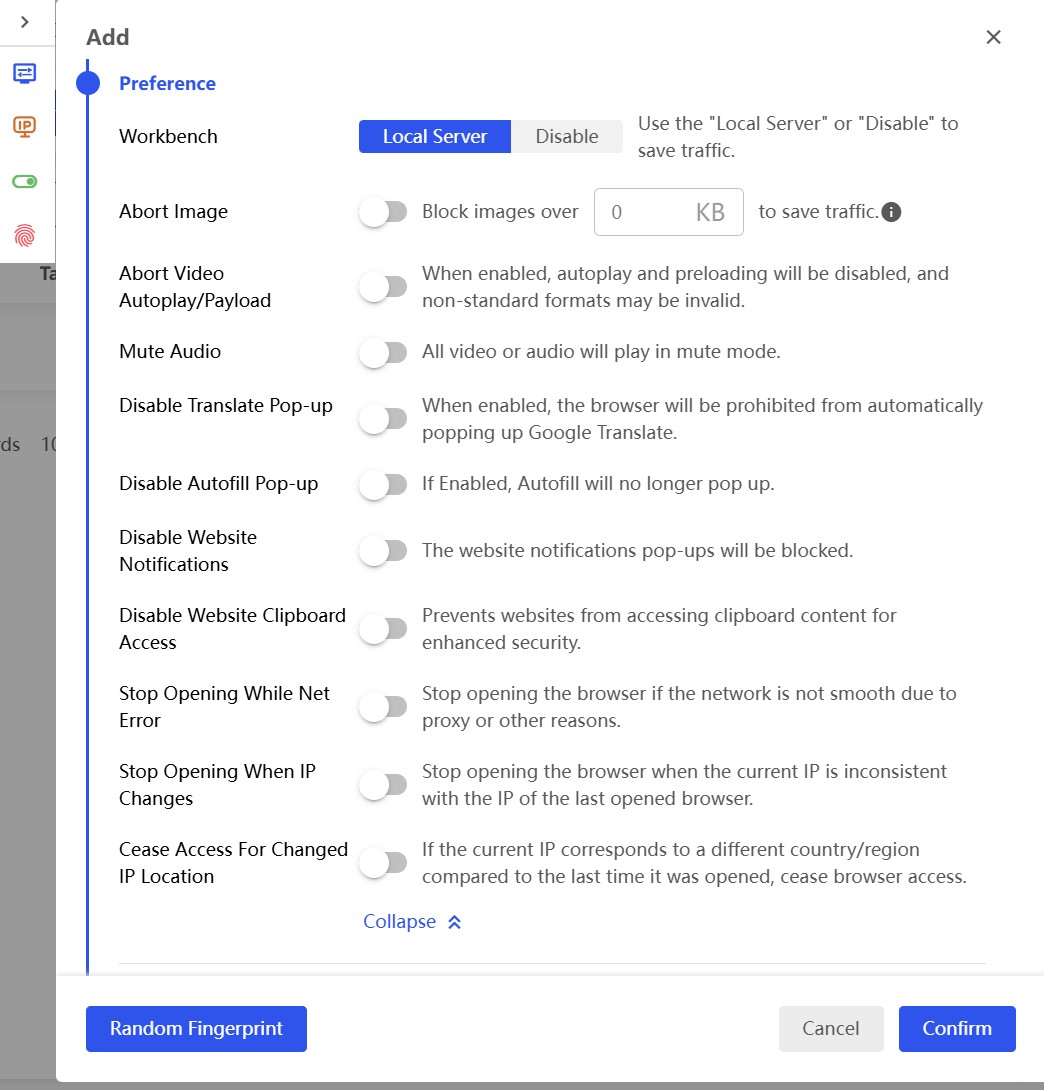
Hidden in here are three critically important safety toggles:
Stop Opening While Net Error — prevents the browser from launching if the proxy is down. Turn this on, no question! Without it, the browser can open with your real IP exposed.
Stop Opening When IP Changes — blocks launch if the IP has changed since the last session. Turn it on for farming — it protects against unexpected sticky session drops.
Cease Access For Changed IP Location — kills the session if the IP now points to a different country. Turn it on — it’s your guard against geolocation anomalies.
All three toggles are off by default. This is a serious flaw in BitBrowser’s default configuration. Dolphin Anty has equivalent features enabled out of the box.
I also recommend enabling: Disable Translate Pop-up (so Google Translate doesn’t reveal your system language), Disable Website Notifications, and Disable Website Clipboard Access.
Anonymity Test: Running the Checkers
I set up a profile with a US-based HTTP proxy from New York (131.108.17.24:9096, ISP: Udasha S.A., United States) and ran it through all the major checking tools. WebRTC was left in Privacy mode (the default).
Whoer.net
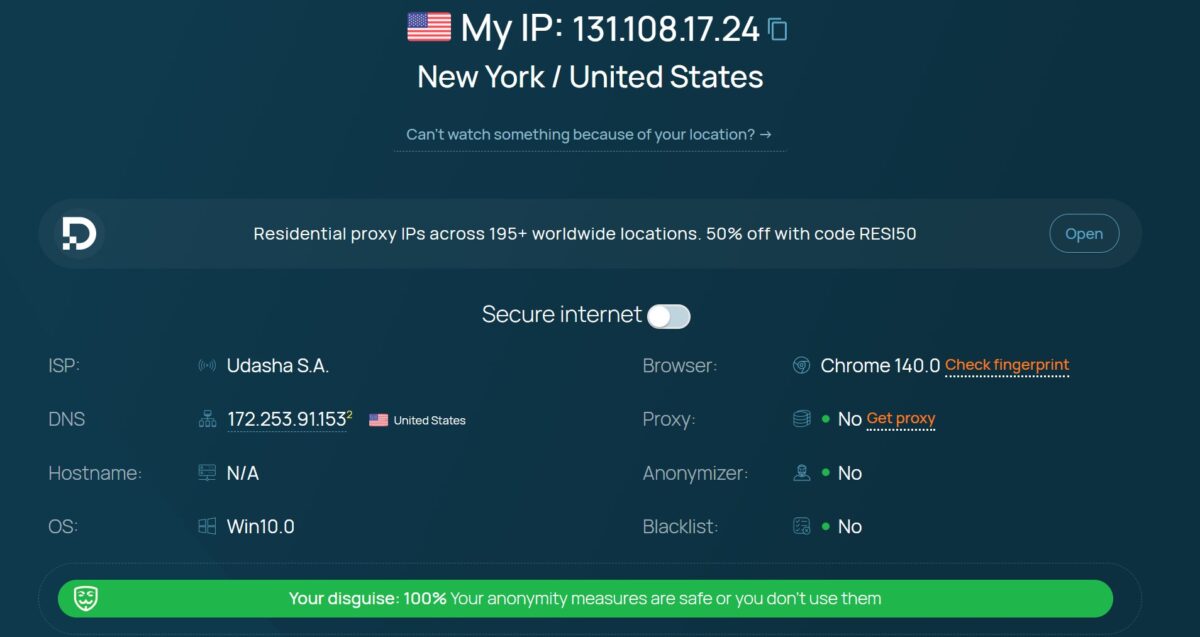
Whoer.net showed 100% disguise and didn’t detect a proxy. That’s a solid baseline result. But Whoer.net isn’t exactly a tough checker — it only looks at basic parameters.
BrowserLeaks WebRTC
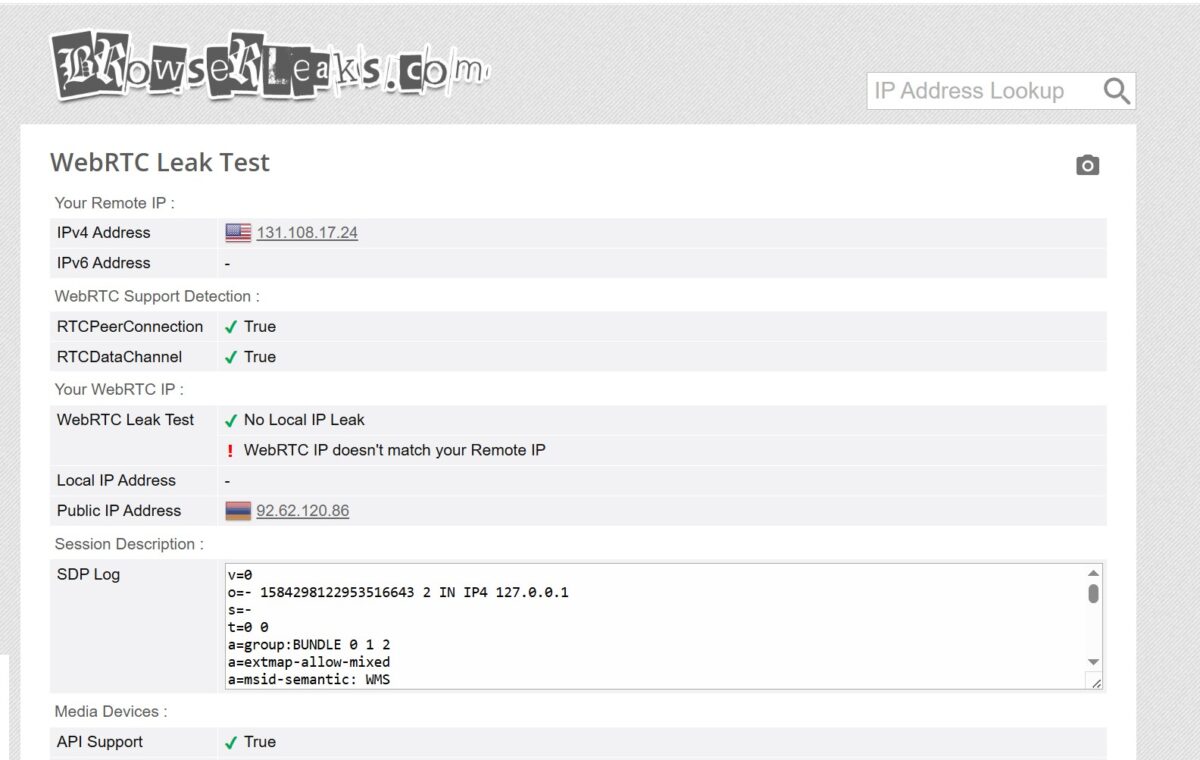
Now here’s where it gets ugly. BrowserLeaks shows:
- Remote IP (HTTP): 131.108.17.24 (proxy IP — correct);
- WebRTC Public IP: 92.62.120.86 (this is NOT the proxy IP!);
- WebRTC Leak Test: No Local IP Leak, but “WebRTC IP doesn’t match your Remote IP”.
The default Privacy mode didn’t substitute the proxy IP into WebRTC. Instead, some other IP (92.62.120.86) leaked through a STUN request. This means BitBrowser’s default WebRTC setting doesn’t provide full masking. The site sees two different IPs: one via HTTP, another via WebRTC. For any serious anti-fraud system, that’s a dead giveaway.
The fix: switch WebRTC to Replace (so it injects the proxy IP) or Block (to disable it entirely).
ToProxyLab WebRTC Leak Test
Using our own tool at toproxylab.com/webrtc-leak-test the results were:
- Remote IP: 131.108.17.24 (United States, Udasha S.A.);
- WebRTC IP Addresses: WEBRTC BLOCKED;
- Leak Status: WEBRTC BLOCKED;
- Media Devices: Audio Input 1, Video Input 1, Audio Output 1.
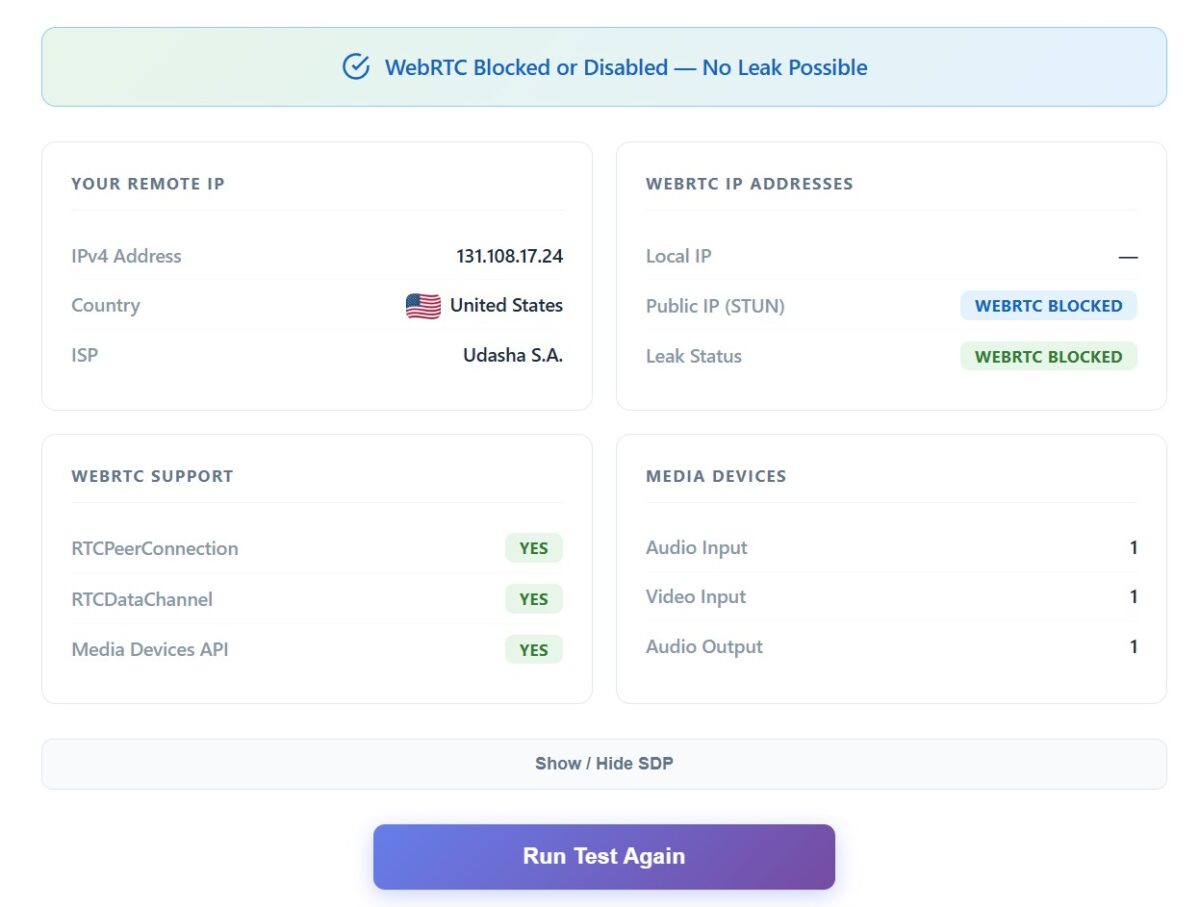
Our test showed WebRTC as blocked (BLOCKED status), no leak detected. The discrepancy with BrowserLeaks comes down to methodology — BrowserLeaks uses more aggressive STUN-based IP extraction, while our test registers the block at the API level. Either way, for maximum security I recommend switching WebRTC to Replace.
BrowserLeaks Canvas
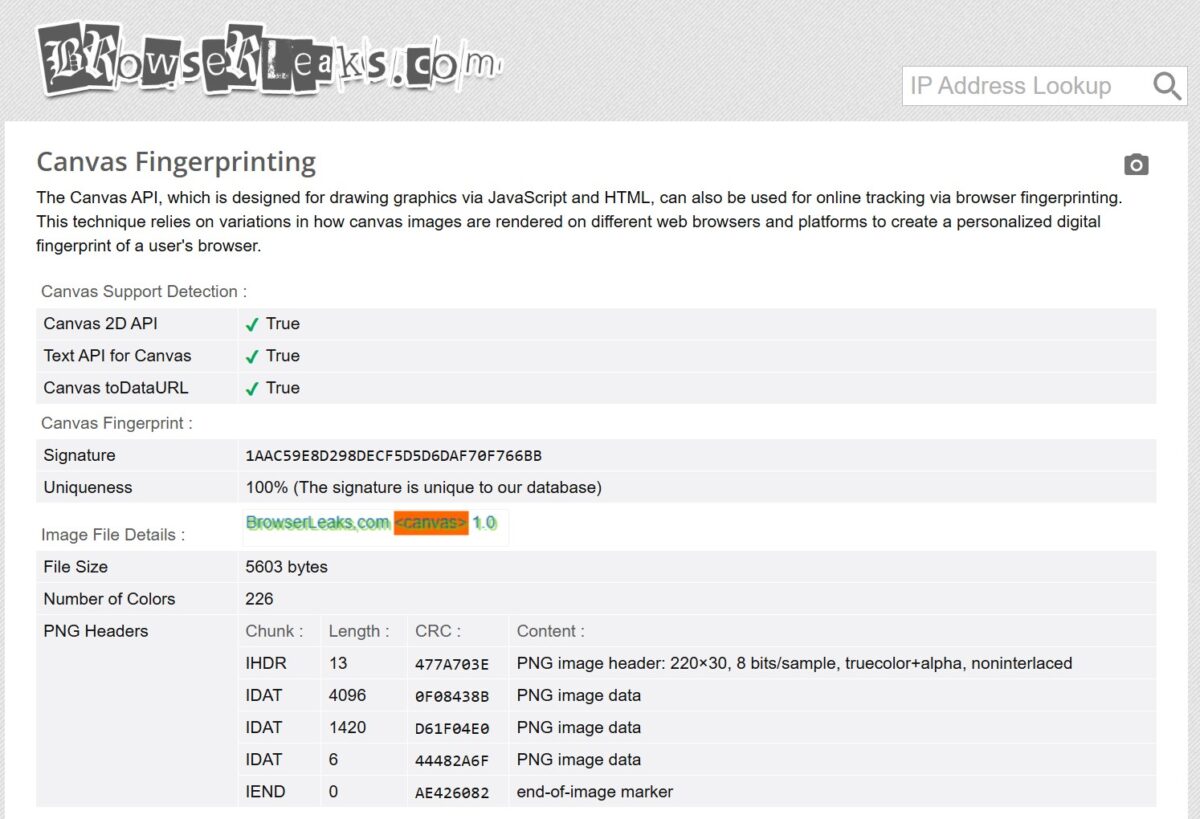
Results:
- Canvas 2D API: True;
- Text API for Canvas: True;
- Canvas toDataURL: True;
- Signature: 1AAC59E8D298DECF5D5D6DAF70F766BB;
- Uniqueness: 100%.
100% Canvas hash uniqueness means BitBrowser successfully injected noise into the rendering. Each profile generates its own unique hash. This is exactly how it should work — Canvas masking is solid.
Pixelscan.net

Pixelscan didn’t detect any fingerprint masking and flagged no bot activity. The proxy passed the check. This is a great result: “No masking detected” means Pixelscan’s anti-fraud system couldn’t tell an antidetect browser was being used.
Iphey.com
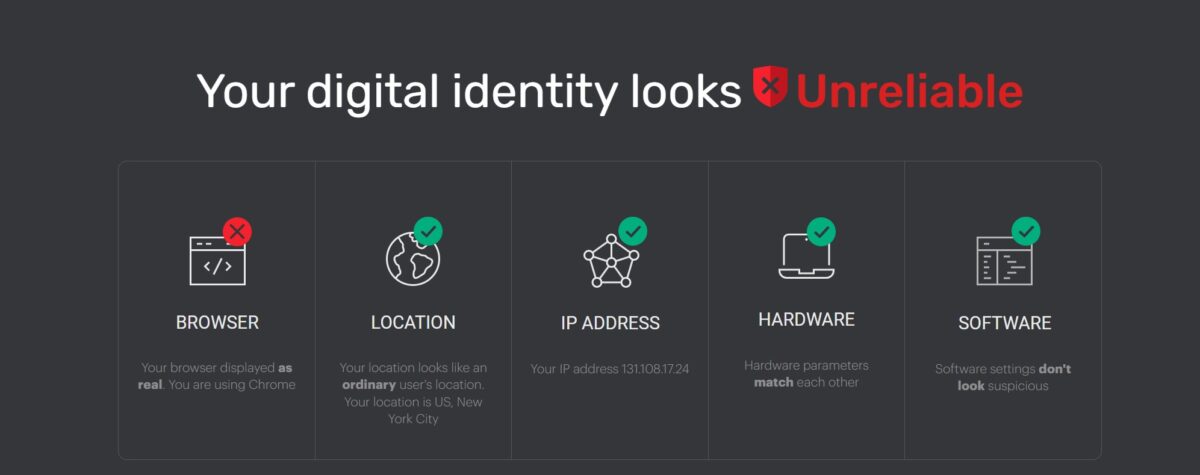
But iphey.com told a different story:
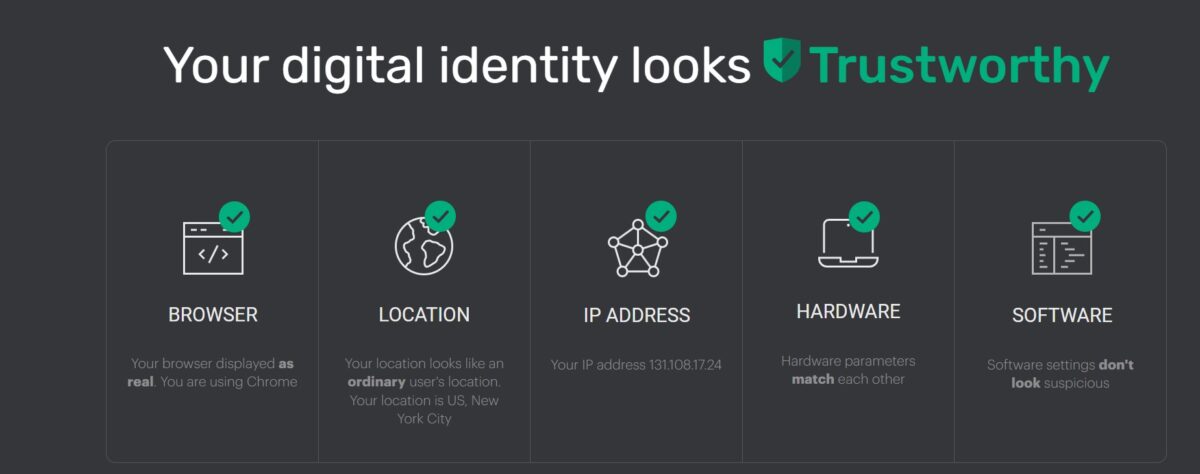
- Browser: red cross (Unreliable). “Your browser displayed as real. You are using Chrome”;
- Location: checkmark. “Your location looks like an ordinary user’s location. US, New York City”;
- IP Address: checkmark. “Your IP address 131.108.17.24”;
- Hardware: checkmark. “Hardware parameters match each other”;
- Software: checkmark. “Software settings don’t look suspicious”.
Overall verdict: Unreliable. Iphey flagged the Browser parameter even though everything else checked out. This means iphey detected some inconsistency in the browser’s behavior that gives it away as modified. Most likely it’s related to Chrome version 140.0.0.0 (which at the time of testing may have been too new or non-standard), or the fact that some low-level Chromium parameters in BitBrowser are modified in ways iphey can detect.
For comparison: Dolphin Anty with similar settings typically gets a “Trustworthy” rating from iphey. This is one of BitBrowser’s key weaknesses — out of the box, profiles don’t always pass strict checkers. You need manual calibration: picking the right kernel version and fine-tuning the settings.
Next, I switched WebRTC to Replace, relaunched the browser, and ran the iphey test again. This time it passed with flying colors.
Pricing and Plans

Discounts for longer commitments: 10% off for quarterly, 20% off for semi-annual, 30% off for annual billing.
Price comparison with competitors:
| Browser | Free tier | 100 profiles | 1,000 profiles |
|---|---|---|---|
| BitBrowser | 10 profiles | $15/mo | ~$60/mo |
| Dolphin Anty | 5 profiles | $89/mo | $159/mo |
| GoLogin | 7-day trial | $49/mo (100) | $99/mo (300) |
| Multilogin | None | ~$33/mo (10!) | $181+/mo |
| AdsPower | 2 profiles | ~$25+/mo | Custom quote |
On price alone, BitBrowser is in a league of its own. $15 for 100 profiles versus $89 at Dolphin Anty — that’s nearly a 6x difference. But as the tests showed, the low price comes with trade-offs in out-of-the-box masking quality and security risks.
Security Incident: The August 2023 Breach
There’s no way to skip this in an honest review. In August 2023, BitBrowser’s servers were compromised. Hackers gained access to cloud-stored user data, including synced browser extensions and local storage from browser profiles.
How it happened: many users had crypto wallet extensions (MetaMask and similar) attached to their BitBrowser profiles with cloud sync enabled. When the servers were breached, attackers got hold of extension data — including seed phrases and passwords. The result: mass theft of cryptocurrency from client accounts.
BitBrowser’s response: the company acknowledged the breach but shifted part of the blame onto users, noting that extension sync wasn’t enabled by default. No transparent compensation mechanisms were offered to those affected.
My recommendations in light of this incident:
- Don’t store seed phrases, passwords, or payment data in extensions attached to BitBrowser profiles;
- Disable Sync Tabs and Sync Cookies for profiles with sensitive accounts;
- Use a third-party password manager with local encryption;
- Don’t install crypto wallets in an antidetect browser — use a separate, isolated browser for that.
RPA Automation and Script Market
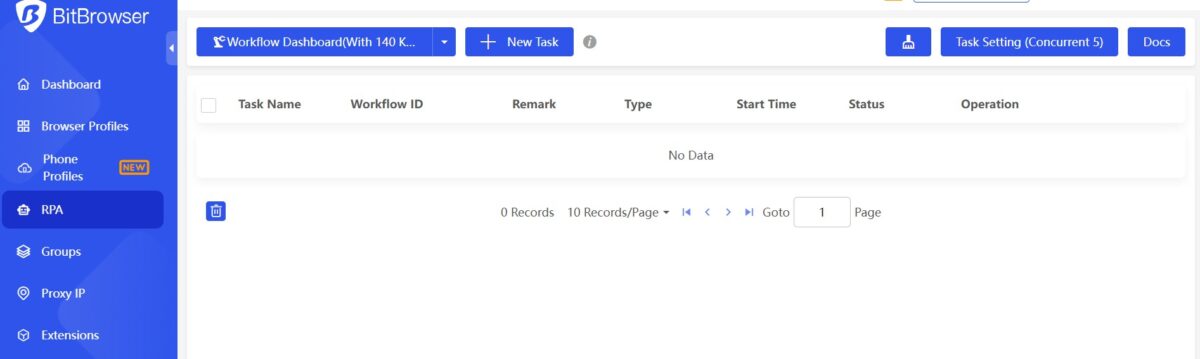
BitBrowser includes a visual RPA builder (Robotic Process Automation) even on the free plan. It’s a drag-and-drop editor where you can build multi-step workflows without writing code: cookie warm-up, automated registration, bulk actions across platforms.
The Script Market (script marketplace) has ready-made templates from the community: AliExpress automation, WhatsApp account warm-up, crypto-related tasks. Some scripts are free, others are paid.
For those who need more than the visual RPA builder, there’s a local API available on all plans. The API runs on port 54345 (or 8000) and supports Selenium, Puppeteer, and Playwright. You can programmatically create profiles, launch them, and manage fingerprints and proxies.
BitCloudPhone: Cloud-Based Android
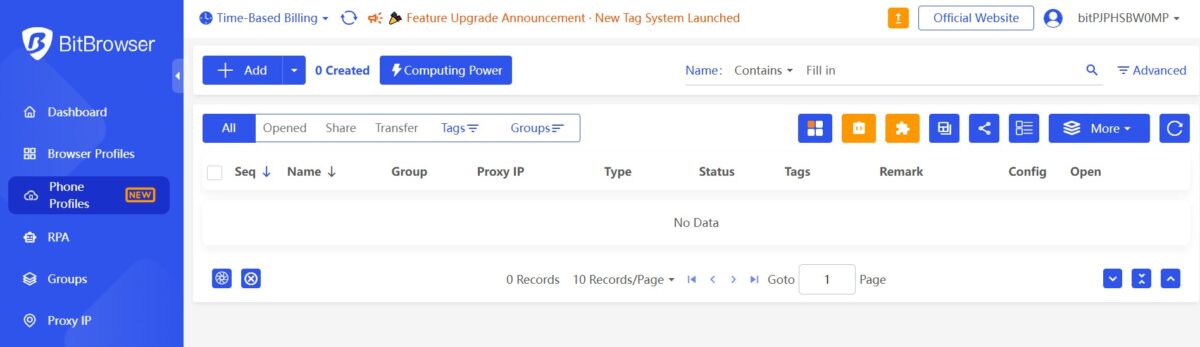
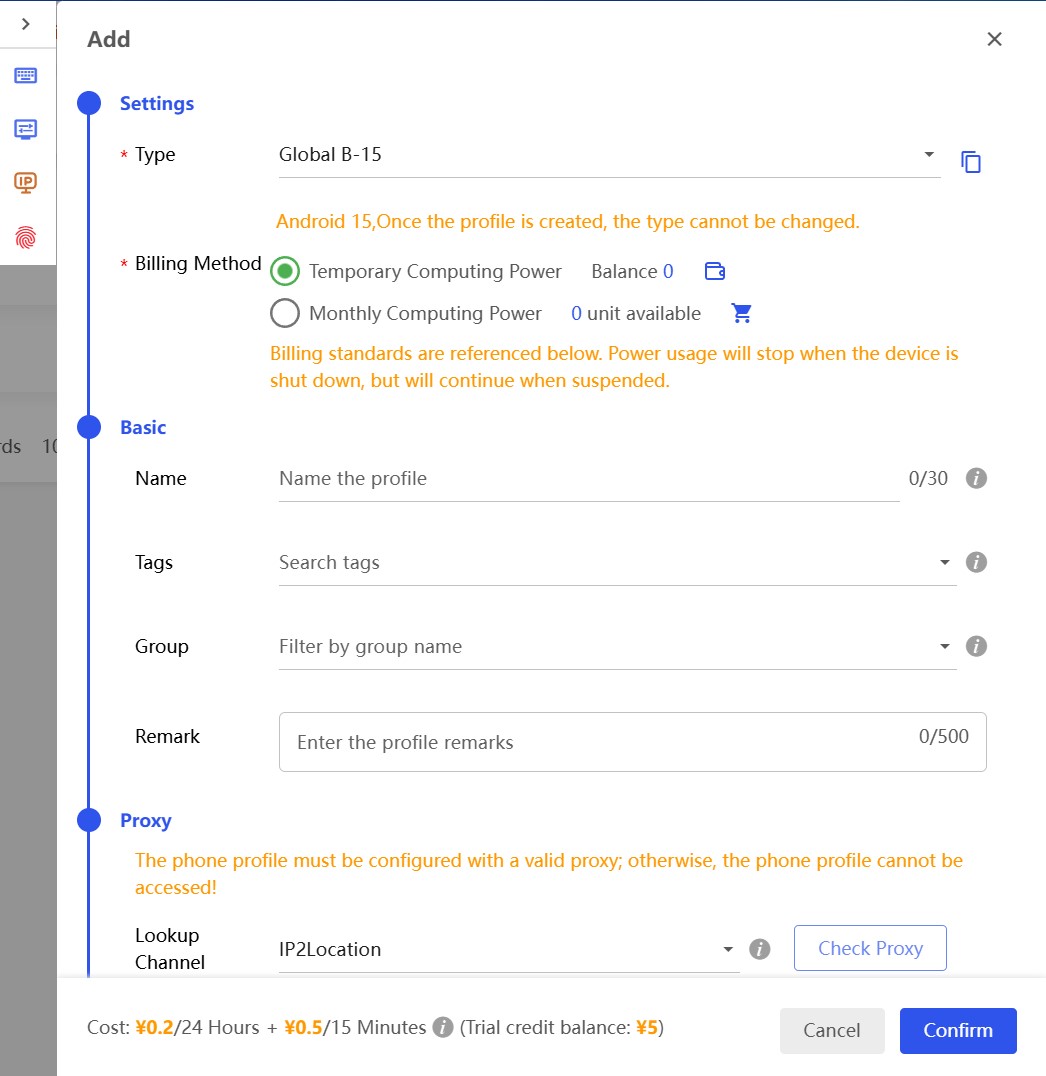
BitBrowser offers something unique in this market: a cloud-based Android emulator (BitCloudPhone). Instead of trying to fake a mobile device through a desktop User-Agent, the service spins up real Android images on remote servers.
Pricing breakdown:
- Profile storage: $0.03 per 24 hours;
- Compute resources: $0.07 per 15 minutes (capped at $1.60/day);
- Running a cloud phone 24/7 works out to roughly $45-48 per month.
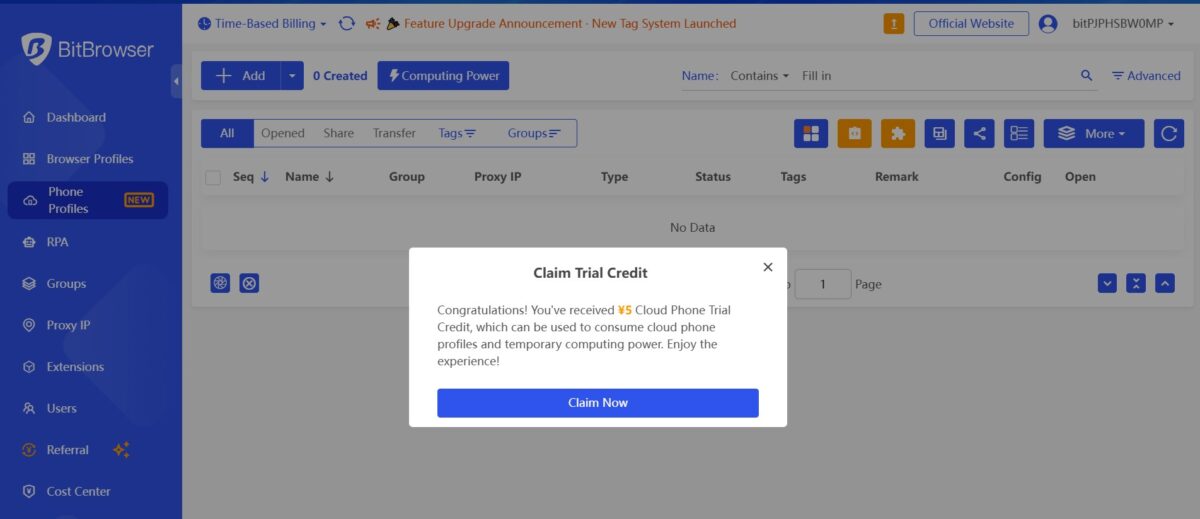
For marketers working with TikTok and Instagram (where desktop antidetect just doesn’t cut it), this could be a viable solution. However, I didn’t test CloudPhone as part of this review, so I can’t vouch for the quality of the mobile fingerprints.
- Price. $15 for 100 profiles with full API and RPA access is genuinely cheap. For beginners and solo affiliate marketers, it’s the best deal on the market in terms of features per dollar.
- Dual engine. Chromium + Firefox in one app. No direct competitor (Dolphin Anty, GoLogin, AdsPower) offers this.
- Granular settings. Control over Hardware Concurrency, Device Memory, Port Scan Protection, Speech Voices, ClientRects, and a dozen other parameters. In Dolphin Anty, some of these are hidden or unavailable.
- Proxy manager with duplicate detection. The “This IP has not been used in this software” warning helps prevent IP overlap between accounts.
- Three safety toggles (Stop Opening While Net Error, Stop Opening When IP Changes, Cease Access For Changed IP Location). Excellent protection against accidental leaks when a proxy drops. Though all three are off by default.
- Free API on the free plan. Neither Dolphin Anty nor GoLogin give you full API access for free.
- Dangerous default settings. Media Device is off, Hardware Concurrency set to 20 cores, WebRTC in Privacy mode (instead of Replace), safety toggles disabled, Fonts on System Default, Resolution on Follow Computer. A beginner who creates a profile with defaults and starts farming is asking for an account ban on the first platform.
- Iphey.com returned Unreliable. With default settings, the BitBrowser profile failed the Browser check on strict checkers. Dolphin Anty with the same settings typically scores Trusted.
- WebRTC leak in default mode. BrowserLeaks showed a mismatch between the Remote IP and WebRTC IP in Privacy mode. A regular user might not even notice this, and it can lead to account bans.
- Cluttered interface. Ad banners right inside the app (Proxy IP, Chuhai2345, Script Market), promo pop-ups. Dolphin Anty is significantly cleaner and more user-friendly.
- Balance in Chinese yuan. The internal balance and parts of the interface still feel very China-centric. Not a dealbreaker, but it gives the impression of a product that hasn’t been fully localized for Western markets.
- 2023 security breach. User data leaked from cloud servers. No public security audit was conducted after the incident.
- Refund policy. According to Trustpilot reviews, the company refuses card refunds and credits the amount to an internal balance instead.
- Support runs on Asian hours. Working hours: 10:00 AM to 10:00 PM Asia time. This means delays for European and American users.
Final Scores
| Parameter | Score | Notes |
|---|---|---|
| Fingerprint masking | 3/5 | Pixelscan — OK, Iphey — Unreliable. Requires manual tuning |
| WebRTC protection | 3/5 | Default Privacy mode leaks on BrowserLeaks |
| Canvas/WebGL | 5/5 | 100% Canvas uniqueness, Random works correctly |
| Interface and UX | 3/5 | Cluttered with ads, but feature-rich |
| Proxy setup | 4/5 | Great manager with duplicate check and geolocation |
| Data security | 2/5 | 2023 breach, cloud sync, no public audit |
| Price | 5/5 | Best per-profile pricing on the market |
| API and automation | 5/5 | Free API + RPA + Script Market |
| Support | 3/5 | Asian hours only, cookie-cutter replies |
| Default settings | 2/5 | Risky for beginners, require manual fixes |
Overall rating: 3.7 / 5
Who Should Use BitBrowser
Go with BitBrowser if:
- You’re on a tight budget (under $25/month for an antidetect browser);
- You need a free API for automation;
- You’re willing to spend time manually tuning each profile;
- You want no-code RPA automation;
- You’re doing crypto airdrops or small-scale affiliate work.
Skip BitBrowser if:
- You need a “set it and forget it” tool with safe defaults;
- You manage high-budget ad accounts;
- Data security is a dealbreaker for you (financial accounts, crypto wallets);
- You need responsive English-language support around the clock;
- You’re used to the clean interfaces of Dolphin Anty or GoLogin.
Think of BitBrowser like a budget Android phone: for the money, you get more features than an expensive iPhone, but you’ll spend more time configuring it and it won’t forgive mistakes. For an experienced affiliate marketer who knows exactly what to tweak, it’s a powerful tool for pennies. For a beginner, it’s a potential trap with dangerous defaults.