




 Why Trust Us?
ToProxyLab has been testing proxy services since 2025. We pay for most plans ourselves, and when a provider gives us test traffic we say so in the review — free traffic buys a place in the testing queue, nothing else. Every provider goes through the same speed, uptime and fraud-score checks, and we publish the real numbers, including the bad ones. A rating cannot be bought. Learn who we are and how we review proxies.
Why Trust Us?
ToProxyLab has been testing proxy services since 2025. We pay for most plans ourselves, and when a provider gives us test traffic we say so in the review — free traffic buys a place in the testing queue, nothing else. Every provider goes through the same speed, uptime and fraud-score checks, and we publish the real numbers, including the bad ones. A rating cannot be bought. Learn who we are and how we review proxies.
Best mobile proxies isn’t just some marketing buzzword you see on banner ads. It’s a real tool I use every single day for work. My journey started with internet security: first I was just looking for ways to protect my data and get around geo-blocks, then it snowballed into affiliate marketing, traffic arbitrage, and social media management.
In simple terms: a mobile proxy is a “mask” for going online. Instead of showing your real IP, you connect through an IP assigned by a mobile carrier. So websites and services don’t see you, they see a regular person browsing from their phone.
Why has this become such a big deal? Pretty straightforward: affiliate marketers can run ads from hundreds of different accounts, social media managers can handle dozens of pages without getting banned, and SEO specialists can scrape search engines without landing on a blacklist.
In this guide, I’ll break down the different types of mobile proxies, how they actually work, what makes them different from regular proxies, and how to use them the right way.
How Mobile Proxies Work
A mobile proxy works by using IP addresses handed out by mobile carriers (T-Mobile, AT&T, Verizon, and others). When you connect through one, your traffic goes through a SIM card, and websites see you as a real person browsing from their phone.
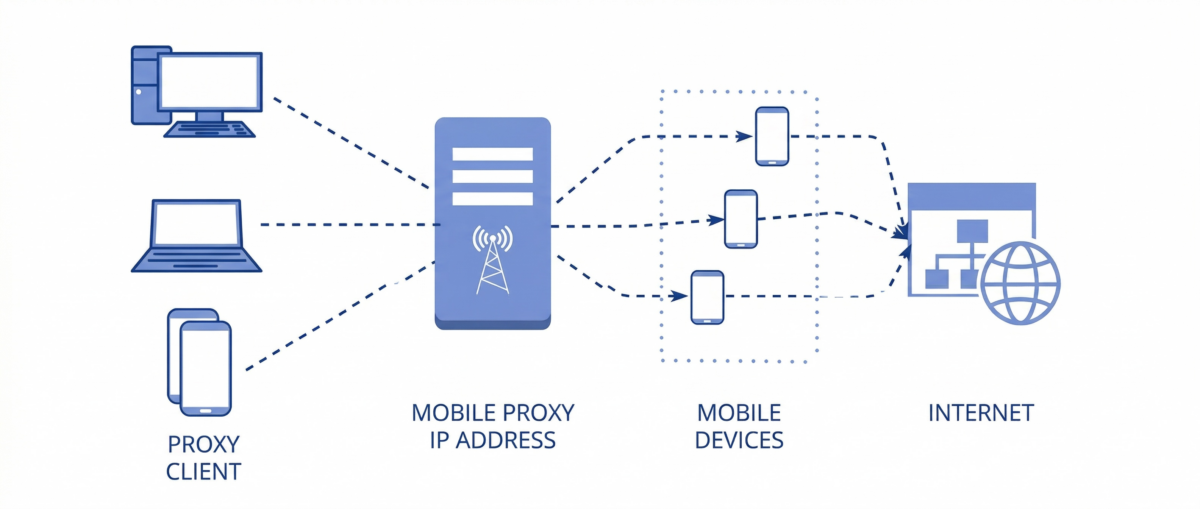
The key advantage here is trust. Regular datacenter proxies get flagged easily because their IPs end up on blacklists all the time. Mobile IPs look “clean.” With over 6.8 billion smartphone users worldwide, millions of people use mobile internet every day, and telling a real user apart from someone on a proxy is extremely hard.
There’s another neat trick: IP rotation. Mobile carriers use a technology called CGNAT (Carrier-Grade NAT) to share IP addresses among thousands of users. So if an IP gets blocked, you just refresh it and keep going.
What’s the difference between a mobile proxy and a regular one? It all comes down to trust. Datacenter proxies are cheaper and more stable, but they get banned faster. Mobile proxies cost more, but they give you anonymity and way more freedom for gray-area tasks.
Why you actually need mobile proxies for real work
From personal experience, the range of use cases for mobile proxies is huge.
- Traffic arbitrage. If you’re running ads on Facebook or TikTok, accounts don’t last long without mobile proxies. It’s the only reliable way to dodge mass bans.
- Social media. Managing dozens of Instagram pages or running Facebook promotions is nearly impossible without proxies. Mobile IPs keep the algorithms from getting suspicious.
- Marketplaces and classifieds. Platforms like Amazon, eBay, and Craigslist block duplicate accounts. With a mobile proxy, you look like a brand new person every time.
- SEO and scraping. When you need to collect Google SERP data or check keyword rankings, regular IPs get throttled fast. Mobile ones give you a lot more room.
Why do I go with mobile proxies specifically? Because they actually work where other options fall flat. Yeah, they cost more, but when you factor in how much time and money a stable tool saves you, it’s worth every penny.
How to use a mobile proxy: step by step in practice
In practice, the setup is pretty simple:
- Real-world examples. I once ran Facebook Ads campaigns to test offers. Without proxies, accounts got nuked within hours. With mobile proxies, they lasted weeks. Another case: scraping Google search results. On regular proxies I’d get blocked after 200 requests. Mobile ones let me pull thousands of rows of data.
- Connection. I grab a proxy from a provider, get the IP and port, then plug it into my browser, phone, or dedicated software.
- Setup on desktop and mobile. On a computer, it’s done through network settings or tools like Proxifier. On Android or iOS, you configure it through standard Wi-Fi or mobile network settings.
- Security. I always recommend checking speed and IP before you start working, never keeping all your accounts on one proxy, and not using work IPs for personal stuff.
When picking a proxy, I always look at three things: speed, stability, and price. And carrier support, obviously. If a service only works with one carrier, that’s a downside because IP rotation will be weaker.

Real mobile modems, unlimited traffic — no FUP
Private channel from $25/mo
Free 2h test • Targeting by country/city/carrier

195 countries with city-level targeting
from $10/day
Real user IPs sourced through Pawns.app

Premium enterprise-grade provider
from $4/1 GB residential (50% off)
HTTP/HTTPS/SOCKS5 protocols

Proxy replacement or refund within 24-72 hours
from $3.5/GB (residential)
speeds up to 1 Gbps
mobile 4G/5G, residential, ISP, IPv4, IPv6
What to Look for When Choosing a Mobile Proxy
I’ve burned money on bad providers more times than I’d like to admit. After testing dozens of services, here’s what I actually check before committing.
Real carrier IPs, not fakes. Some providers slap the “mobile” label on residential or even datacenter IPs. You can check this yourself: run the proxy IP through ipinfo.io and look at the ASN. It should show a real mobile carrier like T-Mobile, AT&T, Vodafone, or similar. If it shows a hosting company or some generic ISP, walk away.
IP rotation options. You want control over when your IP changes. For social media work, sticky sessions (same IP for hours or days) are critical. For scraping, you want fast rotation per request. Good providers give you both. Bad ones give you whatever they feel like.
Geo-targeting that actually works. “195 countries” means nothing if the IPs in your target country are burned or slow. I always test the specific locations I need before buying a full plan. Ask for a trial, pick your target country, and run it through a real workload.
Connection stability. A proxy that drops mid-session can leak your real IP. Even a split-second exposure gets logged by the platform. I need uptime above 95% minimum, and honestly, good providers hit 99%+.
Honest pricing. Real mobile proxy infrastructure costs money to maintain. SIM cards, modems, data plans, hardware. If someone offers mobile proxies at $2/month, something is off. The realistic range is $15-$50/month per proxy for dedicated setups, or $5-$20/GB for rotating pools.
Customer support that actually responds. When your proxy goes down at 2 AM and you have accounts to manage, you need someone on the other end. I always test support response times during the trial period. If they take 24 hours to reply during a trial, imagine what happens after you pay.
Every service has its pros and cons, so I’d suggest grabbing a trial first and testing how it works for your specific needs before going all in.
Types of Mobile Proxies: What’s Out There and How They Differ
When I first started digging into mobile proxies, I realized they come in several flavors. And this is usually where beginners get confused. Let me lay it all out.
- Geo-targeted mobile proxies are IP addresses tied to specific cities or regions. For example, you can grab a New York IP or a Los Angeles one, or go more local. Why does this matter? Say you’re working with local ads or testing search results in a specific area. That’s where geo-targeted proxies are a lifesaver.
- Residential mobile proxies give you a real IP from a mobile carrier. You don’t get a “server” address; you get the same kind of IP a regular smartphone user has. These proxies are as close to real browsing conditions as it gets, so they earn more trust. They’re perfect for social media work and affiliate marketing.
- Country-specific mobile proxies deserve a separate mention. If you’re working a specific market, say promoting products, managing social media accounts, or testing ads within that country, you really can’t do without them. Local carriers hand out IPs that look completely natural to any service checking your connection.
- So how do you pick the right type? It all depends on what you’re doing. For precise city-level targeting, go geo-targeted. For social media trust, residential is the move. And for local projects in a specific country, get IPs from that country’s carriers. I usually mix and match depending on the job.
Mobile Proxies vs Residential vs Datacenter: Quick Comparison
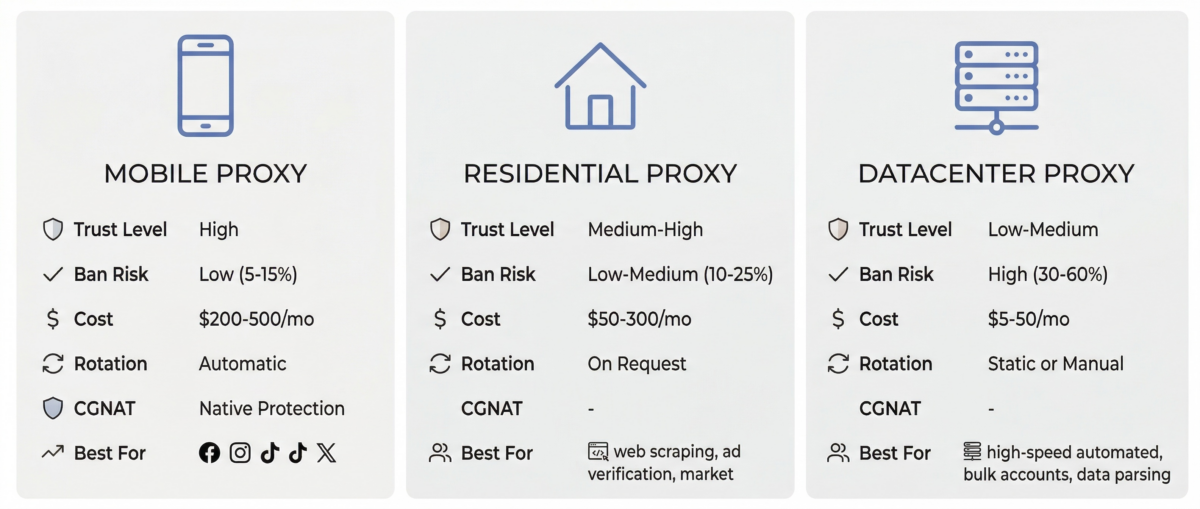
I get asked this all the time so let me just lay it out in one place.
| Feature | Mobile Proxies | Residential Proxies | Datacenter Proxies |
|---|---|---|---|
| Trust Level | Highest | High | Low |
| Ban Rate | Very low | Low to medium | High |
| Speed | 5-25 Mbps (4G) | 10-50 Mbps | 100-1000 Mbps |
| Cost | $15-50/mo per proxy | $5-15/GB | $0.50-2/mo per IP |
| IP Rotation | Natural (CGNAT) | Provider-controlled | Manual |
| Best For | Social media, multi-accounting | Scraping, e-commerce | Bulk tasks, low-risk scraping |
| Detection Risk | Minimal | Low | Very high |
The short version: if you’re doing anything on social media or platforms that actively hunt for automation, mobile proxies are the only real option. Residential works for scraping and e-commerce. Datacenter is fine for low-stakes bulk work where bans don’t cost you much.
Best Mobile Proxies by Use Case
- Affiliate marketing and ads need services with flexible rotation and fast IP switching. Soax has been the best performer in my experience.
- Marketplaces need stability and long-lived IPs so your accounts don’t get knocked off. I tend to use ProxySeller for these.
- Social media (Instagram, TikTok, Facebook) needs IPs that look as “human” as possible. Residential mobile proxies work best here.
- SEO and scraping need speed and the ability to run lots of threads. Geonix wins on price and availability for this kind of work.
Mobile Proxy Rankings (My Personal Take)
Why do I often go with country-specific proxies? Because if you’re working on local projects, it’s a must. Local IPs raise fewer red flags with services, especially when you’re dealing with regional marketplaces like Amazon or eBay.
Local carrier proxies are great because they look natural and work perfectly for social media platforms that filter suspicious activity. But if you need to work on international projects, I grab foreign IPs, like from Europe or the US.
My personal rule is simple:
- if I’m targeting a local audience, I use mobile proxies from that country’s carriers;
- if it’s international campaigns or ads for English-speaking markets, foreign residential proxies are the better bet.
How Much Do Mobile Proxies Cost in 2026?
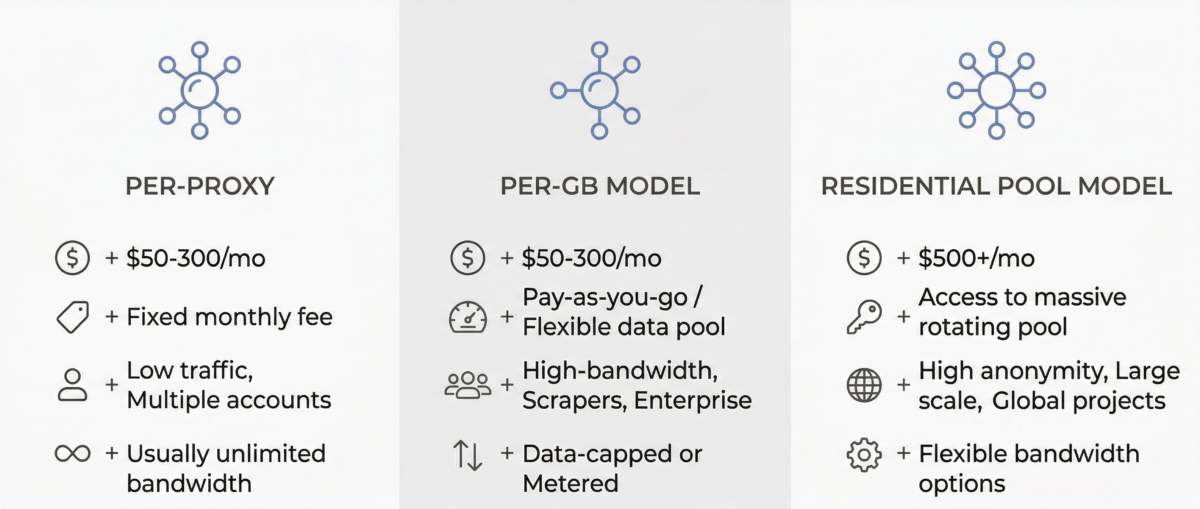
Pricing models vary a lot between providers, and it’s easy to get confused. Here’s how it usually breaks down.
Per-proxy pricing means you pay a flat monthly fee for a dedicated proxy (one SIM card, one connection). This usually runs $50-$300/month depending on the country and carrier. Best for social media management where you need consistent, sticky IPs.
Per-GB pricing means you pay for bandwidth consumed. Typical range is $5-$20 per GB for mobile traffic. Better for scraping and tasks with variable usage. Watch out for overage charges though.
Hybrid models charge a base fee plus bandwidth. Can be cost-effective at scale but harder to predict monthly spend.
A quick sanity check: if a provider offers “unlimited mobile proxies” for under $10/month, they’re almost certainly not real mobile IPs. The SIM cards and data plans alone cost more than that. You get what you pay for here.
Frequently Asked Questions About Mobile Proxies
What is the best mobile proxy service in 2026?
Based on my testing, it depends on your use case. For social media and multi-accounting, Proxy-Seller gives the best all-around value. For affiliate marketing and ad campaigns, Soax stands out with flexible rotation. For budget-friendly scraping, Geonix is hard to beat on price. There’s no single “best” that works for everyone.
Are mobile proxies better than residential proxies?
For social media, multi-accounting, and platforms with aggressive anti-bot systems, yes. Mobile IPs carry higher trust because of how CGNAT works: thousands of real users share the same IP, so platforms can’t block them without hitting legitimate traffic. Residential proxies are better for general scraping and e-commerce tasks where you need larger IP pools at lower cost.
How much do mobile proxies cost?
Dedicated mobile proxies typically cost $50-$300 per month per proxy. Rotating mobile proxy pools usually charge $5-$20 per GB. The price depends on the country, carrier, connection type (4G vs 5G), and whether you get a shared or dedicated IP. Legitimate mobile proxies are always more expensive than datacenter or residential options because the infrastructure requires real SIM cards and data plans.
Can I use mobile proxies for Instagram and TikTok?
Absolutely, and this is where mobile proxies shine the most. Both Instagram and TikTok are mobile-first platforms, so traffic from mobile carrier IPs looks completely natural to their detection systems. Pair a mobile proxy with an anti-detect browser (one profile per account), and you can manage dozens of accounts without triggering bans.
Are mobile proxies legal?
Yes. Using a proxy to route your internet traffic is legal in virtually all countries. What matters legally is what you do with the connection. Managing social media accounts, running ad campaigns, scraping public data, doing market research: all perfectly legal and standard industry practice.
What’s the difference between 4G and 5G mobile proxies?
4G LTE proxies offer speeds of 5-25 Mbps and are the current industry standard. They’re widely available, reliable, and work for most tasks. 5G proxies can hit 50-200 Mbps but cost more and have limited geographic availability. For social media management and basic scraping, 4G is more than enough. 5G makes sense for bandwidth-heavy work like video uploads or large-scale data collection.
How do I check if a mobile proxy is real?
Connect through the proxy and visit ipinfo.io or similar IP lookup tools. Check the ASN (Autonomous System Number) and organization fields. A real mobile proxy will show a recognized mobile carrier like “T-Mobile USA,” “Vodafone,” or “AT&T.” If it shows a hosting provider or generic ISP name, you’re not getting actual mobile IPs.
Conclusion: Which Mobile Proxies Are Right for You
Let’s wrap this up. Mobile proxies exist so you can work online safely, get around blocks, and scale your projects in affiliate marketing, social media, and SEO. They run on mobile carrier IPs, which makes them look way more legit and trustworthy than datacenter proxies.
If you’re just starting out, don’t chase the most expensive service right away. Grab a trial from 2 or 3 providers and compare speed, stability, and how easy the dashboard is to use. Always check which carriers are available, how IP rotation works, and whether there’s actual customer support.
And remember: security comes first. Never store passwords and credentials in plain text, always work through reliable proxies, and don’t cheap out on protecting your data.
If I had to pick just one service, I’d go with Proxy-Seller as the most versatile option for social media and advertising. But again, it all comes down to your specific needs. My rankings are more of a guide than gospel.