




 Why Trust Us?
ToProxyLab has been testing proxy services since 2025. We pay for most plans ourselves, and when a provider gives us test traffic we say so in the review — free traffic buys a place in the testing queue, nothing else. Every provider goes through the same speed, uptime and fraud-score checks, and we publish the real numbers, including the bad ones. A rating cannot be bought. Learn who we are and how we review proxies.
Why Trust Us?
ToProxyLab has been testing proxy services since 2025. We pay for most plans ourselves, and when a provider gives us test traffic we say so in the review — free traffic buys a place in the testing queue, nothing else. Every provider goes through the same speed, uptime and fraud-score checks, and we publish the real numbers, including the bad ones. A rating cannot be bought. Learn who we are and how we review proxies.
Honestly, picking a residential proxy in 2026 is harder than it was three years ago. Providers have multiplied like rabbits, and every single one claims the “cleanest pool” and “99.9% uptime” right there on the landing page. In reality, half of them are just reselling someone else’s traffic with padded numbers.
I spent six months running about ten services through real workloads scraping, social media registrations, ad account warm-ups. Some accounts survived for months. Others got banned within a day. This ranking is what’s left after all that testing.
What Residential Proxies Are and How They Work
Where do these IPs actually come from? Mostly P2P networks and SDK partnerships. Someone installs a free app or VPN, and in exchange agrees to share a slice of their bandwidth. That’s the “legal consent” legit providers love waving around in their compliance reports. Shady operators skip that step entirely grab IPs without consent, and those addresses end up on blacklists sooner or later.
The mechanics are simple enough. Your request hits the provider’s gateway. The gateway picks an available exit node — that home user we mentioned and routes your traffic through it. The target site receives a request from a residential IP with a solid trust score. It has no idea it’s dealing with a proxy.
The whole trick comes down to address reputation. A datacenter IP sits in databases like ipinfo and ip2location tagged as “hosting.” A residential one shows up as “residential,” registered to a real ISP. That single label makes all the difference.
Residential vs Mobile vs Datacenter vs ISP Proxies
Four types, four different tools. Mix them up and you’ll either overpay or get banned.
| Type | IP Source | Trust Score | Price | Best For |
|---|---|---|---|---|
| Datacenter | Data center servers | Low | $0.5-3/IP | Scraping basic sites, bulk use |
| Residential | Home devices | High | $2-15/GB | Social media, protected sites |
| Mobile | 4G/5G smartphones | Very high | $10-30/GB | The toughest anti-fraud systems |
| ISP (static) | Datacenter + provider ASN | High | $1-3/IP | Long sessions on one IP |
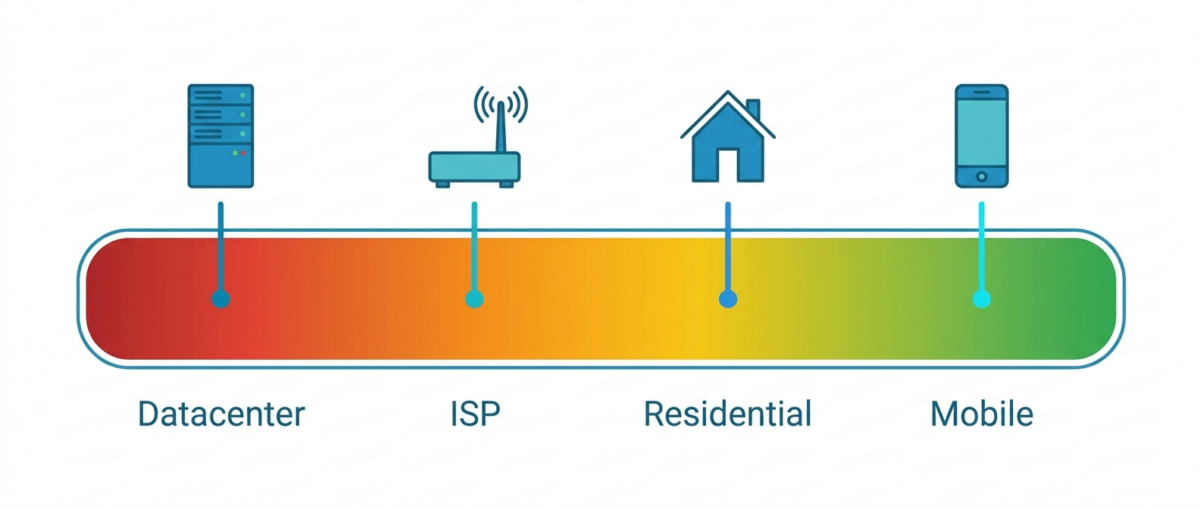
Datacenter proxies are cheap and fast, but any serious target flags them instantly. Mobile gets the best trust score of the bunch, since hundreds of real subscribers share the same mobile IP — banning it would mean punishing a ton of innocent users, so sites think twice. Pricey, though. ISP proxies are a hybrid: the address physically lives in a datacenter but registers under a home provider’s ASN, so it looks residential while staying static.
Sticky Sessions vs Rotating: Which One Do You Need
This one’s entirely task-dependent, and getting it wrong costs you bans.
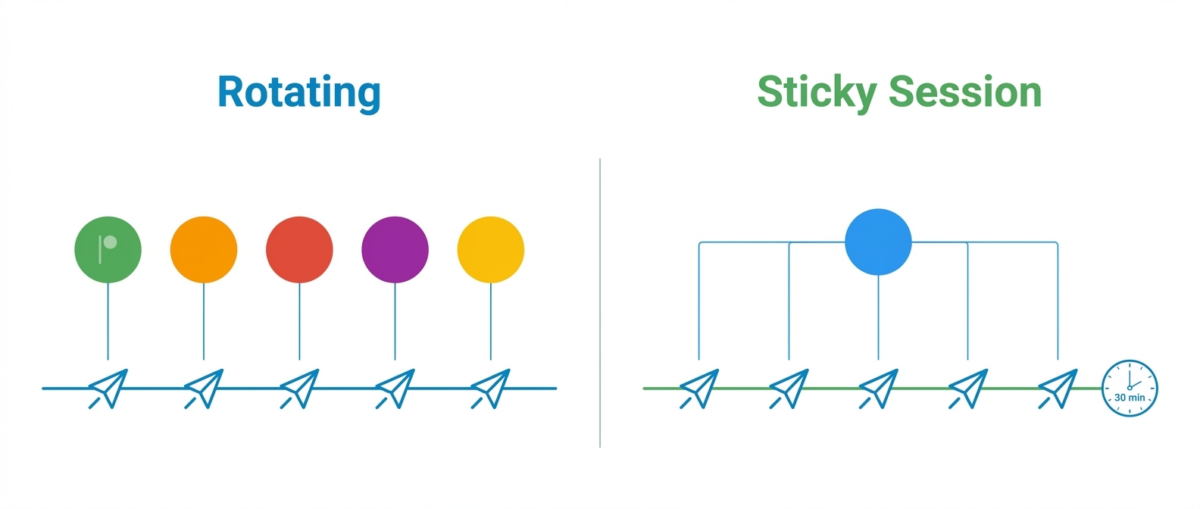
Rotating means a fresh IP for every single request. Perfect for scraping, a thousand requests, a thousand different addresses, none of them sticks around long enough to trip a rate limit. Sticky sessions lock in one IP for you, usually 10, 30, or 60 minutes, then swap it out.
Here’s the simple rule I learned the hard way: rotation on every request for scraping. For social media, registrations, or anything inside a single account — stick with sticky. Try registering a TikTok account on rotation and the anti-fraud system notices your device fingerprint jumping between countries mid-session, then nukes the account. A 30-minute sticky session, on the other hand, looks exactly like a normal user browsing from one home IP.
Where You Actually Need Residential Proxies (and Where It’s Overkill)

Residential proxies aren’t a one-size-fits-all fix. Sometimes cheap datacenter IPs do the job just fine. But in the five scenarios below, there’s no getting around residential.
Social Media Management and Multi-Accounting
Instagram, TikTok, and Facebook flag datacenter IPs almost instantly. I tested this myself — on DC proxies, a fresh Instagram account gets banned within 3-7 days on average, even if you behave like a genuine human. On residential IPs, the same accounts last for months.
Each profile needs its own sticky IP in the right location. Pairing it with an antidetect browser is non-negotiable — skip it and your fingerprint gives away the whole farm. The residential IP covers the network layer, the antidetect browser covers the browser layer. Neither works without the other.
Media Buying and Ad Account Management
Facebook and Google ad accounts are pure paranoia. Log into a new account from a sketchy IP and boom — banned with zero explanation. Media buyers run everything through residential proxies matched to the exact geo of each account.
Session stability matters most here. The ad account should never see IP jumps mid-work. An hour-long sticky session is standard. And the geo needs to match both the payment method and the account, or Facebook’s anti-fraud system flags you.
Web Scraping: Google SERP, Marketplaces, E-Commerce
This is where residential proxies really shine. I ran Google SERP scraping at 50K requests a day — with datacenter IPs, a captcha showed up after the first 200 requests. With rotating residential IPs, my success rate stayed above 95%.
Marketplaces and e-commerce sites are their own beast. Amazon and other big retailers watch for patterns and cut bots off fast. Rotate on every request, target the right country, and your scraper keeps running. For price intelligence and SERP monitoring, this is table stakes.
Multi-Accounting with Antidetect Browsers (Dolphin, AdsPower, GoLogin)
Antidetect browser plus residential proxy is basically the industry standard. Dolphin, AdsPower, and GoLogin create an isolated browser profile, and the proxy gives it a clean network address to match. Skip the proxy and every profile shares the same IP the whole farm goes down together.
Every profile gets its own sticky IP. I run each address through pixelscan and scamalytics before deploying it. If an IP’s already blacklisted or has a high abuse score, I swap it out immediately — no point waiting for trouble.
Airdrop Farming, Web3, and Crypto Use Cases
Multi-wallet and airdrop farming run on the same logic: every wallet needs to look like a separate person on a separate device. Sybil detection in web3 is brutal these days, and projects catch farms by spotting matching IPs.
Rotating residential proxies spread your wallets across different “locations.” Going cheap here is doubly risky — snag one IP with a shady history, and your entire wallet cluster gets flagged.
How to Choose a Residential Proxy Provider: 7 Criteria
After six months of testing, I narrowed it down to seven things that actually matter. Everything else is just marketing fluff.
1. Pool Size and Quality
10M+ IPs is fine, 50M+ is great, and 100M+ puts you among the market’s heavy hitters. But pool size without quality is meaningless — a huge dirty pool loses to a small clean one every time. Bright Data and SOAX run 150M+ and 191M IPs respectively, and both still keep tabs on address reputation. I never trust the numbers on a landing page without checking them myself through real connections and trust-score tools.
2. Geo Coverage and Targeting Precision
Country-level targeting is the bare minimum. A decent service lets you target down to city and ASN. If you’re running ads for a specific US state, you need an IP from that exact state, not just “somewhere in America.” Top providers cover 195+ countries, budget options claim 150-220 locations but often have gaps in accuracy. I always test city and ASN targeting by hand — landing pages promise one thing, dashboards deliver another.
3. Pricing Model: Per GB vs Per IP vs Per Port
Residential proxies almost always charge by the gigabyte. Fair enough for text scraping, but it gets expensive fast if you’re pulling video or heavy media. Some providers sell unlimited ports for a flat daily fee, which pays off at high volumes. Per-IP pricing usually shows up with ISP proxies. Do the math for your actual use case: 10GB of text scraping and 10GB of media traffic cost wildly different amounts in practice.
4. Rotation Type and Sticky Sessions
I check how rotation gets configured and what the max sticky duration is. A good provider offers both per-request rotation and sticky sessions up to 30-60 minutes, and you just toggle it with a parameter in the connection string. A bad one only offers rotation, which makes it useless for social media work. Sticky session length matters a lot when you’re managing accounts.
5. Speed and Stability
Latency and success rate determine whether your scraper actually finishes the job. Residential proxies are slower than datacenter ones by nature – the traffic runs through a real device somewhere. But the range varies wildly. With Decodo, I clocked an average response time around 0.6 seconds, which is excellent for residential. Cheaper providers gave me 3-4 seconds and random dropped connections. A success rate under 95% is a red flag to walk away.
6. Protocol Support and Authentication
HTTP, HTTPS, and SOCKS5 are the basic package. You need SOCKS5 if you’re doing anything beyond plain web traffic. Authentication comes either as login/password or IP whitelisting. Teams need sub-users and separate access levels so the main account never gets exposed. Skip SOCKS5 and half your automation tasks just won’t work.
7. Trials, Refund Policy, and Support Quality
My personal rule: no trial, no interest. You genuinely can’t judge residential proxies from a landing page — you have to run your own traffic through them. Oxylabs offers 7 days, SOAX gives you 400MB for $1.99 over three days, Bright Data throws in a $5 credit. Support needs to answer fast and actually solve problems, not just send canned replies. Live chat with a real engineer is a huge plus.
Top 9 Residential Proxy Services in 2026
Comparison table first, detailed breakdown of each one below. The ratings are mine, based on hands-on testing. Prices and pool sizes verified as of August 2026.
| # | Service | Pool Size | GEO | Starting Price | Sticky / Standout Feature | Rating |
|---|---|---|---|---|---|---|
| 1 | NodeMaven | 34M+ | 150+ countries | $2.00/GB | Sticky sessions up to 7 days + cashback | 4.6 |
| 2 | FloppyData | 6.6M+ | 195+ countries | $1.00/GB | Strong US pool, no markups | 4.2 |
| 3 | IPRoyal | 34M+ | 195+ countries | $1.75/GB | Traffic never expires, sourced via Pawns.app | 4.0 |
| 4 | MangoProxy | 90M+ | 200+ countries | $2.00/GB at 1TB | Built-in checker against a target URL, sticky up to 120 min | 4.0 |
| 5 | Proxy-Seller | 20M+ | 220+ countries | $0.65/GB | Sticky sessions up to 90 minutes | 3.7 |
| 6 | SX.org | 12M+ | 235 countries | $3.00/GB | Flat rate across all proxy types | 3.7 |
| 7 | Oxylabs | 175M+ | 195 countries | $4.00/GB | Enterprise grade, 7-day trial | 3.7 |
| 8 | Thordata | 175M+ | 195 countries | $3.50/GB | Bandwidth up to 1 Gbps | 3.3 |
| 9 | IPFoxy | 70M+ claimed | 200+ countries | $1.99/GB at 1TB | Dedicated IP on Verizon Fios, fraud score 4/100 | 3.3 |

NodeMaven filters its IPs for quality before handing them to clients, and throws in cashback on top.
Pool and GEO:
34M+ IPs, 150+ countries.
Pricing:
- From $2/GB on monthly plans.
Bottom line:
I ran social media registrations through it, and the clean-IP ratio really was above average. That seven-day sticky session is a lifesaver during long account warm-ups.
- Sticky sessions can last up to 7 days — rare in this market;
- IPs get quality-filtered before they're handed out;
- Cashback plus access to both residential and mobile in one plan.
- Smaller pool and narrower geo coverage than the leaders;
- No free trial, you pay to test it.

FloppyData is a young provider with an aggressive $1/GB price tag and a heavy focus on US traffic.
Pool and GEO:
6.6M+ IPs, 195+ locations.
Pricing:
- From $1/GB on subscription;
- $1.50/GB Pay-As-You-Go.
Bottom line:
I tested it scraping US e-commerce sites, and it held up well for the price. The pool’s too small for global-scale work, though.
- One of the cheapest residential proxies around;
- Solid US pool without inflated pricing;
- Transparent per-gigabyte pricing, no hidden tiers.
- Small pool, IPs start repeating at scale;
- Weaker coverage outside the US.

IPRoyal is popular with solo users thanks to honest pricing and a pool sourced through Pawns.app.
Pool and GEO:
34M+ IPs, 195+ countries, targeting down to city and zip code.
Pricing:
- From $1.75/GB, traffic never expires.
Bottom line:
I keep this one as a backup for lighter scraping jobs. The non-expiring traffic is a genuinely nice touch — buy your gigabytes once, use them whenever.
- Low entry price, traffic doesn't expire;
- Ethically sourced pool via Pawns.app;
- Flexible rotation, good for smaller volumes.
- Modest pool compared to the leaders;
- Success rate drops on the most heavily protected sites.

MangoProxy claims 90M+ residential IPs from a service that’s only about two years old, so I went in expecting a resold pool and got something better.
Pool and GEO:
90M+ IPs, 200+ locations, targeting down to country, state, city and ASN. HTTP(S), SOCKS4, SOCKS5, SSH. Sticky sessions up to 120 minutes.
Pricing:
- From $2.0/GB at a terabyte, $3.3/GB on the 5 GB entry package.
- Crypto in 11+ currencies works immediately, cards only after Stripe KYC.
Bottom line:
Tested 400 addresses out of Florida: 97.8% success, every one in the US, hosting and proxy flags at zero. Fine for scraping moderately protected targets, SERP monitoring and antidetect work, provided you disable IPv6 first. The network is better than the company’s reputation, and the billing is worse than the network.
- 391 unique IPs out of 391 on a 400-proxy run, zero duplicates and zero datacenter filler;
- Real Comcast AS7922 with an hsd1 residential hostname, Scamalytics 15/100;
- Median 13.3 Mbps, faster than most residential pools in this ranking;
- Built-in checker runs your list against a target URL and keeps the best rows.
- WebRTC leaks an IPv6 address, so it has to be closed by hand before any account work;
- Latency around a second, against a claimed 'under 0.5 sec';
- 'All sales are final' with a 48-hour window, and the $0.6/GB on the storefront isn't reachable.

Proxy-Seller runs an aggressive pricing model with wide geo coverage, built with solo users and small businesses in mind.
Pool and GEO:
20M+ IPs, 220+ countries, HTTPS and SOCKS5.
Pricing:
- From $0.65/GB.
Bottom line:
I used it for a one-off scraping job in some exotic locations the top providers didn’t cover. Nice price, but the pool quality raises some questions — check your IPs before deploying them.
- Lowest per-gigabyte price in this entire ranking;
- Massive geo coverage, 220+ countries;
- Sticky sessions up to 90 minutes and flexible rotation.
- Pool quality varies unevenly by region;
- No trial — you're buying almost blind.

SX.org runs a flat $3/GB rate across residential, mobile, and corporate proxies with insanely wide geo coverage.
Pool and GEO:
12M+ IPs, 235 countries, targeting down to city and ASN.
Pricing:
- Flat $3/GB across all types;
- Minimum order — $15.
Bottom line:
A straightforward option for multi-accounting, and the flat rate is convenient. But it got flagged on pixelscan, which made me nervous — I’d think twice before using it for anything high-stakes.
- Flat pricing, no sneaky tiers;
- Record geo coverage, 235 countries;
- HTTP/HTTPS/SOCKS5 on every plan.
- Small pool, 12M isn't enough at scale;
- Pixelscan sometimes flags their IPs as proxies — confirmed this myself.

Oxylabs is one of the market’s enterprise-level giants, but it drops down this list purely on entry price.
Pool and GEO:
175M+ IPs, 195 countries, auto-scaling.
Pricing:
- From $4/GB with a 50% discount;
- Base rate: $6-8/GB.
Bottom line:
Quality-wise it’s up there with the market’s best, and I ran a full week of SERP monitoring without a single dropped connection. But for the audience reading this ranking the price stings, so seventh place here is about budget, not technology.
- Success rate consistently above 99%;
- Solid 7-day trial for business accounts;
- Strong support with actual engineers on the line.
- Expensive, built for companies rather than solo users;
- Minimum packages hit small budgets hard.

Thordata advertises a massive pool and leans hard on bandwidth speed as its selling point.
Pool and GEO:
175M+ IPs, 195 countries.
Pricing:
- From $3.50/GB;
- Down to $1.80/GB at volume.
Bottom line:
I used it for scraping heavy content, and the bandwidth saved the day. But the trust score on some of the IPs came in lower than I’d expect for this price tag.
- Large pool with bandwidth up to 1 Gbps;
- Proxy replacement or refund within 24-72 hours;
- Good for heavy traffic loads.
- Actual pool quality falls short of the advertised numbers;
- Support isn't always quick to respond.

IPFoxy is an Asian provider registered in Singapore under the legal entity Tiger Roar Technology Pte. Ltd., on the market since 2022, and turns out to be a solid middleweight in practice — the single IP passes every check with flying colors, while the pool starts to slip under real load.
Pool and GEO:
Claims 70M+ IPs across 200+ countries, but the number on the site is inconsistent — I saw 40M, 50M, and 70M quoted in different blocks at once.
Pricing:
- Rotating Residential — from $4.79 per 1GB/30 days ($5.99/GB) up to $1599.20 for 1TB/180 days ($1.99/GB);
- Over 1TB — custom pricing, with the company claiming rates as low as $0.6-0.8/GB;
- Mobile — from $6.99/GB on small volumes down to $2.79/GB on 1TB.
Bottom line:
The dedicated IP turned out to be a genuine Verizon Fios address with a 4/100 fraud score and zero detections across 79 APIVoid checks — a rare case where the service outperforms its own Trustpilot reputation. But running 400 proxies at once told a different story: 87.8% success rate, a third of addresses repeating, latency over a second on average, and Chinese exits sneaking into a US-only order. Final score — 3.5 out of 5: a workable tool for undemanding tasks, but not a substitute for top-tier networks under real load.
- Real residential IP on Verizon Fios with a 4/100 Scamalytics fraud score and 0/79 detections on APIVoid;
- Pool is nearly free of datacenter contamination — 0.0% hosting flag, 0.3% proxy flag;
- No WebRTC or DNS leaks, all resolvers stay inside Verizon's own network.
- Pool median speed of only 5-6 Mbps with latency around 1 second, spiking up to 8 seconds at p95;
- Success rate of 87.8% on 400 proxies, with a third of addresses repeating and Chinese exits showing up in a 'US only' order;
- Trustpilot rating of 2.0/5 (22 reviews) with complaints about residential-to-datacenter swaps and refund refusals.
How Much Do Residential Proxies Cost in 2026
The residential proxy market runs anywhere from $1 to $15 per gigabyte. That’s a massive range, and it comes down to three things: package size, geo, and pool reputation.
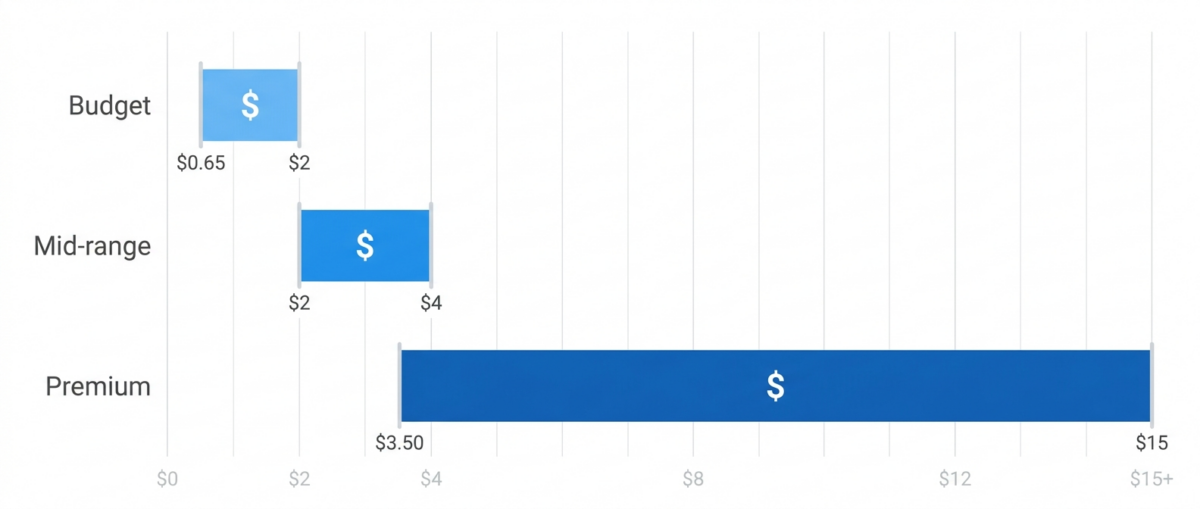
The more you buy, the cheaper each gigabyte gets. Pay-as-you-go always costs more than monthly plans. Geo matters too — US and Western European IPs run pricier, while Asian and Latin American ones cost less simply because demand is lower. Premium city- and ASN-level targeting tacks on extra.
So what does “cheap” actually mean, and where’s the catch? FloppyData at $1/GB or Proxy-Seller at $0.65/GB sound tempting, but it’s usually a trade-off: smaller pool, inconsistent quality, IPs with a shady past. Save money on traffic and you’ll pay for it in bans and re-uploads. I got burned more than once on cheap pools where half the IPs were already blacklisted. Watch the entry price too, because it rarely matches the headline. MangoProxy advertises $0.6/GB and charges $3.3 on the smallest package, and IPFoxy starts at $5.99/GB before volume discounts drag it down to $1.99.
| Segment | Price | Examples |
|---|---|---|
| Budget | $0.65-2/GB | Proxy-Seller, FloppyData, IPRoyal |
| Mid-range | $2-4/GB | NodeMaven, MangoProxy, SX.org, IPFoxy at volume |
| Premium | $3.50-15/GB | Thordata, Oxylabs |
Do the math for your specific use case, not for whatever flashy number sits on a landing page. Sometimes a mid-range option at $2/GB ends up cheaper than a budget one at $0.65/GB, if that cheap pool is killing off your accounts by the dozen.
How We Test and Rate Proxy Services
No rewriting other people’s reviews here. I personally ran every service on this list through real workloads over six months.
Here’s the methodology. I grab a trial or minimum package and connect through real sessions. I run every pool through ipinfo, scamalytics, and pixelscan, checking trust score, abuse rate, and whether the IP registers as residential or hosting. I test latency and success rate scraping Google SERP and marketplaces, usually across tens of thousands of requests. I also test Instagram and TikTok registrations on sticky sessions to gauge account survival rates. And I check for leaks — DNS and WebRTC, plus my own real IP after connecting.
Ratings come from all of it together: pool, geo, price, speed, support, and whether a trial exists. These reviews are independent, though affiliate-based — we earn a commission through the links in this article, and that has zero impact on the ratings. Full methodology and affiliate disclosure live on a separate page: how we test.
Frequently Asked Questions About Residential Proxies (FAQ)
What are residential proxies?
Residential proxies are IP addresses tied to real home devices, assigned by internet service providers. Your traffic routes through an actual user, so the target site sees a regular person instead of a server. Thanks to their high trust score, these addresses get blocked far less often than datacenter ones.
How are residential proxies different from mobile proxies?
Residential proxies use IPs from home devices connected through home internet providers. Mobile proxies run through carriers’ 4G/5G networks instead. Mobile gets a higher trust score, since hundreds of subscribers share the same IP and banning it is risky for the site. But mobile costs noticeably more — $10-30 per gigabyte versus $2-15 for residential.
How does a residential proxy differ from a datacenter proxy?
A datacenter IP belongs to a server sitting in a data center, and databases like ipinfo flag it as “hosting” instantly. A residential IP registers to a real home internet provider. Datacenter proxies are cheaper and faster, but get caught on protected sites. Residential proxies cost more, but they get through where datacenter IPs get blocked on sight.
How much do residential proxies cost?
As of 2026, residential proxies run anywhere from $0.65 to $15 per gigabyte. Price depends on package size, geo and pool quality. Budget tier sits at $0.65-2/GB, mid-range at $2-4/GB, and premium providers like Bright Data and Oxylabs start around $4/GB with a discount and climb to $8 at base rate. The more you buy, the cheaper each gigabyte gets, and the gap is steep: MangoProxy charges $3.3/GB on 5 GB and $2.0/GB on a terabyte for the exact same pool.
Is it legal to use residential proxies in Russia?
A residential proxy on its own is just a regular networking tool, and using one is perfectly legal. What matters is what you actually do with it. Violating a site’s terms of service, accessing someone else’s account, or any other unlawful activity remains entirely your responsibility, proxy or no proxy. Use the tool within the bounds of the law and each platform’s ToS.
Which residential proxy provider is the cheapest?
Among the services I’ve tested, Proxy-Seller has the lowest entry point at $0.65/GB. FloppyData starts at $1/GB, IPRoyal at $1.75/GB with traffic that never expires, and NodeMaven at $2/GB. But a cheap gigabyte isn’t always the better deal, because budget pools tend to hold IPs with low trust scores, and that turns into more bans and re-uploads down the line. Check the volume tiers as well: MangoProxy and IPFoxy both look expensive at the entry package and land near $2/GB once you buy a terabyte.
Can you get free residential proxies?
Genuinely free rotating residential proxies pretty much don’t exist — maintaining a pool like that costs real money. Free public proxy lists are datacenter IPs, and most of them are already blacklisted and unsafe to use. If you want to test things for free or close to it, go for trials instead — Oxylabs offers 7 days.
What is a sticky session and why do you need one?
A sticky session is a mode where the provider locks one IP to you for a set stretch of time, typically 10, 30, or 60 minutes. You need it anywhere address stability matters: managing social media accounts, registrations, ad accounts. Without it, the IP changes on every request, and anti-fraud systems ban accounts over sudden location jumps.
Bottom Line: Which Residential Proxy Service to Pick in 2026
After six months of testing, here’s where I landed.
Need a different type? Check out our mobile proxy ranking.