





 Why Trust Us?
ToProxyLab has been testing proxy services since 2025. We pay for most plans ourselves, and when a provider gives us test traffic we say so in the review — free traffic buys a place in the testing queue, nothing else. Every provider goes through the same speed, uptime and fraud-score checks, and we publish the real numbers, including the bad ones. A rating cannot be bought. Learn who we are and how we review proxies.
Why Trust Us?
ToProxyLab has been testing proxy services since 2025. We pay for most plans ourselves, and when a provider gives us test traffic we say so in the review — free traffic buys a place in the testing queue, nothing else. Every provider goes through the same speed, uptime and fraud-score checks, and we publish the real numbers, including the bad ones. A rating cannot be bought. Learn who we are and how we review proxies.
A rep from niuproxy.com reached out and offered to let me run their proxies through my tests and, while I was at it, land a spot in our rankings. In exchange they handed me 2 GB of premium rotating residential proxies. Fresh names on my shortlist of sane providers are always welcome, so I said yes. Especially since I’d just run a similar story with IPPeak recently, and honestly, the results there surprised me in a good way.
Let me be upfront about one thing. The free traffic doesn’t sway the verdict one bit. The provider isn’t buying my loyalty; all they’re paying for is my word that I’ll run their proxies through the full methodology and show the numbers as they are. I screenshot every step and keep the logs, so any number in this review can be double-checked. Just message me and I’ll send the proof.
All tests follow my methodology. Location as usual is the US. Separately, I ran proxy pools of 100 to 400 IPs through a VPS to check quality, residential match, and speed.
First, the basics. The site is plain, nothing special. Design and features are typical for a mid-tier provider in this niche, a bit slapped together if I’m being honest.
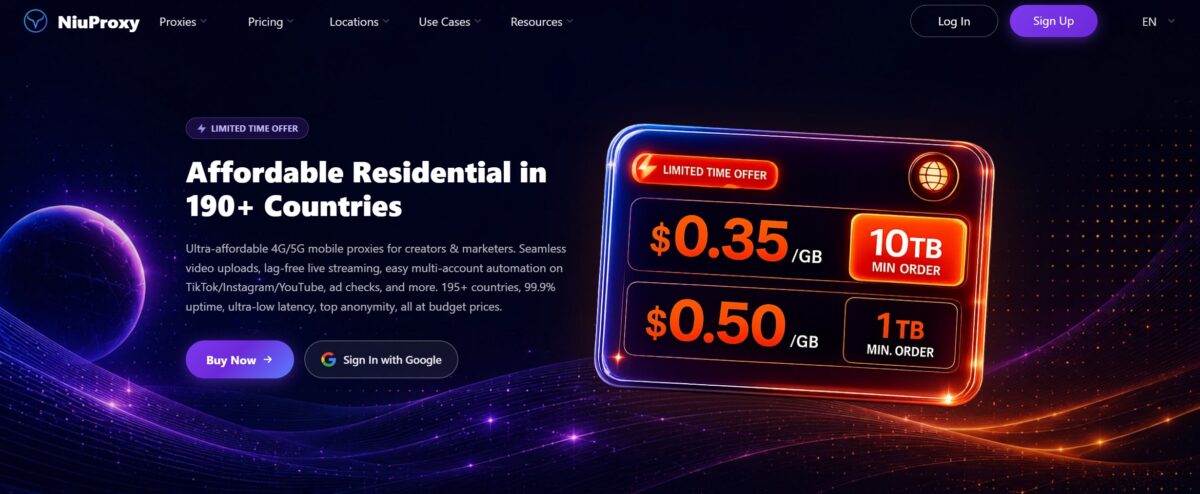
Looks aren’t really the point here though. What matters is what’s inside the proxies.
So what is this service anyway
NiuProxy is a young provider. The domain was registered on September 2, 2025 through Cloudflare, registrant country CN, with the details hidden behind Data Redacted. That means at the time of testing, in July 2026, the service isn’t even a year old. The operator is the Hong Kong based HONG KONG LUOCHUANG TECHNOLOGY CO., LIMITED, while the team, judging by the metadata and Chinese antidetect browser catalogs, sits in mainland China. Yet the phone number on the site is British, +44. A Hong Kong legal entity, a Chinese registrant, and a UK phone number: a curious mix.
The lineup is wide. Six categories: rotating residential, static ISP, rotating and static mobile, unlimited residential, and rotating datacenter. The claimed pool is “50M+ residential IPs”, coverage “195+ countries”, uptime “99.9%”. All of it is marketing off the site, with no independent benchmarks and no SLA document.
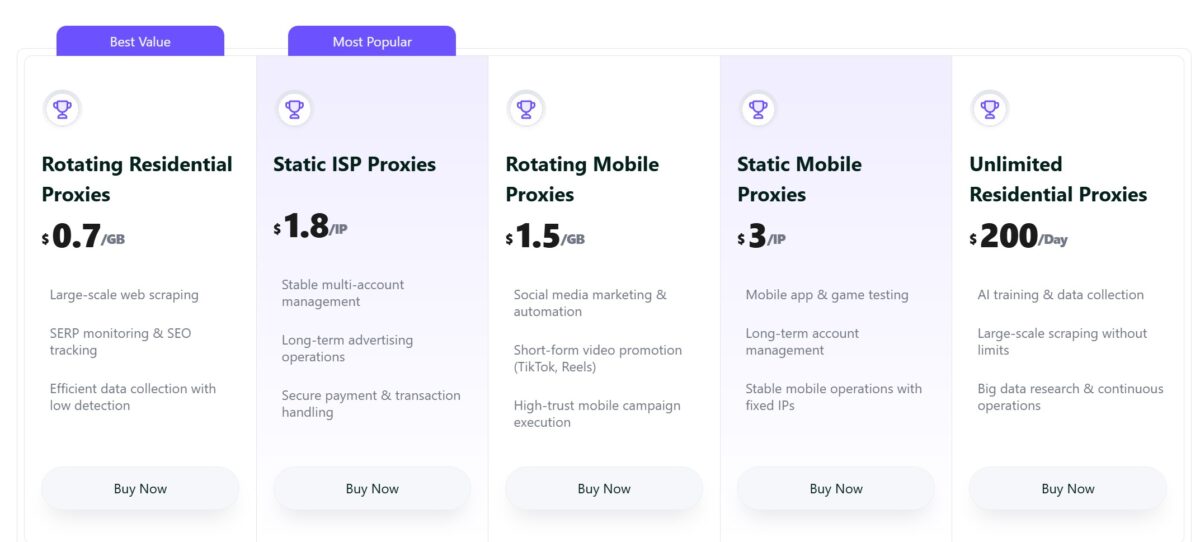
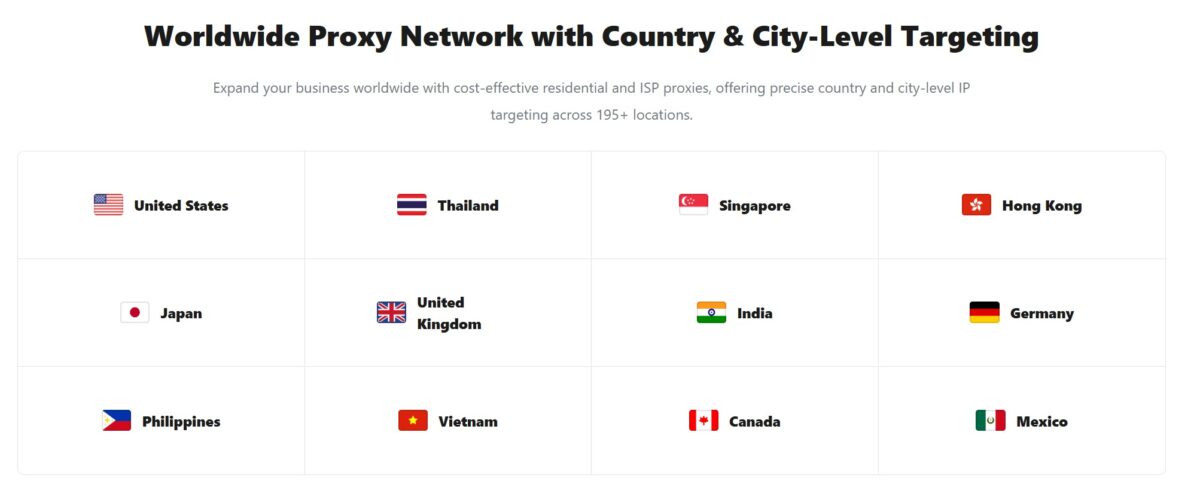
I tested the Advanced Rotating Residential line. They gave me 2 GB.
Dashboard and generating proxies
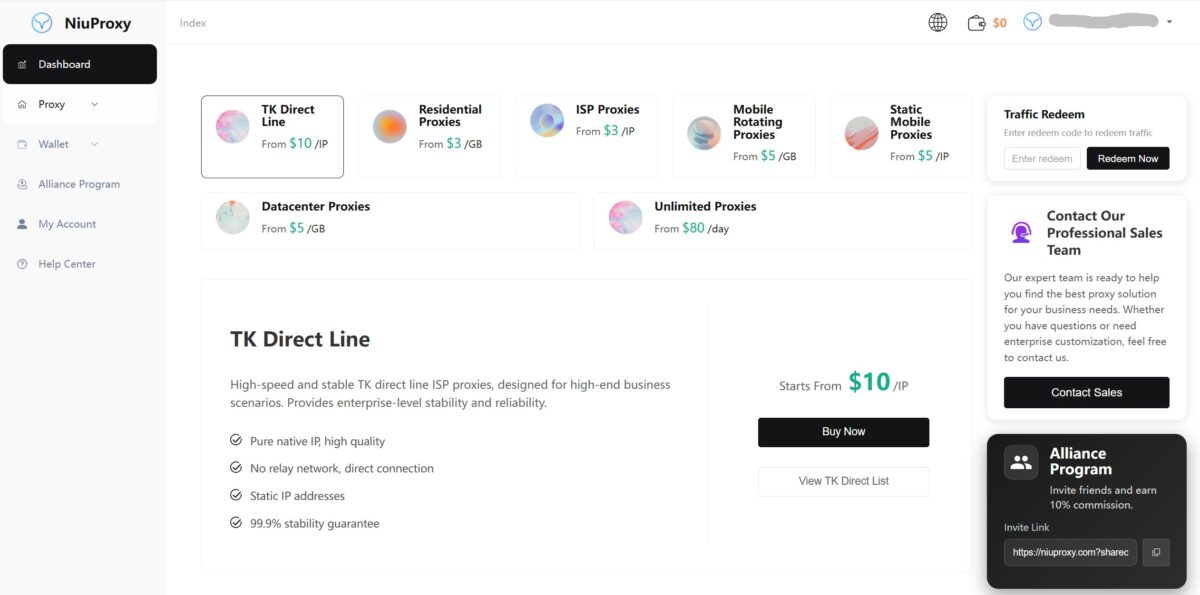
The dashboard lives on start.niuproxy.com. On the left, a menu by product: TK Direct Line, Advanced Rotating Residential, plain Rotating Residential, Static, Mobile, Datacenter, Unlimited. Up top, your balance and Traffic Redeem for activating codes.
The proxy builder is standard. You pick a gateway (Americas Gateway), target by country, state, city, the number of proxies, the protocol (HTTP or SOCKS5), and the session type, either Rotating or Sticky for up to 60 minutes. Hit Generate and you get a list in the IP:Port:Username:Password format.
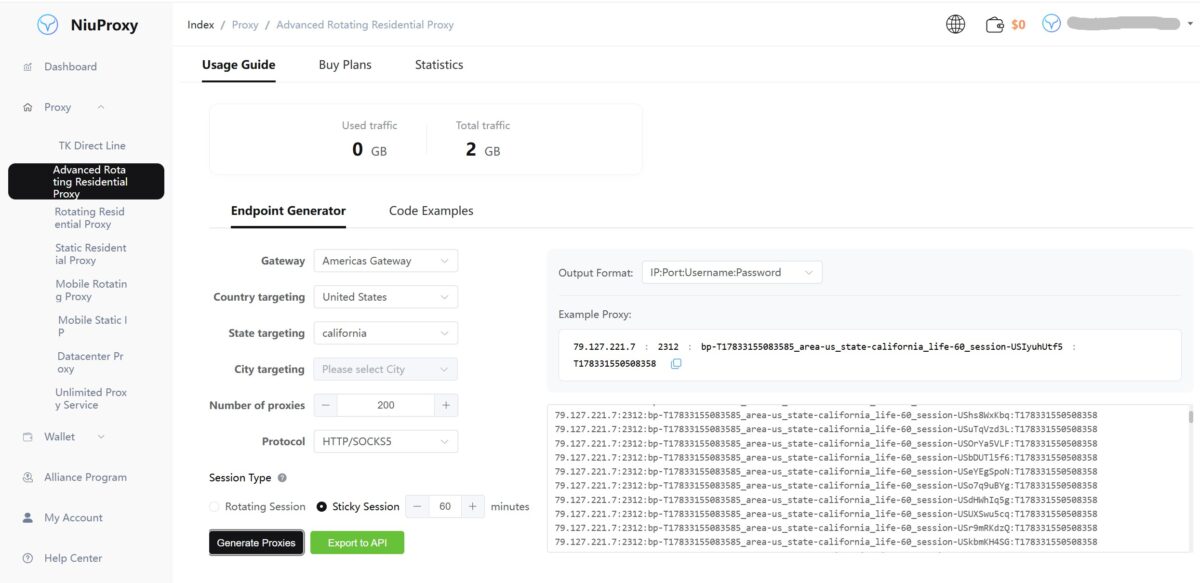
The string looks like this:
79.127.221.7:2312:bp-T17833155083585_area-us_state-california_life-60_session-USIyuhUtf5:************
The whole config is baked into the login: country, state, session lifetime (life-60), session ID. It’s the same approach every big player uses, Bright Data, Decodo, that same IPPeak. The handy part is that you change the parameters right in the login, with no trip to the dashboard needed.
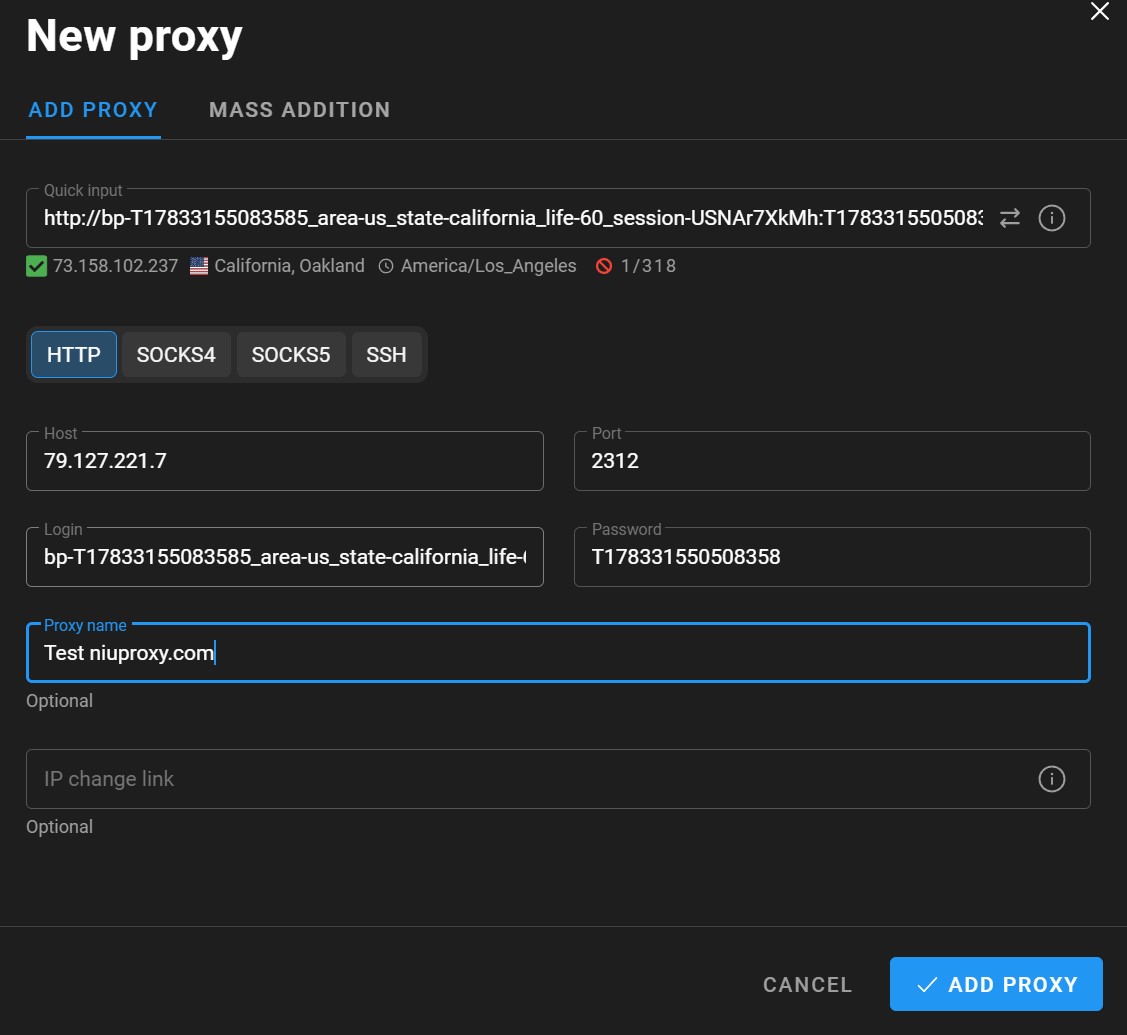
I dropped the string into an antidetect browser. Quick Input parsed it on its own, checked that the proxy was alive, and gave me the green check. The IP came right up: California, Oakland, timezone America/Los_Angeles, 1 of 318 in the pool for that target. No fuss.
The traffic consumption turned into a murky story, and it’s worth telling separately.
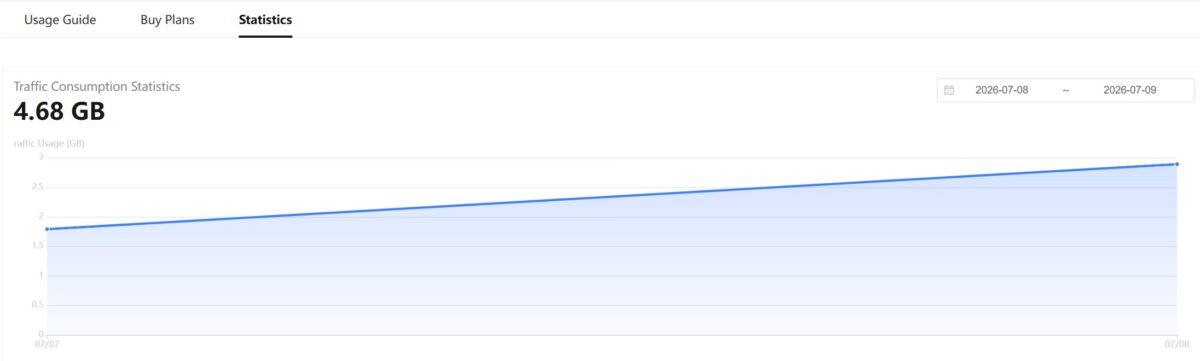
I ran tests on quality, pool stability, and speed. Normally this set eats about 1.3 GB, but here the 2 GB ran out before I even finished my test program. Weird, since I wasn’t pushing anything heavy through the proxies. I asked them for another 2 GB to get to the end, and again the package zeroed out before I could even reach speedtest.net. Second time in a row, out of nowhere.
I’m not ready to call it padding. Maybe the counter tallies service traffic, retries, or headers, I honestly don’t have insight into their internal logic. But the fact stands: by their own stats I burned more traffic than I actually pushed for my tasks, and that happened twice. Keep this in mind if you’re paying by the gigabyte, since real usage with NiuProxy may come out higher than you expect.
The stats in the dashboard are thin. Just a “how many GB spent” chart over a period, with no breakdown by request, domain, or session. NodeMaven and IPPeak were clearer about this. Here it’s a bare number, and there’s no way to check where the traffic went.
I did get the main measurements done before the traffic ran out the second time. Everything below is based on those.
After that I locked in a single sticky IP and started running it through all the quality tests.
The IP under the microscope
My main test IP was 76.32.164.164.
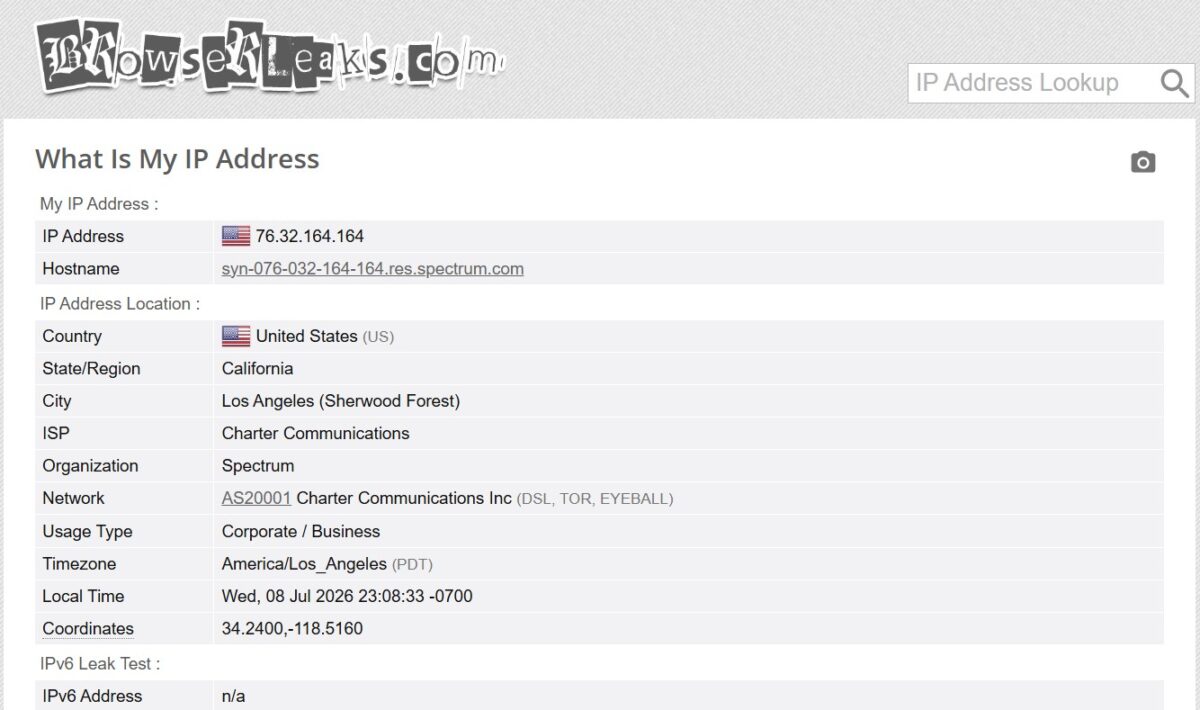
BrowserLeaks showed the important stuff right away: hostname syn-076-032-164-164.res.spectrum.com, ISP Charter Communications, organization Spectrum. The res tag in the hostname points to the residential segment of Spectrum’s real cable network, AS20001, the largest cable provider in the US. No IPv6 was detected, so there’s no v6 leak either. All of which means the IP sits in a real home network, not in some shady hosting setup.
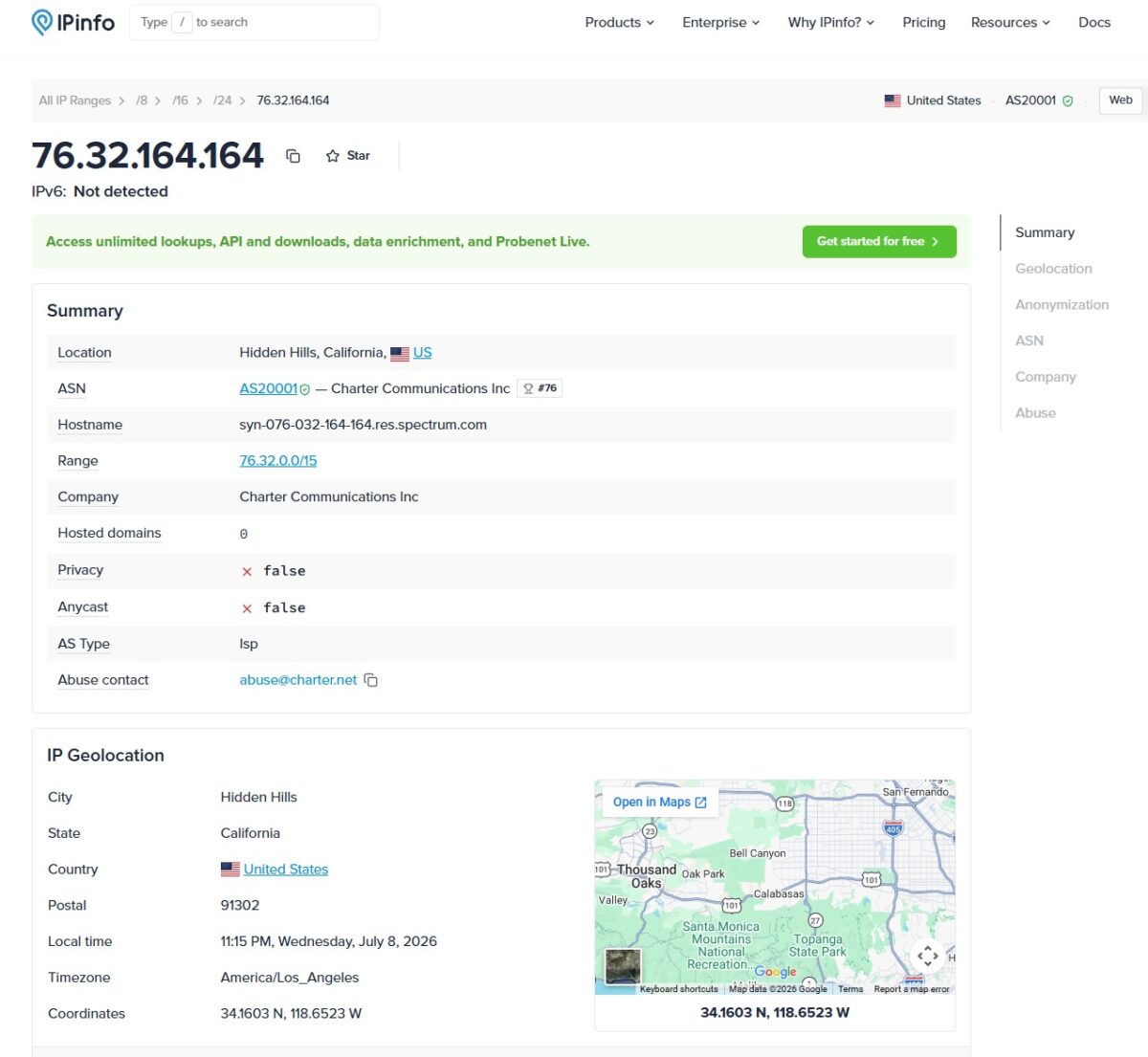
IPinfo confirmed it and drove the point home. AS Type: isp. Hosted domains: 0, meaning not a single site is parked on the IP, which is a sign of a clean residential address. Privacy is false, Anycast is false, and the abuse contact points to charter.net. Per IPinfo and the ASN data, this is exactly what you want from an honest residential.
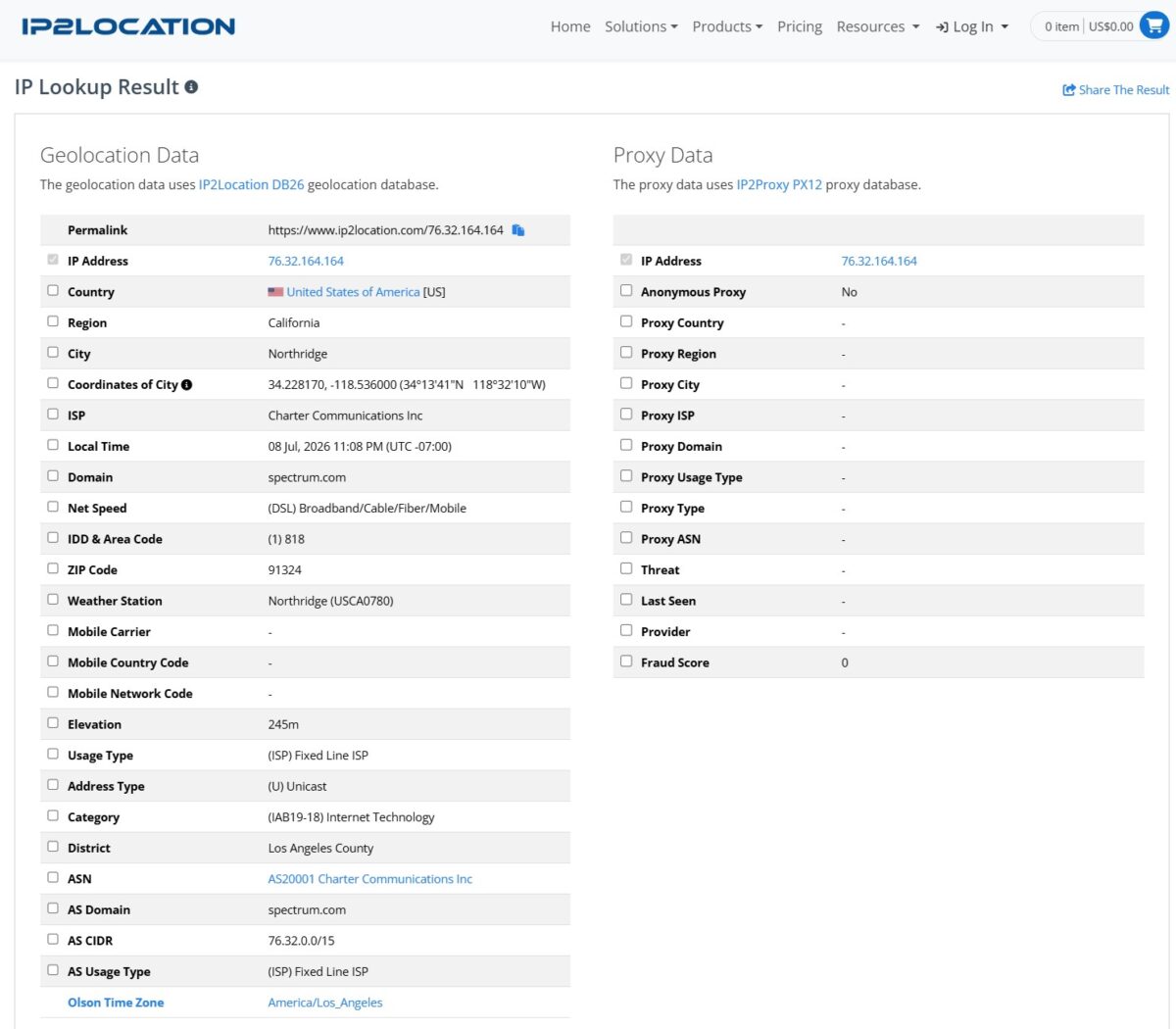
This is where it gets more interesting. IP2Location‘s Proxy Data block gave Anonymous Proxy = No, left all the Proxy Type, Threat, and Provider fields empty, and returned a Fraud Score of 0. That’s noticeably better than what I saw with IPPeak and NodeMaven, where IP2Proxy honestly flagged the address as a residential proxy with a fraud score of 36 to 45. Here the database doesn’t see a proxy in the address at all. Usage Type is Fixed Line ISP, city Northridge, ZIP 91324, Los Angeles County.
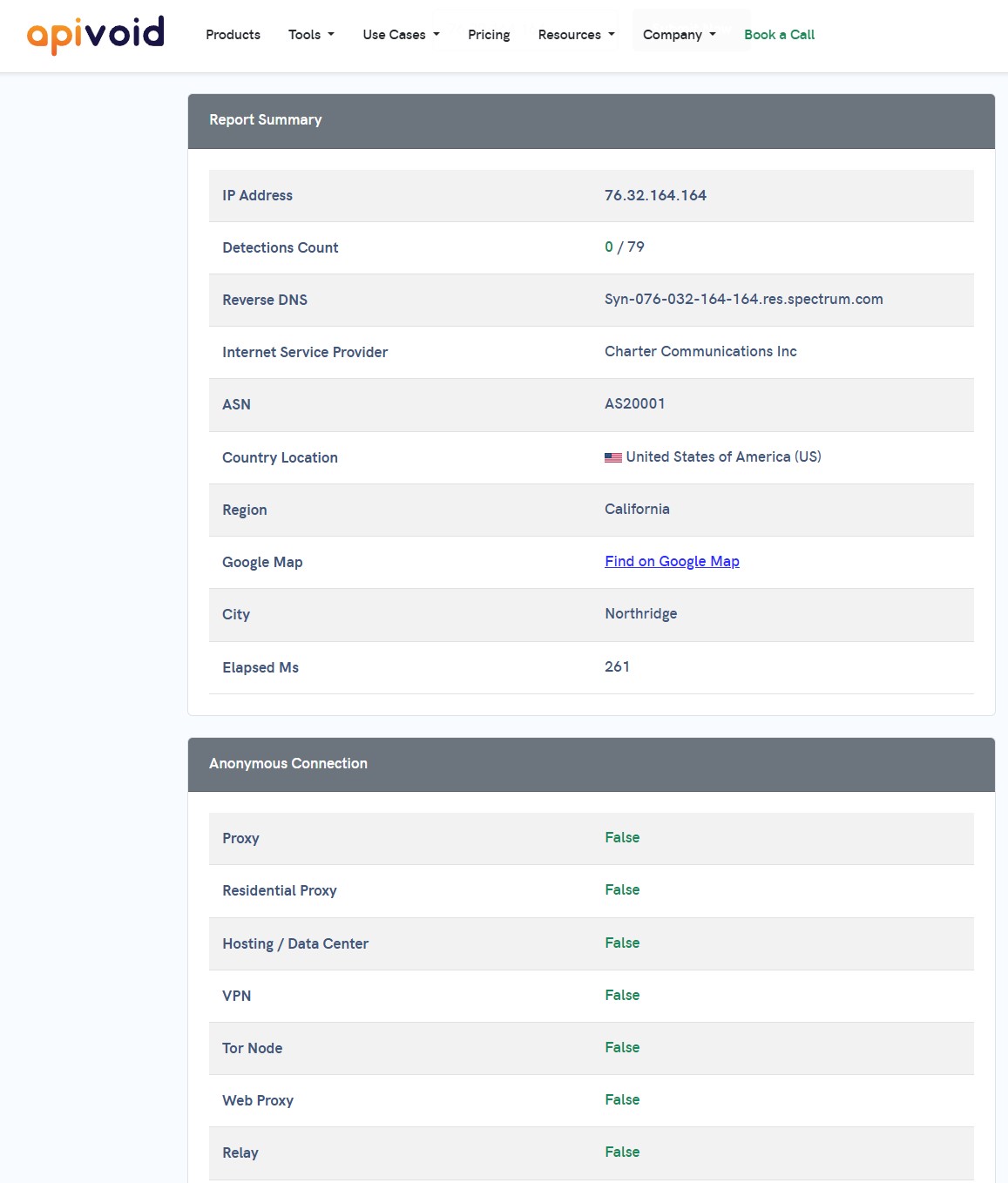
APIVoid filled in the rest of the picture: 0 detections out of 79 reputation checks. Importantly, every field in the Anonymous Connection block came back False. Proxy: False, Residential Proxy: False, VPN: False, Tor: False, Web Proxy: False, Relay: False. It’s worth understanding the nuance here though: APIVoid simply didn’t detect that the address is being used as a proxy. For most tasks, that’s the perfect setup, since the site sees an ordinary Charter home subscriber rather than a proxy exit.
Fraud Score
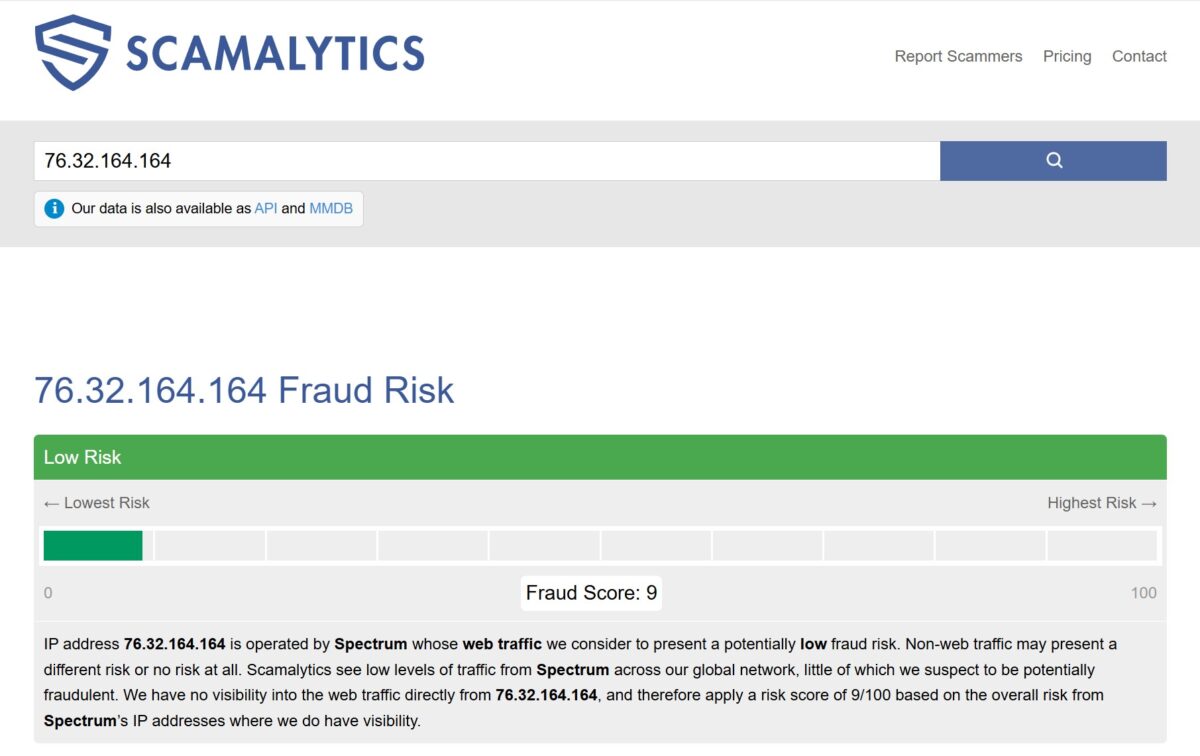
Scamalytics gave it 9 out of 100, rated Low Risk. The operator is Spectrum, and the traffic is considered low risk overall. There’s a small gap with IP2Location’s score of 0 out of 100, but that’s normal, since the databases count things differently. Scamalytics looks at the reputation of the whole ASN, while IP2Proxy looks at the specific address. The truth is probably somewhere in the middle, but in this case both databases agree that the IP is more clean than dirty, and noticeably cleaner than what I’ve seen from competitors in the same price bracket.
Fingerprint and antidetect
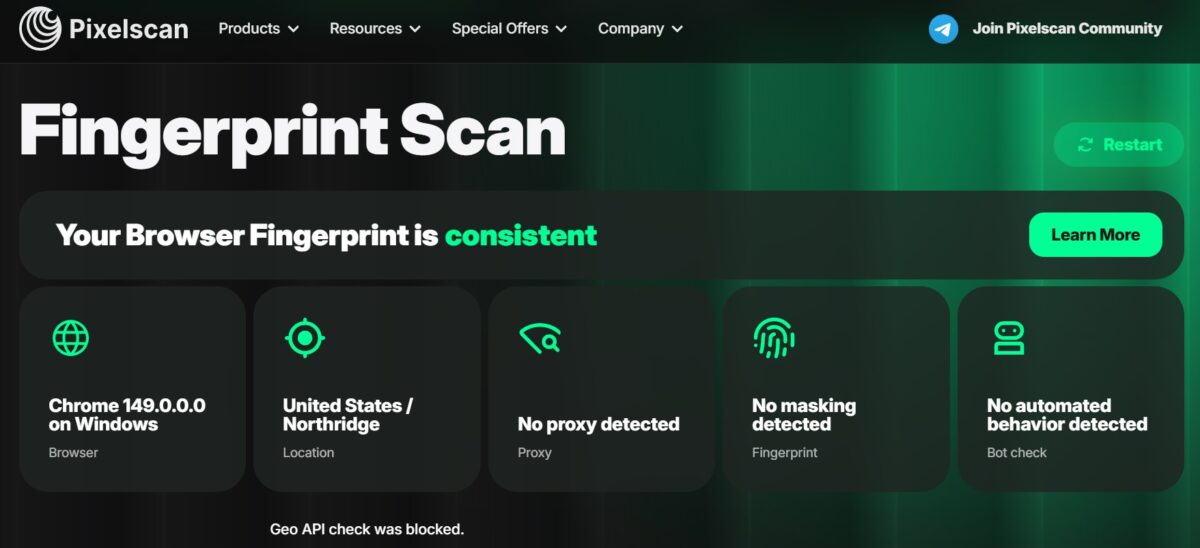
Pixelscan is the serious one here. The fingerprint came back consistent, with a “No proxy detected” verdict, no masking, and no automated behavior. Geo by IP and geo by browser lined up too, Northridge in both. That means the proxy doesn’t blow its cover at the fingerprint level, which is exactly what you want for working with marketplaces, social media, and other places with tough detection.
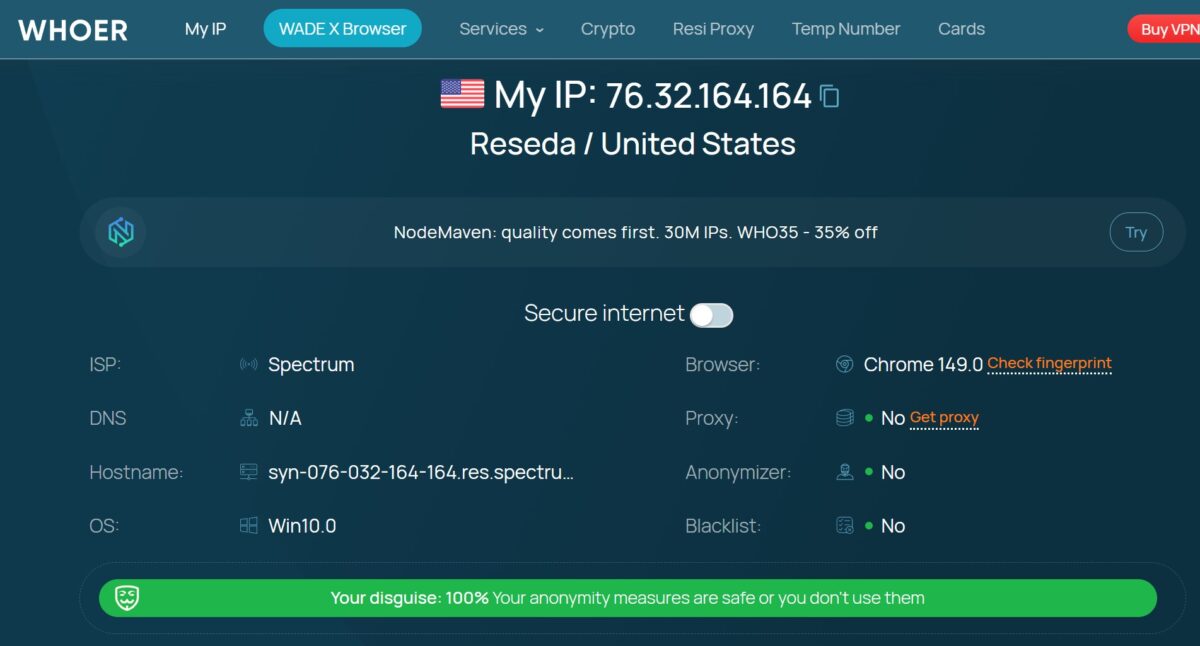
Whoer sealed it: disguise 100%, proxy not visible, anonymizer not visible, clean on blacklists (in their check). Browser and system are in sync.
WebRTC and DNS leaks
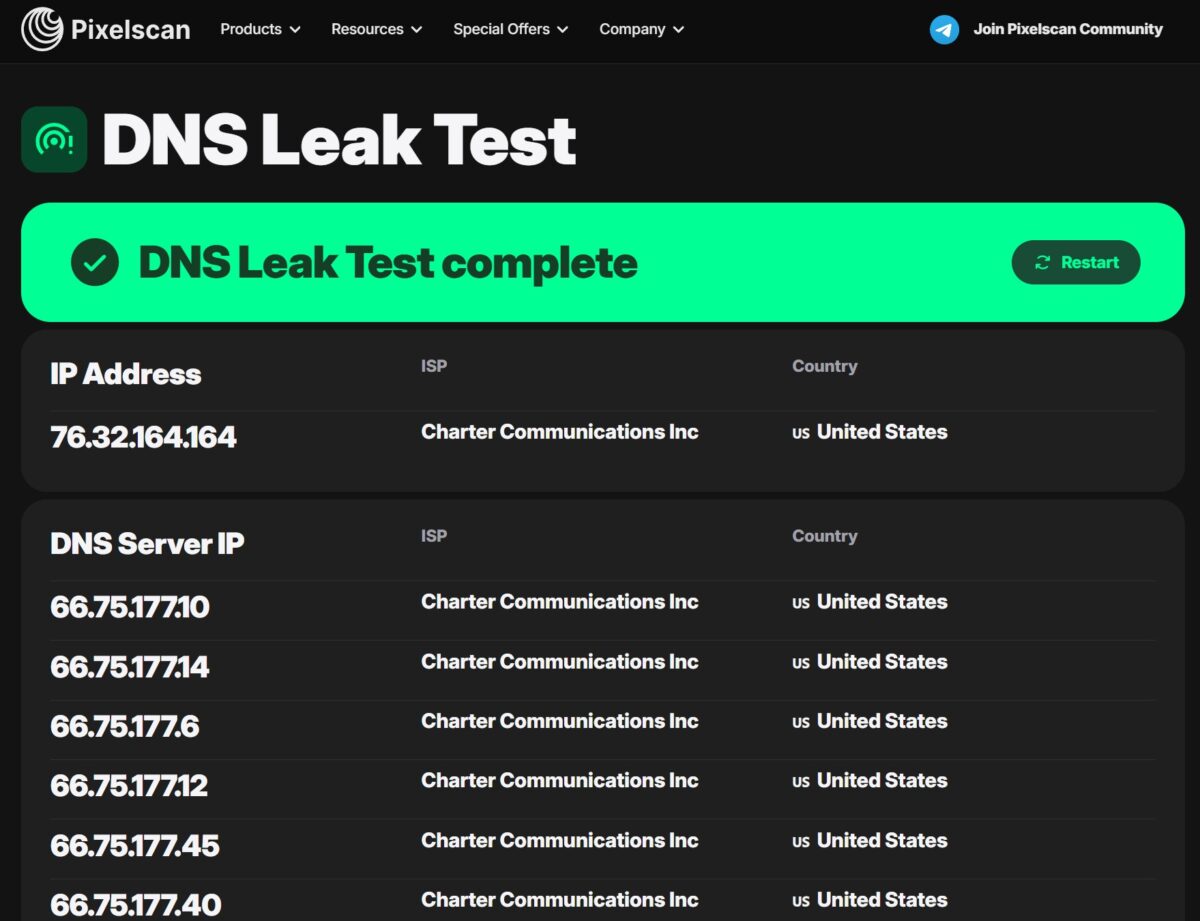
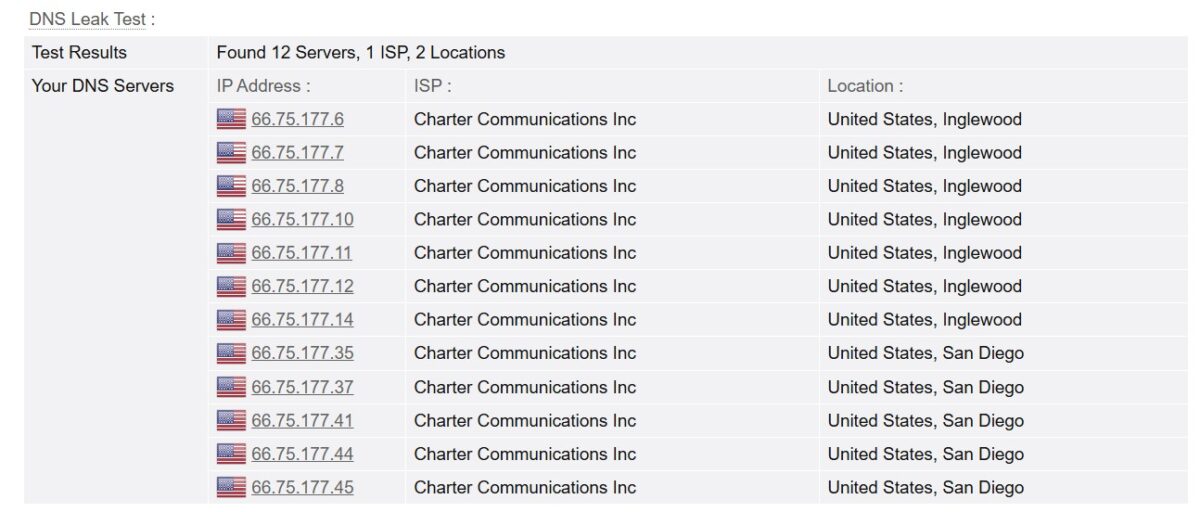
DNS is clean, and that matters. All 12 DNS servers belong to Charter Communications, spread across one ISP and two locations, Inglewood and San Diego, both in the US. There’s no leak to a third-party resolver like Google or Cloudflare. DNS, IP, and ASN all line up, so from the site’s point of view the requests come from a real American cable subscriber. It’s the same clean picture I got with IPPeak on Comcast.
I also ran a separate WebRTC check and found no leaks. The local IP doesn’t show, the external one matches the proxy address everywhere, and the real address never surfaces. I’ll admit I didn’t save the screenshot for this one, so unlike the rest of the numbers in this review, you’ll have to take this on my word for now. I’ll re-check and attach proof when I get the chance. But for multi-accounting purposes, the main thing held up: the WebRTC channel is closed.
TCP/IP and headers
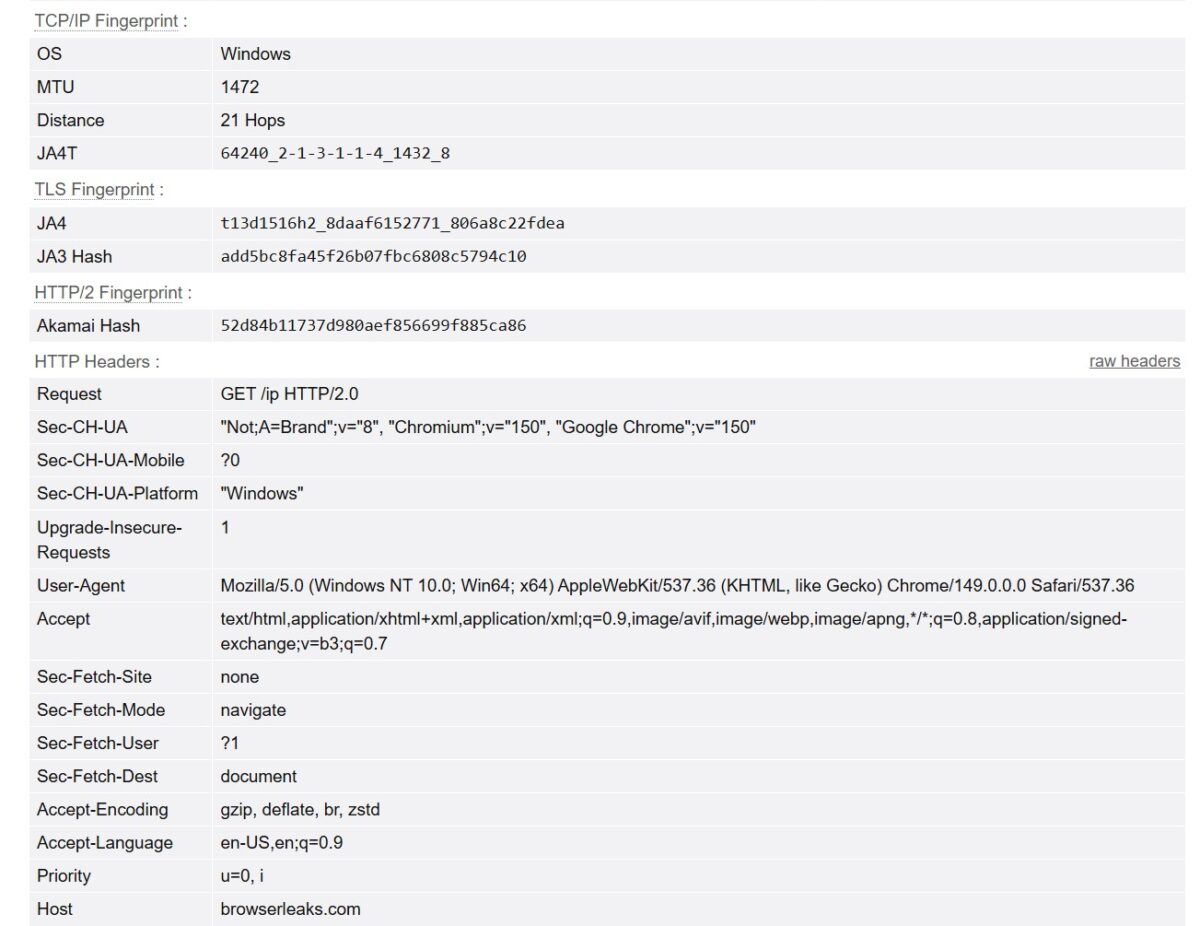
Everything checks out here. The TCP/IP fingerprint reports OS Windows, the User-Agent is Chrome 149 on Windows, and Sec-CH-UA-Platform reads “Windows”. So the system fingerprint at the network level matches what the browser reports. That’s a plus, because with NodeMaven, for instance, I caught a mismatch where the TCP stack showed Android while the browser showed Windows. None of that happens here. Accept-Language is en-US, with the locale set to US, which makes sense.
Blacklists
And here’s the first fly in the ointment.
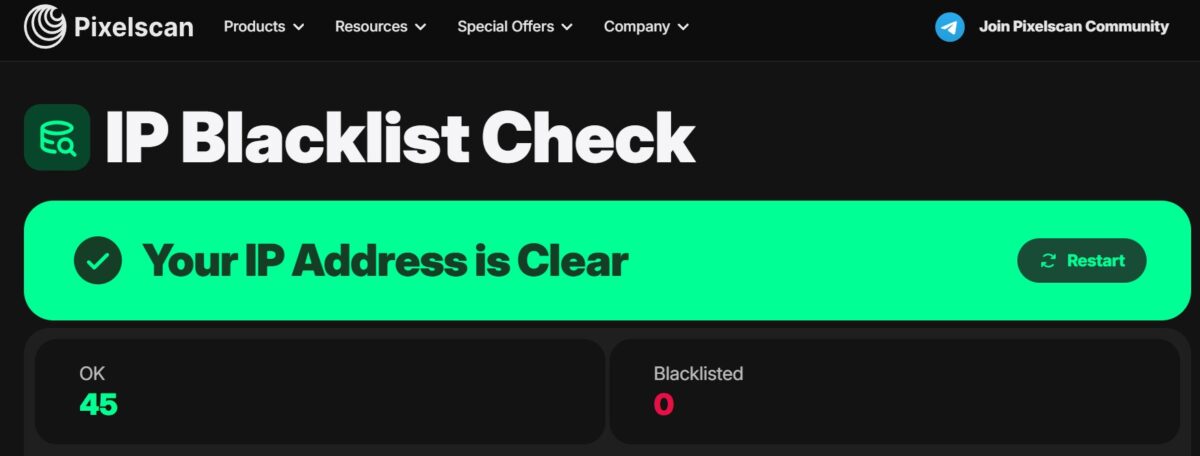
Pixelscan said the IP is clean: 45 checks OK, 0 on blacklists. But I don’t trust a single source, so I ran it through MXToolbox too.
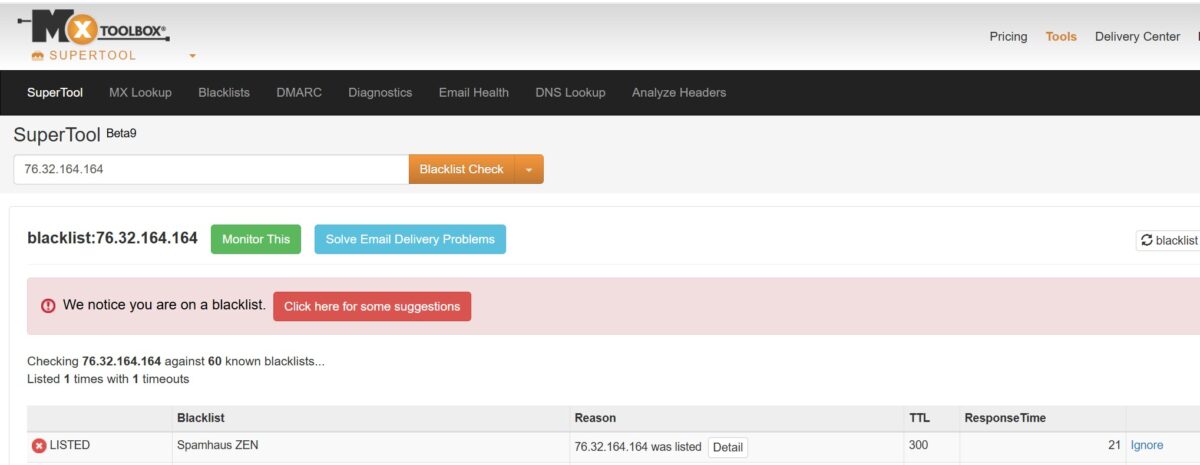
MXToolbox told a different story: the IP is listed on one blacklist, Spamhaus ZEN. Before you panic, here’s what that actually means.
Spamhaus ZEN includes the PBL, short for Policy Block List. This isn’t a list of spammers, it’s a list of ranges that shouldn’t be sending mail directly to mail servers. That means every home subscriber on Charter, Spectrum, or Comcast ends up on it by default, which is the whole point of the PBL. It does not make the IP dirty for web tasks.
The practical takeaway is simple. For scraping, social media, marketplaces, SEO, or ad verification, this blacklist is no obstacle at all. But sending email directly through the proxy is a different matter entirely, so forget it there. Residential proxies just aren’t built for mailing, and NiuProxy is no exception. That’s a trait of every residential network.
Speed
Now the most debatable part.
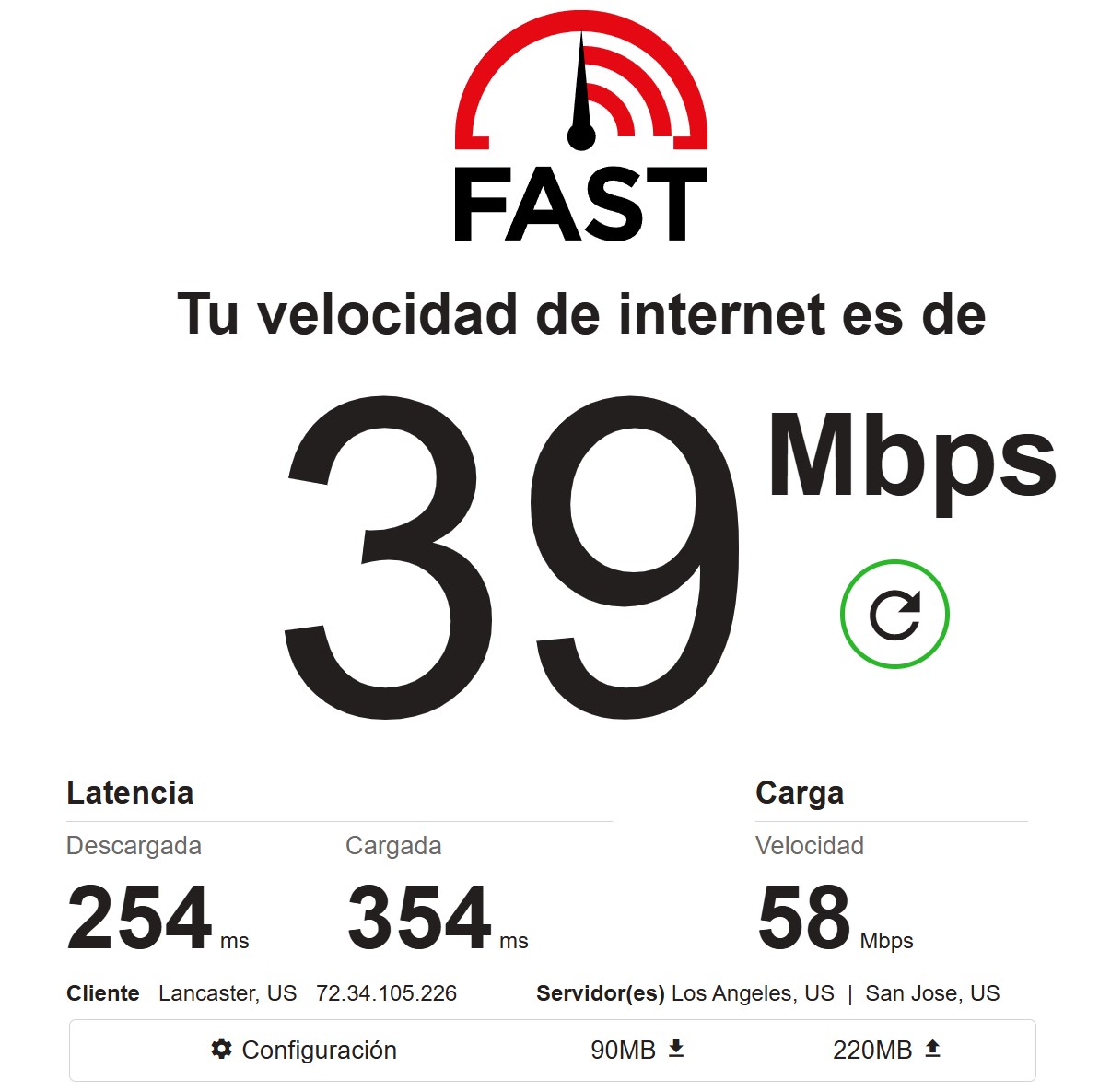
Fast.com gave brisk numbers on a single exit: 39 Mbps download, 58 upload, latency 254/354 ms. Against IPPeak, where fast.com gave 6-7 Mbps, it looks great. But a single measurement is a lottery, and I just landed on a fast exit. So I ran the pool.
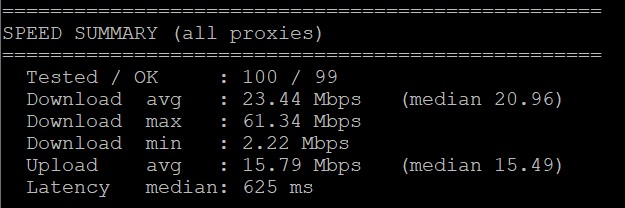
A bulk run across 100 proxies evened out the picture, and this one is more honest. Average download came to 23.44 Mbps, with a median of 20.96. Max was 61 Mbps, min was 2.22. Upload averaged 15.79 Mbps, and median latency was 625 ms.
And honestly, that’s strong for a residential proxy. For comparison, IPPeak gave a median of 7 to 8 Mbps in my test, and NodeMaven came in around 9. NiuProxy beats both here by two to three times. For scraping, SEO, and working with accounts, that’s more than enough, and it’ll even handle heavier content, which you don’t usually expect from cheap residentials.
Median latency of 625 ms is typical for residential. Not lightning, but workable. Won’t cut it for high-frequency tasks and sniping.
Pool quality and stability: the main test
Speed is only half the battle. What matters more is how many proxies in the pool are actually alive and how truly residential they are. I ran 400 proxies through my VPS script.
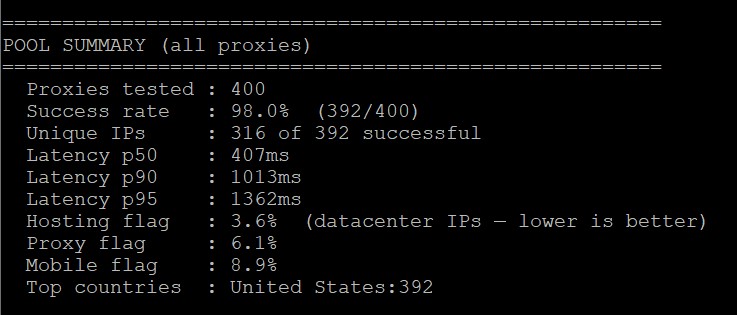
The result is solid, but not perfect. Success rate came out to 98.0%, meaning 8 out of 400 proxies dropped. Unique IPs numbered 316 out of 392 successful ones, so roughly 76 addresses turned out to be duplicates. The pool is wide, but not as clean on uniqueness as IPPeak, which had 394 out of 399. Latency p50 was 407 ms, and p95 was 1362 ms, both normal for residential.
Then there are the three flags at the bottom, which is really what this test was for, so I have to be honest about them. Hosting flag came in at 3.6%, meaning roughly every twenty-eighth IP came back as a datacenter one. Proxy flag was 6.1%, and Mobile flag was 8.9%. For comparison, IPPeak had all three flags at exactly 0.0%. NiuProxy has a bit of hosting mixed in, a bit of detectable proxies, and a bit of mobile. Not a disaster, but the pool isn’t sterile either. The site’s claim of “real household ISPs” holds up mostly, but with some admixture. All 392 successful addresses sat in the US as ordered, so no complaints there.
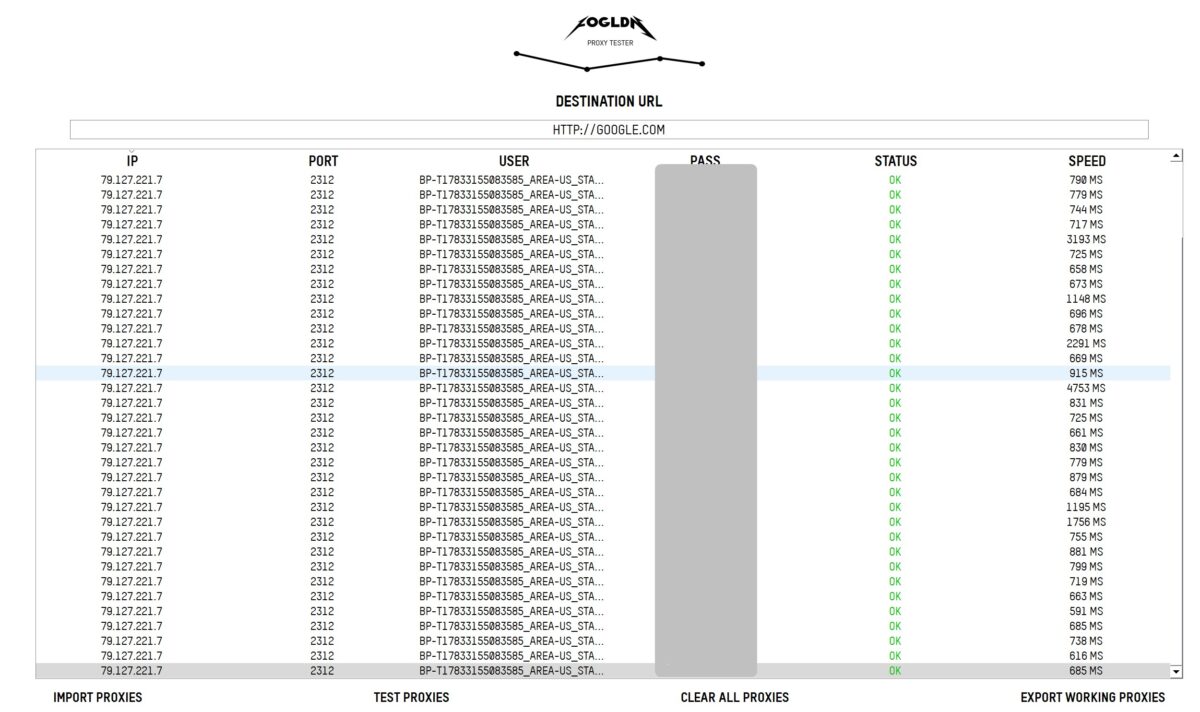
FOGLDN drove the point home on google.com: dozens of proxies, status OK across all of them. Most responses landed between 650 and 900 ms, with a few spikes up to 4753 ms, and no failures. Google let them all in without a CAPTCHA.
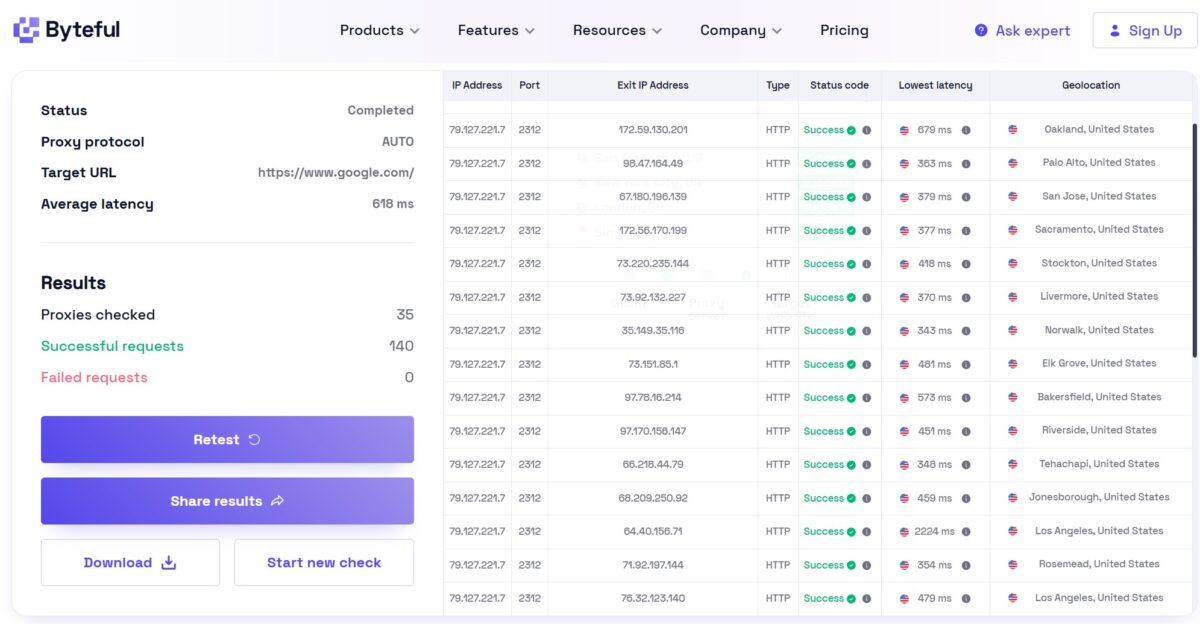
Byteful confirmed it on google.com: 35 proxies, 140 successful requests, 0 fails, and an average latency of 618 ms. Notice the Geolocation column too, since the cities are scattered across California: Oakland, Palo Alto, San Jose, Sacramento, Stockton, Livermore, Norwalk, Elk Grove, Bakersfield, and Riverside. That’s the real geographic spread of a residential network, not three racks sitting in one datacenter. I had targeted California, and the network honestly handed out IPs across different cities within the state.
Payment
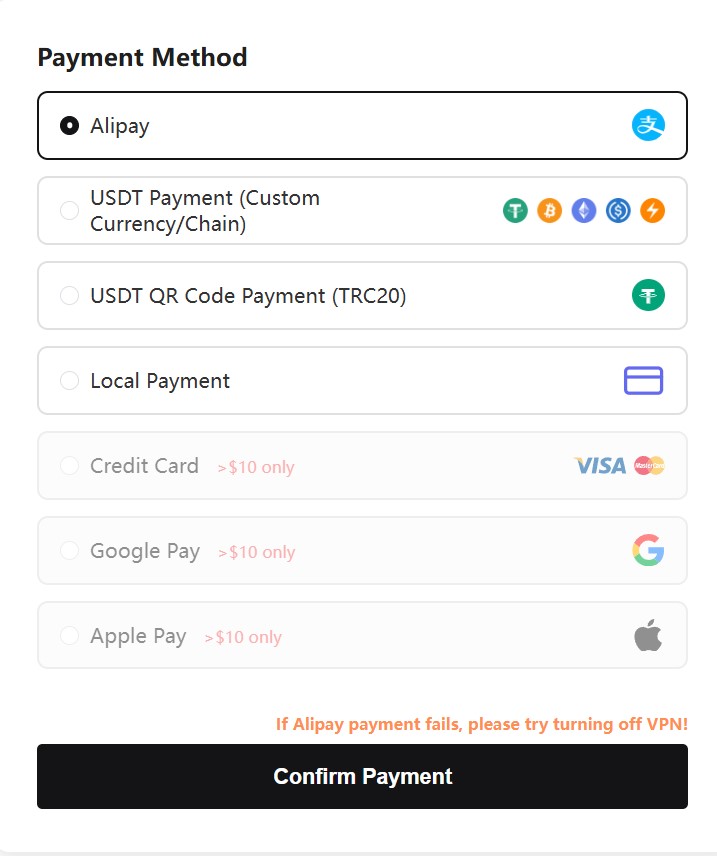
You can pay via Alipay, USDT (Custom chain and QR TRC20), Local Payment, card, Google Pay, or Apple Pay. But there are catches. Card, Google Pay, and Apple Pay only work from $10 upward. And the note “If Alipay payment fails, please try turning off VPN” gives away the service’s Asian, Chinese audience pretty clearly. Crypto without KYC is a plus for anyone who cares about privacy, but crypto payments, per the refund policy, aren’t returned under any circumstances, so keep that in mind.
On refunds in general, there’s a 15-day window, but the exclusion list is very broad. Failure caused by a target site’s anti-bot systems, or the use of an antidetect browser or a captcha-solver, knocks you out of a refund entirely. Basically half of all real-world scenarios fall under these exclusions. On top of that, the stated resolution time on a claim is 3 to 7 business days, which is slow for the B2B sector.
Pricing
Starting prices on the site: Rotating Residential from $0.7/GB, Static ISP $1.8/IP, Rotating Mobile $1.5/GB, Static Mobile $3/IP, Unlimited $200/day. On volume it drops hard: the promo page shows $0.50/GB on 1TB and $0.35/GB on 10TB.
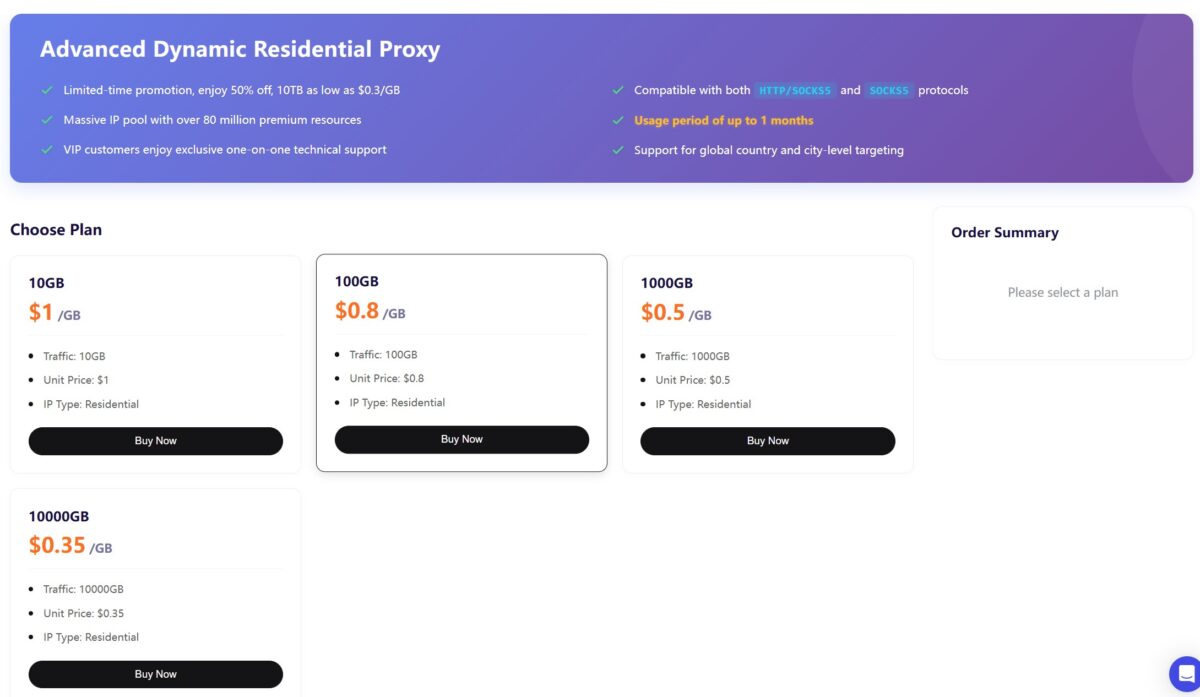
Here’s a fine-print detail worth catching. On the Advanced Dynamic Residential page, in small type, it says “Usage period of up to 1 month,” meaning this promo plan’s traffic expires after a month. That’s despite other pages claiming PAYG traffic has no expiration at all. It’s worth checking at purchase exactly which plan you’re buying: regular PAYG, or a promo with a shelf life.
How does this stack up against the market? $0.35-0.7/GB is one of the cheapest price tags in the niche, cheaper than almost everyone. Bright Data starts at ~$5.88/GB, Oxylabs at ~$6, Decodo at $2, IPRoyal $1.75 on volume. NiuProxy plays flat-out price dumping on large volume, comparable to DataImpulse. The economics for budget tasks are great. The only question is that for this money there’s no independent validation beyond my test.
Reputation
It’s dead quiet here. niuproxy.com has no Trustpilot profile at all, unlike every notable competitor, which sit on hundreds or thousands of reviews. On Reddit, in the topical subreddits like r/proxies and r/webscraping, there are no direct mentions, only traces of the brand’s own SMM activity. The service didn’t make the annual Proxyway Market Research 2026 report either. Gridinsoft assigned the domain a Trust Score of 26 out of 100 with a “young domain” note, though that’s automated heuristics, not an actual verdict.
The mood can be described like this: no clear negatives (nobody writes that they got ripped off or handed a dead pool), but no confirmed positives either. For a provider in 2026, that kind of “reputational silence” is a reason for caution.
There’s a separate downside for Europeans too: the Privacy Policy has no GDPR or CCPA section, no “right to erasure,” and no DPO contact listed. For Bright Data, Oxylabs, or Decodo, that’s standard practice. NiuProxy also never discloses where it sources its residential IPs: no P2P SDK, no partnership, nothing at all. Given that the FBI issued a specific warning in 2026 about the risks of residential proxy networks, this opacity around sourcing is a serious downside for compliance-sensitive tasks.
Summary table
| Parameter | Result | Score |
|---|---|---|
| Download / Upload (pool medians) | 20.96 / 15.49 Mbps | 5/5 |
| Latency (pool p50) | 407 ms | 4/5 |
| Success Rate (400 proxies) | 98.0% (392/400) | 4/5 |
| Hosting / Proxy / Mobile flag | 3.6% / 6.1% / 8.9% | 3/5 |
| Pool uniqueness | 316 of 392 | 3/5 |
| Fraud Score | 9/100 Scamalytics, 0/100 IP2Location | 5/5 |
| IP Reputation (APIVoid) | 0/79 detections | 5/5 |
| Blacklists | Spamhaus ZEN (PBL, for email) | 3/5 |
| ISP Type | Residential, AS20001 Charter/Spectrum | 5/5 |
| Proxy Detection (Pixelscan) | No proxy detected, consistent | 5/5 |
| DNS Leak | none, all DNS = Charter | 5/5 |
| Geo targeting | country + state + city | 4/5 |
| Sticky Session | up to 60 minutes, confirmed (IP held 30 min) | 4/5 |
| FOGLDN / Byteful | OK on all, 0 fails on google.com | 5/5 |
| Price | $0.35-0.7/GB | 5/5 |
| Traffic consumption | 2 GB ran out faster than expected, twice | 2/5 |
| Stats transparency | bare GB number, no detail | 2/5 |
| IP sourcing / Compliance | undisclosed, no GDPR/CCPA | 2/5 |
| Reputation / track record | domain < a year, no Trustpilot or Proxyway | 2/5 |
| Refund terms | 15 days, broad exclusions, crypto non-refundable | 3/5 |
| Overall | 3.8/5 |
- genuine residential: real Charter/Spectrum, AS20001, Fixed Line ISP, hosted domains 0, hostname with the res tag, abuse contact on charter.net;
- clean IP: Scamalytics 9/100, IP2Location fraud score 0, APIVoid 0/79 detections and every Anonymous Connection flag = False;
- proxy stays hidden: Pixelscan “No proxy detected”, fingerprint consistent, Whoer disguise 100%;
- DNS with no leak to a third-party resolver, all 12 servers inside the Charter network;
- TCP/IP and browser fingerprint in sync: both Windows, no mismatch;
- great speed for residential: median 20.96 Mbps download, two to three times higher than IPPeak and NodeMaven;
- FOGLDN and Byteful: OK on all, 0 fails on google.com, real city spread across the state;
- very cheap pricing: from $0.35/GB on volume, one of the lowest price tags in the niche;
- wide lineup: residential, ISP, mobile, datacenter, unlimited;
- crypto without KYC;
- sticky session works as advertised: in a 30-minute test the IP never changed once;
- no WebRTC leak.
- pool isn’t sterile: Hosting flag 3.6%, Proxy flag 6.1%, Mobile flag 8.9% in the 400-IP run, whereas IPPeak was at 0%;
- average uniqueness: 316 of 392, about 76 duplicates in the pool;
- Spamhaus ZEN (PBL): no good for sending mail directly through the proxy (a flaw of all residentials);
- full opacity of the residential IP source: critical for compliance;
- no GDPR/CCPA section in the Privacy Policy: a risk for EU/UK clients;
- domain under a year old, no Trustpilot profile, not in Proxyway benchmarks;
- broad refund exclusions + crypto non-refundable, 3-7 day resolution time;
- the promo plan’s traffic expires after a month (fine print);
- sticky session capped at 60 minutes: less than competitors (IPPeak up to 180, IPRoyal up to 24 hours);
- suspicious traffic consumption: 2 GB ran out faster than expected twice, real usage by their own stats came out higher than the volume pushed;
- stats in the dashboard are thin: just a total GB figure, no breakdown by request or domain, no way to check usage.
Overall impression
I sat down for this test on guard. A domain under a year old, a hidden owner, zero Trustpilot reviews, and a dumping price tag: that’s the classic “something’s off here” combination. And yet in practice, the proxies turned out much better than the reputation suggested.
The main surprise is speed. A median of 20.96 Mbps on a pool of 100 proxies, that’s several times faster than IPPeak and NodeMaven in my own tests. The quality of the individual IP is also top-notch: real Charter, clean fraud score across all three databases, Pixelscan doesn’t see a proxy, DNS doesn’t leak, fingerprints in sync. For $0.35-0.7 per gigabyte that’s very respectable.
Where it sags is pool cleanliness. Across 400 IPs, 3.6% came back as hosting, 6.1% as detectable proxies, and 8.9% as mobile, while IPPeak had a perfect zero on all three. So the network is a bit “noisier”, and on large volumes roughly every twenty-fifth to thirtieth IP won’t be exactly what you paid for. Uniqueness is also just average, with plenty of duplicates. Spamhaus ZEN is the PBL, so it’s no good for email, but that’s not critical for web work.
Who should buy it: anyone doing scraping, SEO, parsing Google SERP results, working with accounts through antidetect browsers, or general data collection. It’s a great budget option, especially if speed matters more to you than pool sterility, and the economics here are among the best on the market.
Who shouldn’t buy it: enterprise users and ad verification teams that need a disclosed IP source and full compliance, clients from the EU who care about GDPR, and anyone who needs every single IP to be clean at high volume, since the admixture of hosting and proxy flags will get in the way there.
One thing did sour the impression though. Traffic ran out suspiciously fast, twice, out of nowhere, even though my usual test set fits comfortably in 1.3 GB. I won’t call it padding, since I don’t have insight into their counter’s internal logic, but by their own stats I “pushed” more traffic than I actually ran. If you’re paying by the gigabyte, budget for the possibility that real usage with NiuProxy could run higher than you expect. And the dashboard stats are so bare that there’s nothing to verify it against.
For price-to-IP-quality this one is solid, but with caveats. I’d put it at 3.8 out of 5. It gets docked for suspicious traffic consumption (that’s the client’s money directly), pool cleanliness, reputational opacity, and thin stats. The IPs themselves are real, fast, and clean, and the network works, working better than I expected from a newcomer carrying these particular flags. But the aftertaste from that traffic story stuck around.
This isn’t a full breakdown of every feature, the review will be updated. Logs and screenshots are saved, I’m happy to double-check any number on request.