






 Why Trust Us?
ToProxyLab has been testing proxy services since 2025. We pay for most plans ourselves, and when a provider gives us test traffic we say so in the review — free traffic buys a place in the testing queue, nothing else. Every provider goes through the same speed, uptime and fraud-score checks, and we publish the real numbers, including the bad ones. A rating cannot be bought. Learn who we are and how we review proxies.
Why Trust Us?
ToProxyLab has been testing proxy services since 2025. We pay for most plans ourselves, and when a provider gives us test traffic we say so in the review — free traffic buys a place in the testing queue, nothing else. Every provider goes through the same speed, uptime and fraud-score checks, and we publish the real numbers, including the bad ones. A rating cannot be bought. Learn who we are and how we review proxies.
A representative from 2extract reached out and offered us free traffic to test their residential proxies for our reviews and rankings. They loaded $12 onto our account, which works out to roughly 3 GB of residential traffic at $3.99/GB.
Standard disclaimer first. Free traffic does not buy a favorable review. The provider pays for a spot in our testing queue, not for a soft verdict. Every step is documented with screenshots, every log is saved. Any number in this review can be verified. Just reach out.
Testing was conducted according to our methodology.
Who Is Behind 2extract
The service is owned by POLYDAN PTE. LTD., registered at 68 Circular Road, #02-01, Singapore (049422). That is the Boat Quay area, a popular spot for registering tech companies, but it is usually a virtual office rather than an actual headquarters with people inside. The legal entity was created in May 2022, with the full proxy service launch announced in December 2025. The founder’s name does not appear anywhere on the site, in press releases, or on LinkedIn. Compare that to Bright Data (Or Lenchner), Oxylabs (Julius Cerniauskas), or Decodo (Aurimas Gudavicius), where leadership is public-facing. Here, there is nothing.
No SOC 2, no ISO 27001. For a service that is less than a year and a half old, that is expected, but if you are working in enterprise with strict compliance requirements, keep that in mind.
Even by proxy market standards, this service is young.
What They Sell
The product catalog is short. Two proxy types:
- Residential – real IPs from home ISP subscribers, rotating or sticky sessions up to 60 minutes. $3.99/GB.
- Mobile – IPs from cellular carriers (3G/4G/5G). $4.99/GB. 2extract is upfront about mobile sessions being less stable and recommends building retry logic into your workflow.
No datacenter proxies. No static ISP proxies. Bright Data, Oxylabs, IPRoyal, and even MangoProxy offer the full stack. 2extract covers roughly half the standard catalog.
And separately, there is an MCP server for managing proxies through AI agents. More on that below. It is the most interesting part of the whole product.
The Website and First Impressions
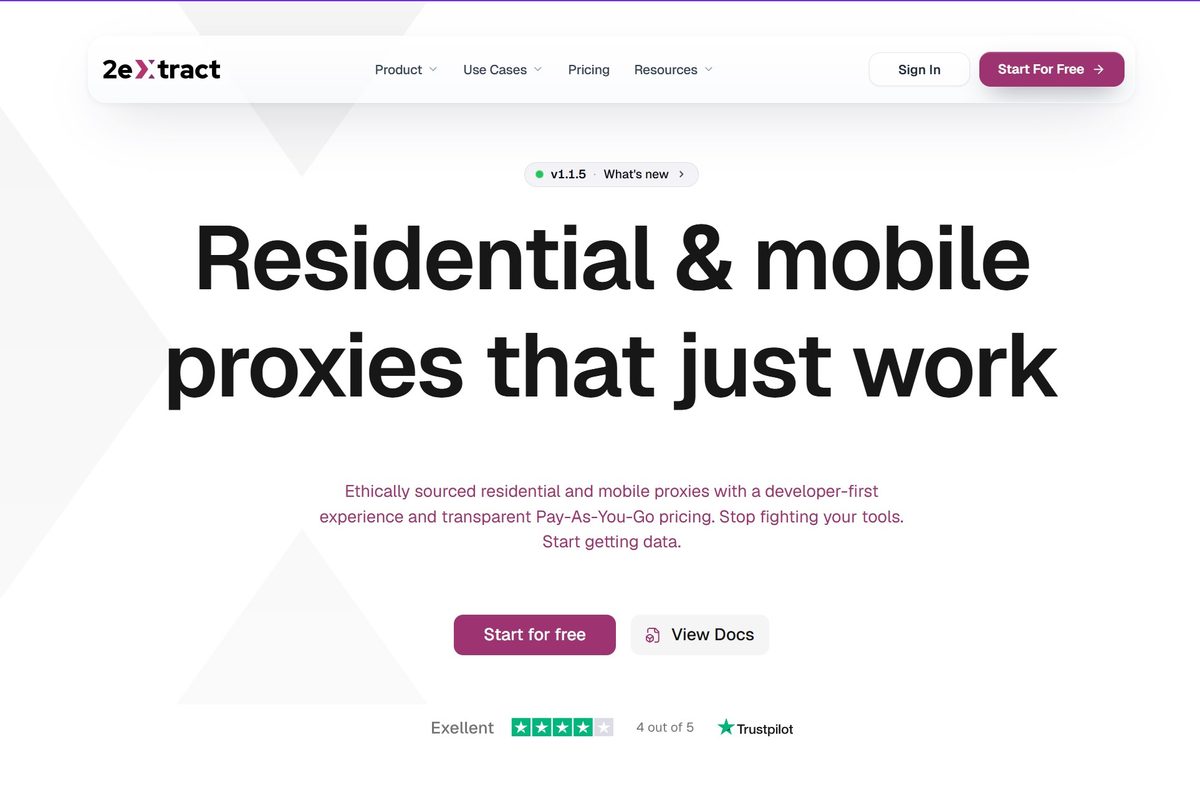
The site is a clean, single-page landing. Why does this even matter? In 2025-2026, dozens of new proxy services hit us up every month asking to be reviewed. Most of them have websites thrown together in an evening using ChatGPT or Claude. You can spot them immediately: same layout, emoji everywhere, neon colors, copy that smells like AI-generated filler. We turn those down. The logic is simple: if the founders did not put effort into the website, they will shut the whole thing down just as easily tomorrow. Do not hand your card details to providers like that.
2extract’s site is actually well made. There is a clear design hand, proper documentation, a changelog with product versions (v1.0 through v1.1.5), a separate About page, and an Acceptable Use Policy. Trustpilot badge at the bottom.
Trustpilot: 4.2 out of 5 based on 6 reviews. Six reviews. The service does have listings on G2 and Capterra, though neither has accumulated meaningful review volume yet. Proxyway, the largest independent proxy benchmark, does not mention 2extract in either “Best Residential Proxies 2026” or “Proxy Market Research.” No organic mentions on Reddit r/proxies either. There is essentially no established reputation to evaluate here. We are starting close to zero.
Sign-Up and Dashboard
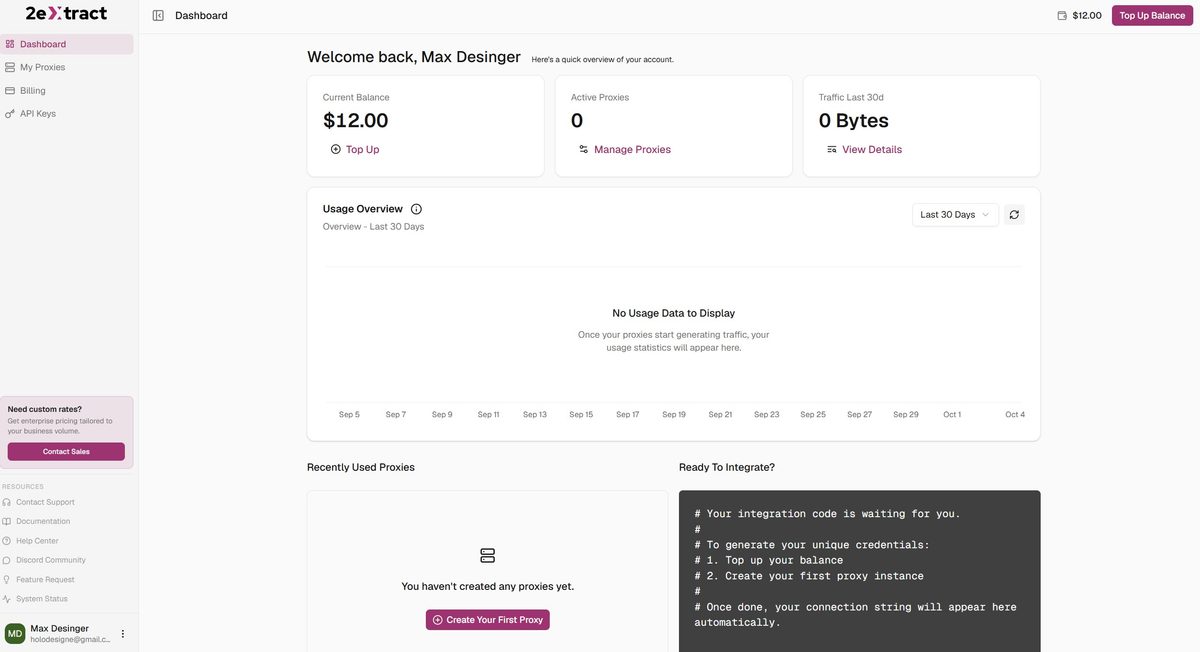
Registration is straightforward: email and password. KYC is not required until your cumulative top-ups hit $50. After that threshold, you will need to submit a document and selfie through a third-party verification provider. For a small test deposit it is invisible. For a working account with regular top-ups, you will hit it fast.
The dashboard is minimal. Balance $12.00, active proxies 0, traffic for the last 30 days 0 bytes. On the right there is a “Ready To Integrate?” block with connection code that appears after you create your first proxy. The left sidebar has: Dashboard, My Proxies, Billing, API Keys. At the bottom, links to Documentation, Help Center, Discord Community, Feature Request, and System Status. Support emails: hello@2extract.com and support@2extract.com. The site claims “real engineers respond, not scripts.” I could not verify that since I did not contact support during the test.
Payment
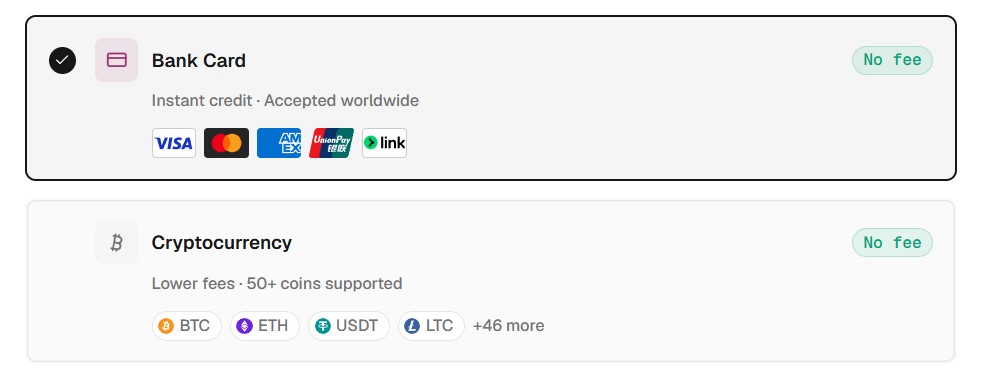
Two options. Bank cards (Visa, Mastercard, AmEx, UnionPay, Link) via Stripe, no fee, instant deposit. Crypto with 50+ coins (BTC, ETH, USDT, LTC and others), also no fee. PayPal and Wise are not supported. For European businesses with formal accounting requirements, that is a gap. Invoices are available via the Stripe Customer Portal as PDFs.
Minimum top-up is $10.
Pricing
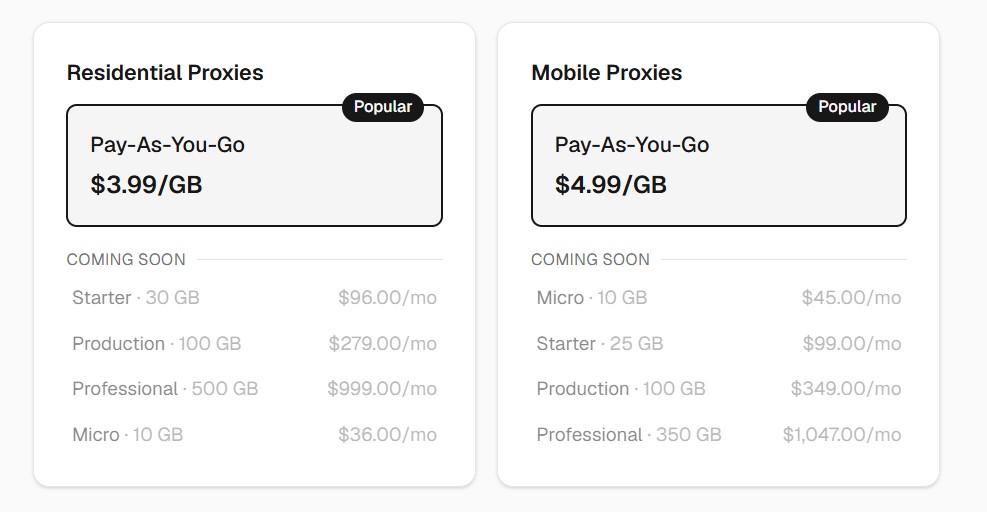
Residential is $3.99/GB. Mobile is $4.99/GB. Monthly plans (Micro $36/mo for 10 GB, Starter $96/mo for 30 GB, Production $279/mo for 100 GB, Professional $999/mo for 500 GB) are marked “Coming Soon.” Enterprise pricing starts at $0.70/GB by request for volumes above 500 GB.
For context, the median market entry price according to Proxyway data is $4/GB. At small volumes under 10 GB, 2extract is right in line with the market. For high-volume usage, the public Pay-As-You-Go rate of $3.99/GB is the only option without a custom Enterprise agreement. If you can negotiate that contract, the rate drops to $0.70/GB, which is competitive with the market. But the Enterprise tier requires reaching out and getting approved, and that is not guaranteed. Without a signed deal, the standard rate applies, and at that rate buying terabytes here is significantly more expensive than at DataImpulse (~$1/GB), Decodo (~$2/GB), or IPRoyal (~$1.75/GB). If you consistently move 100 GB or more per month, contact their sales team before committing.
The refund policy is strict: “all purchases are final,” with exceptions only for technical failures on 2extract’s end (48-hour window to file) or duplicate charges (30-day window).
Creating a Proxy and Configuration Options
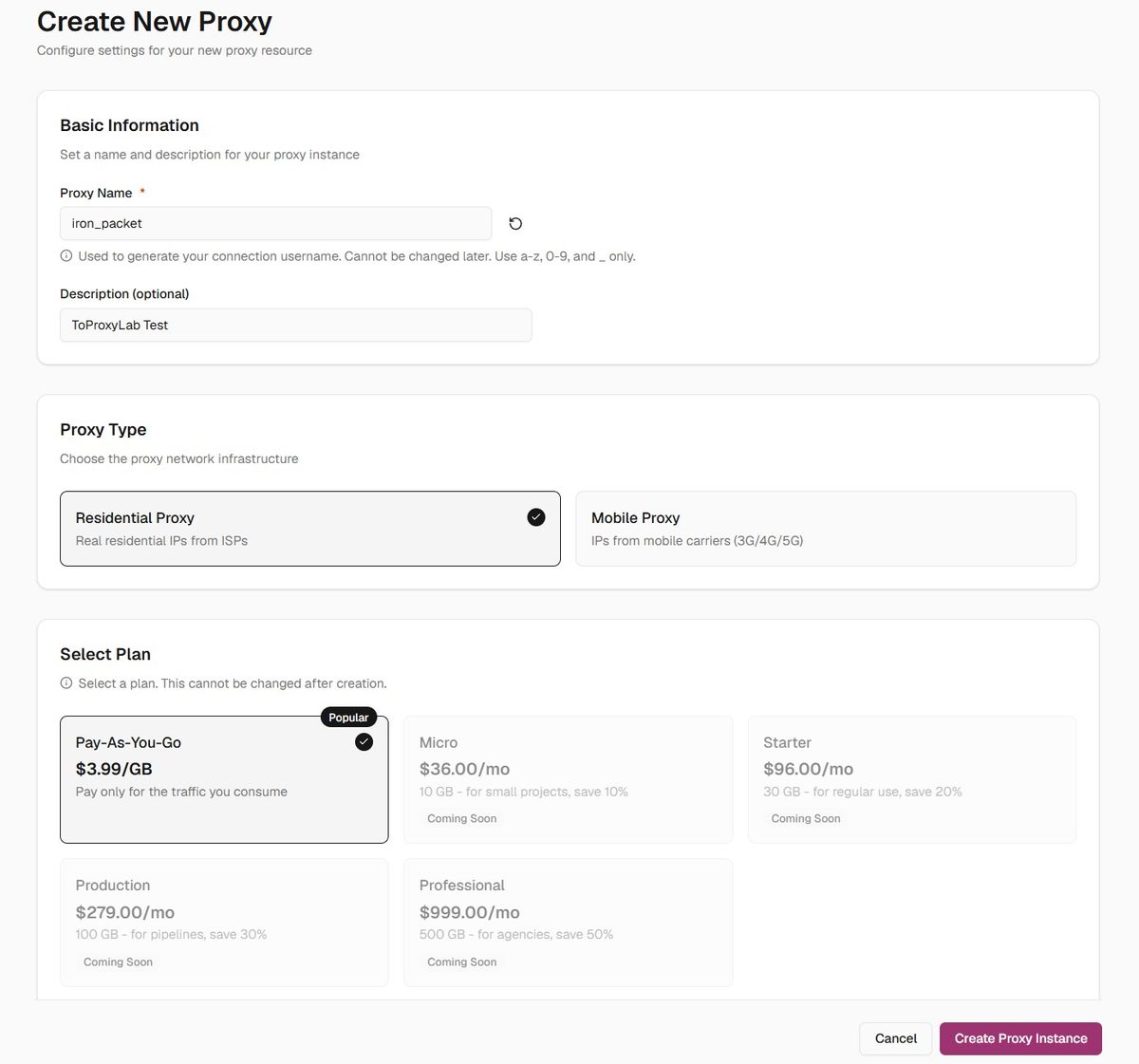
Creating a proxy takes two clicks. Name (I went with iron_packet), description, type (Residential or Mobile), plan (only Pay-As-You-Go available right now). The name cannot be changed after creation since it becomes part of your connection string.
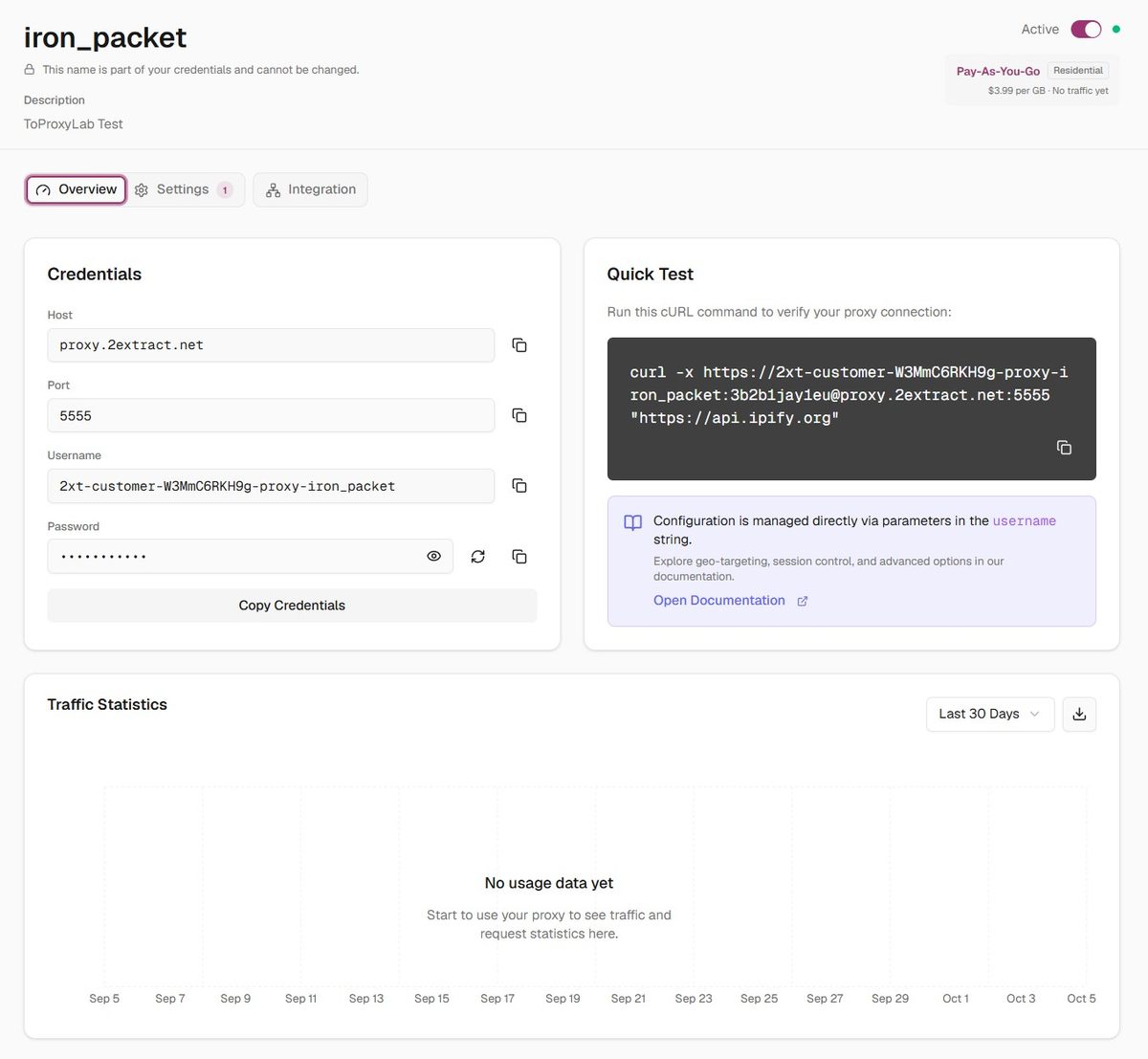
After creation, the Overview tab shows you the host proxy.2extract.net, port 5555, login, password, and a curl command for a quick test.
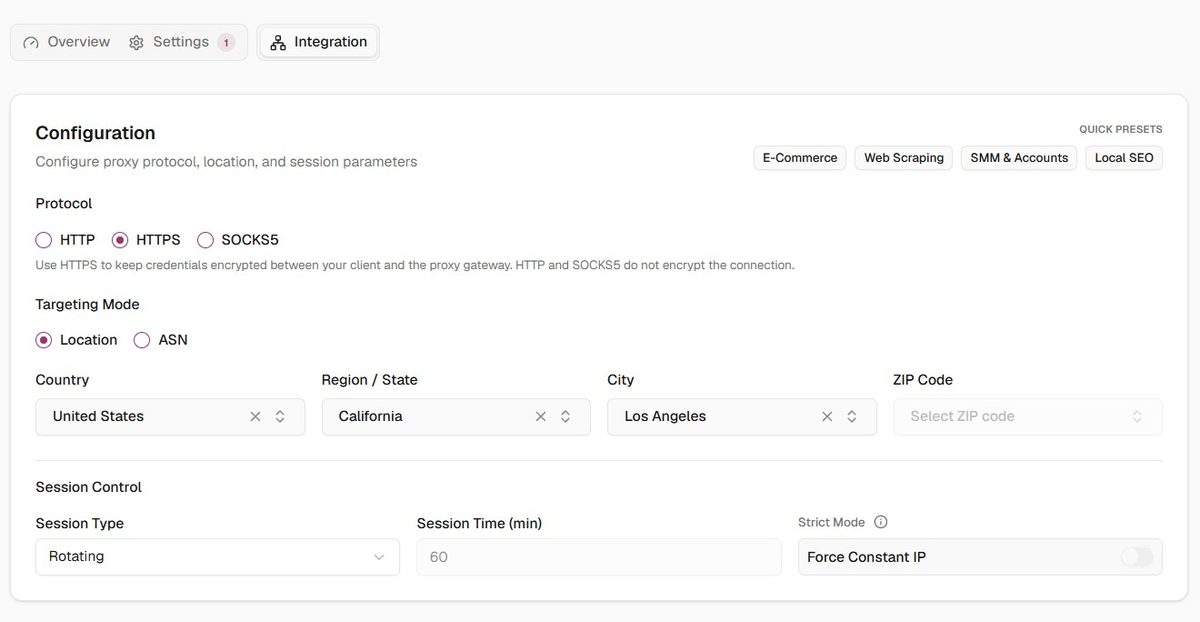
The Settings tab has a full configurator. Protocols: HTTP, HTTPS, SOCKS5. Targeting: country, state, city, ZIP, or ASN. Sessions: Rotating or Sticky (up to 60 minutes by default), plus a Force Constant IP mode called Strict. When Strict is enabled, if a sticky IP drops, the request returns a 502 instead of silently swapping to a different address. That is genuinely useful for multi-account work, and most competitors do not offer it. Pre-built presets available: E-Commerce, Web Scraping, SMM and Accounts, Local SEO.
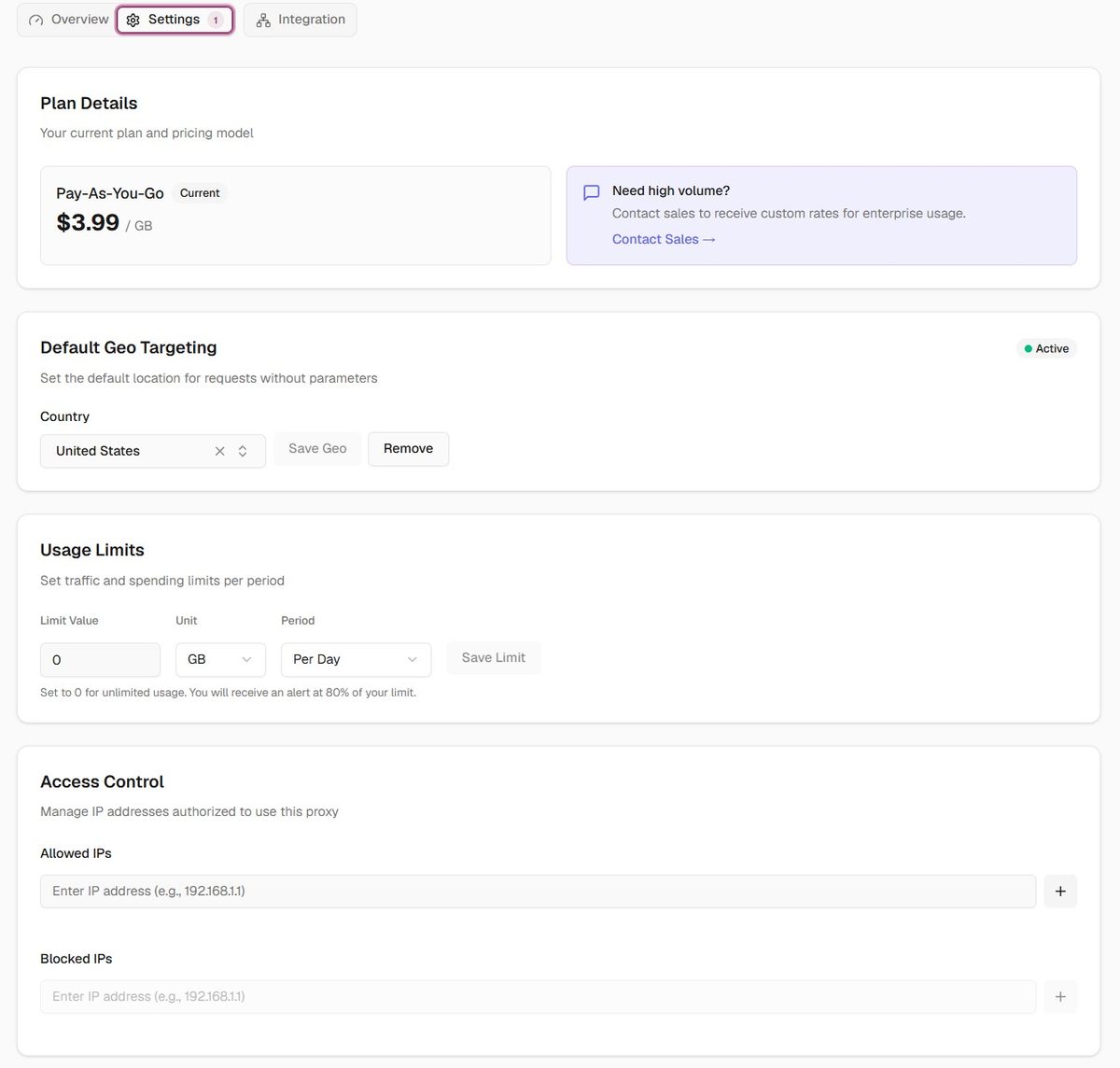
There are also traffic spend limits (by day, in GB or USD) and access controls (Allowed IPs, Blocked IPs, Target Host Whitelists). The IP whitelist is already functional even though the docs still mark it “Coming Soon.” Active development, lazy doc updates.
Targeting is handled through inline username parameters, everything in one string: 2xt-customer-[ID]-proxy-[NAME]-country-us-state-california-city-losangeles-session-abc123-time-30. No need to create a separate proxy for each country. Change the parameter in the string, change the geo. For scripts and pipelines that is a lot more convenient than jumping into a dashboard every time.
I set the location to United States, California, Los Angeles. Rotating mode for the bulk test, sticky for individual checks.
Connecting to an Antidetect Browser
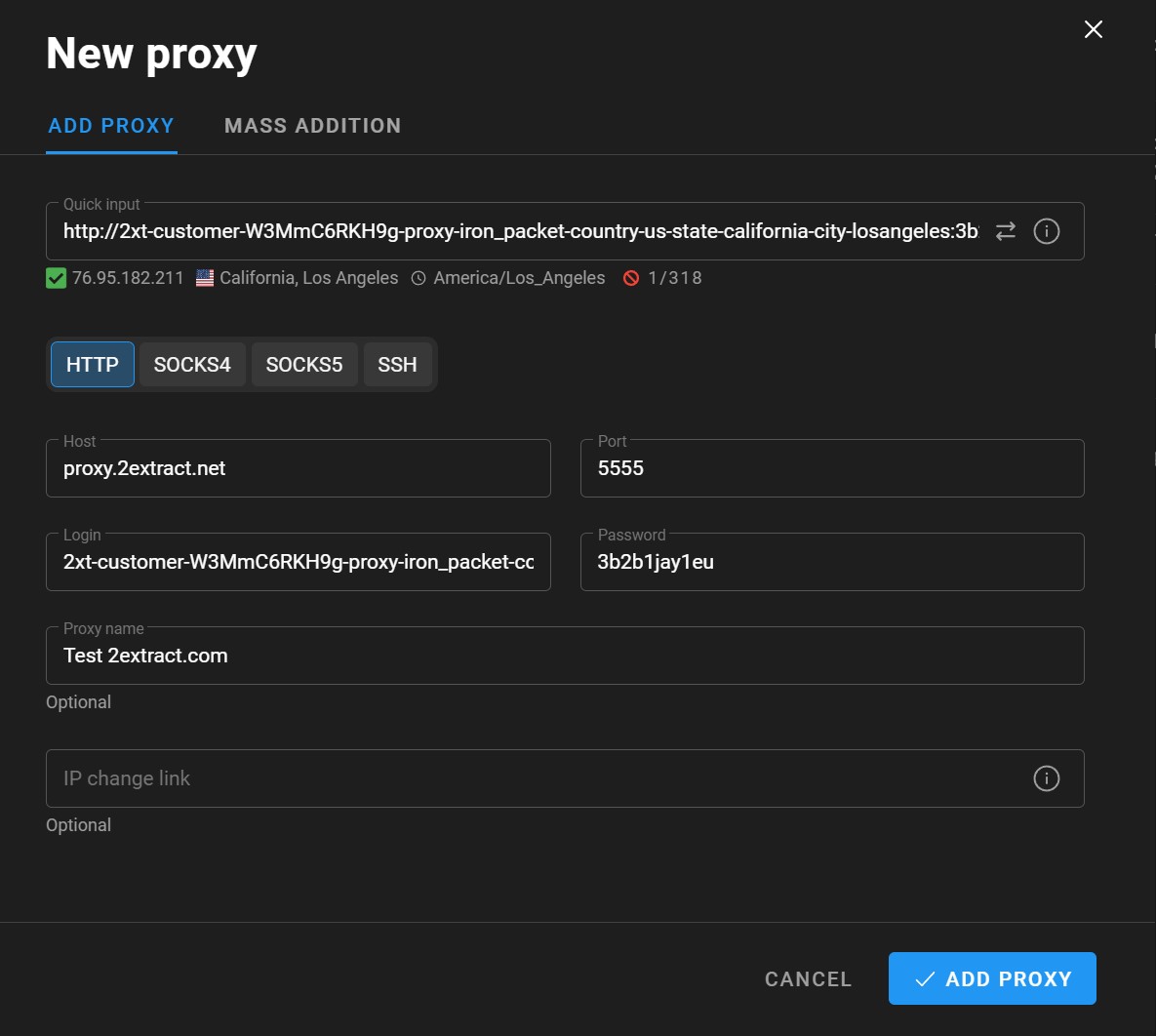
I pasted the connection string via Quick Input in Dolphin Anty. Everything parsed cleanly: host proxy.2extract.net, port 5555, username, password. The checker returned IP 76.95.182.211 from California, Los Angeles, timezone America/Los_Angeles. Geo matched what I ordered.
Single IP Deep Dive
Test address on a sticky session: 70.170.58.129.
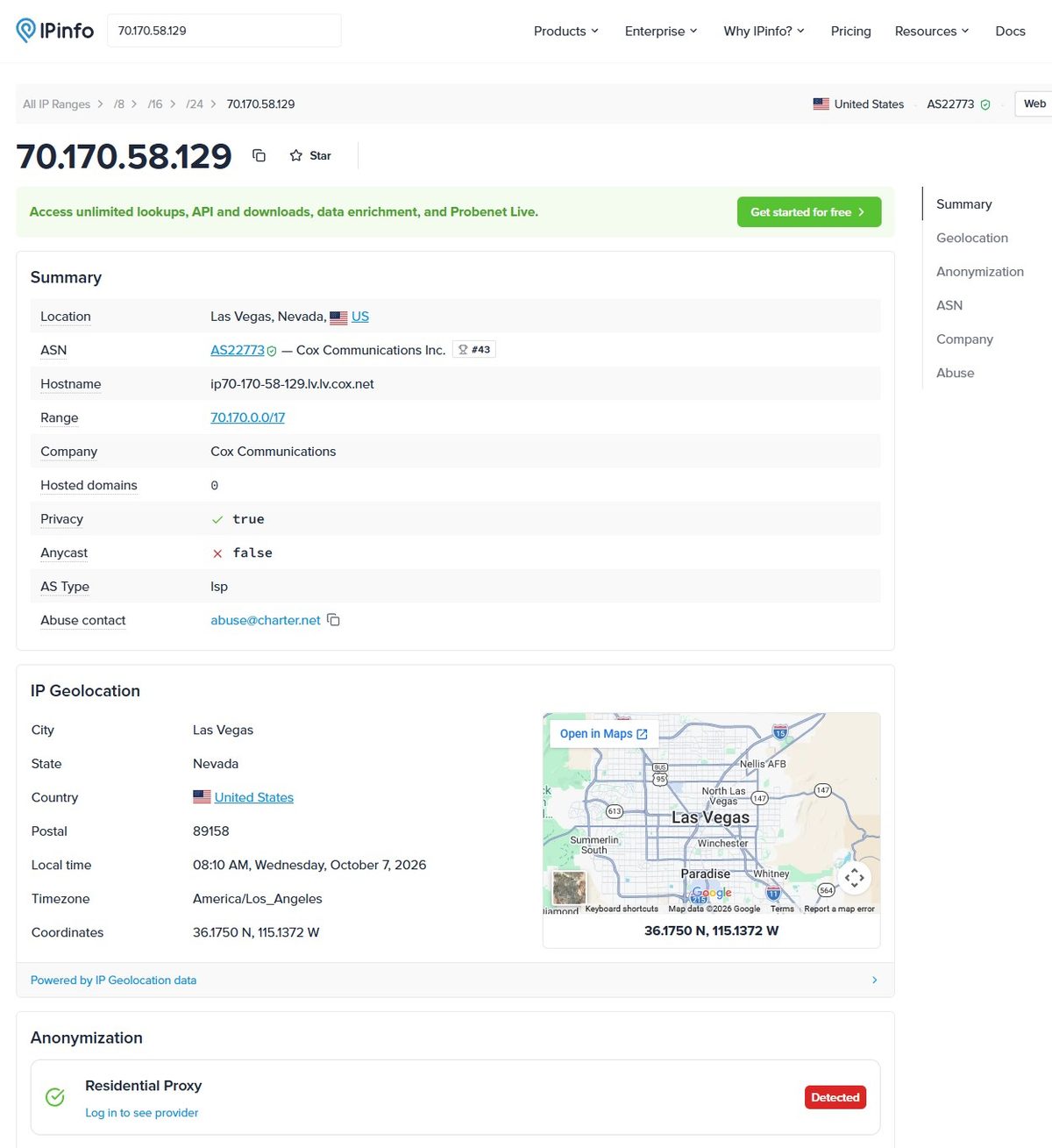
IPinfo: ASN AS22773, Cox Communications Inc., ranked #43 by size among global ISPs. Hostname: ip70-170-58-129.lv.lv.cox.net, which is a textbook residential subscriber hostname structure for Cox in Las Vegas. Hosted domains: 0. AS Type: ISP. Privacy: true. Anycast: false. Las Vegas, Nevada, ZIP 89158.
Wait. I asked for Los Angeles and got Las Vegas. This is just how residential pools work: the gateway handed out the nearest available IP, and nearest turned out to be in Nevada. For scraping, that is irrelevant. For Local SEO with city-level targeting, that is an actual problem.
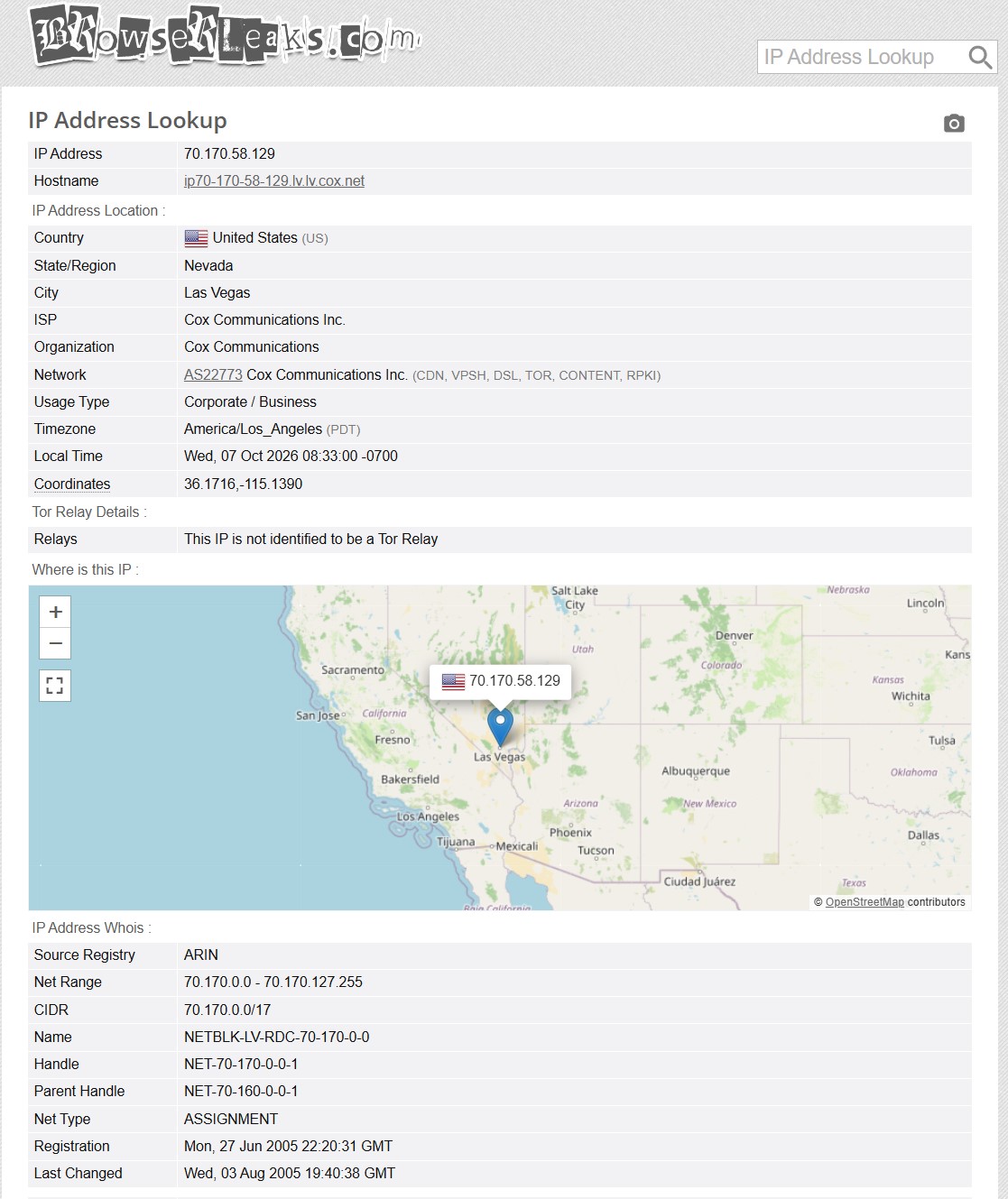
BrowserLeaks confirmed: USA, Nevada, Las Vegas, ISP Cox Communications Inc., AS22773. Usage Type listed as Corporate/Business, which is a database artifact since Cox registers some IP blocks under a legal entity. Not a Tor relay.
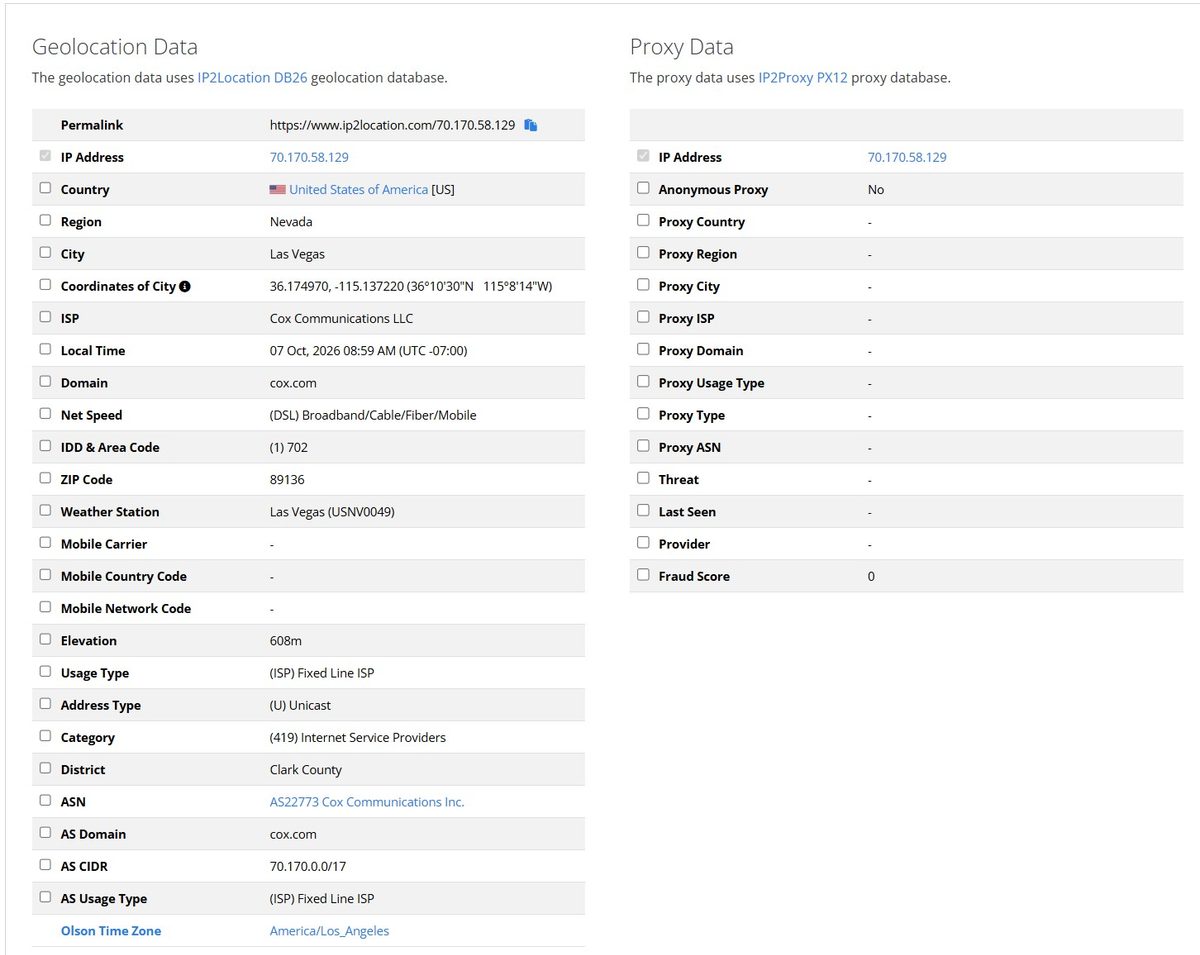
IP2Location was the strongest result. ISP: Cox Communications LLC, Net Speed: DSL/Broadband/Cable/Fiber/Mobile, Usage Type: Fixed Line ISP. The entire Proxy Data column on the right was empty: Anonymous Proxy No, Proxy Type, Proxy Domain, Proxy ISP all blank. Fraud Score: 0. Zero. IP2Location did not flag this address as a proxy at all. For a residential service, that is the best possible outcome.
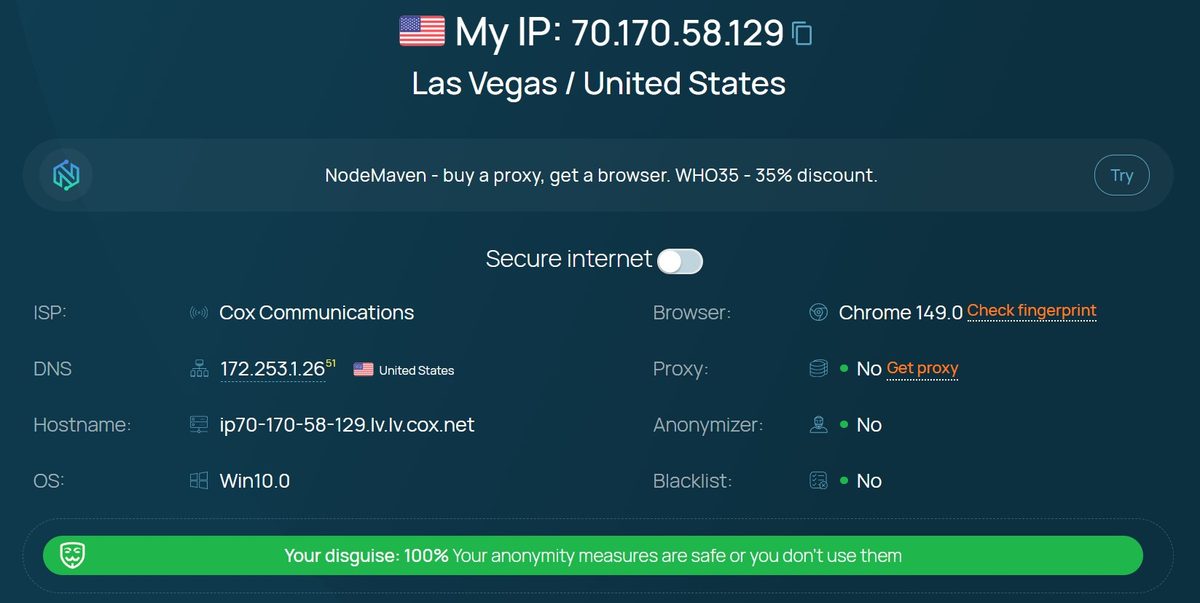
Whoer: ISP Cox Communications, Chrome 149.0, Win10.0. Proxy: No. Anonymizer: No. Blacklist: No. “Your disguise: 100%.” Perfect cover.
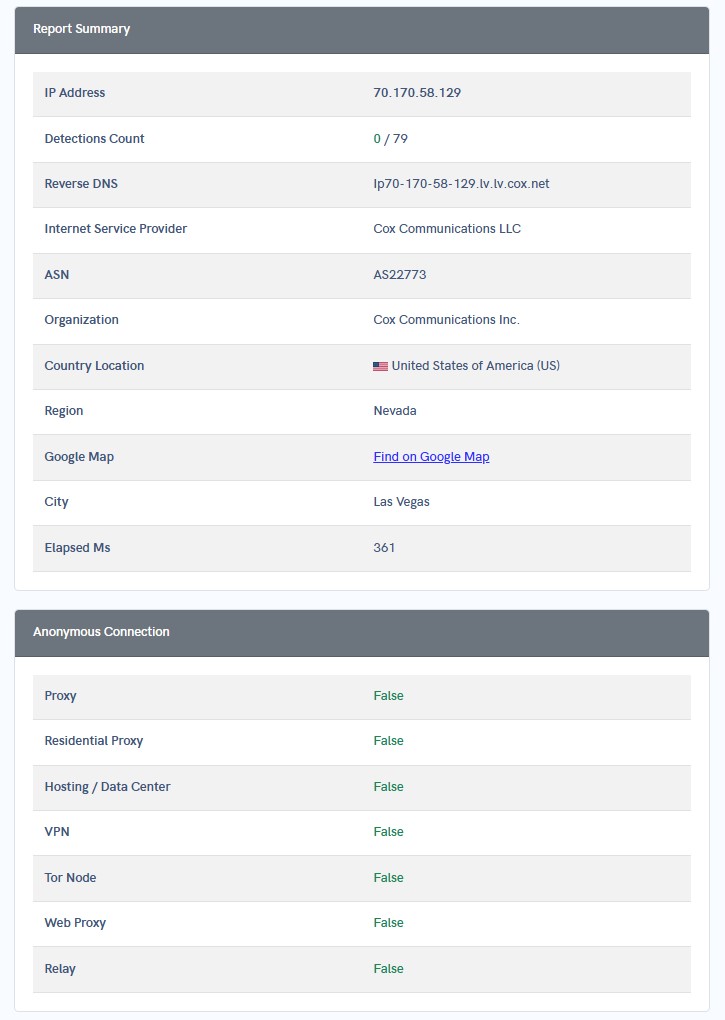
APIVoid reputation check: 0 detections out of 79 databases. Zero. All anonymous connection fields returned false: Proxy False, Residential Proxy False, Hosting/Data Center False, VPN False, Tor Node False, Web Proxy False, Relay False. Clean across the board.
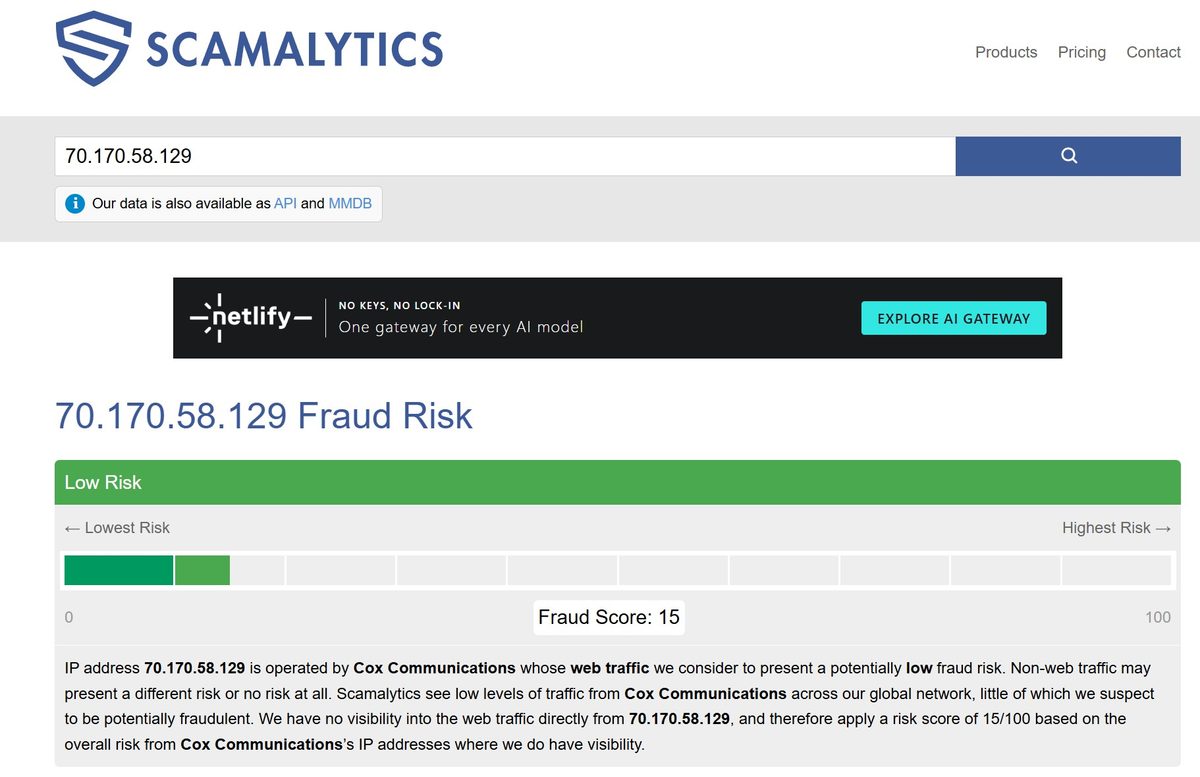
Scamalytics: Fraud Score 15/100, Low Risk. IP operated by Cox Communications, low fraud risk. For reference, datacenter IPs typically score 50+, and commonly used proxy pool IPs land in the 30-40 range. Fifteen is clean.
Leaks and Fingerprint Tests
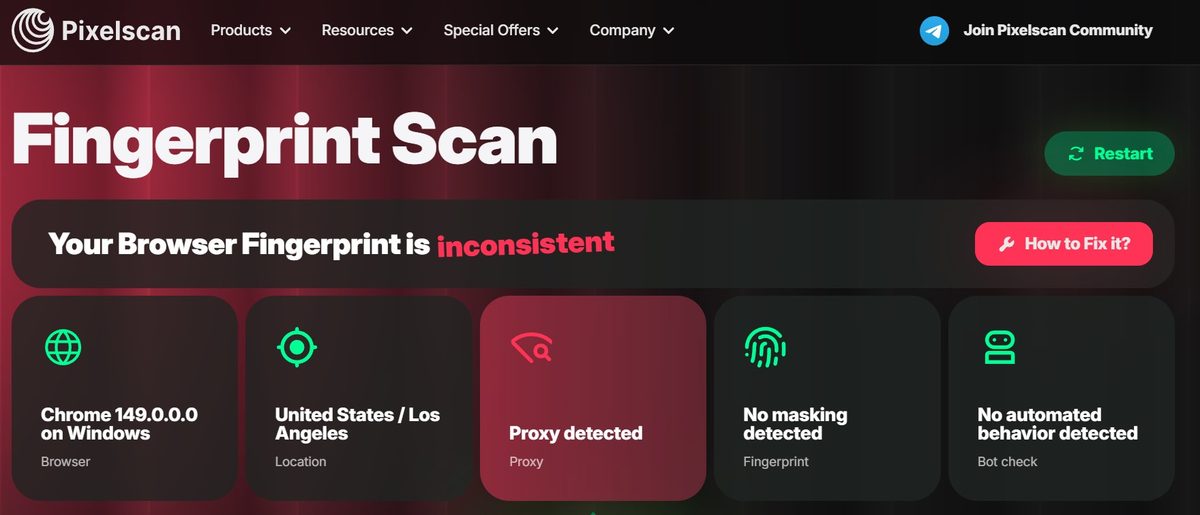
Pixelscan: fingerprint flagged as inconsistent, Proxy field shows “Proxy detected” in red. Chrome 149.0.0.0 on Windows, US/Los Angeles. No masking detected, no automated behavior detected. The IP itself is clean across fraud databases (Fraud Score 0-15), but Pixelscan picked up on something in the connection patterns and identified a proxy gateway. For multi-account work with an antidetect browser, this could be a problem.
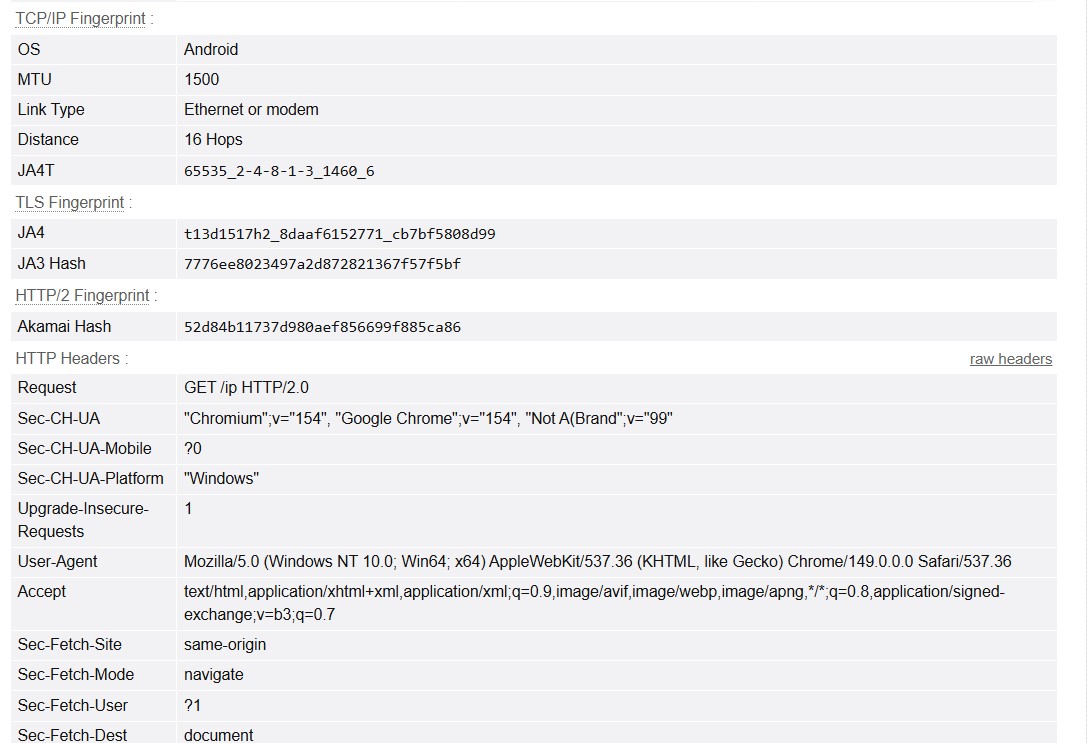
BrowserLeaks TCP/IP fingerprint: OS shows Android, while the User-Agent is Chrome 149 on Windows. That mismatch between the TCP stack and the headers is exactly what antifraud systems like Cloudflare Bot Management catch. It happens when traffic is routing through a mobile peer device on the other end.
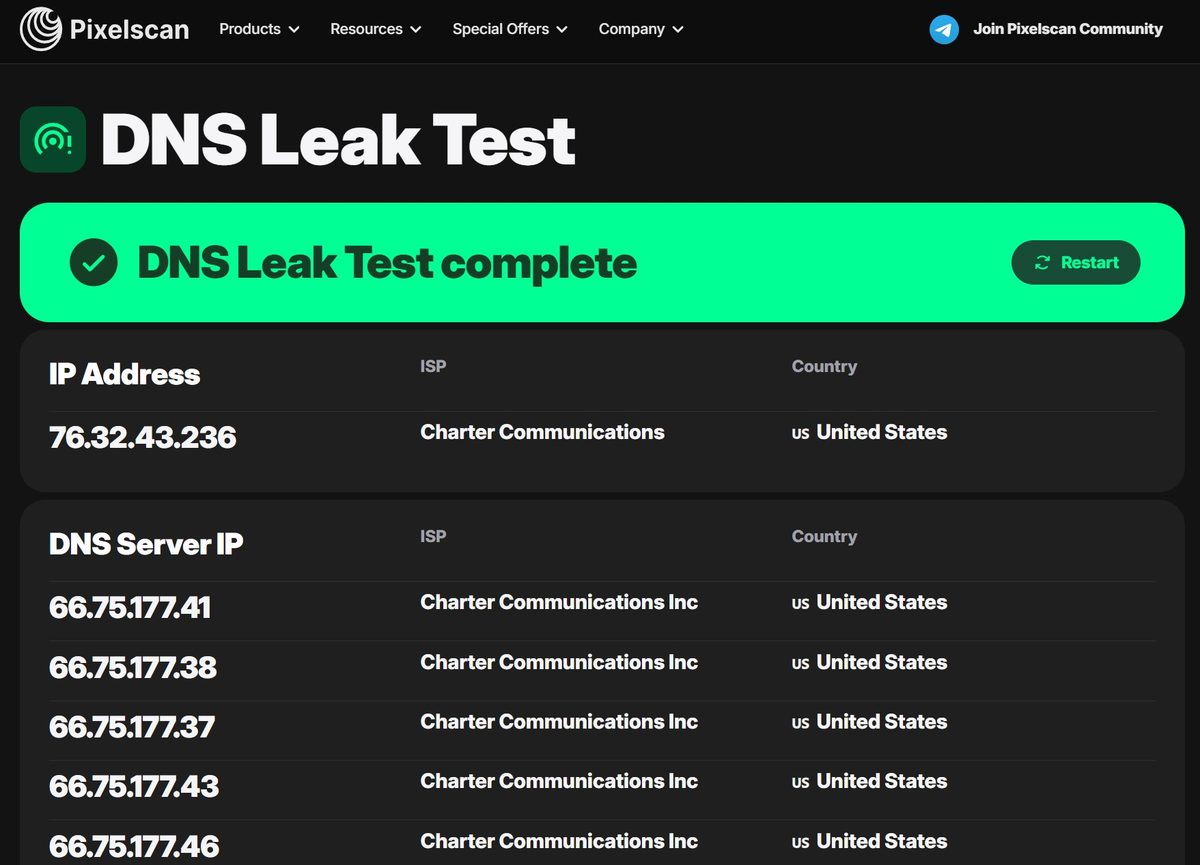
DNS Leak Test: clean. ISP Charter Communications, all resolvers from Charter Communications Inc., United States. Single ISP, single country.
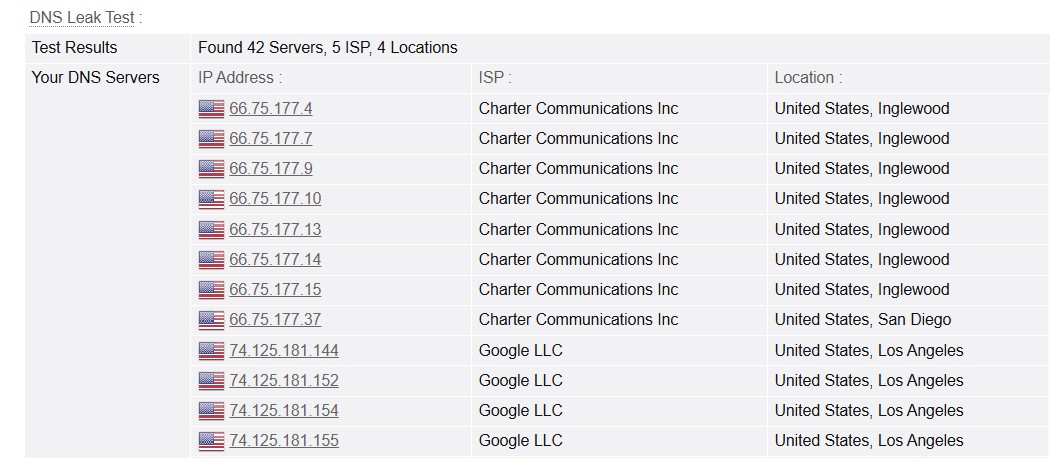
Extended DNS test: 42 servers, 5 ISPs, 4 locations. The bulk are Charter Communications out of Inglewood, plus a handful of Google LLC servers. Seeing Google DNS mixed in is normal since many ISPs route some queries through them. No leak.
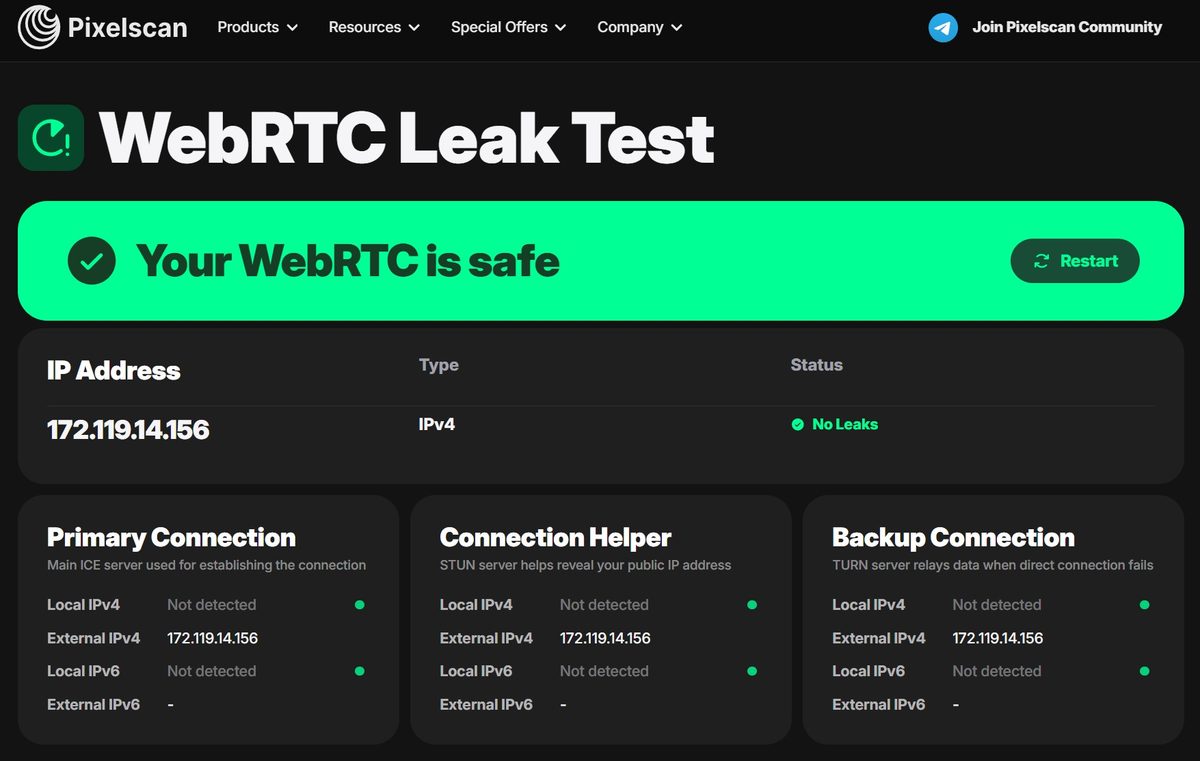
WebRTC: safe, no leaks. All three endpoints show a single External IPv4 172.119.14.156. Local IPv4 and IPv6 both show “Not detected.” The real IP did not break through, and IPv6 did not leak.
Blacklist Check
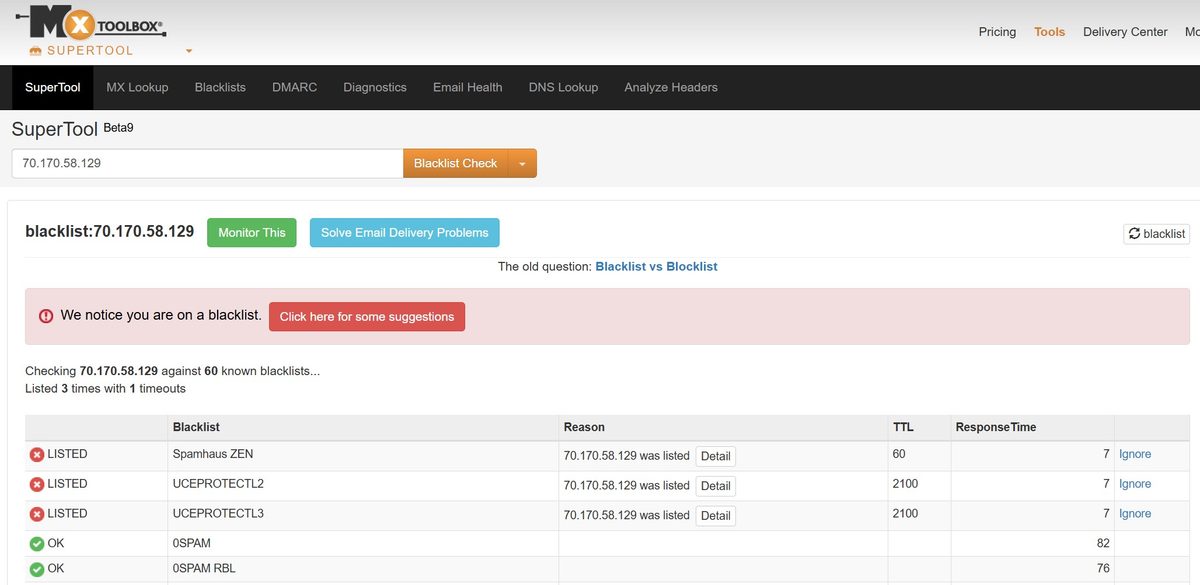
MXToolbox checked 70.170.58.129 against 60 lists. Three hits: Spamhaus ZEN, UCEPROTECTL2, and UCEPROTECTL3.
Spamhaus ZEN includes the PBL (Policy Block List), which is not a spammer list. It is a list of IP ranges that should not be sending mail directly. Every residential subscriber on Cox, Comcast, or Spectrum ends up there by default. UCEPROTECT L2 and L3 are subnet and ASN-level blocks based on accumulated spam complaints. Not an issue specific to this IP.
For scraping, social media, marketplaces, and SEO, none of this matters. Google, Instagram, and Amazon look at ASN, hostname, and Fraud Score, not PBL status. If you plan to send email through proxies, forget it. But that applies to all residential proxies, not just 2extract.
Speed: Individual Measurements
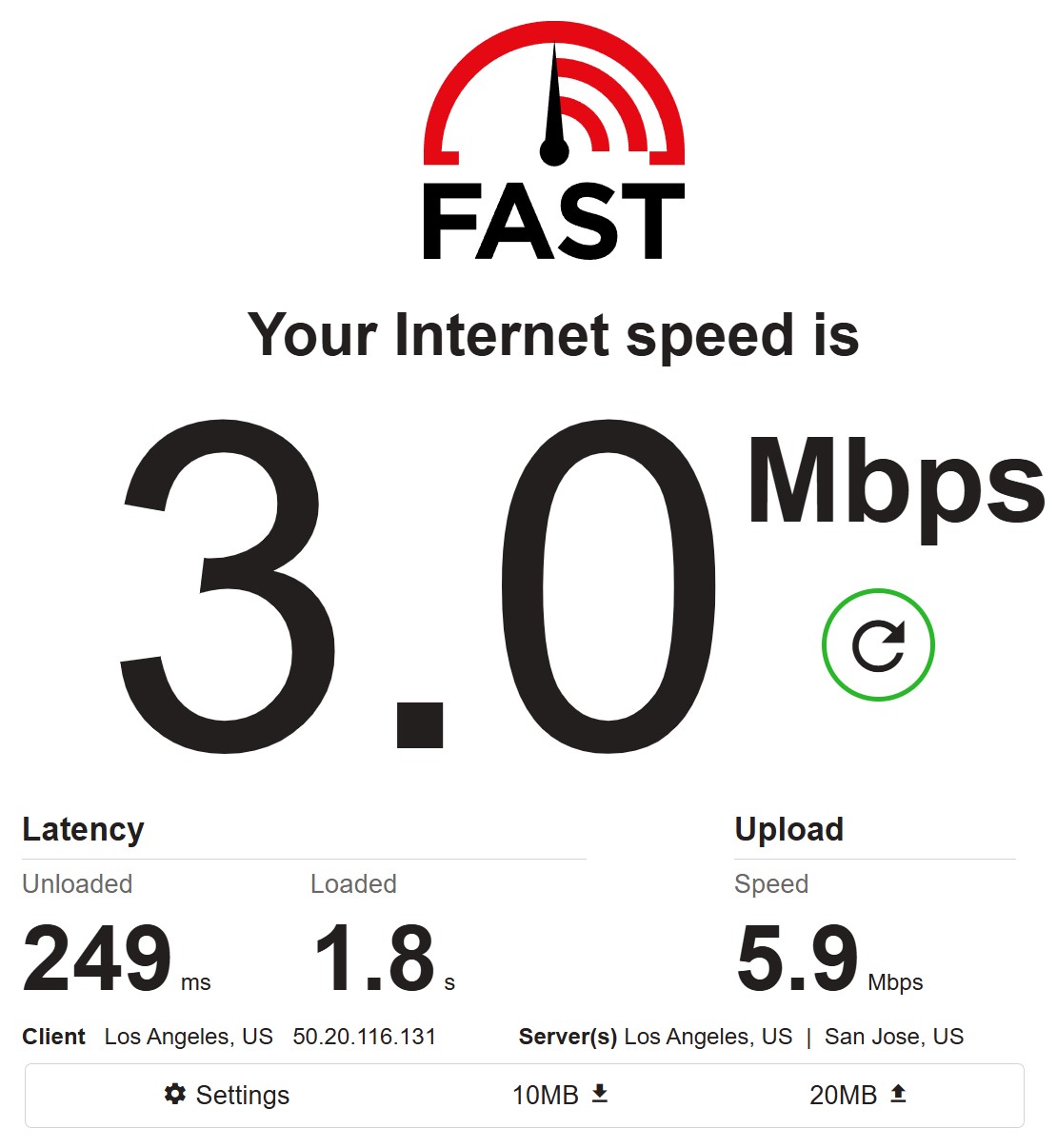
Fast.com, first measurement: 3.0 Mbps download, 5.9 Mbps upload. Latency 249 ms unloaded, 1.8 seconds under load. Slow.
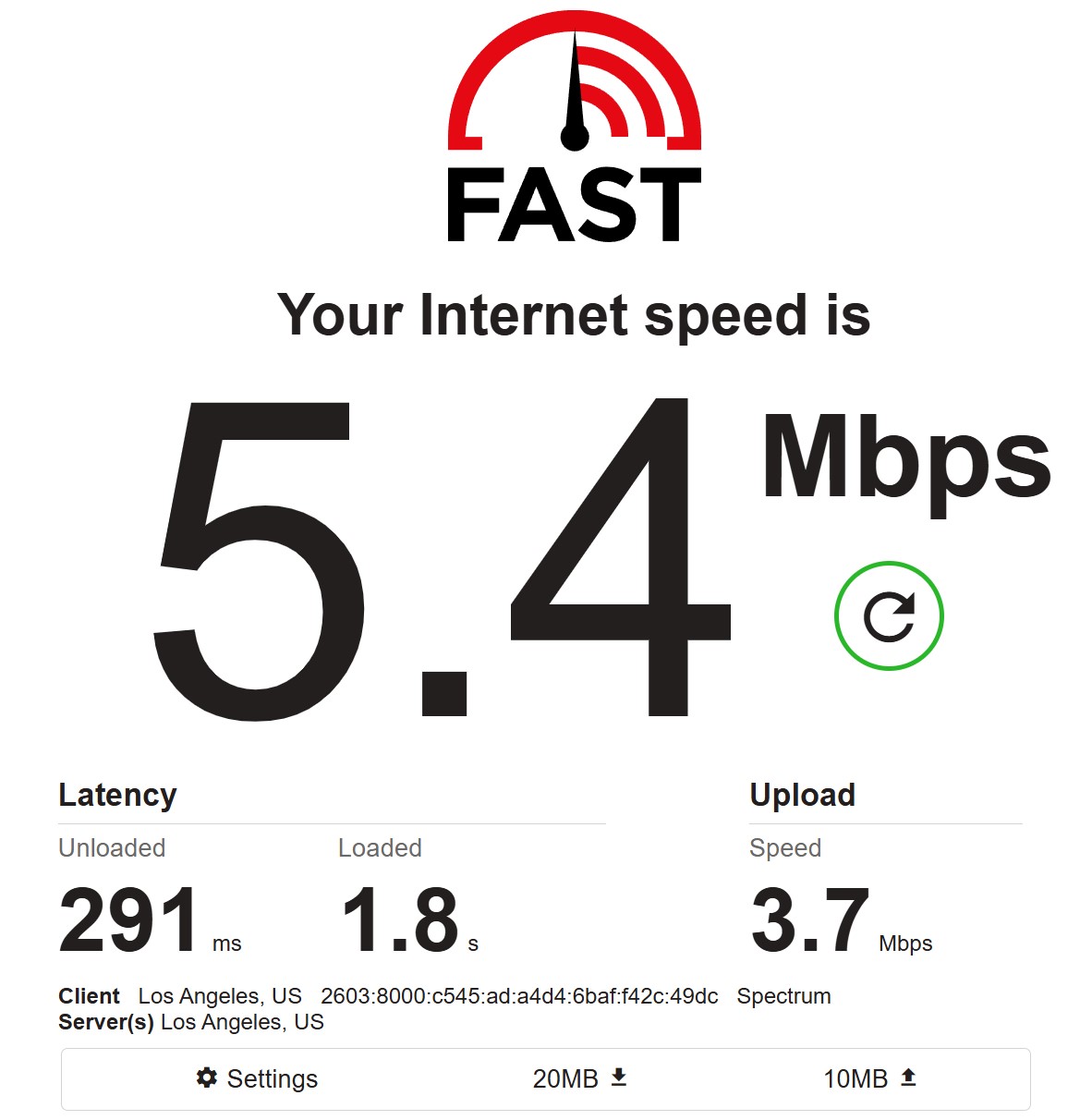
Second measurement (Spectrum): 5.4 Mbps download, 3.7 Mbps upload. Latency 291 ms / 1.8 s. A bit better, but still below average.
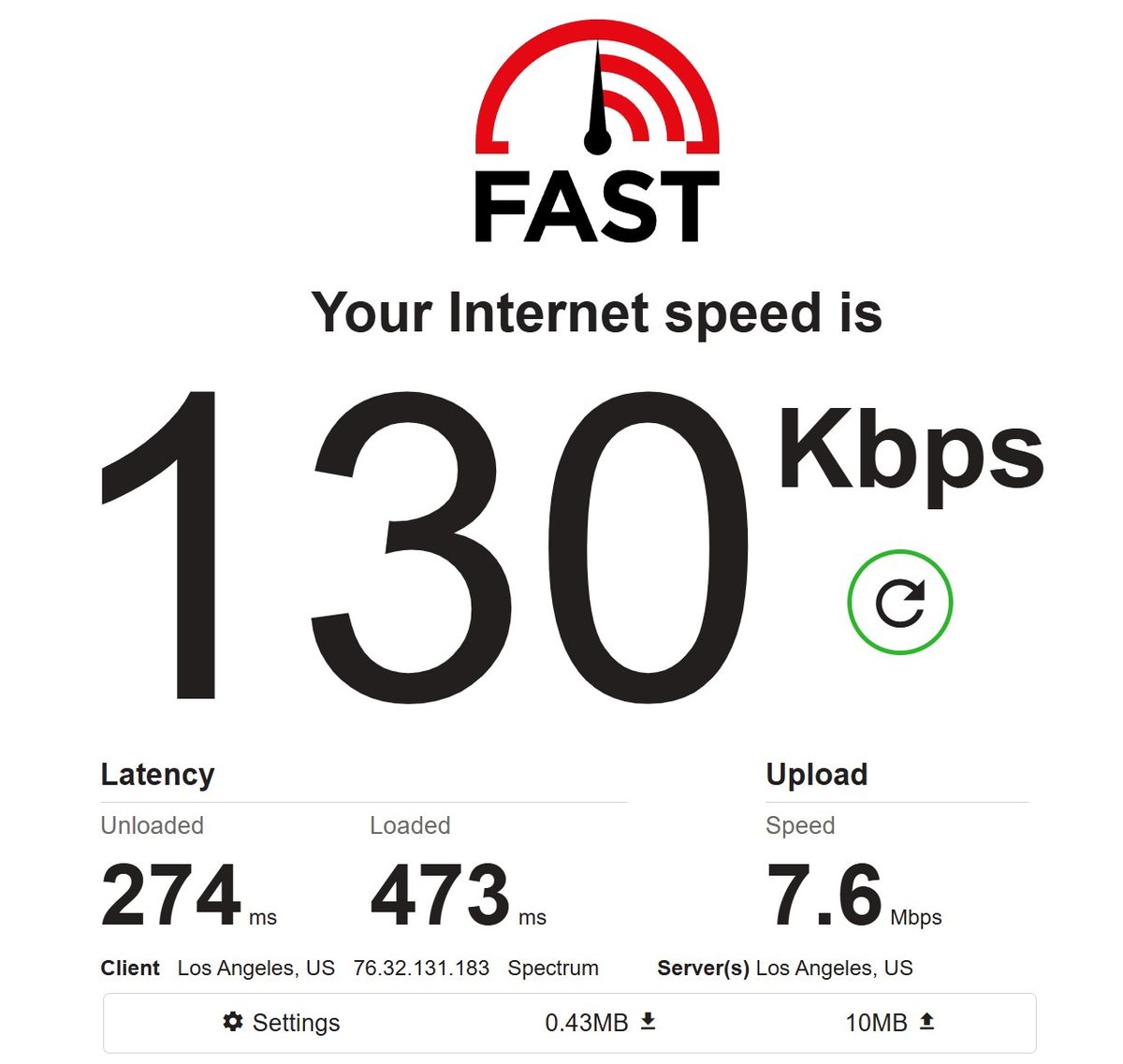
Third measurement: a disaster. 130 Kbps download. Kilobits, not megabits. Upload was 7.6 Mbps. This IP was 76.32.131.183 on Spectrum, clearly a peer with a saturated or capped connection. This is a perfect illustration of the fundamental reality of residential proxies: you get whatever internet connection that particular household has. One IP in the pool is fine, the next one is not.
Individual Fast.com measurements are a lottery. Time to test the pool properly.
Speed: 100-Proxy Pool Test
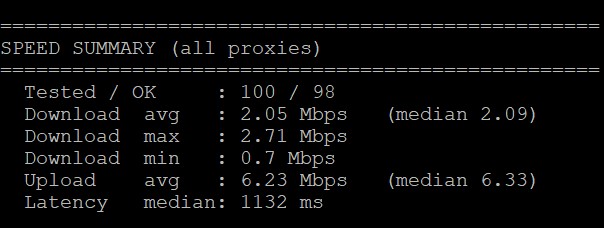
100 proxies tested via a custom script on a VPS. 98 out of 100 succeeded.
Average download 2.05 Mbps, median 2.09 Mbps. Max 2.71, min 0.7. Average upload 6.23 Mbps, median 6.33 Mbps. Median latency 1,132 ms.
A 2 Mbps median is weak. By our methodology that rates 2/5. MangoProxy delivered 13.3 Mbps, NodeMaven 9.4 Mbps, RapidProxy 4.67 Mbps. The gap with the leaders is 5 to 6x. For scraping text pages it will get the job done. For anything media-heavy or interactive, it will not. Latency at 1,132 ms is also on the high side.
Pool Quality: 400-Proxy Test
The main test in this review. 400 proxies, rotating mode, target United States.
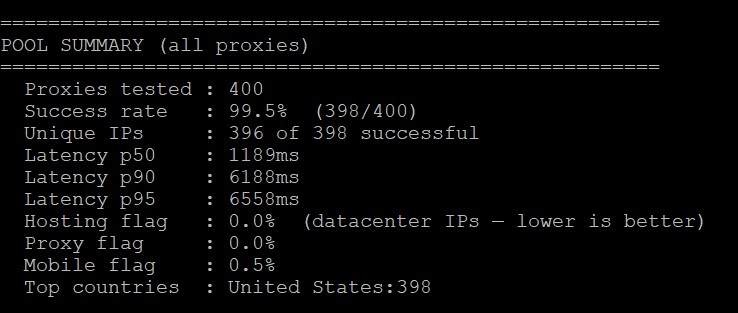
- Success rate: 99.5% – 398 out of 400 successful. On our scale that is 5/5 (threshold is 99%). MangoProxy came in at 97.8%, NodeMaven at 100% on 25 proxies, RapidProxy at 100% on 500. 2extract is among the leaders here.
- Unique IPs: 396 out of 398 successful requests. Two duplicates across four hundred. That is 99.5% uniqueness. Compare that to RapidProxy where only 39 out of 500 sessions returned unique IPs. 2extract is not recycling addresses on short cycles, and that is an excellent sign.
- Hosting flag: 0.0%. Not a single datacenter IP slipped into the residential output. Zero fakes in the pool.
- Proxy flag: 0.0%. No IP was tagged as a proxy. RapidProxy had a 12.6% proxy flag rate by comparison.
- Mobile flag: 0.5%. Two addresses out of four hundred detected as mobile. Negligible.
- Top countries: United States 398. All successful IPs landed in the right country. Zero country misses. City-level targeting is a different story, as the Las Vegas example showed.
- Latency: p50 1,189 ms, p90 6,188 ms, p95 6,558 ms. The median at just under 1.2 seconds is acceptable for scraping. But p95 at over six seconds is a problem. One in every twenty requests will hang for more than six seconds. The p95/p50 ratio of 5.5 points to a long tail distribution.
Google Test (Byteful and FOGLDN)
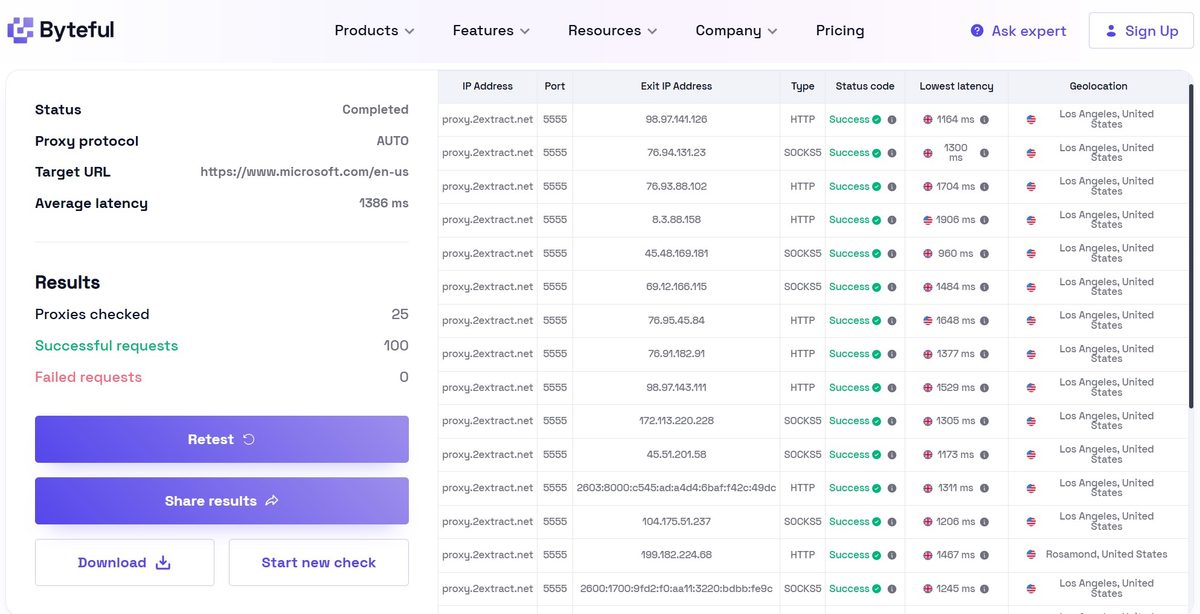
Byteful against microsoft.com: 25 proxies, 100 successful requests, zero failures, average latency 1,386 ms. Geolocations came back as Los Angeles and surroundings, with one IP landing in Rosamond about 75 miles away. HTTP and SOCKS5 alternated without issue. Consistent, no surprises.
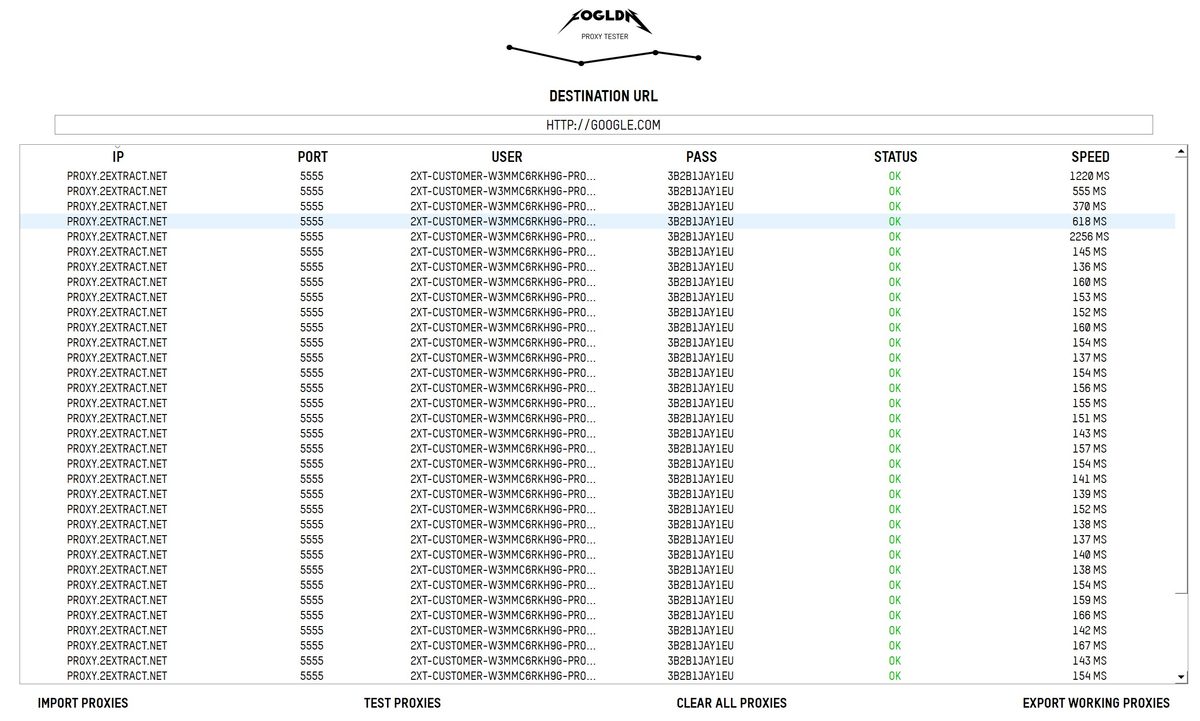
FOGLDN against google.com: all statuses OK. Speeds ranged from 136 ms to 2,256 ms, with the majority in the 130-170 ms range. A couple of heavier outliers at 1,229 ms and 2,256 ms. Zero refusals. Google did not serve a single CAPTCHA.
Claims vs Reality
The website claims “~99% success rate.” Test result: 99.5%. Checks out.
The website claims “195+ countries.” I only tested US, where all IPs landed in the right country. Other geos were not tested.
The website claims “10M+ residential and mobile IPs.” Cannot verify that directly. But 396 unique IPs out of 400 sessions suggests the pool is genuinely large with no heavy recycling.
Documentation promises sticky sessions up to 60 minutes. In practice, IPs could rotate earlier without the Strict mode enabled.
The About page mentions “100% ethically sourced” IPs from opt-in users with GDPR/CCPA alignment. No way to verify that externally. The AUP is detailed and explicitly bans: port scanning, torrenting, ad fraud, fake account creation, ticket and sneaker scalping, and spam.
Traffic Statistics
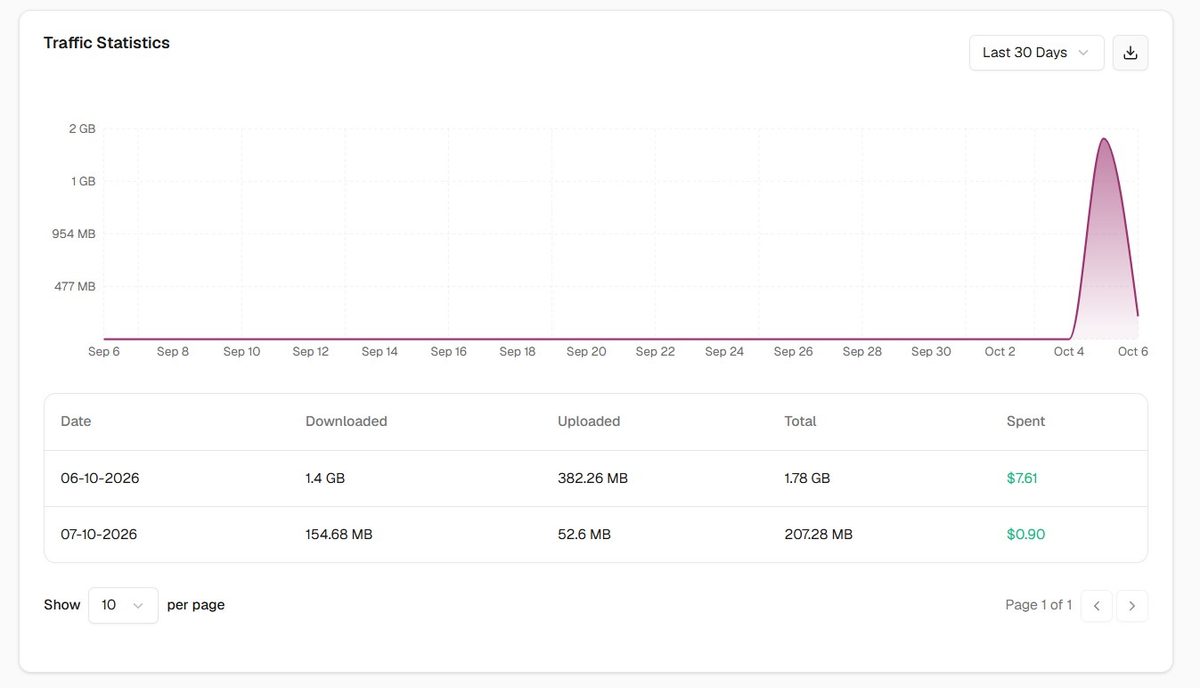
Two days of testing burned roughly 2 GB. October 6: 1.4 GB download, 382 MB upload, $7.61. October 7: 154 MB download, 52 MB upload, $0.90. Total $8.51 out of $12. The stats are broken down by day with separate download and upload columns. There is no per-domain or per-proxy-instance breakdown, so you cannot see exactly where traffic went. With multiple parallel tasks running, that gets inconvenient.
The MCP Server: mcp.2extract.com
This is the most unusual part of the product and the only thing that genuinely sets 2extract apart from dozens of similar residential services.
The MCP server is a remote interface for AI agents. Through it, Claude Code, Cursor, VS Code, Codex, Windsurf, or Cline can manage proxies without ever touching the dashboard. Transport is Streamable HTTP, authorization is a Bearer token tied to your API key.
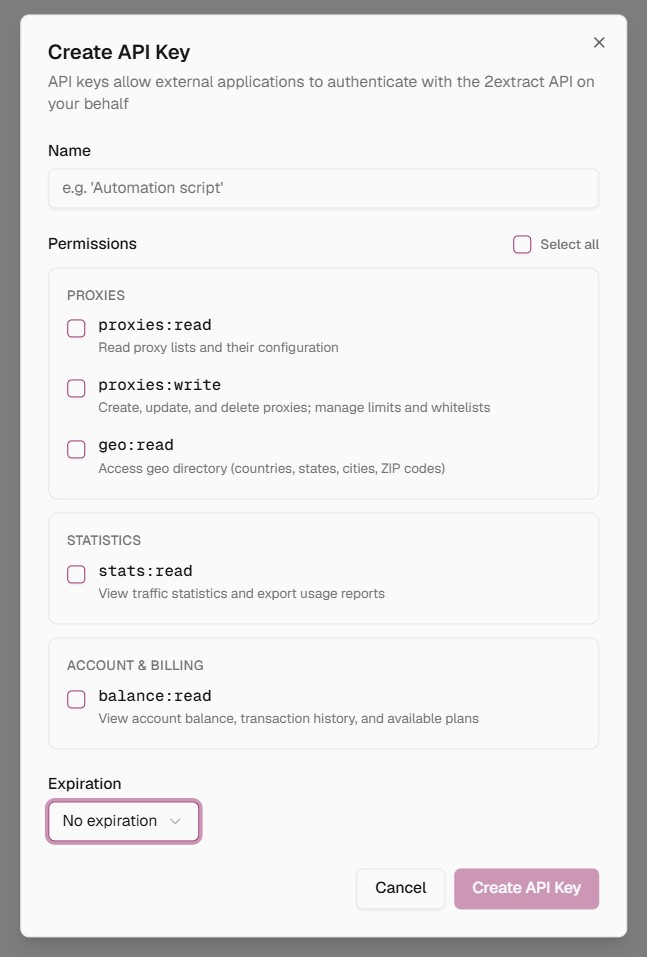
API keys have separate scopes: proxies:read, proxies:write, geo:read, stats:read, balance:read. One important nuance: write does NOT include read. An agent that creates proxies usually needs to check the list of existing ones first, and with a write-only key it will fail halfway through.
Even more important: a key with proxies:write lets an agent create a billable resource, and that action is not marked as destructive in the protocol. The agent may not ask for confirmation. 2extract is upfront about this in the documentation. The recommendation is to set spend limits on every proxy and give agents only the scopes they actually need.
19 tools total: geo lookups down to ZIP and ASN level, create/modify/deactivate/delete proxies, manage traffic limits, check balance and usage stats. Delete and password change are marked destructive and require confirmation. Deactivation is reversible: traffic stops but the resource is not removed.
Four built-in prompts: create a proxy from a task description, build a connection string, generate a monthly spend report, clean up unused proxies older than 30 days.
In practice: you tell Claude Code “create a proxy in Germany for Amazon pricing with a 50 GB limit” and you get a connection string back. Nobody else on this market offers that. For data engineers and ML teams building pipelines with AI agents, this is a real time saver.
There is also a second MCP server, read-only and keyless, just for documentation search. Useful when your coding assistant is guessing at parameter names.
Competitor Comparison
| Parameter | 2extract | MangoProxy | Decodo | IPRoyal |
|---|---|---|---|---|
| Residential price (PAYG) | $3.99/GB | from $3.3/GB | from $2/GB | from $1.75/GB |
| Enterprise rate | $0.70/GB (500+ GB, by request) | N/A | available | available |
| Balance expires? | No | No | Yes | Yes |
| Success rate (pool) | 99.5% (400) | 97.8% (400) | N/A | N/A |
| Unique IPs (pool) | 396/400 (99%) | 391/391 (100%) | N/A | N/A |
| Proxy flag | 0% | 0% | N/A | N/A |
| Hosting flag | 0% | 0% | N/A | N/A |
| p50 latency | 1,189 ms | 780 ms | N/A | N/A |
| Median speed | 2.09 Mbps | 13.3 Mbps | N/A | N/A |
| Datacenter proxies | No | Yes | Yes | Yes |
| Mobile proxies | Yes | Yes | Yes | Yes |
| Static ISP proxies | No | No | Yes | Yes |
| Web Unlocker | No | No | Yes | Partial |
| MCP server | Yes (19 tools) | No | No | No |
| Strict session mode | Yes | No | No | No |
| Trustpilot | 4.2/5 (6 reviews) | N/A | 4.7/5 | 4.7/5 |
| Tested by Proxyway | No | No | Yes | Yes |
| Jurisdiction | Singapore | UAE | Lithuania | Lithuania |
The numbers speak for themselves. On pool cleanliness (0% proxy flag, 0% hosting flag, 99% unique IPs) 2extract is on par with MangoProxy and well ahead of RapidProxy. But it is 6x slower than MangoProxy on median speed. The MCP server and Strict session mode are things none of these four competitors offer.
Scores by Category
| Parameter | Result | Score |
|---|---|---|
| Success rate (400 proxies) | 99.5% (398/400) | 5/5 |
| Pool IP uniqueness | 396/400 (99%) | 5/5 |
| Hosting flag | 0% | 5/5 |
| Proxy flag | 0% | 5/5 |
| p50 latency | 1,189 ms | 3/5 |
| Median speed (100 proxies) | 2.09 Mbps | 2/5 |
| Fraud Score | 15/100 Scamalytics, 0 IP2Location | 5/5 |
| IP reputation (APIVoid) | 0/79 | 5/5 |
| Pixelscan | Proxy detected, inconsistent | 3/5 |
| WebRTC | No leak | 5/5 |
| DNS leak | Clean | 5/5 |
| TCP/IP OS mismatch | Android vs Windows UA | 3/5 |
| Geo accuracy | Country 100%, city-level misses | 4/5 |
| Blacklists | 3 out of 60 (PBL, UCEPROTECT L2/L3) | 4/5 |
| Product lineup | No datacenter, no static ISP | 2/5 |
| Pricing | $3.99/GB PAYG, $0.70/GB Enterprise, balance never expires | 4/5 |
| Transparency | No founder name, no SOC 2 | 2/5 |
| MCP server | 19 tools, 4 prompts, Strict mode | 5/5 |
| Overall | 3.9/5 |
Pros and Cons
- 99.5% success rate across 400 proxies – nearly every request came back;
- 99% IP uniqueness – the pool is not cycling the same addresses in short loops;
- Hosting flag 0%, Proxy flag 0% – a genuinely clean residential pool with no datacenter filler;
- Fraud Score 0 on IP2Location and 15 on Scamalytics – among the cleanest IPs we have seen in any review;
- 0 detections out of 79 databases on APIVoid;
- No WebRTC leaks, no DNS leaks;
- MCP server with 19 tools – the only one on the market at this price point that actually works, not just a demo;
- Strict session mode: returns a 502 instead of silently swapping your IP;
- ZIP and ASN targeting at no extra cost, plus carrier targeting on mobile;
- Balance never expires, no subscription required, crypto accepted;
- All settings handled through inline username parameters, no need to open the dashboard to change geo;
- Enterprise rate of $0.70/GB available for 500+ GB volumes by request;
- Per-proxy spend limits protect you from accidentally burning through your balance.
- Median speed of 2.09 Mbps is 6x slower than MangoProxy and 4x slower than NodeMaven;
- p95 latency at 6.5 seconds means one in twenty requests hangs for a long time;
- TCP/IP fingerprint shows Android while User-Agent is Windows, antifraud systems will catch this;
- Pixelscan flagged the proxy connection and reported an inconsistent fingerprint;
- Sticky sessions are unreliable without Strict mode enabled, IPs can rotate silently;
- City-level targeting sometimes misses (asked for Los Angeles, got Las Vegas);
- No datacenter proxies, no static ISP proxies, no Web Unlocker;
- No free trial traffic, $10 minimum before you can test anything;
- Standard PAYG rate of $3.99/GB is expensive for high volumes without an Enterprise agreement;
- KYC kicks in after $50 in cumulative top-ups;
- No founder identity, no SOC 2, no ISO 27001;
- 6 reviews on Trustpilot, very few on G2 and Capterra, essentially no established reputation yet;
- Refunds are nearly impossible to get.
Final Verdict
The results turned out to be mixed, but in an interesting way. The pool is surprisingly good. Success rate 99.5%, uniqueness 99%, hosting and proxy flags both at zero, Fraud Score 0 to 15, zero detections out of 79 databases. No DNS leaks, no WebRTC leaks, Google passes without a single CAPTCHA. Those numbers are competitive with the best providers we have tested, and on Fraud Score specifically, these are among the cleanest IPs we have seen.
Speed is where it falls short. A 2 Mbps median will handle text scraping fine, but anything heavier will struggle. The long-tail latency distribution with p95 at 6.5 seconds makes it worse. The TCP/IP fingerprint mismatch and Pixelscan detection are real weaknesses for multi-account use cases, though for scraping they do not matter.
Who this is for: scraping teams and data engineers who write code, work with Claude Code or Cursor, and want to automate proxy provisioning. Affiliate marketers who need ZIP-level targeting without paying extra. Anyone who values pool cleanliness and Pay-As-You-Go billing without a subscription.
Who should look elsewhere: anyone running terabyte-level volumes without a negotiated Enterprise deal. Anyone who needs datacenter or static ISP proxies, which simply do not exist here. Anyone who needs a median speed above 5 Mbps.
My recommendation: start with the $10 minimum, run it against your actual use case. That is cheaper than trusting any review, including this one.
This review will be updated over time. Planned additions include tests against Cloudflare and Datadome, a proper measurement of sticky session duration in Strict mode, and a separate run on mobile proxies. All logs are saved.
Targeting down to ZIP and ASN, sticky sessions up to 60 minutes, Strict mode
Residential traffic $3.99/GB, mobile $4.99/GB, Enterprise from $0.70/GB
Residential and mobile proxies plus an MCP server for managing everything through Claude Code, Cursor, and other AI agents