






 Why Trust Us?
ToProxyLab has been testing proxy services since 2025. We pay for most plans ourselves, and when a provider gives us test traffic we say so in the review — free traffic buys a place in the testing queue, nothing else. Every provider goes through the same speed, uptime and fraud-score checks, and we publish the real numbers, including the bad ones. A rating cannot be bought. Learn who we are and how we review proxies.
Why Trust Us?
ToProxyLab has been testing proxy services since 2025. We pay for most plans ourselves, and when a provider gives us test traffic we say so in the review — free traffic buys a place in the testing queue, nothing else. Every provider goes through the same speed, uptime and fraud-score checks, and we publish the real numbers, including the bad ones. A rating cannot be bought. Learn who we are and how we review proxies.
How I stumbled onto this service
I needed residential proxies. Nothing fancy. Run a few Reddit accounts, work with a couple of picky social platforms, occasionally check Google SERPs from the US.
So I dug into search results, compared services, read G2 and Trustpilot reviews. SX.ORG popped up in a few different roundups. Site looks decent, 12 million IPs in the pool, 235 countries, traffic-based pricing with no subscription. Sounded reasonable. I dropped $15 onto the balance and started poking around.
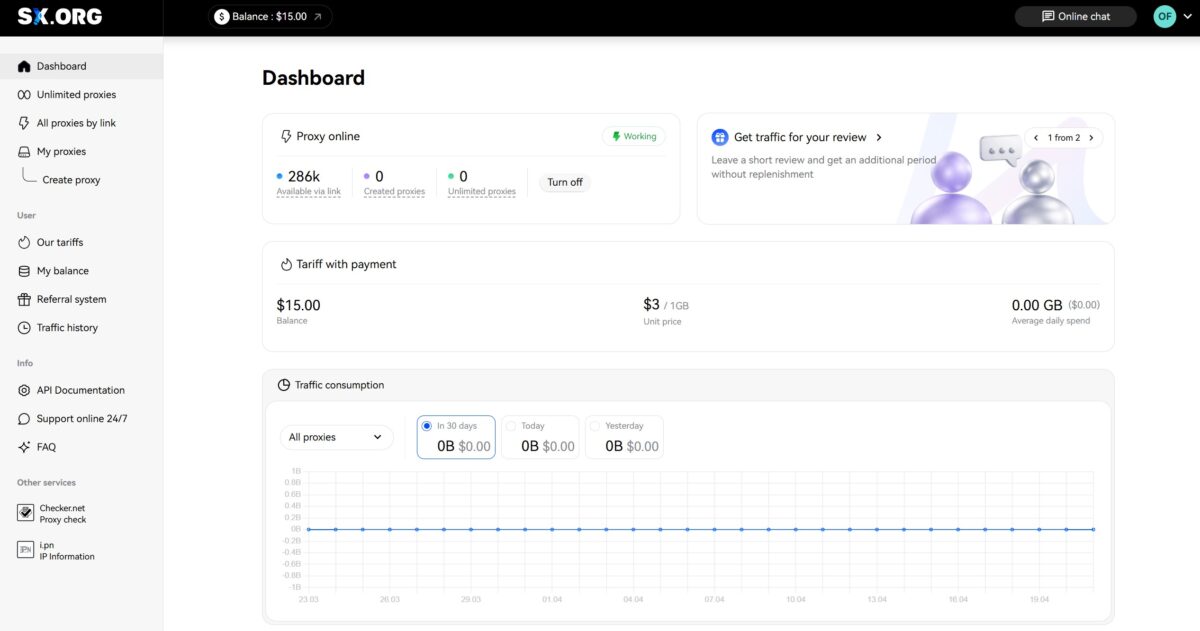
The dashboard screenshot right after signup says it all: $15 balance, Pay-As-You-Go at $3/GB across all proxy types, 286,000 active addresses available through the by-link option.
First impressions of the interface
The user panel is clean. No clutter. Left menu: Dashboard, Unlimited proxies, All proxies by link, My proxies, Create proxy. Below that a user block with plans, balance, referral system, traffic history. Built-in Proxy Checker and IP Information right inside the panel. Honestly, after testing a few services where the UI looks like a freshman CS project, this one feels nice.
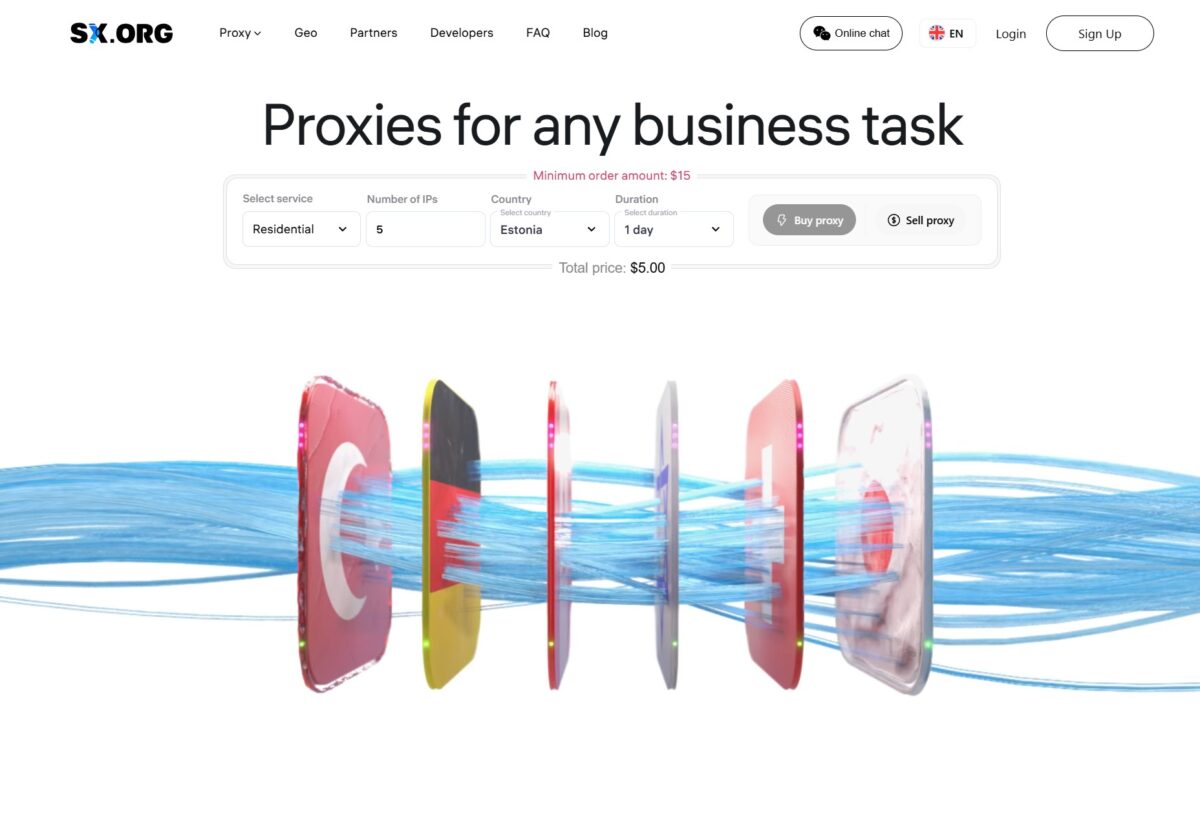
The homepage pitches the service as a one-stop shop: Residential, Mobile, Corporate proxies. $15 minimum order. There’s even a Sell proxy button. You can sell your own IPs, not just buy them. Interesting feature, you don’t see this often.
Plans and pricing
A lot has changed since the service was called 520.sx. The current Traffic tariff is flat $3/GB for every proxy type. Mobile, residential, corporate. No tiering.
There are also unlimited plans running in parallel: $15 per mobile proxy per month, $5 each for residential and corporate. Discounts up to 15% if you order 10+ proxies for a month or longer.
Older plans (Pay As You Go, Starter at $150/month, Advanced at $500, Advanced+ at $1000) are flagged as legacy. My account is still on Pay As You Go though. The platform itself nudges you toward the new Traffic tariff.
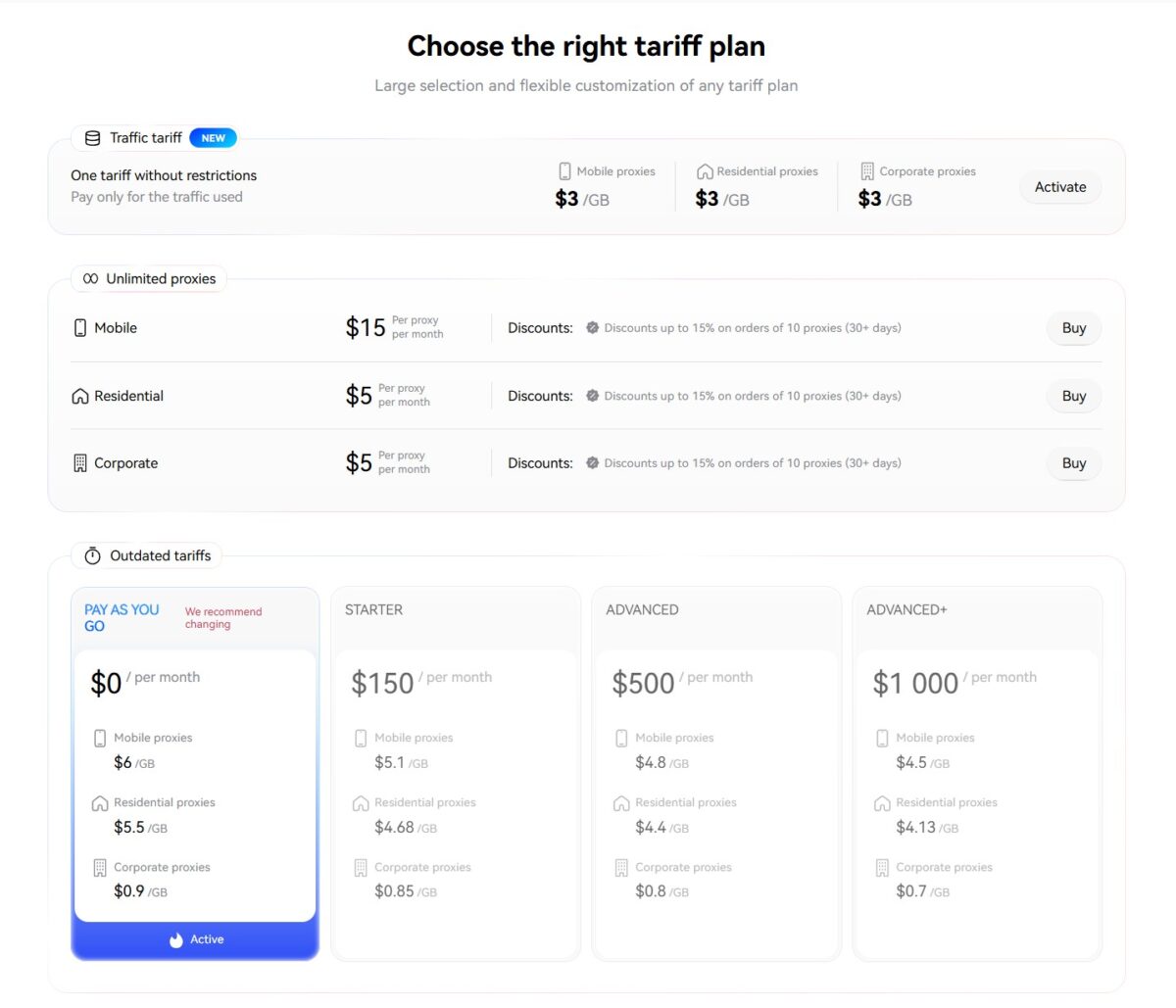
$3/GB for residential is mid-market. DataImpulse charges $1-2/GB. Bright Data can hit $8/GB. Decodo (formerly Smartproxy) wants $4/GB on PAYG. Traffic doesn’t expire here. It doesn’t reset at the end of the month. You bought it, it’s yours forever.
Payment options
Crypto via DV.net (USDT, Bitcoin, Ethereum, Tron, Litecoin) – no fee, $10 minimum. UnionPay through NihaoPay at 2.7%. DOGE, XMR, SBP through Morune at 6%. Plus manual payments through chat operators: PayPal, Payeer, Payoneer, Perfect Money, Web Money, Alipay, Capitalist.
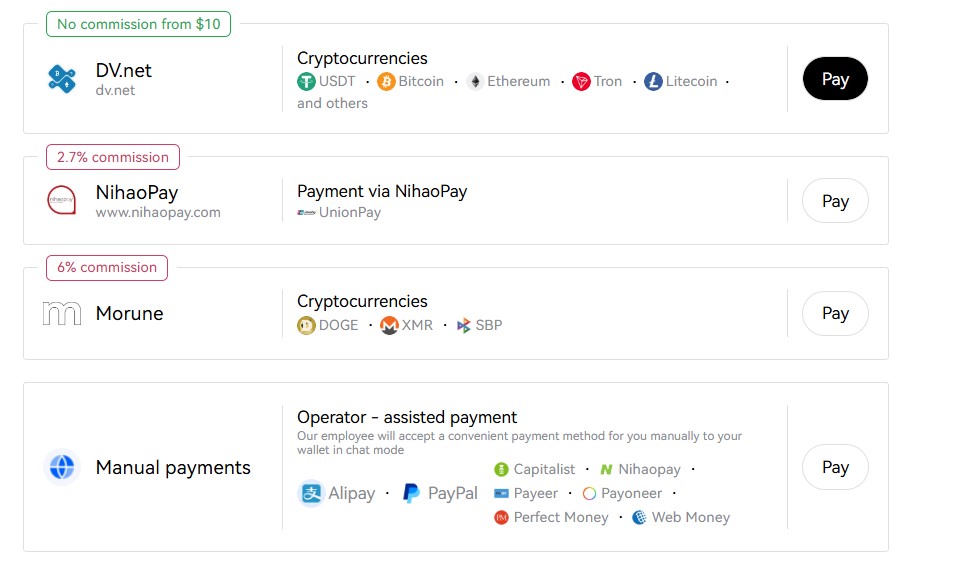
No KYC. Not for signup, not for crypto payments. If that matters to you, file it away.
Creating a proxy: from start to finish
Hit Create proxy. Pick the device type – the little house icon (residential). Then four tabs: Country, Region, City, ASN. Plus a Settings tab.
A tooltip pops up first. Residential proxies are IPs from real ISPs assigned to actual users. Sites see a regular person, not a bot. Good for SMM, scraping, ads, regional content access. Standard pitch.
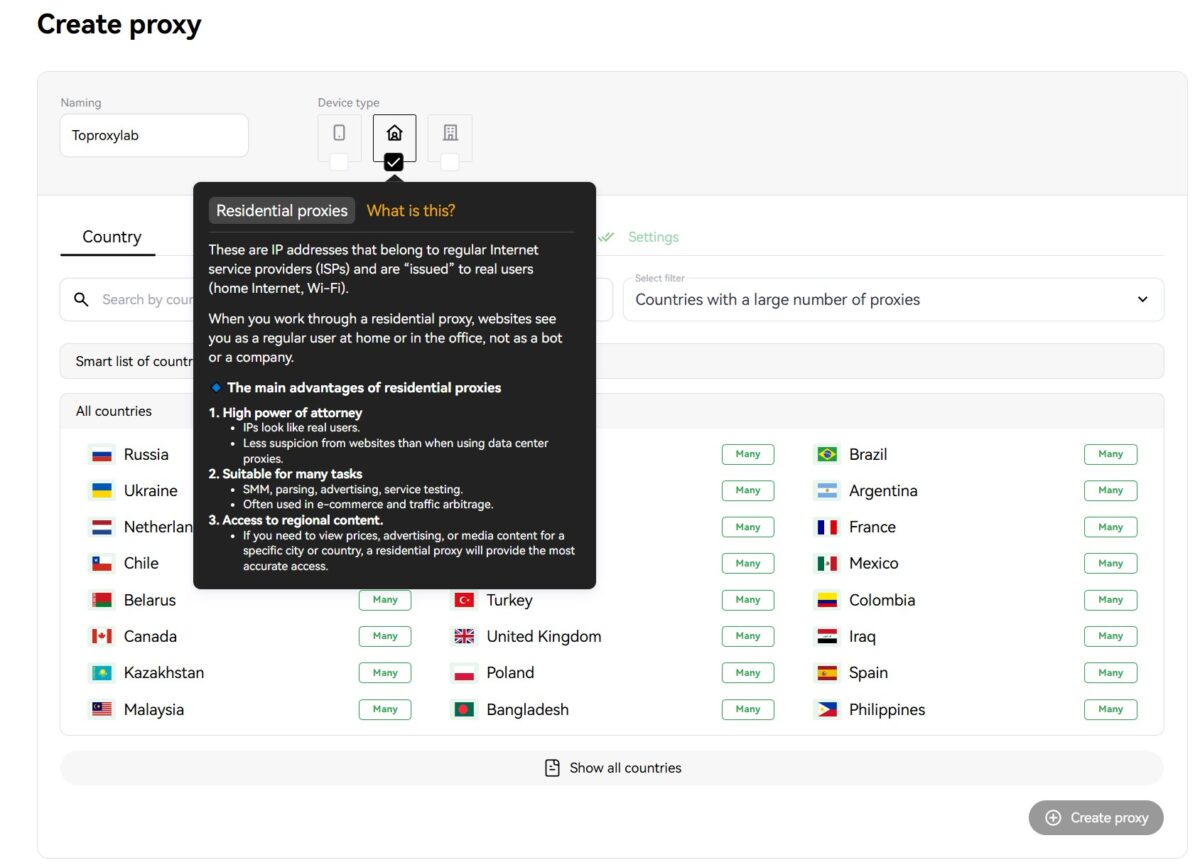
The country list is big. Russia, US, Brazil, Germany, Netherlands, UK, Kazakhstan, Turkey, Iraq, Colombia, India – all marked green with “Many.” These aren’t empty placeholders. I checked. Proxies spin up instantly.
Picked United States. Switched to the Region tab.
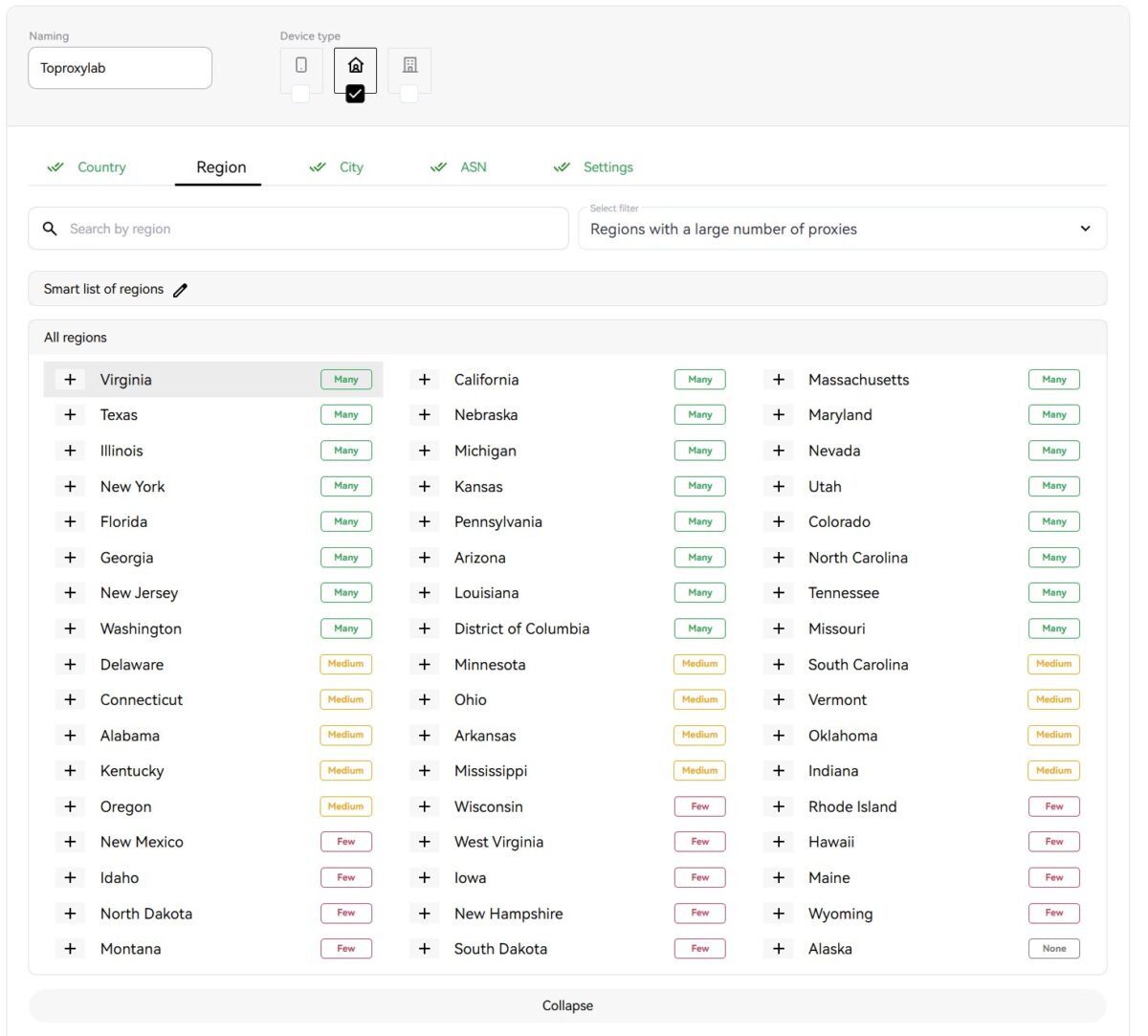
All 50 states. Virginia, Texas, California, New York, Florida – green (Many). Smaller states like Wyoming, Maine, Hawaii – orange (Few). Alaska is the only one with None. For SEO checks where you need SERPs from a specific state, this is exactly the level of control you want.
Picked Virginia. City tab.
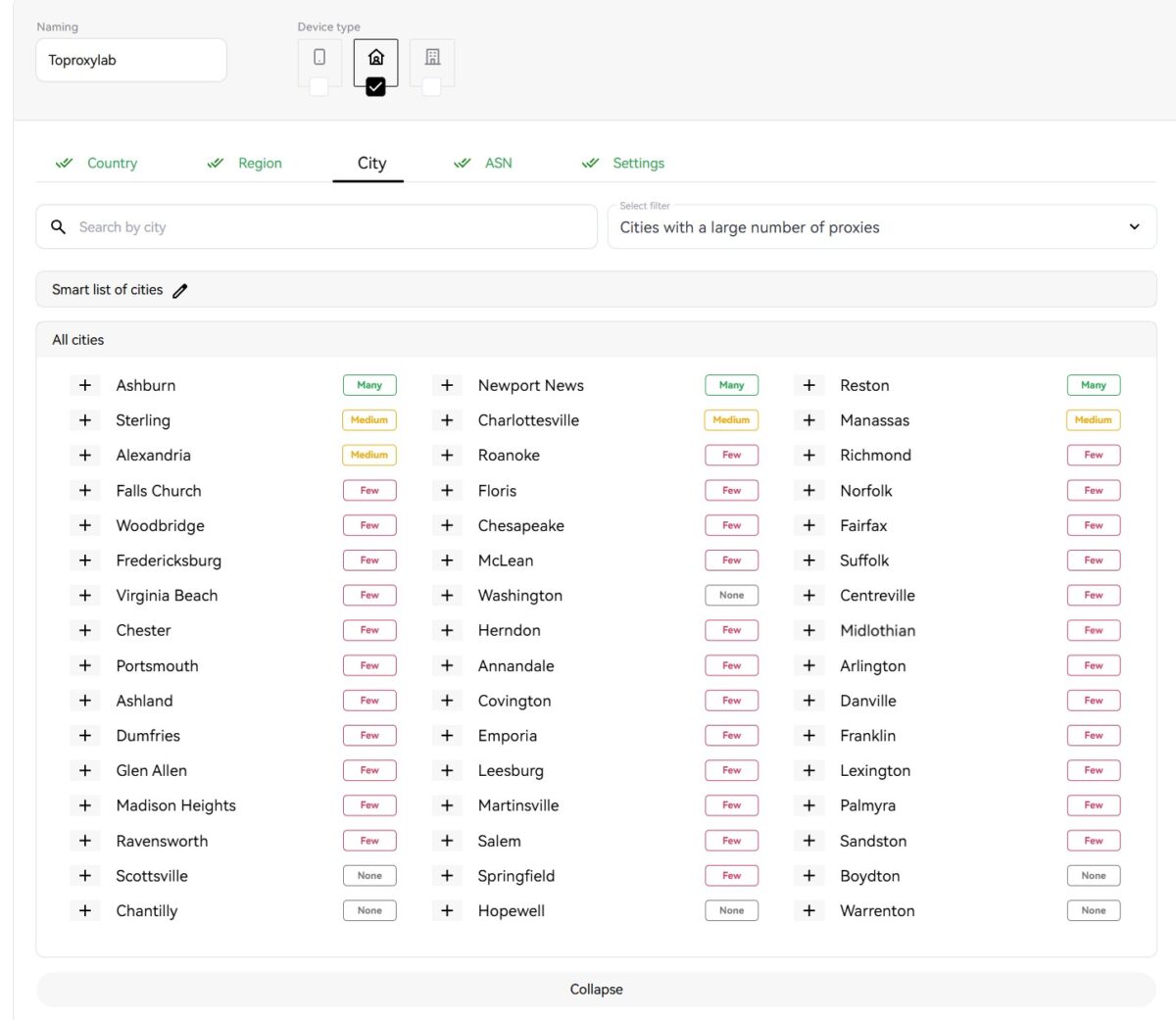
Ashburn, Newport News, Reston – Many. Sterling, Charlottesville, Manassas – Medium. Dozens of small towns marked Few. Even Scottsville and Chantilly with None. The granularity is impressive. For ad verification by city, this is exactly what you need.
Picked Ashburn. On to settings.
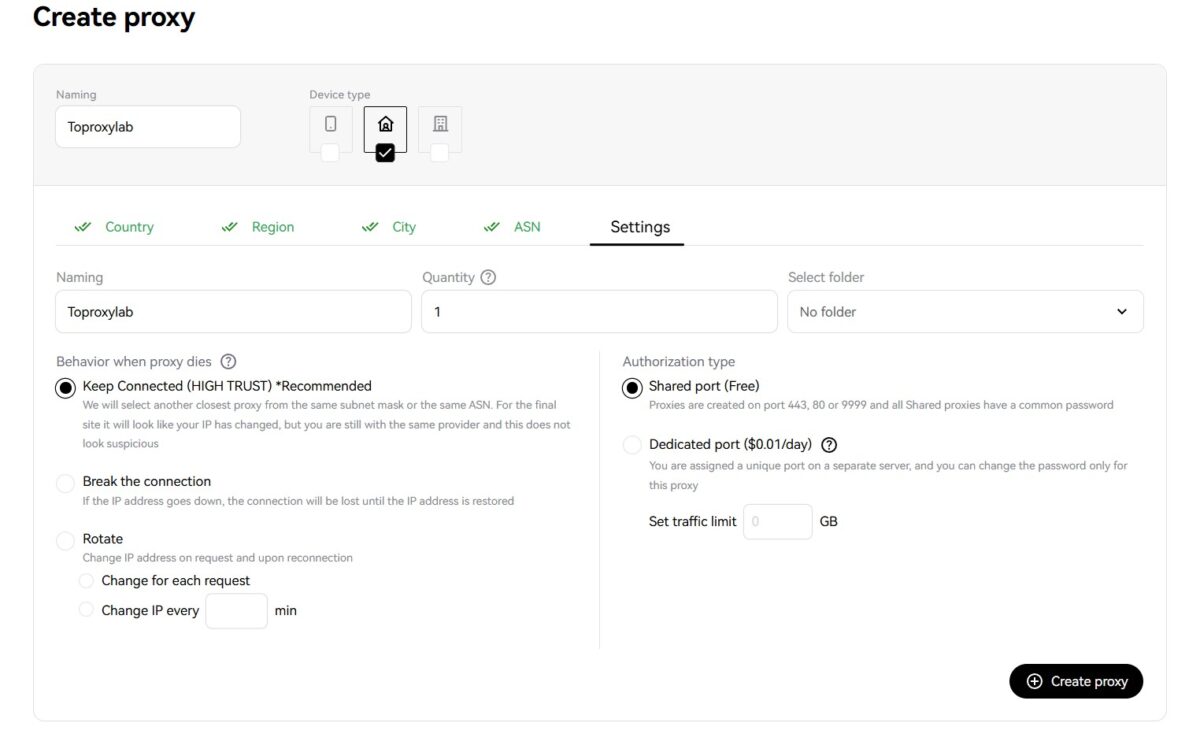
Three behavior modes for when an IP drops. Keep Connected (HIGH TRUST) is the recommended one – the system grabs the closest IP from the same subnet or ASN to keep the session alive. Break the connection – drops until restored. Rotate – rotates on every request or at a set interval.
Auth type: Shared port (free, ports 443/80/9999, shared password) or Dedicated port ($0.01/day, separate server, your own password). You can set a traffic limit too.
Created a proxy named Toproxylab. Done in a second.
The proxy you get
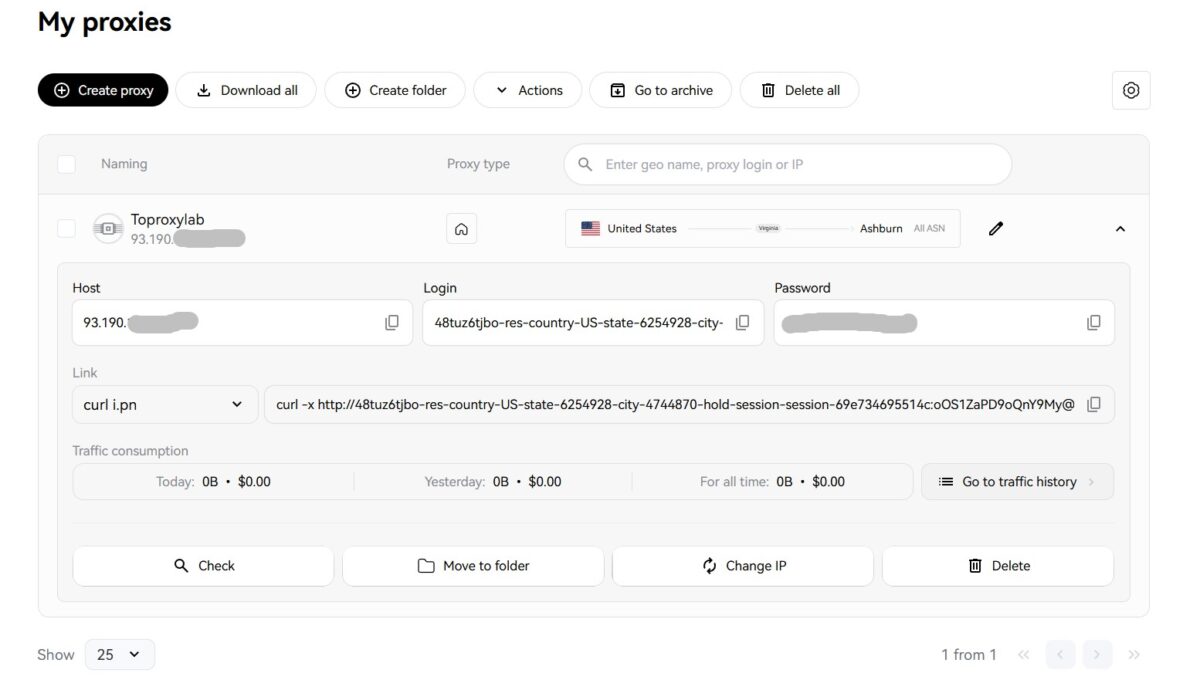
Everything you need on one screen: host 93.190.***, login with geotargeting parameters baked in (res-country-US-state-6254928-city-4744870-hold-session), password. Ready-made curl command for testing. API link to rotate IP. Traffic stats: today, yesterday, all time. Buttons for Check, Change IP, Delete.
The login format itself is telling. The whole geo-targeting is encoded straight into the auth string. Convenient for scripting – tweak the params in the username, get a different geo, no extra API calls needed.
Connecting the proxy to my antidetect browser.
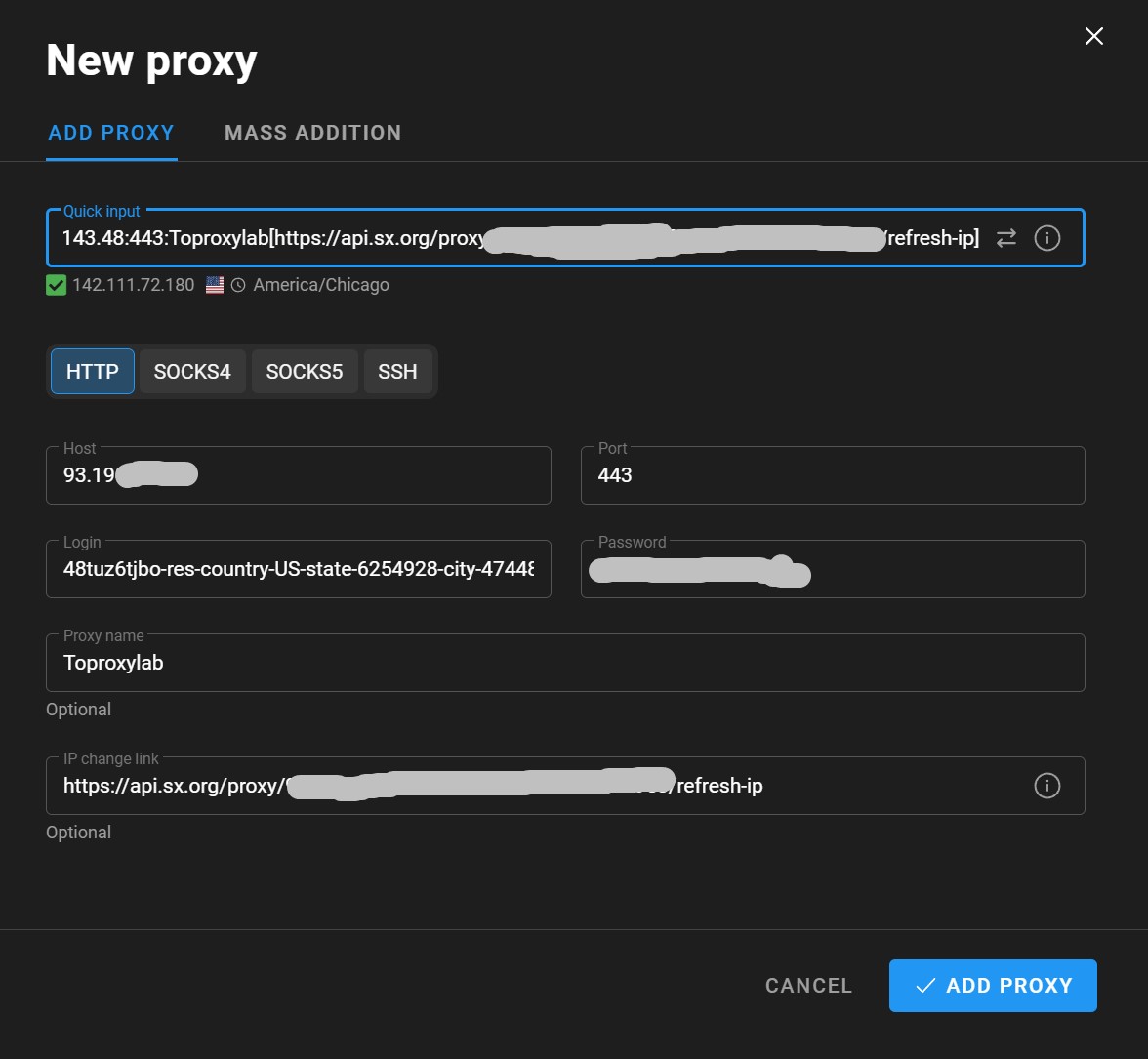
Paste the connection string into Quick Input. Proxy validates, green checkmark: IP 142.111.72.180, America/Chicago, US. Protocol HTTP, port 443. The IP rotation API link from sx.org goes right into the manager’s field.
Proxy is alive. Time for the real tests.
Test 1: Byteful Proxy Checker
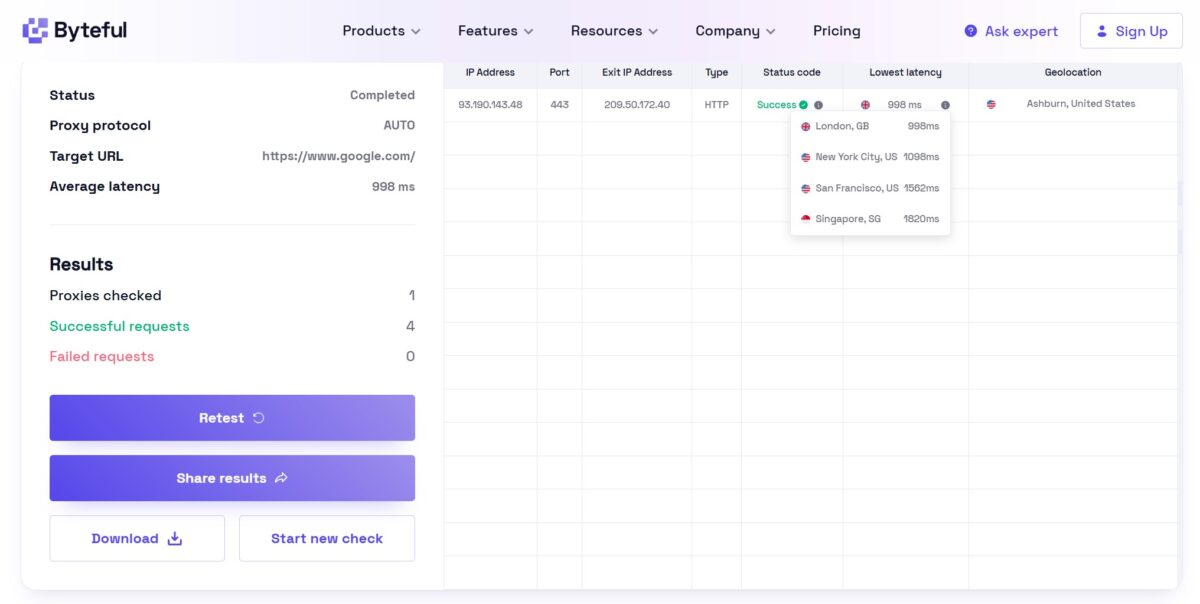
Target URL google.com. Protocol AUTO. 4 of 4 requests successful. Exit IP 209.50.172.40, geo Ashburn, United States.
Latency by region: London 998ms, New York 1098ms, San Francisco 1582ms, Singapore 1820ms. Average around 998ms.
Almost a full second. For background scraping, fine. For interactive Reddit or social sessions, you feel it.
Test 2: speed via Fast.com
Three runs.
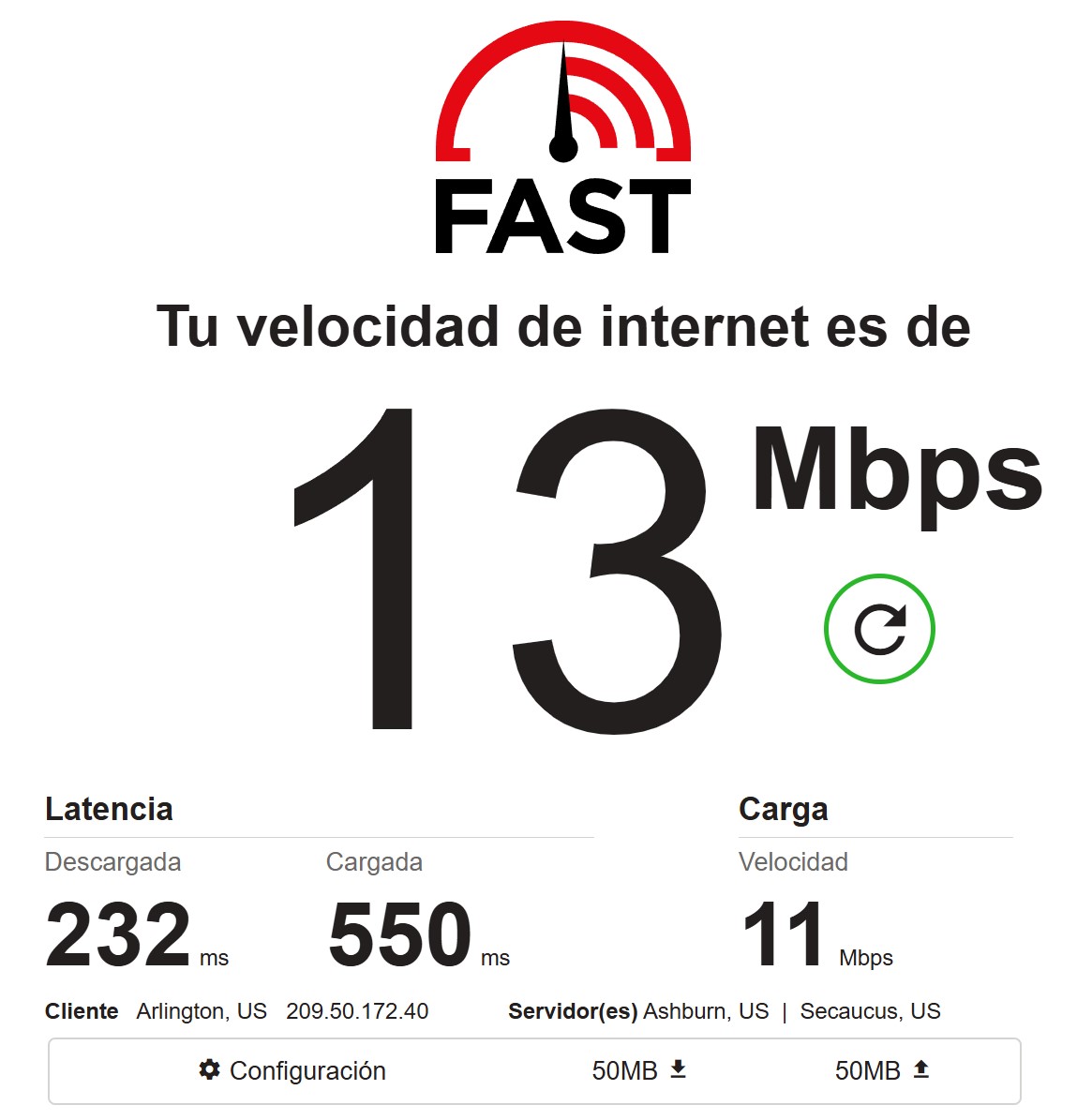
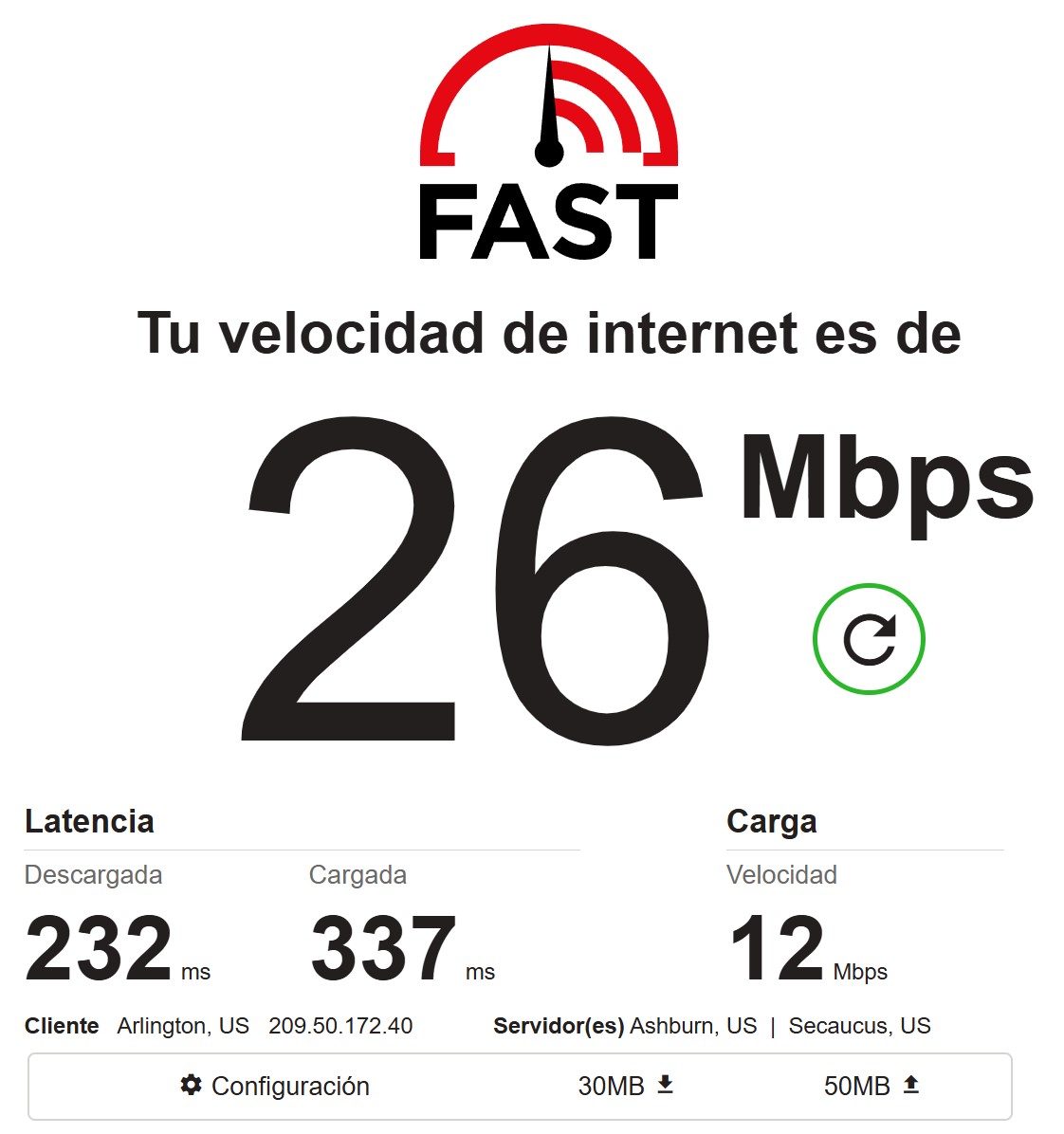
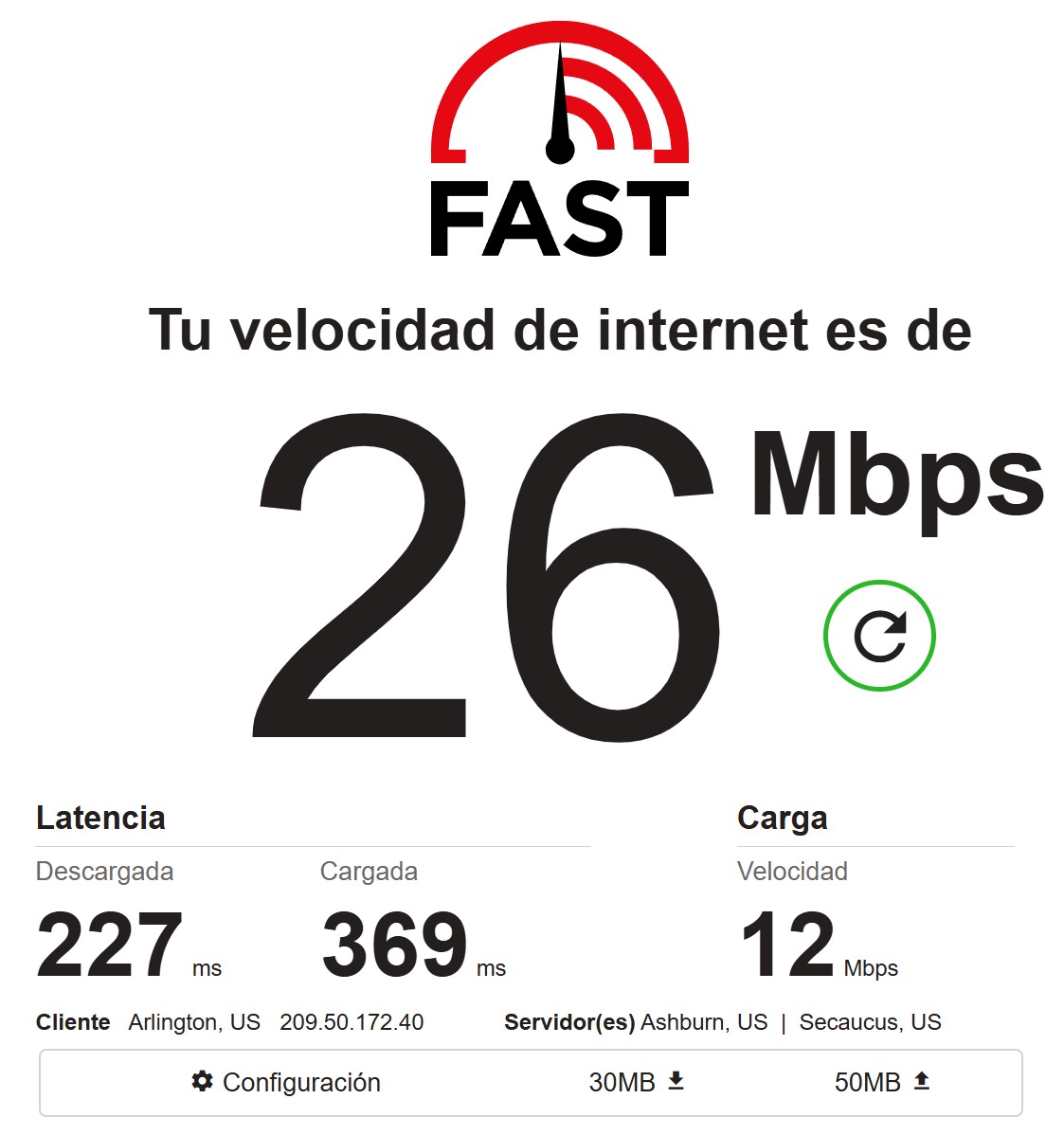
First run: 13 Mbps down, 11 Mbps up. Latency 232ms/550ms.
Second: 26 Mbps down, 12 Mbps up. Latency 232ms/337ms.
Third: 26 Mbps down, 12 Mbps up. Latency 227ms/369ms.
Download speed swings between 13 and 26 Mbps. Upload is steady at 11-12 Mbps. Latency around 230ms inbound, 340-550ms outbound. Client shows up as Arlington, US, servers Ashburn and Secaucus.
For comparison: NetNut in my tests pulled 5.9-7.8 Mbps download with 300ms+ latency. SX.ORG is 2-3x faster on raw speed. Not a world record, but solid for a proxy. Reddit pages load. Social feeds scroll without insane lag. Won’t handle 4K streaming, but you don’t need that anyway.
Test 3: are these actually residential?
Now we get to the part that’s the whole reason I’m writing this review.
IP2Location: Fraud Score 90
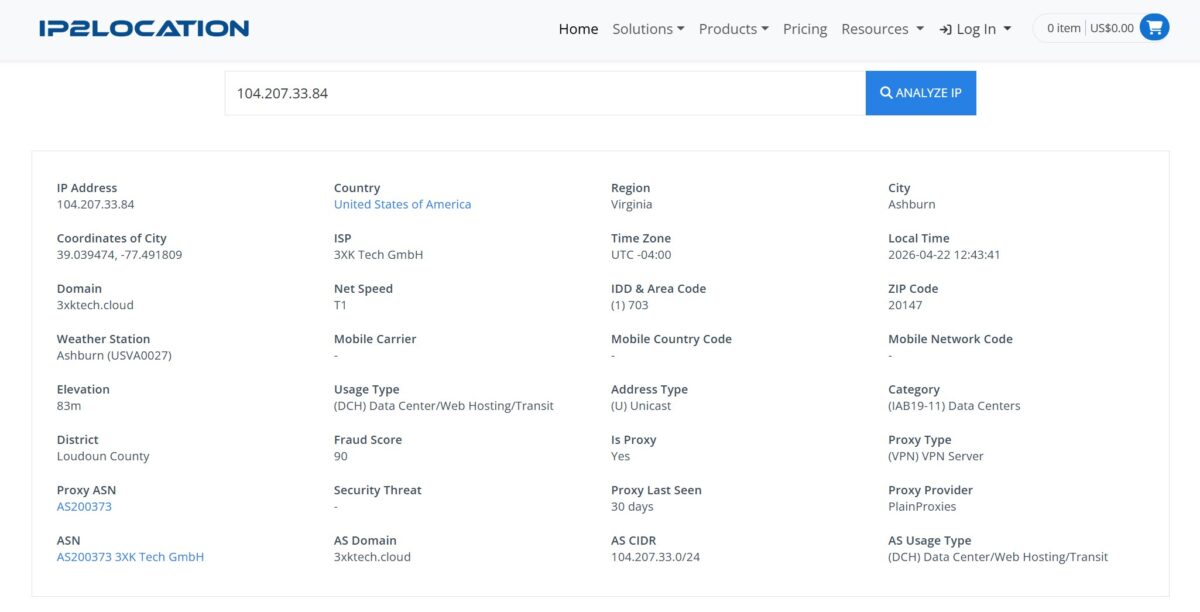
I grabbed one of the exit IPs – 104.207.33.84. Ran it through IP2Location. Here’s what came back.
ISP – 3XK Tech GmbH. Domain – 3xktech.cloud. Network speed – T1. This isn’t a home ISP. This is hosting.
Usage Type – (DCH) Data Center/Web Hosting/Transit. Not Residential. Datacenter.
Is Proxy – Yes. Proxy Type – (VPN) VPN Server. Proxy Provider – PlainProxies. Proxy ASN – AS200373. Category – (IAB19-11) Data Centers.
And Fraud Score – 90 out of 100. Ninety.
I read it three times to be sure. A proxy sold as residential is being classified by IP2Location as a datacenter VPN server with a fraud score of 90. That’s the level where any serious anti-fraud system shoots the traffic on sight.
IPinfo: Hosting, Proxy, SSH
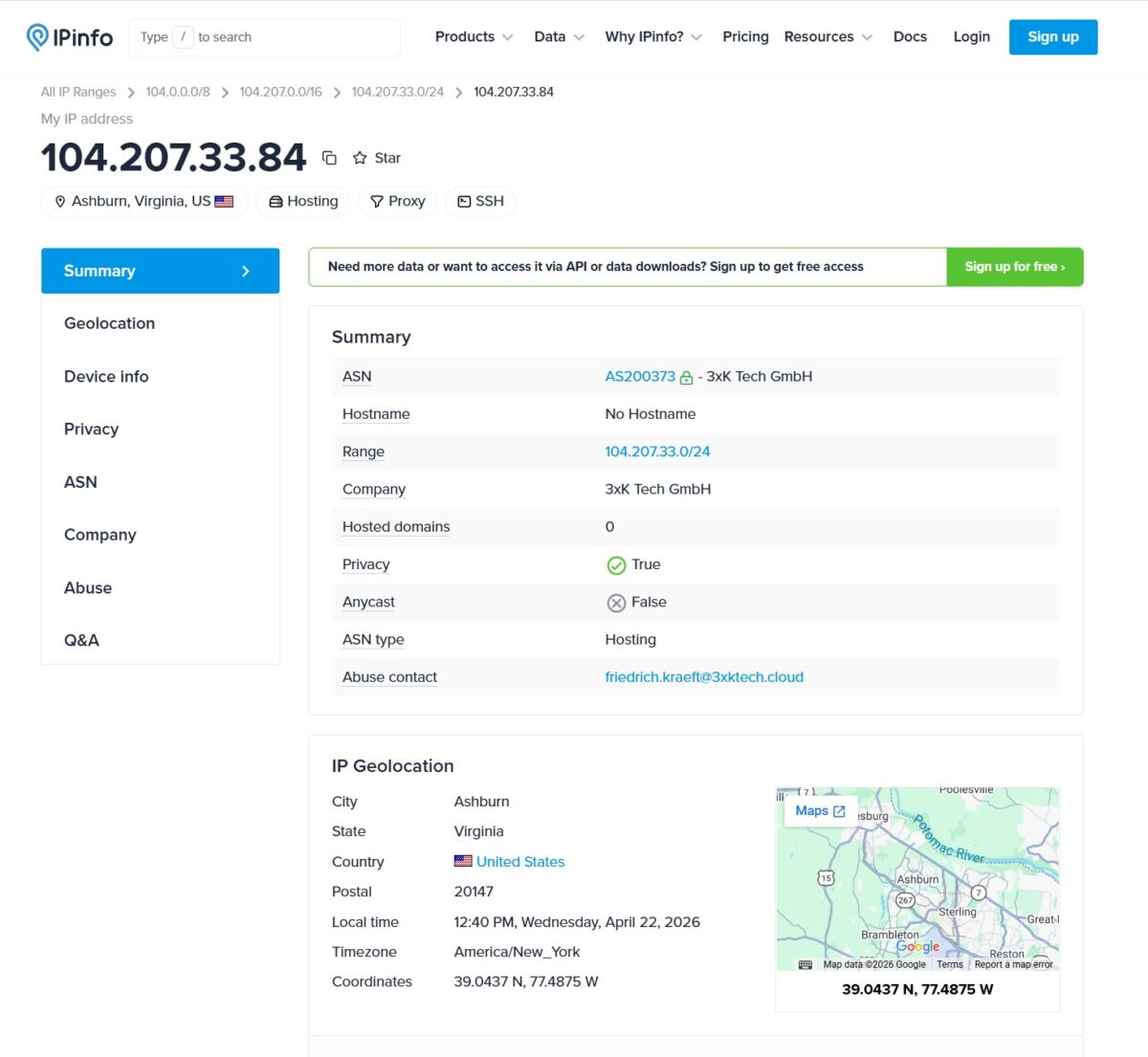
Cross-checked the same IP on IPinfo.io. Result: Ashburn, Virginia, US. Tags – Hosting, Proxy, SSH. ASN type – Hosting. Company – 3xK Tech GmbH. Privacy – True. Hosted domains – 0.
Every major IP intelligence service agrees: this is a hosting address.
Scamalytics: but here it’s Low Risk
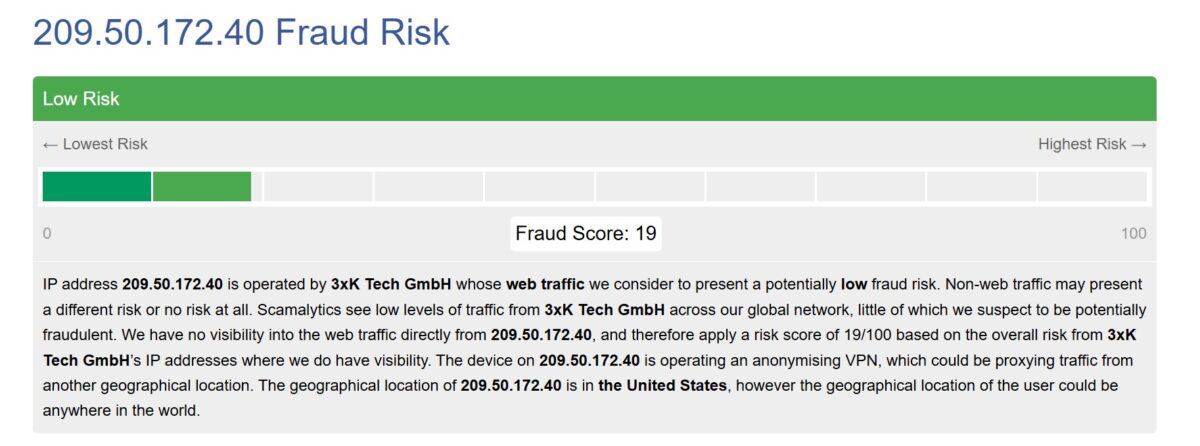
Ran another exit IP – 209.50.172.40 – through Scamalytics. Fraud Score 19/100, Low Risk. Scamalytics doesn’t see much traffic from 3xK Tech GmbH in their network and rates the risk low. But right next to it they note: device on this IP is using an anonymizing VPN, real user location could be anywhere.
The split between scoring services is telling. IP2Location gives 90, Scamalytics 19. Different databases, different methodologies. But both still flag it as VPN.
Report Summary: 4 detections out of 79
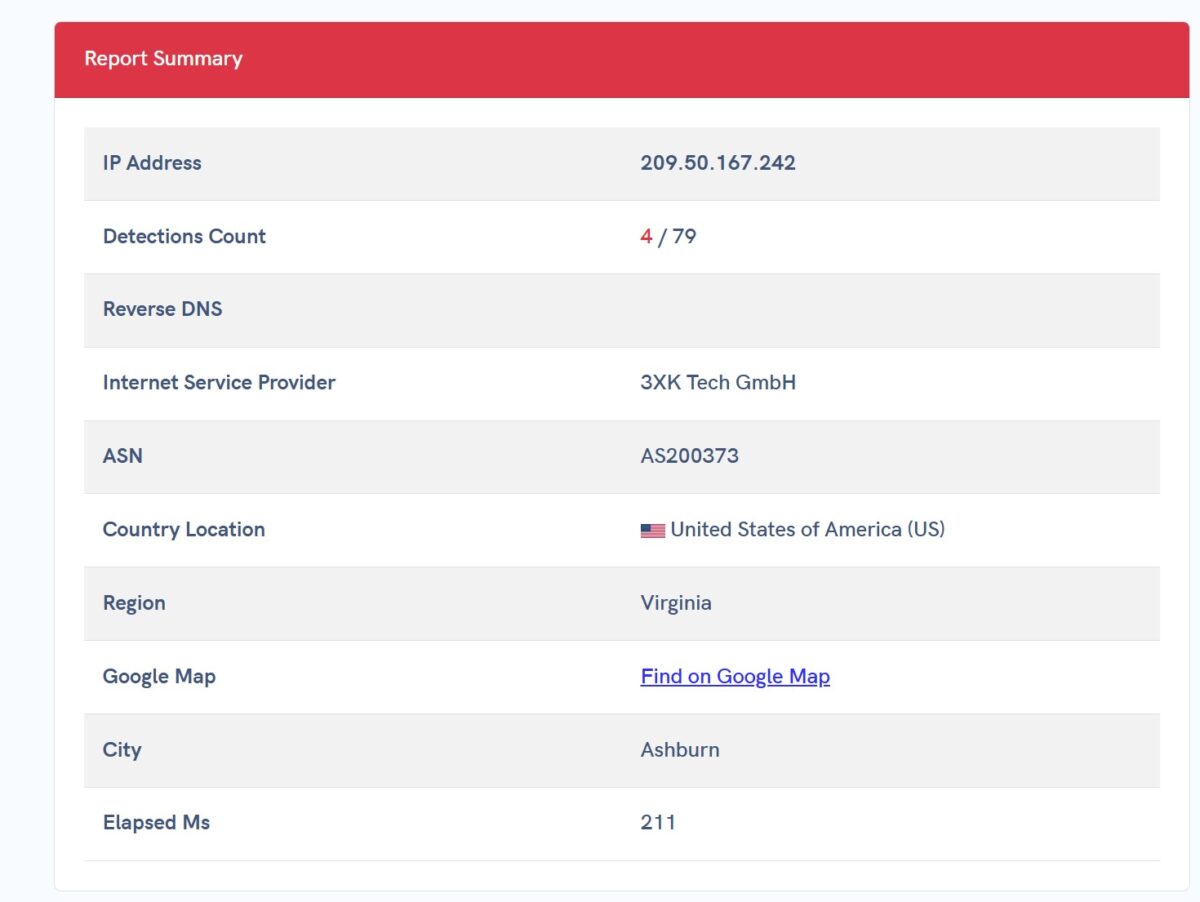
Another IP from the pool – 209.50.167.242. ISP again 3XK Tech GmbH, ASN AS200373. Ashburn, Virginia. Detections: 4 out of 79 checks.
Anonymous Connection: VPN and Data Center = True
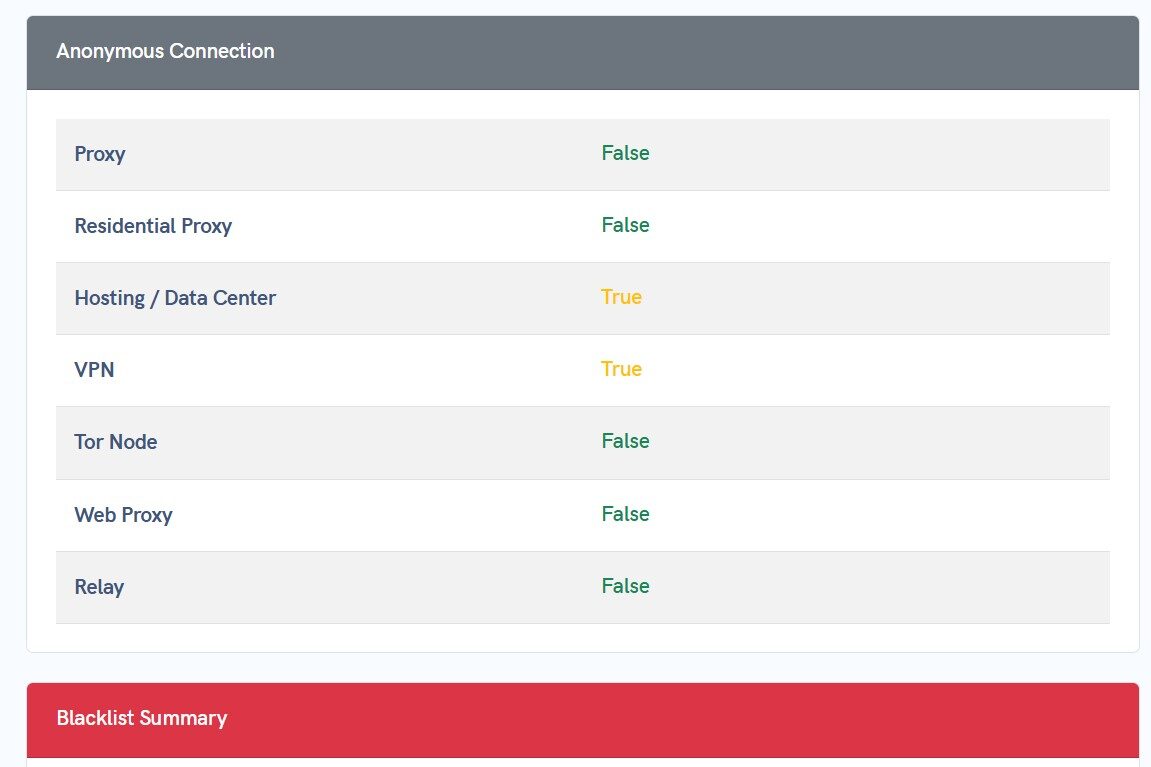
Anonymous connection check on the same IP. Proxy – False. Residential Proxy – False. Hosting / Data Center – True. VPN – True. Tor Node – False. Web Proxy – False. Relay – False.
Right there in plain text: Residential Proxy = False. Hosting = True. VPN = True. This isn’t a residential proxy.
Blacklists: 4-5 hits
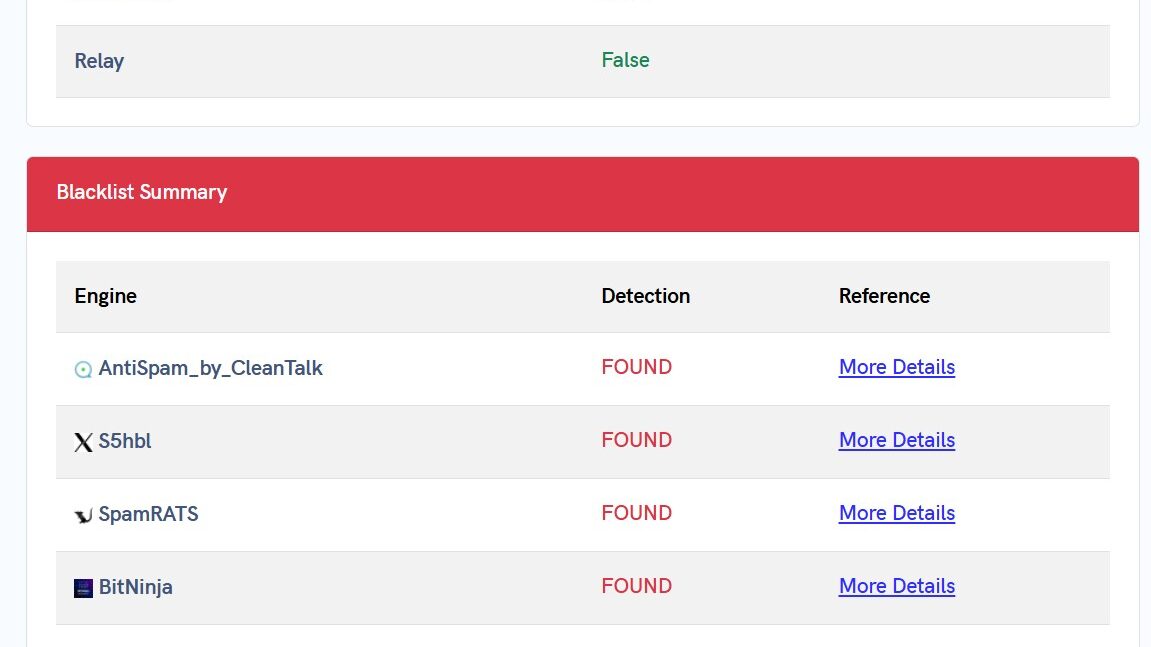
IP 209.50.167.242 found in four anti-spam databases: AntiSpam_by_CleanTalk, S5hbl, SpamRATS, BitNinja.
MXToolbox SuperTool confirms: 5 hits out of 61 blacklists. MAILSPIKE BL, MAILSPIKE Z, RATS Spam, s5h.net, Spamhaus ZEN. Spamhaus is the serious one. Tons of mail and anti-fraud systems use it as their reference.
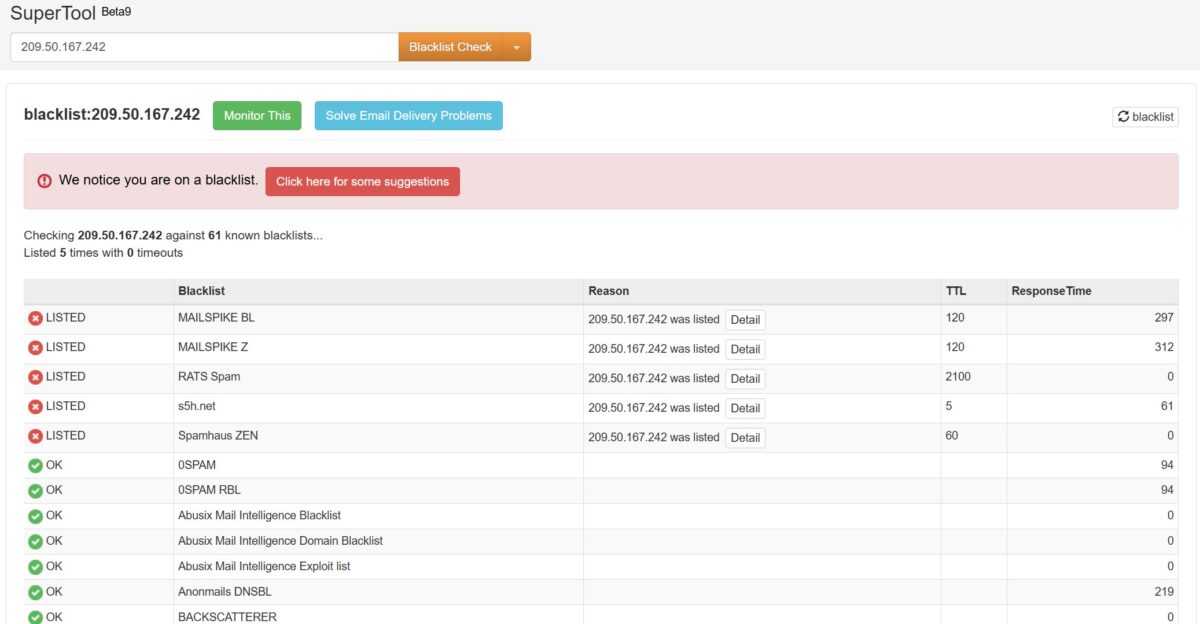
For context, when I tested NetNut their IPs (Cox Communications, AT&T) had Fraud Score 12-16 and zero hits across 80 blacklists. Different picture entirely.
The Reddit thread that explains it all
I found a thread in r/webscraping from September 2025. A user asks: why do datacenter IPs from different proxy providers all trace back to the same ISP – 3XK Tech GmbH? The replies are blunt: “Many providers resell same stuff. Half market easily are resellers.” Half the market is reselling the same subnets to each other.
3xK Tech GmbH (AS200373) controls 72,448 IP addresses. 56% in the US, 11% in Germany. Scamalytics classifies this provider as a hosting operator. Not an ISP. Not a telco.
What this means: the “residential” proxies from SX.ORG (at least the ones I got) are actually datacenter addresses from 3xK Tech GmbH subnets. Not IPs from real home ISPs like Comcast, Verizon, or AT&T.
Test 4: DNS Leak
This part gets ugly.
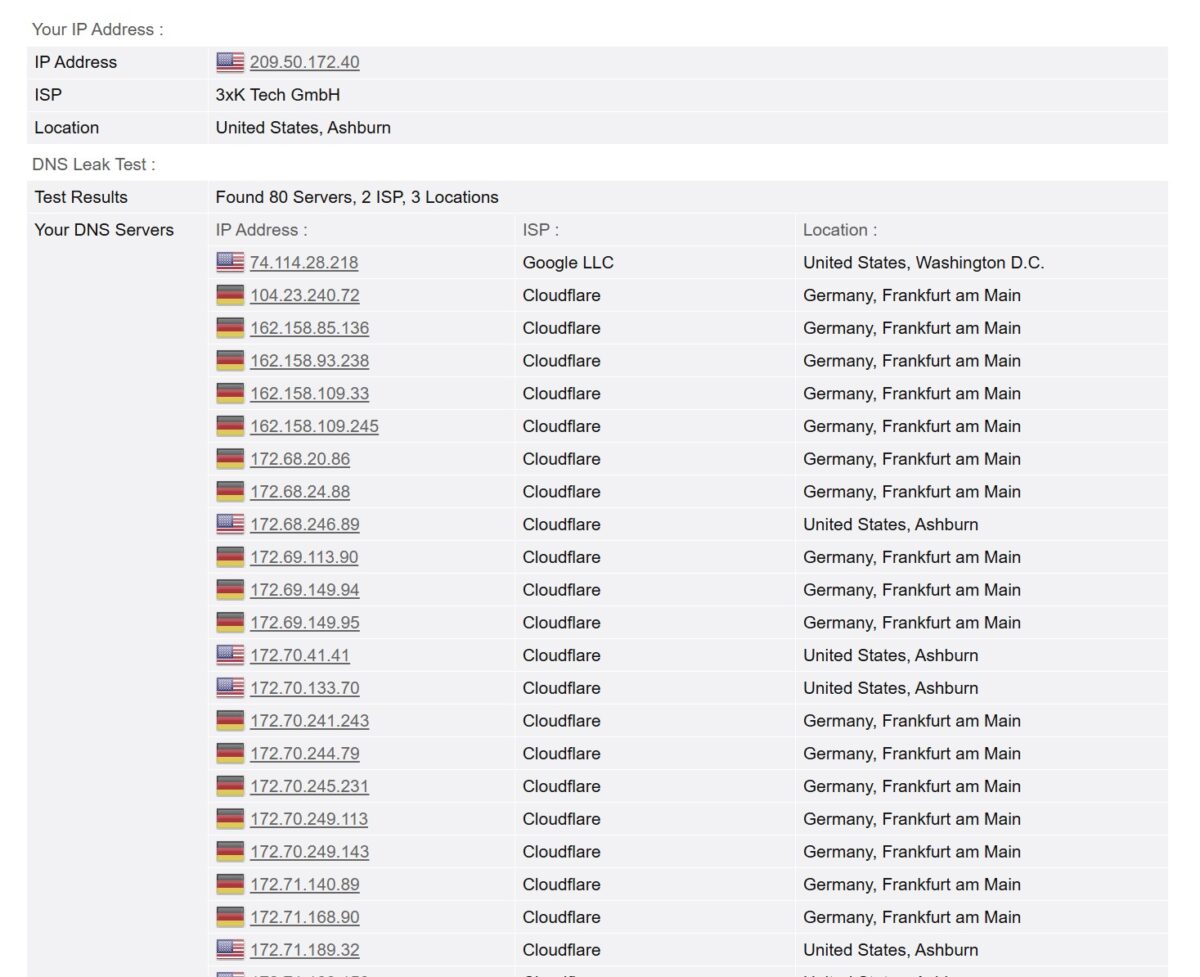
First test. My IP shows as 209.50.172.40, ISP 3xK Tech GmbH, Ashburn. But the DNS leak test caught 80 servers from 2 ISPs across 3 locations. Here’s what those servers were: one Google LLC out of Washington D.C., and the rest – dozens of Cloudflare addresses from Germany, Frankfurt am Main. Plus a few Cloudflare from Ashburn.
German DNS servers on a supposedly American proxy.
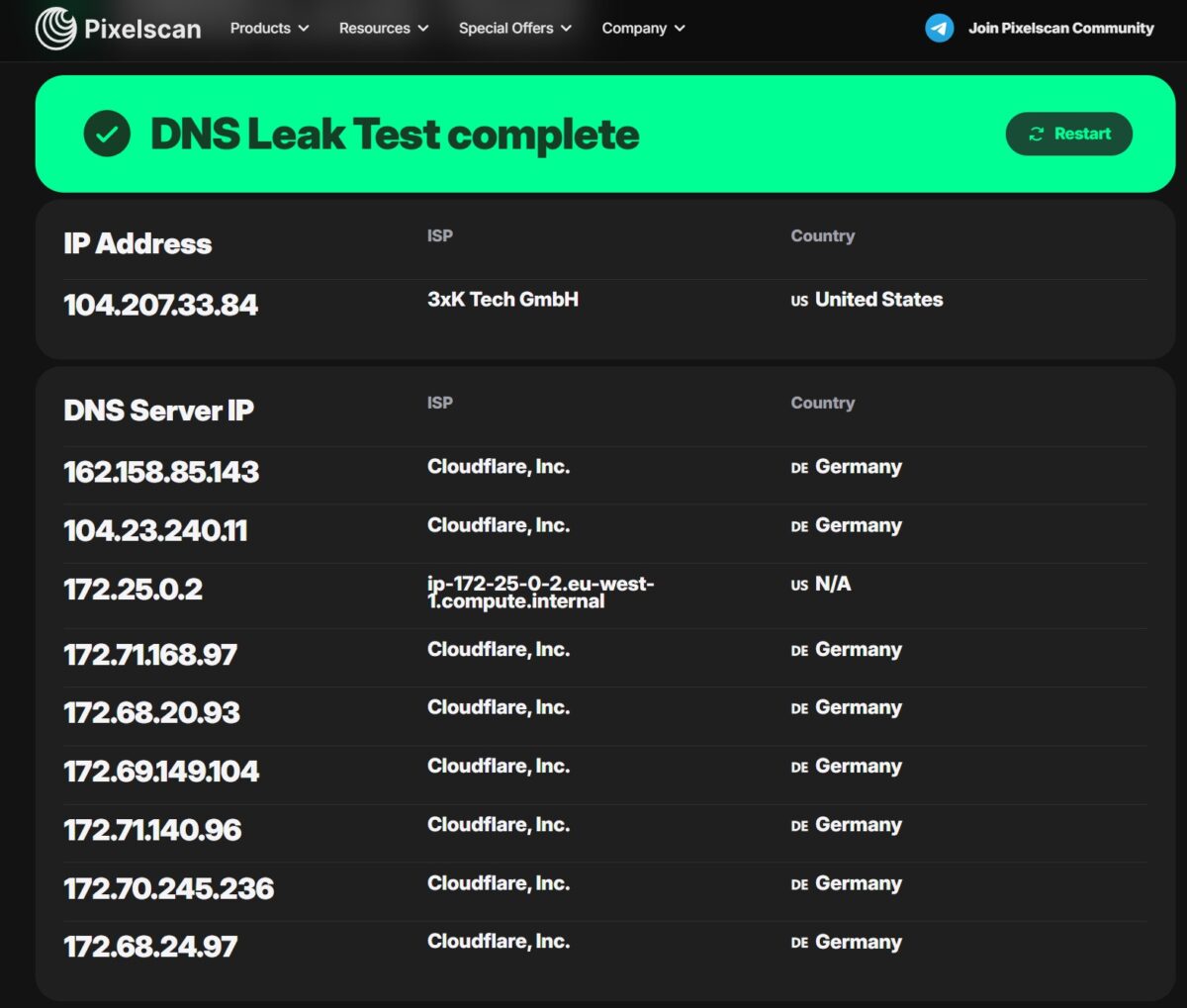
Pixelscan confirms it. IP 104.207.33.84, ISP 3xK Tech GmbH, US. DNS servers: 162.158.85.143 (Cloudflare, Germany), 104.23.240.11 (Cloudflare, Germany), 172.25.0.2 – ip-172-25-0-2.eu-west-1.compute.internal – that’s an internal AWS address in the eu-west-1 region (Ireland). Then 172.71.168.97 (Cloudflare, Germany) and so on. Most of the DNS is going through Germany.
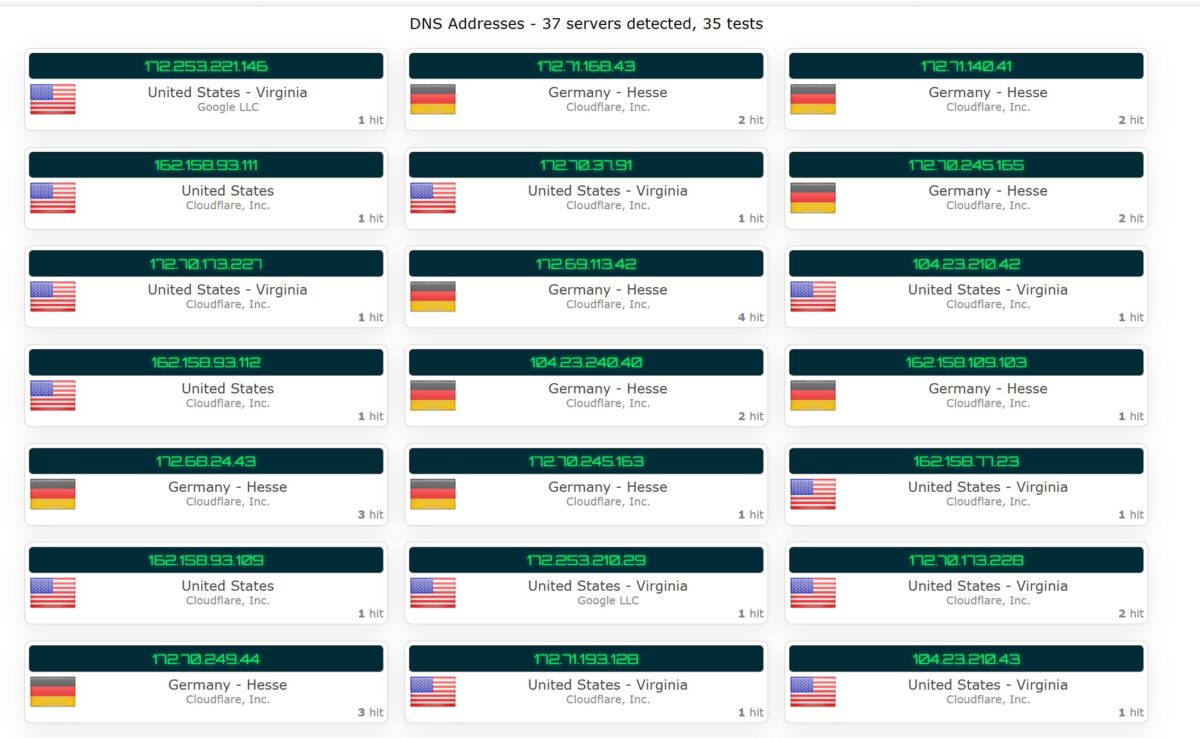
Third test: 37 DNS servers across 35 lookups. Roughly half-and-half between United States Virginia (Cloudflare, Google LLC) and Germany Hesse (Cloudflare). 50/50 split.
For any service that analyzes DNS (and there are more of those every year), this proxy looks shady. You’re supposedly in Ashburn, Virginia, but your DNS queries are flying off to Frankfurt. Social media anti-fraud systems see this. Reddit sees this.
Test 5: WebRTC Leak
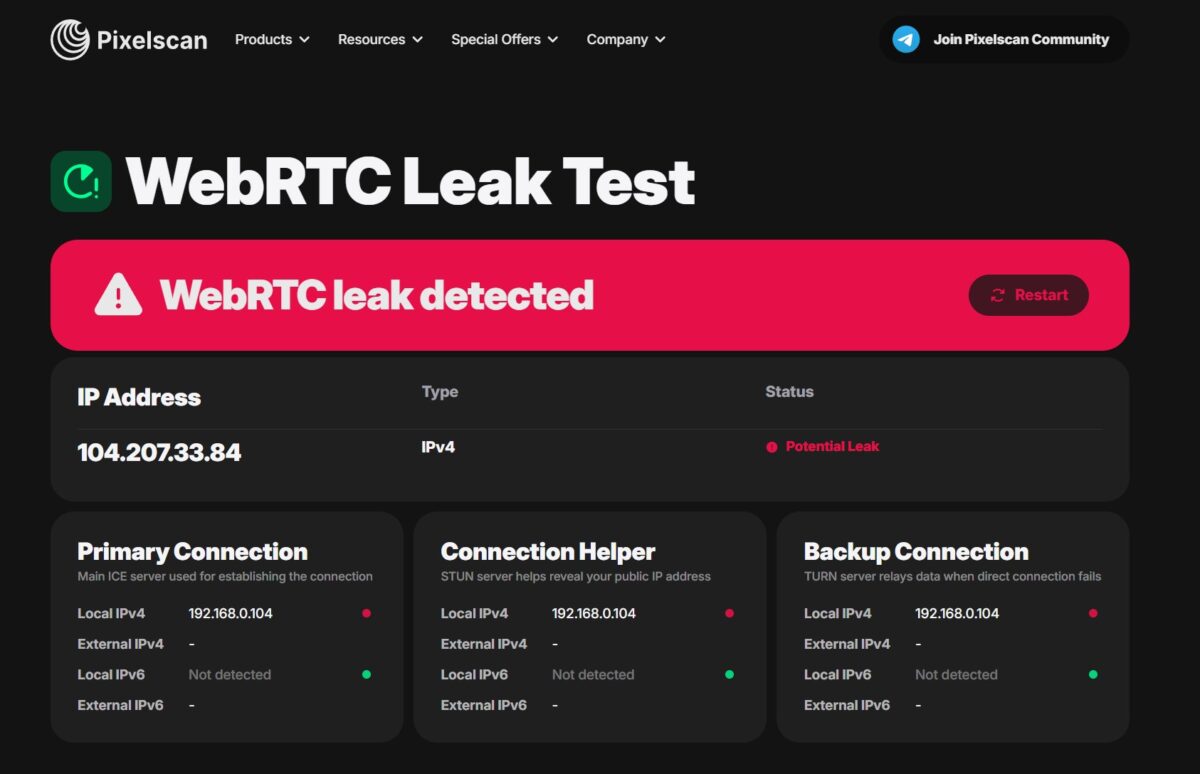
Pixelscan goes red: WebRTC leak detected. Potential Leak for IP 104.207.33.84. Local 192.168.0.104 visible across all three connection types: Primary Connection, Connection Helper, Backup Connection. External IPv4 not detected.
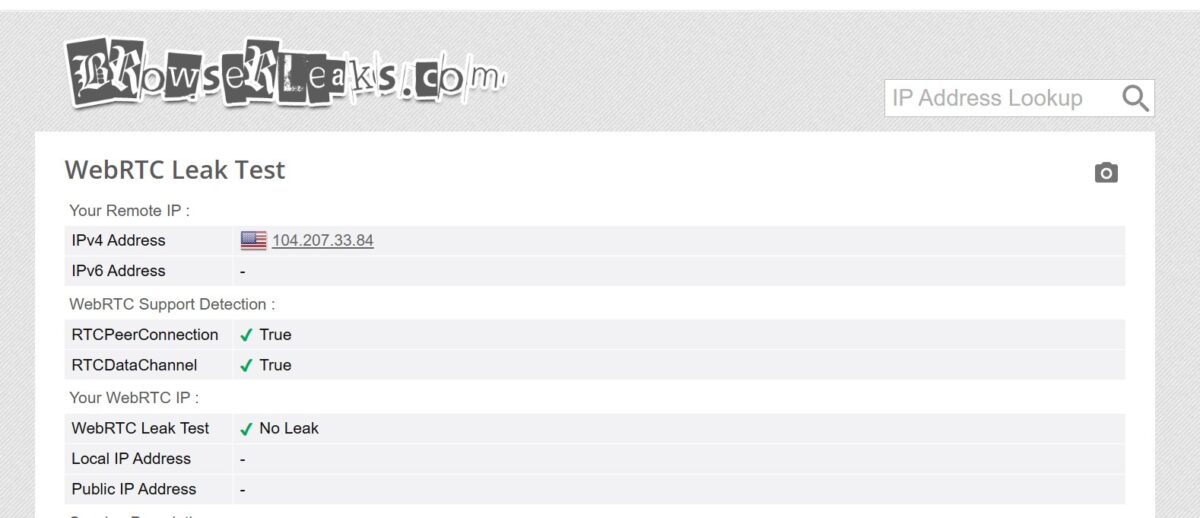
BrowserLeaks meanwhile says: No Leak. Remote IP 104.207.33.84, Local and Public IP not detected. The discrepancy is because Pixelscan uses a more aggressive method with TURN servers.
If you’re working through an antidetect browser with WebRTC disabled (which you should), this isn’t critical. Through plain Chrome though, the local IP leak is real.
Test 6: Fingerprint Scan
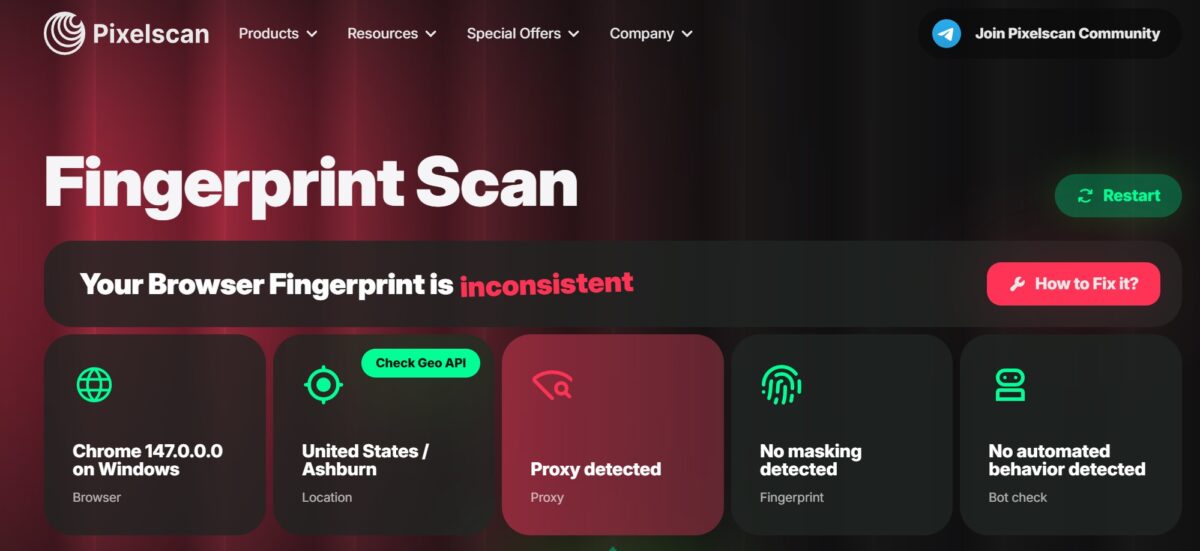
Pixelscan delivers the verdict: Your Browser Fingerprint is inconsistent. Breakdown: Browser – Chrome 147.0.0.0 on Windows, Location – United States / Ashburn, Proxy – Proxy detected (red), Fingerprint – No masking detected, Bot Check – No automated behavior detected.
The proxy gets caught. This was a regular browser without antidetect, so No masking makes sense. But the proxy detection itself is the problem. The IPs in SX.ORG’s pool are already known to detection systems.
For context: when I tested NetNut, Pixelscan said “Your IP looks good” on their IPs. Here it’s Proxy detected.
The big problem: these aren’t residential proxies
Let’s pull the facts together. Every exit IP I tested (209.50.167.242, 209.50.172.40, 104.207.33.84) belongs to one provider – 3xK Tech GmbH (AS200373). A German hosting company with 72,000 IP addresses, 56% mapped to the US.
IP2Location calls the type Data Center/Web Hosting/Transit. IPinfo tags it Hosting and Proxy. The Anonymous Connection check spells it out: Residential Proxy = False, Hosting/Data Center = True.
I bought residential proxies. Picked the Residential type with the little house icon. The interface tooltip swore these were “IPs from real ISPs assigned to actual users.” What I got were datacenter addresses from a German hosting provider’s subnets.
This isn’t nitpicking. This is the difference between an account that survives and an account that gets banned in three days.
What I liked and what I didn’t
- Excellent proxy creation interface with country, state, city, and ASN selection;
- 12+ million IPs across 235 countries with detailed availability indicators;
- Honest $3/GB pricing, no subscription, traffic never expires;
- 13-26 Mbps download speed – faster than NetNut and most competitors;
- Geo-targeting down to city and provider level;
- Crypto with no fees from $10, no KYC;
- Lots of payment options: USDT, BTC, ETH, PayPal, Payeer, Perfect Money;
- Ashburn geolocation displays correctly across all checking services.
- “Residential” proxies get classified as datacenter (3xK Tech GmbH, AS200373);
- Fraud Score 90/100 on IP2Location for one of the tested IPs;
- DNS leak: servers in Germany on a proxy claiming to be in Ashburn, USA;
- IP listed in 5 of 61 blacklists, including Spamhaus ZEN;
- Pixelscan reports Proxy detected, fingerprint inconsistent;
- WebRTC leak on Pixelscan (local IP 192.168.0.104 visible);
- All three tested IPs belong to a hosting provider, not a home ISP;
- Not suitable for social media multi-accounting or Reddit without an antidetect browser.
Will it work for what I need?
Quick reminder: I needed proxies for Reddit accounts, picky social platforms, and SEO checks.
- Reddit – doubtful. Reddit goes hard against multi-accounting. Datacenter IPs with Fraud Score 90 and Spamhaus listings are a one-way ticket to ban. You need clean residential addresses from real ISPs. These aren’t that.
- Social media – risky. Facebook, Instagram, TikTok run anti-fraud that factors in IP type. A datacenter VPN address with a DNS leak to Germany – red flags everywhere.
- SEO checks – this is fine. Checking Google SERPs from a specific US city, watching positions, parsing search results – the IP works, Ashburn geolocation displays correctly. Fraud Score and blacklists matter much less for this kind of work.
- Bulk scraping – works fine. Decent speed, granular geo-targeting, cheap traffic that never expires. Open sites without aggressive protection scrape without issues.
Final test results
| Parameter | Result | Score |
|---|---|---|
| Download speed | 13-26 Mbps | 4/5 |
| Upload speed | 11-12 Mbps | 4/5 |
| Latency | 227-998 ms | 3/5 |
| IP Quality (Fraud Score) | 19-90 of 100 (wide spread) | 2/5 |
| Blacklists | 5 of 61 | 3/5 |
| Geo Detection | Ashburn, VA – accurate | 5/5 |
| Proxy Detection (Pixelscan) | Proxy detected | 2/5 |
| ISP Type | Data Center (3xK Tech GmbH) | 1/5 |
| DNS Leak | Leaking (~50% Germany) | 2/5 |
| WebRTC Leak | Partial (1 service of 2) | 4/5 |
| Interface and UX | Excellent | 5/5 |
| Pricing and flexibility | $3/GB, no subscription, traffic never expires | 5/5 |
| Geo coverage | 235 countries, cities, states, ASN | 5/5 |
| Payment methods | Crypto, PayPal, cards, no KYC | 5/5 |
Final score: 3.6/5
Who this service is for
SX.ORG fits bulk scraping of open data, SEO rank monitoring, ad creative checks across regions, and similar tasks where IP type accuracy isn’t make-or-break.
For social media multi-accounting, Reddit account farming, payment systems, or anything that needs clean residential IPs from actual home ISPs – I wouldn’t recommend it. At least not based on the IPs I pulled in this test.
Maybe I got unlucky with one specific subnet. Maybe they have genuinely residential pools that didn’t show up in my sample. But the facts are the facts: three IPs tested, all from 3xK Tech GmbH, all datacenter, all flagged as hosting.
This review will be updated. I plan to test SX.ORG’s mobile proxies and possibly retry the residential test with different regions. We’ll see if the picture changes.
235 countries, targeting down to city and ASN
Flat $3/GB across all proxy types, no subscription
residential, mobile, corporate