






 Why Trust Us?
ToProxyLab has been testing proxy services since 2025. We pay for most plans ourselves, and when a provider gives us test traffic we say so in the review — free traffic buys a place in the testing queue, nothing else. Every provider goes through the same speed, uptime and fraud-score checks, and we publish the real numbers, including the bad ones. A rating cannot be bought. Learn who we are and how we review proxies.
Why Trust Us?
ToProxyLab has been testing proxy services since 2025. We pay for most plans ourselves, and when a provider gives us test traffic we say so in the review — free traffic buys a place in the testing queue, nothing else. Every provider goes through the same speed, uptime and fraud-score checks, and we publish the real numbers, including the bad ones. A rating cannot be bought. Learn who we are and how we review proxies.
IPcook reached out to me about reviewing their proxies. To be clear, they offered to let me test the proxies for free, and I keep the credits. I figured, why not? So far we’ve been able to look at services that are worth it, and this gets me closer to making content. They put $6.40 on the account, and I decided to spend it on 2 GB of their residential proxies.
Like I say in every other review, we write these honestly and independently. Getting free proxies for evaluation doesn’t sway our reviews. We take screenshots of all the test results and keep logs. If anyone’s interested, I can provide the logs.
As always, these were US residential proxies. Why US residential? I explained it in the FloppyData review — this market is the most demanding and competitive one out there. IPs there get checked immediately for shadowbans, run through anti-fraud, and validated for ISP authenticity. The cutthroat nature of the market and the threats that come with it let us judge the quality of a proxy pool better.
Who IPcook is and why age matters here
IPcook is a young player, and that’s a fact the marketing tries hard not to spotlight. Per the official press release through EIN Presswire / NJ Herald, the residential proxies only launched publicly in August 2025, and ISP plus datacenter got added in December 2025, closing out the “ecosystem.” Full age of the product line at the time of my test — roughly 10-12 months. In June 2026 they separately announced a SOCKS5 service.
Legally, the brand sits behind HoosTag CO., Limited, and the contact person in the releases is Victor Mo. The Trustpilot profile lists a Hong Kong location and the email hhj@ipcook.com. The usual industry setup: a Hong Kong front plus Asian infrastructure. Nothing inherently good or bad about it. But ten months of age means one simple thing. The service doesn’t have a long uptime history yet, or a big body of independent reviews to lean on.
Why age is so critical for proxies specifically. A residential pool isn’t a static database – it’s a living P2P network that gets cleaned for years, weeding out “burned” IPs that landed on Google, Meta, and anti-fraud engine blacklists. Bright Data and NetNut built up their pool reputation over 5-8 years. A service that’s ten months old either rents its pool from an upstream, or threw it together very fast. Either way you have to check the quality by hand, not trust the “55M+” number.
What the marketing promises
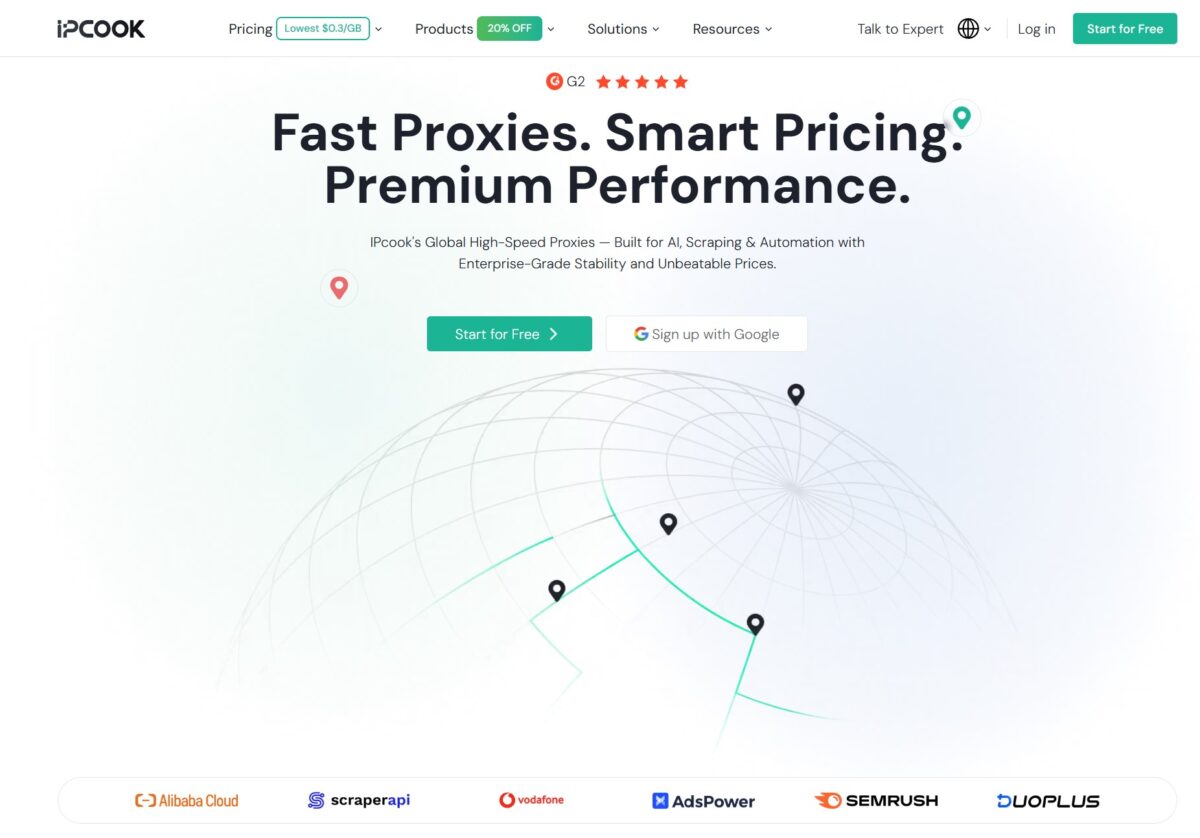
On the landing page IPcook sells itself as “Fast Proxies. Smart Pricing. Premium Performance” — global high-speed proxies for AI, scraping, and automation. Down at the bottom they’ve got logos from Alibaba Cloud, ScraperAPI, Vodafone, AdsPower, SEMrush, and DuoPlus as social proof.
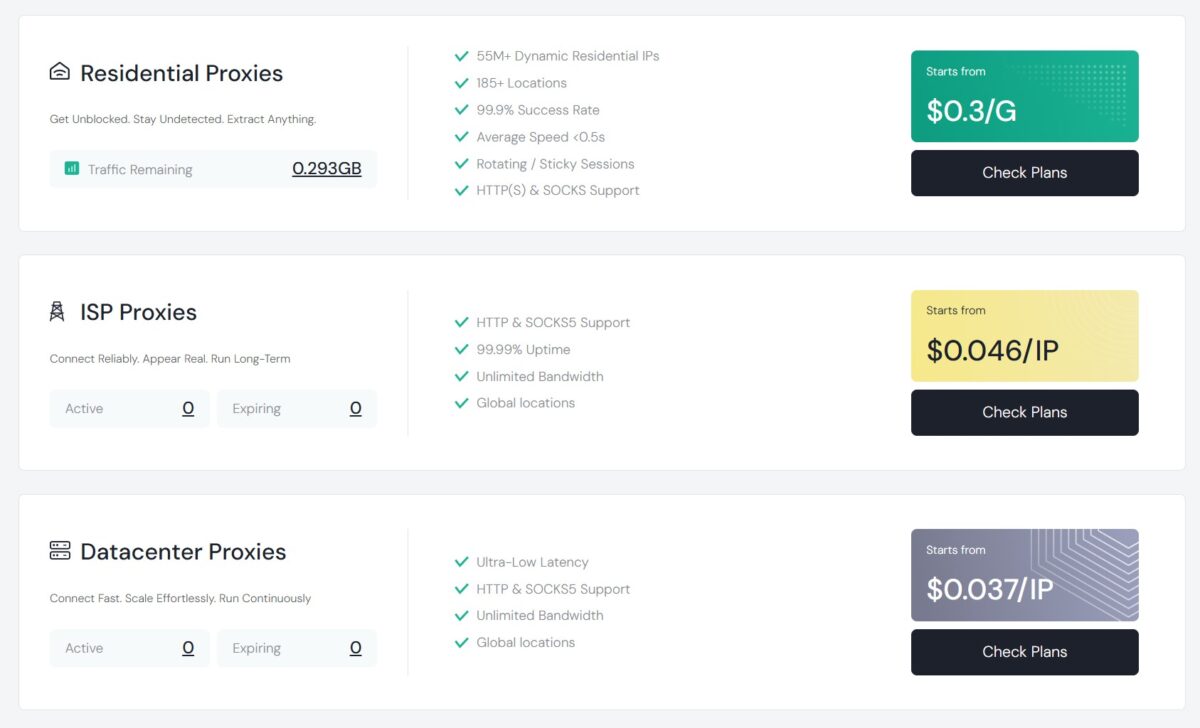
Three product types. Residential: claims 55M+ rotating IPs, 185+ locations, 99.9% success rate, average speed under 0.5s, rotation and sticky sessions, HTTP(S) and SOCKS5, from $0.3/GB, with 100 MB free to start. ISP: HTTP and SOCKS5, 99.99% uptime, unlimited bandwidth, from $0.046/IP (the release quotes $0.05/IP per day). Datacenter: ultra-low latency, HTTP and SOCKS5, unlimited, from $0.037/IP ($0.04/IP per day in the release).
The thing IPcook repeats everywhere — non-expiring traffic, sticky sessions up to 24 hours, up to 10 free sub-accounts, IP whitelist, real-time traffic monitoring, pay-as-you-go. On paper it’s the feature set of a mature provider. And the $0.3/GB price is 3-4x cheaper than Floppydata ($1/GB) and 6-7x cheaper than NodeMaven ($3.50/GB). Which raises the obvious question. Where do those savings come from, and are we paying for them with pool quality?
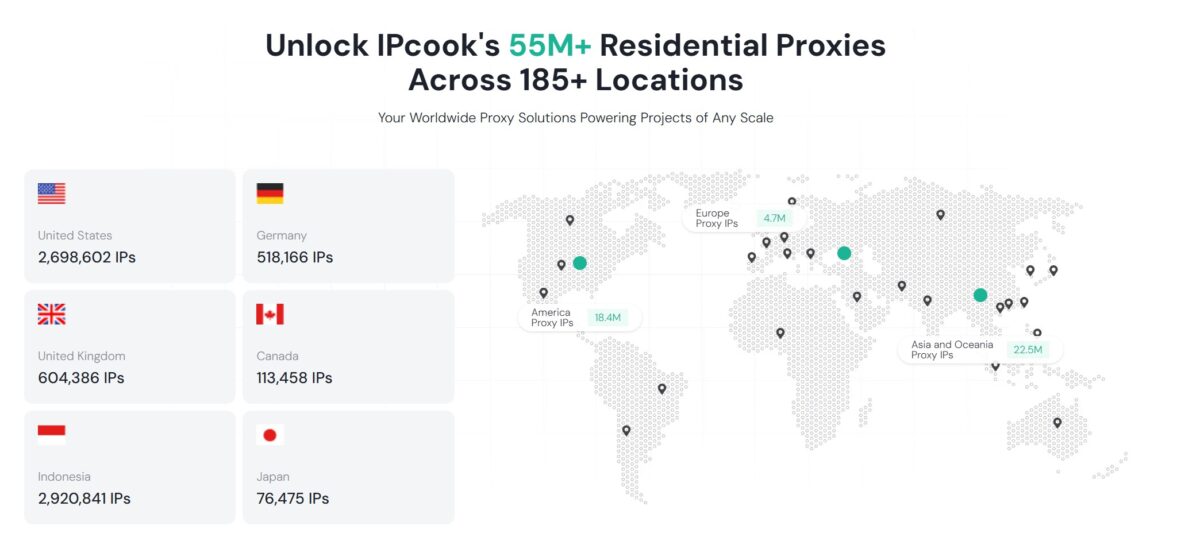
Here’s how IPcook draws the pool map: 55M+ IPs, with 2.7M in the US, 2.9M in Indonesia, 604K in the UK, 518K in Germany, 113K in Canada, 76K in Japan.
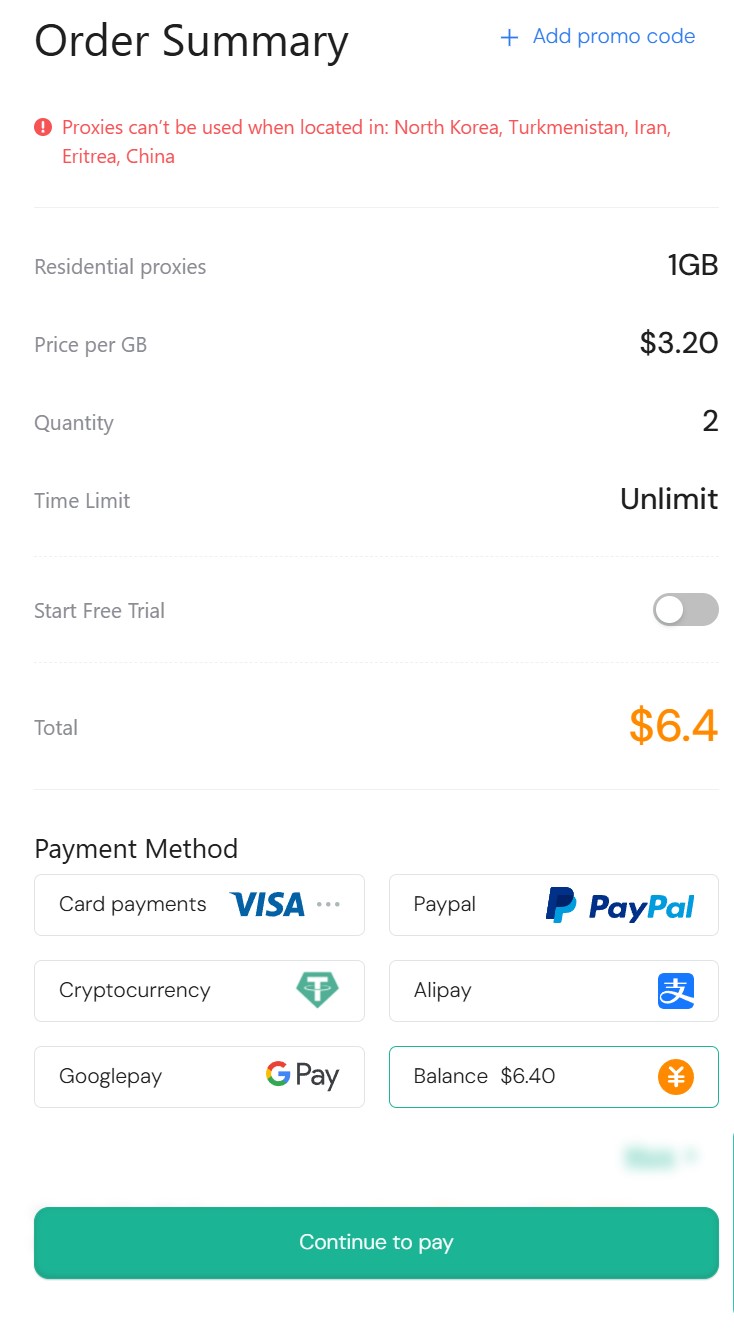
And one restriction from the docs, right up front: you can’t use the proxies if you’re physically in North Korea, Turkmenistan, Iran, Eritrea, or China. A sanctions/compliance list, standard for the industry.
Buying and the dashboard
Correction to the story: I didn’t pay out of pocket. The rep credited $6.40 to my internal balance, and that’s what I’m placing the order with. And this is where the main pricing catch comes out.
The landing page screams “from $0.3/GB.” That number is real. But it’s the Enterprise tier price — 10,000 GB for $5,000. Out of reach for retail. So I take the minimum Basic: $3.2/GB, 2 GB, Time Limit Unlimit (traffic doesn’t expire), $6.4 total. I pay from the balance right down to zero — after payment the dashboard shows Traffic: 2GB, Balance: $0.00.
The pricing grid is built so the per-gig price drops hard only at big volumes:
| Plan / volume | Price per GB | Total |
|---|---|---|
| Basic — 1 GB | $3.2/GB | $3.2 |
| Advanced — 25 GB | $2.4/GB (−20%) | $60 |
| Small Enterprise — 1000 GB | $0.8/GB (−75%) | $800 |
| Enterprise — 10,000 GB | $0.3/GB (−84%) | $5000 |
There’s an in-between grid called More Plan: 10 GB — $2.5/GB, 50 GB — $2.3/GB, 100 GB — $2/GB, 250 GB — $1.2/GB, 500 GB — $1/GB, 3000 GB — $0.7/GB, 5000 GB — $0.6/GB.
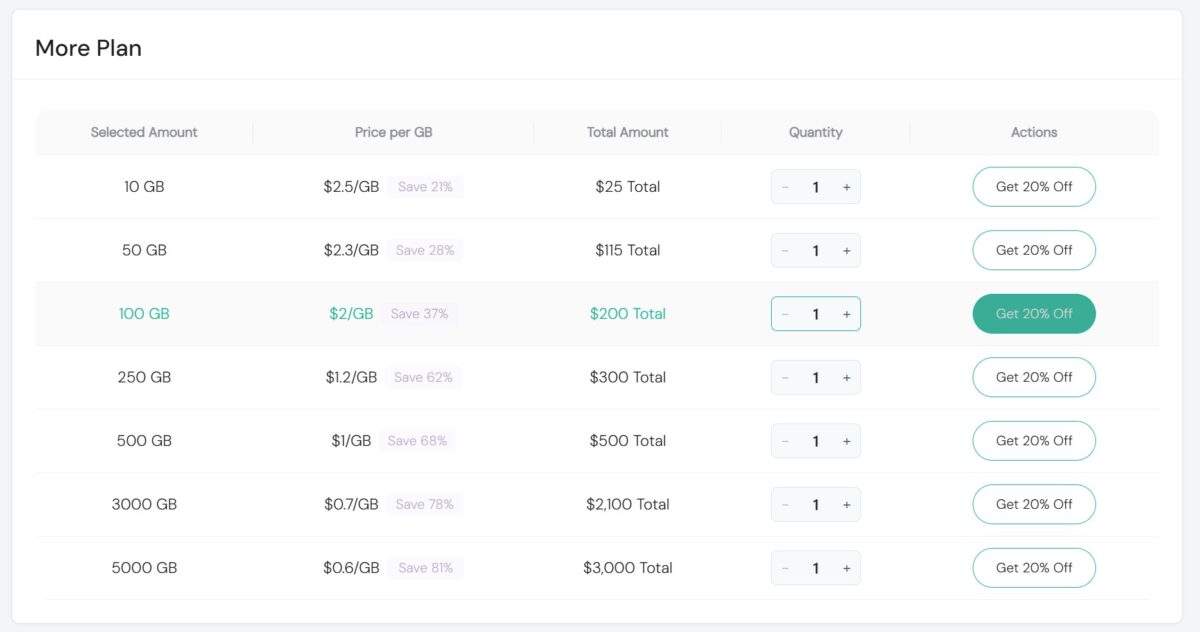
The takeaway is simple. That advertised “$0.3/GB” is the ceiling of savings on a terabyte, and the real retail price for a normal user is $3.2/GB. At small volumes that’s not budget anymore, it’s premium territory: Bright Data and Oxylabs ($5-6/GB at entry), Decodo around $3, NodeMaven $3.50. IPcook only gets cheap once you’re into hundreds of gigs ($1/GB at 500 GB, $0.7/GB at 3 TB). This is volume-based pricing, common across the industry – just keep in mind that the headline rate is the high-volume floor, not the retail entry price, especially if you’re grabbing 1-25 GB for tests or small jobs.
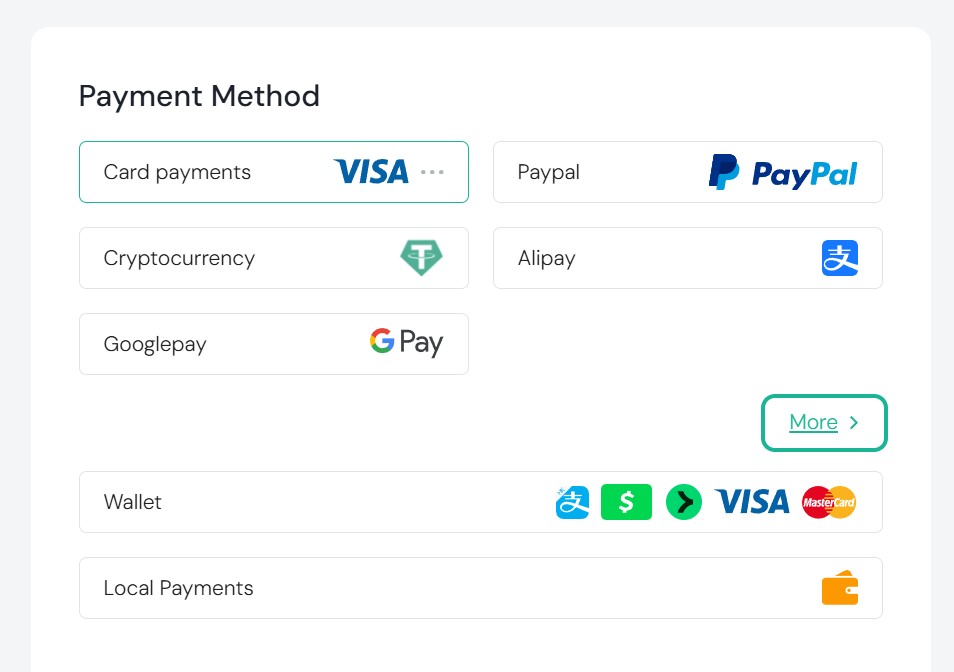
Payment methods are broad: Visa/Mastercard, PayPal, Cryptocurrency (USDT), Alipay, Google Pay, pay from balance. Alipay and crypto are another marker of the Asian infrastructure.
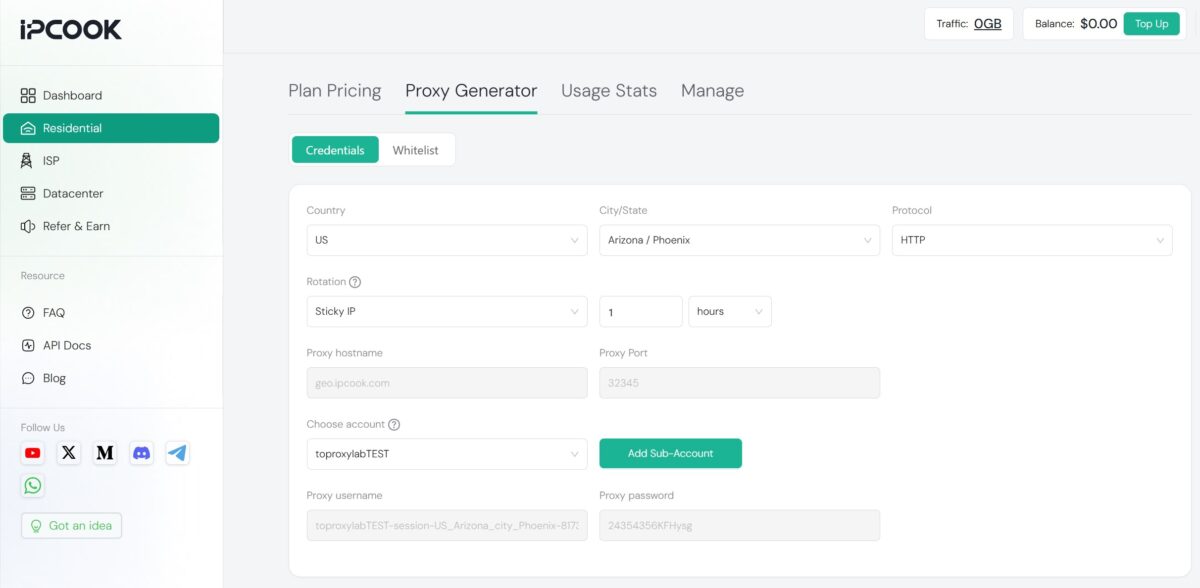
The generation interface is familiar from the competitors. Credentials and Whitelist tabs — auth by login/password or by IP. You set Country (GLOBAL by default), City/State, Protocol (HTTP, SOCKS5 available), Rotation (Randomize IP by default; for sticky you set the session length up to 24 hours). Host geo.ipcook.com, port 32345. Below that — the sub-account binding (up to 10 free), login/password, count, the HOST:PORT:USER:PASS format, and Generate plus Generate API Link buttons. Snippets come for Python, Node.js, PHP, Java, Golang, and C++. Up top you’ve got separate tabs for Plan Pricing, Proxy Generator, Usage Stats, Manage.
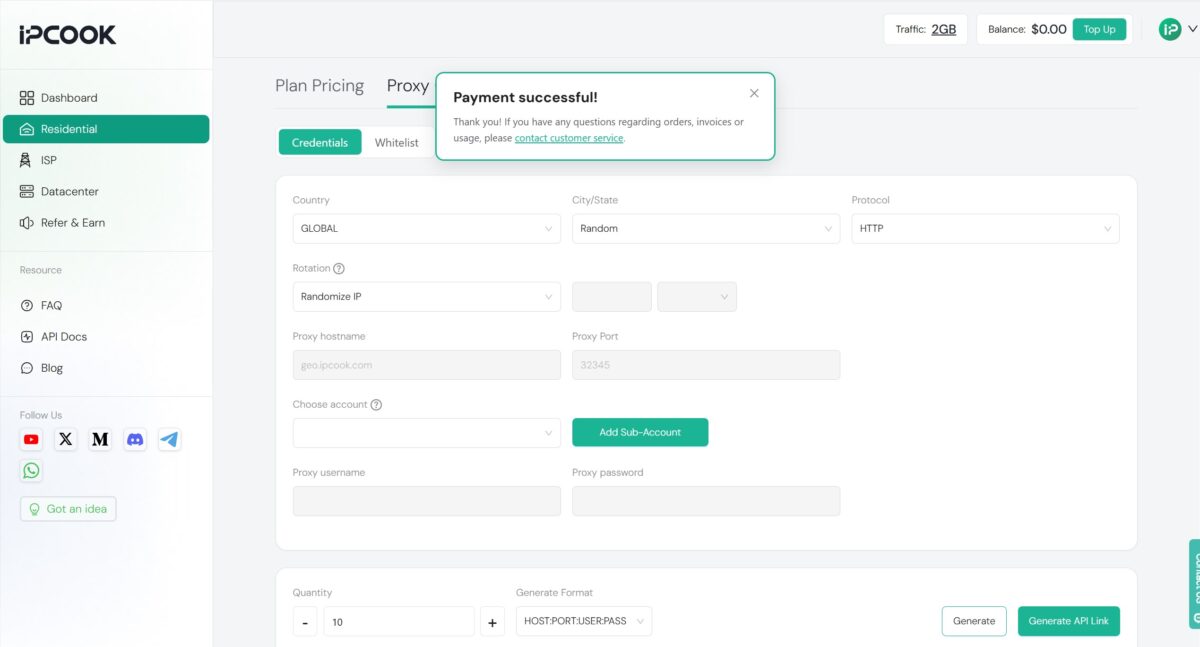
On management features — whitelist, sub-accounts, monitoring, API links, city-level targeting — IPcook doesn’t fall behind the pricey competition. For a service less than a year old, that’s nice to see. But the gap between the advertised $0.3 and the real $3.2 at retail entry stays in the back of your mind.
Generating the list and the first run
Off to the Proxy Generator, where I build a list for our standard scenario — US residential. Country — US, City/State — Arizona / Phoenix, Protocol – HTTP, Rotation – Sticky IP for 1 hour. Host geo.ipcook.com, port 32345. In Choose account I pick the sub-account I made earlier, toproxylabTEST, and the system builds the username itself, something like toproxylabTEST-session-US_Arizona_city_Phoenix-… with a password. I went with Phoenix — mixing up the geo so I’m not repeating Houston from the Floppydata review.
I export the list, check it in FOGLDN Proxy Tester against google.com. And the first snag: the proxies didn’t fire at all on the first try. The whole list dropped to FAILED, not a single working IP.
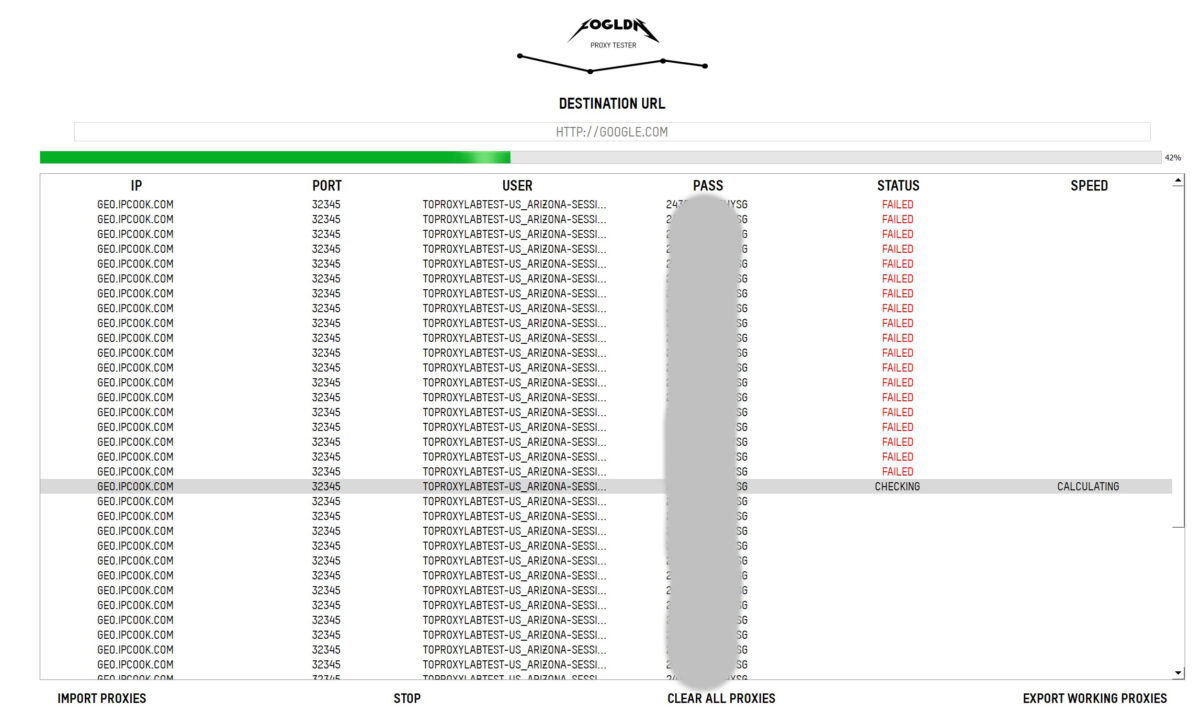
Before blaming the pool, I worked through the obvious theories. Changed parameters, switched the protocol, tried other cities, regenerated the creds. Same result, all FAILED. That’s not typical. When a pool is down, usually some of the IPs still respond. Here everything went down clean — which means it’s not the proxies, it’s the account config.
I found the cause, and it’s not obvious. The sub-account hadn’t been allocated any traffic. The 2 GB I bought were sitting on the main account, while toproxylabTEST, the one I generated the list through, had a zero limit. Every request got bounced before it even hit the network. I went into the sub-account management, gave it 1 GB out of the two — and the proxies worked right away.
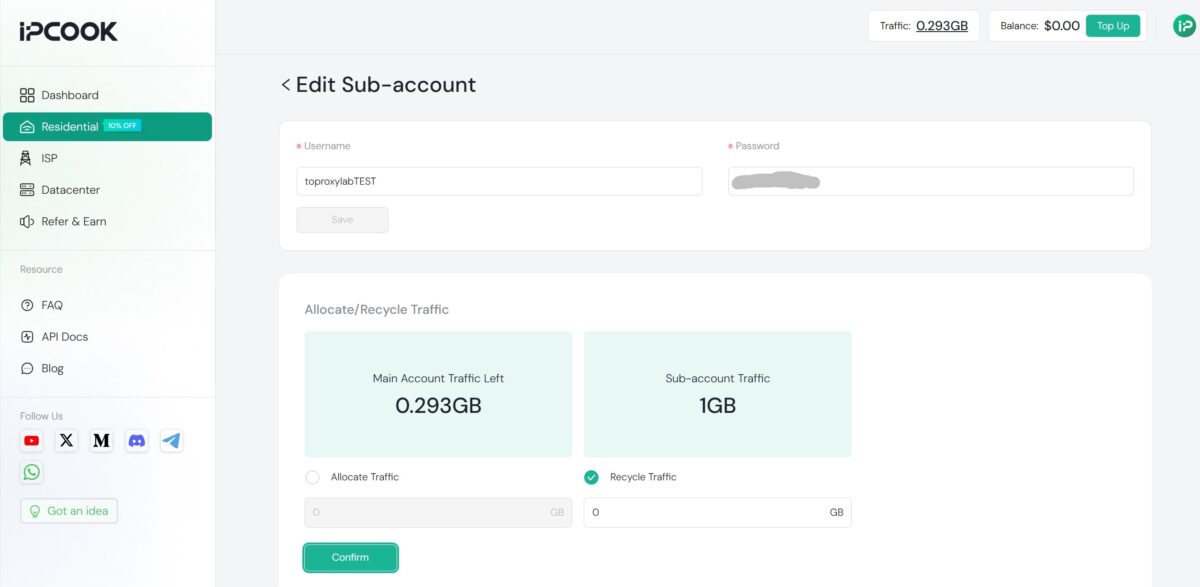
This is a UX minus, not a technical failure. The proxies themselves are fine. But the logic of “traffic lives on the master account, but you work through a sub-account with zero” never gets flagged anywhere during generation. No “your sub-account has 0 GB” warning, no hint at the moment the list crashes to FAILED. A beginner could easily lose half an hour and walk away thinking “the pool doesn’t work,” when all you have to do is distribute the traffic. Mature services solve this with a shared pool by default or a clear error message. IPcook leaves the user with no feedback. A small thing, but a telling one.
Functionality and response time: FOGLDN + Byteful
By the book, first thing I run is basic functionality and response time. Two tools: the desktop FOGLDN Proxy Tester and the online Byteful Proxy Tester. What matters here isn’t peak speed but the share of working proxies and the spread in latency.
After allocating the traffic, the same list (US, Phoenix, sticky) came alive. I run it through FOGLDN against google.com.
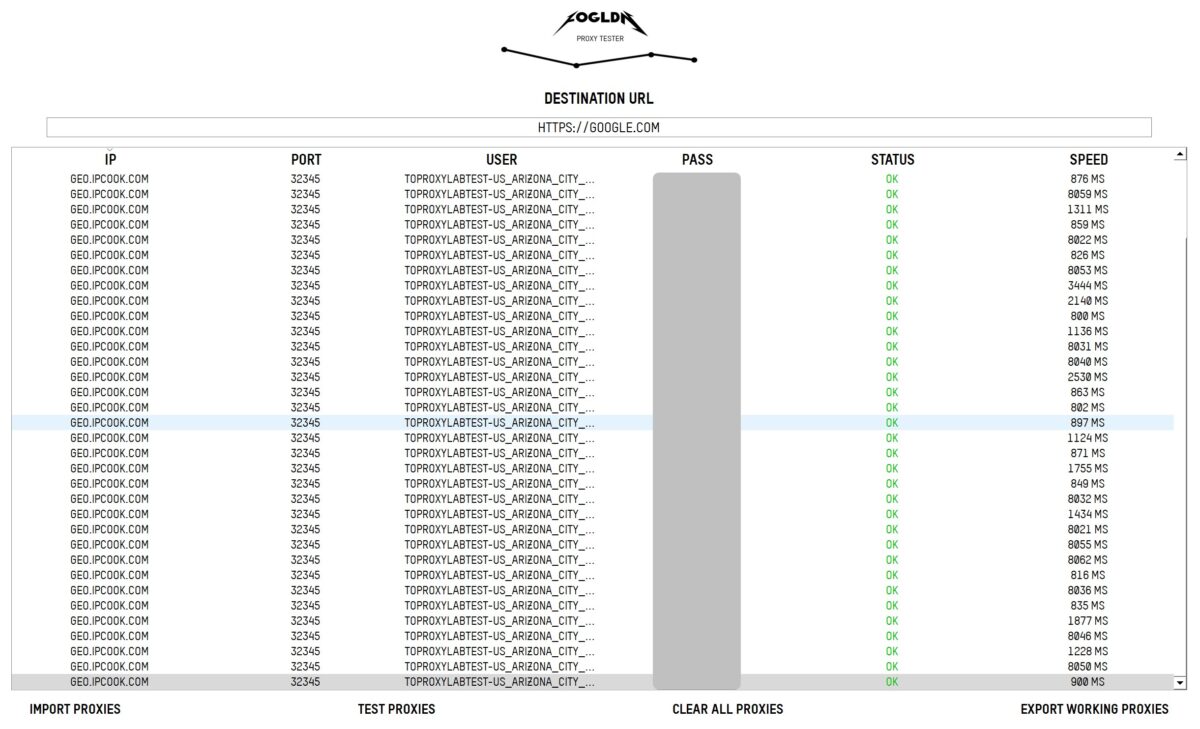
Now the whole list is OK, not a single FAILED. But the SPEED spread is interesting — the values split into two groups. Some run fast, 800-900 ms (826, 859, 871, 882, 897, 900). And half of them consistently stall around 8000 ms (8022, 8031, 8040, 8046, 8050, 8053, 8059, 8062). Almost nothing in between. Either “fast” or “eight seconds.”
That bimodality is a sign of a non-uniform pool. Some exit nodes sit on fast lines, some on slow home connections with big latency. I saw the exact same picture with Floppydata. For scraping it’s tolerable, the request goes through. For real-time and high-frequency parsing those eight-second drops cut your throughput.
I duplicate it online in Byteful, target microsoft.com, protocol AUTO.
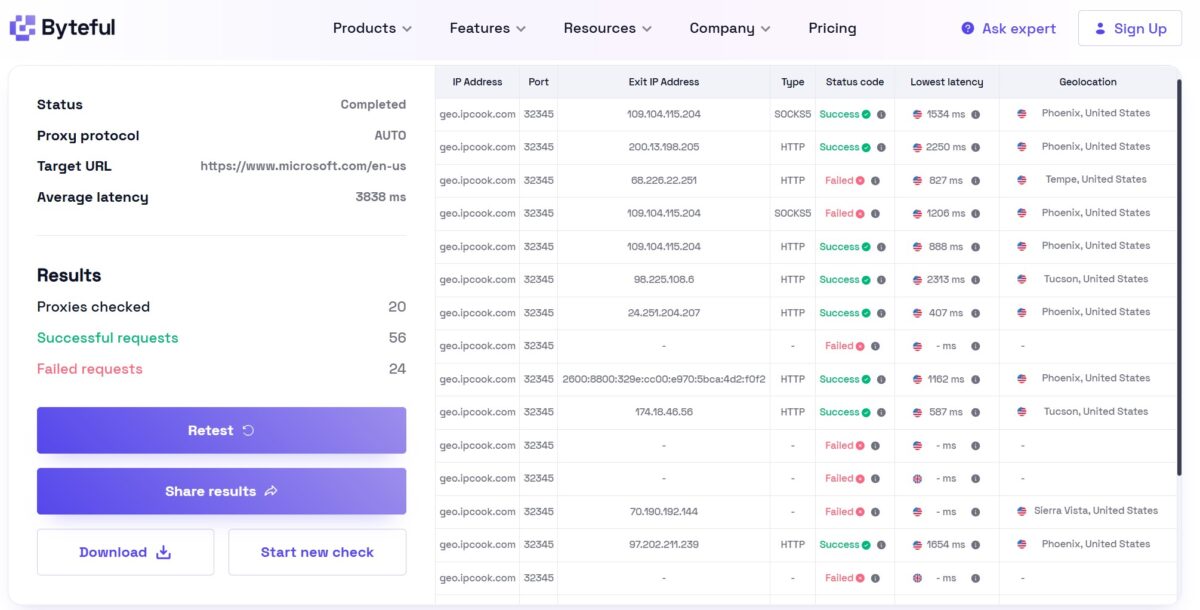
Here the numbers are harsher. Byteful ran 20 proxies, fired off 80 requests: 56 successful, 24 failed. Success rate around 70%. Average latency 3838 ms. On our scale that’s a warning sign — for scraping the red line is 80%, and IPcook didn’t reach it. Some rows are clean (Phoenix, Tucson, Tempe, all United States, latency 407-2313 ms), but a noticeable chunk drops into Failed with a dash instead of an exit IP.
What’s nice. The geo matches what I ordered. Asked for Arizona/Phoenix — and the output really is Phoenix, Tucson, Tempe, Sierra Vista, all US. City-level targeting works, at least at the state level. Among the exit IPs there’s both SOCKS5 and HTTP, and I even caught an IPv6 (2800:8800:…), which confirms the claimed support for both protocols.
The interim verdict is split. FOGLDN gave 100% OK after setup, but with that bimodality (800 ms versus 8000). Byteful gave a harsher, more realistic picture: ~70% success rate at 3838 ms. The gap makes sense. FOGLDN hits google.com and counts the response itself as a success, Byteful hits microsoft.com and is stricter about timeouts. The truth is in the middle: the pool is alive and geo-accurate, but unstable on speed and not reaching 80% on heavy targets.
Fraud score and real residentiality: the main test
This is the most important test for residential. Speed can be forgiven, bimodality too. But if the exit IP gets flagged as a proxy or a datacenter, everything else is worthless. So I dig deep.
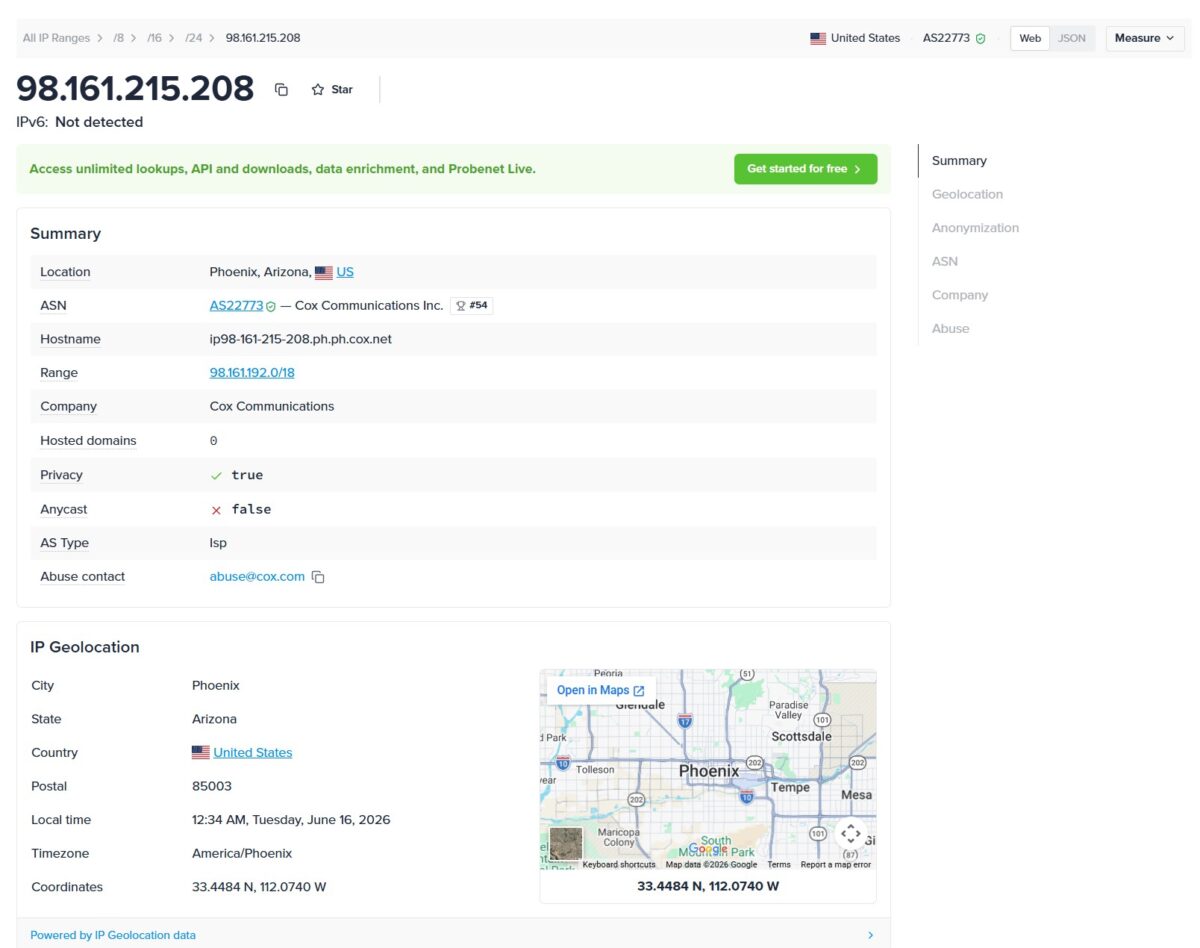
I locked one sticky IP for an hour and ran it through the check stack: Scamalytics, IP2Location/IP2Proxy, IPinfo (Probenet), Pixelscan, and a whoer-style tool. Exited through Phoenix. The address the network handed me — 98.161.215.208.
First and most important — the ASN. The address belongs to AS22773, Cox Communications Inc. A real American cable provider. Not hosting, not Amazon, not some shady VPS upstream. AS Type comes back as ISP everywhere. Hostname ip98-161-215-208.ph.ph.cox.net — the reverse DNS record honestly resolves to a Cox subdomain. Exactly what you want from residential: the traffic looks like an ordinary home cable user in Arizona.
Now Scamalytics. Fraud Score 14 out of 100, Low Risk.
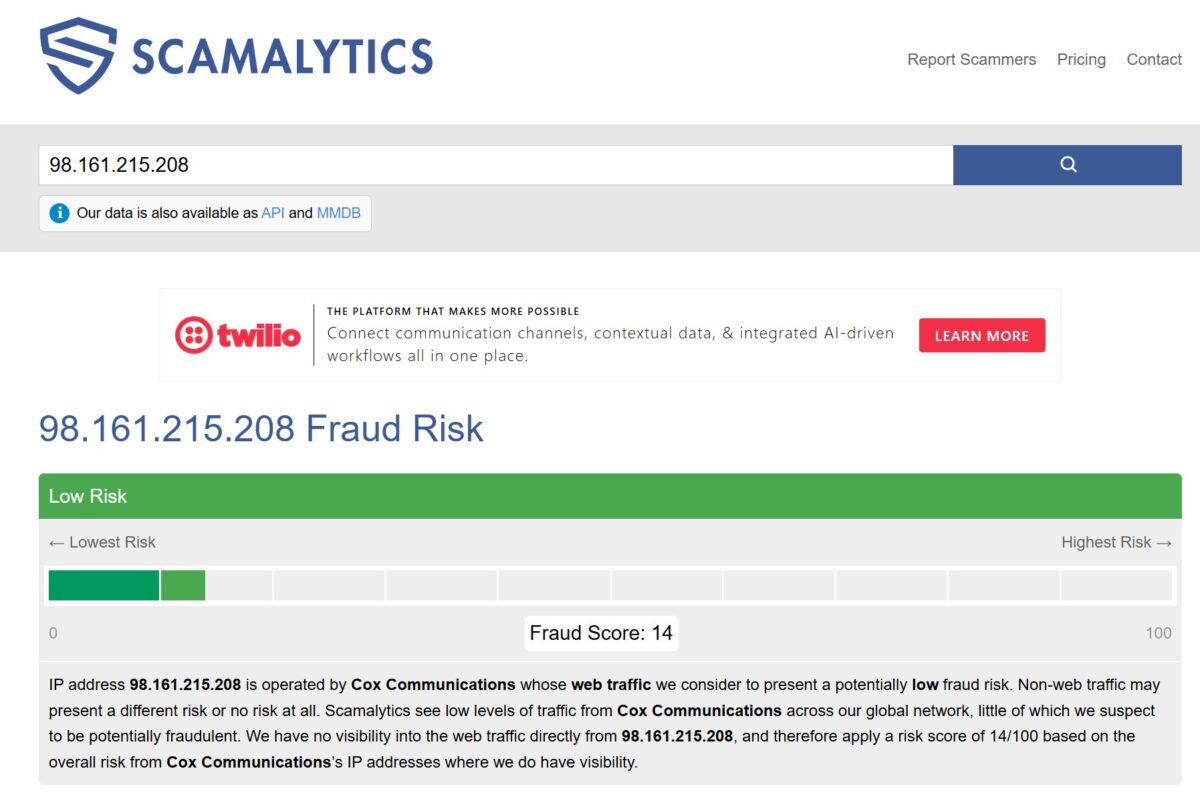
Honestly, I expected worse. 14/100 is a good result for residential. A lot of cheap pools spit out 30-50 and higher. Scamalytics straight up says it sees no direct traffic from this IP and assigns 14 based on the general risk of Cox addresses. Meaning the address itself isn’t flagged as abusive in their database. For scraping, SEO, and signups — a working level.
IP2Location gave an even more telling picture.
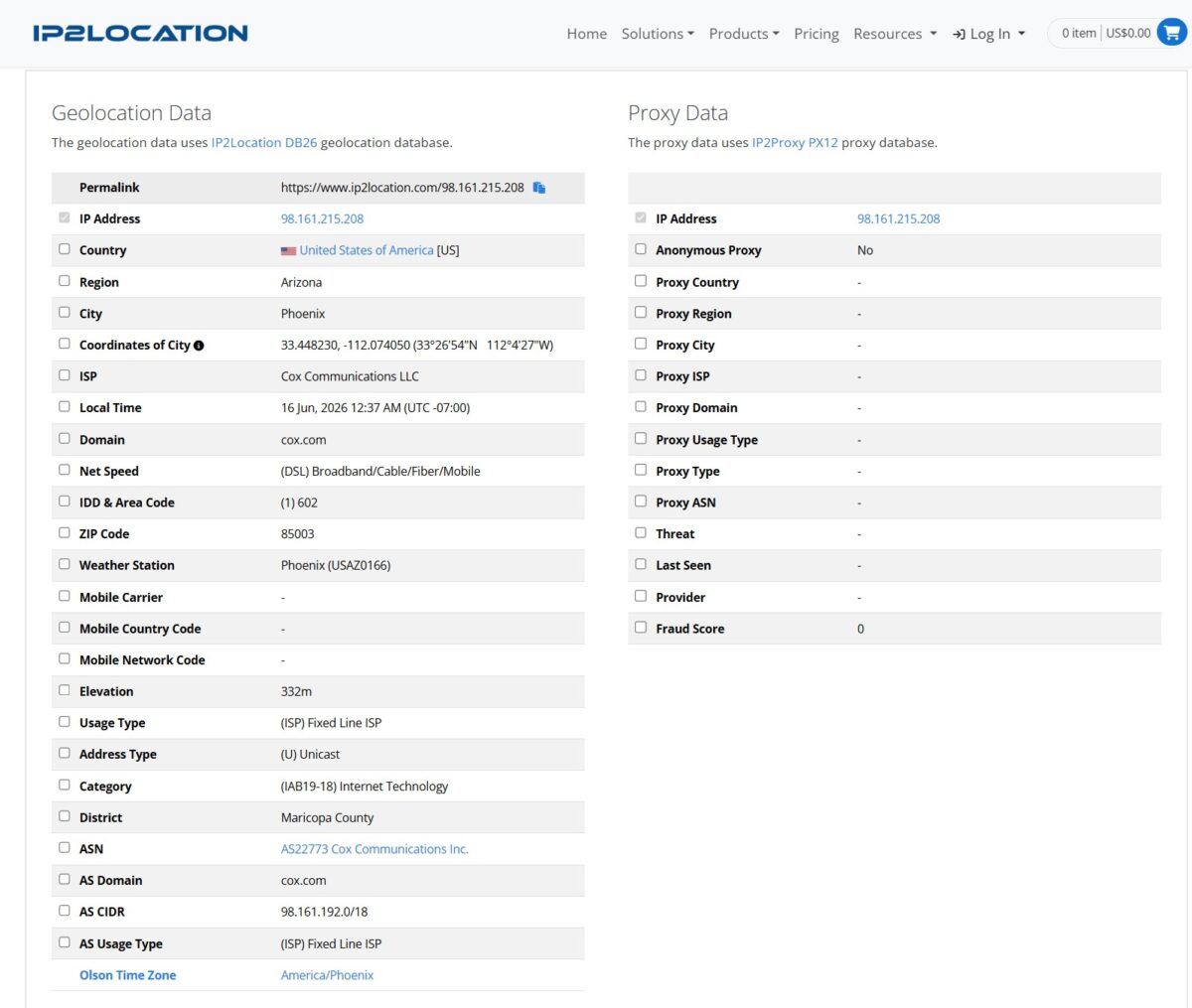
Anonymous Proxy — No. Proxy Type — a dash. Fraud Score — 0. Usage Type — (ISP) Fixed Line ISP. One of the most popular proxy databases in the industry doesn’t recognize the address as a proxy at all. Net Speed — (DSL) Broadband/Cable/Fiber/Mobile, ZIP 85003, Maricopa County. Everything lines up with the “home cable out of Phoenix” story.
But.
And this “but” matters. Not every detector turned out to be so trusting.
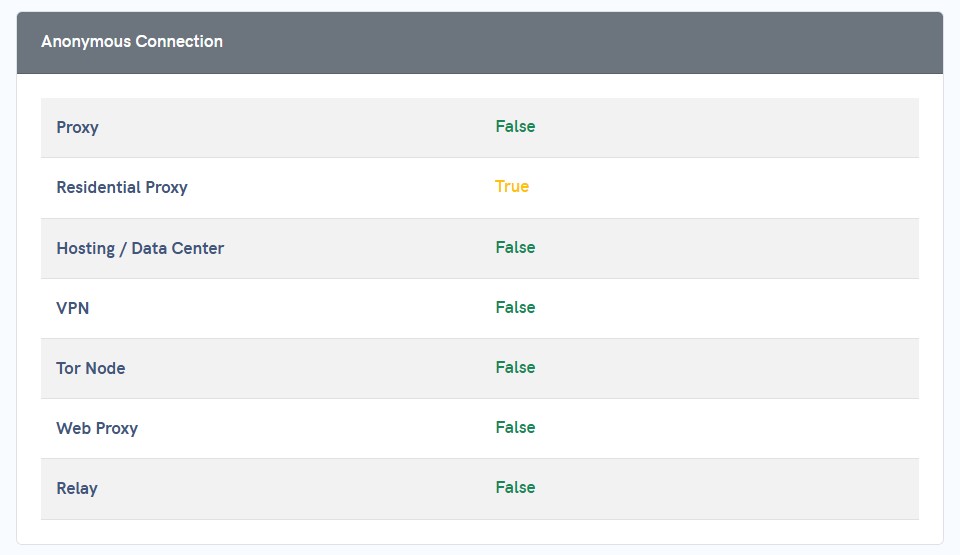
Apivoid.com flagged it yellow in the Anonymous Connection block: Residential Proxy — True. VPN, regular proxy, hosting, Tor, web-proxy, relay — all False (that’s a plus), but the residential proxy engine caught it. The second ipinfo suite showed the same: the Anonymization block, “Residential Proxy — Detected” in red, while VPN/Proxy/Tor/Relay/Hosting all came back with a dash.
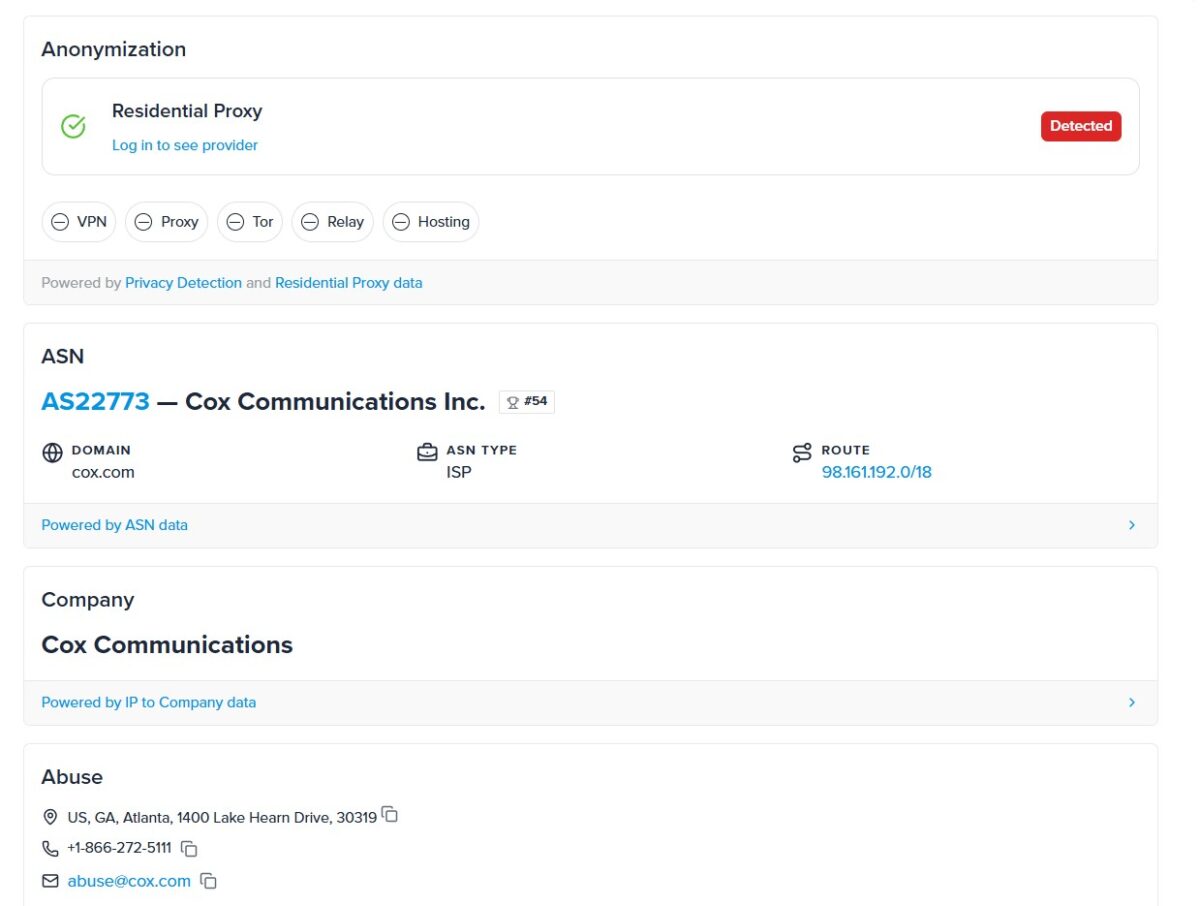
What this means in practice. The basic and mid-tier checks (Scamalytics, IP2Proxy, simple fraud checkers) the IP passes clean — they see Cox, they see Fixed Line ISP, they wave it through. But the specialized proxy-detection engines that keep fresh databases of exposed addresses already know this IP. Typical story for a rented or quickly assembled pool. Same upstream, addresses leak into public proxy lists faster than with the top players who filter for cleanliness on intake.
Let me bring up a number from the DataDome research: only about 16% of sites today reliably detect residential proxies. On 84% of targets IPcook will slip by unnoticed. But if your target is one of those 16% — and that’s the juiciest of them, Cloudflare-protected sites, marketplaces running Datadome, social networks with aggressive anti-fraud — “Residential Proxy: Detected” from Pixelscan is a direct signal that you might get cut there.
Compare that to NodeMaven, which builds its whole marketing around a 95%+ clean IP rate precisely through filtering before handing IPs out. IPcook either doesn’t do that filtering, or does it weaker. That’s what you save when you pay $3.2 instead of $3.5. The price difference is small, but the cleanliness difference on hard targets seems real.
Leaks: DNS, WebRTC, IPv6
A residential IP with a good fraud score is useless if it leaks. I check three vectors — DNS, WebRTC, IPv6 — through Pixelscan, BrowserLeaks, and whoer-style tools.
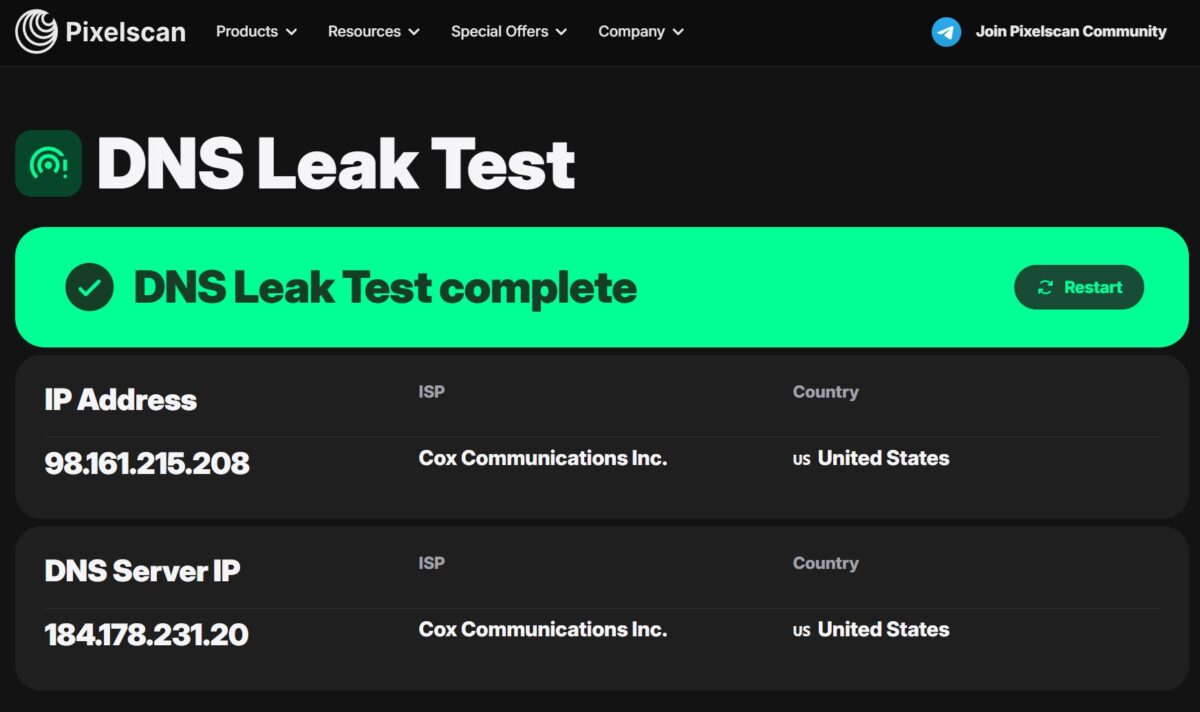
DNS leak passed. The IP and the DNS server are both Cox, both US. The requests don’t leak past the proxy to some third-party resolver. The DNS server 184.178.231.20 is also Cox, going through the same network as the traffic. No leak to a different provider.
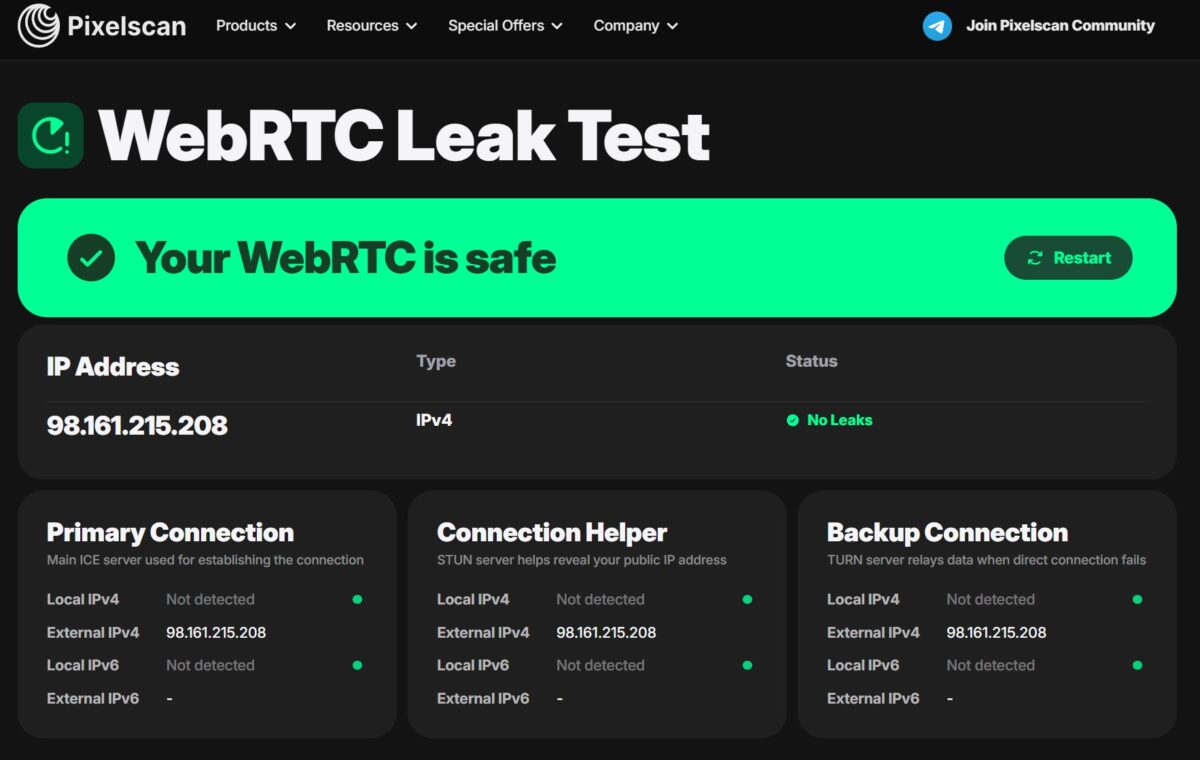
WebRTC clean. “Your WebRTC is safe” — across all three channels (Primary, STUN helper, TURN backup) the External IPv4 shows 98.161.215.208, the same proxy IP. Local IPv4/IPv6 — Not detected, the real address doesn’t leak out. For multi-accounting this is critical. WebRTC is one of the main ways to expose your real location in an antidetect browser, and here it’s shut.
BrowserLeaks threw in a wrinkle, though.
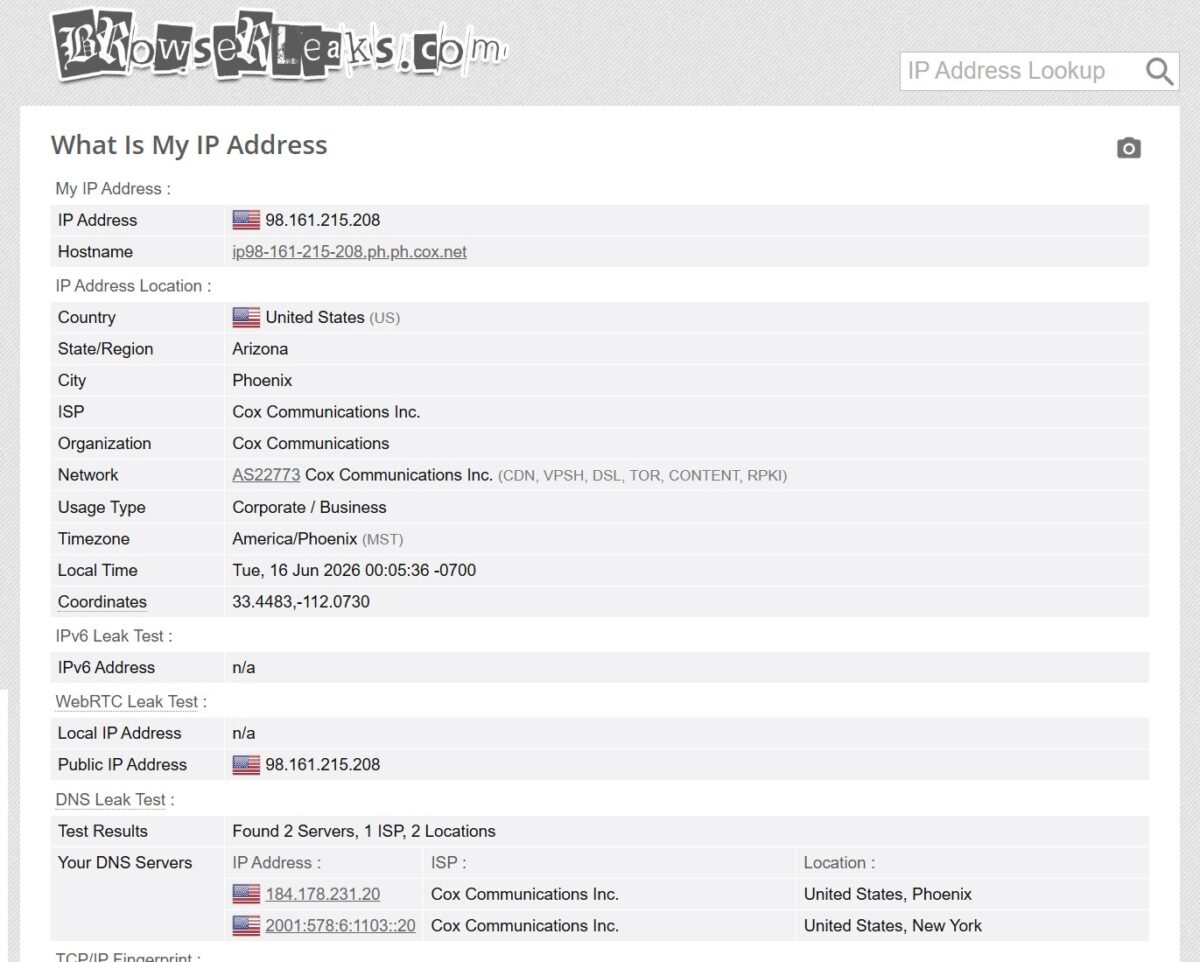
BrowserLeaks found two DNS servers: 184.178.231.20 (Cox, Phoenix) and an IPv6 resolver 2001:578:6:1103::20 (Cox, New York). Both Cox, nothing leaks to a foreign ISP — that’s good. But the second resolver is geographically in New York, not Arizona. Not a critical leak (same ISP, same country), but for very strict fingerprint matching the combo of “exit IP Phoenix, DNS partly New York” creates a small mismatch. The IPv6 itself isn’t used as an exit — in WebRTC and the main test IPv6 is Not detected everywhere.
The Pixelscan fingerprint scan came back consistent.
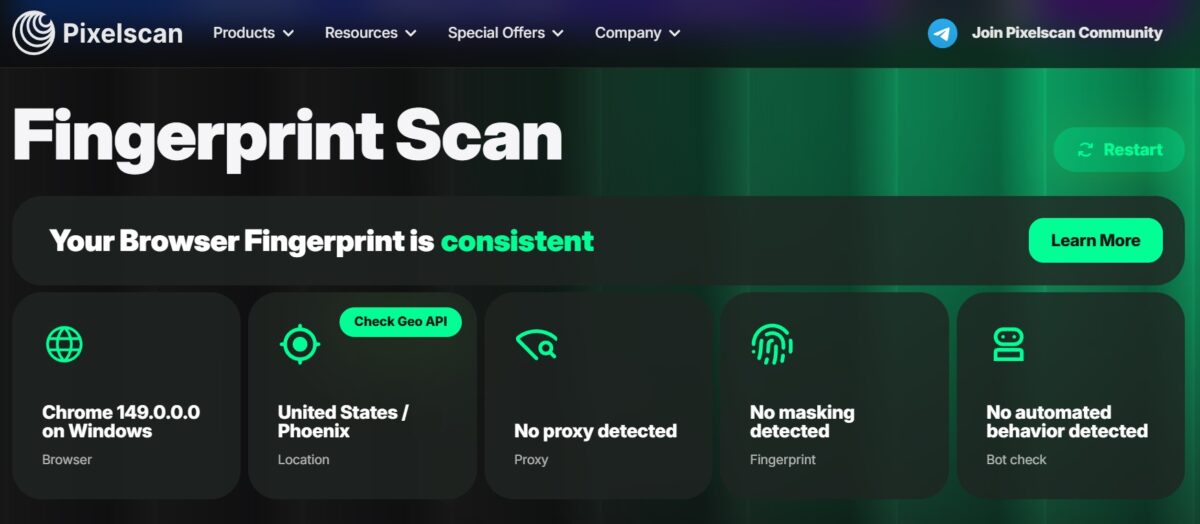
A curious contradiction with the previous section. In the Fingerprint Scan that same Pixelscan writes “No proxy detected” and US/Phoenix, while in Anonymous Connection it’s “Residential Proxy: True.” Simple explanation. The fingerprint scan checks the consistency of the browser fingerprint (timezone, language, Geo API, Canvas) — here the antidetect did its job clean, the fingerprint is even, the behavior isn’t robotic. The known residential-proxy database is a separate layer, and it knows the address. The takeaway for the user: “IPcook + a decent antidetect” gives a consistent fingerprint, but the IP itself is still flagged in the databases.
Blacklist and mail databases
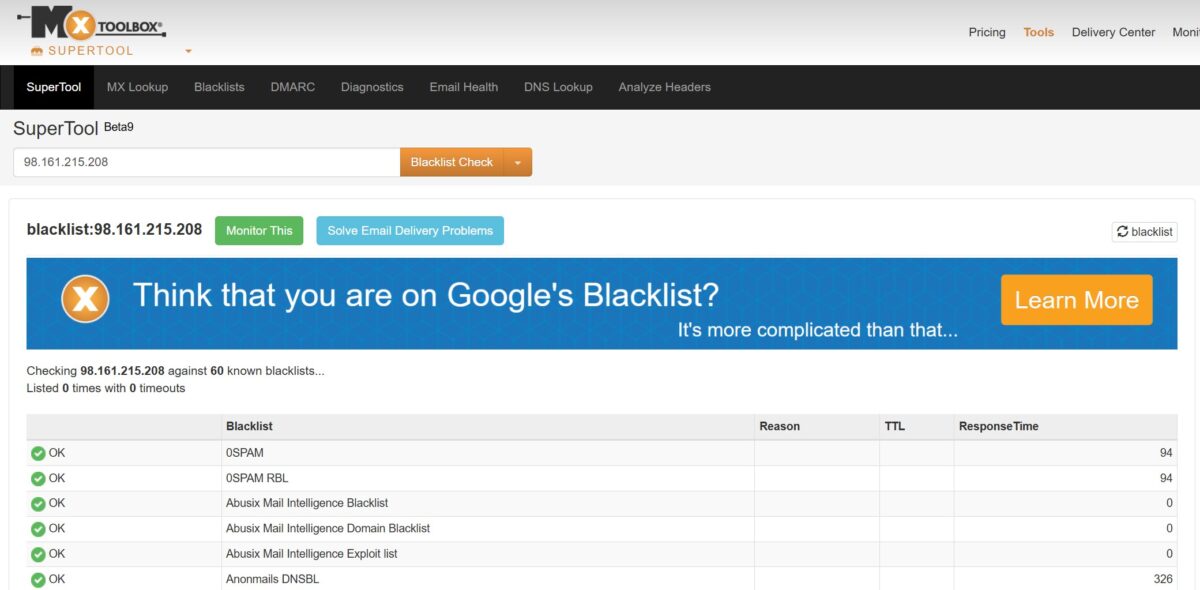
MXToolbox ran the address across 60 mail blacklists (0SPAM, Abusix, Anonmails DNSBL and the rest) — clean, zero listings. For a proxy this is a secondary metric, residential rarely gets used for mail blasts. But it’s nice: this specific exit isn’t flagged in any spam databases. Indirectly that means nobody was pushing straight-up garbage through this IP before me.
Real channel speed: fast.com
FOGLDN and Byteful measure response and success rate, but not throughput. For that I run fast.com through the pinned sticky IP. Three measurements at different times, to filter out random dips.
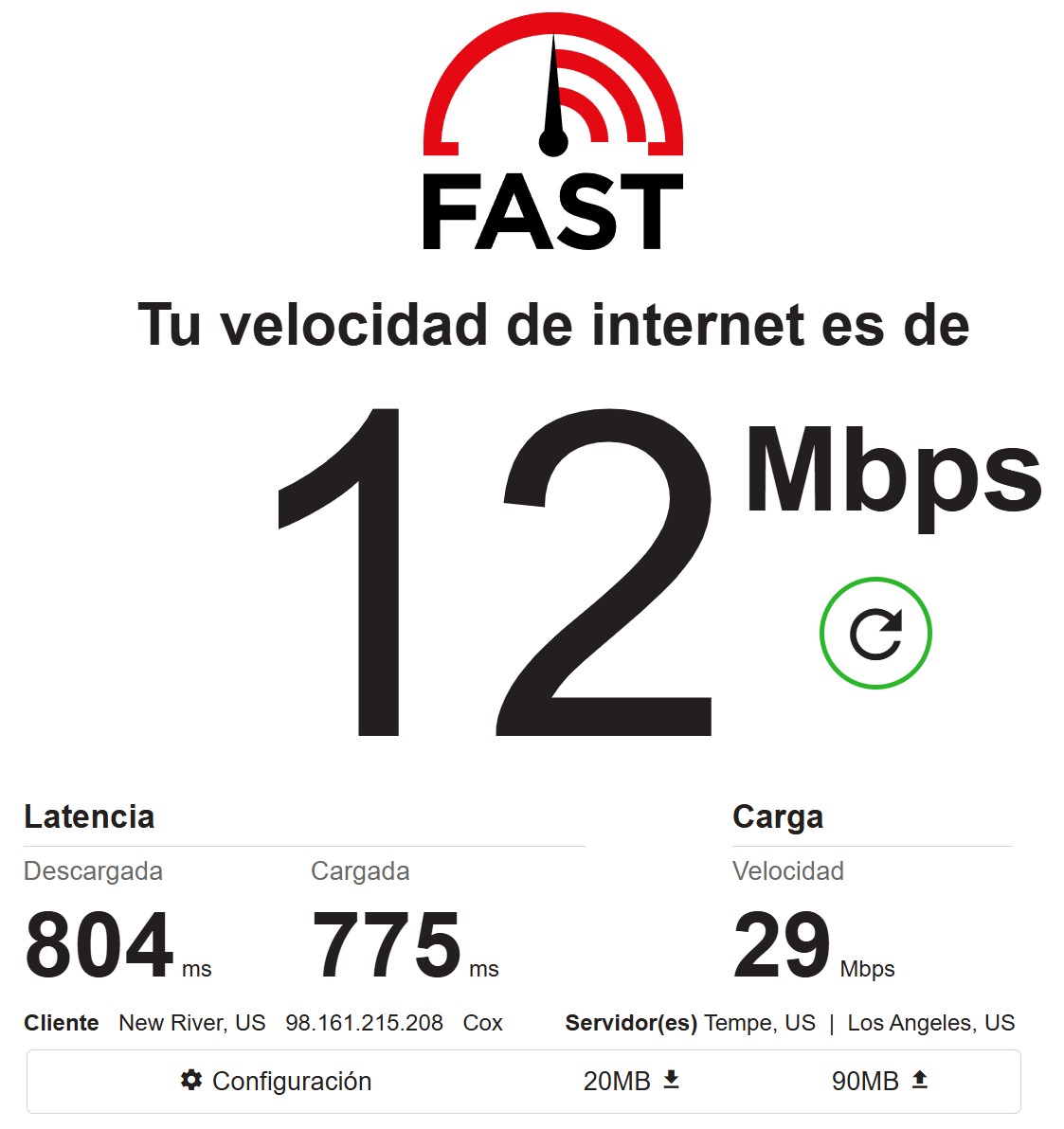
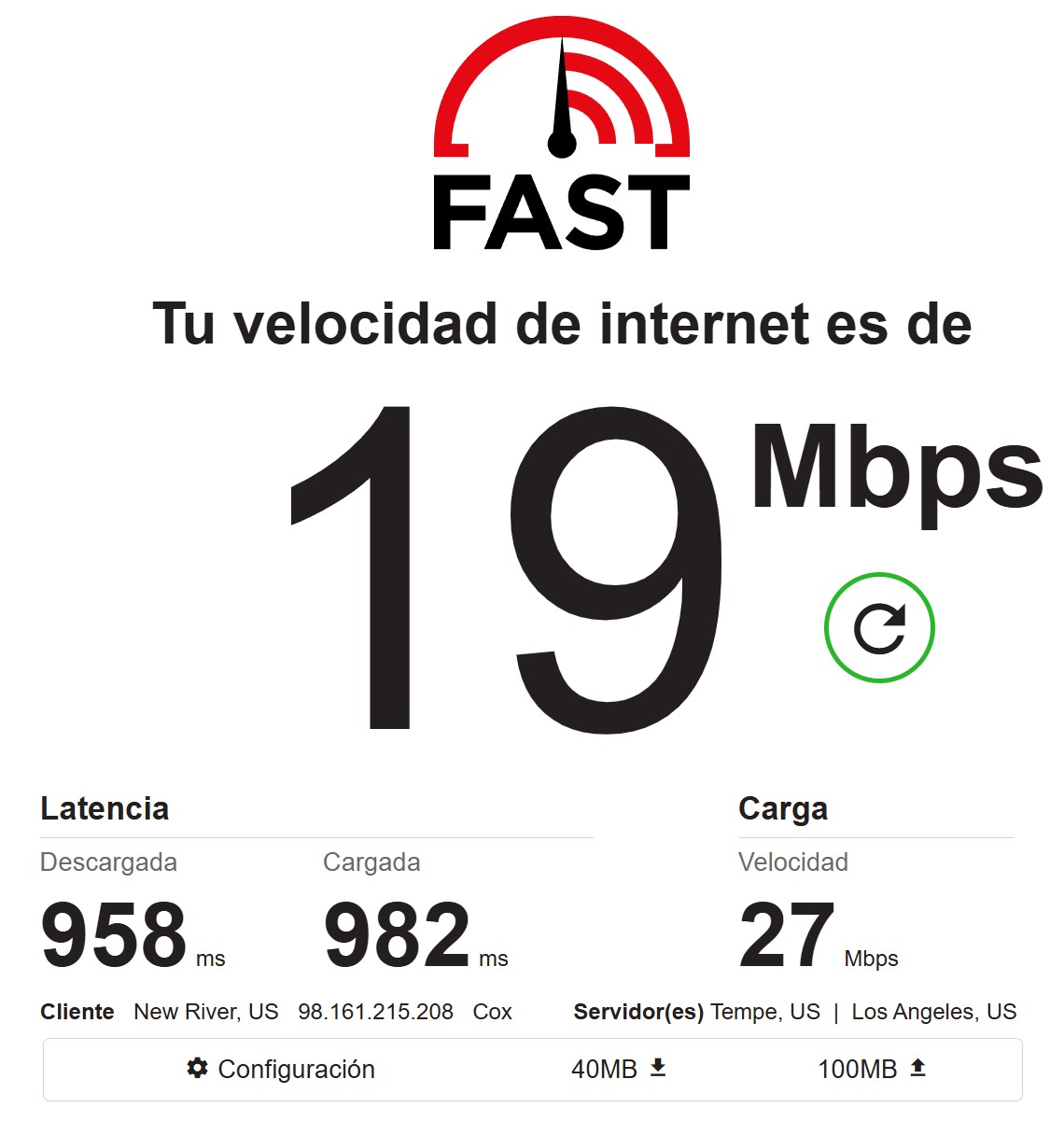
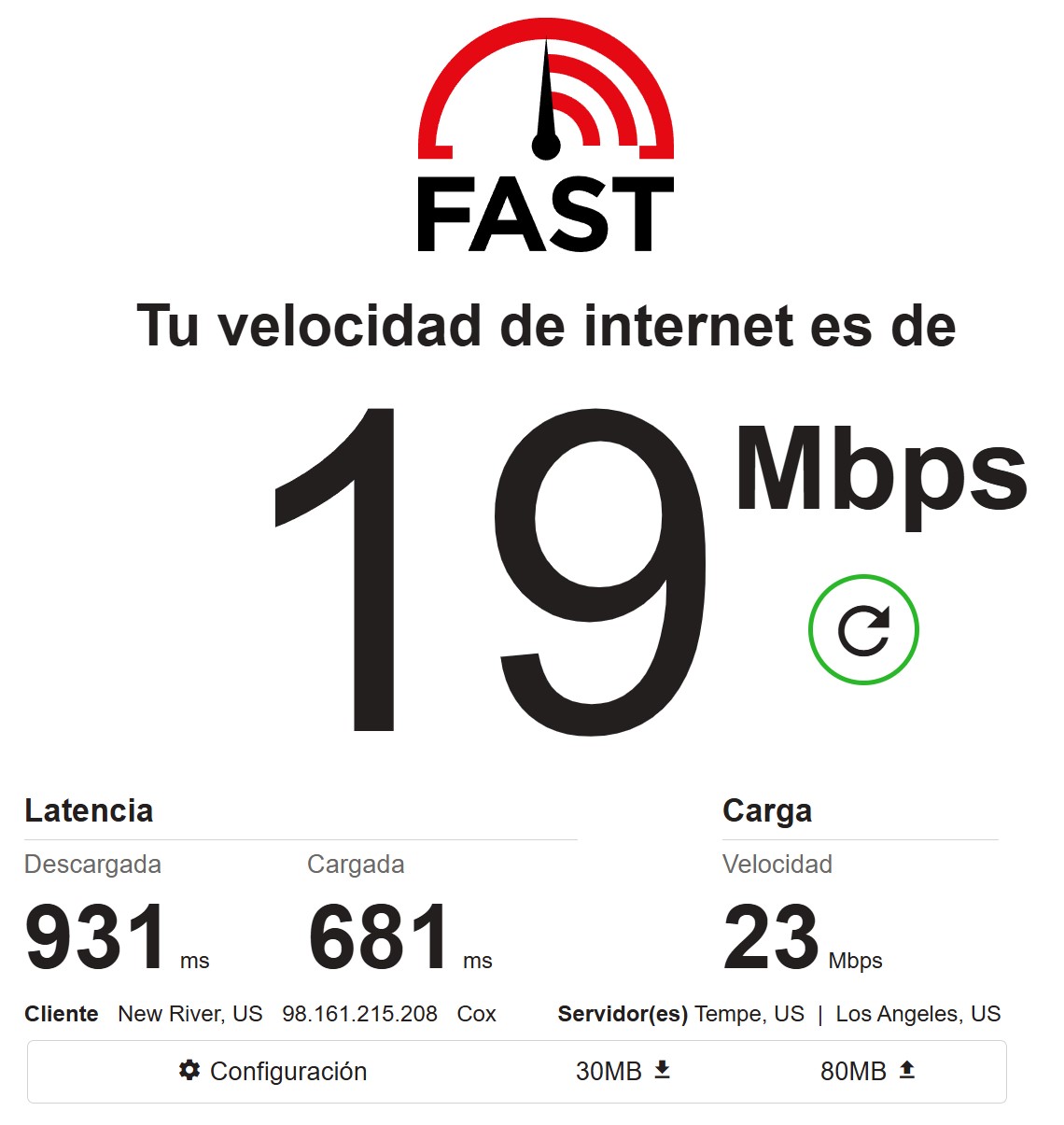
Three runs: download 12, 19, 19 Mbps, upload 29, 27, 23 Mbps. And the latency under load jumps out — brutal: 804/775, 958/982, 931/681 ms. That’s not ping to the server, it’s loaded latency, but numbers near a full second speak for themselves.
Honestly, IPcook sags here. 12-19 Mbps on download is the speed of an average home connection from a decade ago. For scraping text and API requests it’s more than enough. But pulling heavy files, running media, parsing pages loaded with fat assets, or working in real time — that pipe becomes a bottleneck. And that explains the bimodality from FOGLDN: some nodes on normal lines, some on slow home ones where 12 Mbps is the ceiling. Funny thing, upload is consistently higher than download (27-29 vs 12-19). Not typical for home lines — a hint that part of the pool isn’t quite “home” in the classic sense.
One more detail from the screenshots: the client gets identified as New River, US, not Phoenix. New River is a suburb north of Phoenix, same metro and same Cox, geo within normal bounds. But it shows once again: IPcook’s city-level accuracy is “give or take the metro area,” not “exactly the city you ordered.”
Final test results
| Metric | Tool | Result | Score |
|---|---|---|---|
| Download Speed | fast.com (3 runs) | 12-19 Mbps | 3/5 |
| Latency (loaded) | fast.com | 804-958 ms (down), 681-982 ms (up) | 2/5 |
| IP Quality (Fraud Score) | Scamalytics / IP2Location | 14/100 and 0/100 | 5/5 |
| Blacklists | MXToolbox (60 databases) | 0 listings | 5/5 |
| Geo Detection | Byteful / IP2Location | Arizona, Phoenix-Chandler — accurate by state | 4/5 |
| Proxy Detection (basic) | IP2Location / Scamalytics | Not detected as a proxy | 5/5 |
| Proxy Detection (specialized) | Pixelscan / ipinfo | Residential Proxy: Detected | 2/5 |
| ISP Type | IPinfo, IP2Location | Residential (Cox, AS22773, Fixed Line ISP) | 5/5 |
| WebRTC Leak | Pixelscan | No Leak | 5/5 |
| DNS Leak | Pixelscan / BrowserLeaks | No leak to a foreign ISP, IPv6 resolver in NY | 4/5 |
| Success Rate | Byteful (80 requests) | 56/80 ≈ 70%, avg 3838 ms | 3/5 |
| Success Rate | FOGLDN (google.com) | 100% OK after traffic setup | 4/5 |
| Fingerprint | Pixelscan | Consistent, no masking | 5/5 |
| Sticky session | Dashboard | up to 24 hours (claimed), stable | 4/5 |
| City targeting | Byteful / fast.com | Accurate by state, drifts by city | 4/5 |
Overall proxy quality score: 3.8 / 5
- genuine residentiality — Cox Communications, AS22773, Fixed Line ISP, correct rDNS on cox.net;
- low fraud score — 14/100 on Scamalytics and 0/100 on IP2Location, one of the best results among the providers I’ve tested;
- IP2Location doesn’t see a proxy at all: Anonymous Proxy — No, Proxy Type — a dash;
- WebRTC fully closed, the real IP doesn’t leak — matters for multi-accounting;
- DNS with no leak to a foreign provider, both resolvers inside the Cox network;
- consistent fingerprint, no masking or robotic behavior detected;
- clean blacklist — 0 listings out of 60 MXToolbox mail databases;
- non-expiring traffic: the gigs you buy don’t burn;
- sticky sessions up to 24 hours, up to 10 free sub-accounts, IP whitelist, real-time monitoring;
- HTTP(S) and SOCKS5 support, API snippets for six languages, ready integration with AdsPower and DiCloak;
- crypto payment (USDT), Alipay, PayPal, Google Pay — wide choice with no hard KYC;
- reasonable pricing at large volumes: $0.7/GB at 3 TB, $0.3/GB at 10 TB.
- volume-based pricing – worth understanding before you buy: the advertised $0.3/GB is the discount floor on 10,000 GB, while real retail entry is $3.2/GB;
- low channel speed — 12-19 Mbps on download, weak for mass scraping and media;
- brutal loaded latency — near a full second in every one of the three runs;
- pool bimodality: some nodes at 800 ms, some stuck at 8000 ms;
- success rate 70% on microsoft.com — below my 80% threshold;
- specialized detectors Pixelscan and ipinfo flag the IP as a Residential Proxy — a problem on protected targets;
- UX trap: traffic sits on the master account, a sub-account with zero silently dumps the whole list to FAILED with no hint;
- DNS micro-mismatch: IPv6 resolver in New York while the exit IP is in Arizona;
- city targeting drifts across the metro — asked for Phoenix, got New River;
- no mobile proxies, no public ISO/SOC2, the legal entity HoosTag CO., Limited can’t be verified in open registries;
- young brand — ~10-12 months, just 10 Trustpilot reviews concentrated in the first weeks after launch, barely recognized on r/proxies.
What it’s good for
Go for it:
- Medium-difficulty web scraping — open sites, news portals, marketplaces without hard anti-fraud. Cox + fraud 14 + clean leaks get through without trouble.
- SEO and SERP monitoring across different US geos. City-level by state works, and Google didn’t throw a captcha on bulk requests during my test.
- Multi-accounting and signups on mass platforms paired with an antidetect browser. WebRTC closed, fingerprint consistent.
- Bypassing geoblocks and academic data collection, where what matters is getting through, not peak speed.
Go for it with caveats:
- Ad verification and brand protection — geo is accurate by state, but drifts by city within the metro.
- Any large-volume task done to save money — the savings only show up from 500 GB and above.
Better skip it:
- High-end protected targets (Cloudflare Enterprise, Datadome, PerimeterX) — Pixelscan and ipinfo already see the IP as a residential proxy, and on those 16% of smart sites it’ll bite you.
- Mass scraping with heavy assets and media — 12-19 Mbps becomes a bottleneck.
- Sneaker and ticket copping — that’s the turf of specialized providers with public success rates (LiveProxies, MarsProxies, NodeMaven).
- Mobile tasks — IPcook simply has no mobile pool.
- Regulated industries (banking, healthcare) — no ISO/SOC2, the legal entity isn’t verifiable.
- Email campaigns — residential isn’t meant for mail in the first place.
Overall impression
IPcook is a solid mid-tier player pretending to be a budget leader.
There’s genuinely a lot to like. The IPs are honestly residential — Cox, AS22773, Fixed Line ISP, decent rDNS. A fraud score of 14 and a complete shrug from IP2Proxy — the kind of level where 84% of sites won’t even notice the proxy. No leaks: DNS inside the provider’s network, WebRTC closed, fingerprint consistent, blacklist clean. Geo accurate by state. Features on par with mature services, even though the brand is under a year old. For the money, a solid package.
What holds back a high score. The gap between the advertised $0.3/GB and the real $3.2/GB at retail entry. Weak speed of 12-19 Mbps with loaded latency near a second. A 70% success rate, below my threshold. Detection on the smart engines: Pixelscan and ipinfo see the address as a Residential Proxy, and on hard targets that’s decisive. The UX trap with traffic on the sub-account. And the general backdrop: the legal entity isn’t verifiable, no ISO/SOC2, ten Trustpilot reviews with a suspicious cluster in the first weeks, recognition on r/proxies close to zero.
My score: 3.8 / 5 on the test scale
A reasonable candidate for the role of a second provider on cost-sensitive, large-volume tasks where getting through mass targets matters more than speed. As the only solution for critical infrastructure or against protected targets — too early for that. The service needs time: build up an independent reputation, clean the pool so the specialized detectors stop flagging it, and bump up the speed. The potential is there. The maturity isn’t yet.
Tested personally, logs saved, available on request.
This isn’t a full breakdown of every feature. The review will get updated as new tests come in: a run against protected targets, speed from a VPS, rotation checks on a big batch of IPs, and a test of the static ISP proxies.
City- and state-level targeting, sticky sessions up to 24 hours
Residential traffic from $0.3/GB at volume
retail price $3.2/GB
residential, ISP, datacenter + dedicated SOCKS5, up to 10 sub-accounts, IP whitelist