





 Why Trust Us?
ToProxyLab has been testing proxy services since 2025. We pay for most plans ourselves, and when a provider gives us test traffic we say so in the review — free traffic buys a place in the testing queue, nothing else. Every provider goes through the same speed, uptime and fraud-score checks, and we publish the real numbers, including the bad ones. A rating cannot be bought. Learn who we are and how we review proxies.
Why Trust Us?
ToProxyLab has been testing proxy services since 2025. We pay for most plans ourselves, and when a provider gives us test traffic we say so in the review — free traffic buys a place in the testing queue, nothing else. Every provider goes through the same speed, uptime and fraud-score checks, and we publish the real numbers, including the bad ones. A rating cannot be bought. Learn who we are and how we review proxies.
A representative from byteful.com reached out and offered to run their residential proxies through our tests for inclusion in our rankings and reviews. They provided 3 GB of residential traffic for testing.
And right away, the standard disclaimer. Free traffic doesn’t buy a spot in the rankings and doesn’t buy loyalty. The provider pays for exactly one thing: an honest run through all tests using our methodology. Every step is documented with screenshots, logs are saved. Any number in this review is verifiable. Just reach out to me.
All tests were conducted following our standard testing methodology.
Update: After the initial review was published, Byteful’s team reached out with a fair point. Our standard methodology uses narrow city-level targeting, which limits the pool and can understate success rate and IP uniqueness. They offered additional traffic to run a broader test. We agreed, because more data means a more complete picture. Below you’ll find results from both tests side by side: the original 500-proxy run on San Diego / Cox, and a new 5,000-proxy run on California (the largest US state pool at ~80,000 IPs).
What Is This Service
Byteful is a mid-sized British proxy provider. Until April 2026, it operated under the name Ping Proxies. The legal entity is Ping Technology Labs Ltd, registered with Companies House under number 12699144, status Active, address in Manchester. The founder is Timur Gok, who started the project while studying at the University of Leeds.
In Proxyway’s independent 2026 benchmarks, the service posted one of the best results on hard targets: 81.23% success rate against Amazon, Google, and Instagram, first place out of 13 providers. Proxyway rating: 8.8 out of 10, Newcomer of the Year 2026. Claimed pool: 35M+ residential IPs across 195+ countries.
But I actually knew this service for a completely different reason. Their flagship tool, the Byteful Proxy Tester, is something I personally used in all my previous reviews. It shows IP latency across different countries pretty accurately and honestly, and it’s free for everyone. So when the chance came to test the actual proxies behind that tester, I jumped on it.
Website and First Impressions
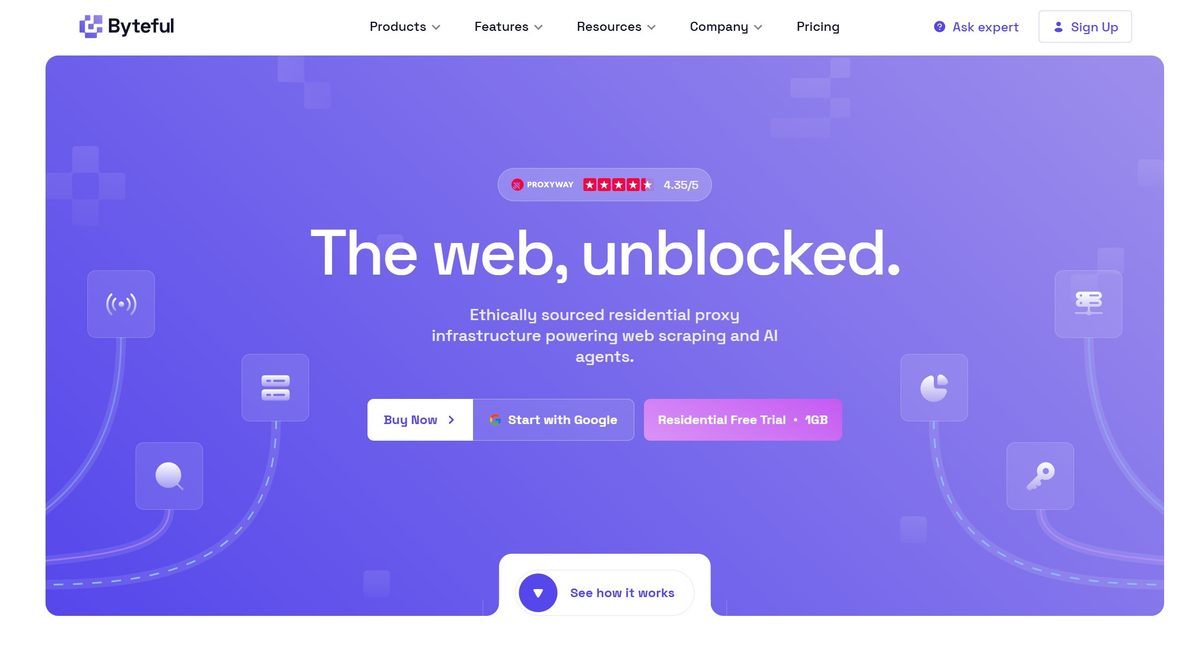
At first glance, the website is very well made. It has its own style: purple color scheme, clean product blocks, a Proxyway widget right on the homepage showing a 4.35/5 rating, and a button for a free 1 GB trial.
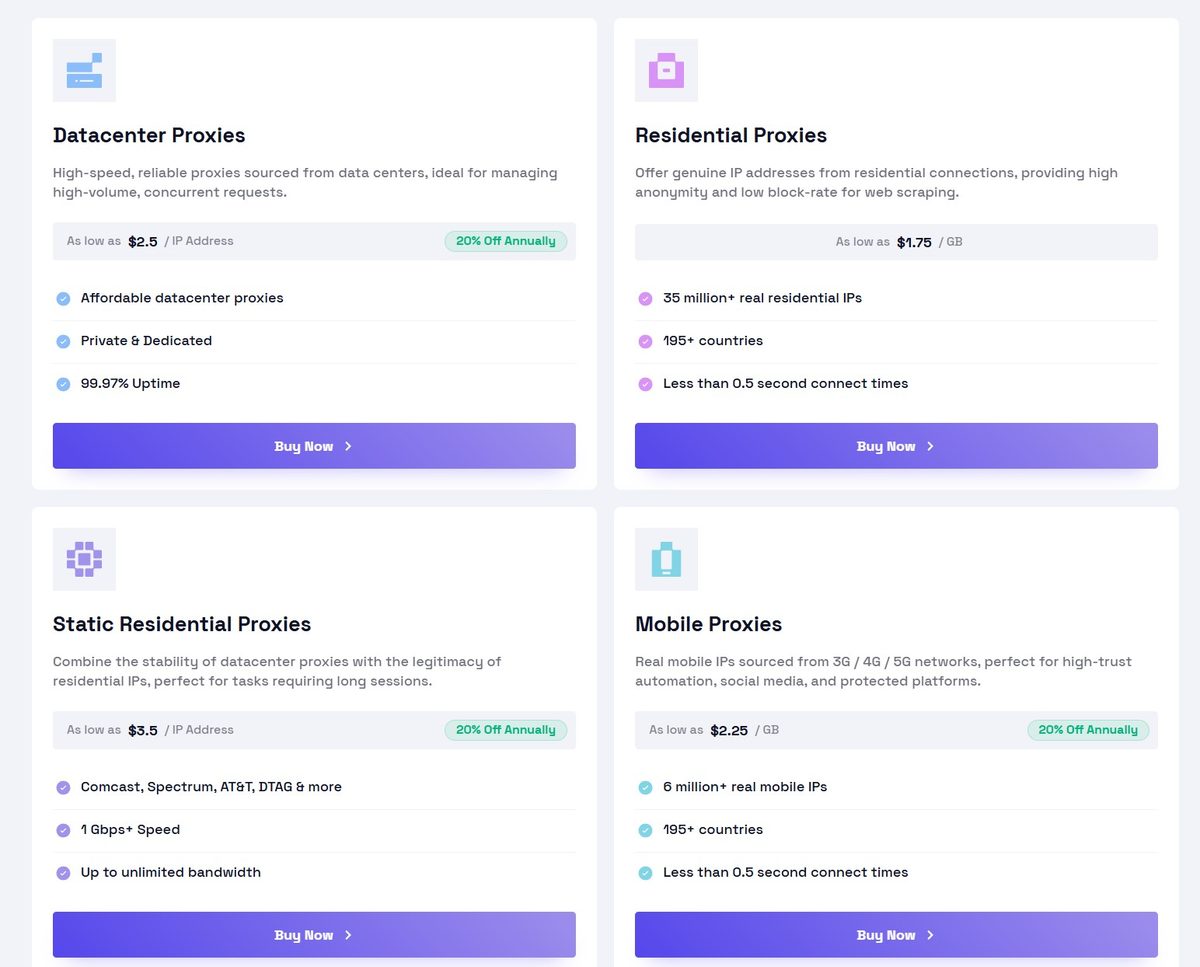
Four products right on the homepage: Datacenter Proxies from $2.5/IP, Residential Proxies from $1.75/GB, Static Residential ISP from $3.5/IP, Mobile Proxies from $2.25/GB. 20% discount with annual billing.
Looks trustworthy. But our tests are built on facts, and nice packaging isn’t the same as a solid product. So let’s get straight to business.
Dashboard and Proxy Setup
The dashboard greets you with a clean interface. At the top are three key metrics: number of proxies, remaining residential traffic (3.00 GB in my case), and account balance. Below that are four product cards with their statuses. Residential shows Active, the rest show Inactive.
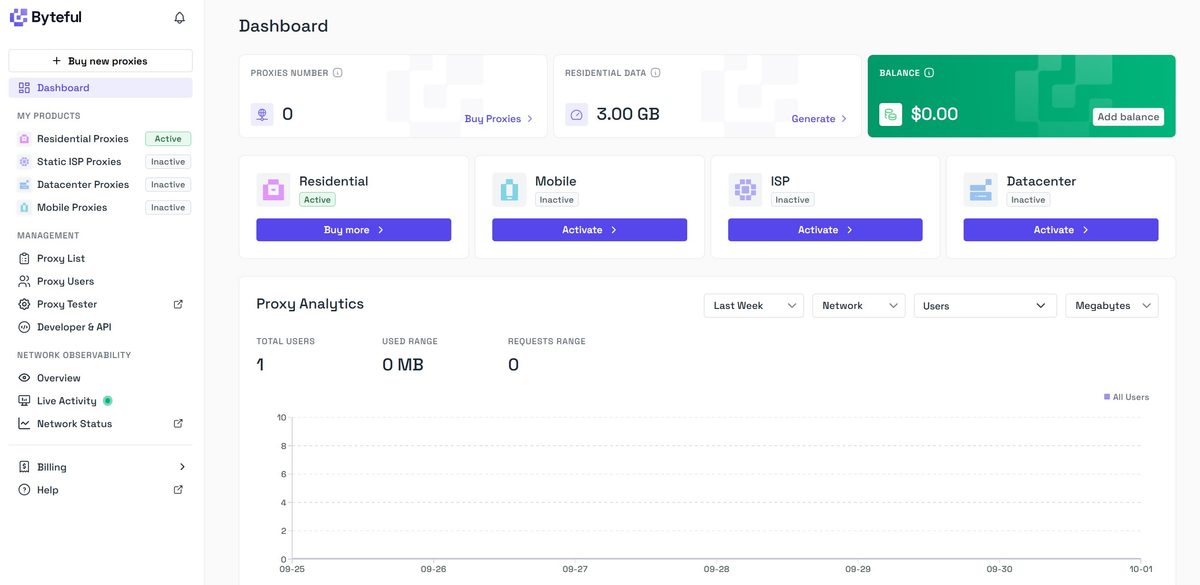
The left sidebar is minimalist and not cluttered: Dashboard, four proxy types (Residential, Static ISP, Datacenter, Mobile), a Management section (Proxy List, Proxy Users, Proxy Tester, Developer & API), Network Observability (Overview, Live Activity, Network Status), Billing, and Help. Everything in its place, nothing extra.
Let’s head over to the proxy generator. This is where it gets interesting.
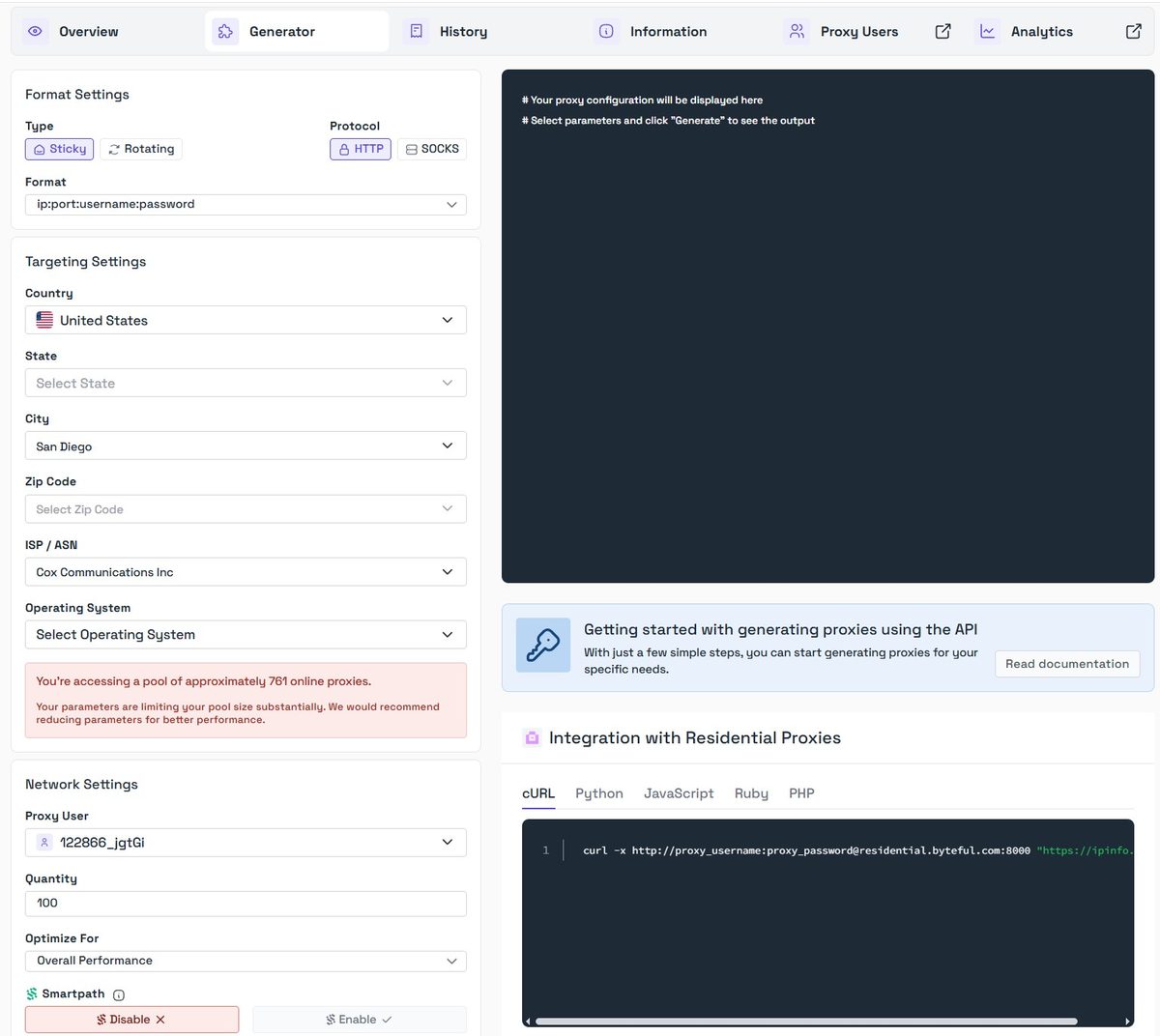
First, you pick a proxy type: Sticky (static IP for the session duration) or Rotating (new IP on every request). As always, I test Sticky because it’s easier to check the quality of a specific address. But right away I spotted a quirk: when you select Sticky, there’s no option to set the IP rotation interval. Most providers have this as a basic feature where you set 10, 30, or 60 minutes yourself. NodeMaven, for example, even has a “Super sticky sessions – Keep IP as long as possible” mode up to 7 minutes, and MangoProxy offers sticky sessions up to 120 minutes with duration set in the connection string. Byteful’s documentation claims sticky sessions up to 24 hours, but the generator itself has no duration setting.
Next up: targeting. I picked United States, city San Diego, ISP Cox Communications Inc. And here’s where Byteful has a genuinely useful feature. When you select each parameter, the system instantly shows how many IPs are available for that targeting. For example, San Diego showed 2,699 IPs. And when I narrowed it down to Cox Communications specifically (ASN 22773), it showed 761 proxies.
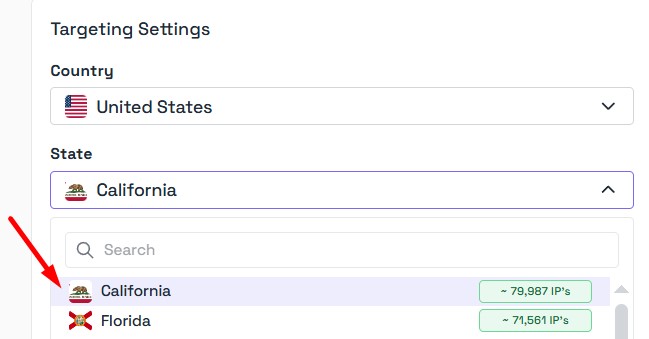
The difference is dramatic. San Diego + Cox gave us 761 IPs. Switching to California with no ISP filter opens up ~79,987 IPs. That’s a 105x larger pool from just one state. For the second round of testing, I used this broader targeting to see how the service performs when it isn’t bottlenecked by a tiny slice of the network.
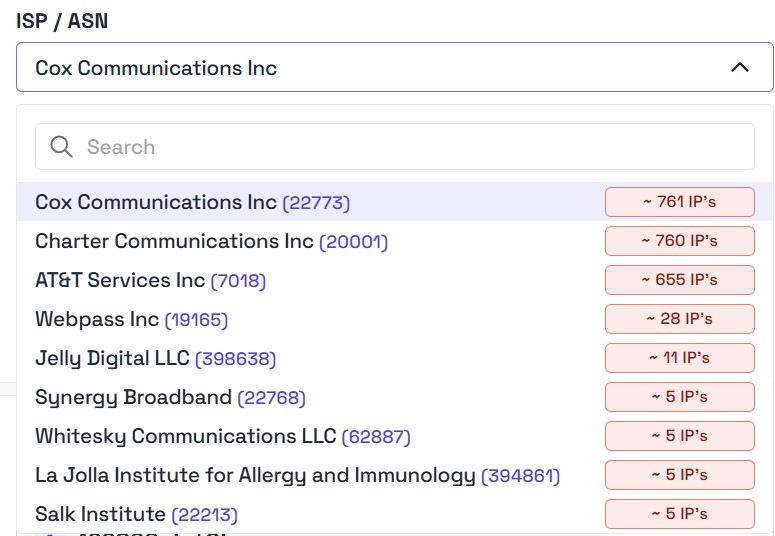
This is a really helpful and honest feature. You see exactly what to expect before you even generate a proxy. Among the providers we’ve tested, Oxylabs and ProxyEmpire offer something similar, showing approximate pool size when you select a geo. But Byteful’s implementation is especially clear and visual.
And the most unusual feature: an operating system filter. Right in the generator, you can pick Android (~639 IPs), Linux (~78 IPs), or Windows (~44 IPs).
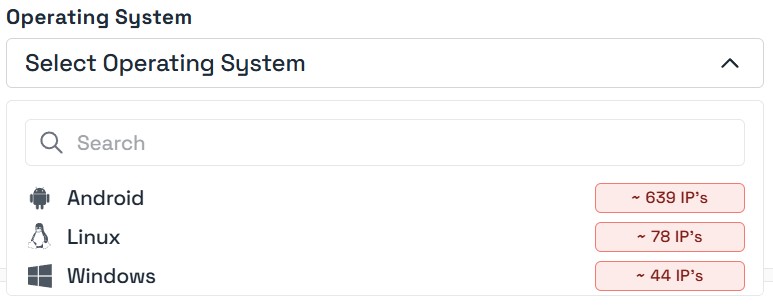
Why does this matter? Anti-fraud systems inspect the TCP/IP fingerprint and cross-reference it with the browser’s User-Agent. If your browser says “I’m Windows” but the TCP stack screams Android, that’s a red flag. OS targeting solves this problem at the proxy level. Among competitors, ProxyEmpire (TCP/OS targeting for Windows, Android, Linux, macOS) and Oxylabs (Advanced Filters by OS) offer this too. For multi-accounting with anti-detect browsers, this is genuinely valuable.
Smartpath
A separate note about the Smartpath feature. It’s enabled by default and can be toggled off right in the generator.
Sounds great, but there’s a catch. Proxyway warns that Smartpath isn’t ideal for tasks where every single request needs to be high quality, like ad verification. If you need every request going through a residential IP, you’re better off turning Smartpath off. I disabled it for my tests to get clean data on the residential pool itself.
Testing Process and the Sticky Session Issue
Let me walk you through a gotcha I ran into right away. Even though I selected Sticky (static IP), the addresses kept changing on me. Pinning down a single IP for a thorough individual test was difficult. Because of this, different checks on the “same” proxy returned different IP addresses, and the data doesn’t always line up.
This might be related to the generator having no sticky session duration setting, so the system decides on its own when to rotate the address. For scraping, this isn’t a big deal, but for multi-accounting where you need to stay on one IP for hours, it’s a real concern. I’m documenting this as a fact.
Single IP Check
The main test address I managed to pin down was 68.8.247.46.
IPinfo.io
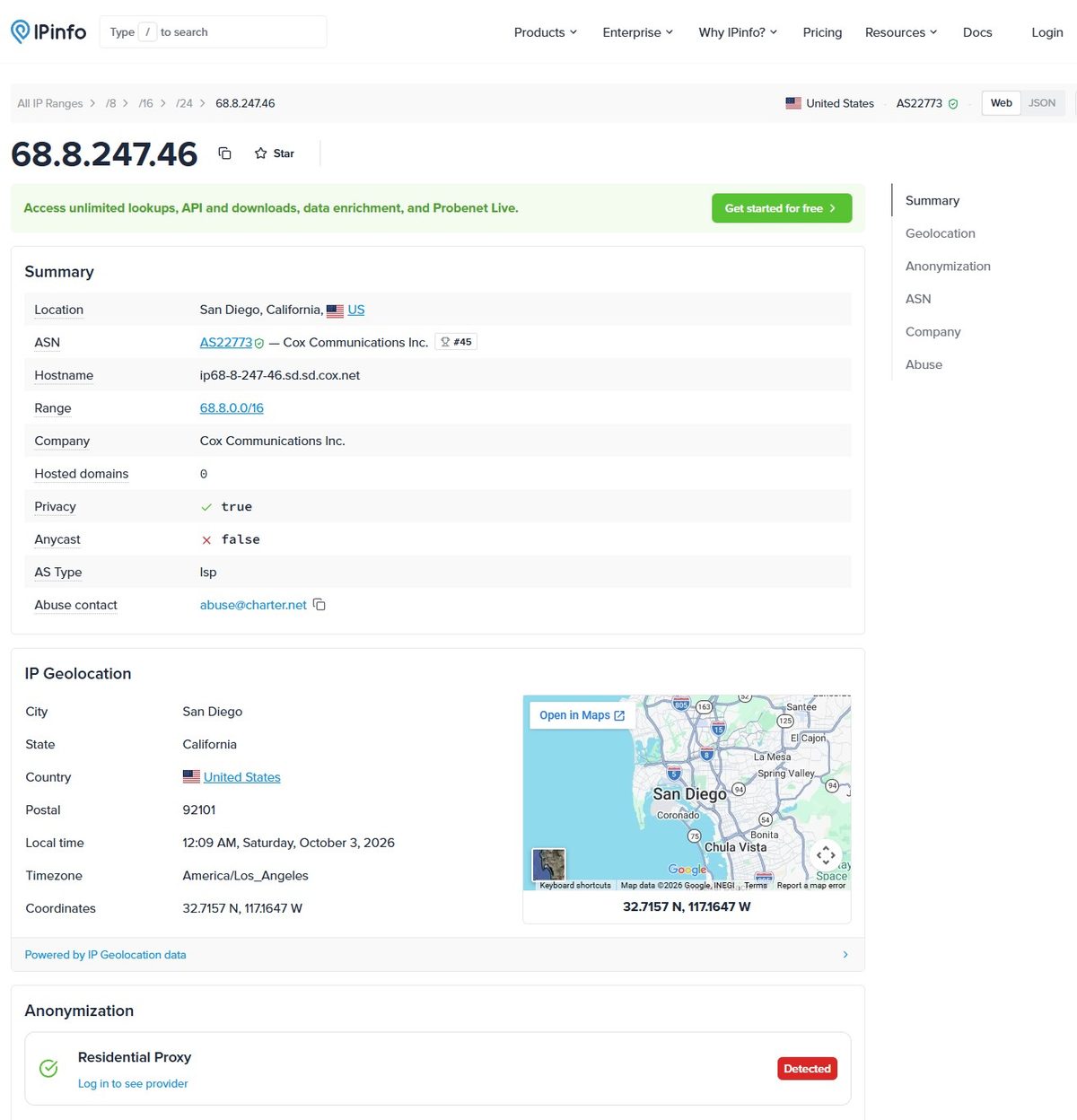
IPinfo gives us the full picture. ASN AS22773, Cox Communications Inc, one of the largest cable ISPs in the US. Hostname ip68-8-247-46.sd.sd.cox.net is a typical residential cable hostname pattern in San Diego. Hosted domains: 0, meaning no websites hosted on this address. It’s a clean residential IP. AS Type: ISP.
But there’s something worth noting. The Anonymization section flags it as “Residential Proxy – Detected.” The IP is already known as a proxy network exit node. For scraping, that’s not critical, but for accounts it’s an extra flag to worry about.
IP2Location
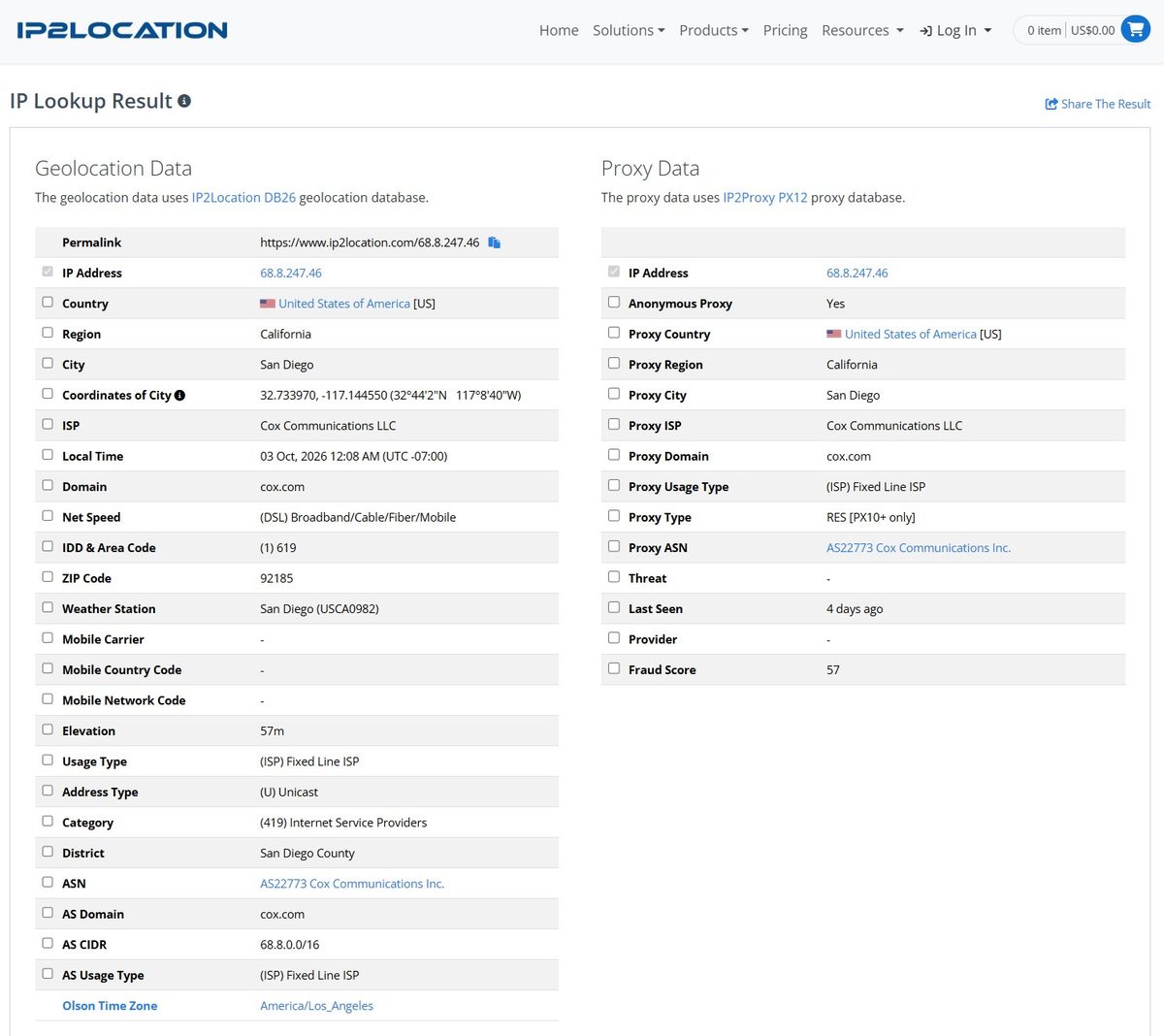
IP2Location confirms the geolocation and connection type: Fixed Line ISP, cable internet. But the Proxy Data is less rosy: Anonymous Proxy = Yes, Proxy Type = RES (residential proxy), and a Fraud Score of 57 out of 100.
57 is a middling result. For comparison, NodeMaven got 36/100 on IP2Location, and one MangoProxy IP scored 0/100. But IP2Location and Scamalytics use different methodologies, so let’s keep going.
Scamalytics
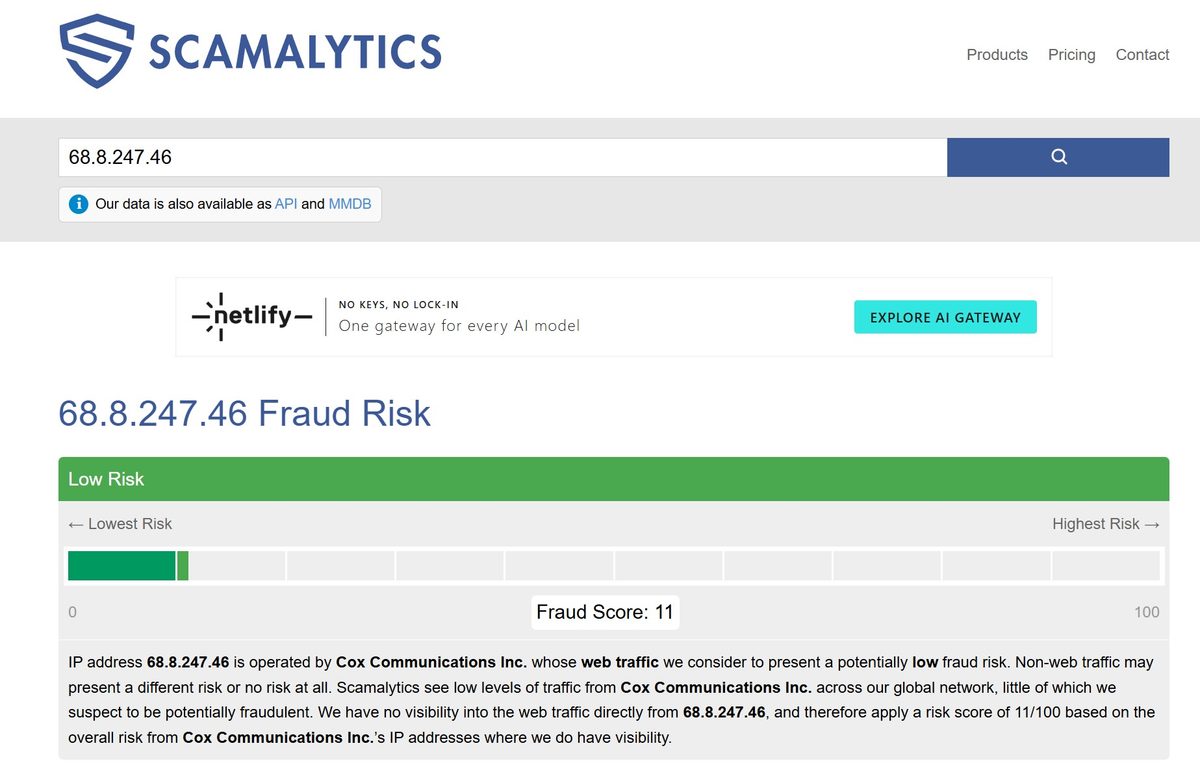
Scamalytics scored 11 out of 100, Low Risk. That’s a good result. For comparison: NodeMaven got 0/100 (perfect), MangoProxy got 15/100, and Oxylabs trial DC came in at 50-100/100. Eleven points is the level of a clean residential IP.
The gap between IP2Location (57) and Scamalytics (11) is easy to explain: they use different databases and algorithms. Scamalytics focuses on web traffic and actual activity patterns, while IP2Location leans more on database classification. In our methodology, we rely on the Scamalytics median across multiple IPs, and a score of 11/100 lands in the “Clean – typical of quality residential/ISP IPs” category (5 out of 5).
Pixelscan – Fingerprint
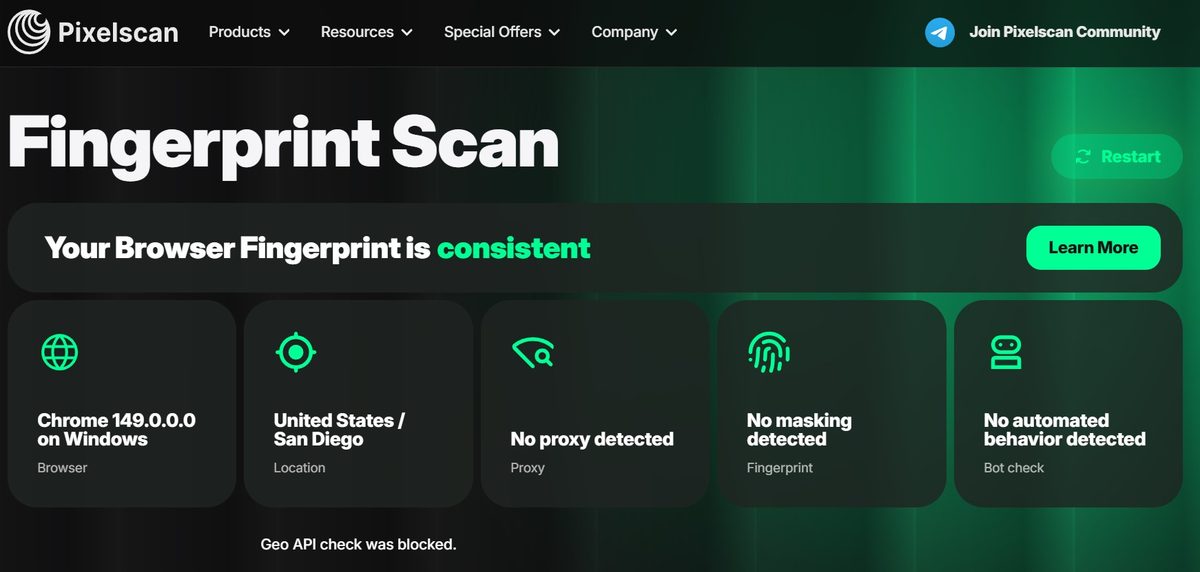
Pixelscan is arguably the strictest public checker out there. Fingerprint: consistent. No proxy detected. No masking detected. No automated behavior detected. City shows San Diego, matching what I ordered.
For social media and marketplace work, this is exactly the result you want to see.
Whoer.net
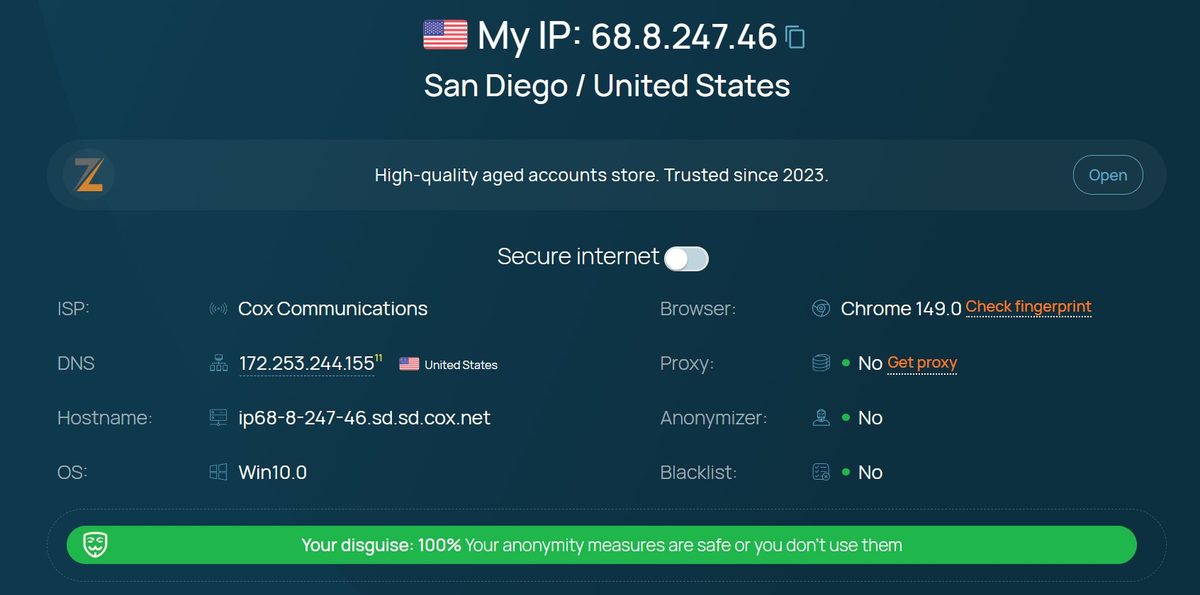
Whoer gave a 100% anonymity score. No proxy visible, no anonymizer visible, blacklists clean, OS Win10.0 and Chrome 149 match the IP fingerprint.
One thing though: DNS resolves through 172.253.244.155, which is Google DNS. Not Cox. For most use cases this isn’t critical, but if an anti-fraud system cross-references the ISP from the IP with the ISP from the DNS, there could be a mismatch.
BrowserLeaks
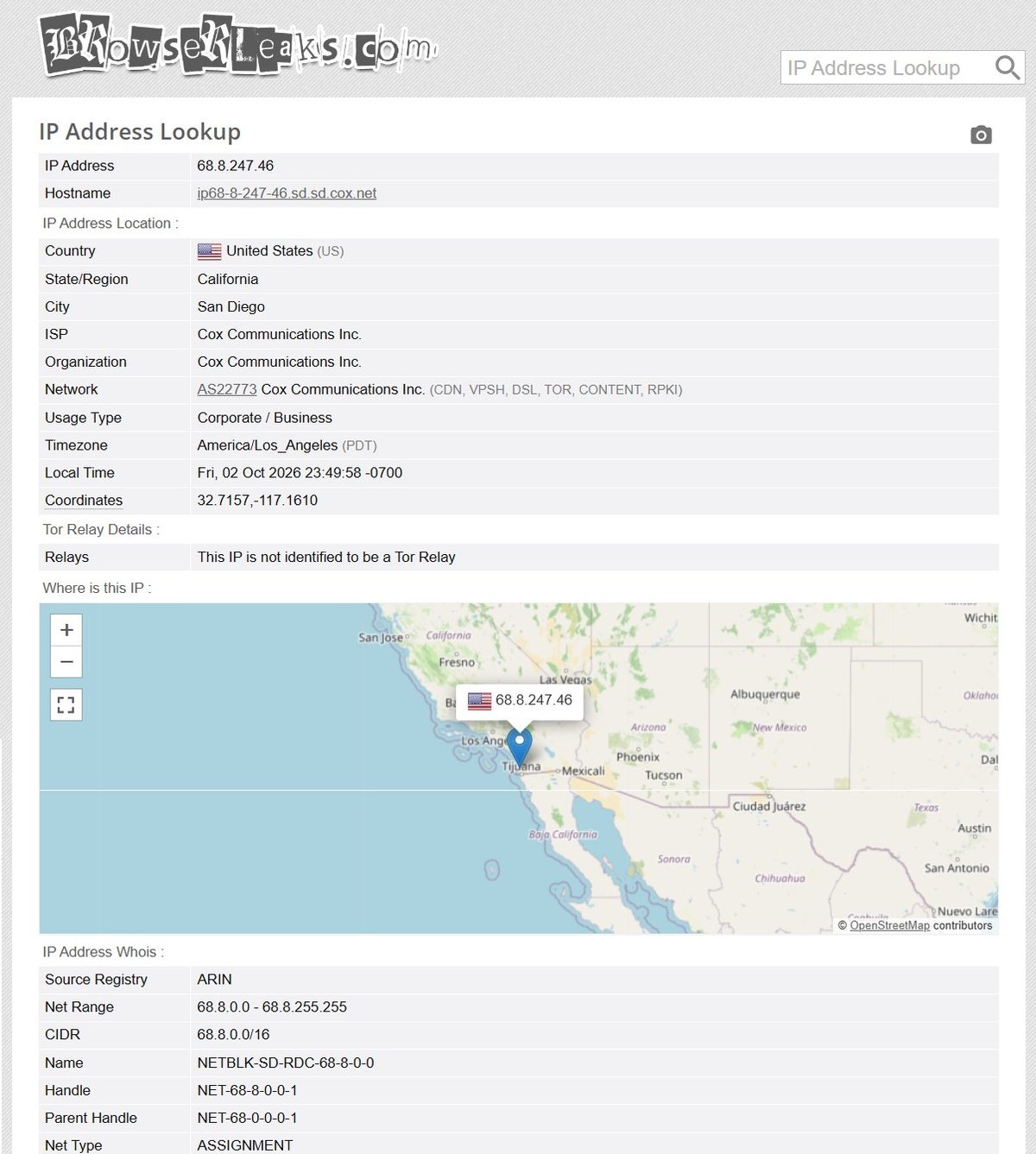
BrowserLeaks confirms all the data. The only thing is that Usage Type shows up as “Corporate / Business” instead of Residential. That’s just a BrowserLeaks classification quirk; other checkers identify the IP as ISP/Residential.
Leak Tests
DNS Leak Test
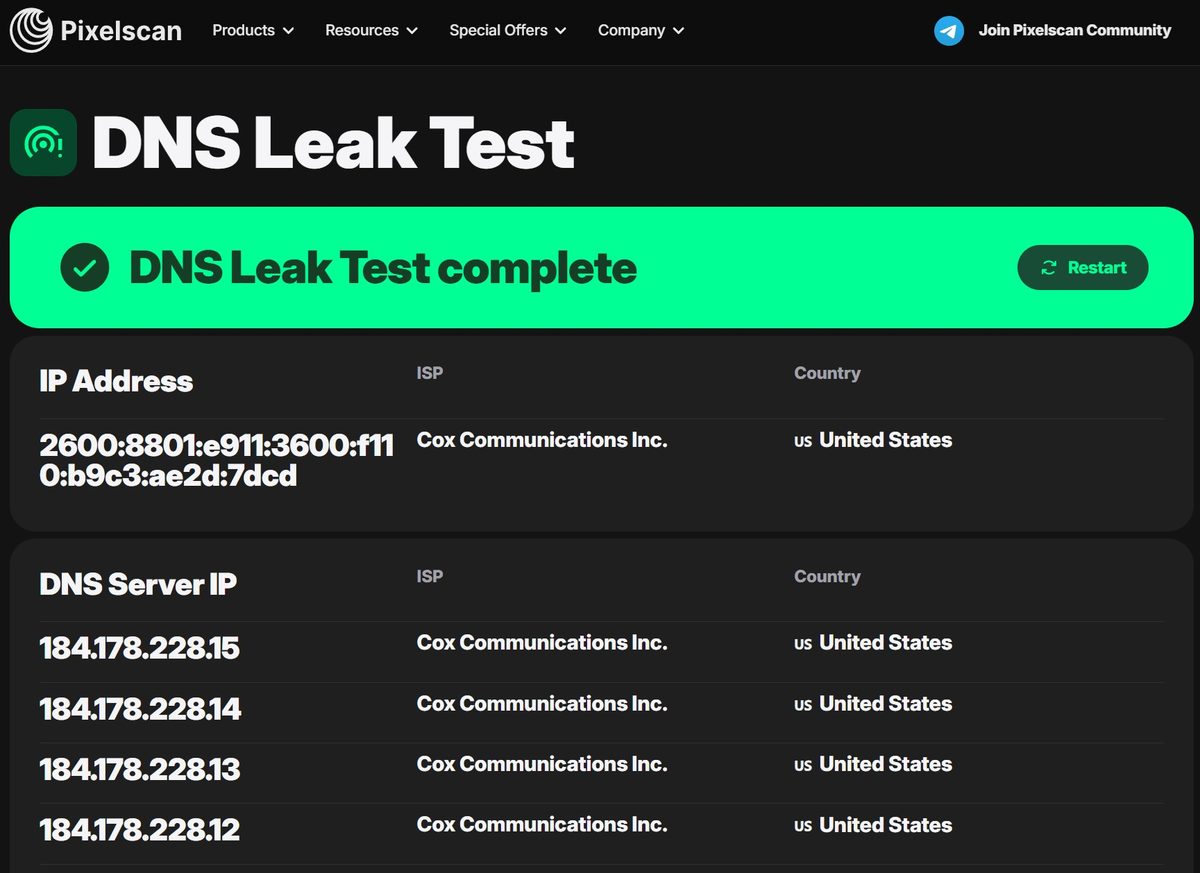
No DNS leaks. All four DNS resolvers belong to Cox Communications: 184.178.228.12, .13, .14, .15. This means DNS queries go through the proxy’s ISP, not through a third-party service. IP, ASN, and DNS all match. From a website’s perspective, the requests look like a regular Cox subscriber in San Diego.
There is a discrepancy with the Whoer.net data though, where DNS showed up as Google (172.253.244.155). Pixelscan and Whoer likely use different DNS detection methods, or the IP changed between tests (remember the sticky session issue).
WebRTC Leak Test
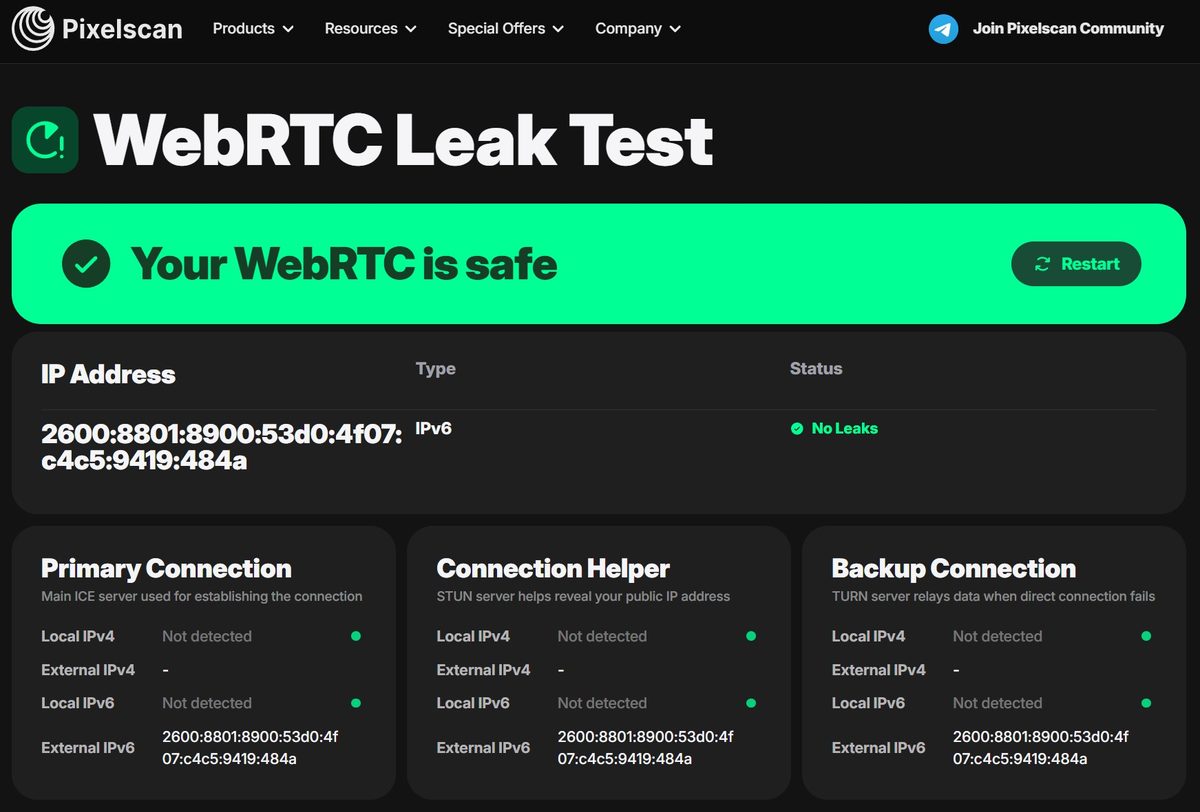
WebRTC: clean. No leaks. All three endpoints (Primary, Connection Helper, Backup) return the same IPv6 address from Cox’s network. No real machine IP leaked through.
This is better than MangoProxy, where the WebRTC test revealed an IPv6 leak. Here everything is locked down properly.
IP Blacklist Check (Pixelscan)
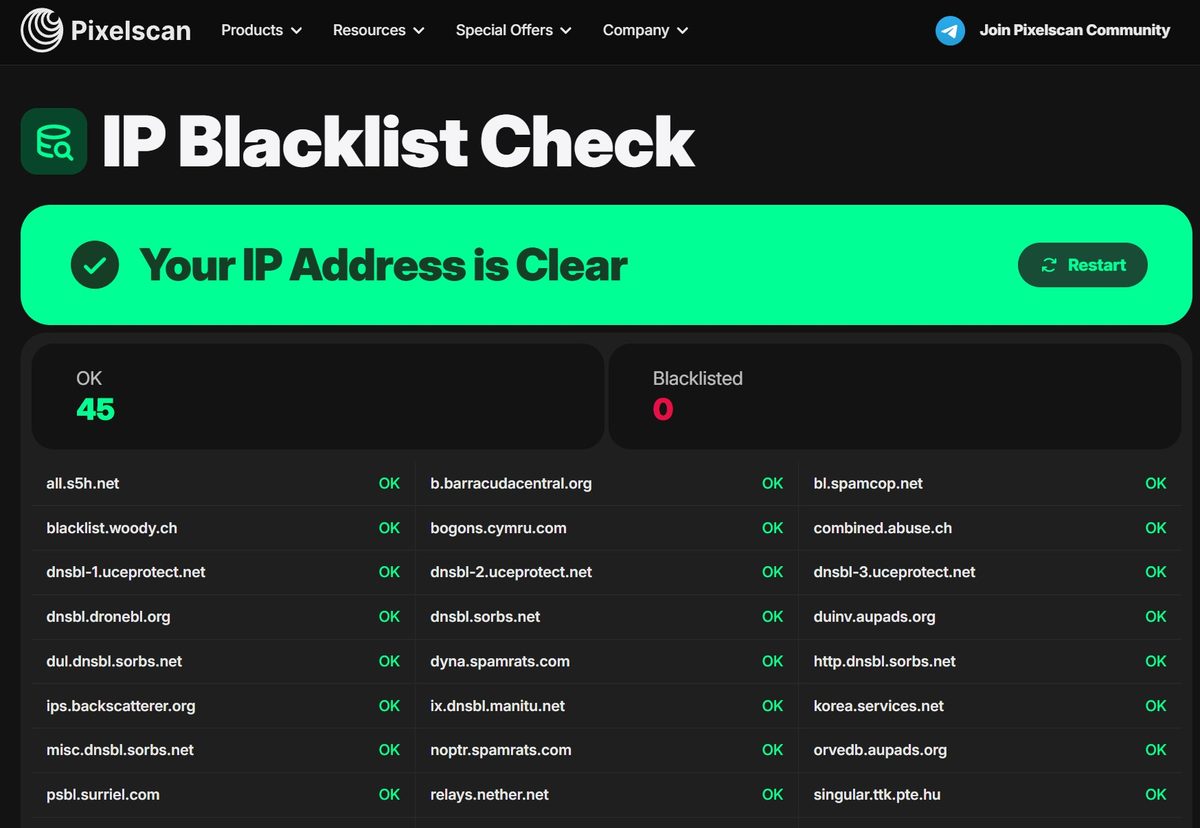
45 out of 45 databases: zero blacklist hits. Spotless result.
IP Blacklist Check (MXToolbox)
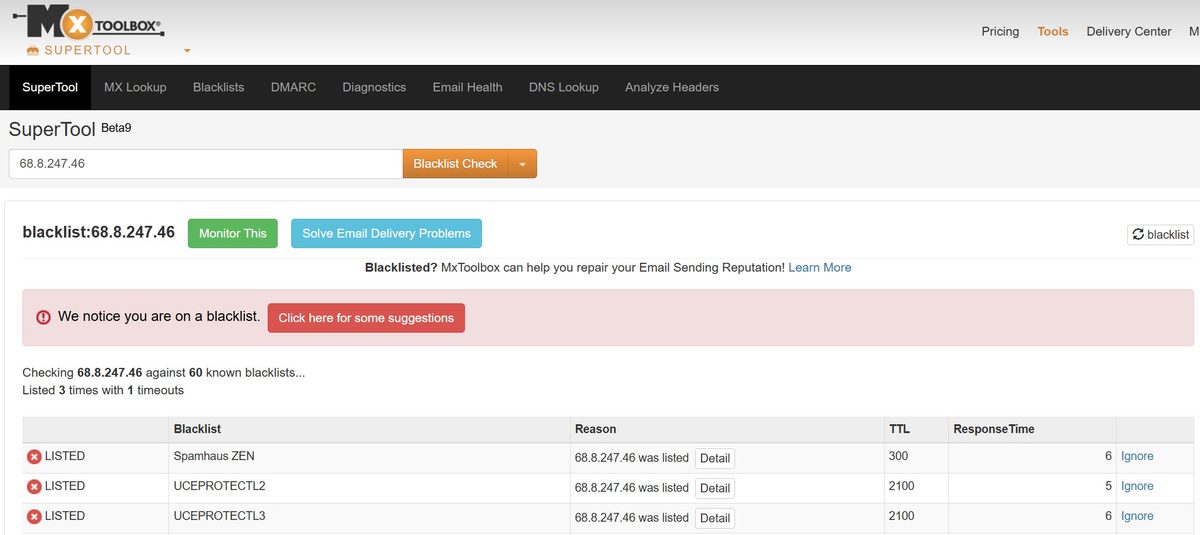
MXToolbox tells a different story though: 3 hits out of 60 on Spamhaus ZEN, UCEPROTECTL2, and UCEPROTECTL3.
But let’s break this down. Spamhaus ZEN includes the PBL (Policy Block List), a list of IP ranges that aren’t meant to send mail directly to MX servers. Every residential subscriber on Cox, Comcast, AT&T, and Spectrum sits on this list by default. It’s not a spammer marker and it’s not “bad” reputation. It’s simply policy. UCEPROTECTL2 and L3 work the same way: they block entire subnets and even whole ASNs.
For scraping, social media, marketplaces, and SEO, these listings mean nothing. For sending email directly through a proxy, sure, that won’t work. But residential proxies aren’t built for that anyway.
For comparison: MangoProxy showed 1 out of 60 on MXToolbox (Spamhaus ZEN only), NodeMaven also 1/61. Three out of sixty is slightly more, but all three are explained by list policy, not actual abuse.
Speed
Individual Measurements (Fast.com)
Two measurements via Fast.com on different IPs:
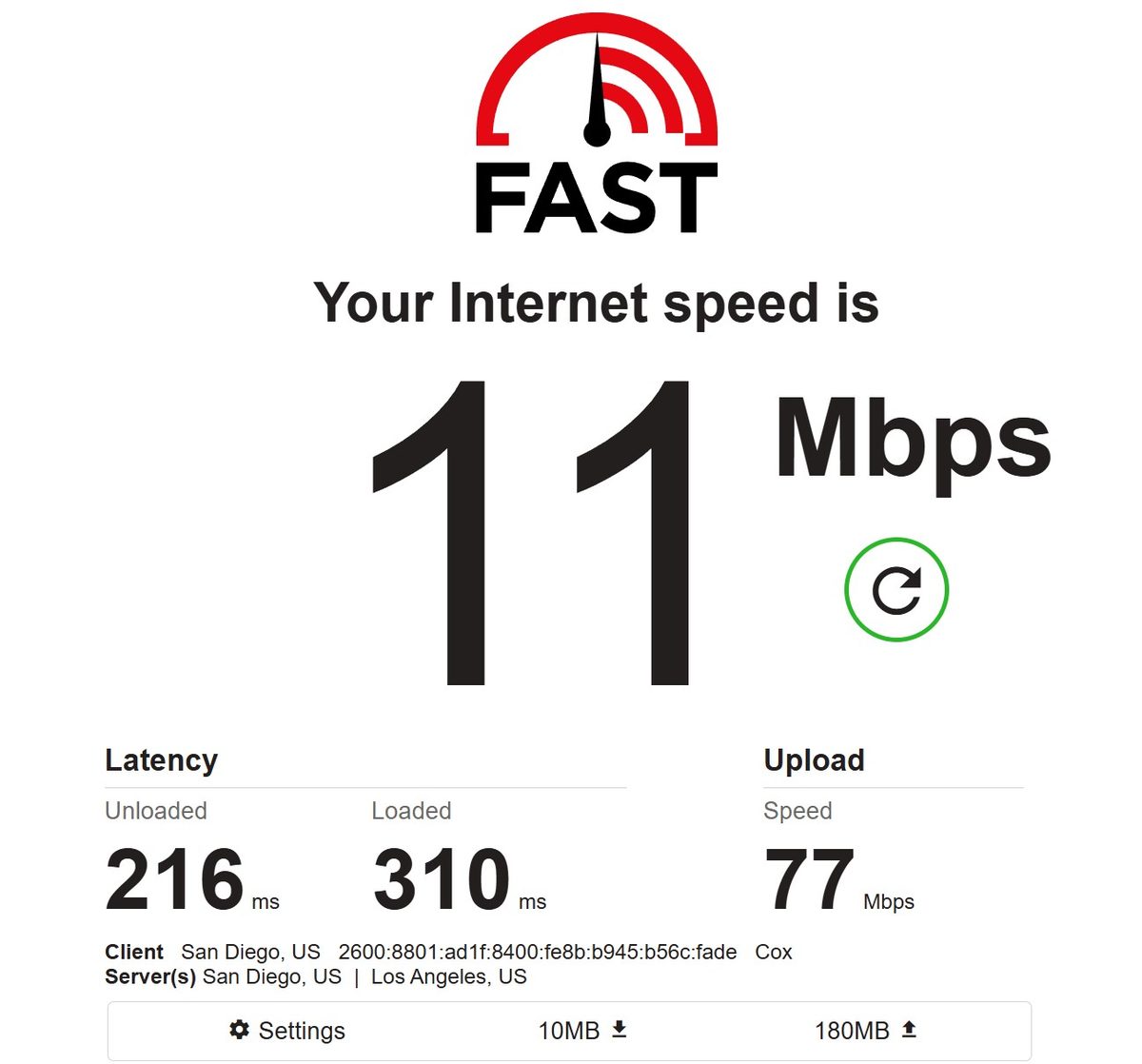
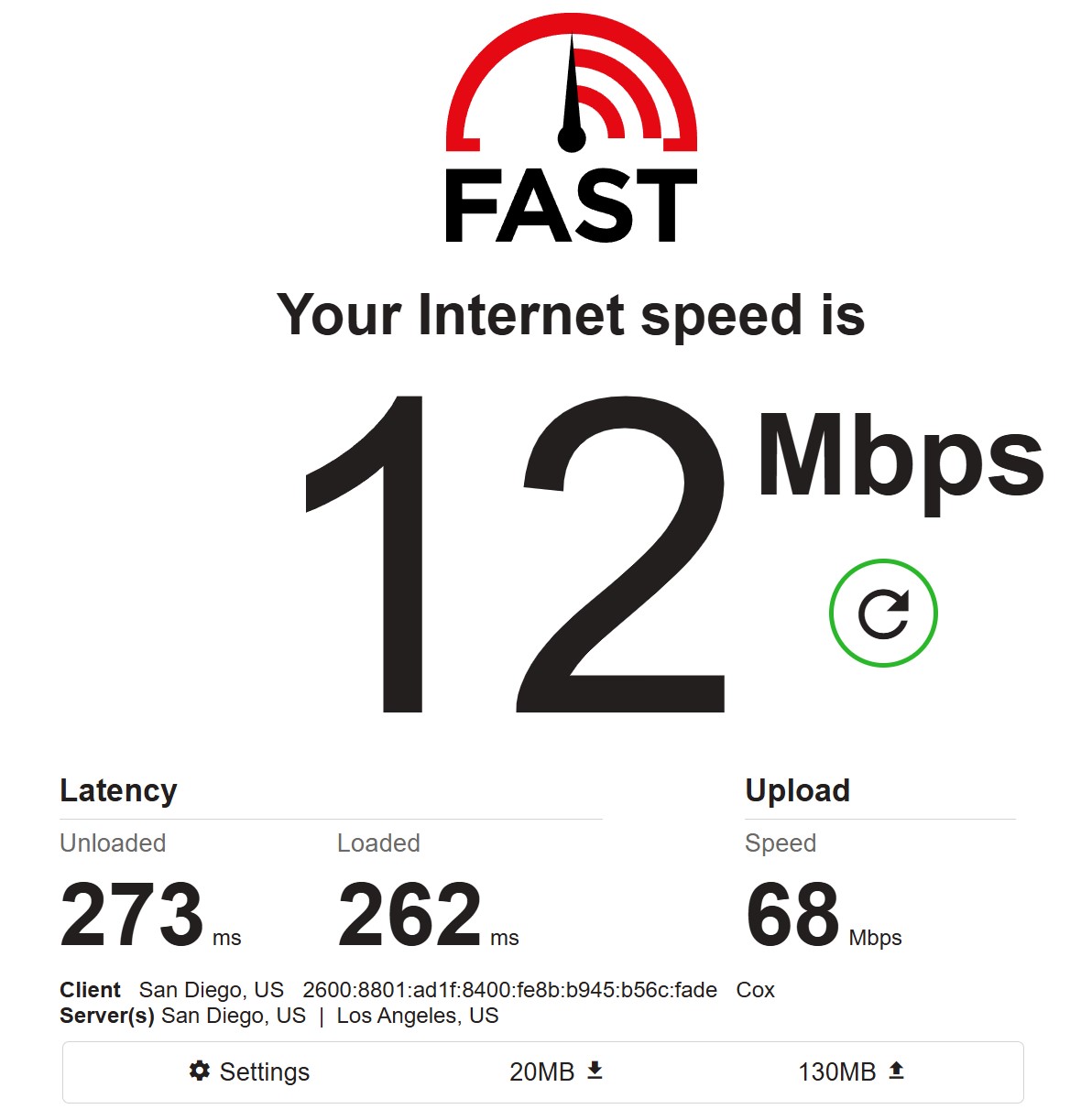
Two individual measurements came in at 11 and 12 Mbps download. Upload hit 77 and 68 Mbps, but for a residential cable connection those numbers are suspiciously high, most likely an artifact of how Fast.com measures through proxies. I wouldn’t rely on them.
Latency: 216-273 ms unloaded. For a residential IP in a different city, those are normal numbers.
For reference, the service does have faster exit nodes. One measurement on a different Cox IP produced completely different numbers:
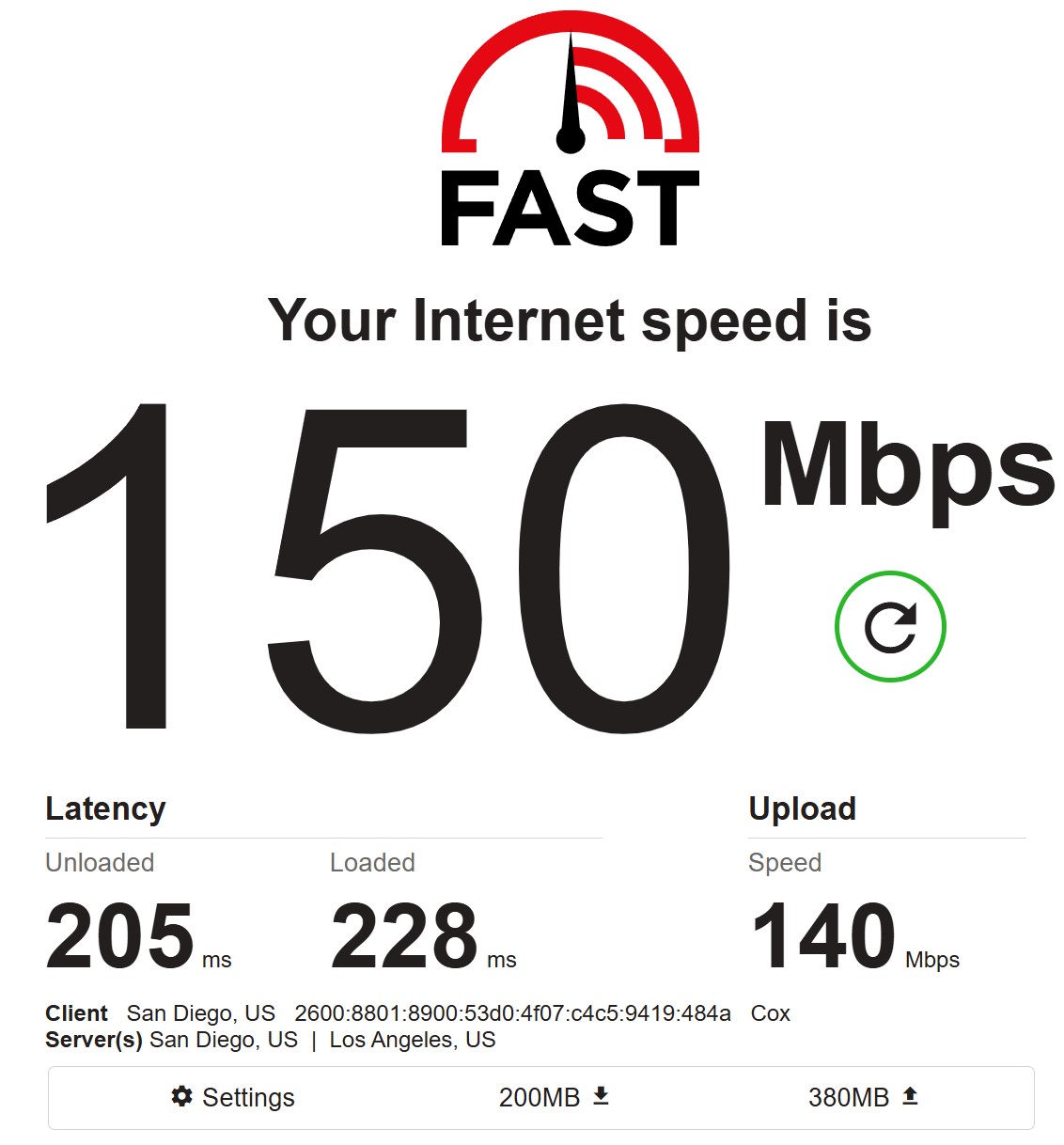
150 Mbps, but this was likely a static residential (ISP) proxy rather than a regular residential from the P2P pool. The difference between 11 and 150 Mbps shows just how much the channel can vary between exit nodes.
Batch Pool Test (500 Proxies)
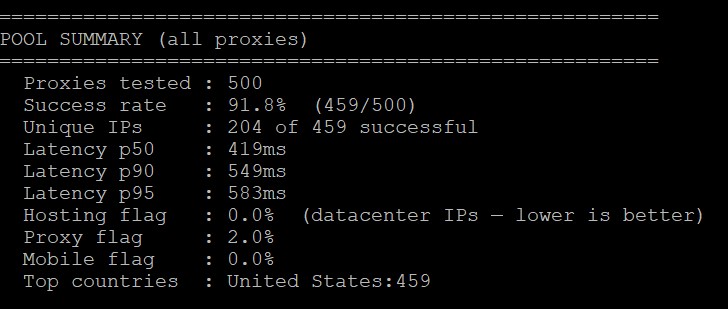
Key numbers from a pool of 500 proxies:
- Success rate: 91.8% (459 out of 500). 41 proxies didn’t respond. This is an average result. MangoProxy scored 97.8% (391/400), NodeMaven hit 100% on 25+ requests through FOGLDN. Proxyway gives Byteful 99.69%, but they use a different methodology and timeout settings.
- Unique IPs: 204 out of 459 successful. Now this is interesting. Less than half the addresses were unique, meaning the pool is actively reusing IPs. Getting only 204 different addresses from 500 requests is a lot of duplicates. MangoProxy had 391 unique out of 400 requests (nearly 100%). This is the weakest metric in this test.
- Latency: p50 419 ms, p90 549 ms, p95 583 ms. This is an excellent result. The 419 ms median is faster than MangoProxy (p50 780 ms) and NodeMaven (634-740 ms average per Byteful Proxy Tester). The spread between p50 and p95 is minimal (419 vs 583), meaning the pool is very consistent with no “long tail” of slow IPs.
- Hosting flag: 0.0%. Not a single datacenter IP mixed in. Pure residential.
- Proxy flag: 2.0%. 2% of addresses are flagged as proxies in databases. That’s a good number for a residential pool.
- Mobile flag: 0.0%. No mobile IPs, everything runs through fixed lines.
- Geo accuracy: 100%. All 459 successful requests came from the United States. Zero misses to another country.
Broad Pool Test (5,000 Proxies, California)
After publishing the initial results, we ran a second test with significantly broader targeting: United States, California, no ISP or city filter. 5,000 proxies instead of 500. The goal was to see how the pool behaves when it isn’t squeezed into a narrow slice.
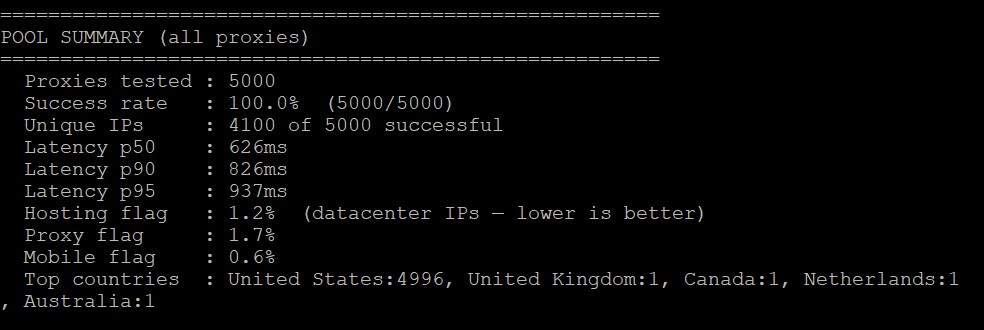
The results speak for themselves.
| Metric | San Diego / Cox (500) | California / Any ISP (5,000) |
|---|---|---|
| Success rate | 91.8% (459/500) | 100% (5,000/5,000) |
| Unique IPs | 204 / 459 (44.4%) | 4,100 / 5,000 (82%) |
| Latency p50 | 419 ms | 626 ms |
| Latency p90 | 549 ms | 826 ms |
| Latency p95 | 583 ms | 937 ms |
| Hosting flag | 0.0% | 1.2% |
| Proxy flag | 2.0% | 1.7% |
| Mobile flag | 0.0% | 0.6% |
| Geo accuracy | 100% US | 99.94% US (3 non-US out of 5,000) |
100% success rate on 5,000 requests. Zero failures. That’s a completely different picture from the 91.8% on narrow targeting. The pool simply had enough headroom to rotate through addresses without exhausting itself.
IP uniqueness jumped from 44% to 82%. Out of 5,000 requests, 4,100 came back with distinct addresses. That’s strong. The remaining 18% of reuse is expected at this volume, and 4,100 unique IPs from a single state in one session is a large, healthy pool.
Latency did go up. The p50 rose from 419 ms to 626 ms, and the p95 from 583 ms to 937 ms. This makes sense: broader targeting pulls in IPs from more diverse infrastructure across California, including slower residential lines. The narrow Cox pool in San Diego was likely concentrated on faster cable nodes. Still, 626 ms is competitive. MangoProxy’s p50 was 780 ms, and NodeMaven sits at 634-740 ms.
A few new flags appeared in the broader pool. 1.2% hosting flag means a small number of datacenter IPs crept in, likely from residential ISPs that also serve business customers. 0.6% mobile flag shows some mobile IPs in the mix. Neither number is alarming, but they weren’t present in the pure Cox pool.
Geo accuracy stayed excellent at 99.94%. Three requests out of 5,000 landed outside the US (1 UK, 1 Canada, 1 Netherlands, 1 Australia). For a pool this size, that’s statistical noise.
Batch Speed Test (200 Proxies)
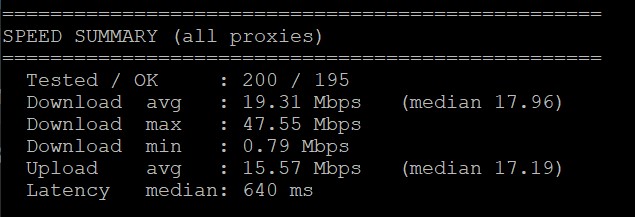
200 proxies through a script. 195 completed, 5 timed out.
- Download median: 17.96 Mbps. This is a very solid result for residential. MangoProxy’s median was 13.3 Mbps, NodeMaven’s was 8.6-9.8 Mbps. Byteful is faster.
- Download max: 47.55 Mbps. A ceiling of nearly 50 megabits means the pool has some fast cable lines.
- Download min: 0.79 Mbps. The floor. As always with residential, you’ll hit some slow nodes.
- Upload median: 17.19 Mbps. Surprisingly high upload, nearly matching download. For cable connections that’s unusual (upload is typically much lower), but Cox in San Diego apparently offers symmetrical speeds on some plans.
- Latency median: 640 ms. A bit higher than the p50 from the pool test (419 ms), but this test uses a different methodology where the measurement includes full file download. Still faster than most competitors.
FOGLDN Proxy Tester
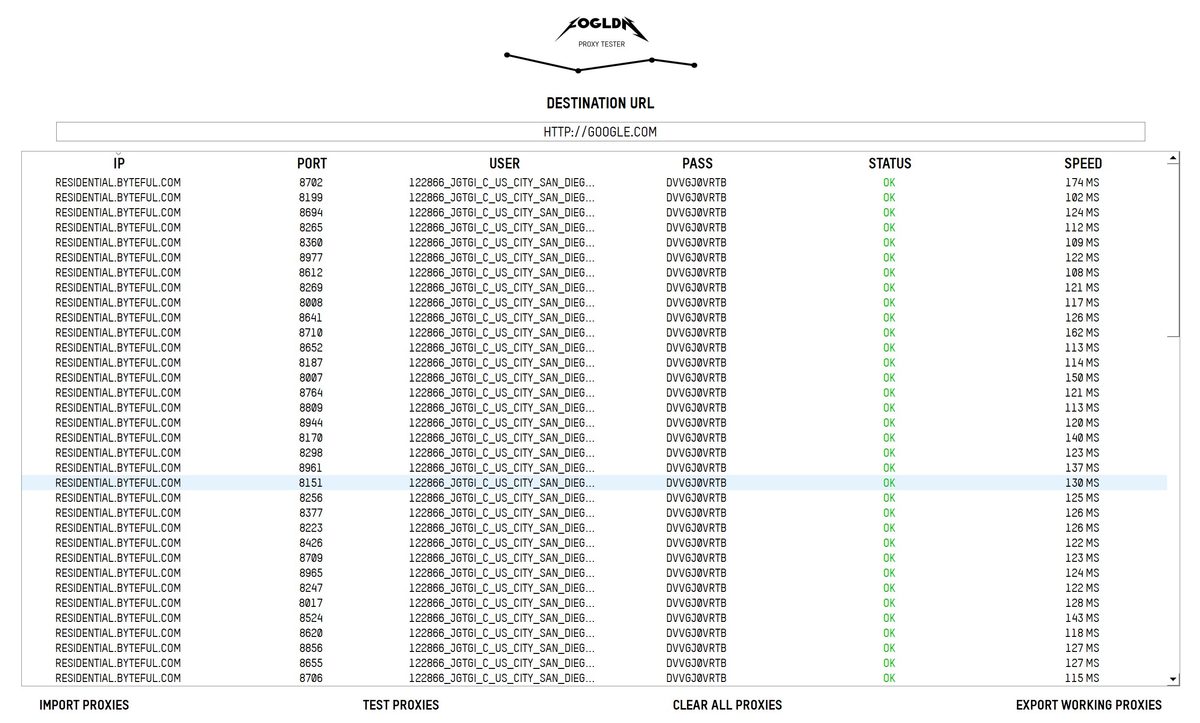
FOGLDN ran several dozen proxies against google.com. Every single one returned OK. Response time ranged from 108 to 174 ms. That’s fast. Really fast. Google let every address through without a CAPTCHA.
For comparison: MangoProxy on FOGLDN showed 520-850 ms with spikes up to 3,800 ms, and NodeMaven came in at 469-1,825 ms. Byteful turned out to be the fastest of everything I’ve tested.
Observability: Analytics Panel
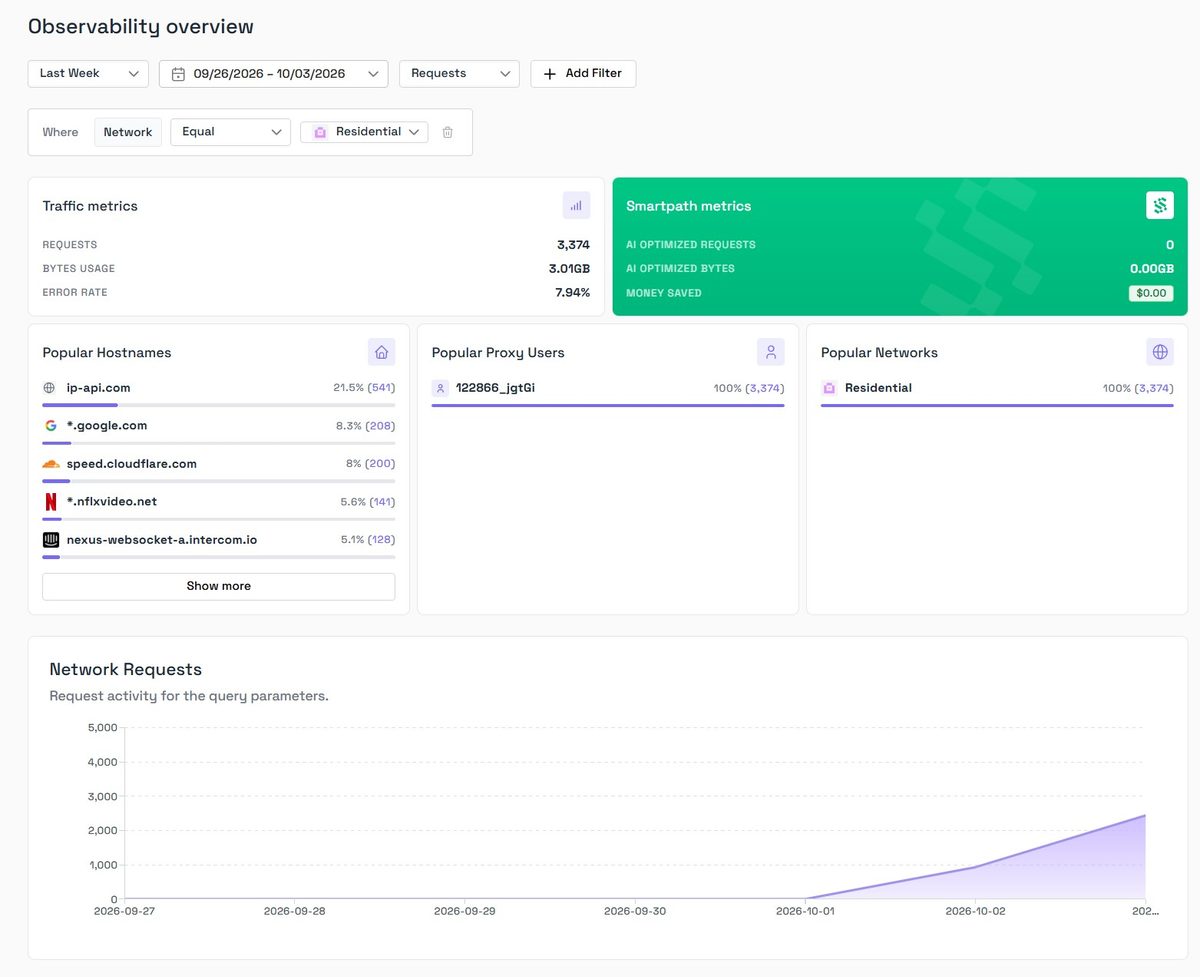
The Observability section is something a lot of providers are missing. Here you can see:
Total traffic: 3,374 requests, 3.01 GB used, error rate 7.94%. Top domains by request count (ip-api.com at 21.5%, that’s my test script; google.com at 8.3%; speed.cloudflare.com at 8%). Request graph over time.
Smartpath metrics show zeros because I had it disabled.
The 7.94% error rate matches the batch test data (91.8% success = 8.2% errors). The numbers add up.
For teams working with large volumes, this panel is genuinely useful. You can figure out where traffic is going and where problems are. It’s better than MangoProxy (where stats would disappear entirely once traffic was used up) and comparable to Oxylabs.
Anti-Detect Browser Setup
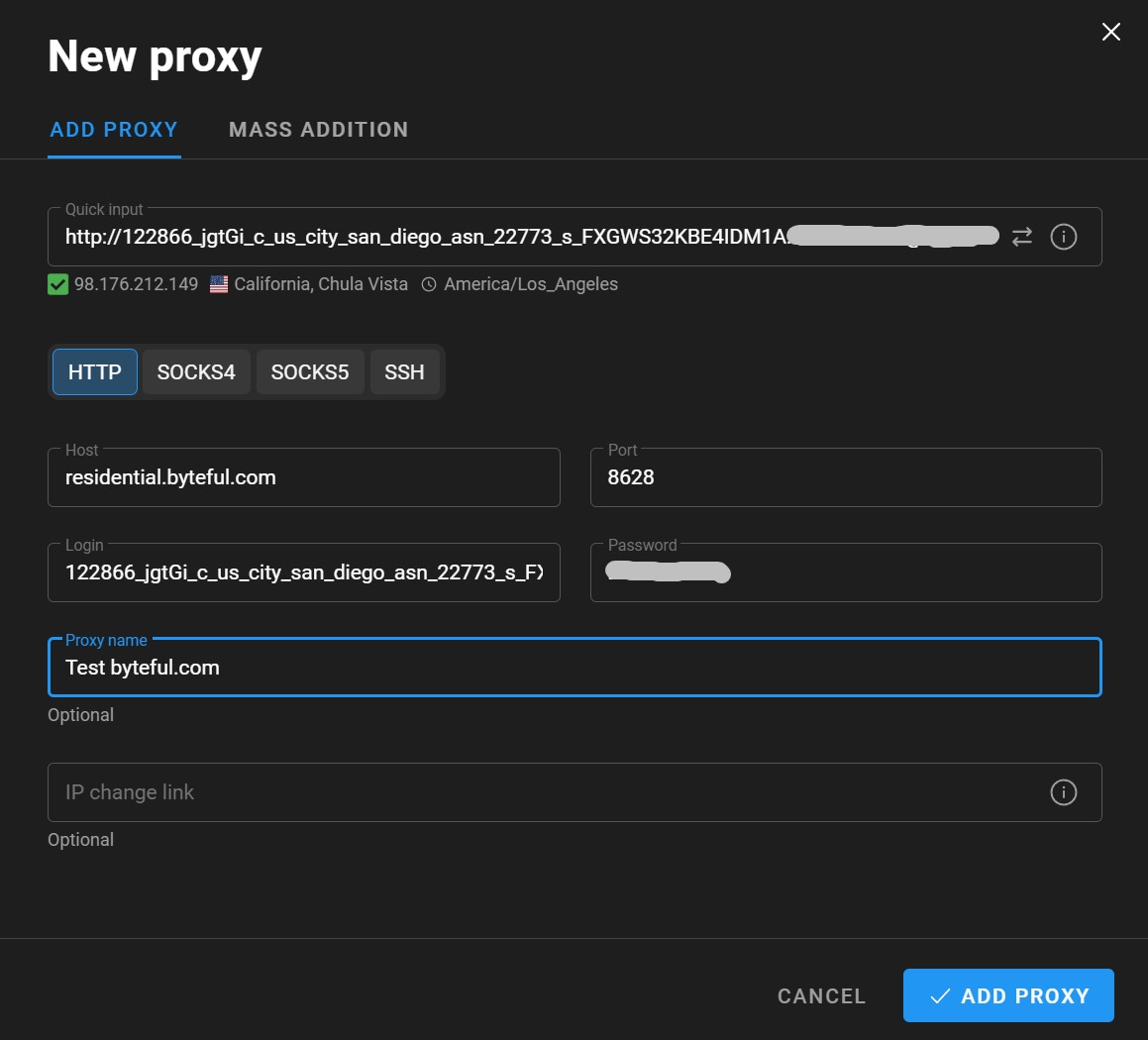
Setting up with Dolphin Anty went smoothly. The connection string from the generator gets pasted into Quick Input, and all fields auto-parse: host, port, login, and password. The checker confirmed right away that the proxy was alive: IP 98.176.212.149, California, Chula Vista.
Note that I ordered San Diego but got Chula Vista. These are neighboring cities in the same metro area, about 10 miles apart. For residential proxies, this kind of discrepancy is within the normal range. City is determined by geolocation databases, and they’re not always accurate down to the specific city within a metro.
Protocols: HTTP, SOCKS4, SOCKS5, SSH. The full set.
Byteful has an official guide for setting up with Dolphin Anty and a partnership page with them. There are no official integrations for other anti-detect browsers (Multilogin, AdsPower, GoLogin), but technically any browser that accepts HTTP or SOCKS5 with authentication will work.
Pricing and Competitor Comparison
Current residential pricing at the time of testing:
- 10 GB – $3.25/GB
- 25 GB – $3.00/GB
- 100 GB – $2.75/GB
- High volume – from $1.75/GB (custom quote)
Discounts: 10% with quarterly billing, 20% with annual billing.
The key commercial differentiator: purchased traffic never expires. No expiration date, no “use by end of month.” For projects with irregular workloads, this is a serious plus. Confirmed by both independent directories and Byteful themselves.
Prices on the homepage reflect the starting rate per unit (e.g., $3.5/IP for ISP proxies, $2.5/IP for Datacenter). These are the single-unit prices; volume discounts kick in as you increase the quantity — for example, ISP proxies drop to $3.00/IP at 10 units and $2.25/IP at 1,000+ units. The pricing table is available on each product page in the dashboard.
How Byteful stacks up against competitors on residential:
| Provider | Entry | ~100 GB | High Volume |
|---|---|---|---|
| Byteful | $3.25 (10 GB) | $2.75 | $1.75 |
| MangoProxy | $3.30 (5 GB) | ~$2.50 | $2.00 |
| NodeMaven | $3.80 (trial) | ~$3.50 | custom quote |
| Oxylabs | $6.00 (5 GB) | $4.50 | $2.50 |
| Decodo | $3.75 (3 GB) | $2.75 | $2.00 |
| IPRoyal | $7.00 (1 GB) | – | $1.75 |
| Webshare | $3.50 (1 GB) | $2.25 | $1.40 |
Byteful sits in the lower-middle segment. Cheaper than Oxylabs and NodeMaven, roughly on par with MangoProxy and Decodo, pricier than Webshare at high volumes.
Payment
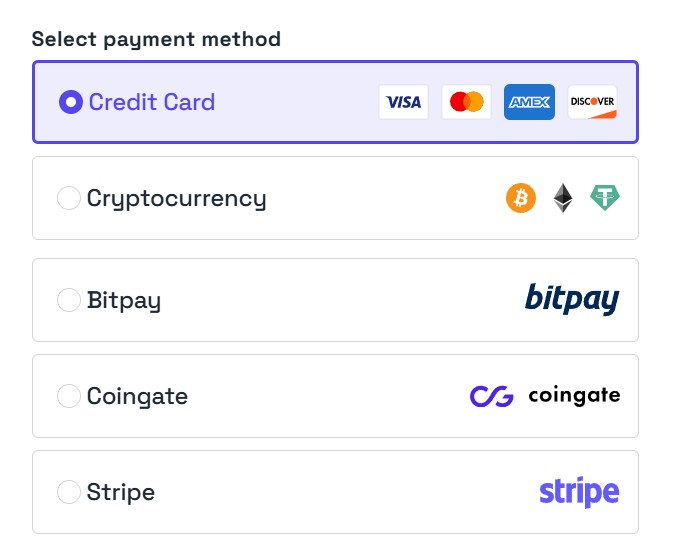
Five payment options: credit/debit cards (Visa, Mastercard, Amex, Discover), direct crypto, BitPay, CoinGate, and Stripe. Apple Pay and Google Pay are also available. For orders over $1,000, bank transfers (ACH, wire, BACS) are supported.
PayPal and Wise are not supported. For some users, that could be a dealbreaker.
Trial and Refund Policy
Trial: 1 GB residential for free. But only after KYC verification through iDenfy, requiring a passport or driver’s license. There’s no way to test the service anonymously.
Refund conditions are strict:
- Request must be submitted within 24 hours of purchase
- No more than 2 GB or 25% of the package used (whichever is less)
- One refund per customer, ever
- Granted at the company’s discretion
IP Replacement: for static proxies, no replacements during the paid period. There was a conflict on Reddit over exactly this, where a customer was denied a replacement for an ISP proxy on day 15 of their billing cycle.
For comparison: MangoProxy has “All sales are final” with a 48-hour window, and most major providers offer 3-7 days. Byteful is somewhere in between, but leaning toward the strict end.
Final Score
| Parameter | Result | Score |
|---|---|---|
| Download / Upload (200 proxies) | 19.31 / 15.57 Mbps (median 17.96 / 17.19) | 4/5 |
| Latency (500 proxy pool, p50) | 419 ms | 5/5 |
| Success rate (500 proxies) | 91.8% (459/500) narrow / 100% (5,000/5,000) broad | 4/5 |
IP uniqueness | 44.4% narrow / 82% broad (4,100/5,000) | 4/5 |
| Hosting / Proxy / Mobile flag | 0.0% / 2.0% / 0.0% | 5/5 |
| Geo accuracy | 459/459 in the US | 5/5 |
| Fraud Score (Scamalytics) | 11/100 – Low Risk | 5/5 |
| IP Reputation (Pixelscan Blacklist) | 0 out of 45, clean | 5/5 |
| Blacklists (MXToolbox) | 3 out of 60 (Spamhaus ZEN + UCEPROTECT) | 4/5 |
| ISP type | Residential, AS22773 Cox Communications, hostname cox.net, hosted domains 0 | 5/5 |
| Proxy detection (Pixelscan) | No proxy detected, fingerprint consistent | 5/5 |
| WebRTC | Clean, no leaks | 5/5 |
| DNS Leak | Clean, all resolvers Cox | 5/5 |
| FOGLDN (google.com) | All OK, 108-174 ms | 5/5 |
| Geo targeting | Country, state, city, ZIP, ISP/ASN, OS | 5/5 |
| Smartpath (traffic savings) | Works, claims up to 60% savings | 4/5 |
| Sticky sessions | Up to 24h claimed, but no duration setting | 3/5 |
| Observability / analytics | Solid panel with per-domain breakdown | 4/5 |
| Price | $3.25/GB entry, $1.75 at volume, traffic never expires | 4/5 |
| Refund and IP replacement | 24 hours, once ever, no ISP replacements | 2/5 |
| Overall Score | 4.3/5 |
- Best speed across all our tests. Download median 17.96 Mbps, FOGLDN 108-174 ms. Faster than MangoProxy and NodeMaven.
- Consistent pool latency. p50 419 ms, p95 583 ms, no sharp spikes.
- Clean IPs. Scamalytics 11/100, Pixelscan Blacklist 0/45, fingerprint consistent, Whoer 100%.
- Genuine residential. AS22773 Cox Communications, hostname cox.net, hosted domains 0, ISP Fixed Line.
- No leaks. WebRTC clean, DNS clean, all resolvers Cox.
- Flexible targeting. Country, state, city, ZIP, ISP/ASN, and operating system. Very few providers offer OS targeting.
- Honest pool indicator. You see available IP count right when configuring.
- Traffic never expires. A unique advantage in this market.
- Observability. Proper analytics with per-domain breakdown and charts.
- Smartpath saves traffic on junk requests, up to 40-60%.
- Full protocol support. HTTP, HTTPS, SOCKS5.
- Byteful Proxy Tester. A free tool the whole industry uses.
- Success rate 91.8% on narrow city+ISP targeting. Jumps to 100% on state-level, but narrow use cases will see more failures.
- IP uniqueness 44% on narrow targeting, 82% on broad. If you need maximum diversity within a single city+ISP combo, the pool is limited.
- Sticky sessions with no duration control. IPs rotated unpredictably; couldn’t lock down a single address for long.
- 24-hour refund window, once per lifetime, at company’s discretion. No ISP proxy replacements.
- KYC required for trial. Passport or driver’s license, no anonymous testing.
- Support in English only. Core hours weekdays 5:00 AM-7:00 PM EST, no 24/7.
- IP2Location Fraud Score 57. While Scamalytics gives 11, the gap between databases is noticeable.
- IPinfo flagged the IP as Residential Proxy Detected. The address is already known as a proxy network exit node.
- MXToolbox 3 out of 60 blacklists. More than competitors (1/60), though all three are explained by list policy.
- Homepage pricing shows single-unit rates without volume tiers, which can be confusing at first glance. Check the product page for the full pricing table.
Overall Impression
Byteful left me with mixed but mostly positive impressions.
The network is fast. Seriously fast. In terms of speed and latency, this is the best residential provider I’ve put through our tests. A median close to 18 Mbps and p50 at 419 ms is something neither MangoProxy, nor NodeMaven, and certainly not NetNut could match. FOGLDN on google.com returned 108-174 ms with zero errors. Proxyway’s numbers (0.41s, top result on hard targets) line up with my own measurements.
The IPs are clean. Scamalytics 11/100, Pixelscan doesn’t see a proxy, fingerprint consistent, WebRTC and DNS don’t leak. This is the level of a quality residential pool. Cox, AT&T, Charter: real cable ISPs, not hosting.
The platform is mature. A generator with a live pool indicator, OS targeting, Smartpath, Observability, an API with 40+ endpoints: technically the service is built at the level of top-tier providers. Non-expiring traffic is a genuinely unique perk.
But there are two areas where the initial results looked weak. Success rate and IP uniqueness on narrow targeting came in at 91.8% and 44%. However, the follow-up test on 5,000 proxies with state-level targeting told a different story: 100% success rate and 82% unique IPs. The pool itself is large and healthy. The original numbers were a consequence of squeezing 500 requests through a 761-IP slice, not a fundamental limitation. The second weak spot remains: customer policies. A 24-hour refund window, no ISP replacements, KYC for trial, English-only support. If something goes wrong, there’s not much room to maneuver.
Score: 4.3 out of 5
Fast network, clean IPs, mature platform, and traffic that never expires. Narrow targeting showed 91.8% success, but the broad California test hit 100% on 5,000 proxies with 82% unique IPs. Sticky sessions behave unpredictably, and the refund policy is one of the strictest in the market. 4.3 out of 5. Start with the minimum package or the trial.
Who It’s For
- Scraping medium- and heavily-protected sites, where speed and Smartpath give you an edge
- SEO and SERP monitoring, since Google passes without CAPTCHA and ZIP targeting is great for local SEO
- Multi-accounting through Dolphin Anty with ISP proxies (but keep the no-replacement policy in mind)
- Projects with irregular workloads, since traffic never expires
- Dev teams who need API access, role-based permissions, and Observability
Who It’s Not For
- Those who need full anonymity, since KYC is required and target logs are stored for up to 12 months
- Tasks requiring maximum pool size and SLA guarantees, as the pool is smaller than Oxylabs or Bright Data
- Gray-area use cases, since the AUP is strict and banks and government sites are blocked
The broad pool test (5,000 proxies, California) was conducted after the initial review, using additional traffic provided by Byteful at our request. The methodology remained identical. Raw logs for both tests are available for verification.
This is not a complete review of every Byteful feature. We didn’t separately test mobile proxies, ISP proxies, or datacenter proxies, didn’t run tests against Cloudflare and DataDome, and didn’t measure actual sticky session duration. This review will be updated as testing continues. All logs are saved, and any number can be verified upon request.
35M+ residential proxies with OS targeting
from $1.75/GB
HTTP, SOCKS5, rotating, sticky 24h