






 Why Trust Us?
ToProxyLab has been testing proxy services since 2025. We pay for most plans ourselves, and when a provider gives us test traffic we say so in the review — free traffic buys a place in the testing queue, nothing else. Every provider goes through the same speed, uptime and fraud-score checks, and we publish the real numbers, including the bad ones. A rating cannot be bought. Learn who we are and how we review proxies.
Why Trust Us?
ToProxyLab has been testing proxy services since 2025. We pay for most plans ourselves, and when a provider gives us test traffic we say so in the review — free traffic buys a place in the testing queue, nothing else. Every provider goes through the same speed, uptime and fraud-score checks, and we publish the real numbers, including the bad ones. A rating cannot be bought. Learn who we are and how we review proxies.
The service launched in 2023, and the operator is registered in a Dubai free zone. No office, no phone number, all support runs through a Telegram bot in English and Russian. The target audience is obvious at a glance: affiliate marketing, multi-accounting, antidetect browsers.
The catalog has four proxy types: residential, ISP, datacenter and mobile. The claim is 90 million residential IPs across 200+ locations. That’s a Bright Data level number coming from a service with a two year history. Maybe it’s reselling somebody else’s pool, maybe it’s honest growth. Let’s find out.
Pricing starts at $3.3/GB for the 5 GB package and drops to $2.0 at the terabyte tier. The homepage, meanwhile, promises “from $0.6 per GB”, but that’s volume and coupon territory. Technical perks: sticky sessions up to 120 minutes, SOCKS5, official integrations with Dolphin Anty, Undetectable and Octobrowser.
What bothered me before the tests even started. Trustpilot gives 3.5 out of 5 across 49 reviews, Reviews.io gives 4.91 across 43. That’s a wide gap. And the refund policy is worded harshly: “All sales are final”, with a 48 hour window to file a claim. Most competitors give three to seven days.
Now to the facts.
How I got access
A rep from mangoproxy.com reached out and offered me a test of their residential proxies plus a spot in our reviews and rankings. They gave me 2 GB of traffic.
Same disclaimer as always. Free traffic does not shape the verdict. What a provider buys is not loyalty, only my promise to run their proxies through every test and write down what I saw, the awkward parts included. I screenshot every step and keep the logs. Any number in this review can be double checked, just message me.
I took US residentials. Same reason as in previous reviews: the US market is the most demanding one. IPs there get checked for shadowbans immediately, pushed through antifraud and matched against the ISP.
The website and first impressions
The site is built properly. Not a landing page thrown together over a weekend, but a real product resource: sections for each proxy type, locations, a blog, dev docs, an affiliate program. Clean layout, a mango in the brand yellow and black palette, everything loads fast.
Two trust elements sit above the fold: a Reviews.io widget showing 44 reviews and five stars, plus a SourceForge User Reviews badge. Three more 2026 awards appear further down the page.
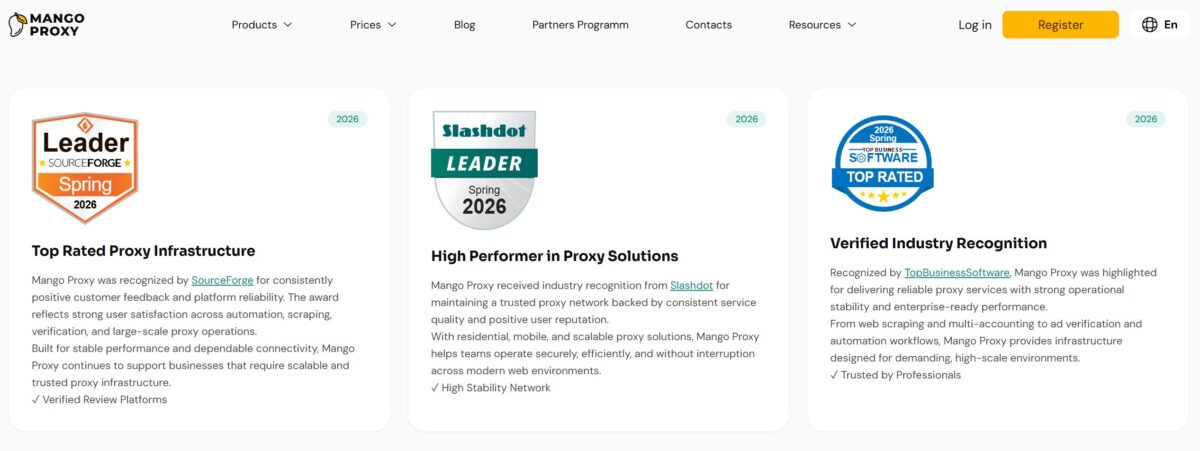
And here’s where I tripped. There’s no Trustpilot widget on the homepage. Not there, not on the pricing pages either. The company does have a Trustpilot account, and it sits at 3.5 out of 5 across 49 reviews, with 66% of them being one and two stars. Reviews.io and Trustpilot collect feedback from roughly the same number of people, yet the results differ by a point and a half. The samples are comparable, the outcome isn’t. Draw your own conclusions, I’m just recording the fact: the storefront was assembled from whatever shows the service at its best, and the most recognized platform was quietly left off stage.
The SourceForge and Slashdot awards, by the way, are also about collecting reviews, not about a technical audit. Nice detail, but it doesn’t carry much weight.
One thing I genuinely liked: the free tools. The service runs its own set: My IP, IP Lookup, Proxy Checker, Port Scanner, IP Trace, DNS Leak Test.
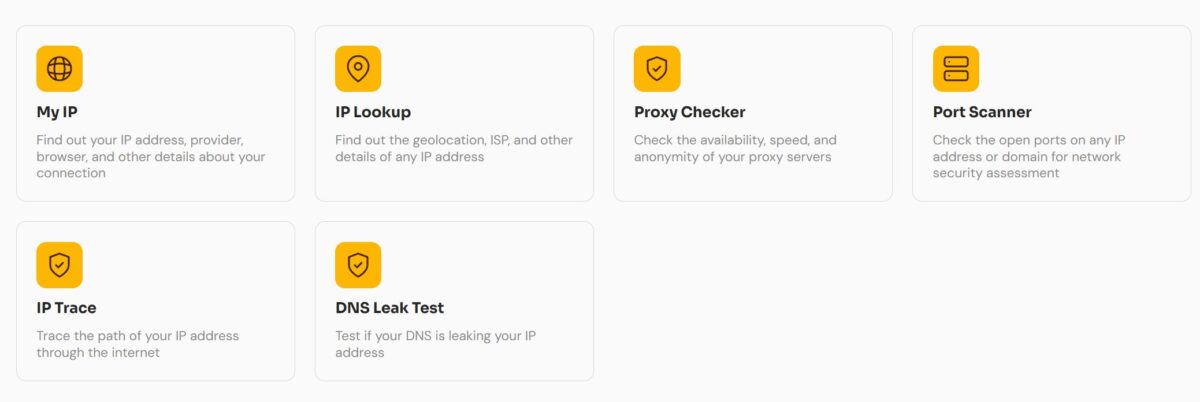
Smart move. It pulls search traffic and it keeps people around: somebody comes to check an IP and walks into the product. The tools work fine, nothing groundbreaking, but it’s one less reason to bounce to a third party checker.
Products and pricing
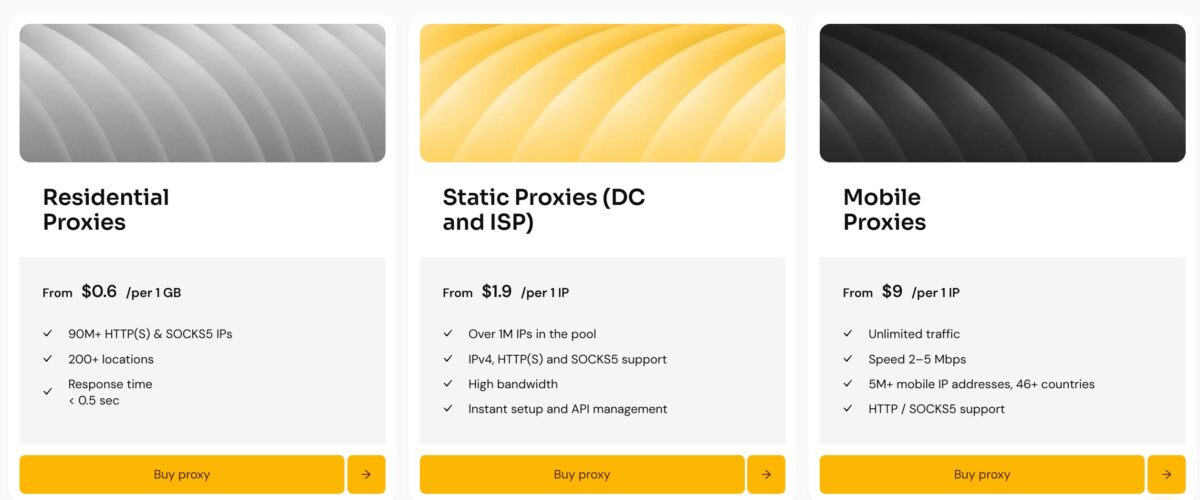
Residential is advertised from $0.6 per gigabyte with 90M+ addresses, 200+ locations and sub 0.5 second response time. Static starts at $1.9 per IP, over a million addresses in the pool, IPv4, HTTP(S) and SOCKS5, API management. Mobile runs from $9 per IP with unlimited traffic and an honestly stated 2-5 Mbps speed. Credit where it’s due on that mobile speed figure, most providers hide it.
The actual residential pricing inside the dashboard looks nothing like the storefront.
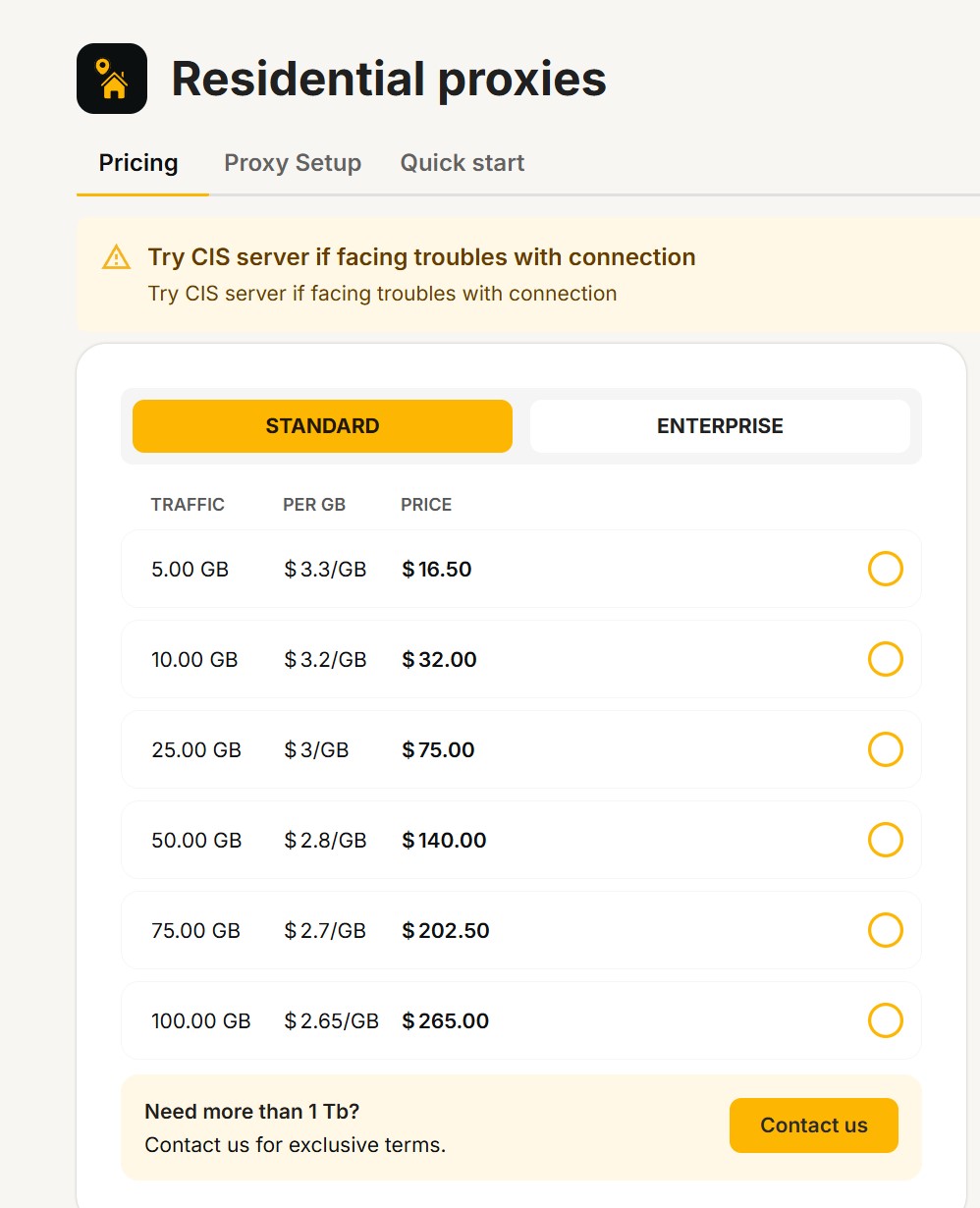
Minimum entry is $16.50 for 5 gigabytes. From there the ladder goes down to $2.0/GB at a terabyte. The promised $0.6 lives somewhere outside the public price list, in “Need more than 1 Tb? Contact us” territory plus coupons. Technically not a lie, the promo price exists. In practice the storefront shows a number a regular buyer will never see. A fivefold gap between the headline and the checkout.
For market context: IPRoyal goes down to $1.75/GB at volume, Decodo does $2/GB, Oxylabs starts at $6 and falls to $2.5 at a terabyte, Bright Data holds $2.5-4. MangoProxy lands right in the middle. Not cheap, not expensive.
Payments, now that’s an interesting wrinkle.

Cards only unlock after identity verification. That’s Stripe and its KYC: passport, selfie, and for companies the registration documents and beneficiary details. Crypto works right away, no checks, 11+ currencies. That much KYC on cards is unusual for the proxy market, where 3-D Secure normally does the job. Some will read it as a sign of grown up compliance, others as a reason to pay in USDT. No PayPal, no Wise, no invoicing for businesses.
Dashboard and proxy generator
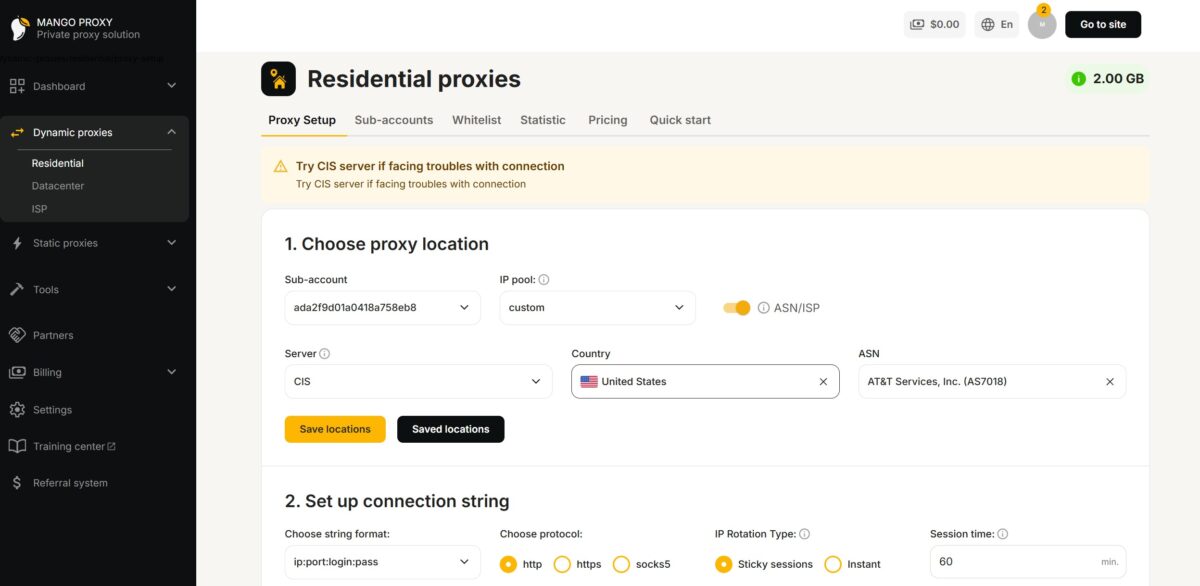
The dashboard is laid out sensibly. Navigation on the left: Dashboard, Dynamic proxies with Residential / Datacenter / ISP subsections, Static proxies, Tools, Partners, Billing, Settings, Training center, Referral system. Remaining traffic sits up top, 2.00 GB in my case.
The generator runs in three steps. First, location: subaccount, IP pool (custom), an ASN/ISP toggle, server, country, ASN. There’s a “Save locations” button so you don’t rebuild the same combo twice.
The server picker deserves a separate mention. Alongside the standard gateways the dropdown has CIS, and a hint above the form reads “Try CIS server if facing troubles with connection”. So there’s a dedicated network entry point for users in the CIS region. Small thing, but it tells you who the core audience is.
Step two is the connection string: format (ip:port:login:pass and others), protocol http / https / socks5, rotation type Sticky or Instant, session length in minutes. I ran 60 and 30.
Step three, and this is the part I liked most.
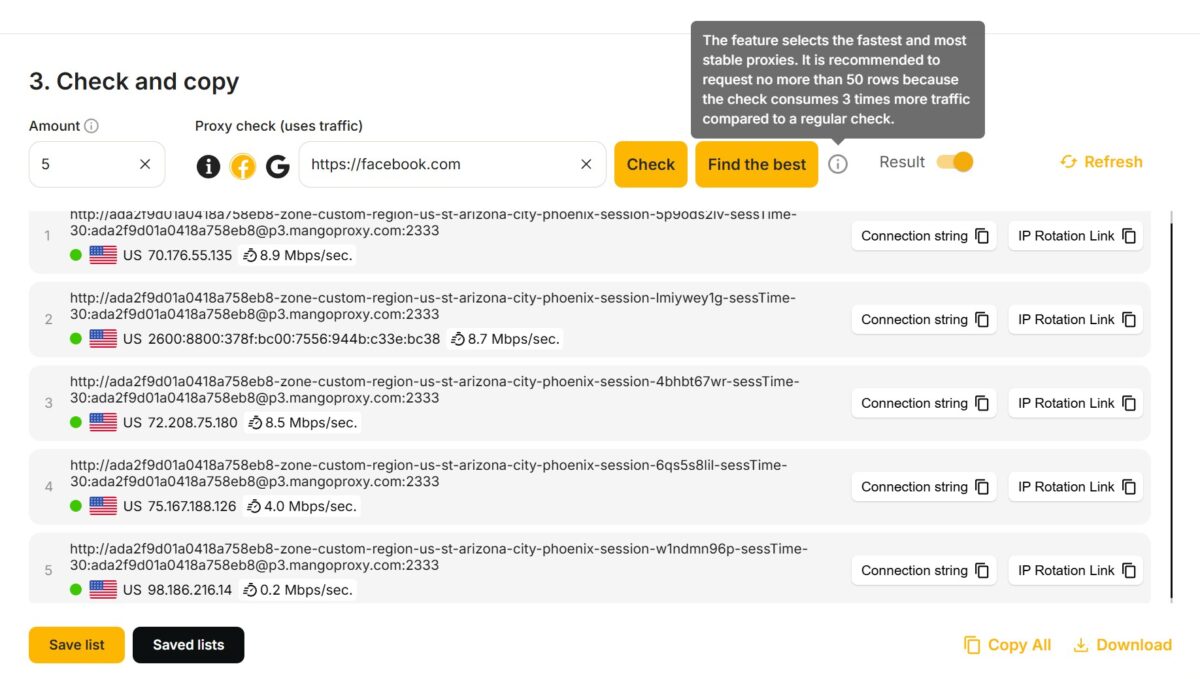
Right inside the generator you set the number of proxies, a target URL, and hit Check. The service pings the generated list for liveness and shows the speed of each one. The “Find the best” button picks out the fastest and most stable. I tested against facebook.com, got five rows ranging from 8.9 down to 0.2 Mbps, and dropped the last one immediately.
Honestly, I have never seen a built in checker that tests against a specific target domain anywhere else. Yes, the check burns traffic, and the tooltip openly warns that “Find the best” eats it three times faster than a regular check, recommending you stay under 50 rows. Still a useful feature: instead of exporting to an external tester and back, you clean your list in one click.
One more detail stood out in that same block: an IPv6 address showed up among the results (2600:8800:378f:bc00:7556:944b:c33e:bc38). So the pool is mixed, v4 and v6 come out interleaved. Irrelevant for some tasks, but worth knowing upfront if you’re running multi-accounting.
The connection string looks like this:
ada2f9d01a0418a758eb8-zone-cis-region-us-st-florida-city-hollywood-session-bg3452b05-sessTime-30Host p3.mangoproxy.com, port 2333. The whole config is baked into the username: zone, region, state, city, session ID, session length. Standard industry scheme, and you can switch geo right in the string without opening the dashboard.
About my targeting mixup. For the bulk run on 400 proxies I filtered by a specific operator’s ASN, because I didn’t immediately find where the city gets set. The spot checks on individual IPs were done with city targeting on Hollywood. So the pool benchmark and the single address checks ran on different filters. It doesn’t affect the numbers themselves, but I’m leaving the ASN targeting accuracy test for the next round.
Setting it up
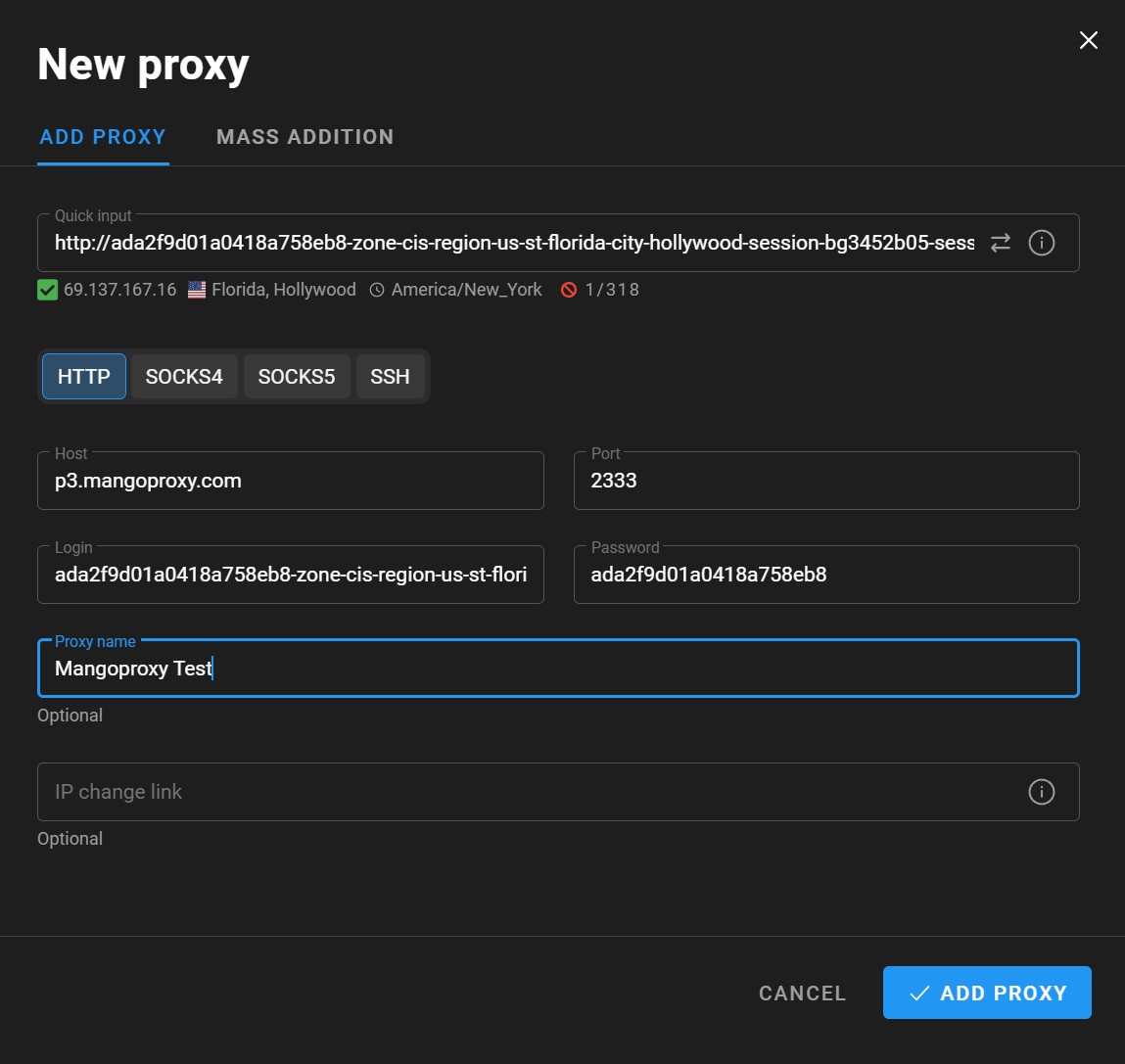
I dropped the string into the antidetect browser’s Quick input. It parsed itself, host, port, login and password landed in the right fields, and the checker confirmed the proxy was alive right away: 69.137.167.16, Florida, Hollywood, America/New_York timezone. The advertised city matched the real one.
Protocols available in the interface: HTTP, SOCKS4, SOCKS5, SSH. The full set.
Single IP breakdown
My main test address was 174.48.226.150.
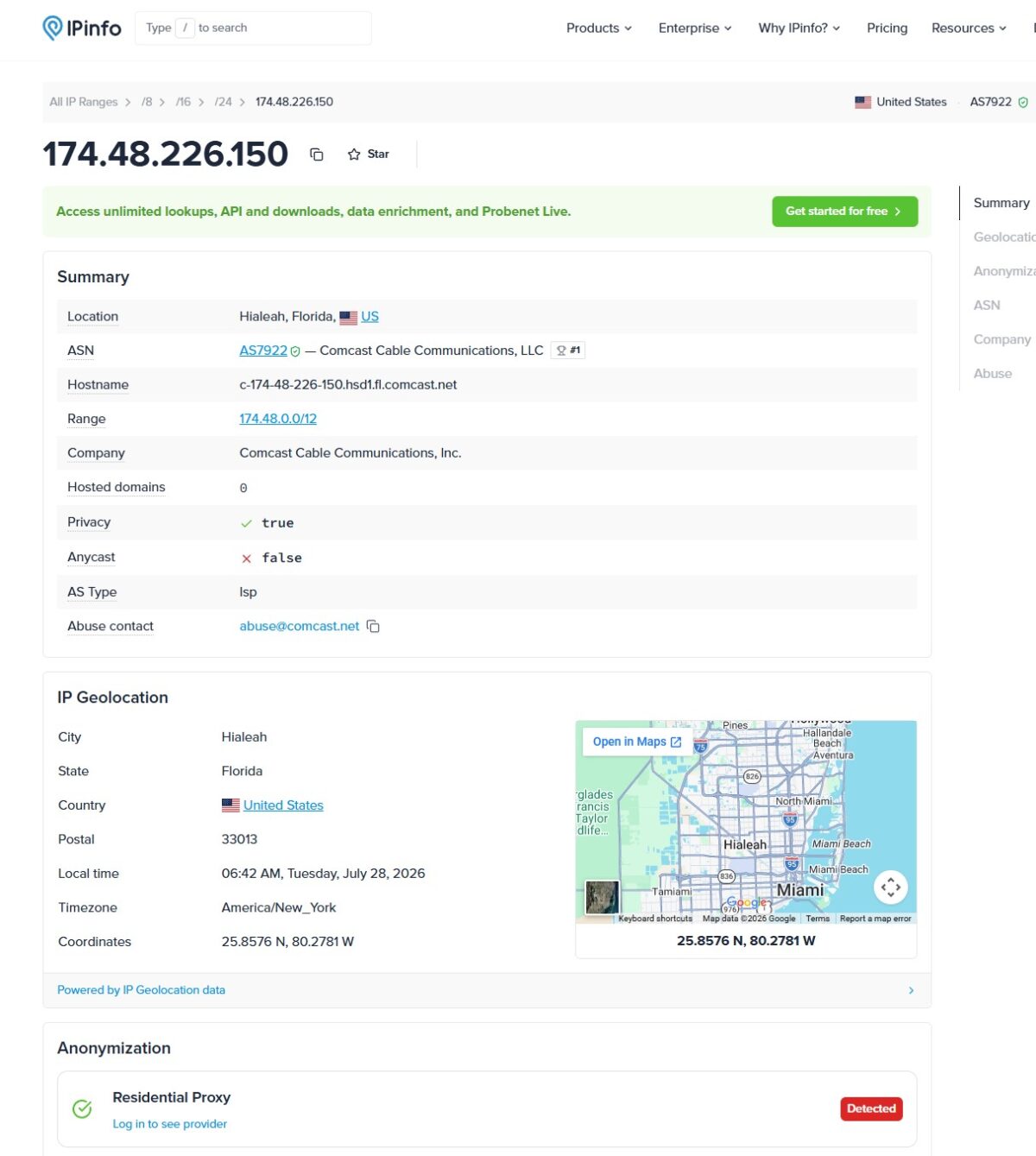
IPinfo gave me the important stuff. ASN AS7922, Comcast Cable Communications, AS Type isp. Hostname c-174-48-226-150.hsd1.fl.comcast.net, the classic hsd1 (High Speed Data) pattern of a residential cable subscriber. Hosted domains: 0, not a single site parked on the address. Abuse contact points to comcast.net. Range 174.48.0.0/12. Anycast false.
AS7922 is the largest US ISP network by address count. This IP sits in a real home cable line, not in a hosting rack. That’s exactly what you buy residential for.
The one thing spoiling the picture: in the Anonymization block IPinfo marks Residential Proxy – Detected. So the address is known as an exit node of a proxy network.
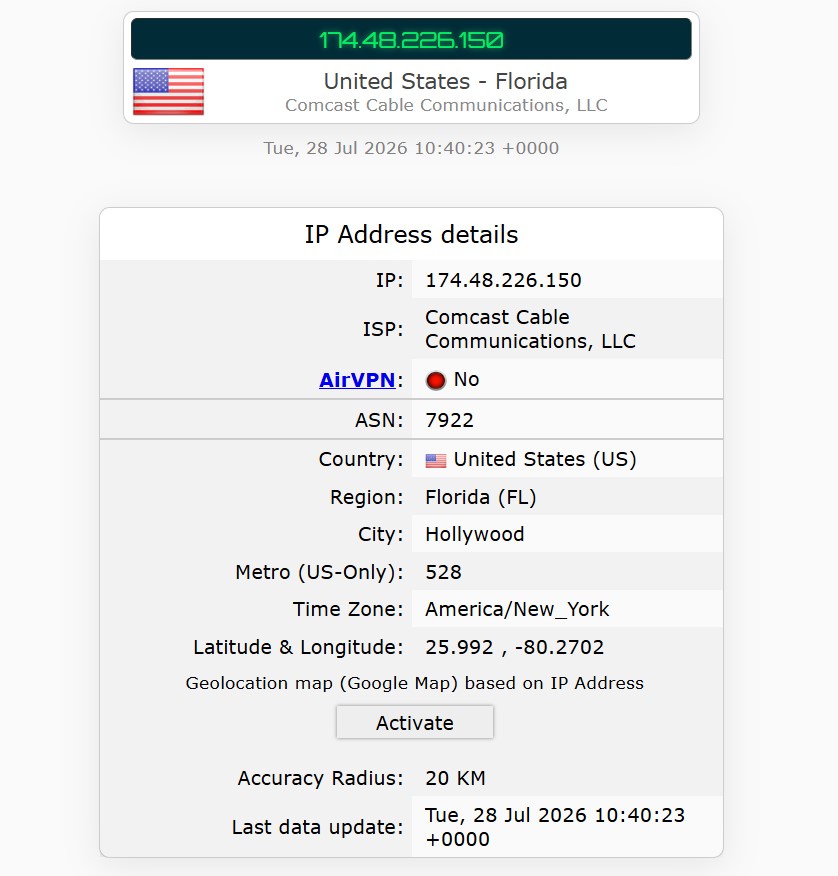
A second checker confirmed the geo: Florida, Hollywood, America/New_York, accuracy radius 20 km. AirVPN flag: No.
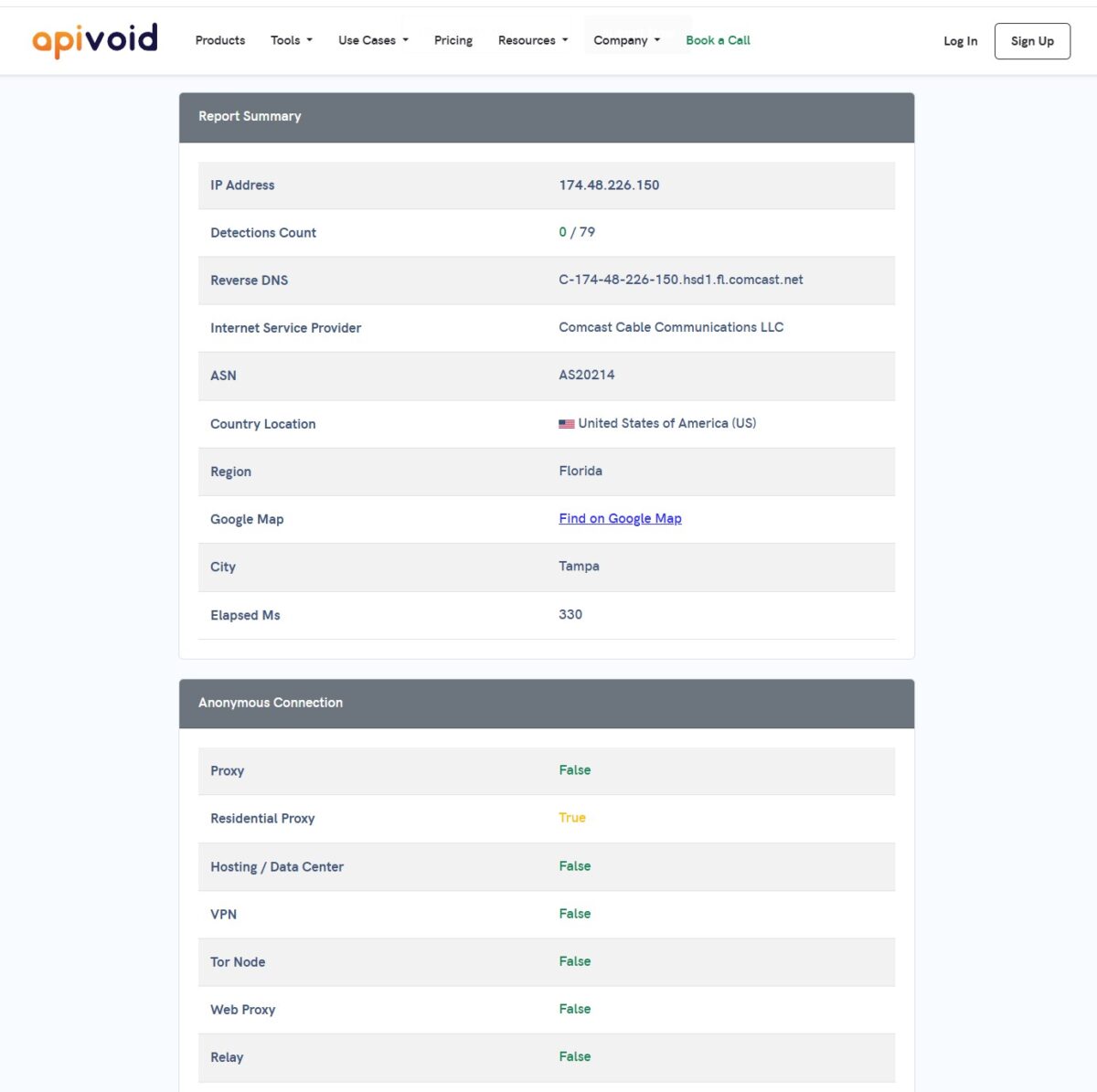
APIVoid returned 0 detections out of 79 reputation databases. The address appears in no spam lists and no threat feeds. In the Anonymous Connection block it honestly says Residential Proxy: True, while Proxy, Hosting/Data Center, VPN, Tor, Web Proxy and Relay all come back False. The distinction is simple: 0/79 means clean reputation, and the Residential Proxy flag just states membership in a residential proxy network. That alone is not a death sentence.
A small inconsistency: APIVoid read the ASN as AS20214 and the city as Tampa, while IPinfo gave AS7922 and Hialeah. Both autonomous systems belong to Comcast, and city level disagreement between geo databases is an eternal story with residentials. Country, state, ISP and timezone match across every source, and that’s what counts.
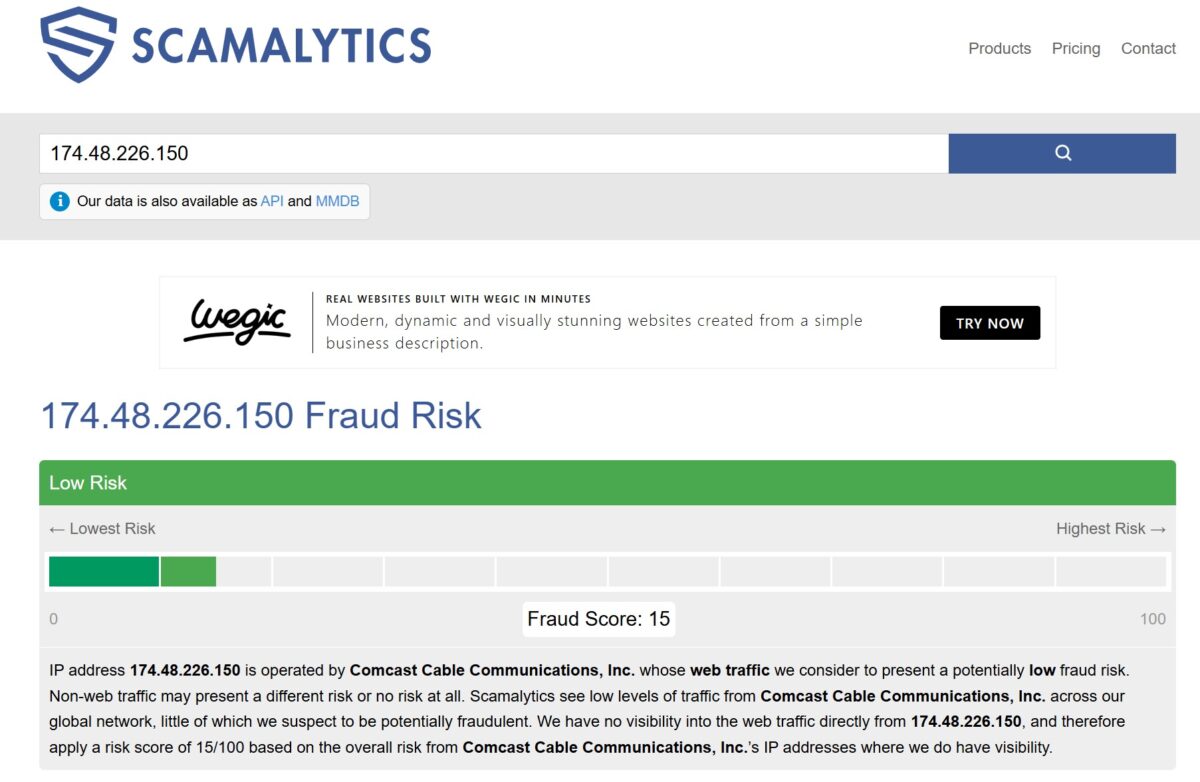
Scamalytics says 15 out of 100, Low Risk. That score reflects the general risk of Comcast address space. Fifteen is good. For comparison, corporate and datacenter addresses regularly hit 50+ there.
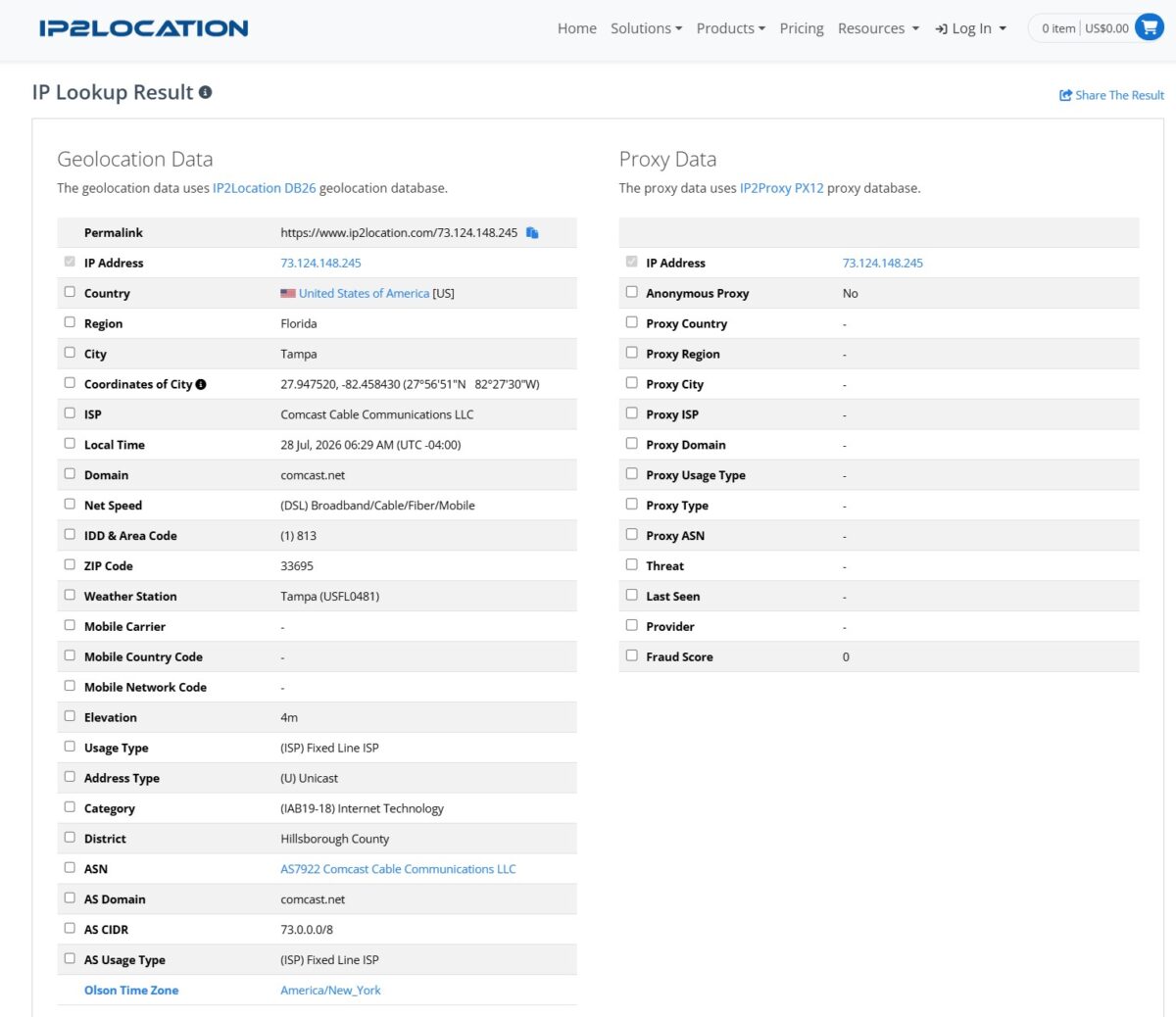
IP2Location, though, gave me something I don’t see often on a different address from the pool (73.124.148.245). Geo: Tampa, Florida, ZIP 33695, Comcast, Usage Type (ISP) Fixed Line ISP, Net Speed Broadband/Cable/Fiber. And the entire Proxy Data block is empty: Anonymous Proxy No, Proxy Type blank, Fraud Score 0.
That’s a strong result. The IP2Proxy database usually catches residential proxies and tags them RES with a fraud score of 35-50. Here the address isn’t flagged at all. Which means part of the pool is still unknown to the detectors.
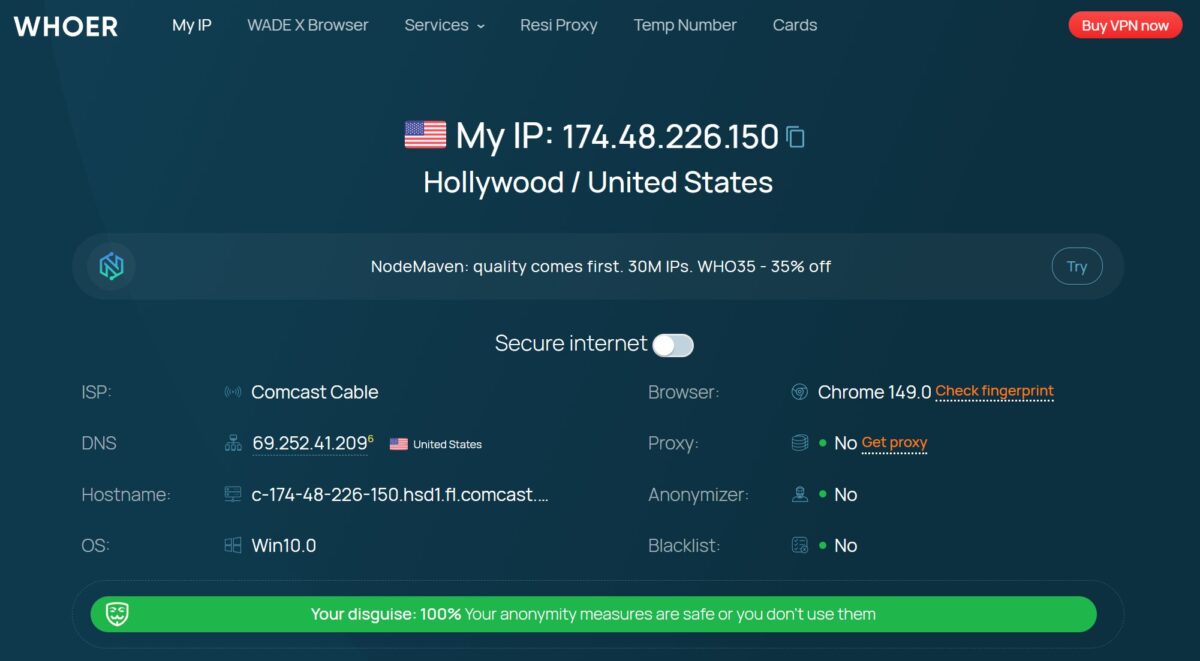
Whoer backed it up: 100% anonymity, no proxy visible, no anonymizer visible, blacklists clean, DNS 69.252.41.209 inside the Comcast network, hostname matches, Win10 and Chrome 149 consistent with the IP.
Antidetect and leaks
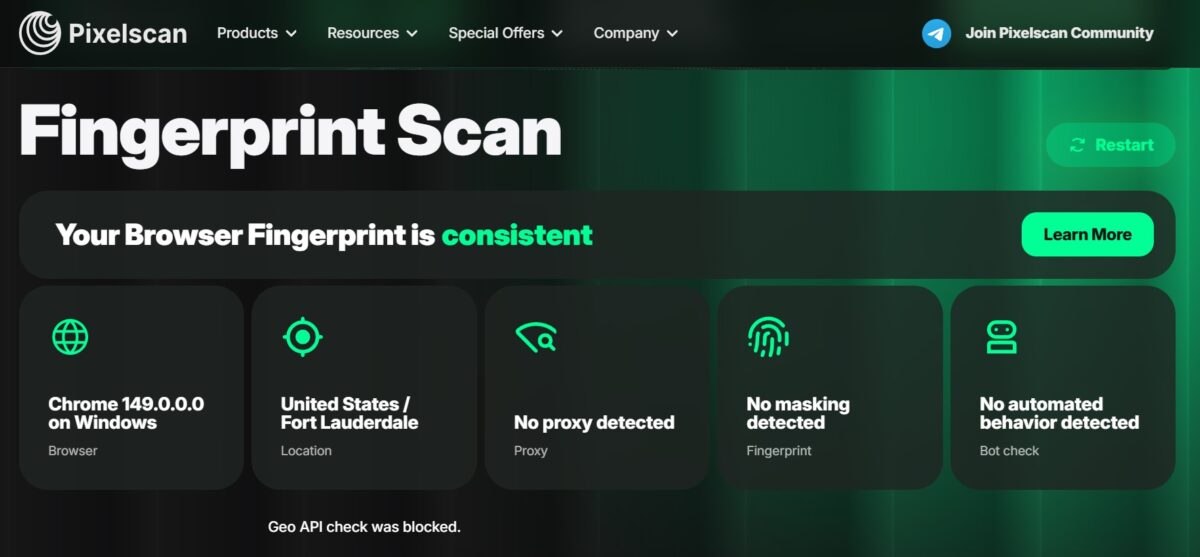
Pixelscan is the strictest public checker out there. Fingerprint came back consistent. “No proxy detected”, “No masking detected”, “No automated behavior detected”. Browser Chrome 149 on Windows, location United States / Fort Lauderdale. At the bottom there’s a “Geo API check was blocked” note, meaning the browser refused to hand over geolocation through the API, which is normal with permissions turned off.
For social media and marketplace work this is exactly the result you want: at the fingerprint level the proxy doesn’t give itself away.
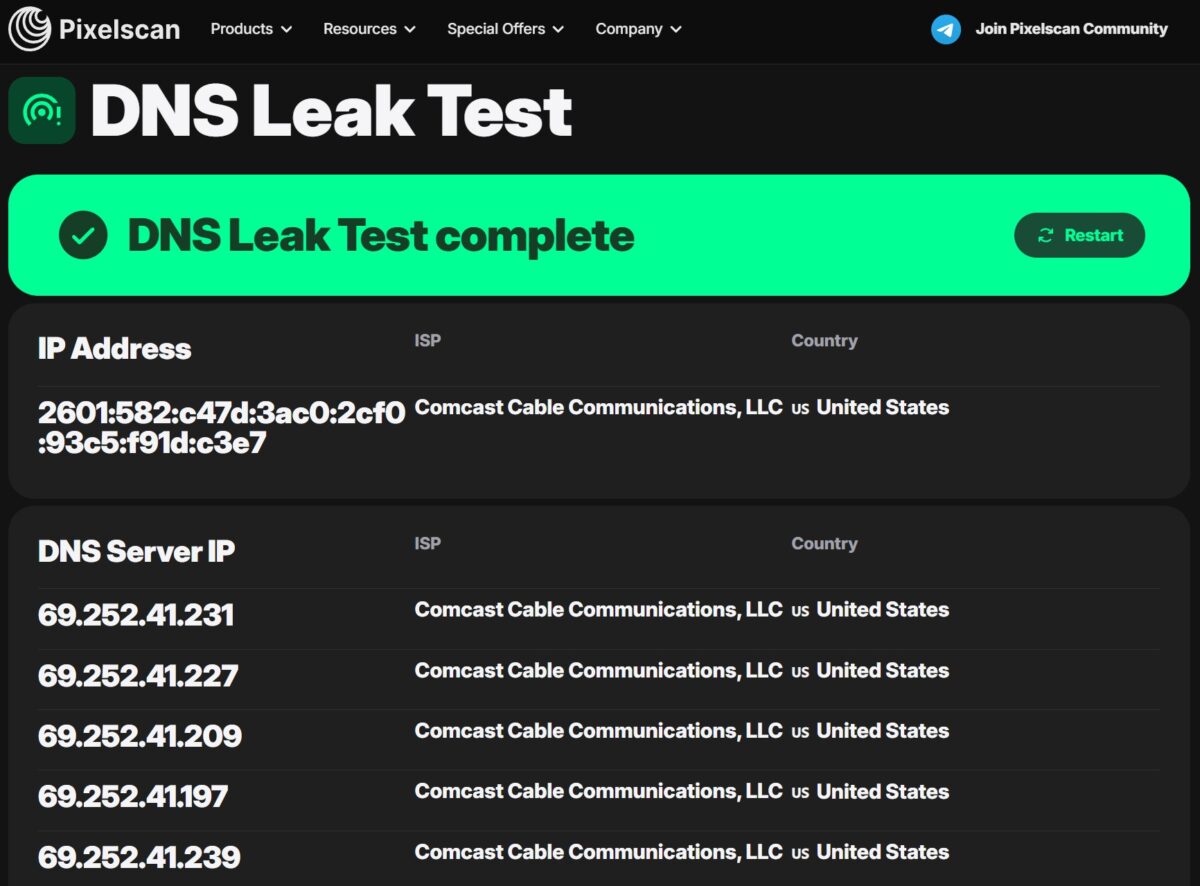
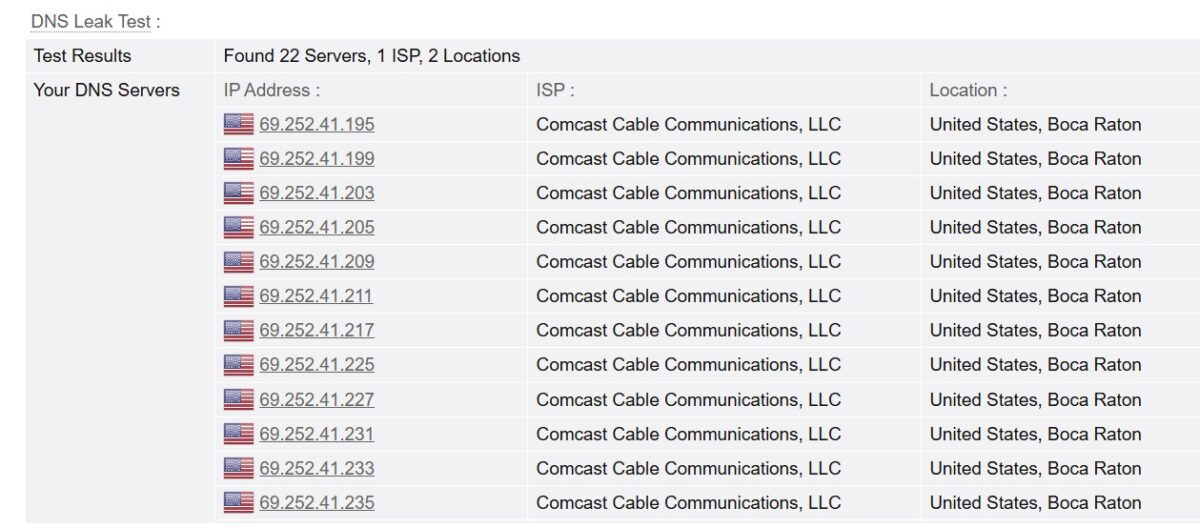
DNS is clean, and that matters more than people think. The second checker found 22 resolvers, every single one belonging to Comcast, one ISP, two locations inside Florida. Nothing wandered off to Google or Cloudflare. IP, ASN and DNS line up, so from a website’s point of view the requests come from a living cable subscriber in Florida.
Now the bad news.
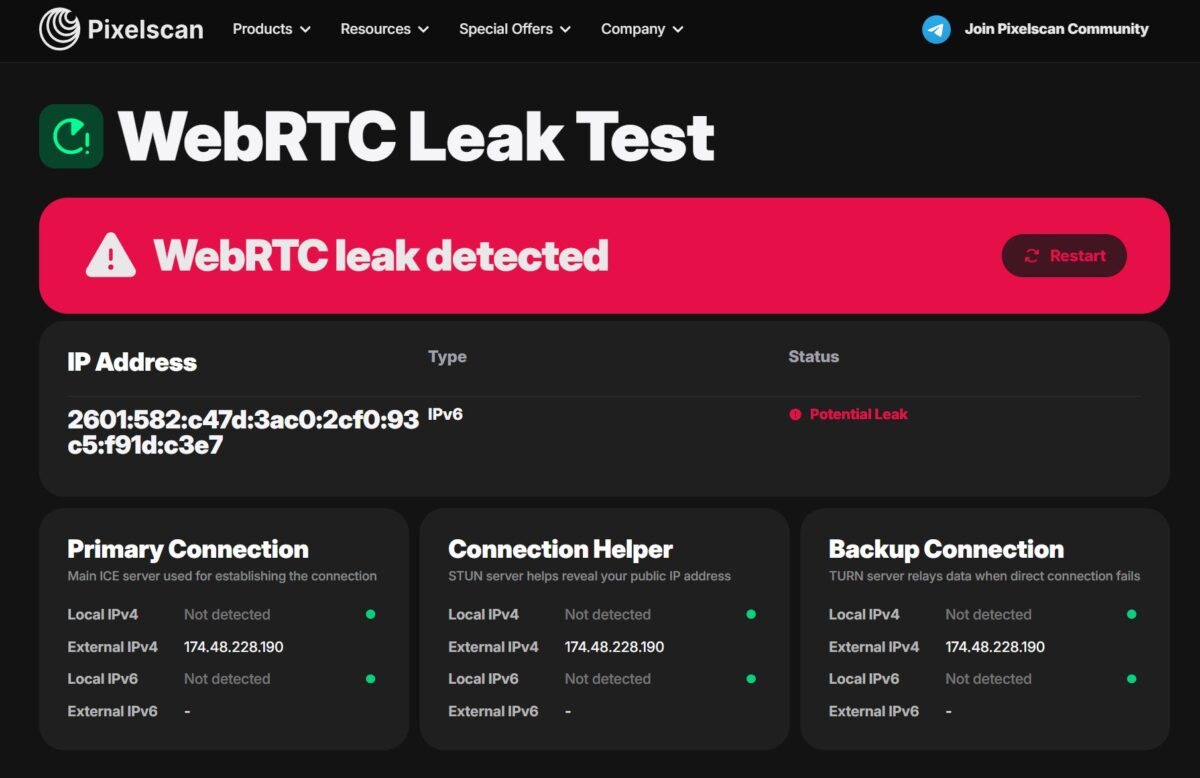
WebRTC leak detected. RTCPeerConnection pushed out an IPv6 address, 2601:582:c47d:3ac0:2cf0:93c5:f91d:c3e7, tagged as a Potential Leak. The external IPv4 shows 174.48.228.190 at all three points (Primary, Helper, Backup), so the proxy holds there, but version six slipped out on its own.
Let’s unpack this calmly. The 2601: prefix belongs to Comcast, so the leaked address comes from the same network as the exit node. The test machine’s real home IP never showed up. But the fact stands: an identifier left the browser that doesn’t match the proxy address and that antifraud can correlate across sessions. For scraping, who cares. For running an account farm it’s a hole, and you have to patch it by hand: disable IPv6 in the antidetect browser, kill WebRTC, or spoof it to the proxy IP. IPPeak came back clean in this same test, so blaming it on residentials in general won’t fly.
Blacklists
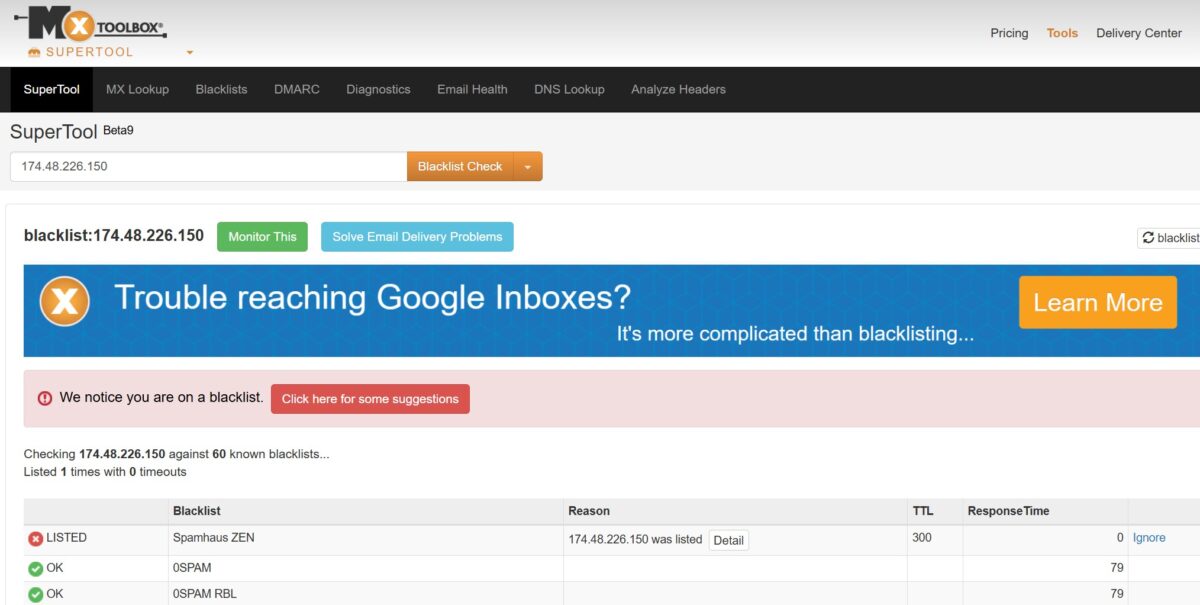
MXToolbox ran the address against 60 lists. One hit: Spamhaus ZEN.
Before anyone panics. ZEN includes PBL, the Policy Block List, which is not a registry of spammers. It’s a list of ranges that aren’t supposed to send mail directly to mx servers. Every residential Comcast, AT&T and Spectrum subscriber sits in it by default. That’s the design.
The practical takeaway is simple. For scraping, social media, marketplaces, SEO and ad verification this entry changes nothing, because Google, Instagram and Amazon look at ASN, hostname and fraud score, not at PBL. For sending email straight through the proxy, forget it. Residentials were never built for that.
Speed
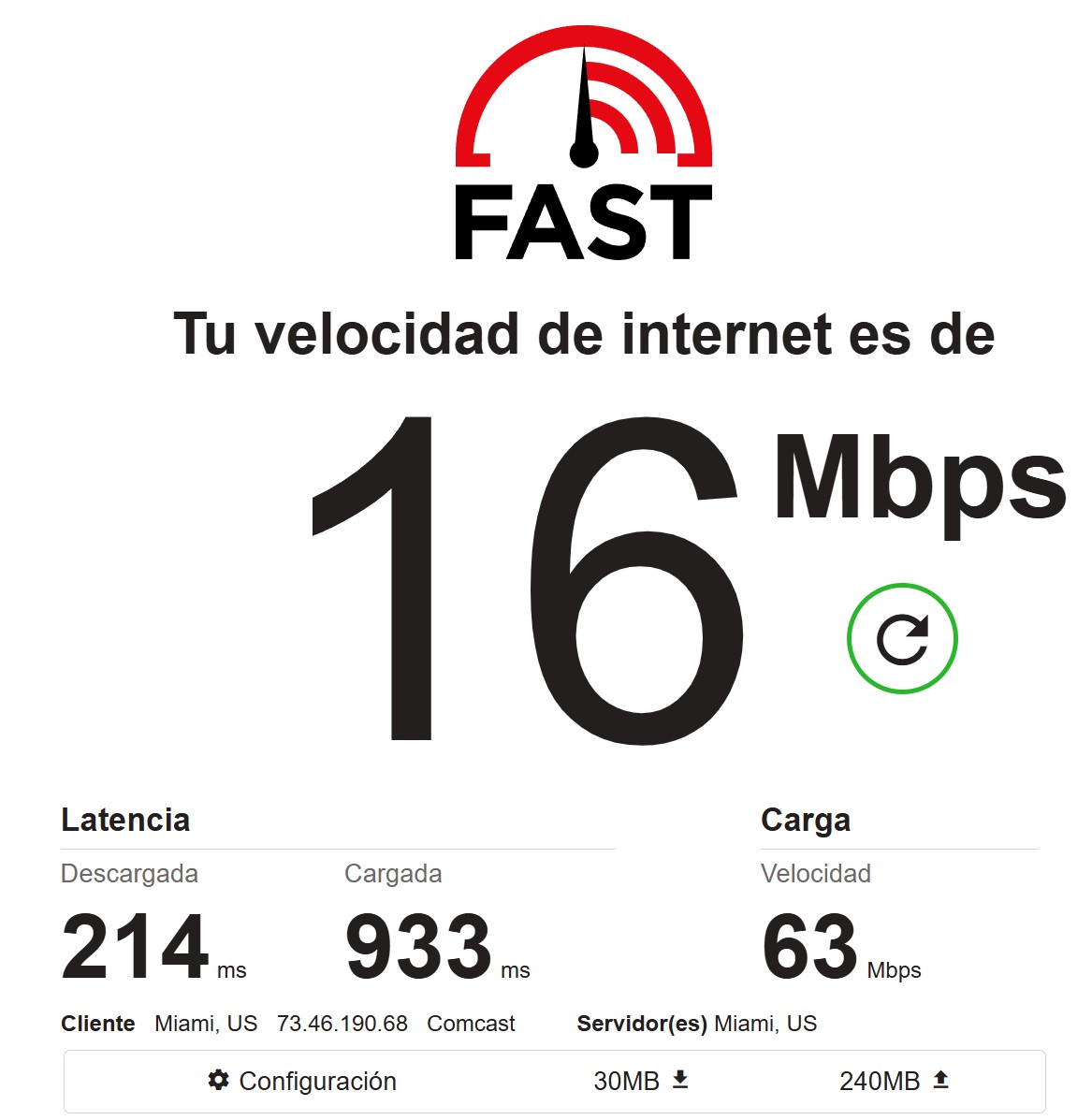
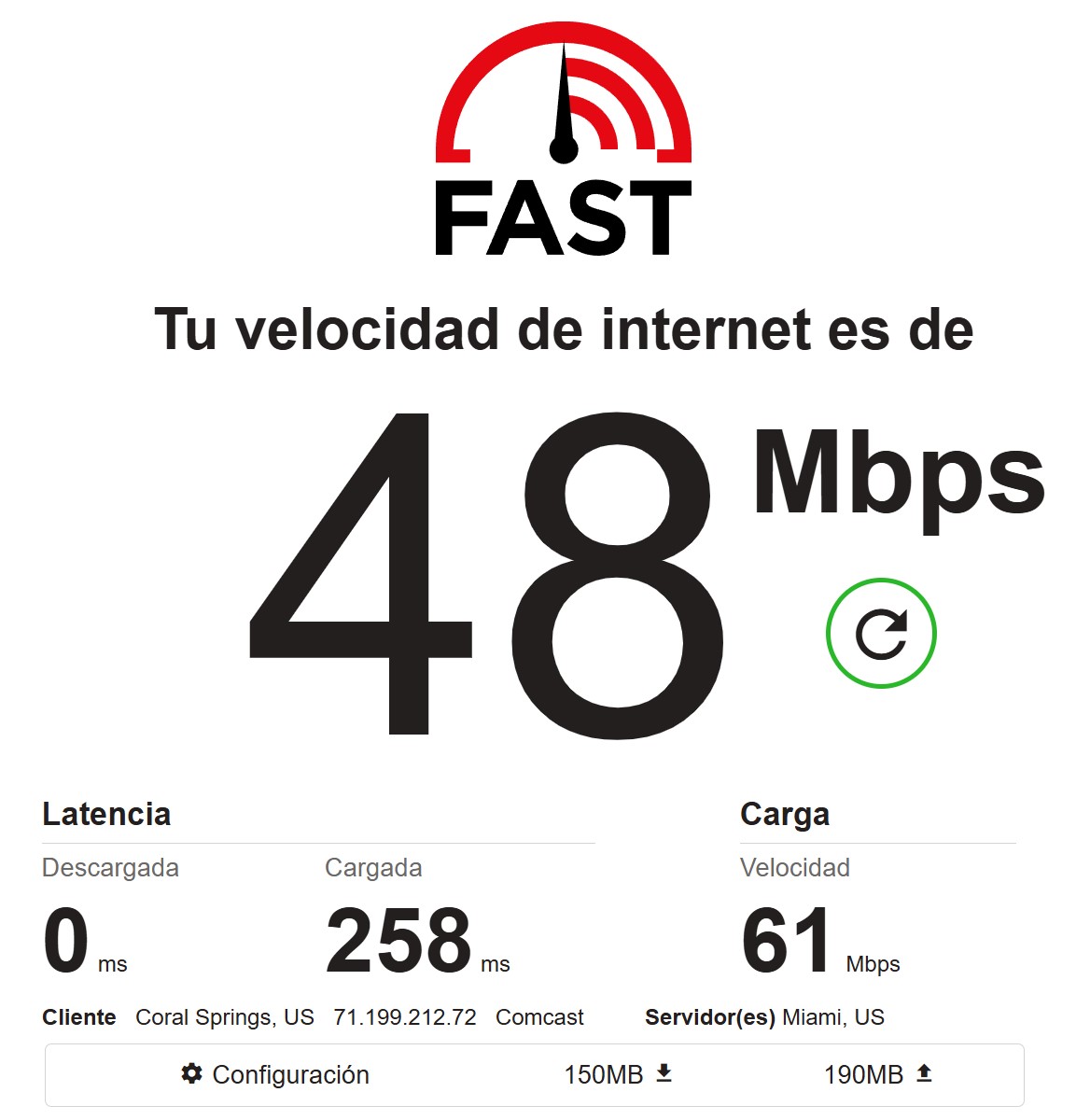
Two single measurements gave 16 and 48 Mbps on download. A threefold spread, which is normal for residential: different exit nodes, different home connections. Latency under load blew up to 933 ms in the first case and stayed at 258 in the second. Upload came in at a fantastical 61-63 Mbps both times, which looks odd for a home cable line and is most likely a quirk of how fast.com measures through a proxy. I don’t take those numbers seriously.
A single measurement is a lottery anyway. So, on to the pool.
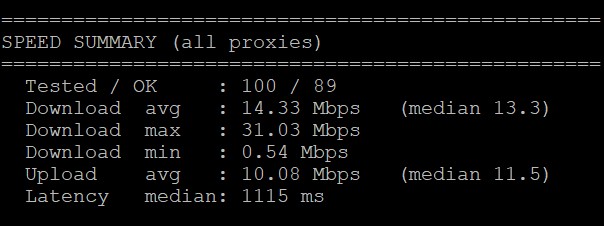
A hundred proxies through a VPS. 89 worked, eleven dropped. Average download 14.33 Mbps, median 13.3, ceiling 31.03, floor 0.54. Upload averaged 10.08 with a median of 11.5. Median latency: 1115 ms.
The speed is good for residential. Thirteen megabits at the median is noticeably above what IPPeak showed (7-8) and NodeMaven (around 9). Plenty for scraping and for handling media content in reasonable volumes.
Latency is the weak spot. Over a second per request is slow. ProxyStats data on this provider from independent runs paints the same picture: a median somewhere around 1000-1460 ms. So my result reproduces and isn’t a fluke. The “response time < 0.5 sec” claim on the site has nothing to do with reality, they miss it by a factor of two or three.
Pool quality and stability
The main test of this review. 400 proxies through a script on a VPS.
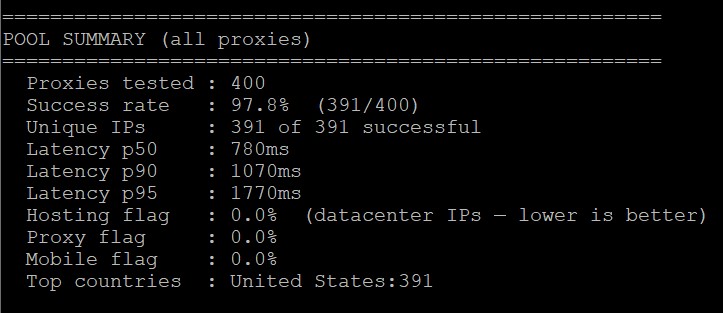
Line by line.
Success rate 97.8%, 391 alive out of 400. Nine failures across four hundred is acceptable, though it doesn’t reach IPPeak’s 99.8%.
Unique IPs: 391 out of 391. Not one repeat. This is probably the most interesting result in the whole review. Remember the complaint from the intro about those dubious 90 million and the blank in the IP uniqueness column at ProxyStats? On a sample of 400 the pool returned four hundred different IPs without a single duplicate. That doesn’t prove ninety million, obviously, but it doesn’t look like a cramped reseller network either.
Hosting flag 0.0%, Proxy flag 0.0%, Mobile flag 0.0%. Not a single datacenter address got mixed into the residential output. No mobile ones either, which makes sense since they’re sold separately.
Top countries: United States 391. Every last one in the ordered country, no bleed into neighboring geos.
Pool latency: p50 780 ms, p90 1070, p95 1770. The p95/p50 ratio sits around 2.3, spread is moderate, no brutal tails.
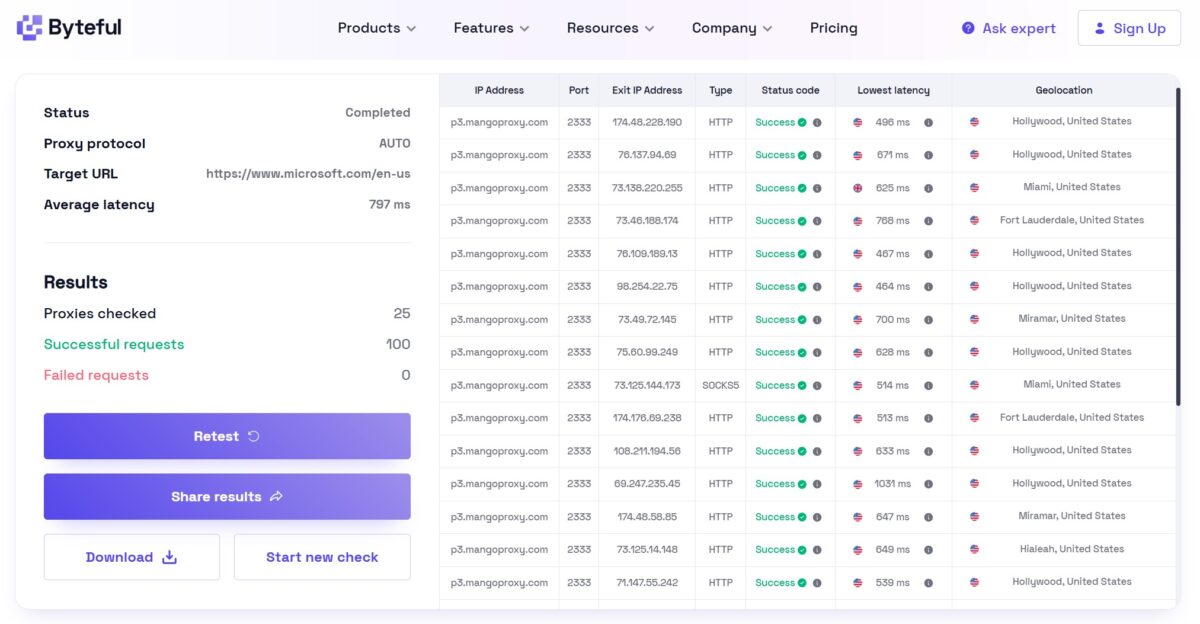
Byteful confirmed it on microsoft.com: 25 proxies, 100 successful requests, zero failures, average latency 797 ms. I paid separate attention to the Geolocation column: Hollywood, Miami, Fort Lauderdale, Miramar, Hialeah. Different cities, all within the South Florida metro area, which is what you’d expect when targeting Hollywood. One row went through SOCKS5, the rest over HTTP, with no behavioral difference.
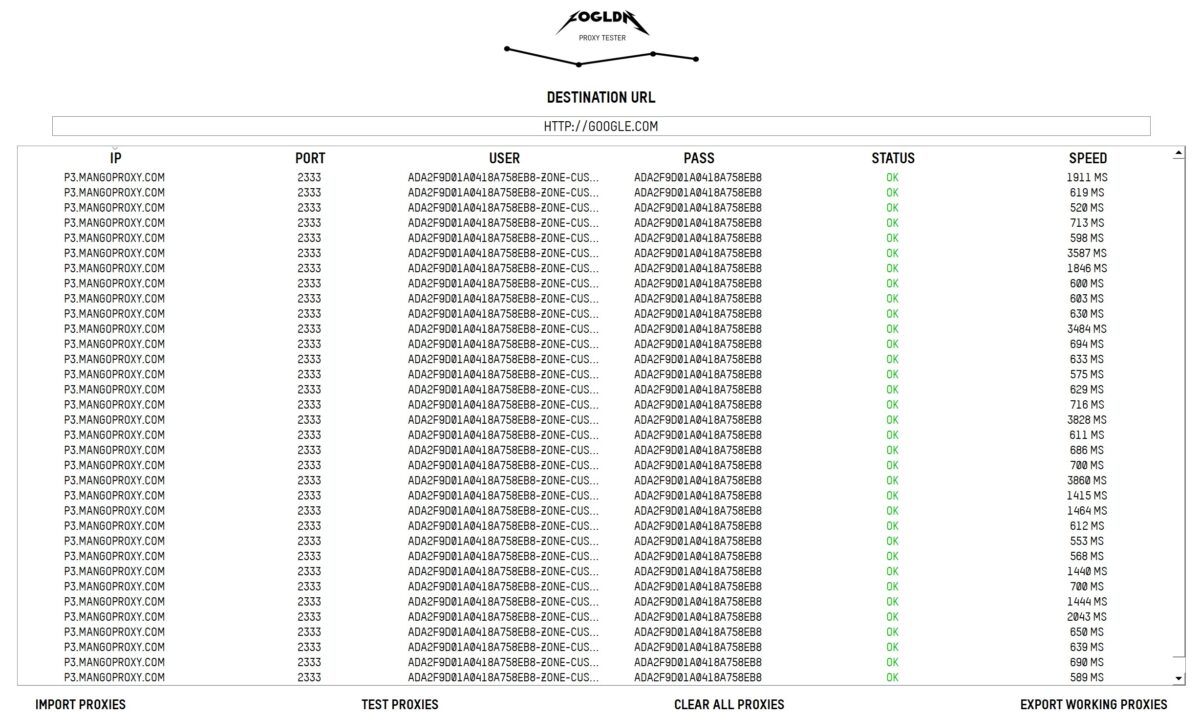
FOGLDN finished the picture: several dozen proxies against google.com, OK status on every one. Most responses landed between 520 and 850 ms, but there were outliers: 1911, 2043, 3484, 3587, 3828, 3860 ms. Roughly every seventh or eighth address lags three to four times behind the average. No failures, but I wouldn’t call the pool even. Google lets them all through without a captcha.
What I didn’t like: stats and billing
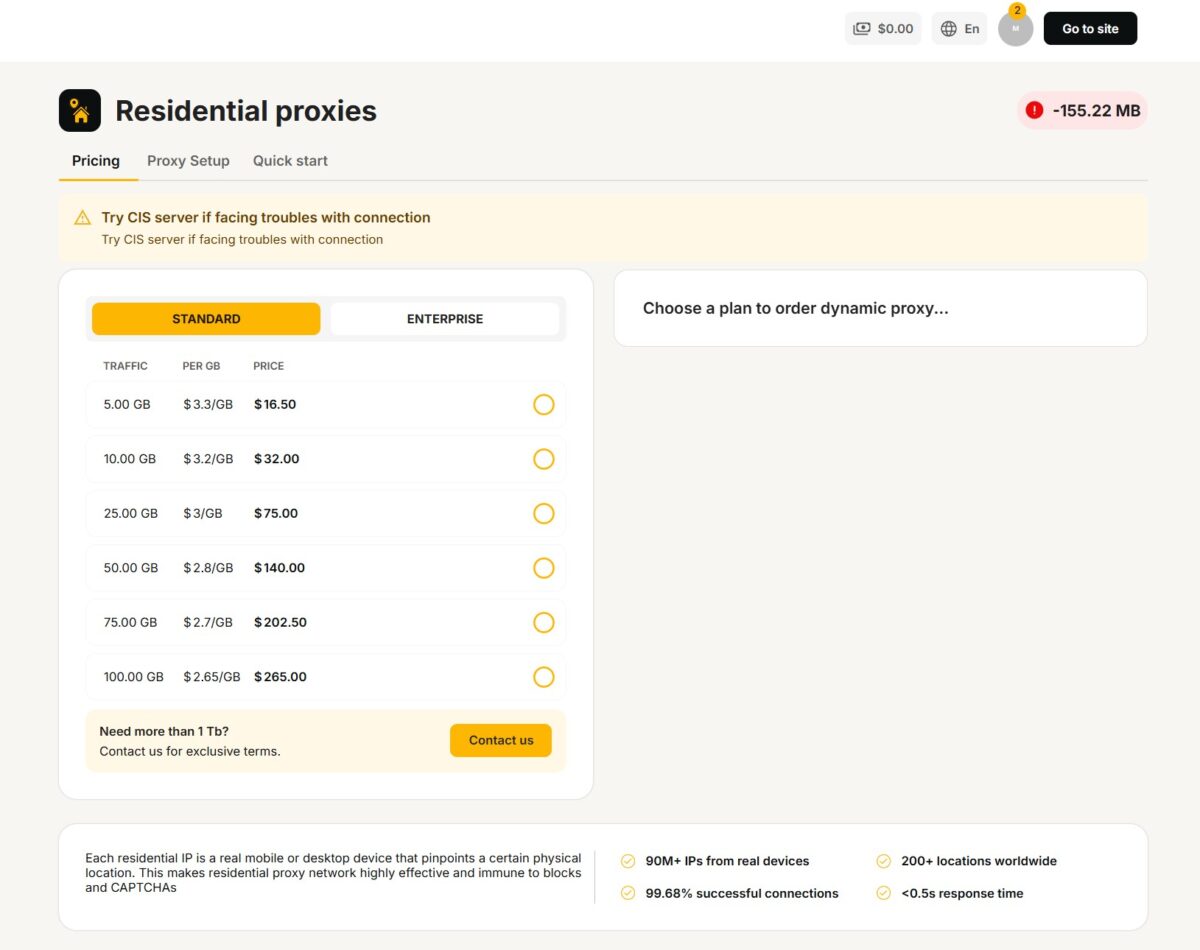
While I still had traffic, the stats section opened fine. The moment the package ran out, the section went dark, and all the dashboard shows me now is a red banner reading -155.22 MB. So the service let me run 155 megabytes into the negative (thanks for not cutting the session mid run), and along with zeroing out the package it cut off access to the usage history.
The logic is clear enough: no active plan, no section. The logic is still wrong. Traffic history is my data for money I already spent, and it should stay available at least in read mode.
Second complaint about the stats themselves: they’re shallow. You get usage numbers, you get no logs by source. Where exactly the gigabytes went, which domains, which subaccounts over time, none of that is visible. When several jobs run in parallel and traffic melts faster than expected, there’s nothing to investigate. Decodo and Oxylabs give you per request and per target breakdowns. Here there’s nothing.
Final scorecard
| Parameter | Result | Score |
|---|---|---|
| Download / Upload (100 proxy pool) | 14.33 / 10.08 Mbps (median 13.3 / 11.5) | 4/5 |
| Latency (400 proxy pool, p50) | 780 ms, 1115 ms median in the speed test | 3/5 |
| Success rate (400 proxies) | 97.8% (391/400) | 4/5 |
| Pool uniqueness | 391 of 391, no duplicates | 5/5 |
| Hosting / Proxy / Mobile flag | 0.0% / 0.0% / 0.0% | 5/5 |
| Geo accuracy | 391/391 in the US, city within the metro area | 5/5 |
| Fraud Score | 15/100 Scamalytics, 0/100 IP2Location | 5/5 |
| IP Reputation (APIVoid) | 0 detections out of 79 | 5/5 |
| Blacklists (MXToolbox) | 1 of 60, Spamhaus ZEN (PBL) | 4/5 |
| ISP type | Residential, AS7922 Comcast, hsd1, hosted domains 0 | 5/5 |
| Proxy detection (Pixelscan) | No proxy detected, fingerprint consistent | 5/5 |
| WebRTC | IPv6 leak | 3/5 |
| DNS Leak | Clean, all 22 resolvers inside Comcast | 5/5 |
| Byteful / FOGLDN | 100 of 100 successful, OK across the board | 5/5 |
| Geo targeting | Country, state, city, ASN/ISP, CIS server | 5/5 |
| Sticky sessions | up to 120 minutes, configured in the string | 4/5 |
| Built in proxy checker | Yes, tests against a target URL | 5/5 |
| Stats and logs | Disappear once the package runs out, no breakdown | 2/5 |
| Refunds | “All sales are final”, 48 hour window | 1/5 |
| Price | $3.3/GB entry, $2.0 at 1 TB | 4/5 |
| Overall | 4.2/5 |
- The pool is honest. 400 proxies, 391 unique IPs with zero duplicates, hosting flag 0.0%, every address in the ordered country.
- Genuine residential. AS7922 Comcast, AS Type isp, hostname hsd1.fl.comcast.net, hosted domains 0, abuse contact at comcast.net.
- Clean addresses. Scamalytics 15/100, APIVoid 0 detections out of 79, and IP2Location didn’t recognize one of the addresses as a proxy at all, giving it a Fraud Score of 0.
- The proxy stays hidden. Pixelscan says “No proxy detected”, fingerprint consistent, Whoer anonymity 100%.
- No DNS leaks. All 22 resolvers inside the Comcast network, nothing wandering off to a third party provider.
- Above average speed for the residential segment. Median 13.3 Mbps across a hundred addresses, peak 31.
- Full pass rate on live targets. Byteful 100/100 on microsoft.com, FOGLDN OK across the board on google.com, Google with no captcha.
- Built in proxy testing against a target URL right in the generator, with automatic selection of the best ones. Haven’t seen that from any competitor.
- Flexible targeting: country, state, city, ASN/ISP, plus a dedicated CIS gateway for users in that region.
- Complete protocol set: HTTP, HTTPS, SOCKS4, SOCKS5, SSH. Quick input in the antidetect browser parses the string on its own.
- Free tools on the site: proxy checker, DNS leak test, port scanner, IP trace.
- Crypto payments with no verification, 11+ currencies.
- IPv6 leak through WebRTC. The most serious technical issue here, and you have to patch it by hand for multi-accounting.
- Latency. p50 780 ms across the pool and a 1115 ms median in the speed test against the advertised “under 0.5 seconds”. They miss by a factor of two or three.
- Stats vanish along with the traffic. Once the package hits zero, all that’s left is a -155.22 MB banner.
- No usage breakdown. No logs by domain, no split by source.
- Refunds. “All sales are final”, three narrow exceptions, a 48 hour window. Tougher than any of the top six providers.
- The $0.6/GB storefront price is unreachable on regular packages. Real entry point is $3.3.
- Trustpilot 3.5 with 66% negative, while the homepage only displays Reviews.io at 4.91. Sample size doesn’t explain the gap.
- Speed spread inside the pool runs from 0.54 to 31 Mbps, and every seventh address in FOGLDN lags three times behind.
- Cards only after KYC with a passport and a selfie.
- No PayPal, no Wise, no invoicing for companies.
- The origin of the residential IPs is described with talk of “ethical sources” without naming a single SDK partner or opt-in mechanism.
- No trial in the usual sense, minimum entry is $16.50.
- API documentation is limited to snippets for C#, Python, Node.js and cURL, with no proper REST API for session management.
Overall impression
I went into this test biased. A Dubai free zone, a marketing agency among the founders, a claim of 90 million IPs from a two year old service, a storefront price five times below the real one, a hidden Trustpilot. That’s a solid pile of red flags.
The tests didn’t confirm the bias.
The pool turned out to be fine. Four hundred addresses without a single duplicate, zero datacenter filler, all in the ordered country, AS7922 Comcast with a residential hsd1 hostname and no parked domains. Fraud scores are low across all three independent databases, and IP2Location didn’t even recognize one of the addresses as a proxy. Pixelscan says no proxy detected. DNS doesn’t leak. Live targets pass at a hundred percent, Google lets you through without a captcha. Median speed of 13 megabits is higher than half the services I’ve tested this year.
So the network is real and it works. The complaints I’m left with sit in two other areas.
The first one is technical, and there’s only one: WebRTC leaks IPv6. Doesn’t matter for scraping, but for an account farm it’s a hole you have to close in your antidetect settings. Plus latency around a second, which is uncomfortable for anything real time.
The second is about how the service treats its customers. And that part is uglier. “All sales are final” with a 48 hour window, stats that vanish once the package runs out, no traffic breakdown, $0.6 on the storefront against $3.3 at checkout, an invisible Trustpilot. None of these points are about proxy quality. All of them are about the fact that if something goes wrong, the customer will have neither data nor leverage.
It’s an odd balance sheet. Technically I’d give it 4.5. Factoring in billing, transparency and the refund policy, it comes out at 4.2 out of 5.
A rare case where the network is better than its reputation and the customer experience is worse than its network. MangoProxy’s pool is the real thing: Comcast, clean fraud scores, zero duplicates across four hundred addresses. But billing with no breakdown and “all sales are final” is what cost them almost a full point. 4.2 out of 5, and start with the smallest package.
Who it fits. Scraping moderately protected targets, SEO and SERP monitoring, ad verification, account work through Dolphin Anty or Undetectable with IPv6 turned off. Especially if you pay in crypto and want Russian speaking support on Telegram.
Who it doesn’t fit. Anything with a strict SLA and latency requirements. Enterprise clients who need invoices, a contract and a clear story behind where the IPs come from. Anyone planning to drop several hundred dollars at once: start with the minimum package, because getting your money back is close to impossible. And email sending, though that’s a problem with every residential network out there.
This isn’t a complete breakdown of every feature. The review will be updated: Cloudflare and Datadome tests are coming, along with a check on real sticky session duration, a measurement of ASN targeting accuracy and a separate run on the static ISP proxies. Logs are saved, and I’ll re-verify any number on request.