





 Why Trust Us?
ToProxyLab has been testing proxy services since 2025. We pay for most plans ourselves, and when a provider gives us test traffic we say so in the review — free traffic buys a place in the testing queue, nothing else. Every provider goes through the same speed, uptime and fraud-score checks, and we publish the real numbers, including the bad ones. A rating cannot be bought. Learn who we are and how we review proxies.
Why Trust Us?
ToProxyLab has been testing proxy services since 2025. We pay for most plans ourselves, and when a provider gives us test traffic we say so in the review — free traffic buys a place in the testing queue, nothing else. Every provider goes through the same speed, uptime and fraud-score checks, and we publish the real numbers, including the bad ones. A rating cannot be bought. Learn who we are and how we review proxies.
A RapidProxy rep reached out with the usual offer: they give me 2 GB of traffic, I run it through every test I’ve got and publish an honest breakdown. Standard stuff. I took the traffic, but the deal here is simple: a provider buys a spot in the queue, not my loyalty. Every step is documented with screenshots, every number can be re-checked. Drop me a line if you want to. I’ve had providers quietly vanish after a bad score before, and that’s their call. My job is one thing: report what’s actually there.
Who Is Behind RapidProxy
They launched in May 2025. The brand belongs to Flux Stream Network Limited, registered in Tsim Sha Tsui, Hong Kong: “RM A5, 7/F, Astoria Building, No.34 Ashley Road”. That’s a typical shared office address where hundreds of companies sit on the same few floors. The launch itself was announced through a ZEX PR WIRE press release on May 17, 2025. Who founded it? The press release just says “CEO of RapidProxy.io”. No first name. No last name. Compare that to Bright Data, Oxylabs or Decodo, who publish their leadership and company history openly. Here there’s nothing. That’s not a death sentence, but it’s a fact worth keeping in mind.
As I write this, the service is under a year and a half old. That’s young even by proxy market standards.
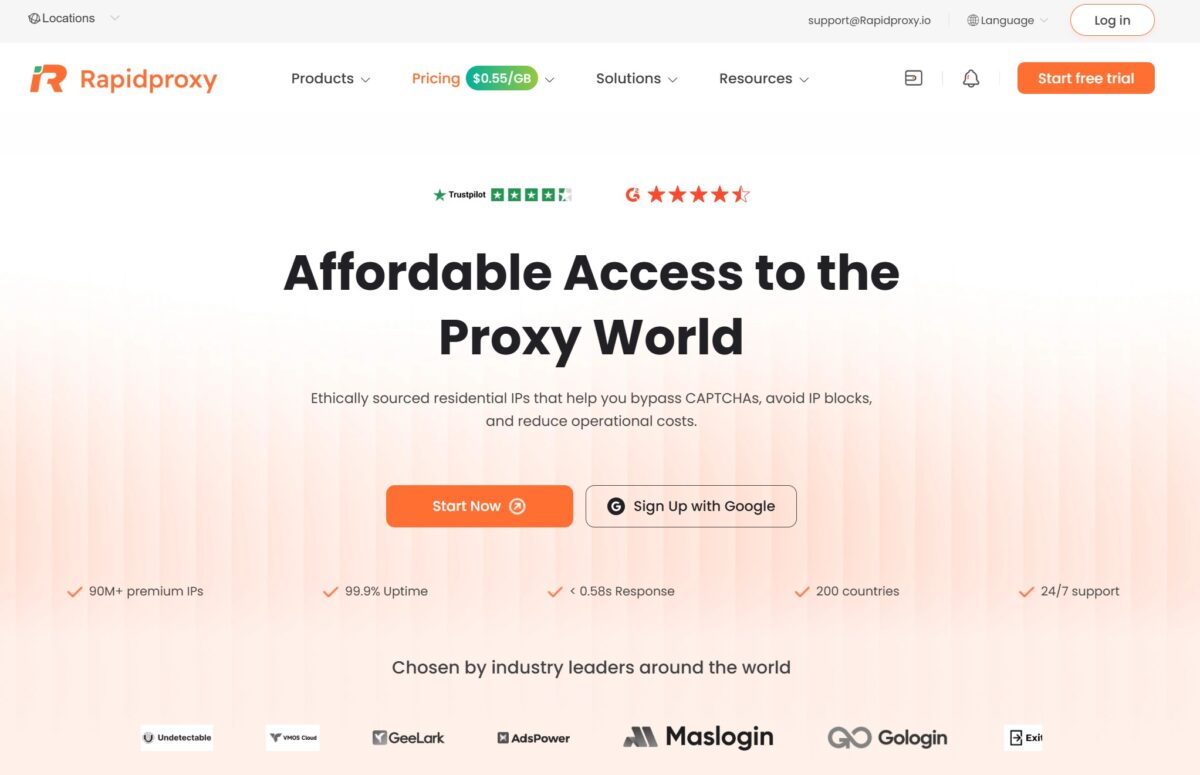
What They Actually Sell
The price list has three items.
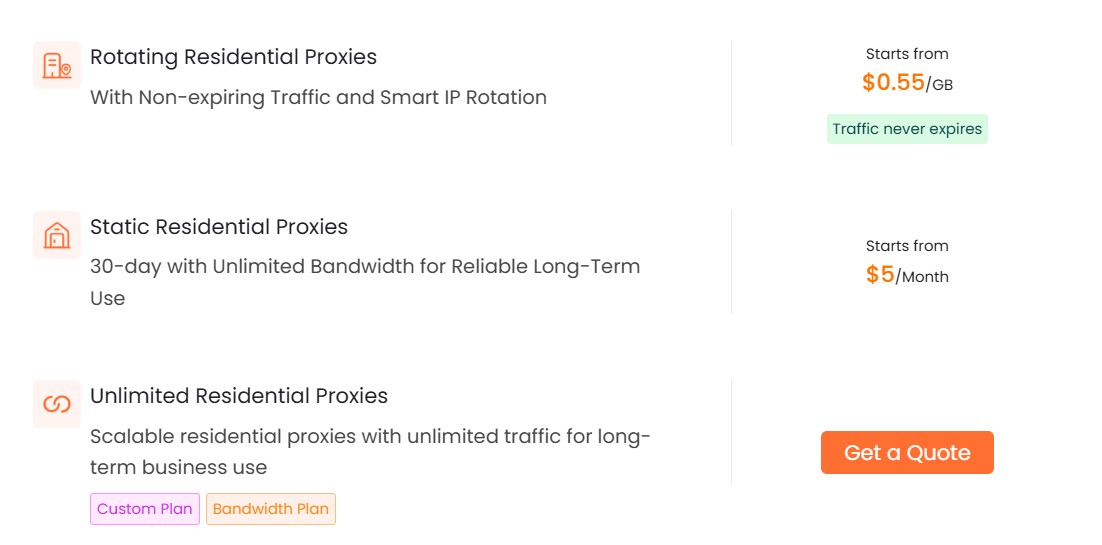
- Rotating Residential – pay per GB, starting at $0.55/GB according to the site.
- Static Residential (ISP) – $5 per IP per month with unlimited traffic for 30 days.
- Unlimited Residential – an enterprise plan “on request”, behind a “Get a Quote” button.
No mobile proxies. No datacenter proxies as a separate product. Yet on their own blog the company talks about “residential, datacenter, and ISP proxies” as if all three were theirs. In the price list, datacenter simply doesn’t exist. Bright Data, Oxylabs, IPRoyal and SOAX all give you the full lineup. RapidProxy covers roughly two thirds of the bare minimum.
One more detail on the Unlimited plan. Here’s the pricing screen:
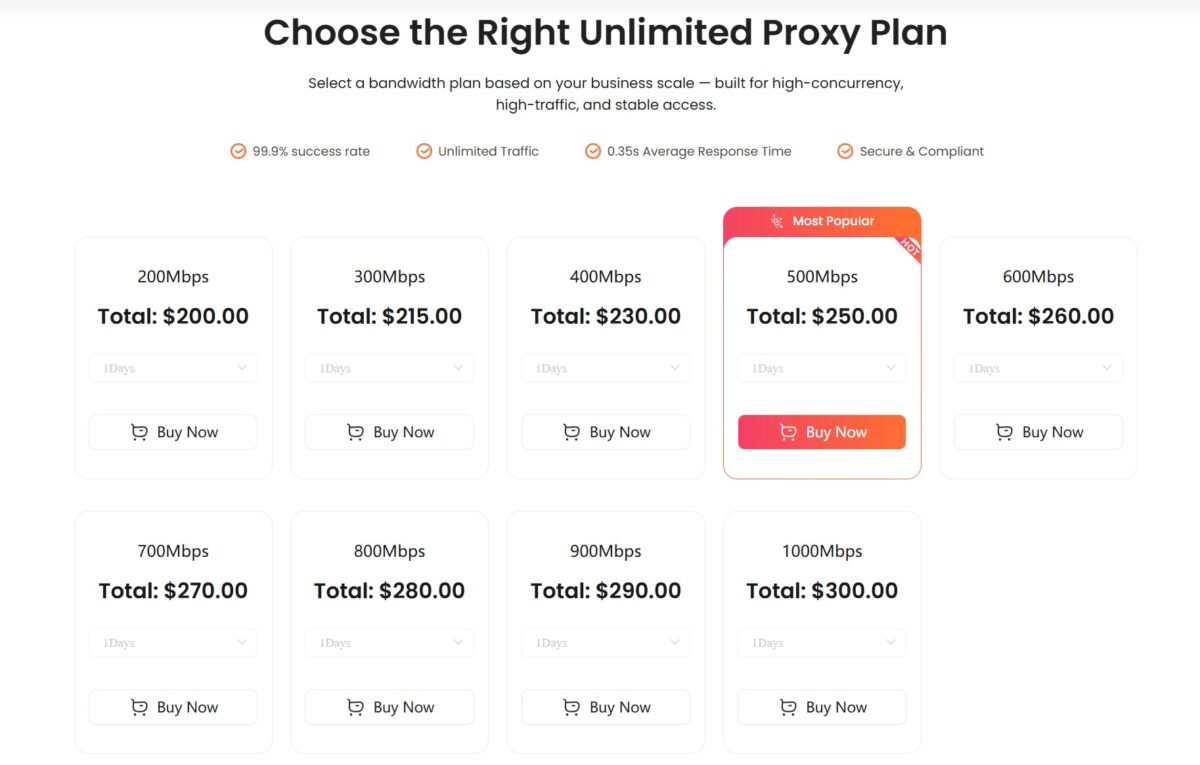
These are bandwidth-based plans, from 200 Mbps at $200 per day up to 1000 Mbps at $300 per day. It’s an unusual model, but it works fine for heavy-load jobs.
Dashboard and Proxy Setup
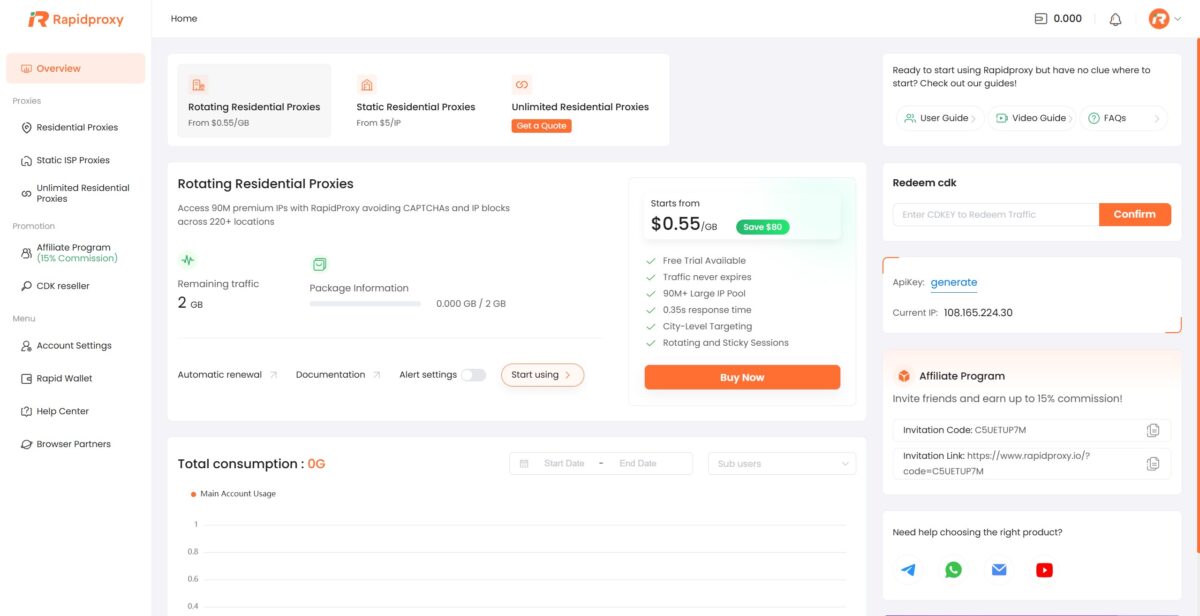
The dashboard looks clean. Navigation on the left: Overview, Residential Proxies, Static ISP Proxies, Unlimited Residential Proxies, Affiliate Program, CDK reseller. Your remaining traffic sits up top, and quick access to your API Key and support is on the right. There’s also a “Redeem CDK” section for promo codes.
You configure the proxies in the “Use Proxy” section.
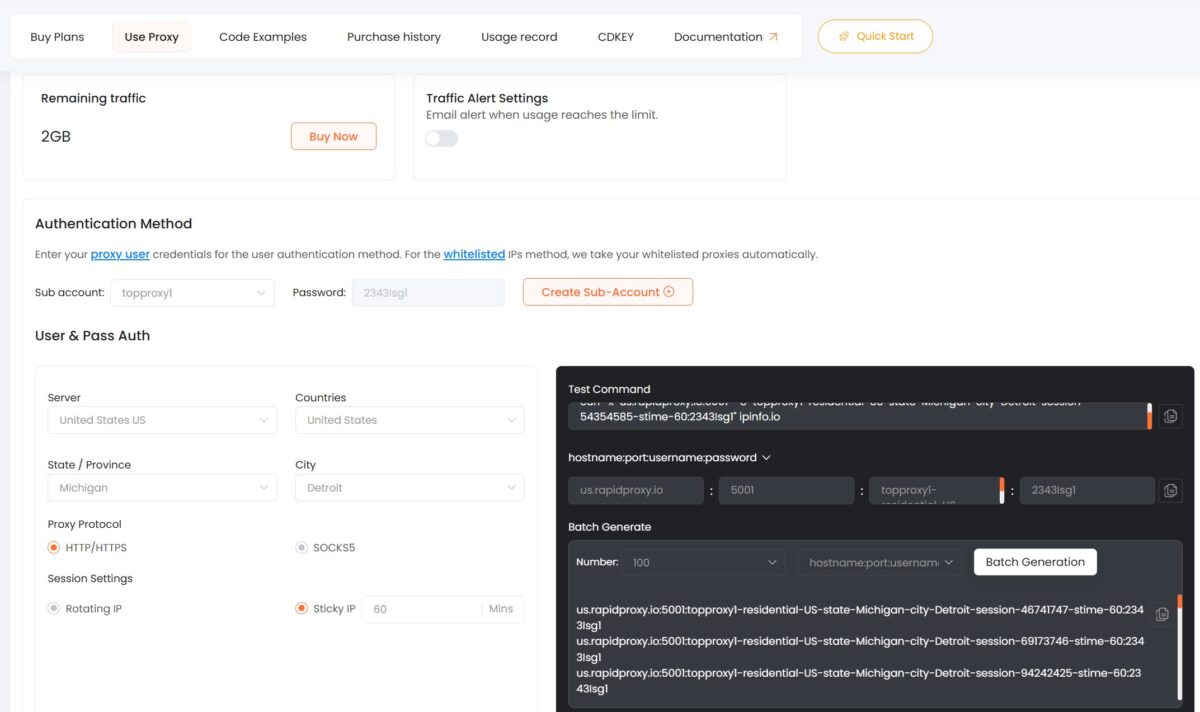
You pick a country, state, city, protocol and session mode. Sticky IPs hold for up to 60 minutes. Right there you can copy a ready connection string in hostname:port:username:password format, or spin up a whole list with Batch Generate.
And here’s the first real annoyance.
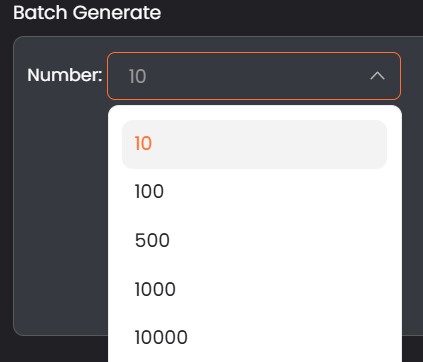
You can only pick the number of proxies from a fixed dropdown: 10, 100, 500, 1000, 10000. No manual input at all. If you need exactly 50 or 400 proxies, tough luck. You’ll have to grab more than you need. It’s clumsy, especially when you’re on a small traffic package and want tight control over what you burn. With Decodo or Oxylabs it’s just a text field where you type any number you want.
That’s exactly why I tested 500 proxies for pool quality and 100 for speed instead of my usual 400 and 50.
Adding the Proxy to an Antidetect Browser
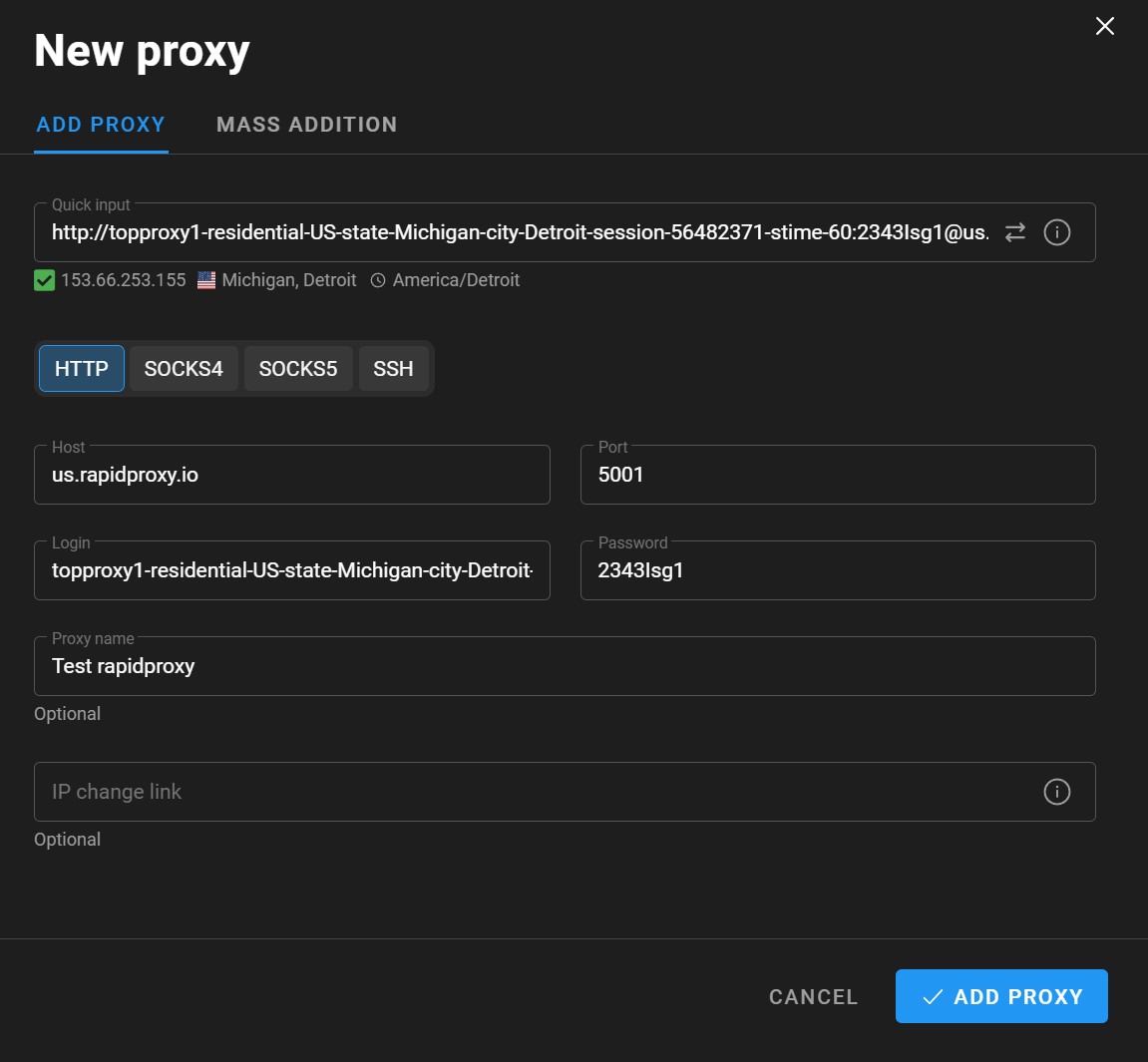
I pasted the connection string into the antidetect browser through Quick input. It parsed correctly: host us.rapidproxy.io, port 5001, username and password. The built-in checker immediately showed IP 153.66.253.155, Michigan, Detroit, timezone America/Detroit. The advertised city matched the real one.
Protocols in the interface: HTTP, SOCKS4, SOCKS5, SSH. Full set.
Breaking Down a Single IP
The working address for my single-IP test: 153.66.253.155.
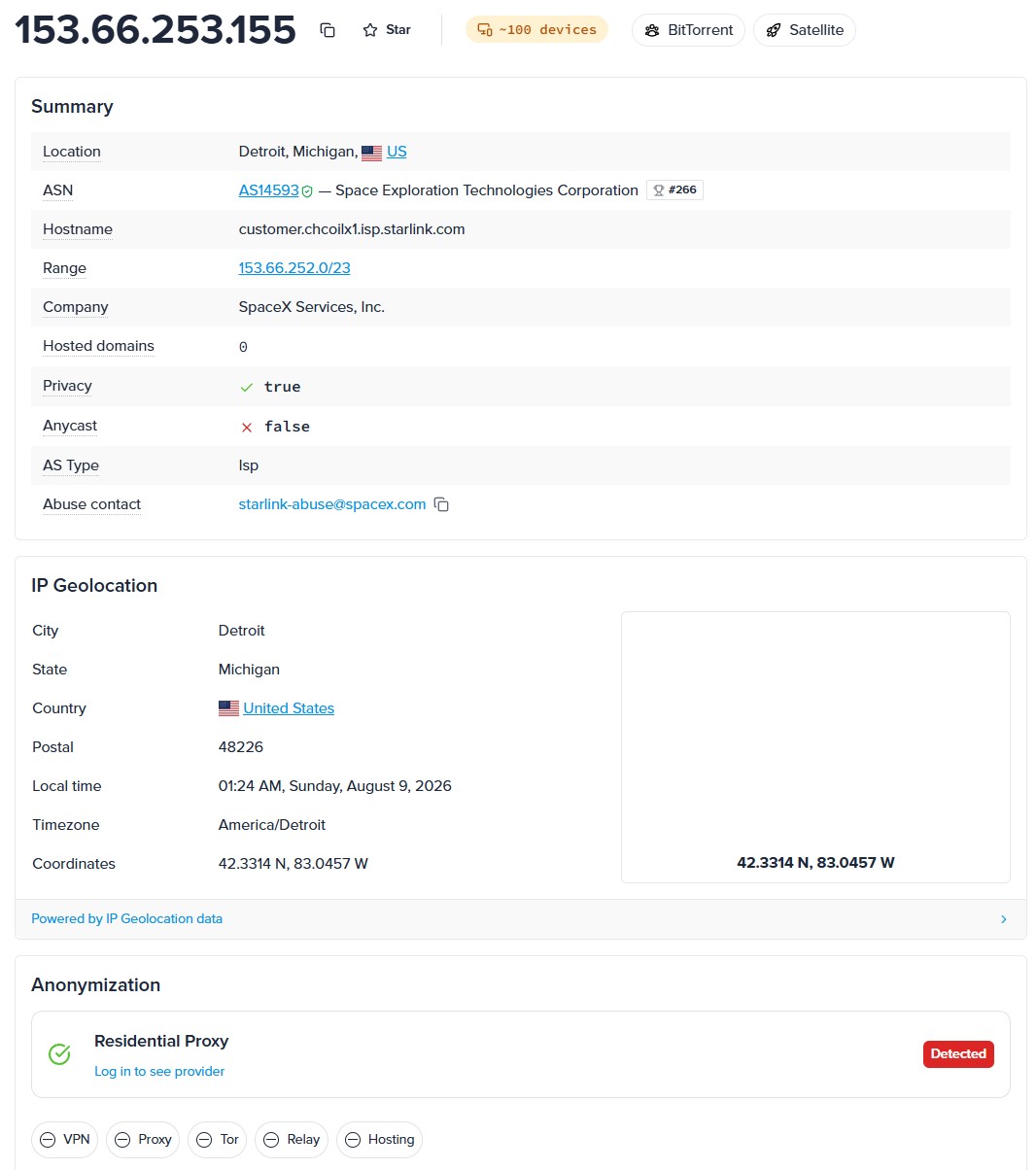
IPinfo painted an interesting picture. ASN AS14593, Space Exploration Technologies Corporation. That’s Starlink. AS Type: isp. Hostname: customer.chcoilx1.isp.starlink.com. Range 153.66.252.0/23. Anycast: false. Hosted domains: 0. One thing stands out: the Privacy flag is True, and IPinfo tags the address with ~100 devices, BitTorrent and Satellite.
What that means in practice. Starlink as a provider is genuine home internet, satellite-based, classified as ISP. Not a datacenter. Not hosting. It’s real residential by nature. But the fact that roughly 100 devices exit through one range tells you Starlink subscribers share exit addresses, which is normal for satellite connections running behind CGNAT.
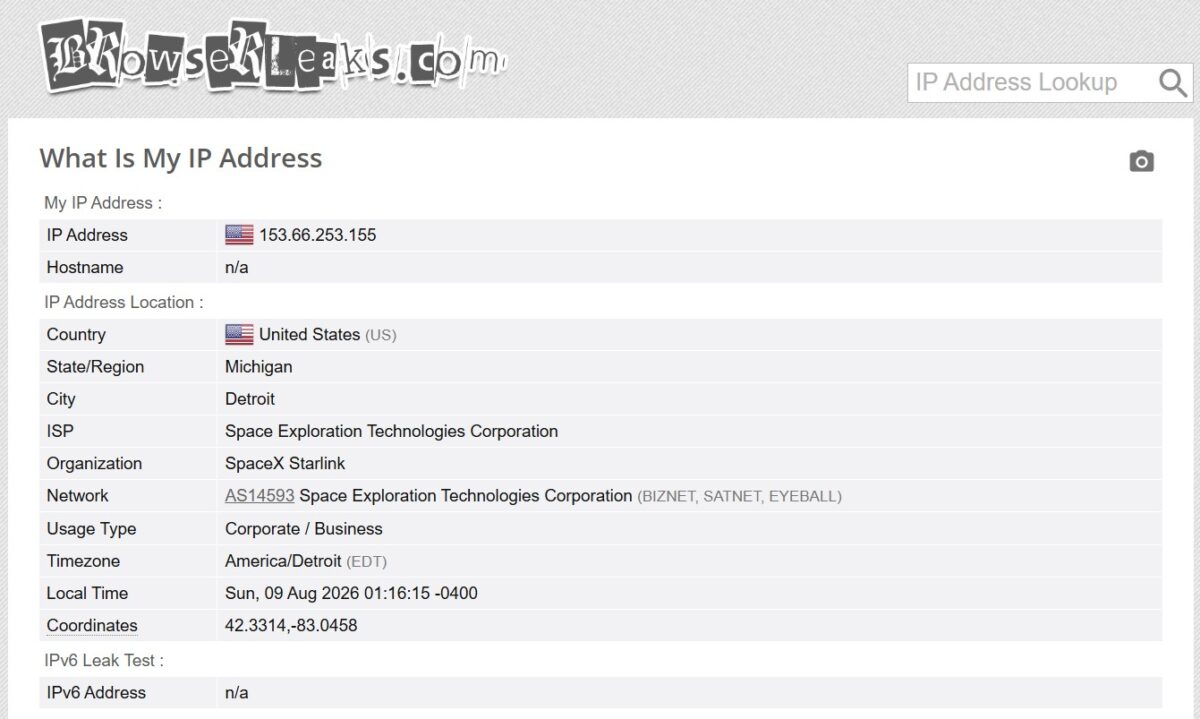
BrowserLeaks confirmed the geo: Michigan, Detroit, SpaceX Starlink, AS14593. Curiously, Usage Type shows up as Corporate/Business here. Worth noting. Some antifraud systems look specifically at usage type, and “Corporate/Business” for Starlink is a quirk of that particular database, not of the proxy.
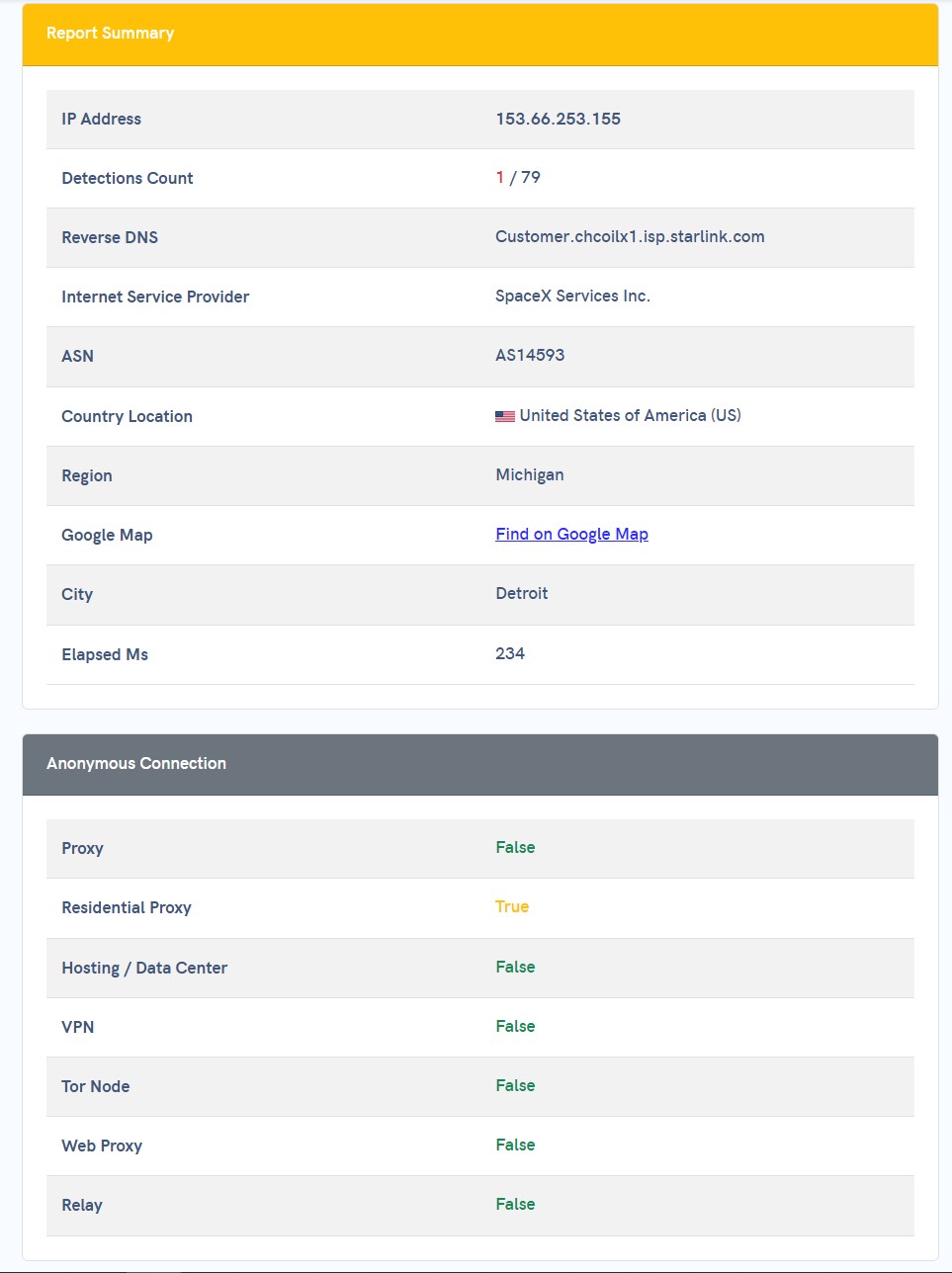
APIVoid: 1 detection out of 79 databases. A single flag. In the Anonymous Connection block, Residential Proxy is True and everything else (Proxy, Hosting, VPN, Tor, Web Proxy, Relay) is False. That’s a good result. 1/79 means only one database knows this address serves as a residential exit node. Reputation is clean.
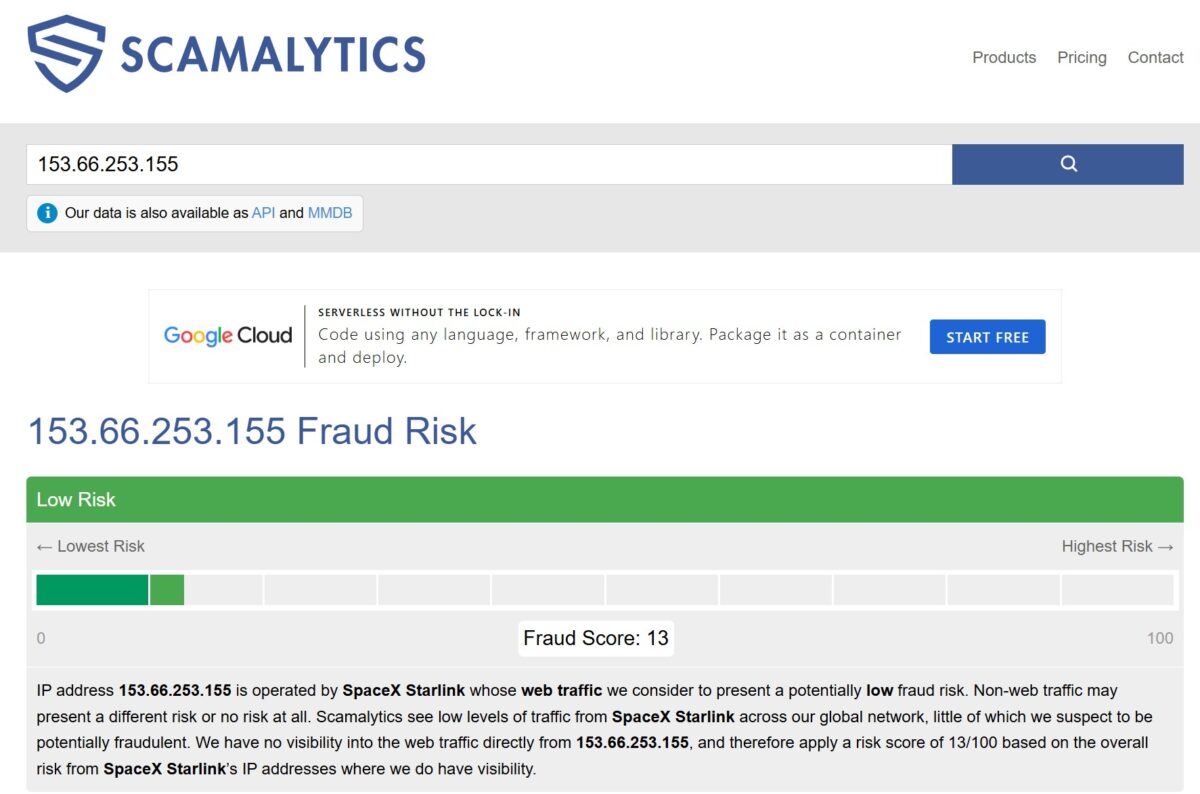
Scamalytics: Fraud Score 13 out of 100, Low Risk. Their own report notes that SpaceX Starlink as a network shows low levels of fraudulent traffic on their radar. For a residential proxy, 13/100 is a solid number.
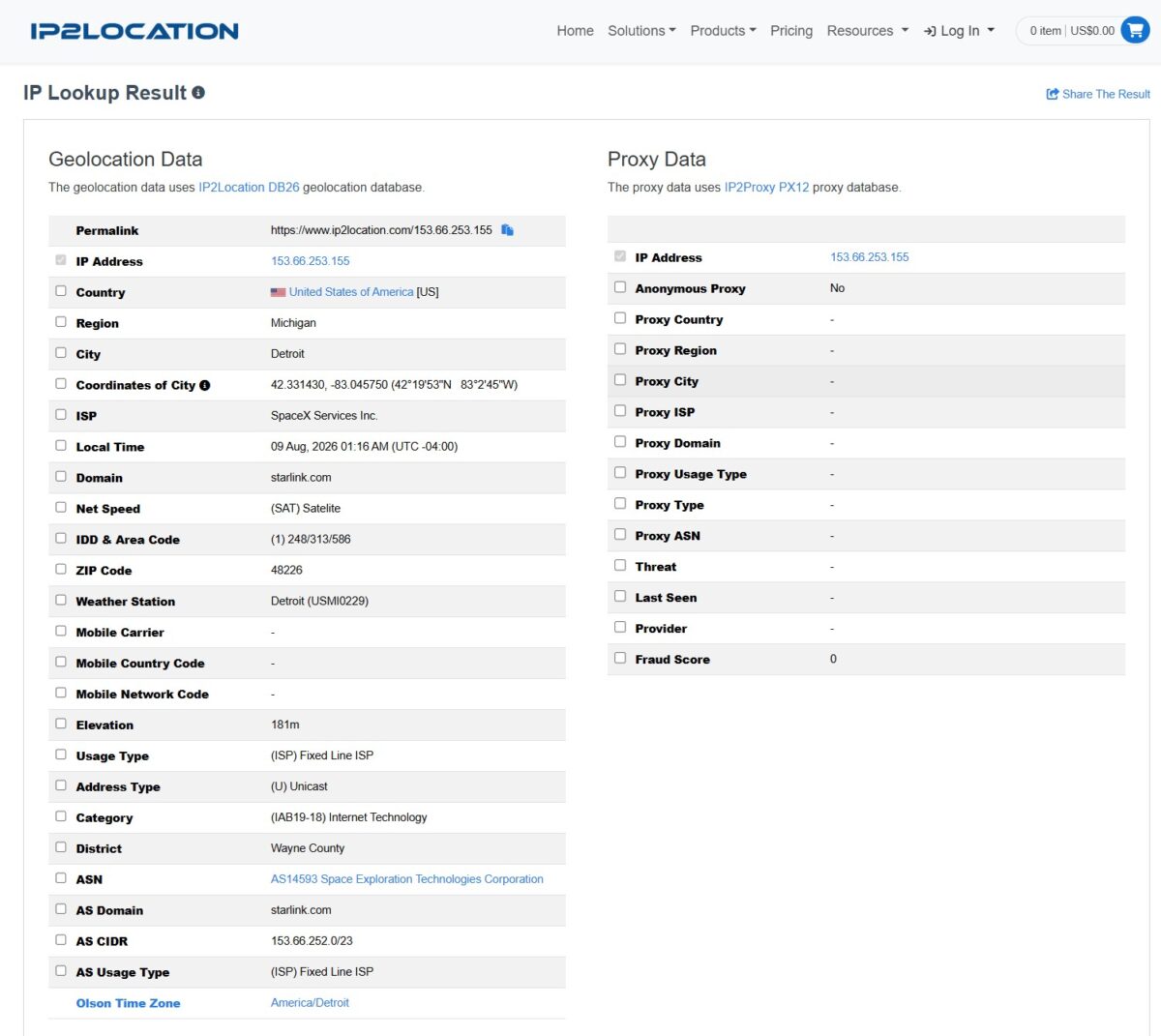
IP2Location: Fraud Score 0. And the big one: every field in the Proxy Data block is empty. Anonymous Proxy: No. The IP2Proxy database doesn’t flag this address as a proxy at all. For comparison, IP2Proxy catches most residential proxies and slaps a RES tag on them with a fraud score of 35 to 50. Here, nothing. Which means either the address is brand new to the pool, or Starlink ranges haven’t made it into that database yet.
Anonymity and Leak Tests
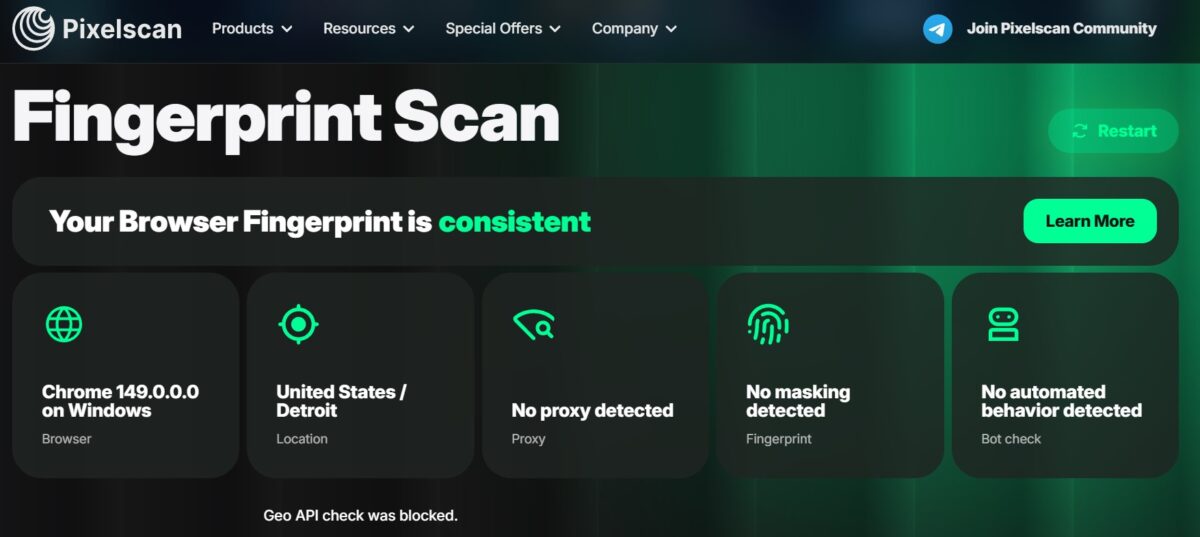
Pixelscan is a strict public fingerprint checker. Result: fingerprint consistent. “No proxy detected”, “No masking detected”, “No automated behavior detected”. Browser reported as Chrome 149 on Windows, location United States/Detroit. The note at the bottom, “Geo API check was blocked”, just means the browser denied the API access to geolocation, which is normal when permissions are off.
For multi-accounting and social media work, that’s exactly the result you want.
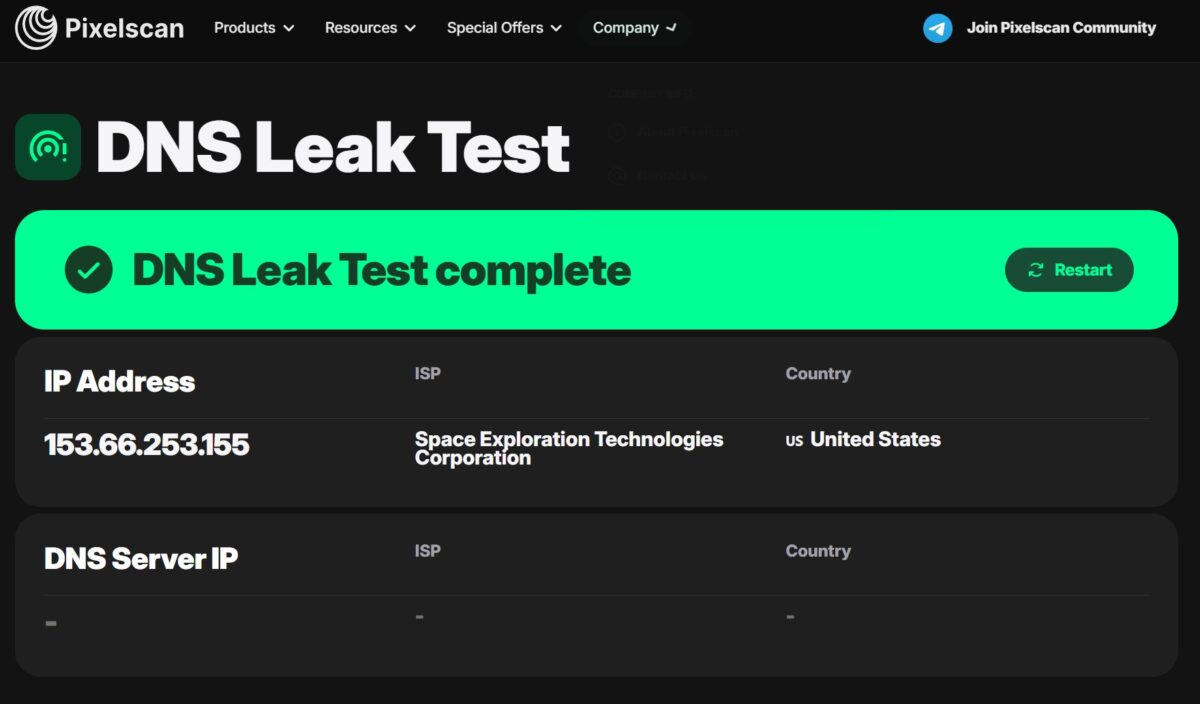
DNS test. Pixelscan: DNS Leak Test complete, all clear. A parallel test returned 26 servers, 1 provider, 1 location. Every DNS server belonged to Cisco OpenDNS and sat in Chicago, USA. Nothing leaked out to any third-party resolver. IP, ASN and DNS all lined up.
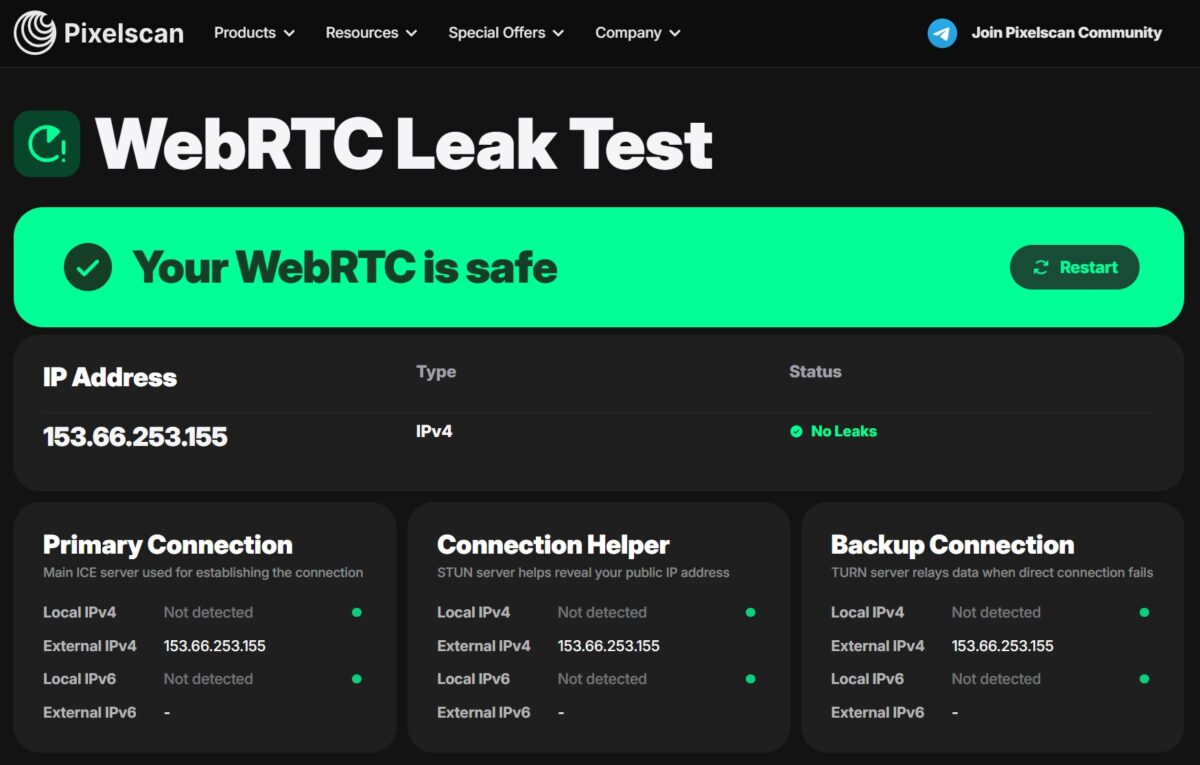
Pixelscan WebRTC: Your WebRTC is safe, No Leaks. The external IPv4 at all three checkpoints was 153.66.253.155. Local IPv4 and IPv6: not detected. Good result.
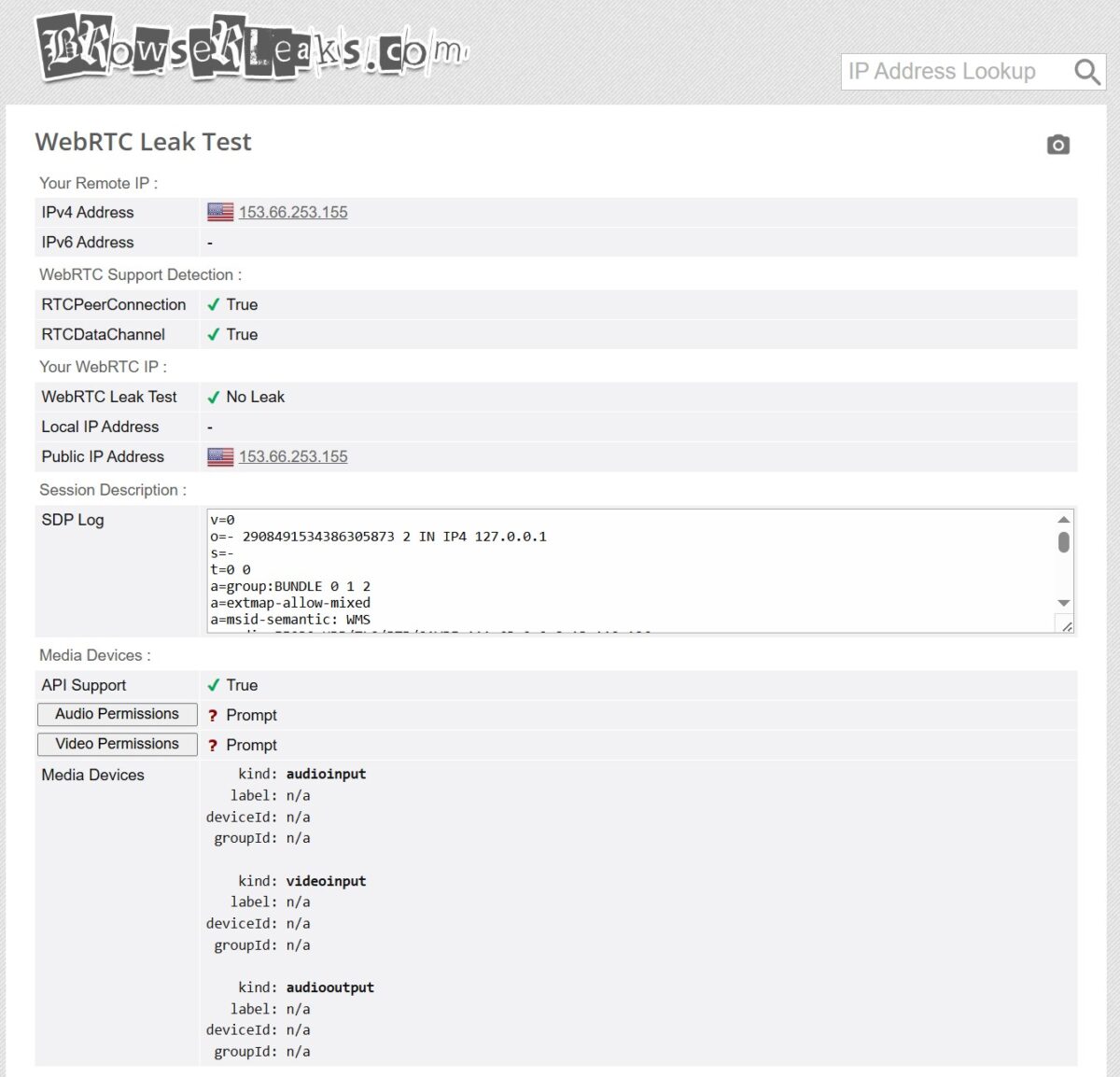
BrowserLeaks agreed: No Leak. Local address not detected, public address matches the proxy.
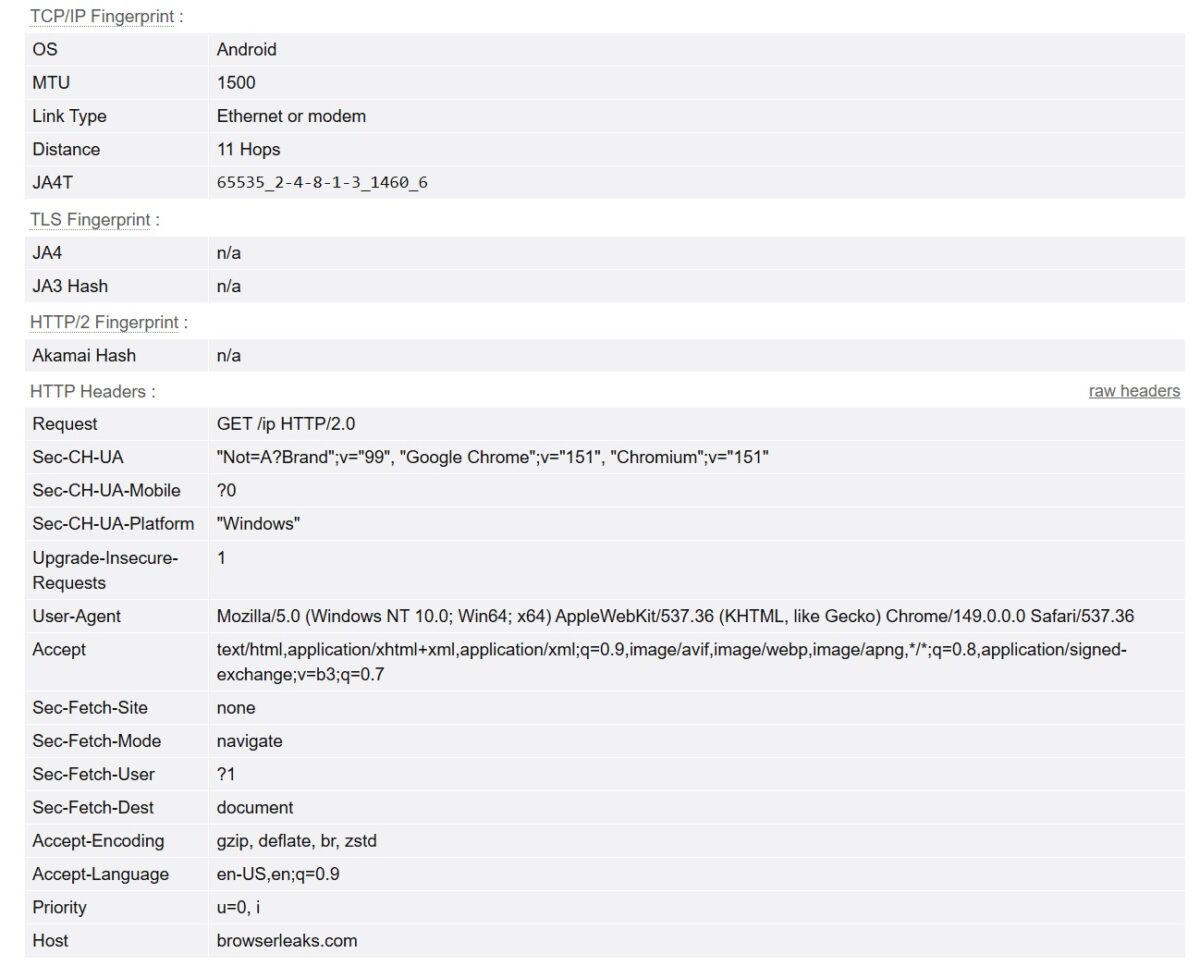
Here’s a curious one. The TCP/IP Fingerprint reports the OS as Android, while the User-Agent says Chrome 149 on Windows. Link Type: Ethernet or modem. Distance: 11 hops. That mismatch comes from how Starlink behaves at the connection level. Antifraud systems that cross-check the OS through JA3/JA4 and the TCP fingerprint may react to it. For plain scraping it hardly matters. For multi-accounting on strict platforms, you should know about it.
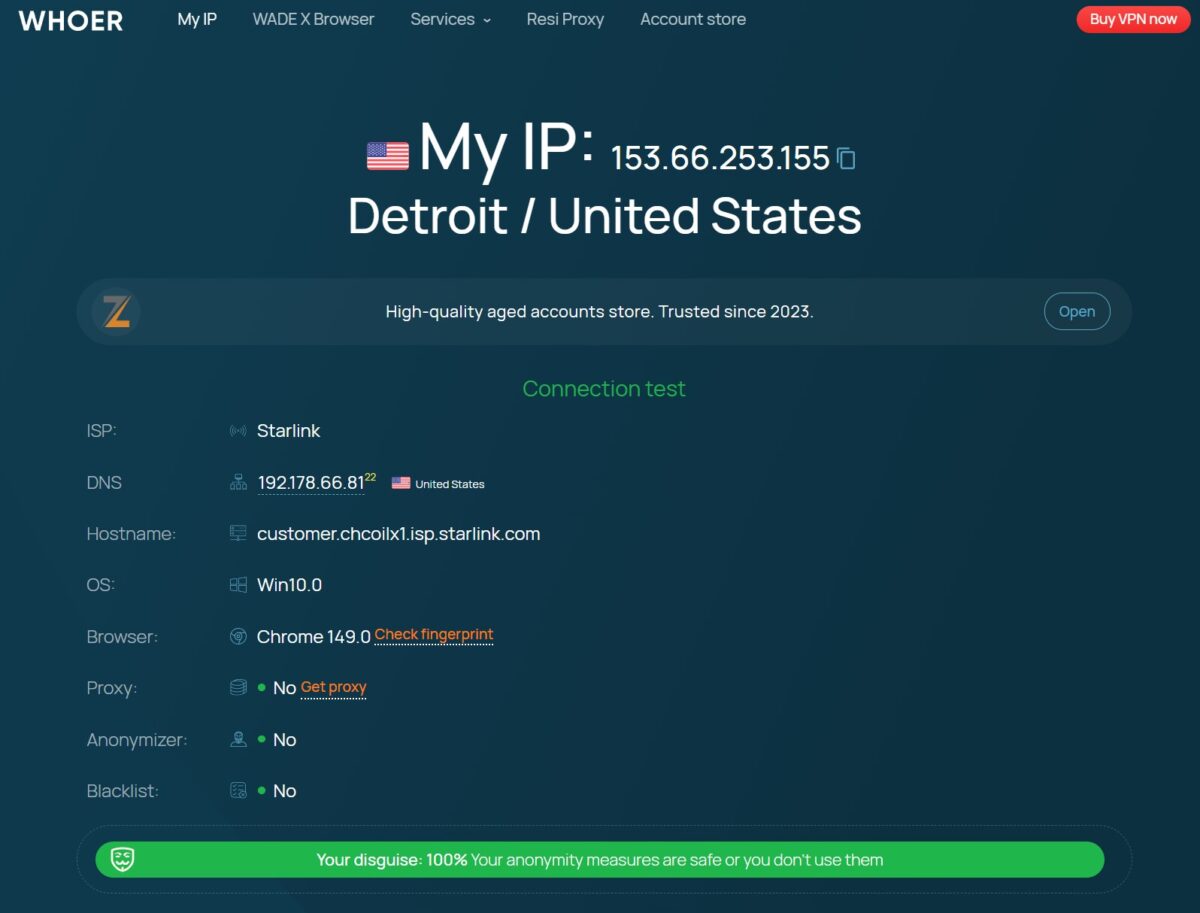
Whoer.net: 100% disguise, Proxy: No, Anonymizer: No, Blacklist: No. DNS resolves to 192.178.66.81 (Google), which is normal for Starlink. Hostname matches. Nothing sticking out.
Blacklists
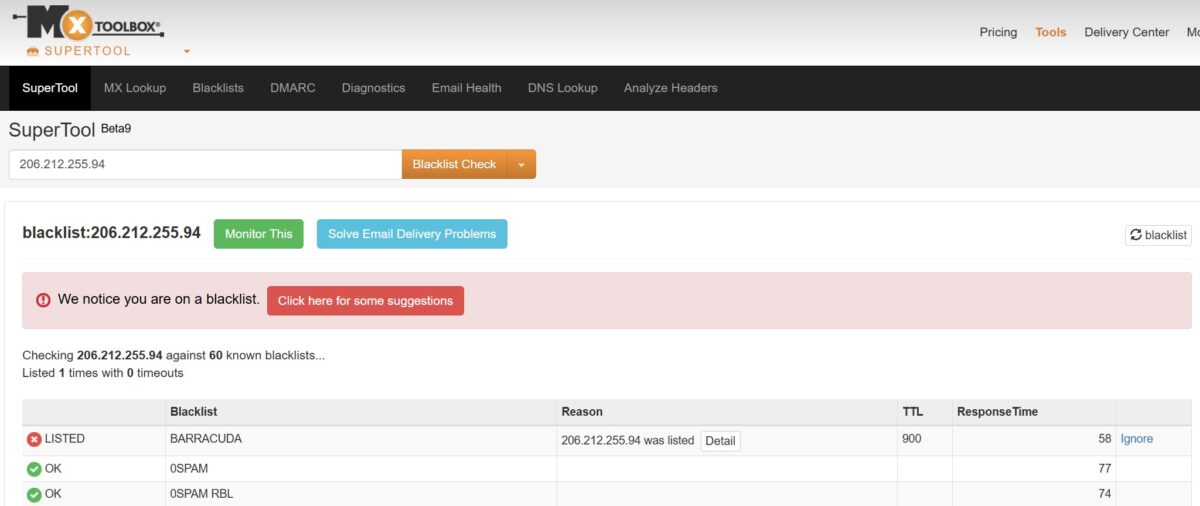
MXToolbox ran one of the pool addresses (206.212.255.94) against 60 databases. One hit: BARRACUDA. The other 59 came back OK. Barracuda Networks maintains its own spam lists, and landing on one of them while Pixelscan is clean and the Fraud Score sits at 13 isn’t a problem for scraping or multi-accounting. You wouldn’t want to send email through it, but residential proxies were never meant for that anyway.
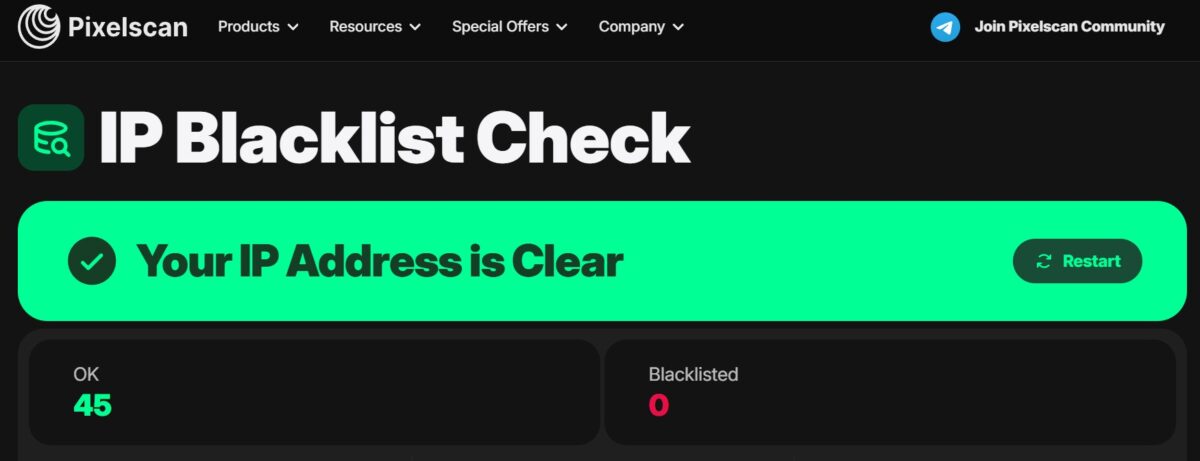
Pixelscan IP Blacklist Check on the main test address: 45 OK, 0 Blacklisted. Clean across all 45 lists.
Single Proxy Speed
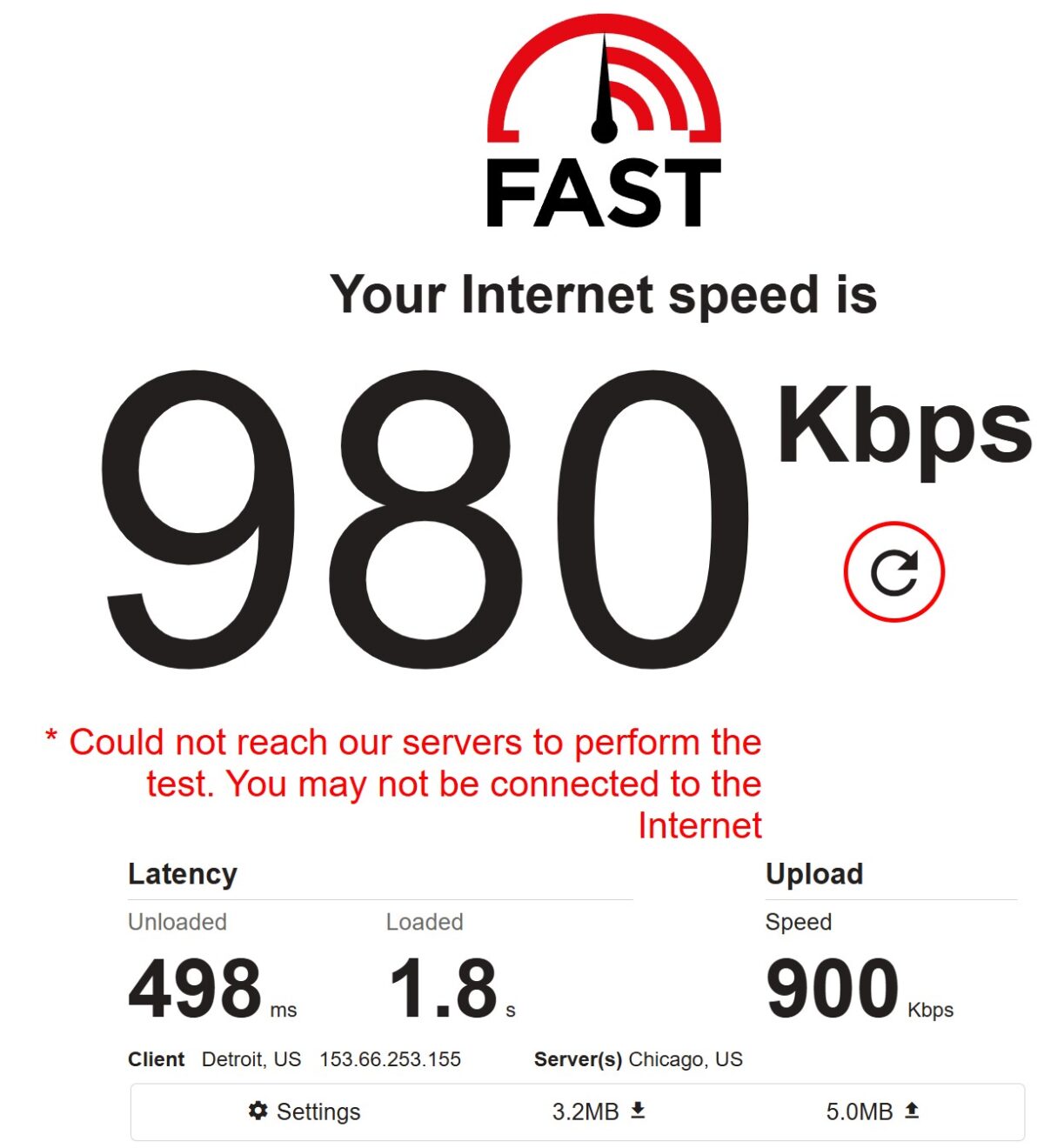
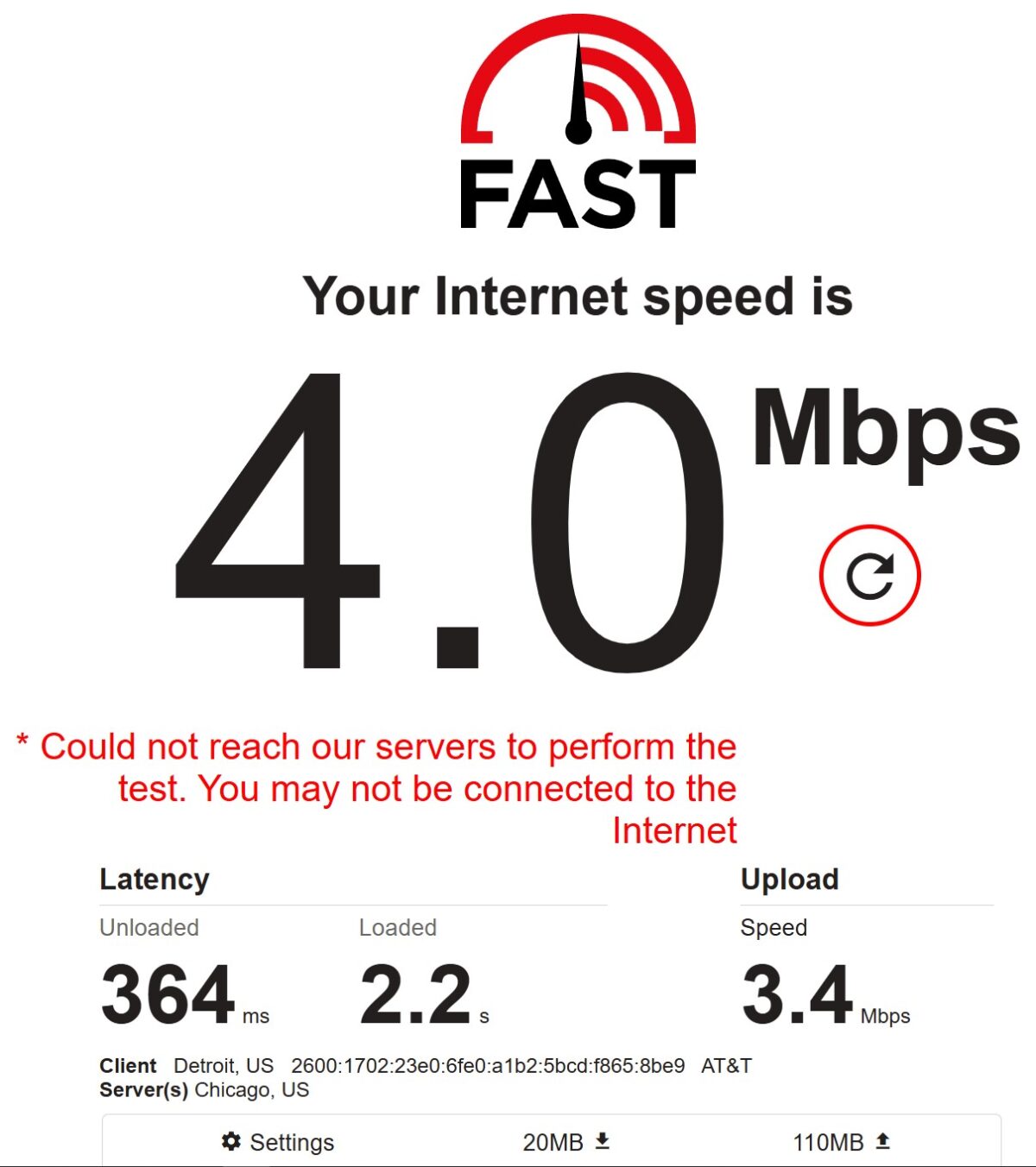
Two runs on fast.com gave me two very different numbers: 980 Kbps and 4 Mbps. On the first run the speed barely moved at all, and fast.com even threw a warning that the server was unreachable. Loaded latency hit 1.8 seconds. That’s slow. While testing single proxies I kept seeing the speed drop to zero, with pages hanging and throwing load errors. That’s not how a healthy residential network behaves.
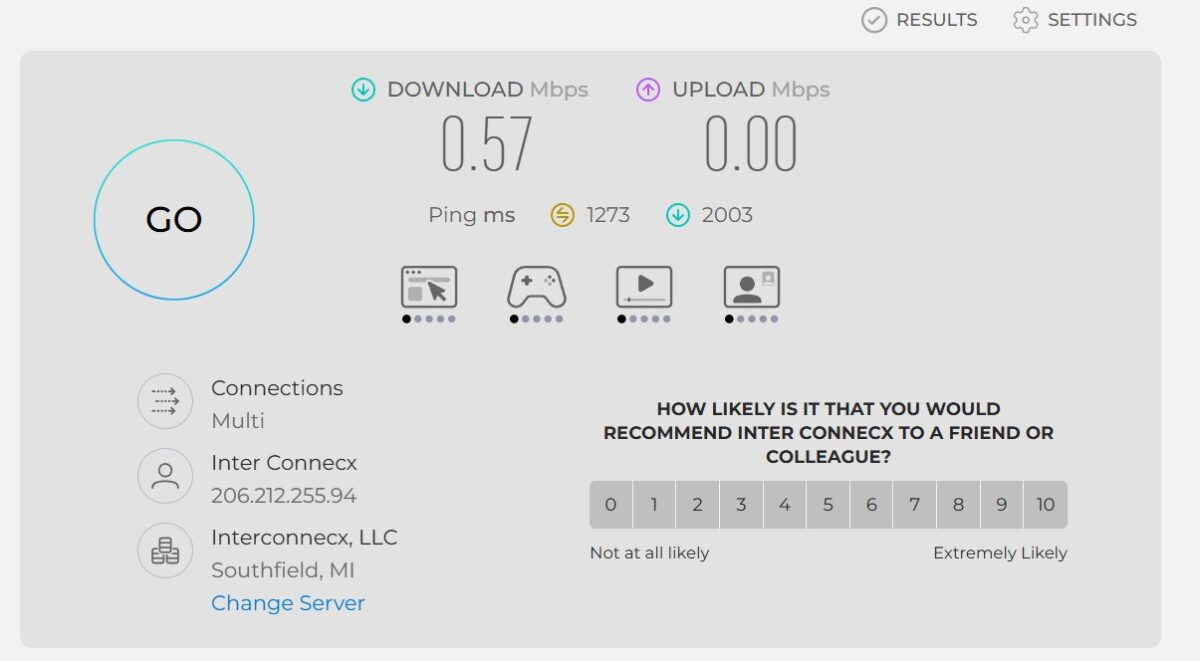
Speedtest.net through a different pool address: 0.57 Mbps download, 0.00 Mbps upload, 1273 ms ping, 2003 ms jitter. That’s rough. Over a second of ping and two seconds of jitter. Pages load with errors at numbers like these.
Single proxies were all over the place. One address gave 4 Mbps, another 0.57 Mbps. Huge spread, and the low end is simply unusable.
Pool Speed Test (100 Proxies)
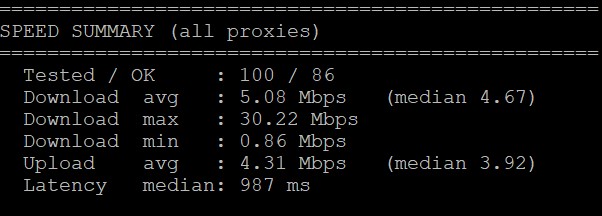
A hundred proxies through a script on a VPS. Results:
- Tested / working: 100 / 86. Fourteen proxies dropped out. That’s an 86% success rate on the speed test.
- Download avg: 5.08 Mbps, median 4.67 Mbps
- Download max: 30.22 Mbps
- Download min: 0.86 Mbps
- Upload avg: 4.31 Mbps, median 3.92 Mbps
- Median latency: 987 ms
A median of 4.67 Mbps is below the market average for residential. MangoProxy hit 13.3 Mbps median on the same test. NodeMaven came in around 9. The 0.86 to 30.22 Mbps spread is huge, which is normal for P2P residential, but that floor is depressing. Latency near 1000 ms is slow.
Pool Quality Test (500 Proxies)
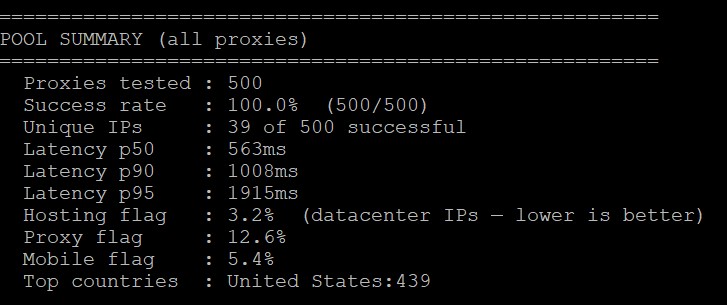
This is the test that matters most. 500 proxies through a script. Here are the numbers line by line.
- Success rate: 100.0% (500/500). Every single proxy responded. That’s great.
- Unique IPs: 39 out of 500 successful sessions. And this is where it gets bad. Out of 500 proxies tested, only 39 returned a unique IP. Which means one physical address can serve hundreds of different sessions at the same time. For comparison, MangoProxy returned 391 unique IPs on a 400-proxy test without a single repeat. RapidProxy gave me 39 unique IPs out of 500. That’s a critically low uniqueness rate for a pool.
- Latency p50: 563 ms, p90: 1008 ms, p95: 1915 ms. The 563 ms median beats what I saw in the speed test, but p95 creeps up to nearly two seconds. Long tail.
- Hosting flag: 3.2%, meaning some addresses read as datacenter. Not what you want from “pure” residential. Proxy flag: 12.6%, so every eighth address is tagged as a proxy exit. Mobile flag: 5.4%, some addresses register as mobile.
- Top countries: United States 439 out of 500. Roughly 12% of requests went somewhere other than the US even though I selected a US location. Not a disaster, but not 100% either.
Bottom line on pool quality: the success rate is great, but IP uniqueness is critically low. 39 unique addresses across 500 sessions is bad news for anything that depends on IP rotation.
Google Test (Byteful)
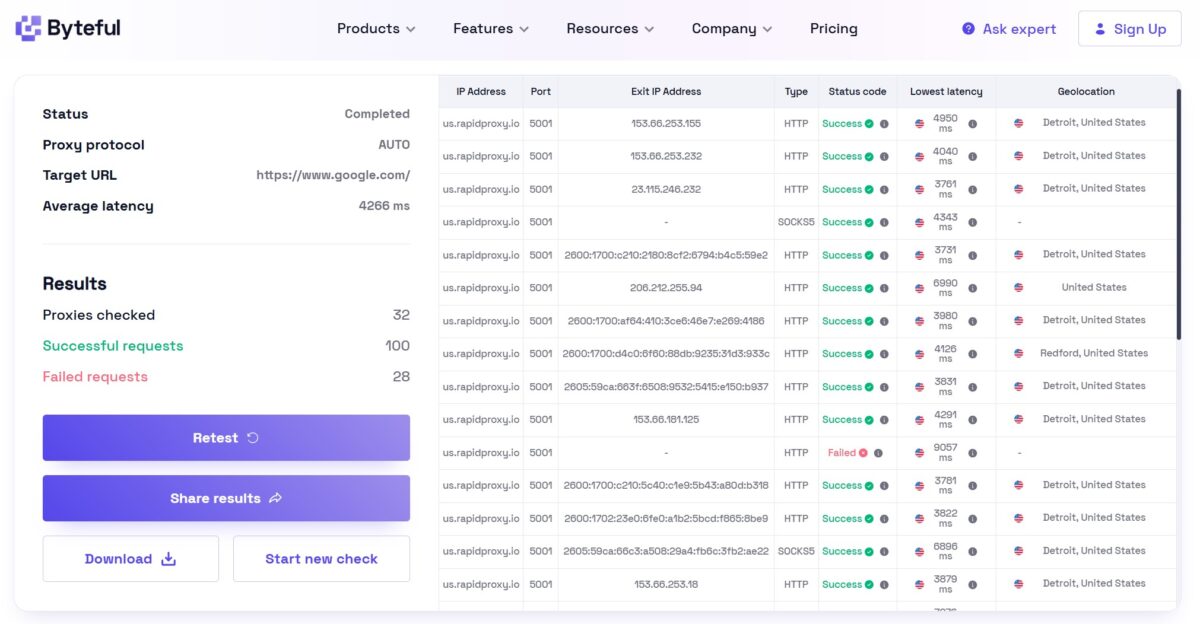
Byteful against google.com. 32 proxies, 100 requests. Results:
- Successful: 100 (100%)
- Failed: 28
- Average latency: 4266 ms
An average of 4.2 seconds per request to Google is slow. The table shows delays ranging from 3731 to 9057 ms. Google lets you through without a captcha, but the speed leaves a lot to be desired. 28 failed requests against 100 successful ones is a decent ratio for Google, though you have to weigh it against that latency.
Claims vs Reality
The site promises “< 0.58s Response” and “99.9% uptime”. In practice:
- Median pool latency: 563 ms (close to the claim, though p95 stretches to 1915 ms)
- Success rate on 500 proxies: 100% (checks out)
- But single-proxy speed kept dropping to zero, which is nothing like “99.9%”
- Pool uniqueness: 39/500, a problem the marketing never mentions
What You Actually Pay
The $0.55/GB on the site and the $0.65/GB in the docs contradict each other, and you spot it right away. The real retail price for a regular user without enterprise volume lands closer to $2/GB and up.
Payment Options
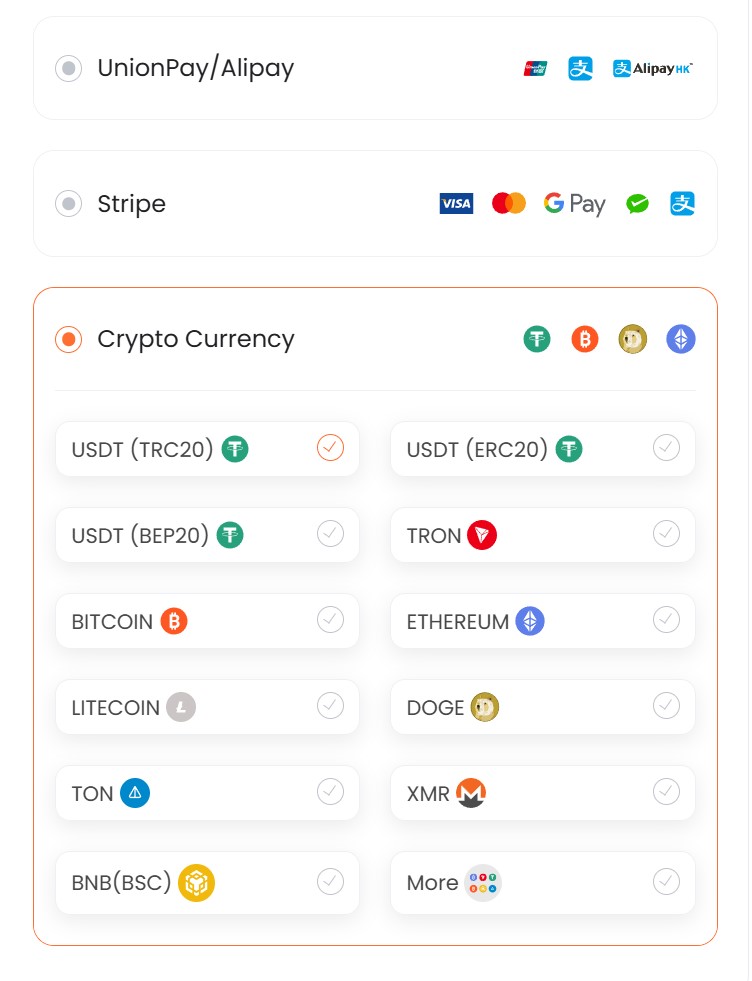
Three ways to pay: UnionPay/Alipay, Stripe (cards plus Google Pay), and crypto. Crypto covers 11+ coins: USDT on three networks, Bitcoin, Ethereum, Litecoin, DOGE, TON, XMR, BNB and more. For the Asian market that lineup makes sense. No PayPal. No Wise. For European business customers, that’s a downside.
Reputation and Reviews
Trustpilot: 3.8/5 from a grand total of 2 reviews. Statistically meaningless. G2 shows 4.5/5, but judging by the structure of those reviews it’s probably one or two accounts close to the vendor. Proxyway, the leading independent benchmarker in this market, doesn’t mention RapidProxy anywhere. Not in “Best Residential Proxies 2026”, not in “Proxy Market Research”. The service never comes up in organic discussions on r/proxies either. Most public mentions are affiliate reviews with referral links.
Separate story: a RapidProxy rep (Daisy) offered money and free traffic to the maintainer of the open-source project vladkens/twscrape on GitHub in exchange for a README mention. Cold outreach inside an open-source community is a marker of a company that pours money into affiliate promotion but has no organic reputation to lean on. Nothing shady about it, it just tells you plainly what the strategy is.
How It Stacks Up Against Competitors
| Parameter | RapidProxy | MangoProxy | Decodo | IPRoyal |
|---|---|---|---|---|
| Residential price | from $0.65/GB | from $3.3/GB | from $2/GB | from $1.75/GB |
| Traffic rollover | Never expires | Never expires | Expires | Expires |
| Success rate (pool) | 100% (500/500) | 97.8% | N/A | N/A |
| Unique IPs (pool) | 39/500 (7.8%) | 391/391 (100%) | N/A | N/A |
| Proxy flag | 12.6% | 0% | N/A | N/A |
| Hosting flag | 3.2% | 0% | N/A | N/A |
| Latency p50 | 563 ms | 780 ms | N/A | N/A |
| Median speed | 4.67 Mbps | 13.3 Mbps | N/A | N/A |
| Datacenter proxies | ❌ | ✅ | ✅ | ✅ |
| Mobile proxies | ❌ | ✅ | ✅ | ✅ |
| Web Unlocker | ❌ | ❌ | ✅ | ⚠️ |
| Trustpilot | 3.8/5 (2 reviews) | N/A | 4.7/5 | 4.7/5 |
| Tested by Proxyway | ❌ | ❌ | ✅ | ✅ |
| Jurisdiction | Hong Kong | UAE | Lithuania | Lithuania |
The numbers above speak for themselves. RapidProxy is the cheapest of the four and the traffic never expires. But MangoProxy, at five times the price, delivered 100% unique IPs against RapidProxy’s 7.8% and ran three times faster. So cheap doesn’t always mean good value. Detailed scores for each parameter below.
| Parameter | Result | Score |
|---|---|---|
| Success rate (500 proxies) | 100% (500/500) | 5/5 |
| Pool IP uniqueness | 39/500 (7.8%) | 1/5 |
| Hosting flag | 3.2% | 3/5 |
| Proxy flag | 12.6% | 2/5 |
| Latency p50 | 563 ms | 4/5 |
| Median speed (100 proxies) | 4.67 Mbps | 3/5 |
| Fraud Score | 13/100 Scamalytics, 0 IP2Location | 5/5 |
| IP reputation (APIVoid) | 1/79 | 5/5 |
| Pixelscan | No proxy detected, consistent | 5/5 |
| WebRTC | No Leak | 5/5 |
| DNS Leak | Clean | 5/5 |
| TCP/IP OS mismatch | Android vs Windows UA | 3/5 |
| Geo accuracy | Michigan/Detroit matches | 5/5 |
| Blacklists | 1 Barracuda hit out of 60 | 4/5 |
| Batch generator | Fixed values only | 2/5 |
| Product lineup | No datacenter, no mobile | 2/5 |
| Price | From $0.65/GB with non-expiring traffic | 4/5 |
| Transparency | No CEO name, no compliance | 2/5 |
| Overall | 3.5/5 |
- 100% success rate across 500 proxies, every one responded.
- Non-expiring traffic, the gigabytes you buy stay yours.
- Fraud Score of 13/100 on Scamalytics, 0 on IP2Location.
- Pixelscan says “No proxy detected”, fingerprint consistent.
- No WebRTC or DNS leaks.
- IP2Location doesn’t recognize the Starlink addresses as proxies at all.
- SOCKS5 support, rotating and sticky sessions (up to 60 minutes).
- City-level geo targeting works correctly.
- Wide range of crypto payment options.
- 500 MB free trial on signup.
- Pool uniqueness of 39/500, a critically low number.
- Proxy flag 12.6%, hosting flag 3.2%, the pool isn’t clean.
- Median speed of 4.67 Mbps, below the market average.
- Single proxies are unstable, speed dropped to zero at times.
- TCP/IP fingerprint reports Android while the User-Agent says Windows.
- The batch generator won’t let you pick an arbitrary number of proxies.
- No datacenter proxies, no mobile, no Web Unlocker.
- Price mismatch: $0.55 on the site vs $0.65 in the docs.
- No founder name, no SOC 2 or ISO 27001.
- Tiny online reputation: 2 reviews on Trustpilot.
Final Thoughts
RapidProxy knows what it is: cheap, non-expiring traffic on Starlink addresses with good fraud scores. And that part genuinely works. IP2Location doesn’t see the addresses as proxies at all, Pixelscan says “No proxy detected”, Whoer gives 100% anonymity. I didn’t expect that kind of detection cleanliness from a service under a year and a half old.
But a pool with 39 unique IPs across 500 sessions is a serious problem. It means that during heavy account work or scraping with rotation, dozens of your tasks will be sharing one physical address at the same time. That hurts anonymity in real scenarios. Add a median speed of 4.67 Mbps, which is a long way from the “< 0.58s Response” on the homepage.
The youth and the opacity (no CEO name, no compliance) are a risk if you care whether your vendor is still around a year from now.
Worth trying through the free 500 MB trial, especially for jobs where staying clean against detectors matters more than IP rotation.
Who it fits. SEO monitoring, scraping public directories, anything where the critical path is fraud score and detection rather than IP uniqueness. Static ISP at $5 per IP per month is a competitive price.
Who should skip it. Multi-accounting at scale where you need real rotation, industrial scraping behind Datadome or Akamai, and enterprise buyers with SOC 2 requirements.
This review will be updated: Cloudflare and Datadome tests are planned, along with a check on how long sticky sessions really last and a separate test of the Static ISP proxies. Logs are saved.