






 Why Trust Us?
ToProxyLab has been testing proxy services since 2025. We pay for most plans ourselves, and when a provider gives us test traffic we say so in the review — free traffic buys a place in the testing queue, nothing else. Every provider goes through the same speed, uptime and fraud-score checks, and we publish the real numbers, including the bad ones. A rating cannot be bought. Learn who we are and how we review proxies.
Why Trust Us?
ToProxyLab has been testing proxy services since 2025. We pay for most plans ourselves, and when a provider gives us test traffic we say so in the review — free traffic buys a place in the testing queue, nothing else. Every provider goes through the same speed, uptime and fraud-score checks, and we publish the real numbers, including the bad ones. A rating cannot be bought. Learn who we are and how we review proxies.
A rep from IPFoxy reached out to me. They offered to let me test their residential and mobile proxies to get into our rankings. Handed me a promo code for 5 GB of residential. Mobile, sadly, wasn’t in the deal – residential only.
Let me say the thing I say in every review right up front. Free traffic doesn’t sway the verdict. A provider isn’t buying my loyalty. They’re buying exactly one thing: that I’ll honestly run their proxies through every test and write down what I saw, not what they’d like me to show. Every step gets a screenshot, every log gets saved. Any number in this review can be double-checked – just message me and I’ll send it over.
Testing follows our methodology, same as always. It’s right here.
Now about the service itself. Public records say it’s an Asian provider registered in Singapore under the legal entity Tiger Roar Technology Pte. Ltd. IPFoxy is their product brand, not a separate company. On the market since 2022. So by the time of my test the brand is roughly four years old. Not a rookie like IPcook with its ten months, but no veteran on the level of Bright Data either.
First impression of the site. A standard, middle-of-the-road landing page. Doesn’t promise much, but everything you need is there: proxy types, prices, a calculator, a dashboard. Coverage of 200+ countries and 70 million IP addresses – that’s what the homepage claims.

And here’s the first thing that caught my eye, before any testing at all. The pool number keeps shifting. On the homepage it’s “40 million IPs” in one spot, then “70 million+” in a block right next to it. In the rotating residential section it’s “70M+” again. And in a partner review over at Dolphin Anty it’s suddenly “50M+”. Forty, fifty, seventy. Three different numbers in materials from one and the same company. IPFoxy explains this as a result of the pool growing over time, with external-facing numbers lagging behind the actual expansion — the earlier figures (40M, 50M) appeared during previous website versions and partner campaigns, and as of mid-2026 the company has unified all channels to report 70M+. That’s a fair explanation, but with services whose pools actually get audited (Oxylabs lists 175 million, SOAX 155 million), the figure is the same everywhere from day one. When it bounces around from block to block, that’s marketing that didn’t keep up with itself. Noted, and we’ll check it by hand.
In terms of site structure and promises, IPFoxy reminds me of my recent IPcook review and partly of IPPeak. Same Asian handwriting: a Singapore-Hong Kong storefront, infrastructure somewhere in Asia, crypto plus Alipay among the payment options, pretty uptime percentages with no link to an independent benchmark. Familiar stuff. Let’s see how IPFoxy actually differs from them in practice.
Dashboard and Proxy Generation
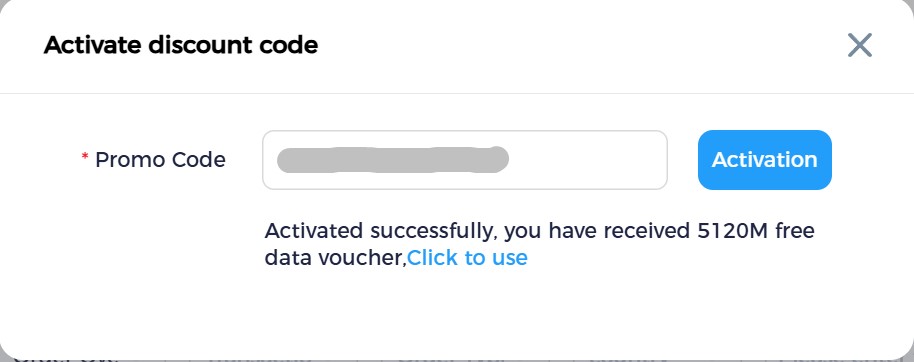
The promo code activated with no trouble. In the “Activate discount code” window I entered the code, hit Activation, and got a “5120M free data voucher,” which is exactly 5 GB. Nice touch that it’s not 5000 but an honest 5×1024. Small thing, but it tells me they know how to count around here.
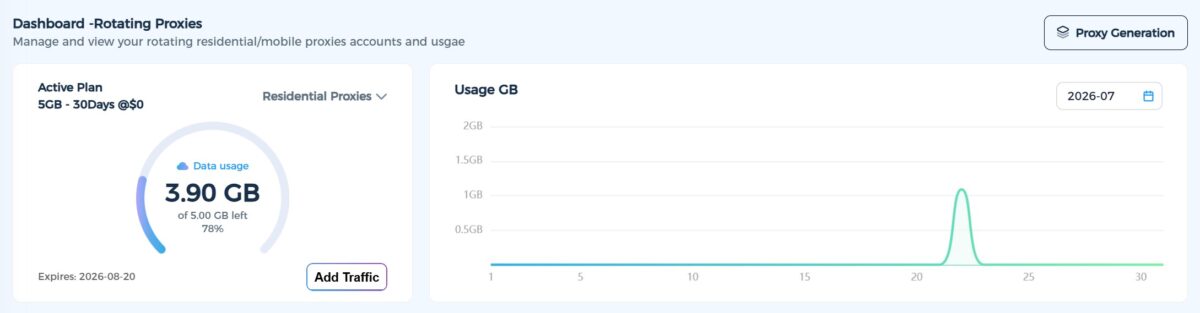
The dashboard lives on a subdomain, the interface is in English (there’s a language switcher and a support chat icon in the corner). The left-hand menu: Dedicated Proxies, Rotating Proxies, Generate Proxy, Billing, Affiliate Program, Settings. Everything’s laid out logically, I didn’t have to hunt for anything.
The Dashboard shows the active plan: “5GB – 30Days @$0.” Out of five gigs I burned a little over one across all the tests, leaving 3.90 GB, so 78% of the limit untouched. The daily usage chart honestly draws the spike on July 21, when I ran the main batch of tests. Traffic is valid through August 20. And here’s the first downside worth stating plainly: the traffic expires along with the plan window. Didn’t use it up in 30 days? Goodbye, gigabytes. IPRoyal and Webshare don’t do this, there your unused data doesn’t vanish. With IPFoxy it does. In fairness, IPFoxy also offers longer-term plans of 60, 90, and 180 days, so users who need more breathing room can pick a wider window — but the principle remains: once the plan period ends, unused traffic is gone.
The proxy generator is the strong part of the dashboard. Proxy type (Residential / Mobile), country, state, city, session type (Sticky), server (Americas Route), output format (Host:Port:Username:Password), method (Account & Password), IP count – all of it on one screen. I set United States, Virginia, Ashburn, Sticky, and generated 400 proxies with a single button. The list dropped into a black field with Batch Copy, Export, and QR Code buttons next to it. They all share one host, gate-us.ipfoxy.io, port 58688, and the whole config is baked into the login: customer-WTY1VpsyxK-cc-US-st-Virginia-city-Ashburn-sessid-1784623441_10101. Standard industry approach, exactly like Bright Data or IPRoyal. It works.
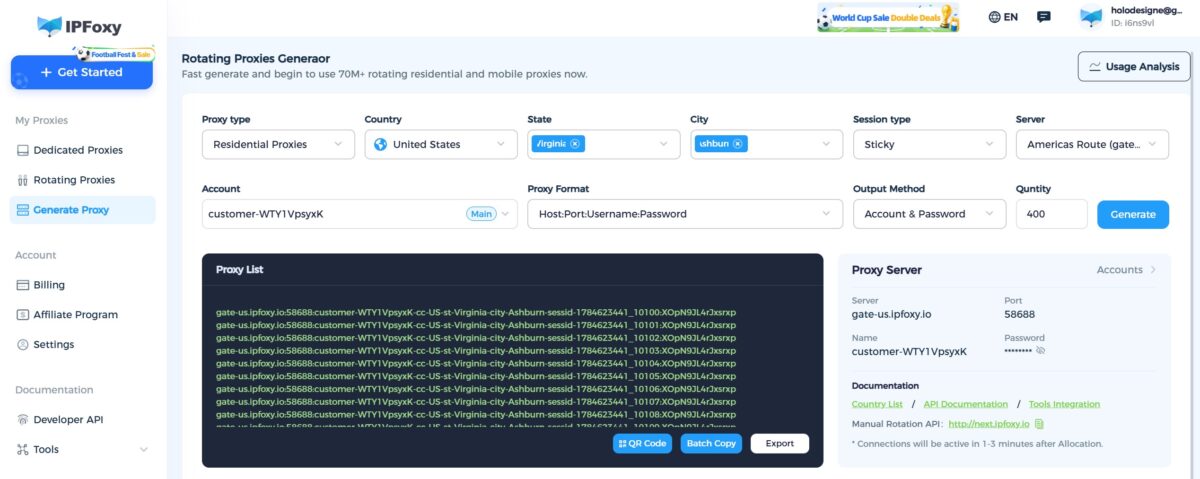
Below the field there’s an honest note in fine print: “Connections will be active in 1-3 minutes after Allocation.” And that’s how it went – for the first couple of minutes some proxies didn’t respond, then they came up.
First Connection
I dropped the string into an antidetect browser via Quick input. It parsed itself, showed a green checkmark and the IP 134.195.104.238, America/Chicago. Protocols to pick from: HTTP, SOCKS4, SOCKS5, SSH. Host gate-us.ipfoxy.io, port 58688. No jumping through hoops, connected on the first try.
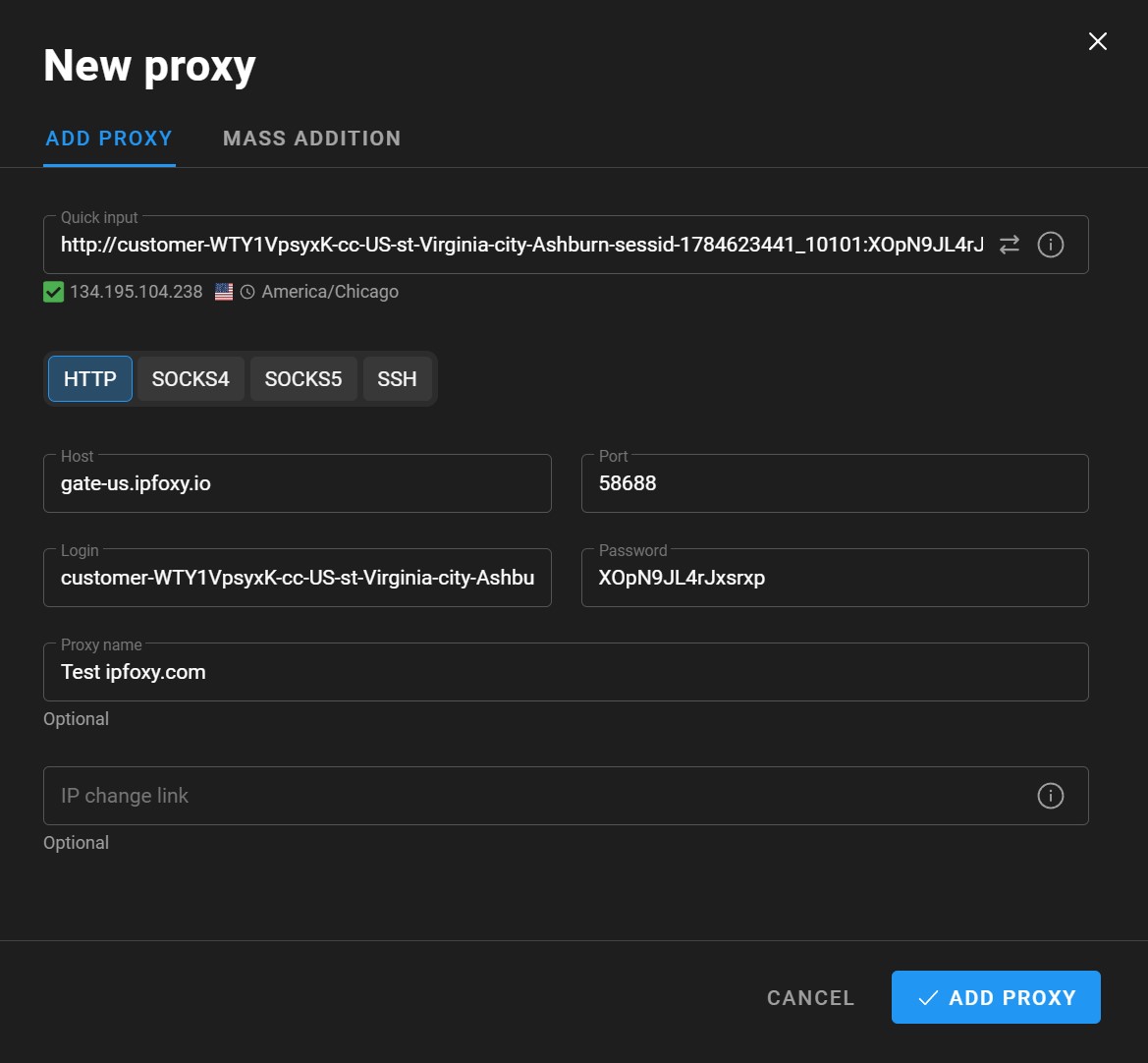
And this is where it gets interesting. Because the IP shown at connection, 134.195.104.238, and the IP I was actually going online under are two different addresses. On every checker I showed up as 70.106.209.127. That’s how a rotating gateway works: gate-us.ipfoxy.io is the entry point, and on the way out you get released through one of the residential nodes in the pool. A normal setup, but keep this in mind: the address in the connection window and your public IP are not the same thing.
The IP Under the Microscope
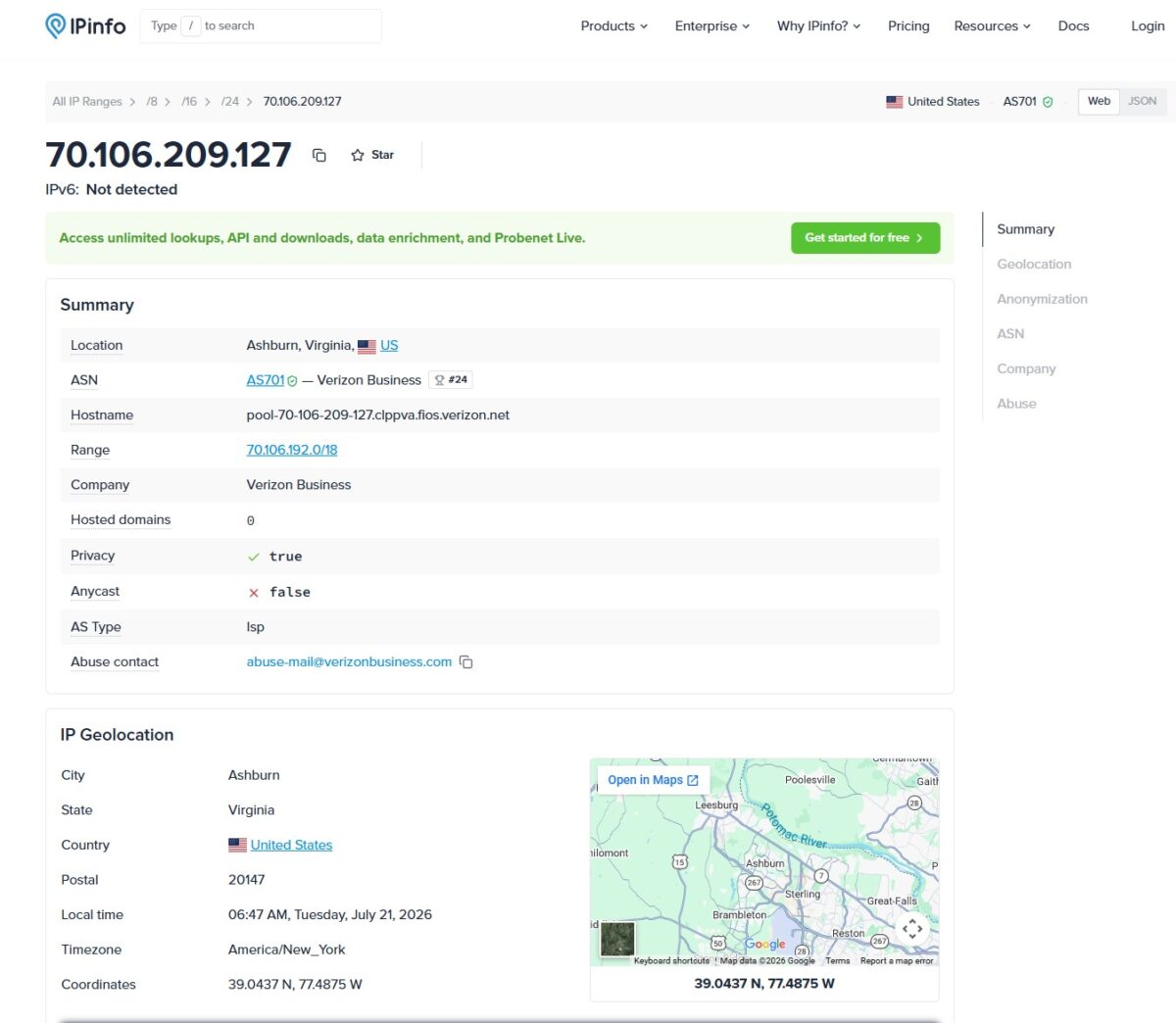
I locked one sticky IP and ran it through everything I’ve got. The main test address was 70.106.209.127.
And here IPFoxy surprised me in a good way. Because after everything I’d read about them on Trustpilot (swaps to Zenlayer, fraud score 100), I was bracing for the worst. What I got was a clean residential.
IPinfo showed: Ashburn, Virginia, US. ASN AS701, company Verizon Business. Hostname pool-70-106-209-127.clppva.fios.verizon.net – notice the fios in the name, that’s Verizon Fios, home fiber internet. Hosted domains: 0. AS Type: isp. Privacy: true (meaning IPinfo sees that proxy traffic runs through the address, but the address itself is a real ISP). AS701, by the way, is the former UUNET, one of the oldest and largest networks in the US.
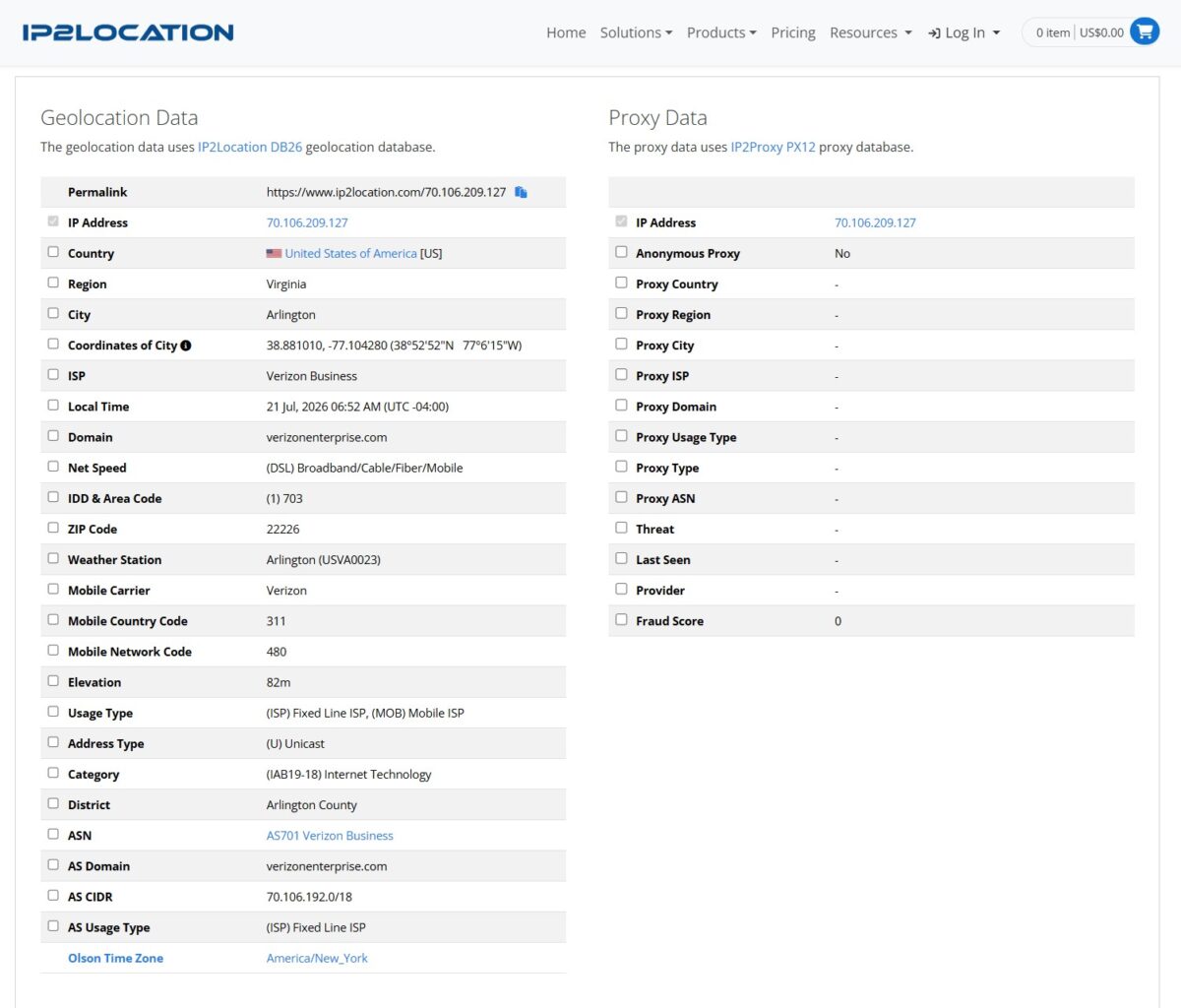
IP2Location confirmed it: Arlington/Virginia, ISP Verizon Business, Usage Type “(ISP) Fixed Line ISP, (MOB) Mobile ISP,” domain verizonenterprise.com. And in the Proxy Data block – this is the important part – Fraud Score 0, Proxy Type empty, Anonymous Proxy = No. So the IP2Proxy database doesn’t even count this address as a proxy. For comparison, NodeMaven in my last test scored 36/100 here with a RES tag. IPFoxy: zero and clean.
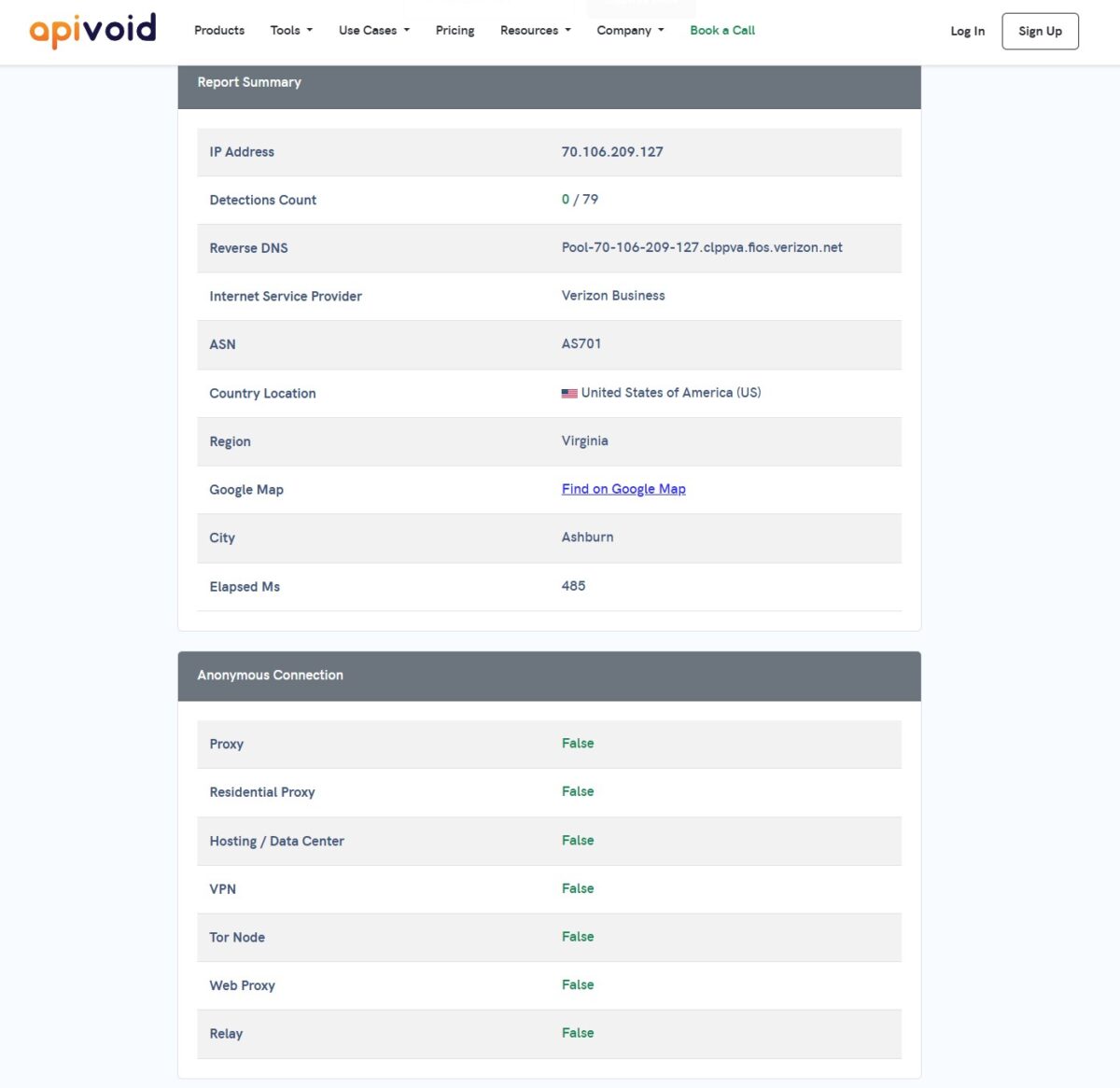
APIVoid nailed it down: 0 detections out of 79 reputation checks. In the Anonymous Connection block everything’s False – Proxy False, Residential Proxy False, Hosting False, VPN False, Tor False. ISP Verizon Business, Ashburn, Virginia. Reverse DNS again shows fios.verizon.net.
Fraud Score: Clean
Scamalytics gave 4 out of 100 – Low Risk. The description says it straight: “operated by Verizon Business… low fraud risk.” That’s a great result for a residential. Not a perfect zero, but 4/100 is the green zone, no questions asked.
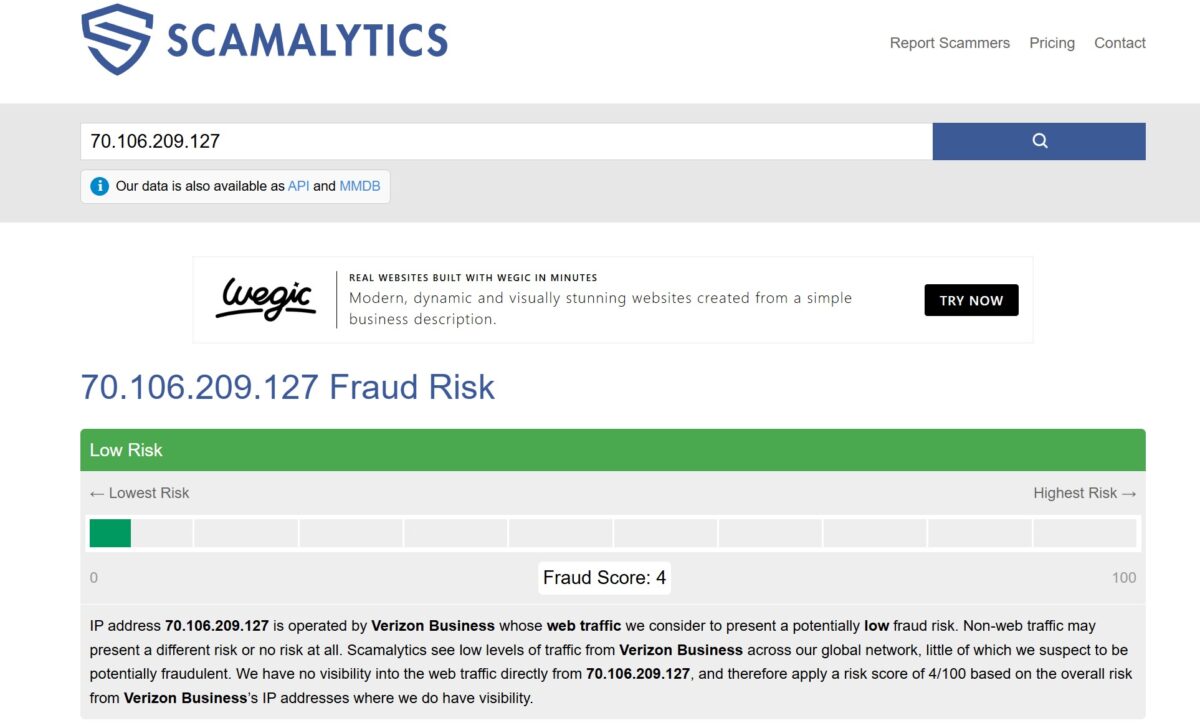
So that Trustpilot complaint about “The fraud score is 100” didn’t hold up at all on my specific IP. If anything, the address was cleaner than a lot of competitors. But don’t get excited too fast. One good IP isn’t a pool yet. We’ll come back to the pool, and there it’s a whole different story.
Antidetect and Fingerprints
Pixelscan gave a mixed picture. Fingerprint: inconsistent. At the same time “No proxy detected,” “No masking detected,” “No automated behavior detected.” One thing glowed red: Timezone spoofed – Location. Pixelscan spotted a timezone mismatch: the browser reports America/Chicago while the IP sits geographically in Virginia (that’s the East Coast, America/New_York). It didn’t flag the proxy, but it caught the geo.
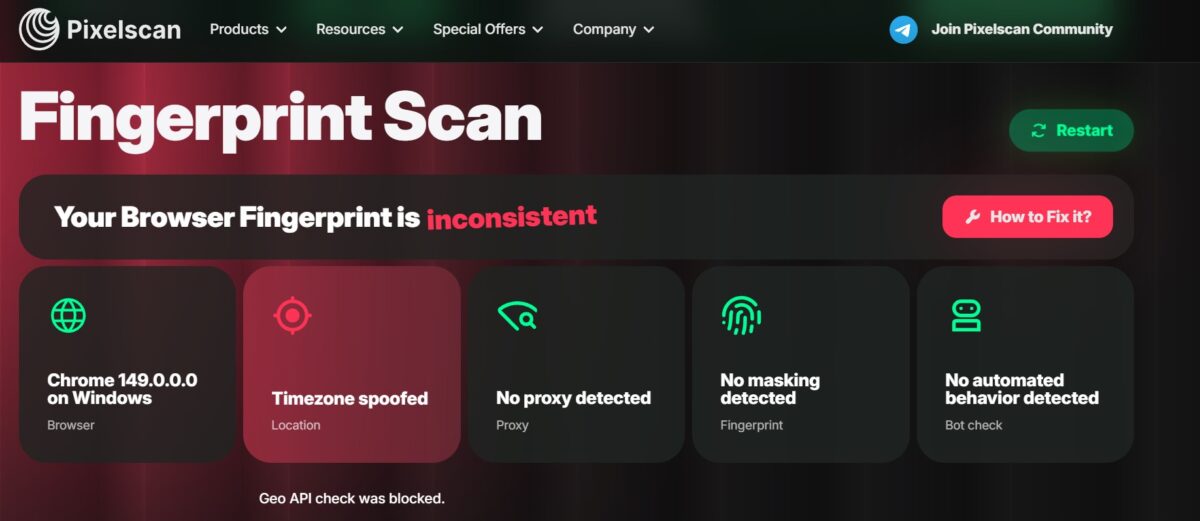
I’ll be honest: that’s not IPFoxy’s fault. That’s on me for not setting the timezone in the antidetect browser to match the exit IP’s geo. A classic config mistake. The proxy did its job – as a proxy it’s invisible. But the lesson is universal: with a rotating residential, always match your profile timezone to the actual IP, or any decent antifraud will catch you on that mismatch rather than on the proxy itself.
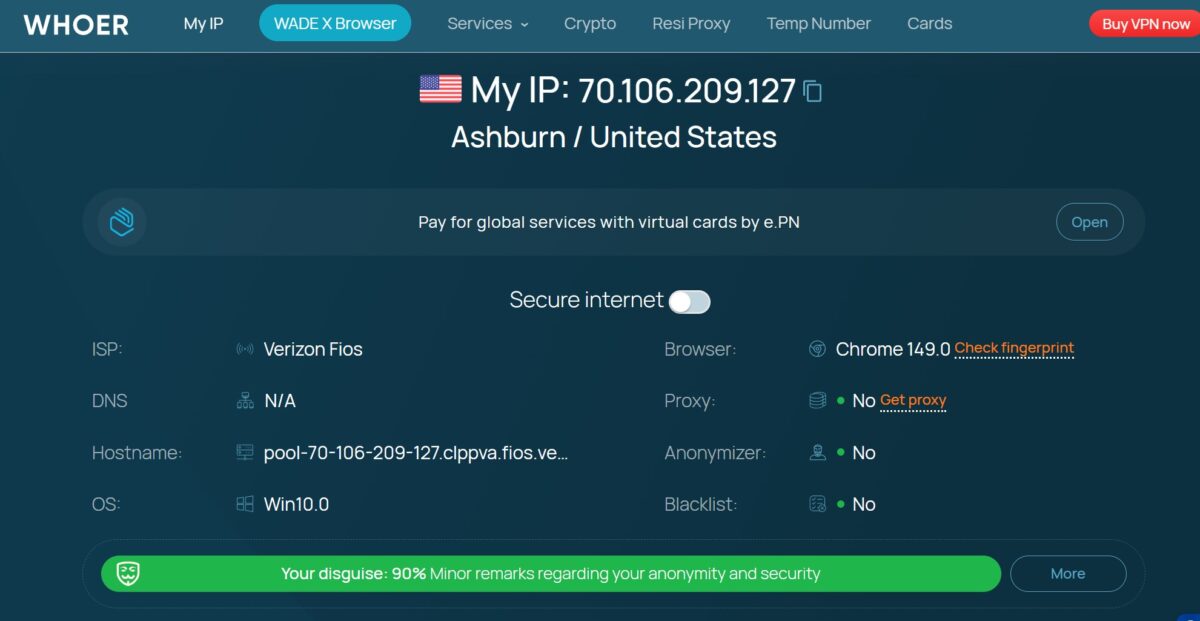
Whoer put disguise at 90% – “Minor remarks regarding your anonymity.” Proxy: No, Anonymizer: No, Blacklist: No. ISP Verizon Fios. The only thing that docked the score was the same browser-vs-system mismatch (Chrome 149 against Win10.0). Again, a question for my setup, not the proxy.
Leaks: WebRTC and DNS
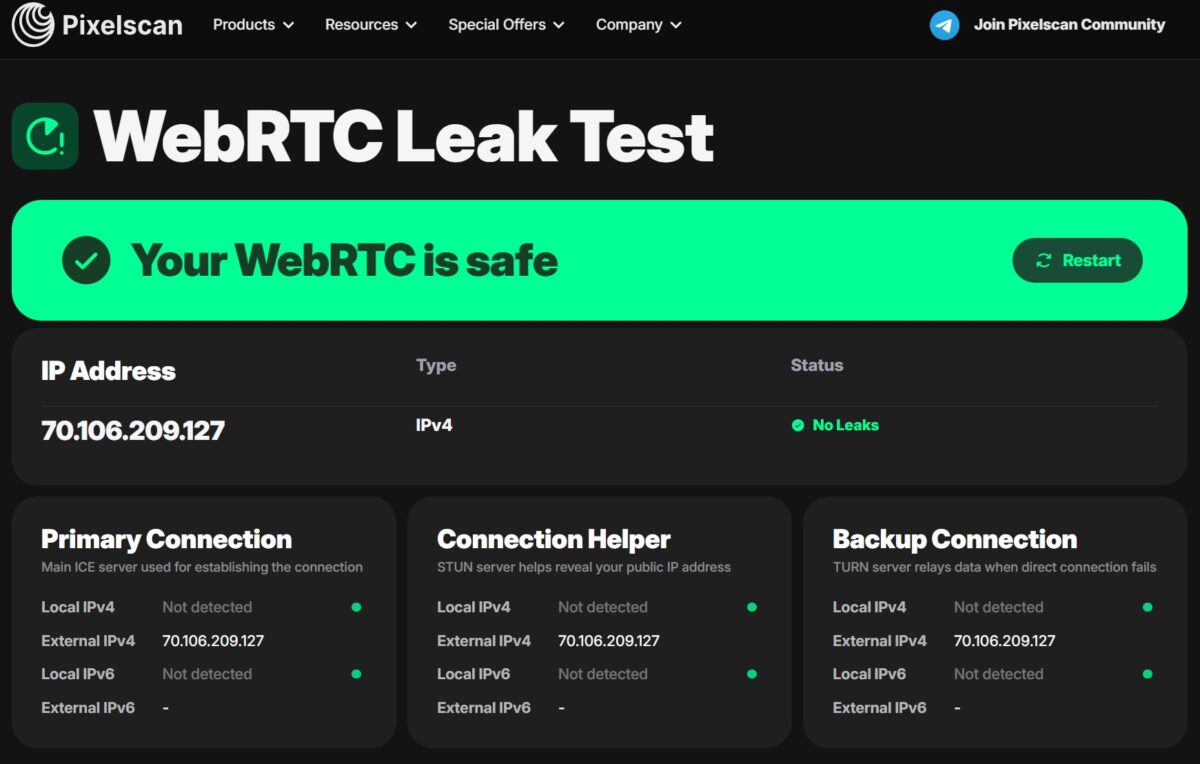
WebRTC: clean. Pixelscan: “Your WebRTC is safe,” Local IPv4 Not detected, External everywhere 70.106.209.127, no IPv6. Neither Primary, Helper, nor Backup leaks the real address. One of the most common deanonymization holes is shut.
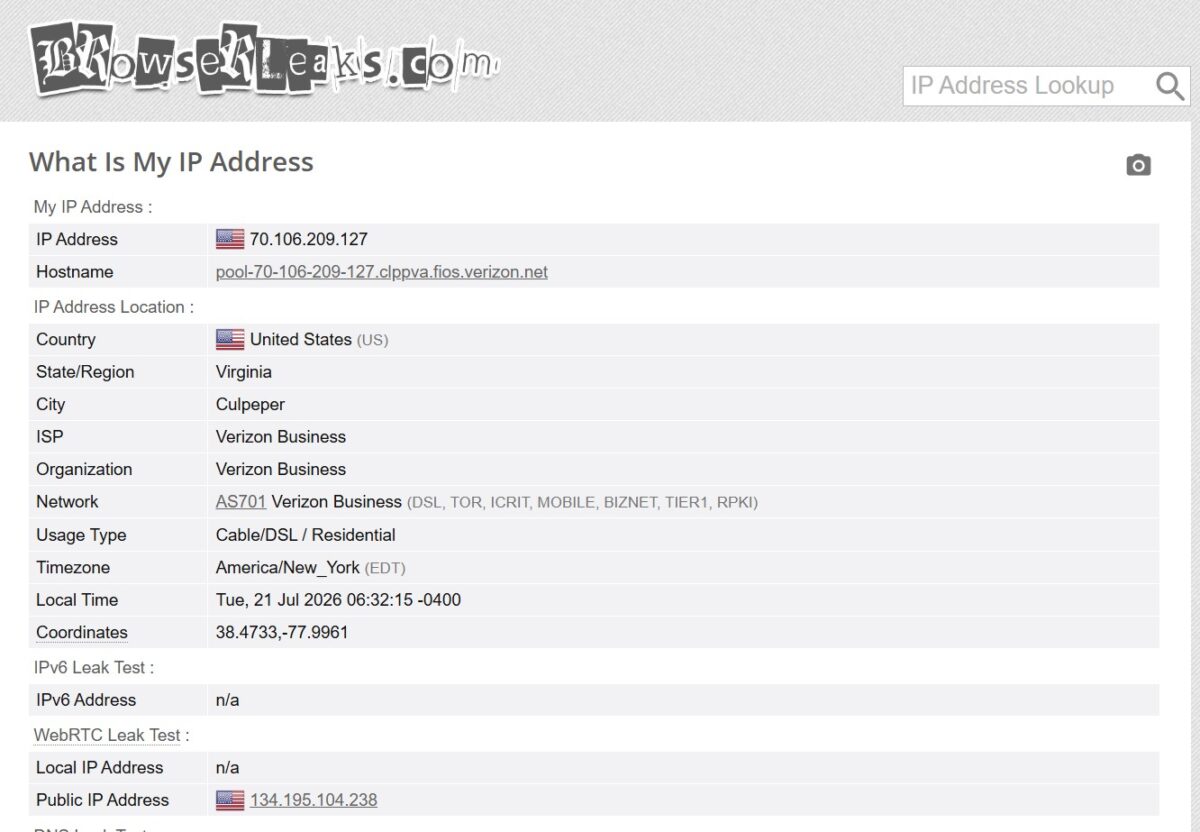
DNS: also clean, and this matters. Pixelscan showed DNS servers 71.252.1.49, 71.252.1.87, 71.242.1.31 and others – all Verizon Business, all US. BrowserLeaks found 47 DNS servers, District of Columbia and Pennsylvania, all Verizon. So DNS doesn’t leak to a third-party resolver (a common problem when traffic spills over to Google or Cloudflare). IP, DNS and ASN are all in sync – from a site’s point of view the requests come from a real Verizon subscriber on the East Coast.
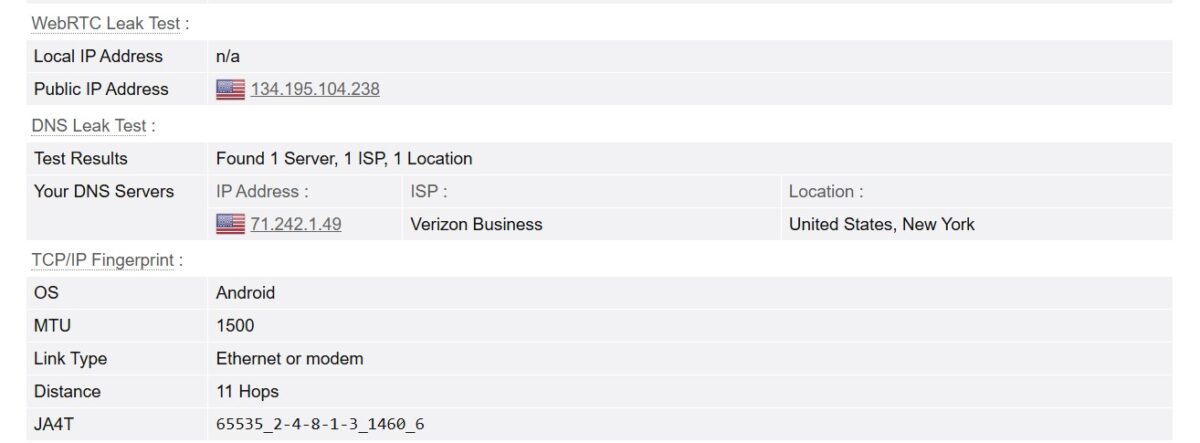
In the TCP/IP Fingerprint block BrowserLeaks turned up something curious: OS Android, MTU 1500, Link Type “Ethernet or modem,” a JA4T fingerprint. So at the TCP level the stack looks like a mobile Android device, even though the browser presents as Chrome on Windows. Smart antifraud engines like Cloudflare Bot Management know how to catch a mismatch like that. For careful work you’ll want to clean this up.
Blacklists
And here’s the first fly in the ointment. I ran 70.106.209.127 through MXToolbox and the address showed up on two lists: Sender Score Reputation Network and Spamhaus ZEN. “Listed 2 times with 1 timeouts.”
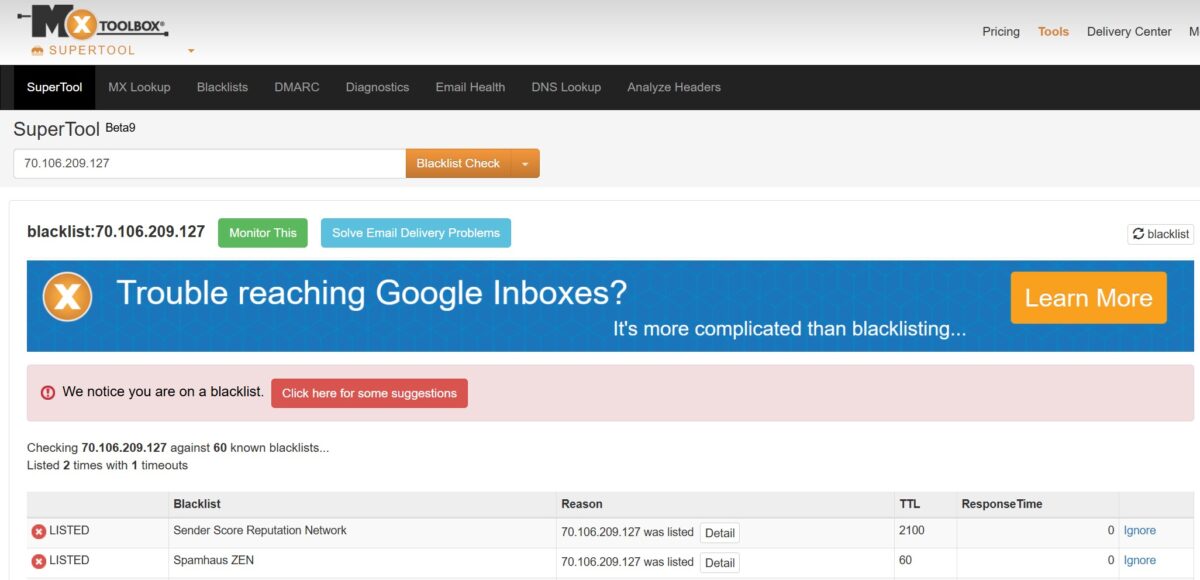
Before you clutch your chest, let’s break down what this means. Spamhaus ZEN includes the PBL – Policy Block List. That’s not a list of spammers. It’s a list of ranges that aren’t supposed to send mail directly to mx servers. Every home subscriber of Verizon, Comcast, AT&T lands there by default – that’s the whole point of the PBL. For web tasks – scraping, social media, marketplaces, SEO – this block is no obstacle at all. But sending email directly through the proxy won’t work. Then again, residential proxies aren’t meant for mailing in the first place – that’s true of every residential network, not a screwup specific to IPFoxy.
Speed
Now for speed, and here I’ve got some bad news.
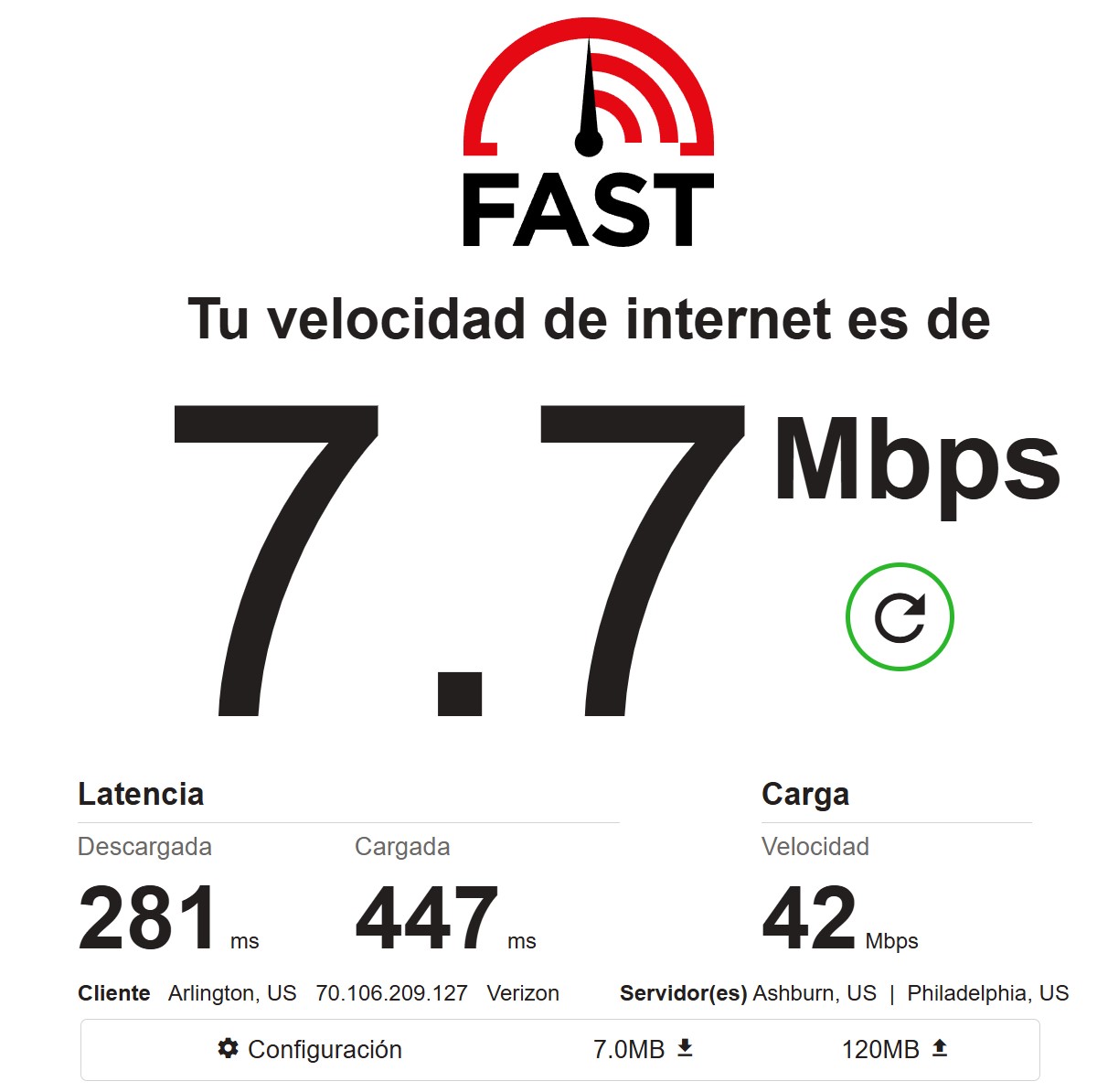
Fast.com gave 7.7 Mbps on download, 42 Mbps upload, latency download 281 ms, upload 447 ms. Client: Arlington, US, Verizon. Download of 7.7 is slow. Upload was surprisingly peppy, but people usually pull data down, not push it up.
One measurement is a lottery – I could’ve hit a slow exit. So I ran a pool of 150 proxies for speed. The picture didn’t improve: average download 5.42 Mbps (median 5.84), max 29.03, min 0.61. Average upload 9.34 Mbps. Median latency: 872 ms.
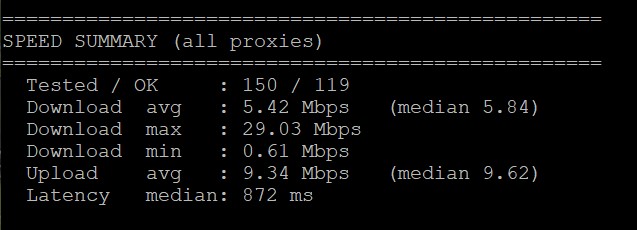
I’ll say it plainly: for 2026 that’s weak. A median of 5-6 Mbps on download and nearly a full second of latency. For comparison, Floppydata gave me 27-37 Mbps, IPPeak 7-8, NodeMaven around 9. IPFoxy comes in below even that bottom tier. For parsing text, checking search results, working with accounts – it’ll do. For heavy content or video – forget it. 872 ms of latency kills any high-frequency task and any sniping.
Pool Quality: The Main Test
Speed is only half the trouble. What matters far more is how many proxies in the pool are alive and how genuinely residential they are. I ran 400 proxies through my script on a VPS. And here the picture sharply diverges from that squeaky-clean single IP I was admiring earlier.
Success rate 87.8% – out of 400 proxies, 351 worked. Not a disaster, but noticeably below the top networks, where I see 99%+. Unique IPs: 236 out of 351 successful. So roughly every third successful request returned an address I’d already seen. The pool is either not as wide as advertised, or it’s thin on this specific geo (US/Virginia/Ashburn).
Latency across the pool was heavy: p50 1036 ms, p90 6042 ms, p95 8444 ms. Eight and a half seconds at the 95th percentile is a lot.
But the most interesting part is the flags. Hosting flag 0.0% (no datacenter IPs found – good). Proxy flag 0.3%. But Mobile flag 2.3% – meaning 2-3% of the addresses came back as mobile, even though I ordered residential. All 351 successful ones were in the United States, geo matched.
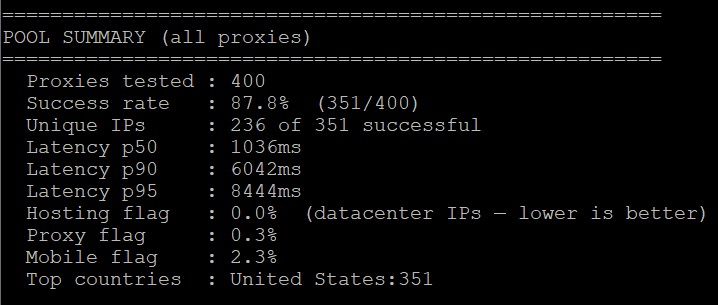
What this means in plain terms. The datacenter contamination people scream about on Trustpilot (“cheap zenlayer datacenter proxy”) is almost absent from my pool – 0% hosting, 0.3% proxy. That’s better than I expected. For context: Zenlayer networks carry a risk score of 55/100 at Scamalytics, so if they’d slipped me their addresses, I’d have seen it. They didn’t. But an 88% success rate and 236 unique out of 351 is middle of the pack. And a median latency over a second is weak.
FOGLDN and Byteful
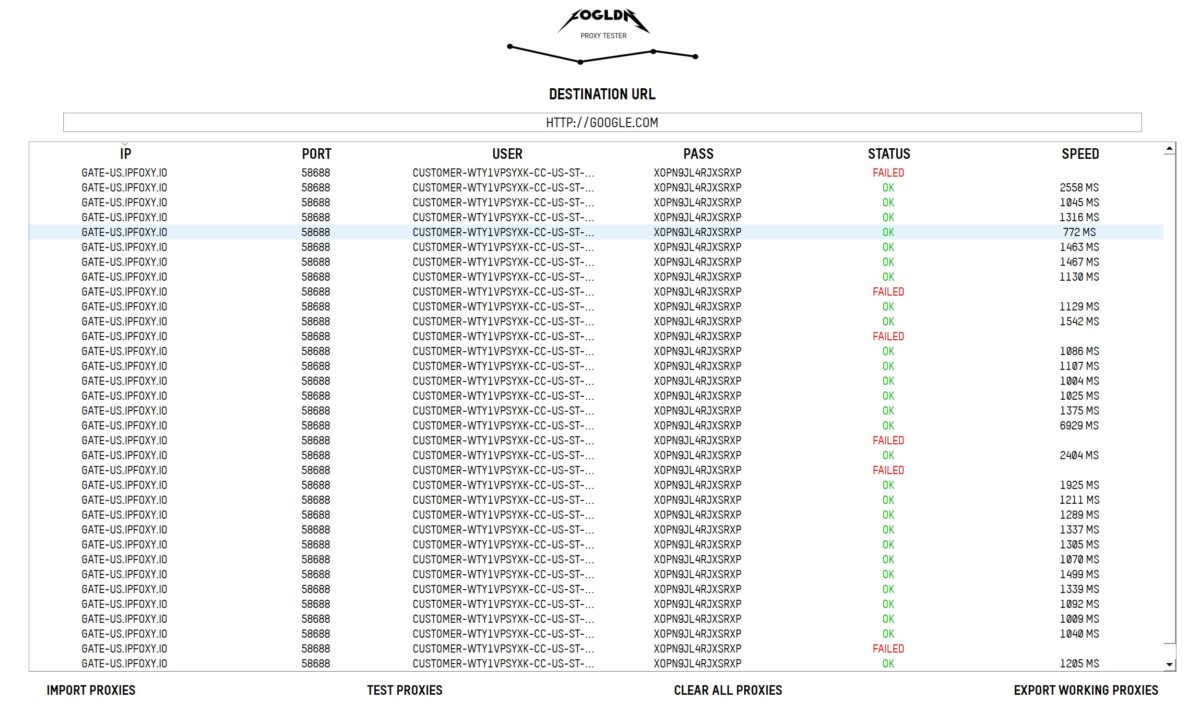
FOGLDN Proxy Tester against google.com: dozens of proxies, mixed status – most were OK, but FAILED kept popping up regularly. Speeds on the successful ones ran from 772 ms to 6929 ms, a wild spread. Google let them through without a captcha, but there’s no consistency.
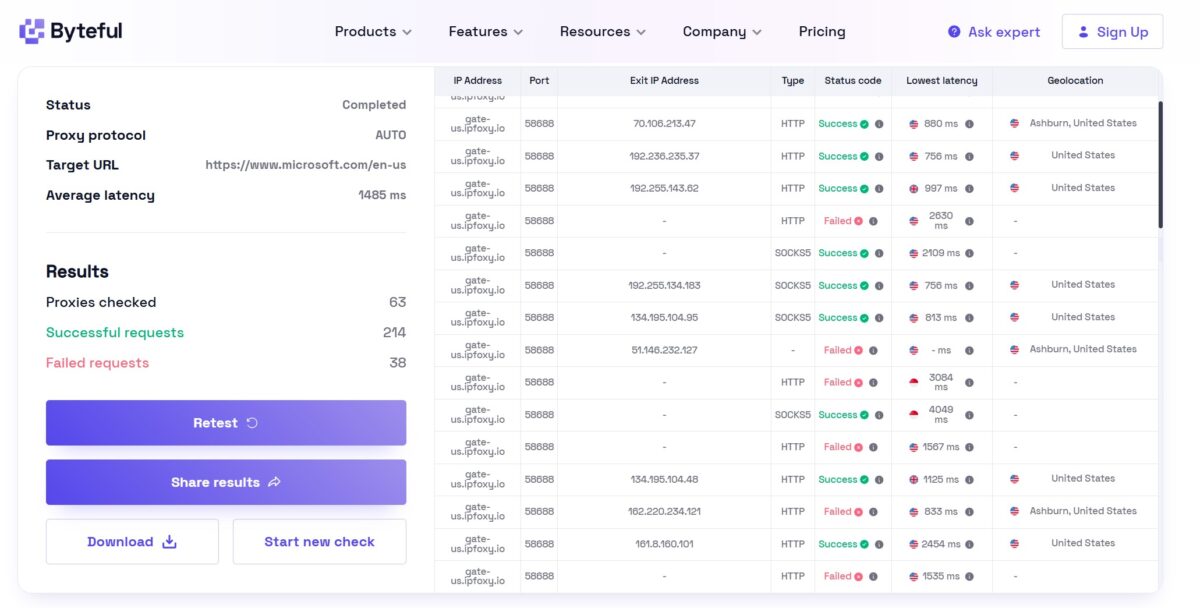
Byteful against microsoft.com: 63 proxies, 214 successful requests, 38 failed. Average latency 1485 ms. In the Geolocation column – Ashburn and various US cities, but plenty of rows with a dash and a Failed status. Some nodes suddenly turned out to be geo-located in China (you can see Chinese exits among the American ones by the flags in the table). For a “US only” order, that’s sloppy.
Pricing
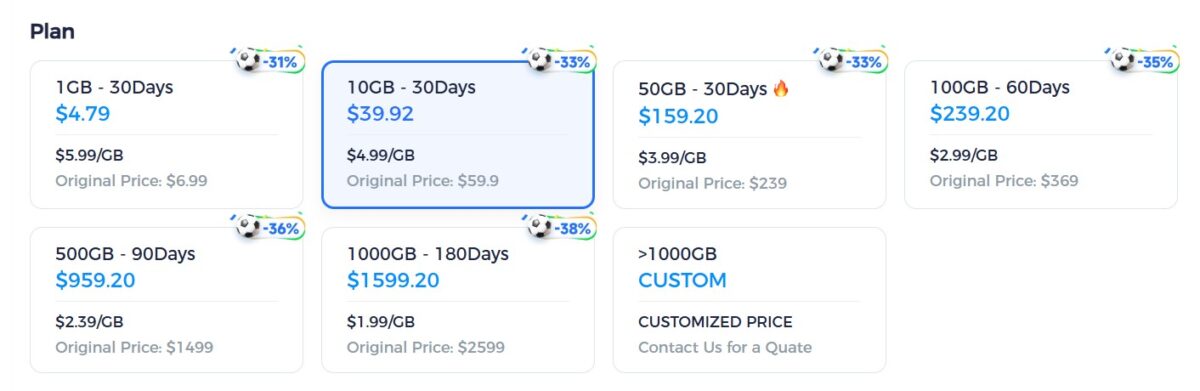
The pricing page is dressed up as a “World Cup Sale” with little soccer-ball discounts. Rotating residential: 1 GB / 30 days – $4.79 ($5.99/GB), 10 GB – $39.92 ($4.99/GB), 50 GB – $159.20 ($3.99/GB), 100 GB / 60 days – $239.20 ($2.99/GB), 500 GB / 90 days – $959.20 ($2.39/GB), 1000 GB / 180 days – $1599.20 ($1.99/GB), over 1000 GB – custom. On larger volumes the marketing also flashes $1.59, and down to $0.60 on custom plans. IPFoxy notes that high-volume buyers can negotiate custom rates as low as $0.6–0.8/GB, which would place them at mid-market pricing — though these rates aren’t publicly listed and require direct negotiation.
Mobile proxies are a separate tab, from $6.99/GB on 1 GB down to $2.79/GB on 1 TB. I didn’t get to test them, so I’m judging by the price list alone.
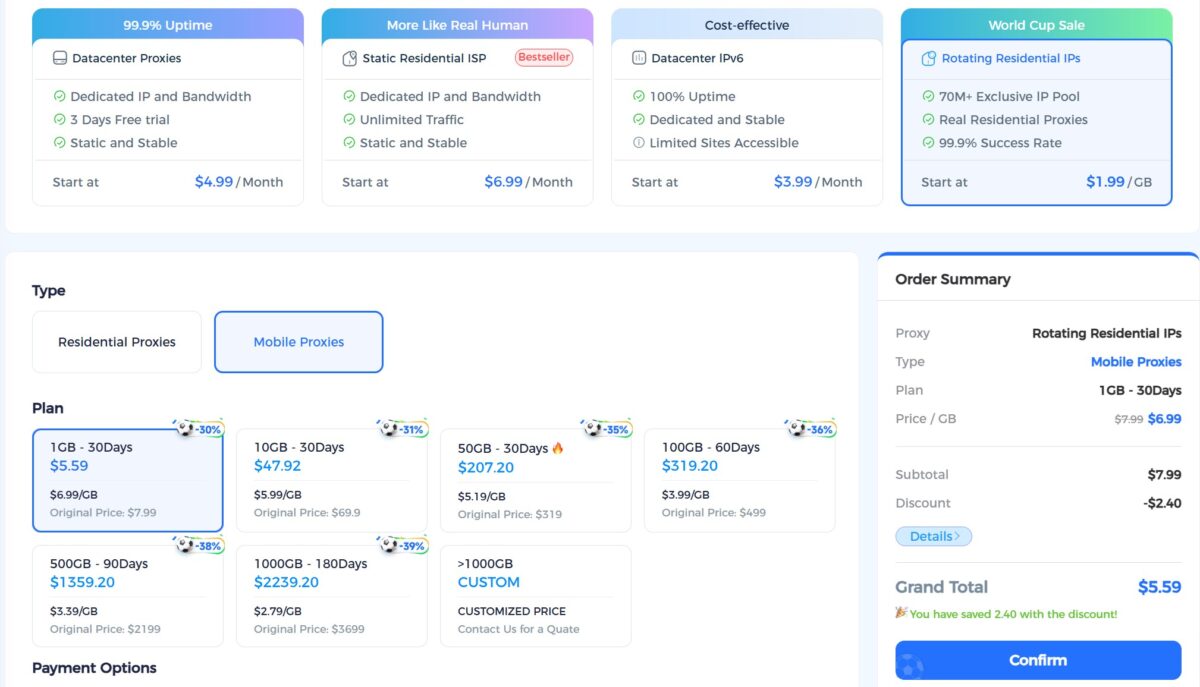
How this stacks up against the market. On small volumes $4.79 per gig is on the pricey side: Decodo starts at $2.75, IPRoyal at $3.50. At the 1 TB level ($1.59-1.99/GB) IPFoxy gets more competitive and undercuts Bright Data (pricing ~$3.5+) and Oxylabs. But it’s exactly at the big-ticket end that the reputation risks bite hardest. Paying over a thousand dollars to a service with a 2/5 on Trustpilot is a bold move.
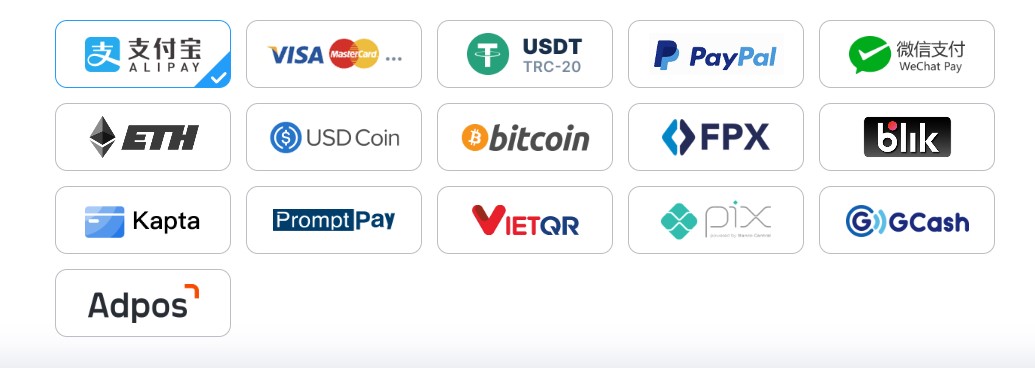
Payment methods – 18 icons: Alipay, Visa/MasterCard, USDT-TRC20, PayPal, WeChat Pay, ETH, USD Coin, Bitcoin, FPX, blik, Kapta, PromptPay, VietQR, pix, GCash, Adpos. Crypto without KYC is a plus for privacy. The pile of Asian methods (Alipay, WeChat, FPX, PromptPay, VietQR, GCash) flat out gives away who the service is aimed at – Southeast Asia and China.
Reputation: What You Can’t Ignore
Here I have to be blunt. On Trustpilot IPFoxy sits at 2 out of 5 across just 22 reviews — a limited sample that should be taken with a grain of salt, though the patterns in the complaints are still worth noting. For comparison: Bright Data 4.4/5, Decodo 4.2/5, IPRoyal and Webshare 4.6-4.7/5. And the Trustpilot indicator honestly warns that the company responds to negative reviews “typically takes over 1 month” – more than a month. IPFoxy clarifies that Trustpilot is not their actively managed support channel, and that response times through their official website are significantly faster — a distinction worth keeping in mind when evaluating this metric. Still, for a provider advertising “7×24” support, slow public-facing responses aren’t a great look.
The complaints are repetitive and specific: residential swapped for datacenter Zenlayer, wrong geo (ordered Pakistan, got Hong Kong), fraud score 100, refusal to refund a $42 balance, “bandwidth meter is fake,” “proxy fails to connect 99% of the time.” There’s also a direct accusation of review manipulation: supposedly you get 200 MB of bonus traffic for a five-star review.
On the refund complaints specifically, IPFoxy points out that they provide free trial quotas for both static and rotating IPs, allowing users to verify suitability before committing money. Their stated policy is that refunds are not issued for reasons other than actual IP quality issues — a measure they say is designed to prevent abuse (bulk traffic consumption followed by refund requests). Legitimate IP quality refund requests, they say, are always processed. This is a reasonable framework on paper, but it doesn’t fully account for the frustration in those Trustpilot reviews, where users clearly felt the policy was applied unfairly.
Part of this my tests did not confirm – my IP was a clean Verizon with a fraud score of 4, and there was almost no datacenter contamination in the pool. But part of it was indirectly confirmed: the geo mismatch (Chinese exits in a “US” order), the instability (FAILED in FOGLDN, 88% success rate), the expiring traffic. So the complaints aren’t just empty noise.
A word on organic presence. In the big r/proxies threads about the best residential providers of 2026, IPFoxy isn’t mentioned once. The largest independent portal, Proxyway, doesn’t include it in its top 12 residentials for 2026 either — though IPFoxy notes that Proxyway requires paid partnerships for ranking visibility, which they have opted not to pursue (similar to paid ad placements). That’s a valid business decision, but the absence still matters to buyers who use Proxyway as a trust signal. Meanwhile there’s no shortage of partner reviews with UTM tags and referral links (Dolphin Anty, Afina, Octo Browser). The classic profile of a player running aggressive SEO with a weak organic base.
The Legal Side, Briefly
The legal entity is Tiger Roar Technology Pte. Ltd., Singapore. The Privacy Policy is dated August 2022 and hasn’t been updated since. GDPR/CCPA aren’t mentioned explicitly. The source of the residential IPs isn’t disclosed: no data on a consent mechanism for device owners, no KYC for network suppliers, no audit of ethical sourcing. Bright Data has a public Ethical Sourcing framework, Oxylabs has an Ethics Advisory Board. IPFoxy has none of that. In light of the FBI warnings (March 2026) about malicious residential networks, this is a serious legal risk for corporate clients in the EU.
A curious detail: the Service Agreement contains phrases like “endangering national security,” “disclosing state secrets,” “disseminating cult-related ideology or feudal superstition.” That’s the language of the Chinese regulatory lexicon – an indirect hint at the real operational jurisdiction, not the Singapore storefront.
Summary Table
| Parameter | Result | Score |
|---|---|---|
| Download / Upload | 5-6 Mbps / 9 Mbps (pool medians) | 2/5 |
| Latency (pool p50) | 1036 ms | 2/5 |
| Success Rate (400 proxies) | 87.8% (351/400) | 3.5/5 |
| Hosting / Proxy / Mobile flag | 0.0% / 0.3% / 2.3% | 4/5 |
| Pool uniqueness | 236 of 351 | 2/5 |
| Fraud Score | 4/100 Scamalytics, 0/100 IP2Location | 5/5 |
| IP Reputation (APIVoid) | 0/79 detections | 5/5 |
| Blacklists | Spamhaus ZEN + Sender Score (PBL, for email) | 3/5 |
| ISP Type | Residential, AS701 Verizon Fios | 5/5 |
| Proxy Detection (Pixelscan) | No proxy detected (but timezone spoofed) | 4/5 |
| WebRTC Leak | No Leak | 5/5 |
| DNS Leak | None, all DNS = Verizon | 5/5 |
| Geo-targeting | Country + state + city | 4/5 |
| FOGLDN / Byteful | Some FAILED, Chinese exits in a US order | 3/5 |
| Price | $1.59-4.79/GB (custom from $0.6/GB) | 3/5 |
| Trustpilot | 2.0/5 (22 reviews, limited sample) | 1/5 |
| Overall | ~3.5/5 |
- a real residential — Verizon Fios, AS701, Fixed Line ISP, hosted domains 0;
- low fraud score on the single IP — 4/100 Scamalytics, 0/79 APIVoid;
- the proxy doesn’t get flagged — Pixelscan “No proxy detected”;
- WebRTC fully locked down;
- no DNS leak, all resolvers inside Verizon;
- almost no datacenter contamination in the pool — hosting 0%;
- flexible generator with country + state + city targeting;
- HTTP/SOCKS4/SOCKS5/SSH protocols;
- tight integrations with antidetect browsers;
- crypto without KYC and a pile of Asian payment methods;
- free trial quotas available for both static and rotating IPs before purchase.
- slow — pool median 5-6 Mbps, latency 872-1036 ms;
- success rate 88% and uniqueness 236 of 351 — middling;
- Chinese exits in a “US only” order;
- expiring traffic tied to the plan window (though longer plans up to 180 days are available);
- Trustpilot 2/5 (limited sample of 22 reviews) and complaints about swaps, refund refusals, review manipulation;
- no presence in organic Reddit or Proxyway;
- opaque IP source, no compliance and no audit;
- Privacy Policy from 2022;
- timezone/TCP mismatch you have to fix by hand.
Overall Impression
Honestly? IPFoxy turned out better than its Trustpilot reputation, but worse than its marketing.
The single IP pleasantly surprised me. A real Verizon Fios, clean fraud score, zero proxy detection, no WebRTC or DNS leaks. After the complaints about “Zenlayer datacenter” and “fraud score 100” I was braced for a dumpster, and got a normal residential address instead. At this level the service does what it promises.
And then I turned on the 400-proxy pool, and the picture started to slide. Success rate 88%, uniqueness of every third address in question, median latency over a second and up to 8 seconds on the tails, Chinese exits in an American order, regular FAILEDs. Speed weak across every measurement. This isn’t a top-tier network, it’s a solid middleweight whose good individual IP doesn’t scale into a stable, quality pool.
Who it fits. Small teams working the Asian market (JP/KR/HK/TW), where the Western leaders cost more. Light scraping and SEO monitoring without hard speed requirements. Multi-accounting through antidetect – but only after you check each batch yourself with IPQualityScore or Scamalytics, because node quality wanders.
Who it doesn’t fit. Enterprise with GDPR requirements (no compliance, no source transparency). Scraping behind Cloudflare/Datadome at speed. Sneaker copping and Facebook/Google ad accounts, where an unstable pool and fingerprint mismatch will get you banned fast. Anyone who needs the provider to carry legal responsibility in an incident.
My score: 3.5 out of 5.
The quality of the individual IP raises almost no questions – the address is real, clean, leak-free, and antifraud doesn’t flag it. That’s a solid five within the score, and it’s what pulls the service up out of the middle. I docked points for speed, for pool instability at volume, and for the Trustpilot reputation. But a proxy that gives you fraud 4 and zero detection on a single node isn’t a dumpster, it’s a working tool for the right tasks. Hence 3.5, and not lower.
If you do decide to buy – only after your own test through IPQualityScore, IP2Location and Scamalytics, only for non-critical tasks, and with a minimal deposit. Judging by the Trustpilot complaints the company is reluctant to refund leftover balances, so test a refund on $10-20 first before you load up hundreds. For serious work under Western regulation, look straight at Oxylabs, Decodo or Bright Data.
This isn’t a full breakdown of every feature. The review will be updated: static ISP testing, a run against protected targets, sticky-session checks on a large batch. Logs and screenshots are saved, and I’m ready to double-check any number on request.
Targeting by country, state and city, sticky sessions up to 30 minutes
Residential traffic from $1.59/GB at volume
retail price $4.79/GB
residential, ISP, mobile, datacenter IPv4/IPv6 + SOCKS5, antidetect browser integrations, IP whitelist