






 Why Trust Us?
ToProxyLab has been testing proxy services since 2025. We pay for most plans ourselves, and when a provider gives us test traffic we say so in the review — free traffic buys a place in the testing queue, nothing else. Every provider goes through the same speed, uptime and fraud-score checks, and we publish the real numbers, including the bad ones. A rating cannot be bought. Learn who we are and how we review proxies.
Why Trust Us?
ToProxyLab has been testing proxy services since 2025. We pay for most plans ourselves, and when a provider gives us test traffic we say so in the review — free traffic buys a place in the testing queue, nothing else. Every provider goes through the same speed, uptime and fraud-score checks, and we publish the real numbers, including the bad ones. A rating cannot be bought. Learn who we are and how we review proxies.
A rep from 9proxy.com reached out and offered to let me test their service for a review – they wanted me to weigh in on the quality of their IPs. We always need content, and widening the pool of decent proxy services we’ve vetted is never a bad thing, so I said yes. They dropped a promo code for 3 GB of traffic onto my balance. I’ve been in SEO for years and I farm Reddit accounts, I’ve worked with proxies forever, and over that time I’ve learned to pick the best of a bad bunch. So I’ll run this one through the grinder too – content for you, work and extra experience for me.
Let me get the awkward part out of the way, same as I do in every review like this. Those free gigabytes have zero effect on my score. I test what I see, and I document every step with screenshots – the logs are sitting on my drive. If anyone wants to double-check my numbers, message me and I’ll hand over the raw data, no questions asked. Nobody paid me to sing praises over a couple of gigs.
As usual, I’m testing US residential proxies. Why the US specifically – I spelled it out in detail in my Floppydata review, but the short version: it’s the most demanding and competitive market, where IPs get checked instantly for shadowbans, anti-fraud flags, and whether the ISP is real. It shows pool quality better than anywhere else. And I recently wrote some scripts on my VPS to run a small pool – anywhere from 50 to 400 proxies – through a mass speed and quality check all at once. Details are in my updated testing methodology.
One fact stayed in the back of my mind from the start. Proxyway – the leading independent market researcher – didn’t rate 9Proxy in its 2025 rankings. Not at all. Top-tier reviewers give it a wide berth, which means there are no transparent third-party benchmarks for this service. I had to do the testing myself.
Who’s behind it
First, about the company, because there’s a trap lurking here. 9Proxy is a trade name of ConnectWise Limited, registered in Hong Kong. It says so right in their Terms of Service. And here’s the first pitfall for users: the name is identical to the well-known American IT vendor ConnectWise LLC, which makes RMM/PSA software. These are different legal entities. The Hong Kong ConnectWise is a niche proxy provider with no connection to its American namesake. Confusion out of thin air.
They launched in 2023 – on their own blog they mention “three years” of operation as of 2026. It’s a young service. The Hong Kong registration also makes any public due diligence harder: the registries there are closed, so you can’t dig deep.
And separately about pool size, because the numbers on their site are all over the place. In one spot it’s “9 million IPs,” in another “20 million+,” and a partner GitHub promo even throws out “95 million in 200+ countries.” That last one is almost certainly marketing fiction, because the official site says “90+ countries.” When a provider contradicts itself threefold on pool size, it doesn’t exactly build trust in the figures. The threat-intelligence platform Synthient counted just ~610,000 unique live IPs for 9Proxy over a week of observation across 16.4 million events, and flagged the provider as HIGH RISK. For residential networks, the gap between “20M claimed” and “online right now” is normal – only a small slice of the pool is ever online. But the order of magnitude is telling all the same.
The dashboard: narrow, but no clutter
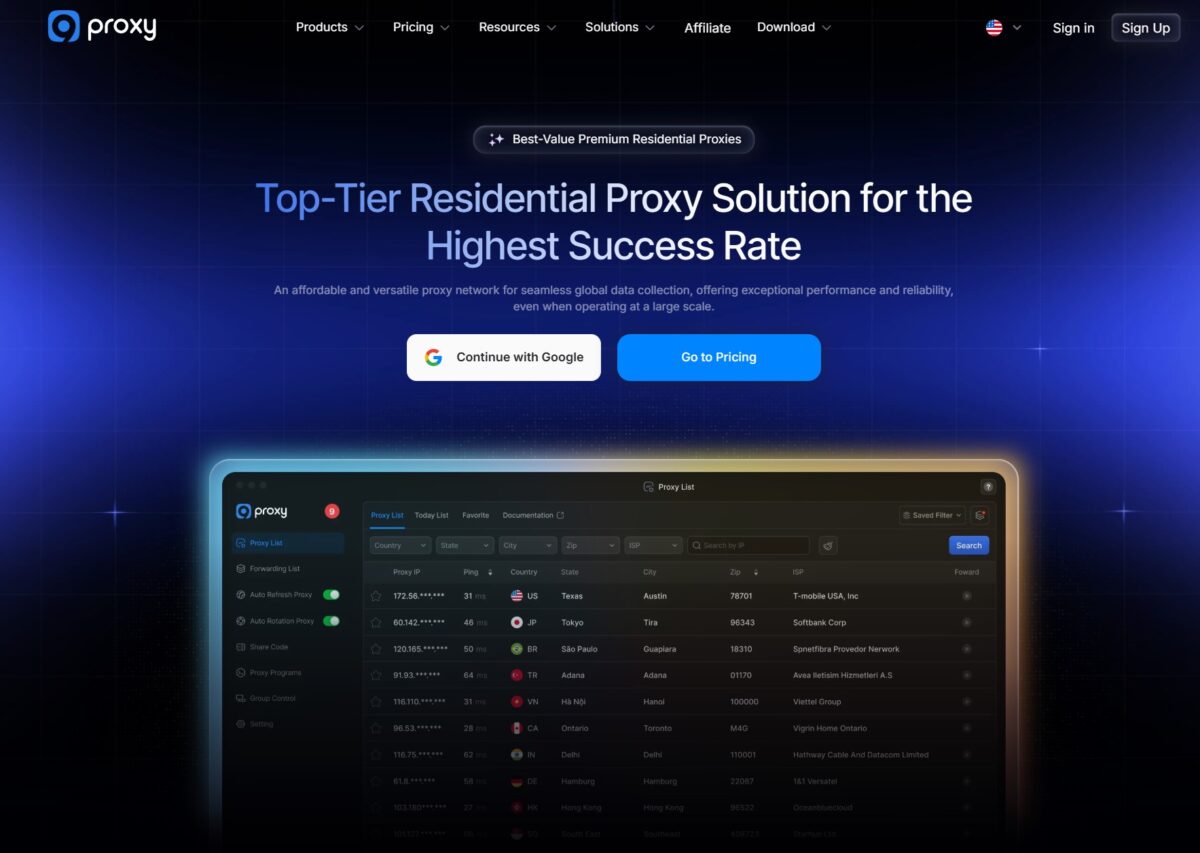
The interface is minimalist. The left menu: Overview, Residential Proxies (IPs and GB split apart), Billing History, Sub-Accounts, Share Code, 9Proxy Wallet, My Account, plus Affiliate and Enterprise blocks. The desktop app and the web dashboard look the same.
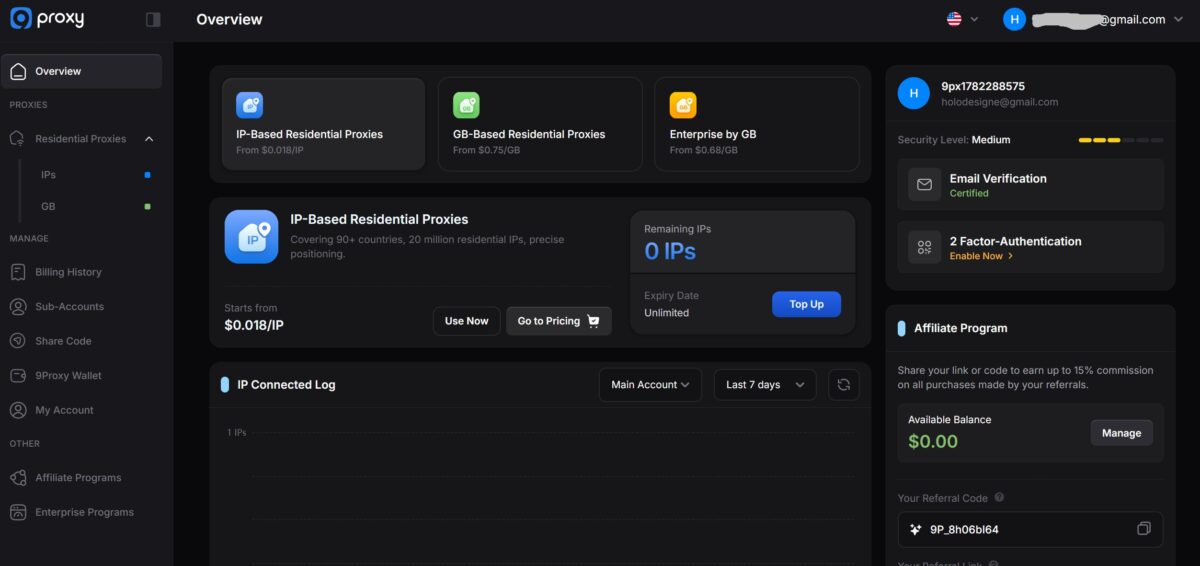
The lineup is narrow – residential only. No datacenter, no static ISP, no mobile. Want mobile proxies for sneaker bots – not here. There are only two categories: IP-based and GB-based. That, by the way, sets 9Proxy apart from the market: almost all residential providers sell traffic by the gigabyte, but here you can also buy IPs individually.
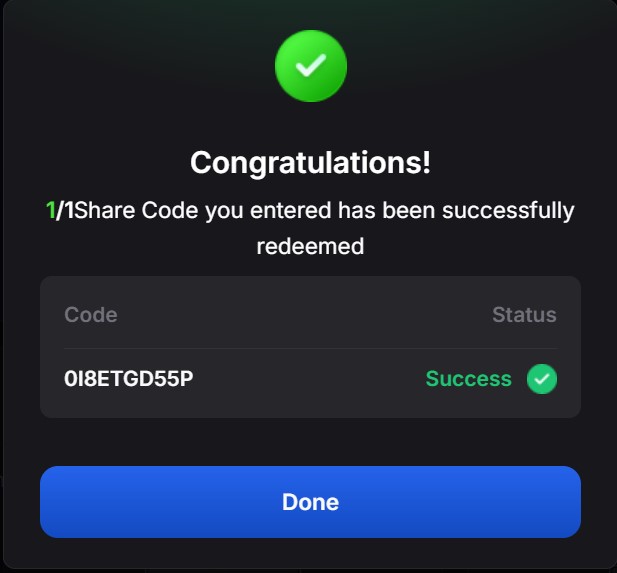
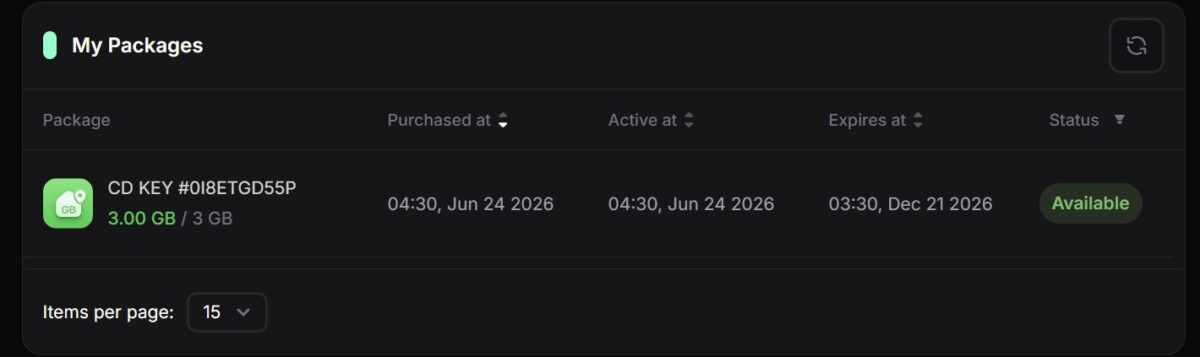
I tested the GB plan. The traffic came through a Share Code – I redeemed code XXXXXXXX, and exactly 3.00 GB landed on my balance with a 180-day validity (through December 21, 2026). The fact that traffic doesn’t expire after a month, like with a lot of providers – that’s a solid plus.
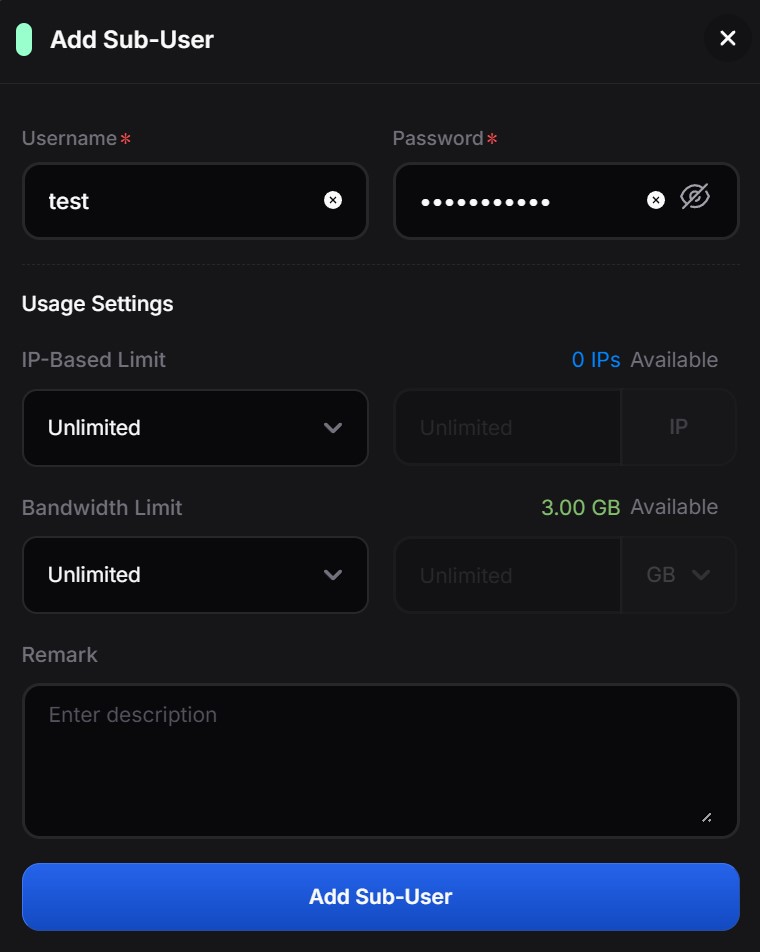
Proxies aren’t generated on the main screen – you do it by creating a Sub-User. The logic is like NodeMaven’s: you set up a user:pass account, optionally slap on IP and traffic limits (mine had 0 IPs and 3 GB available), then head to Get Proxy to dial in the geo and output format. Two auth methods – classic user:pass via Sub-User, and IP whitelisting.
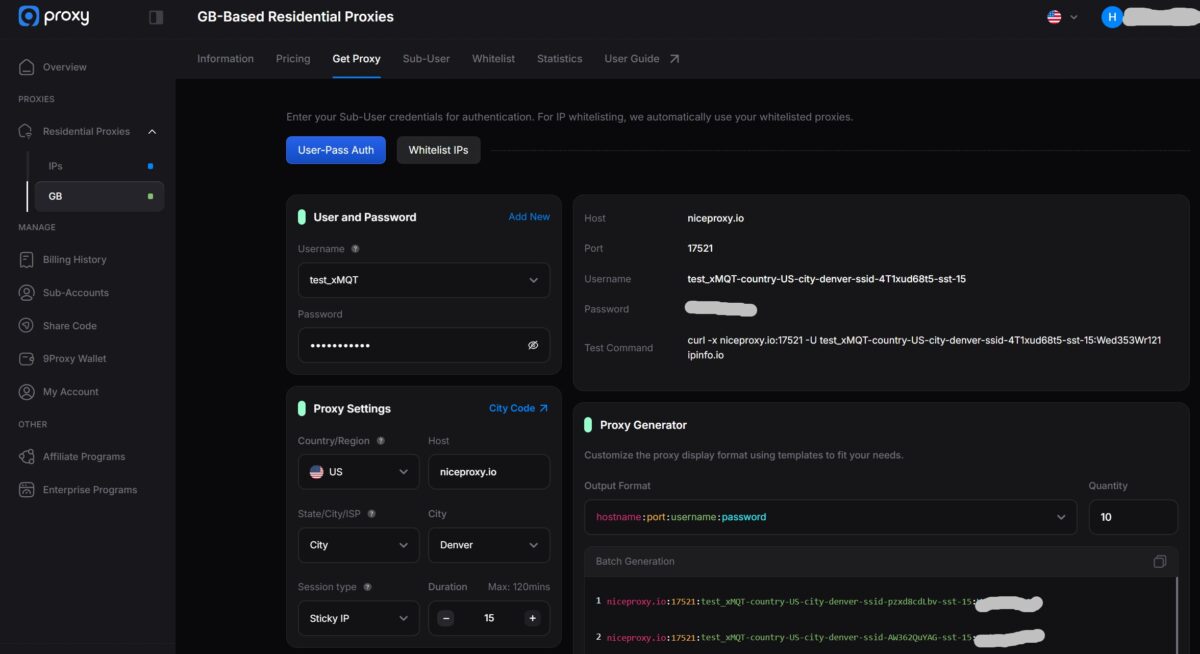
The generator is standard fare: country US, State/City/ISP filters, city selection (I set Denver), session type Sticky or Rotating, lifetime up to 120 minutes. Their host, by the way, is niceproxy.io – not 9proxy, a small thing, but it catches the eye. The output is a string like niceproxy.io:17521:test_xMQT-country-US-city-denver-ssid-.... You get a ready-made curl command right there to check the connection. You can generate them in batches – I grabbed 50 for testing. Protocols are HTTP, HTTPS, SOCKS5.
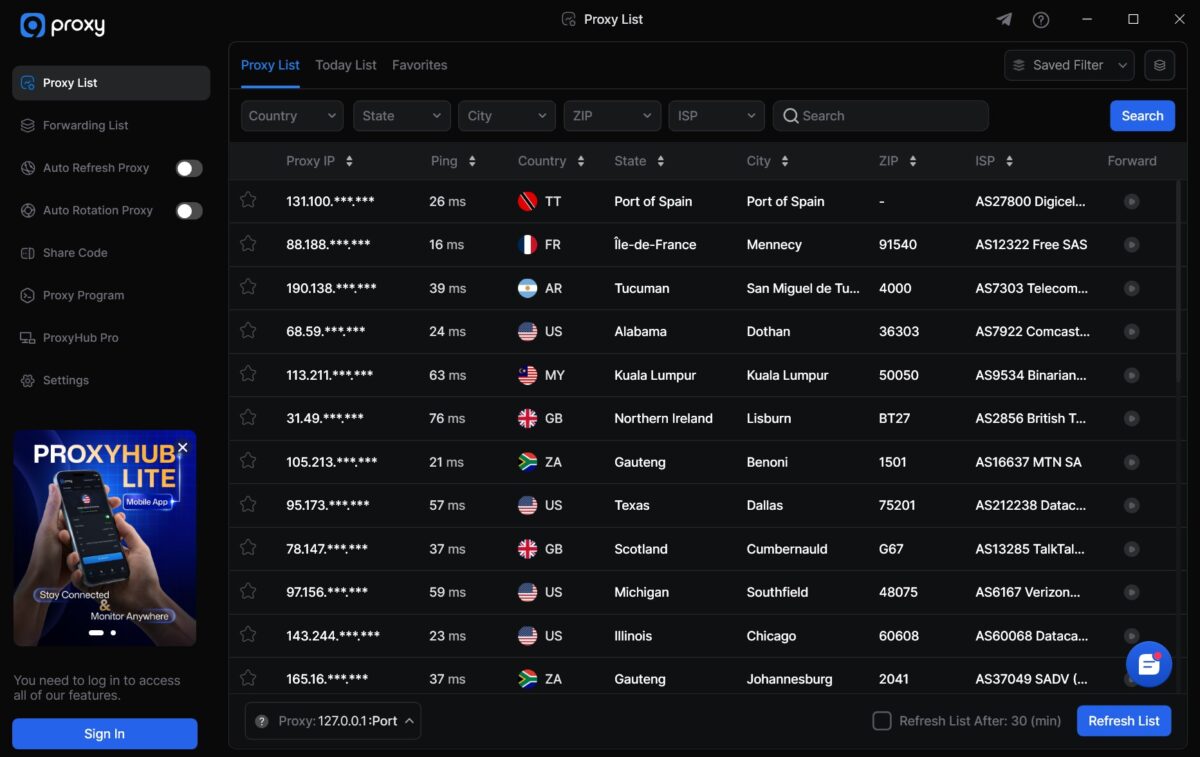
A word on the main Proxy List screen in the desktop app: a live table with Proxy IP, Ping, Country, State, City, ZIP, ISP, and a Forward button. The pings in the listing bounce around – from 16 ms (France) to 76 ms (UK), with the US in the 24-59 ms range. The geo is genuinely scattered: Trinidad, France, Argentina, Malaysia, South Africa, the US. Auto Refresh and Auto Rotation are tucked into the side menu as separate toggles.
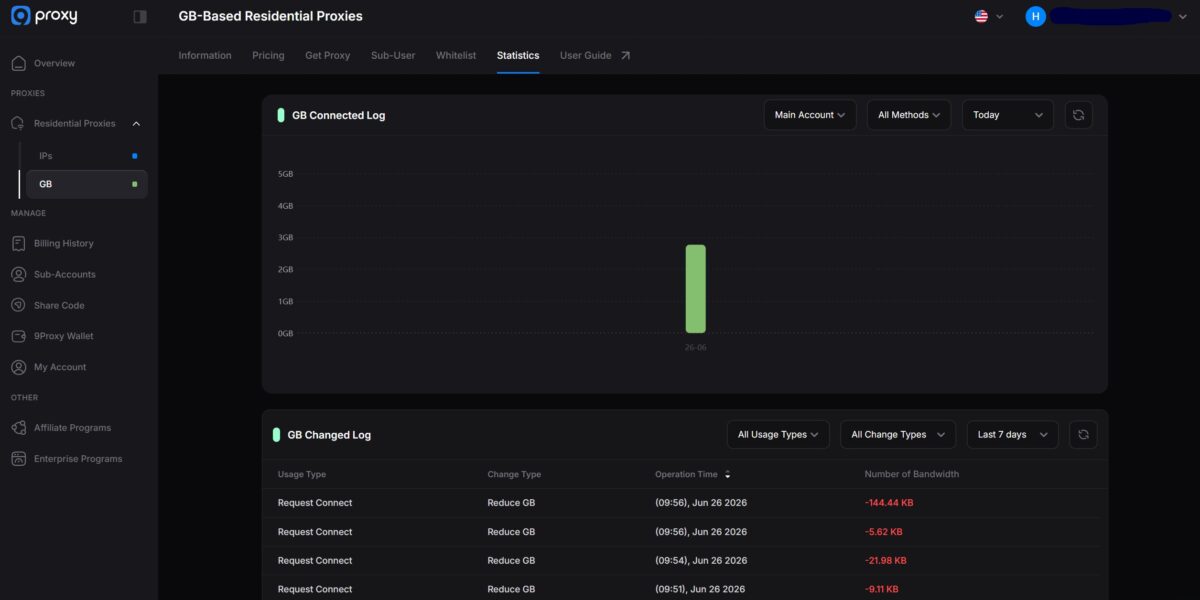
The dashboard stats are honest, down to the kilobyte. The GB Connected Log showed my usage in real time, and the GB Changed Log broke down every request: Reduce GB, timestamp, how many bytes went out (-144.44 KB, -5.62 KB, -21.98 KB, and so on). Easy to keep an eye on spending, no black box.
Test 1. Connectivity and pool: FOGLDN, Byteful, and a 400-proxy batch
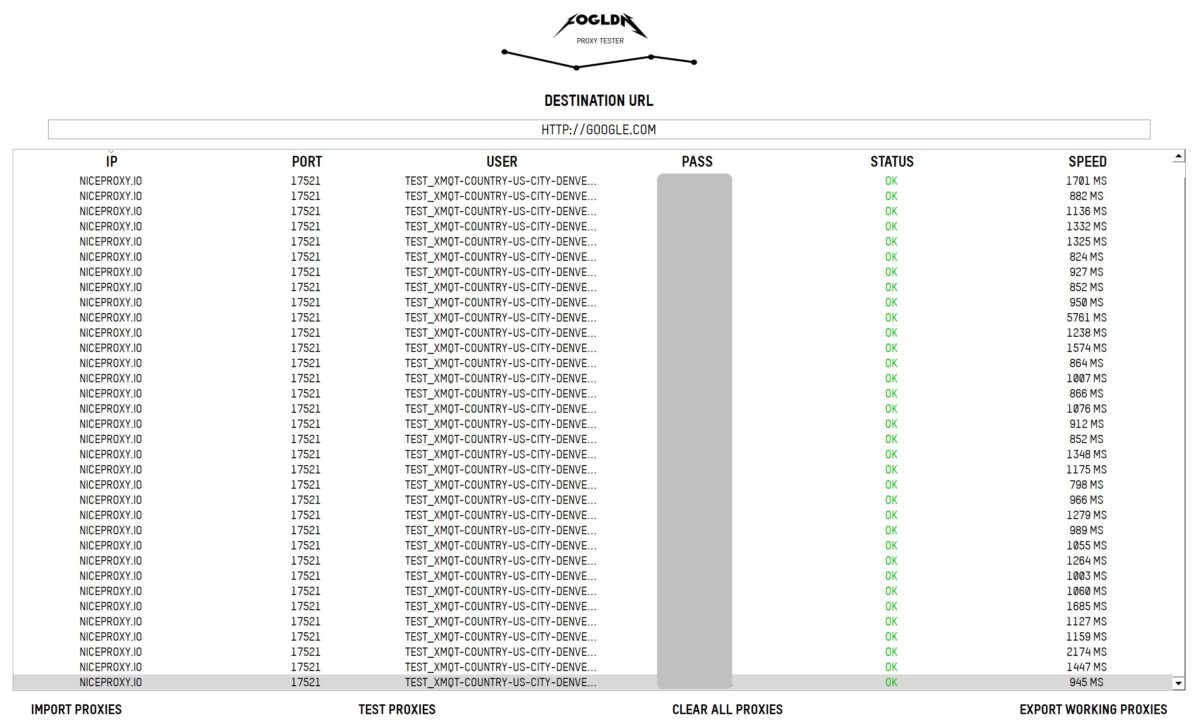
I started with a mass check – that’s the whole point of the new scripts. First, 50 proxies through FOGLDN ProxyTester hitting google.com. Almost the whole list came back green, Status OK across the column. For residential that’s normal – the odd FAILED on home IPs is just life, real devices go offline. But the speed put me on guard right away: latency wanders from ~798 to 5761 ms, averaging somewhere around 1000-1500 ms. Not fast.
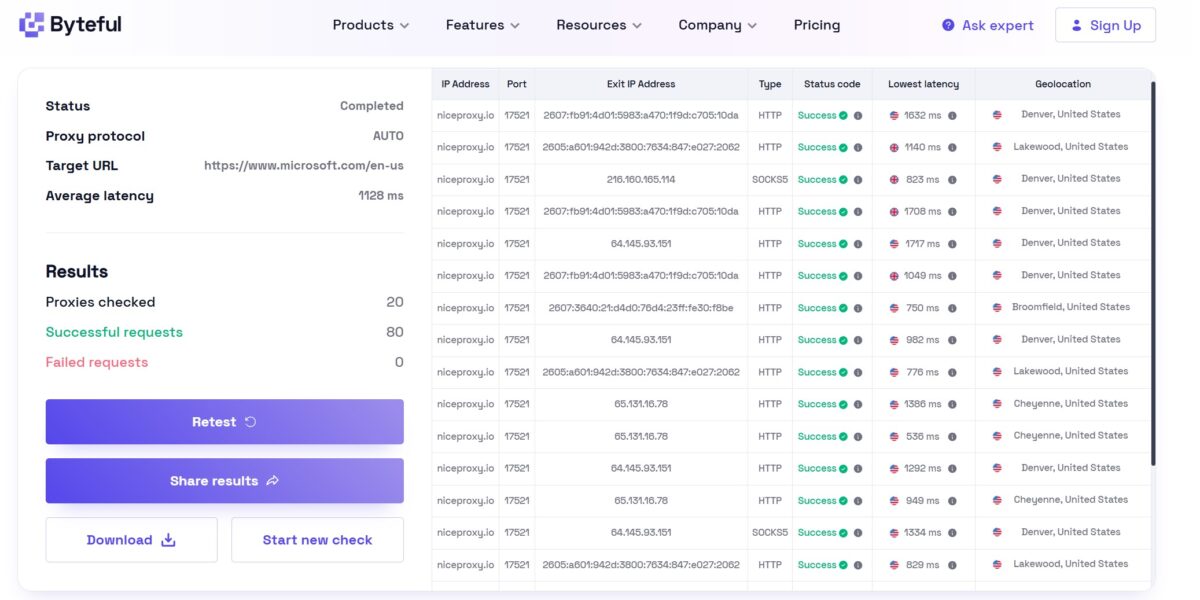
Byteful on 20 proxies hitting microsoft.com confirmed the picture: 20 proxies checked, 80 successful requests, 0 failed, average latency 1128 ms. The geo in the output – real little US towns: Denver, Lakewood, Broomfield, Cheyenne. The subnets look like live home networks, not hosting blocks. Not bad already.
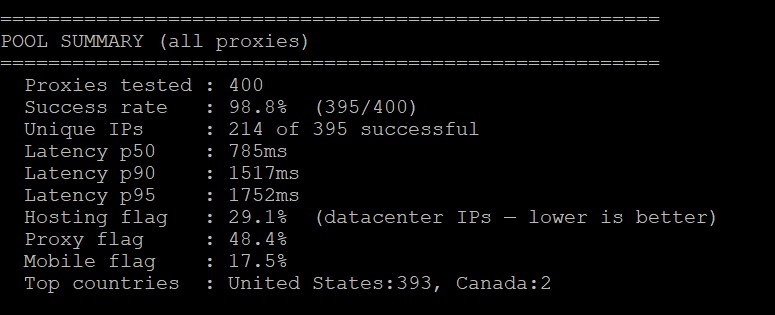
Next – my custom batch on 400 proxies, and this is where the numbers got most interesting. Pool summary:
- 400 tested, success rate 98.8% (395 of 400) – strong;
- unique IPs – 214 of 395 successful. Meaning the pool recycles addresses noticeably sooner than “20 million” would suggest. A little over half the requests returned a unique exit;
- latency p50 785 ms, p90 1517 ms, p95 1752 ms – a slow long tail;
- hosting flag 29.1% – nearly a third of exit addresses tagged as datacenter. For a service selling itself as clean residential, that’s a lot;
- proxy flag 48.4% – almost half get made as a proxy;
- mobile flag 17.5%;
- top countries: US 393, Canada 2 (the US targeting worked).
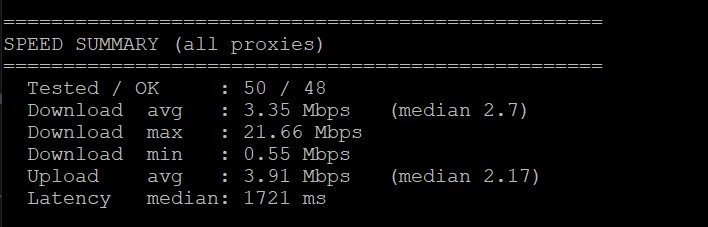
Separately I ran a speed summary on 50 proxies: download avg 3.35 Mbps with a median of just 2.7, max 21.66, min 0.55. Upload avg 3.91 Mbps. Median latency 1721 ms. In plain terms: the pool is slow. A couple of fast nodes drag the average download up, but a typical user will see ~2.7 Mbps – that’s low even for residential. The gap between max 21 and median 2.7 is itself a diagnosis about consistency.
The verdict on the first test is mixed. Connectivity is excellent (98.8% success), the geo is honest, but speed and pool uniqueness are weak. And I kept those 29% hosting and 48% proxy-flag in mind. So I went to check a specific address.
Test 2. The main check – what’s actually under the hood of an IP
This is the most important test in any of my reviews. Success rate and a pretty dashboard mean nothing if the exit address is garbage. I pulled a live IP from the session – 24.9.30.178 – and ran it through the whole arsenal.
And here, unlike the batch with its 48% proxy-flag, the specific address turned out surprisingly clean.
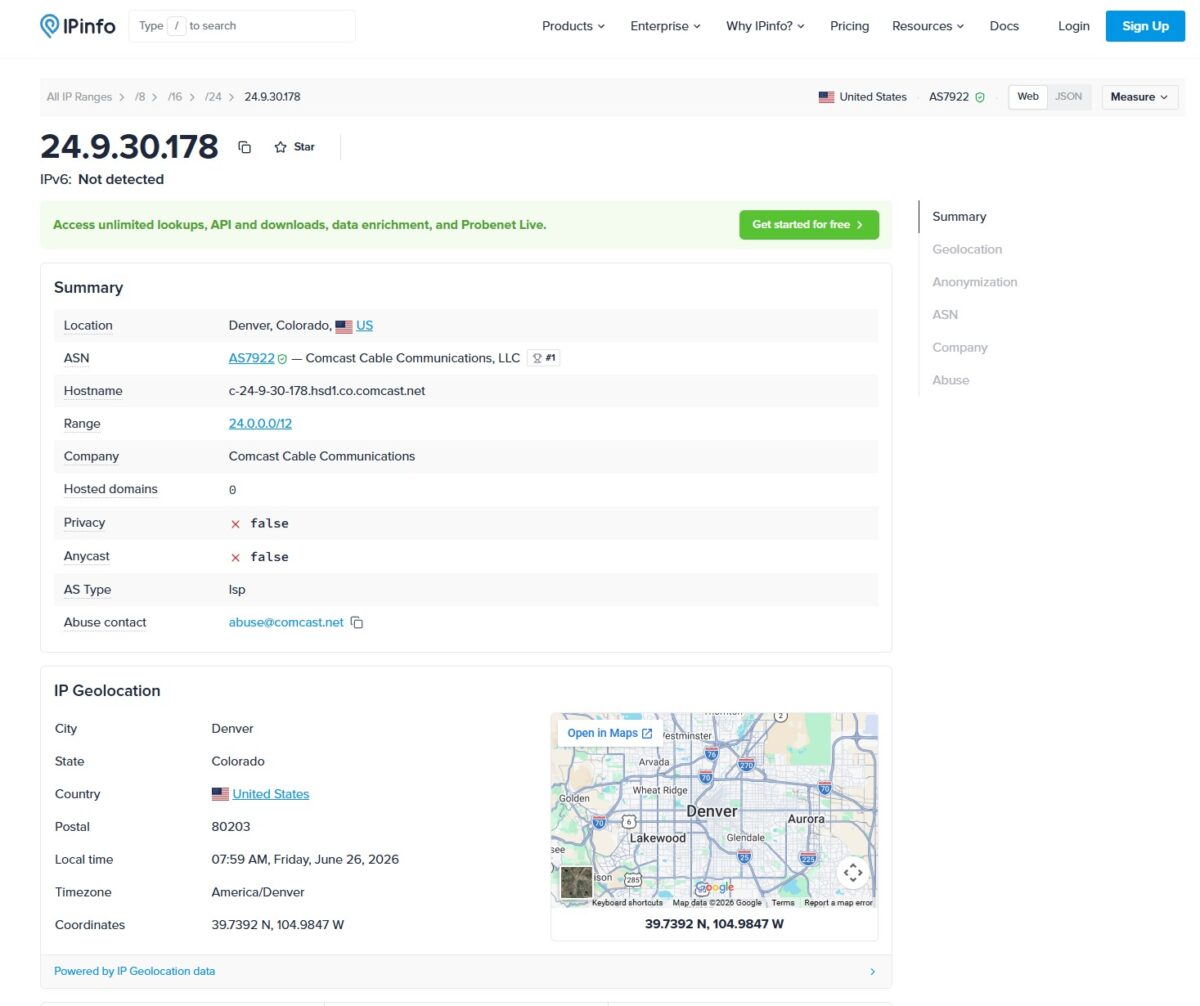
IPinfo: Denver, Colorado, US. ASN AS7922 Comcast Cable Communications, hostname c-24-9-30-178.hsd1.co.comcast.net. Privacy – false, Anycast – false, AS Type — ISP, Hosted domains 0. That’s a home Comcast line, not hosting.
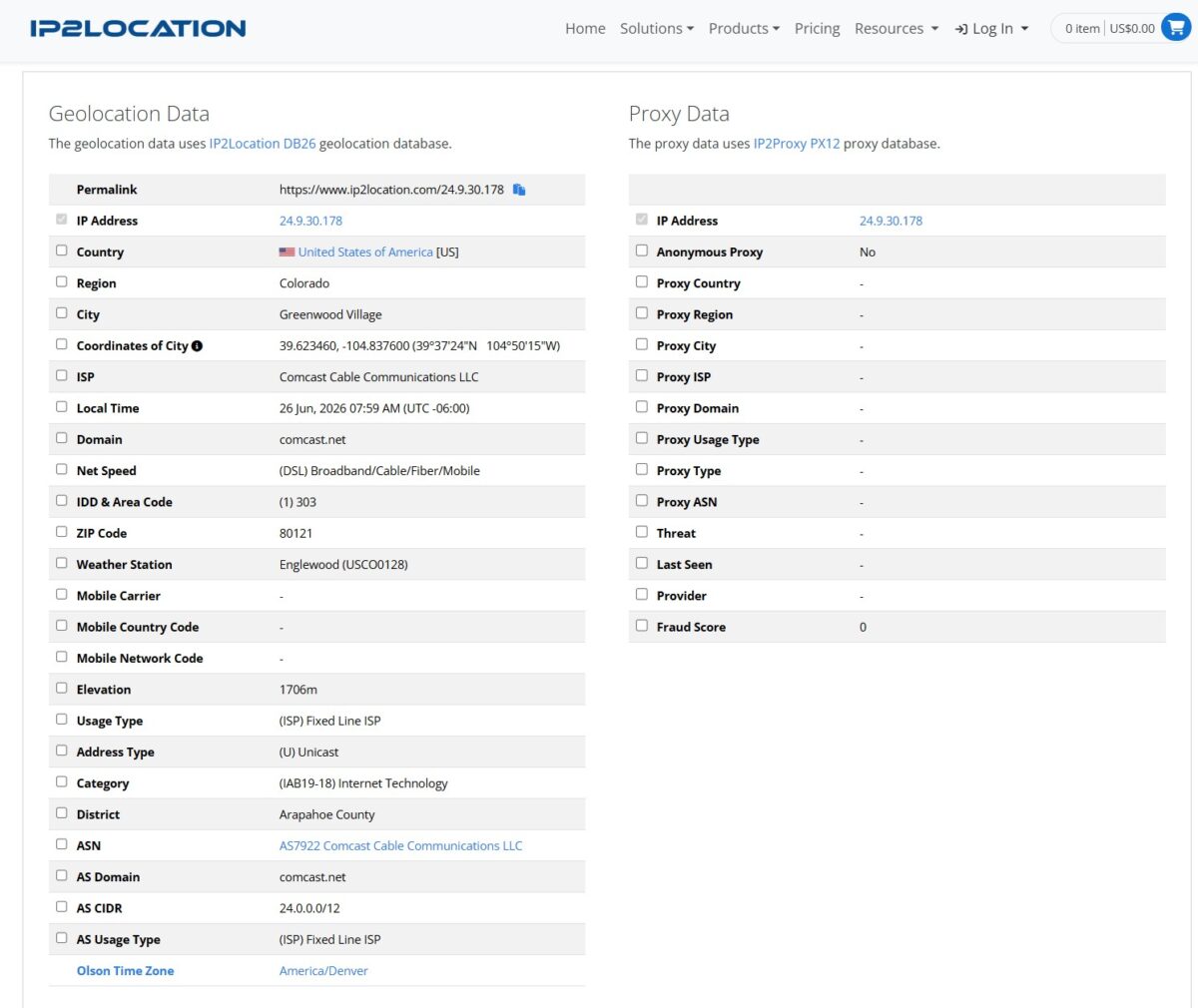
IP2Location: same Comcast, Usage Type (ISP) Fixed Line ISP, Net Speed DSL/Broadband/Cable/Fiber/Mobile. And the key bit – the Proxy Data block is empty: Anonymous Proxy No, Proxy Type blank, Fraud Score 0. Clean residential, no VPN traces. The complete opposite of what I caught with Thordata, where the same IP2Location threw out a Fraud Score of 99 and an IPVanish tag.
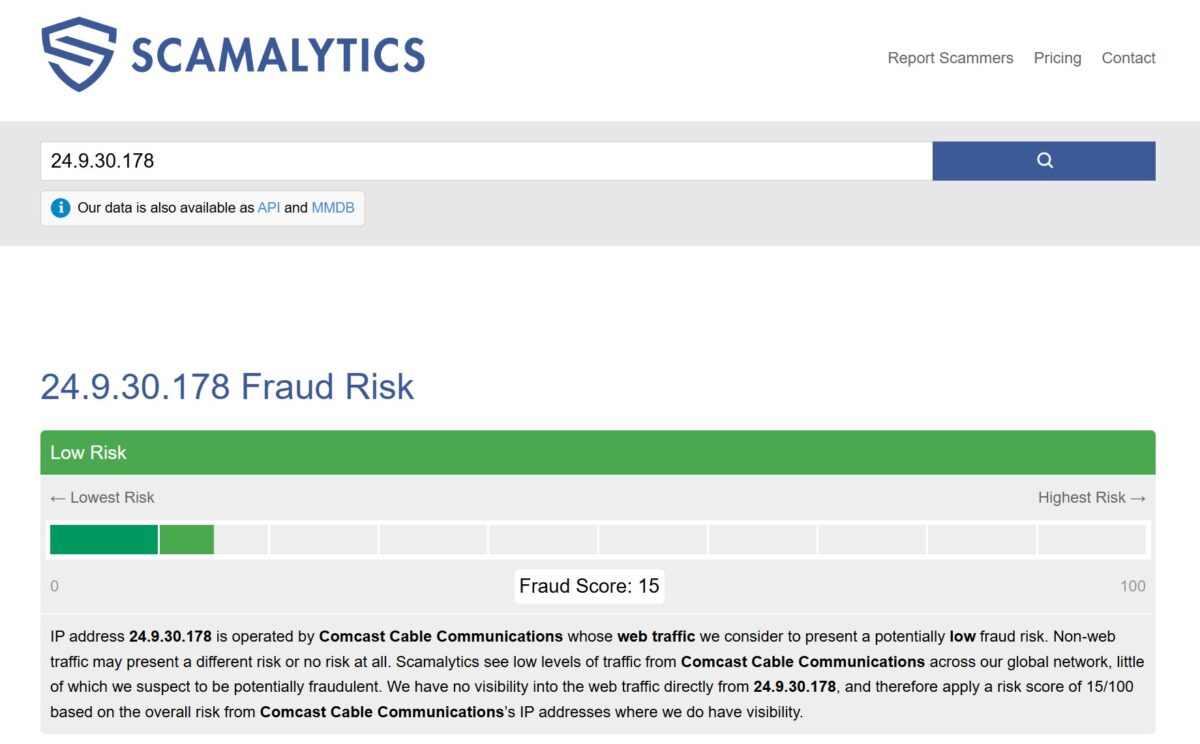
Scamalytics: Low Risk, Fraud Score 15/100 – green zone, typical of quality residential. I’ll be upfront here: Scamalytics itself notes it has no direct visibility into this IP’s traffic and assigns the 15 based on the overall reputation of the Comcast range. So it’s “clean, with an asterisk.”
APIVoid (anonymous connection check): Proxy – False, Residential Proxy – False, Hosting/Data Center – False, VPN – False, Tor – False, Web Proxy – False. Detections 0 of 79. Reverse DNS, again, Comcast.
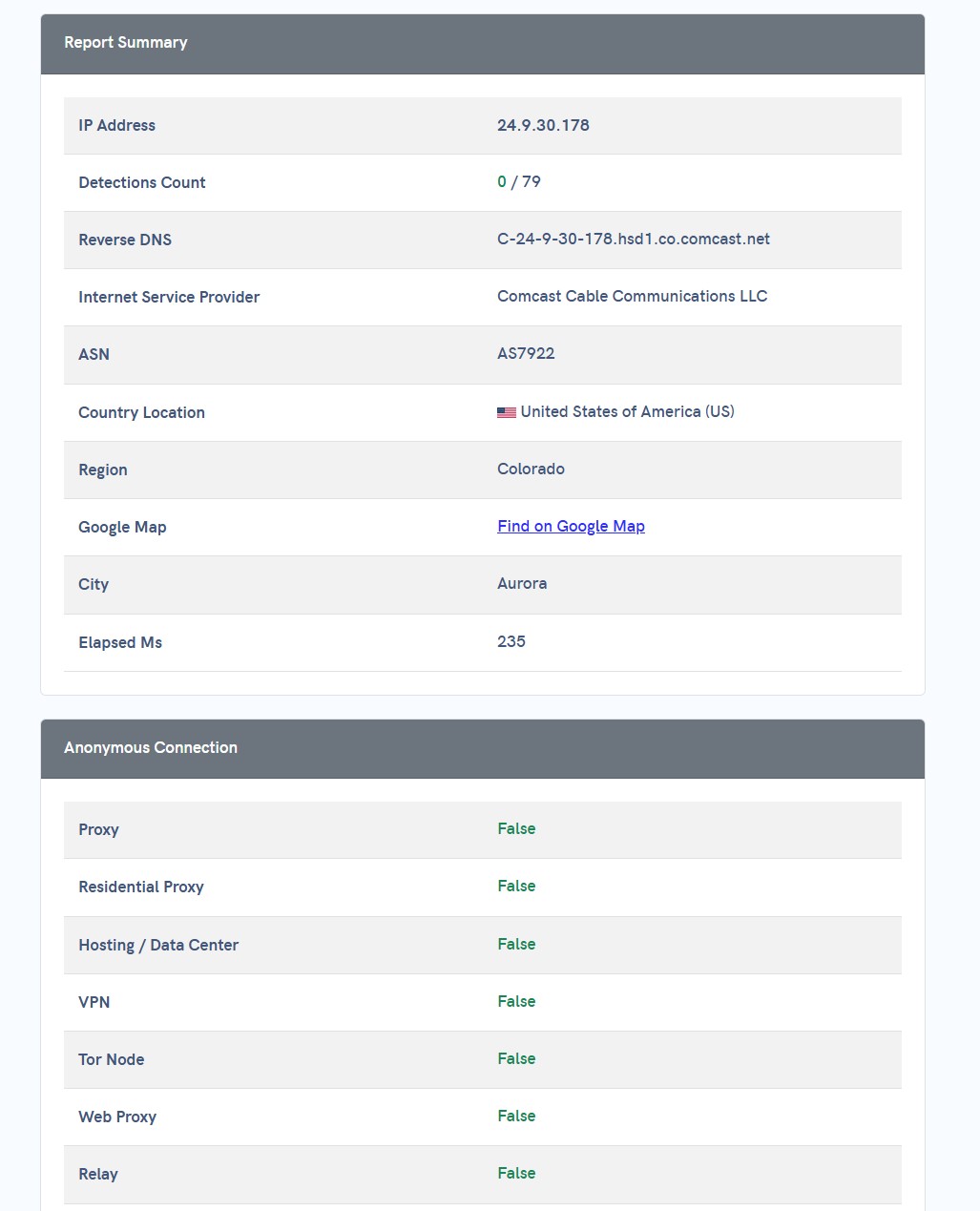
So for this particular address – an honest home Comcast line out of Aurora, Colorado. Reverse DNS, ASN, ISP classification – it all lines up. But keep the discrepancy in mind: the 400-proxy batch gave 29% hosting and 48% proxy-flag. I drew a good address in Test 2. That doesn’t mean the whole pool is like this. 9Proxy itself admits in its docs: “shared residential IPs” with an “extremely low sharing ratio.” The IPs are shared, not dedicated – hence the low price, and hence the risk of landing a “burned” address someone already torched on your target.
Test 3. Blacklists
Since the address looks like a home line, I ran it against the blacklists.
MXToolbox: a check against 60 databases turned up 1 listing – Spamhaus ZEN. A single Spamhaus listing is something I catch on practically every residential service – it’s a quirk of how Spamhaus flags dynamic and ISP-owned ranges (the PBL is a policy list, not proof of spam). For web scraping and SMM, a listing like that barely matters. For email campaigns – sure, an address on ZEN will get bounced, but nobody buys residential proxies for email blasts anyway.
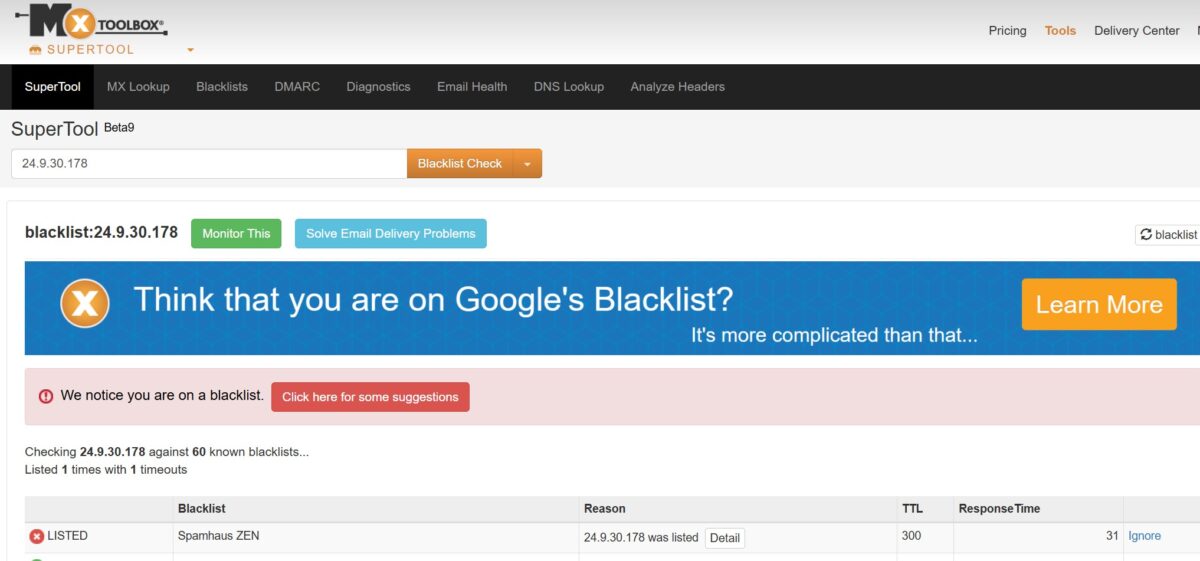
Bottom line: the blacklist here is no crime, well within market norms.
Test 4. Anti-detect, leaks, and fingerprint
I hooked the proxy up to an anti-detect browser and ran Pixelscan.
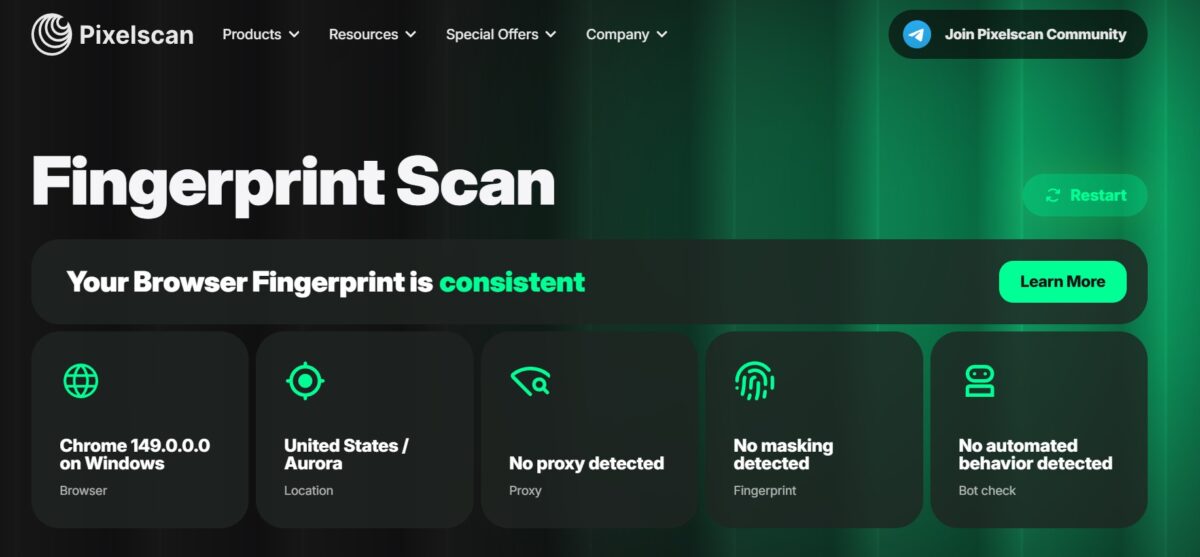
Fingerprint Scan: Your Browser Fingerprint is consistent. Chrome 149 on Windows, location United States / Aurora, No proxy detected, No masking detected, No automated behavior detected. For this specific address, the anti-detect worked clean – unlike the batch, where half the pool gets made.
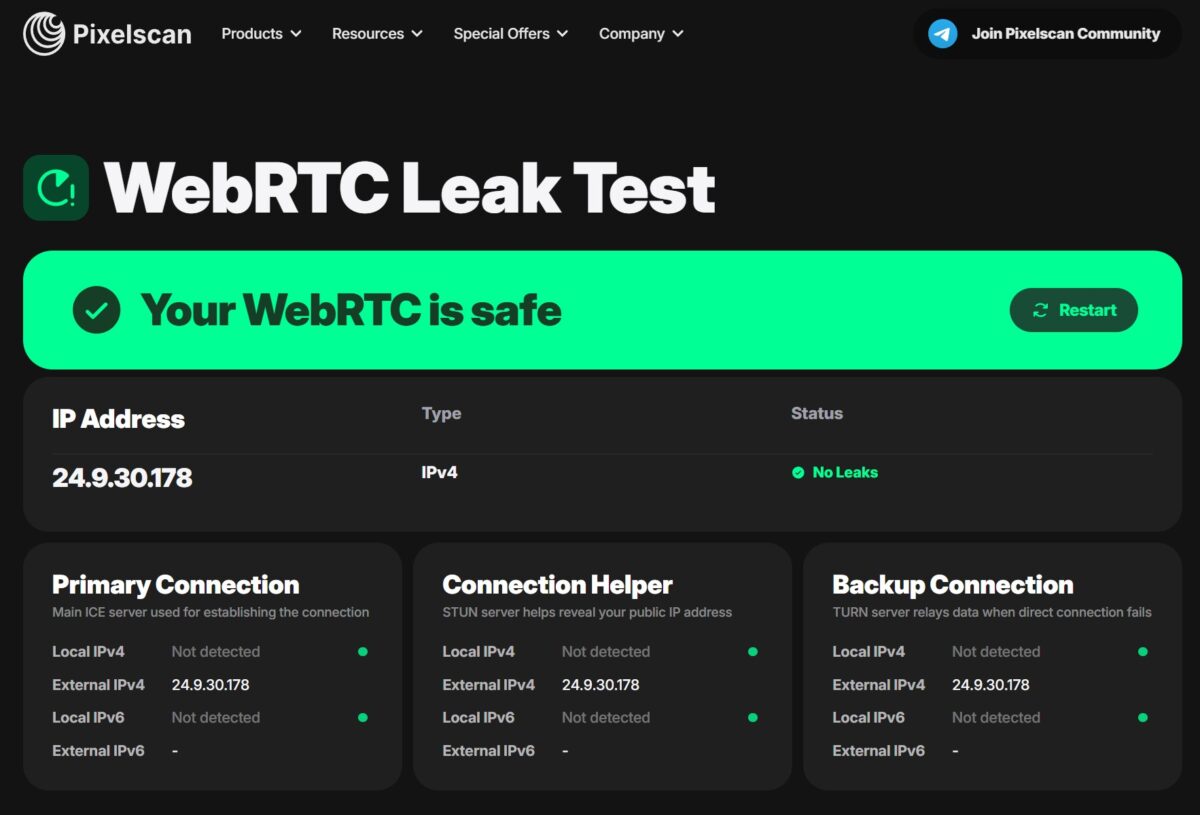
WebRTC Leak Test: Your WebRTC is safe, No Leaks. External IPv4 matches the proxy (24.9.30.178), the local IP doesn’t leak, IPv6 isn’t detected. I checked all three sections – Primary, Connection Helper, Backup – clean across the board.
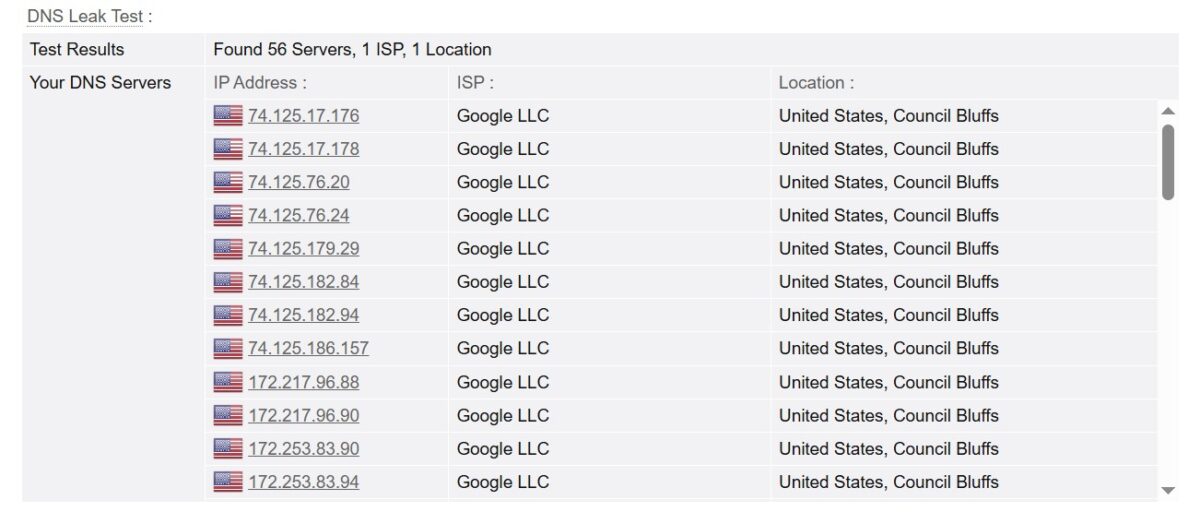
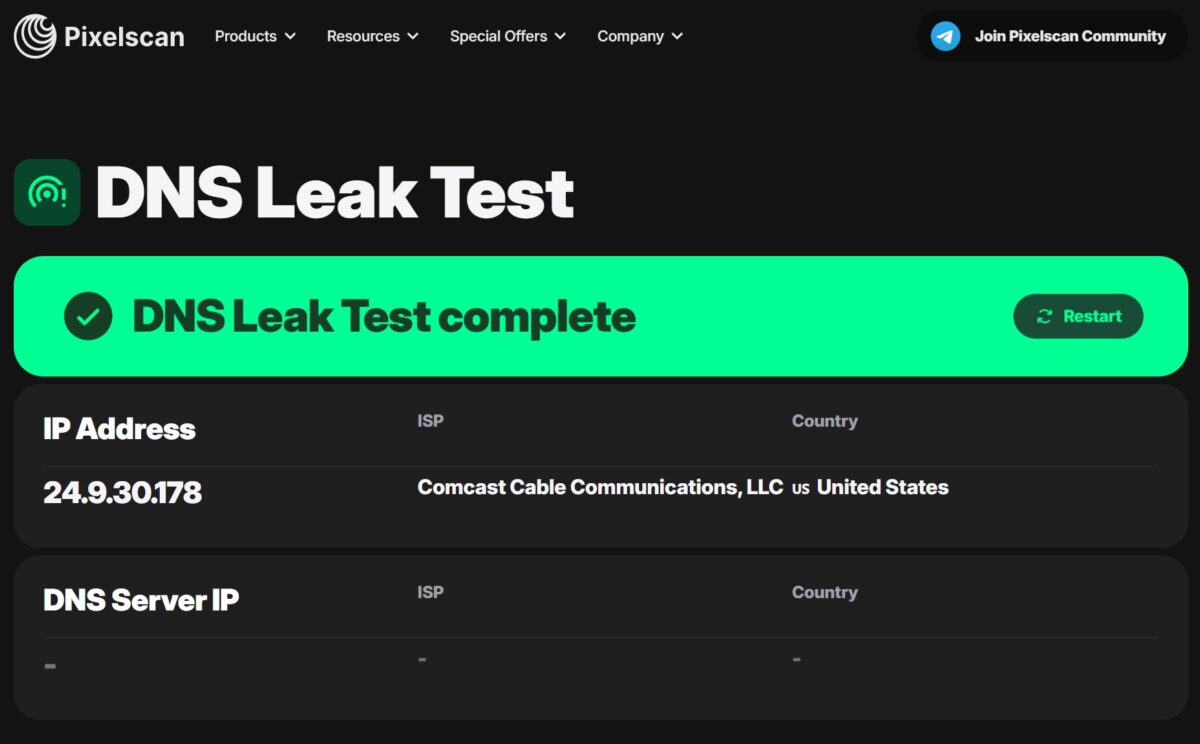
DNS Leak: here’s the catch. Pixelscan didn’t show a DNS server at all (blank), while BrowserLeaks found 56 servers, all Google LLC, Council Bluffs. So DNS goes through Google, not through this IP’s Comcast resolver. A classic mismatch: exit IP in Colorado, DNS a Google one in Iowa. There’s no leak of the real IP, but for advanced anti-detect this is a trail that serious protection can stitch together. The ideal “everything through one ISP” picture isn’t there.
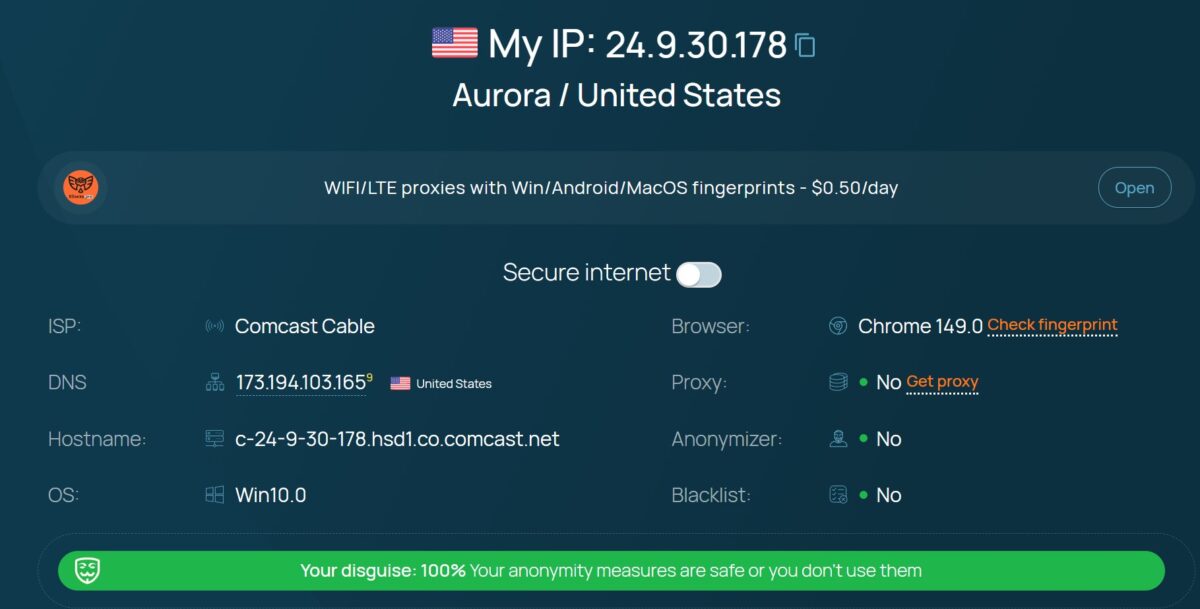
I also ran it through a whoer-style service: ISP Comcast Cable, DNS US, Proxy – No, Anonymizer – No, Blacklist – No, disguise 100%. At the consumer level, the masking reads as clean.
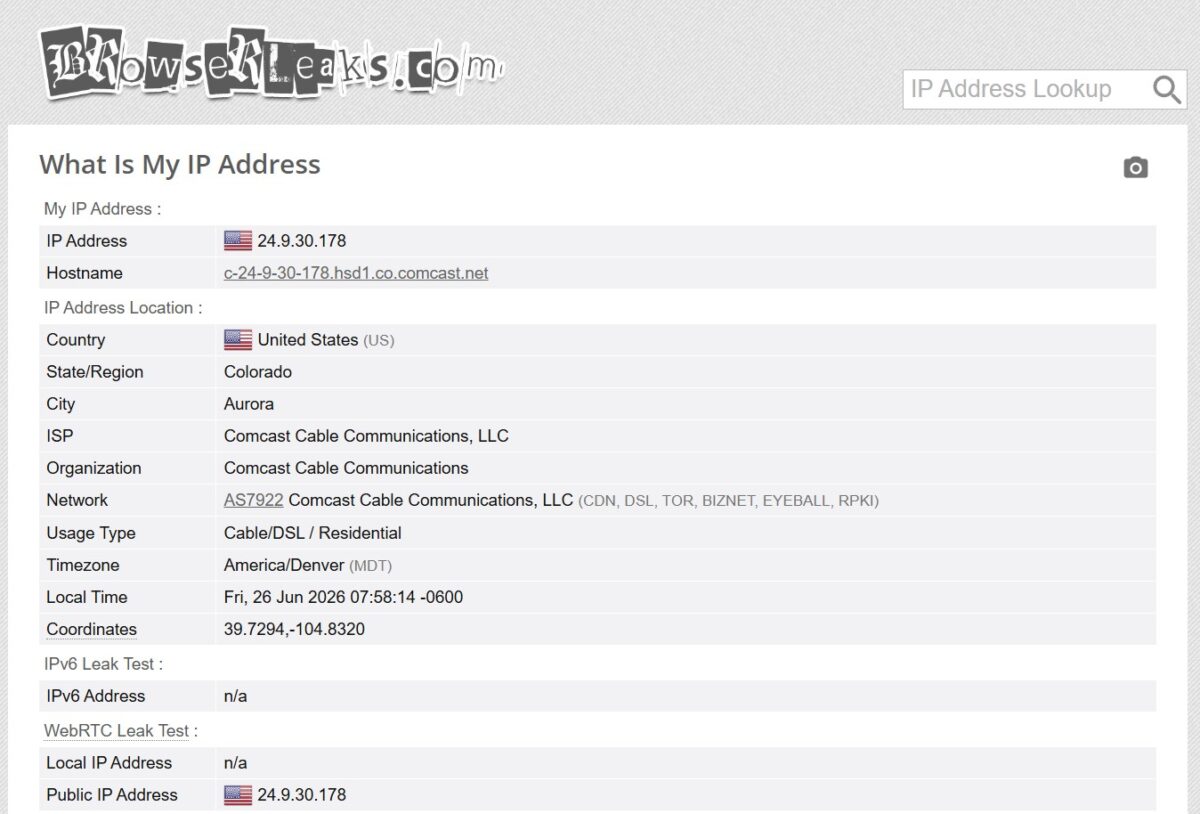
BrowserLeaks confirmed the rest: IP 24.9.30.178, Aurora, Colorado, Usage Type Cable/DSL / Residential, IPv6 doesn’t leak, WebRTC returns the proxy’s public IP. The Comcast network is tagged CDN, DSL, TOR, BIZNET, EYEBALL, RPKI – the standard set for a big home ISP.
Test 5. Speed
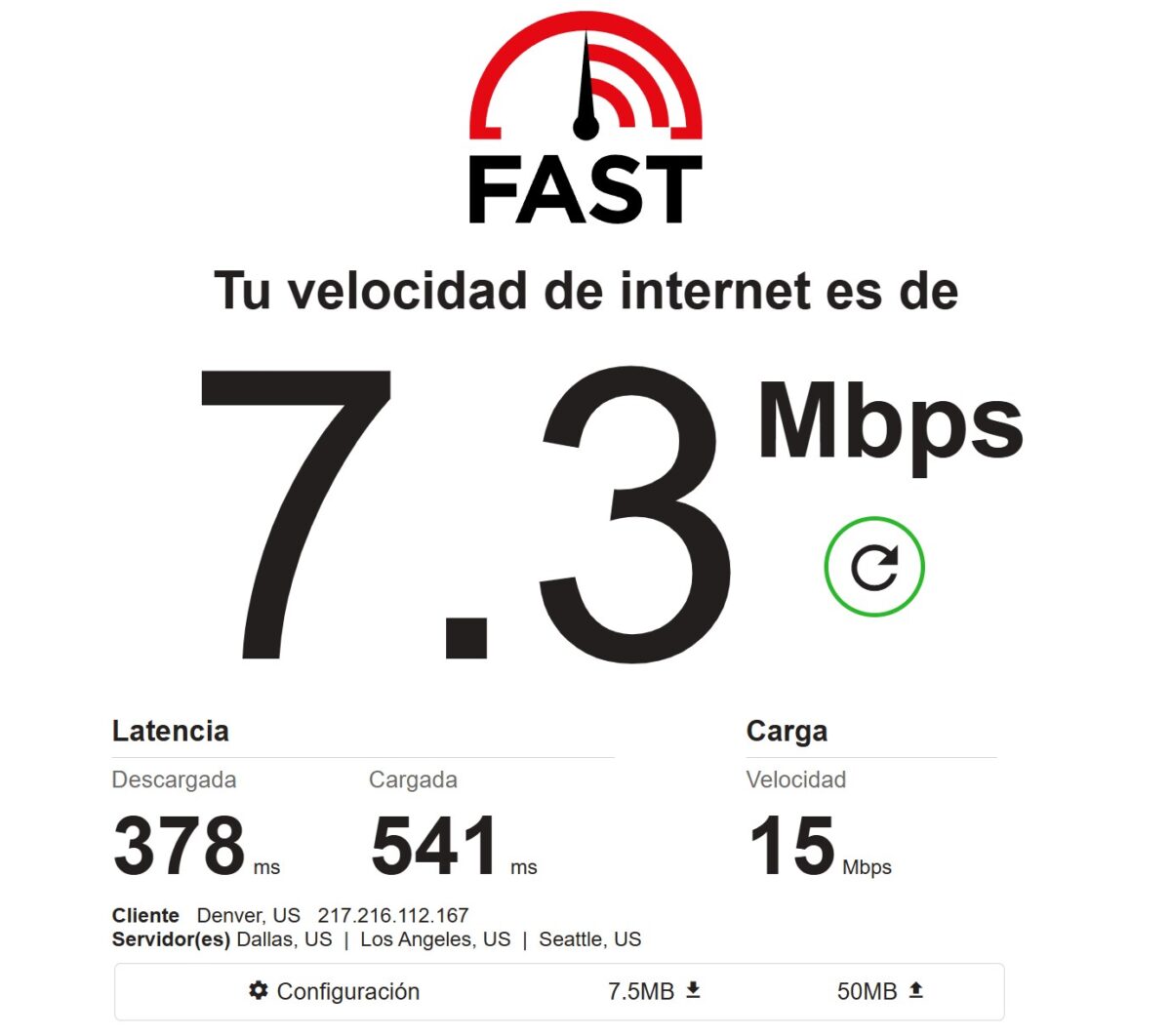
The FAST measurements and the batch agreed on one thing: the pool isn’t fast. The speed summary gave a median download of 2.7 Mbps with an average of 3.35 and a peak of 21.66. Median latency 1721 ms, p50 785 ms by the batch. The jumpy speed just confirms the pool’s instability. For home lines it’s the low end of normal, but it’s nothing to write home about. Enough for scraping static pages and SMM, anything heavier – cutting it close.
Pricing and payment
This is where 9Proxy really bites. The GB rate is $0.68 per gigabyte at any volume, no monthly commitments, traffic lasts 180 days. On pure price per gigabyte, it’s one of the cheapest options on the market: about four times cheaper than IPRoyal, nearly ten times cheaper than Decodo, several times cheaper than Bright Data.
IP-based is even more aggressive: from $0.24 per 100 IPs down to ~$0.018/IP on large bulk packages. There are IP+GB bundles too – 100 IPs + 5 GB for $30, 1500 IPs + 50 GB for $180, 5000 IPs + 500 GB for $720.
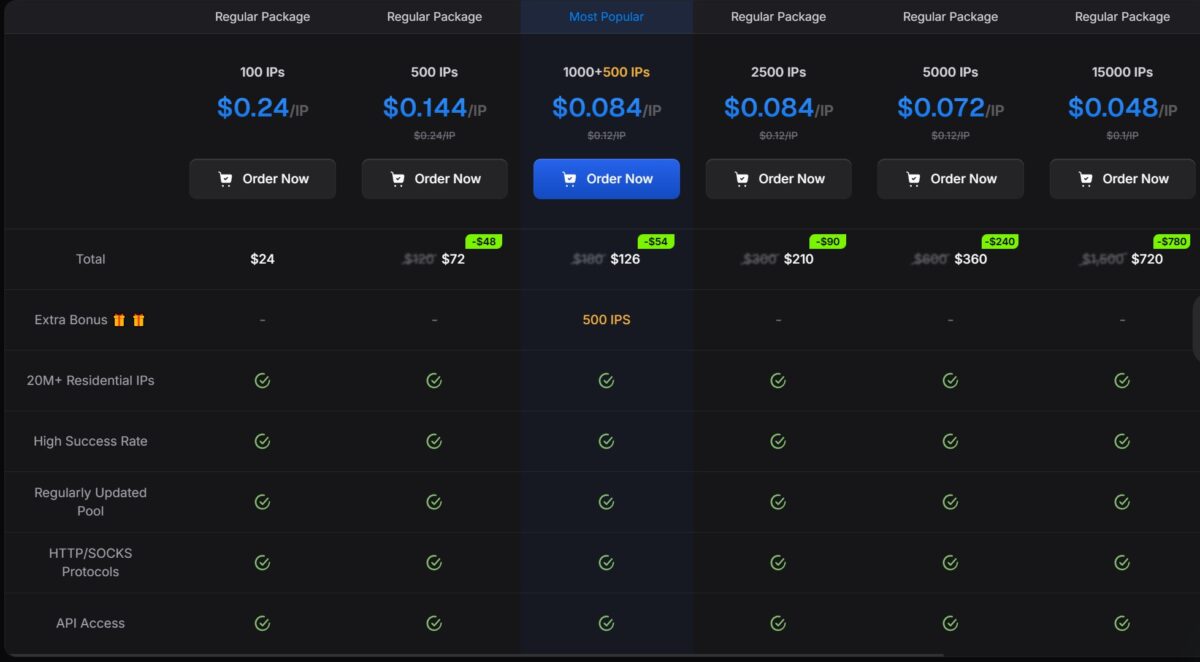
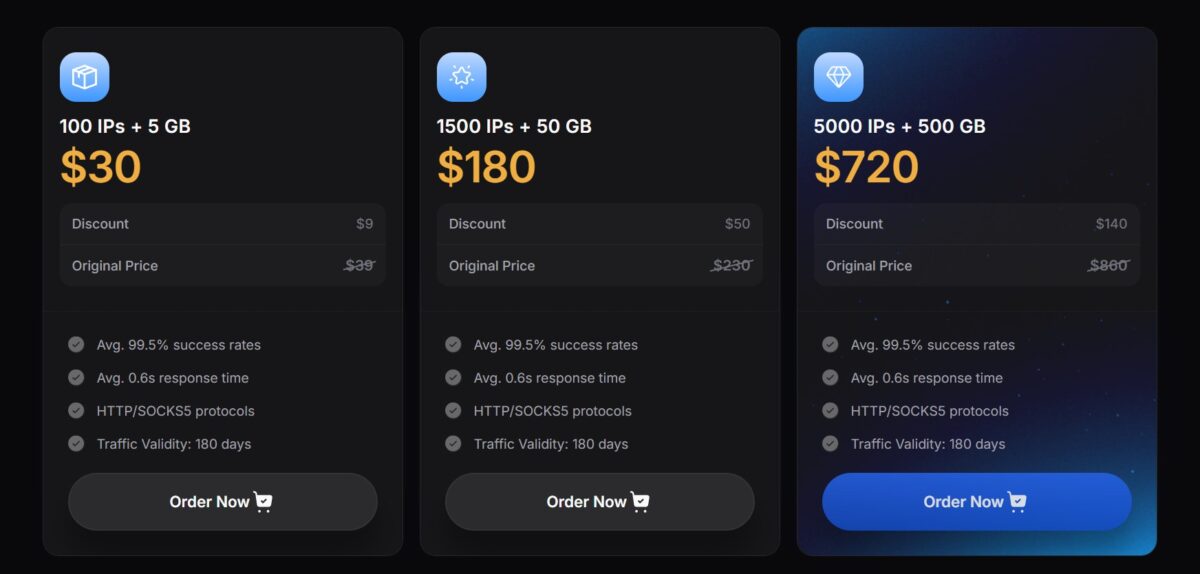
As of June 1, 2026, they raised prices on IP-based and bundles (GB stayed at $0.68). IP packages bought before that date, they say, keep the old rate forever.
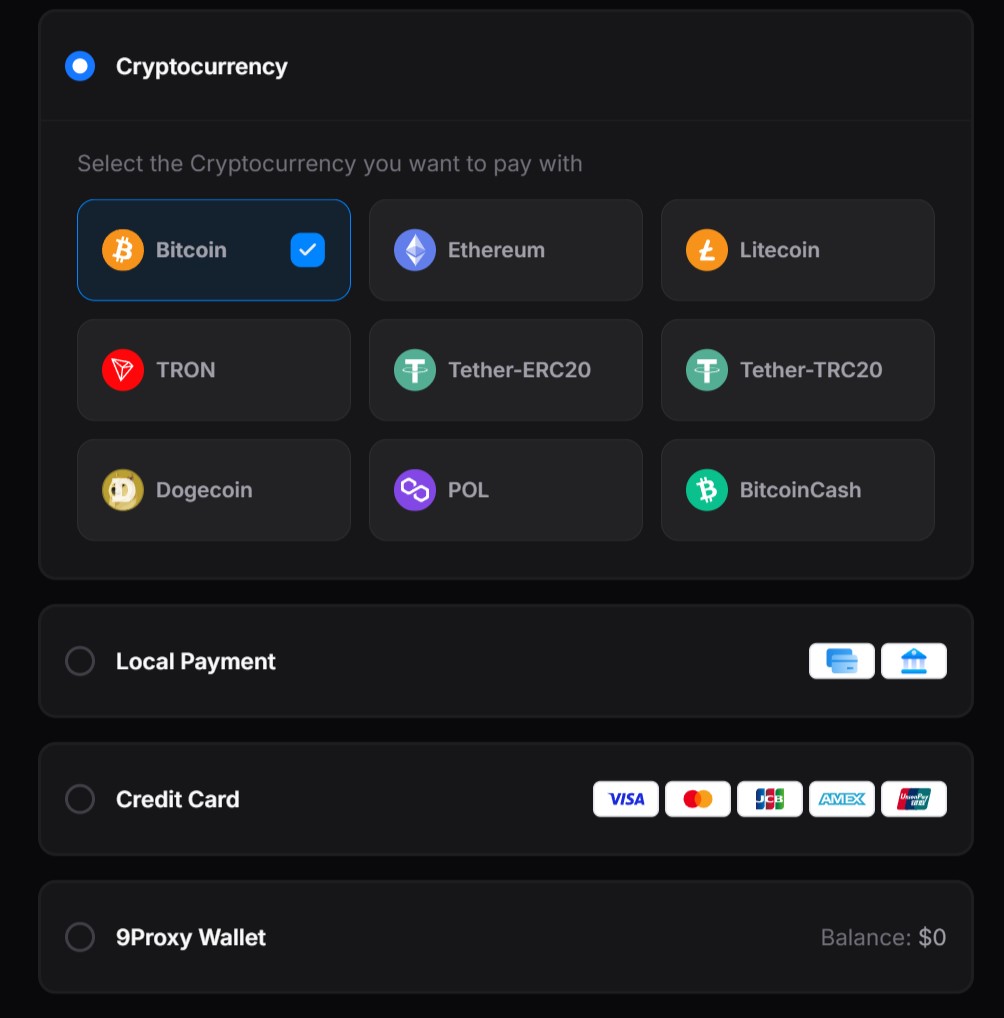
Payment: cards (Visa/Mastercard/JCB/AMEX/UnionPay), Apple Pay, Google Pay, crypto (BTC, ETH, LTC, TRON, USDT-ERC20/TRC20, Dogecoin, POL, BitcoinCash), local payment, and the in-house 9Proxy Wallet. No KYC at checkout. PayPal and Wise aren’t directly confirmed.
Refunds, though – that’s the sore spot. There’s no free trial (they give 5 bonus IPs to try, but that’s not a trial). The refund policy is harsh to the point of absurd: you have to report a non-working IP within 60 seconds of first use, and then the system returns it to your balance. After 60 seconds – that’s it. The Terms of Service spell it out separately: “all payments are final, and we do not offer refunds under any circumstances.” Plus a 60-day hold against chargebacks. This is one of the most common themes in the negative reviews.
Reputation: this is where it gets bumpy
On the storefront they’ve got G2, Capterra, and positive vibes. But the facts paint a ragged picture.
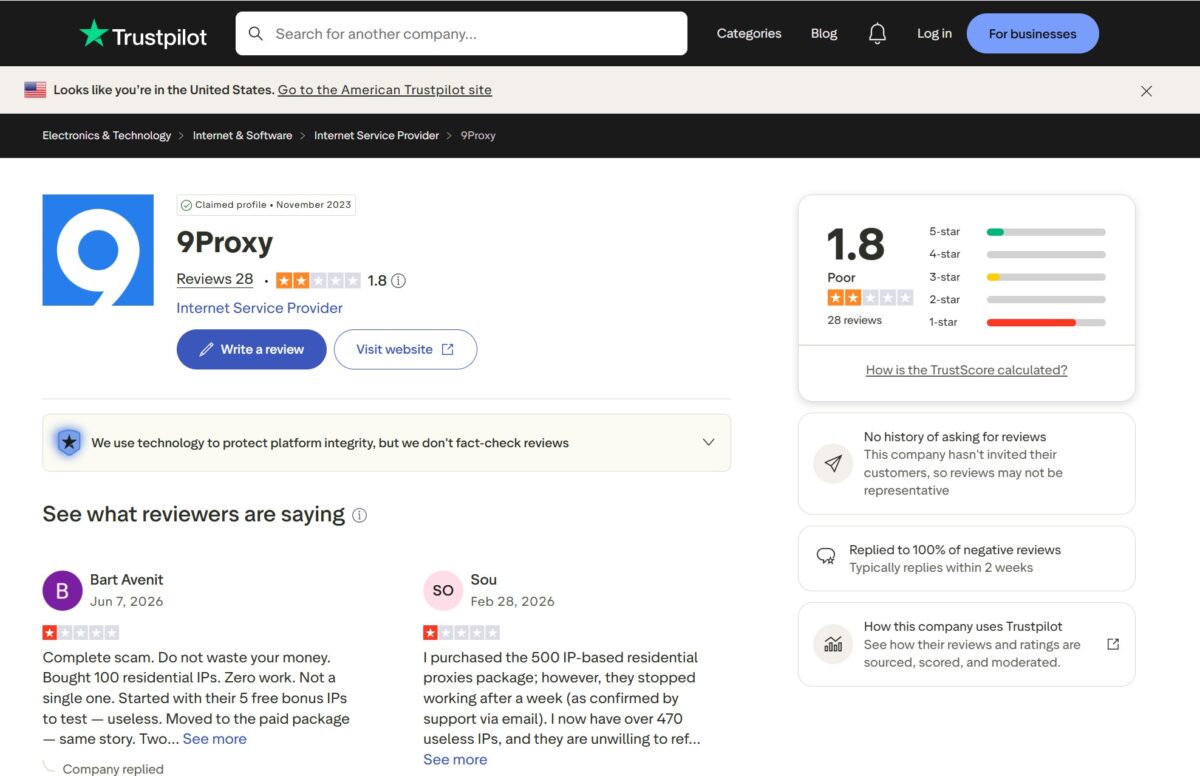
On Trustpilot, 9Proxy sits at 1.8 out of 5 across 28 reviews – “Poor.” For comparison: Decodo is at 4.3 with 2000+ reviews. The recurring complaints repeat themselves: a high share of “dead” IPs right after purchase, no way to get your money back for non-working proxies because of the 60-second policy, problems with SOCKS5 ports. One quote is blunt: “Complete scam… Bought 100 residential IPs. Zero work.” Trustpilot separately notes the company doesn’t invite customers to leave reviews – meaning they land organically, which usually makes the picture harsher.
That said, on SourceForge the tone is positive (2024-2026), and on Reddit 9Proxy more often gets praised as a “cheap working option”: in r/proxies people confirm the “Dolphin Anty + 9Proxy” combo, and a post about the good rates pulled in upvotes. But here’s an important caveat: the company has its own r/9Proxy subreddit full of marketing content, and a chunk of the YouTube/blog reviews are affiliate ones with promo codes. So the spread – “2 on independent platforms versus 4-5 on friendly ones” – is the textbook profile of a budget provider with aggressive marketing.
How it compares to the competition
To keep the score honest, I’m putting 9Proxy side by side with the ones I’ve tested using the same method.
| Parameter | 9Proxy | NodeMaven | Thordata | Floppydata |
|---|---|---|---|---|
| Type | Residential | Residential | Residential | Residential |
| Pool (claimed) | 20M (~610K live in reality) | 30M+ | 100M | — |
| Price per GB | $0.68 | $3.50 | $0.65-2.00 | from $1 |
| Latency (median) | 785-1721 ms | 175-182 ms | 1589-1800 ms | — |
| Fraud Score (test IP) | 0 (IP2Loc) / 15 (Scam) | 0/36 | 99/100 | 14/100 |
| IP type (test) | Residential ISP (Comcast) | Residential ISP | VPN/Hosting (Clouvider) | Residential (Comcast) |
| Hosting flag (batch) | 29.1% | — | — | — |
| Pixelscan | consistent, no proxy | consistent | inconsistent, detected | — |
| Success rate (batch) | 98.8% (400) | 100% (FOGLDN) | high (without ASN) | — |
| Trial | no (5 bonus IPs) | no | yes (some products) | — |
| Proxyway 2025 | no | no | no | no |
By the one address I checked, 9Proxy sits closer to a clean NodeMaven than to Thordata with its VPN node dressed up as residential. But by the batch (29% hosting, 48% proxy-flag), the pool on average is noticeably dirtier than the top players’. 9Proxy’s main trump card in the table is price. For it, you get a lottery on the IP type: draw a home Comcast line – great, draw hosting – you’ll burn your session.
Who it’s for, and who it isn’t
A good fit for: SEO agencies and arbitrage folks on a tight budget, scrapers hitting static and moderately protected targets, anyone for whom even $1.75-2.75/GB at IPRoyal/Webshare is too much. If you know how to filter IPs yourself before getting to work – at $0.68 it’s a workable tool.
Not a fit for: multi-accounting and sneaker copping, where IP cleanliness is critical – there, an address from the “hosting” 29% will kill your session instantly. Enterprises with compliance requirements (KYC, source audits, GDPR). Anyone who wants guaranteed clean residential with a zero fraud score – that’s the road to NodeMaven. Email campaigns are a miss too (Spamhaus ZEN).
Test summary table
| What I tested | Result | Score |
|---|---|---|
| Download speed (batch) | median 2.7 Mbps, max 21.66 | 2/5 |
| Latency (batch/FOGLDN) | p50 785 ms, p95 1752 ms | 2/5 |
| Success rate (400 proxies) | 98.8% | 5/5 |
| IP uniqueness | 214 of 395 | 3/5 |
| Hosting/Proxy flag in the pool | 29.1% / 48.4% | 2/5 |
| IP Quality (test address) | Fraud 0 (IP2Loc), 15 (Scam) | 4/5 |
| IP type (test address) | Residential ISP, Comcast | 5/5 |
| Blacklist | 1 (Spamhaus ZEN) | 4/5 |
| Geo Detection | Aurora, Colorado – spot on | 5/5 |
| Pixelscan Fingerprint | consistent, no proxy | 5/5 |
| WebRTC Leak | No Leaks | 5/5 |
| DNS Leak | through Google, mismatch with ISP | 3/5 |
| UX / dashboard | minimalist, stats down to the KB | 4/5 |
| Price | from $0.68/GB | 5/5 |
| Payment | cards, crypto, no KYC | 5/5 |
| Refund policy | 60 seconds, no refund | 2/5 |
| Reputation | Trustpilot 1.8, absent from Proxyway | 2/5 |
Final score: 3.4 / 5
- the cheapest traffic in my table – from $0.68/GB, dropping to ~$0.018/IP for IP-based at volume;
- flexible payment model – you can buy by traffic (GB) or per IP, a rarity on the market;
- traffic doesn’t expire – GB validity is 180 days, no monthly commitments;
- excellent connectivity – 98.8% success rate on a 400-proxy batch (395 of 400);
- the specific test IP turned out to be a clean home Comcast line (AS7922), Fraud Score 0 on IP2Location and 15 on Scamalytics;
- Pixelscan showed consistent, No proxy detected, WebRTC with no leaks;
- geolocation reads accurately – Aurora, Colorado lines up across all services (IPinfo, IP2Location, BrowserLeaks);
- flexible payment, crypto accepted (BTC, ETH, USDT, TRON and others), no KYC;
- dashboard stats are transparent, down to the kilobyte – you see every request;
- integrations with anti-detect browsers (Multilogin, AdsPower, Dolphin Anty, GoLogin) and a public REST API.
- the pool on average is dirty – the 400-proxy batch gave 29.1% hosting IPs and 48.4% flagged as proxies;
- few unique addresses – 214 of 395 successful, the pool recycles IPs much sooner than the claimed “20 million”;
- weak speed – median download of just 2.7 Mbps with latency p50 785 ms and p95 1752 ms;
- marketing discrepancies – the site shows 9M/20M/95M IPs, while only ~610K are live in reality per Synthient, with a HIGH RISK tag;
- harsh refund policy – you have to report a non-working IP within 60 seconds, after that “no refunds under any circumstances”;
- no free trial, just 5 bonus IPs to try;
- narrow lineup – residential only, no mobile, static ISP, datacenter, or scraping tools;
- DNS goes through Google (Council Bluffs), not the IP’s Comcast resolver – a mismatch for advanced anti-detect;
- uneven reputation – Trustpilot 1.8 out of 5, absent from the Proxyway 2025 rankings;
- the Hong Kong ConnectWise Limited has no public Trust Center and no disclosure of IP sources.
Overall impression
9Proxy leaves a mixed impression, and that’s the honest takeaway from the tests. Connectivity is excellent – 98.8% success on 400 proxies, accurate geo, and the specific exit address came back as a clean home Comcast line with Fraud Score 0 and a flawless Pixelscan. By a single IP, the service looks like solid residential.
But I don’t test a single IP, I test the pool. And the batch showed what the storefront hides: nearly a third of exit addresses are tagged as hosting, half get made as proxies, unique IPs are a little over half, and median speed is 2.7 Mbps with latency around a second to a second and a half. This isn’t “20 million clean residentials,” it’s a cheap shared pool where you’ll either get lucky with an address or you won’t. Plus the harsh 60-second refund policy and Trustpilot 1.8 – signals you can’t ignore.
The takeaway is simple. At $0.68/GB it’s a workable option for an experienced user who runs every IP through Scamalytics before getting to work – for SEO, scraping static pages, arbitrage in Tier-2/Tier-3 geos. For multi-accounting, sensitive tasks, and anything where IP cleanliness is decisive – the risk outweighs the savings. Cheap, but you pay for the cheapness with the time spent filtering the pool.
This review isn’t final, I’ll keep adding to it as new tests come in. Logs and screenshots for all the checks are saved – message me and I’ll show you.
City-level targeting, sticky sessions up to 120 minutes, HTTP/HTTPS/SOCKS5
Residential traffic from $0.68/GB
IP-based from $0.018/IP at volume
residential only + REST API, integrations with Multilogin, AdsPower, Dolphin Anty, GoLogin