


Two years ago I bought my first residential proxy plan. The landing page said “$1.75 per GB.” My first invoice said $140. The gap between those two numbers is what this article is about.
 Why Trust Us?
ToProxyLab has been testing proxy services since 2025. We pay for most plans ourselves, and when a provider gives us test traffic we say so in the review — free traffic buys a place in the testing queue, nothing else. Every provider goes through the same speed, uptime and fraud-score checks, and we publish the real numbers, including the bad ones. A rating cannot be bought. Learn who we are and how we review proxies.
Residential proxy pricing is a minefield of marketing math. Every provider shows you the lowest possible number, which usually applies to a 5,000 GB enterprise commitment you’d never sign. Then you buy a real plan and discover the actual rate is triple.
First, Why Residential IPs Cost More Than Datacenter Ones
Quick context, because the price gap confuses everyone.
A datacenter proxy IP costs a provider fractions of a cent. They rent servers in bulk, each server holds hundreds of IPs, maintenance is automated. That’s why datacenter proxies sell for $1-2 per IP per month, unlimited traffic.
Residential IPs are different animals. These are IP addresses assigned by internet service providers like Comcast or Vodafone to actual households. If you need a refresher on how proxy servers route traffic in general, Cloudflare’s proxy server explainer covers the fundamentals well.
Providers can’t manufacture residential IPs in bulk. They build pools through bandwidth-sharing apps, paying developers per opted-in user. Every gigabyte that flows through someone’s home connection costs real money. That’s why residential proxy prices are quoted per GB of traffic instead of per IP, and why the whole residential proxy cost structure starts at dollars, not cents.
The demand side keeps prices up too. According to Imperva’s 2025 Bad Bot Report, bad bots account for 37% of all internet traffic, and automated traffic overall has overtaken human activity. Websites respond with aggressive anti-bot protection, datacenter IPs get blocked on sight, and everyone doing web scraping, price monitoring, ad verification, or sneaker copping ends up needing residential IPs. Demand stays hot. Prices follow.
The Two Pricing Models You’ll Meet
Pay-per-GB (metered bandwidth). The industry standard for rotating residential proxies. You buy traffic, every request and response eats from your balance. Rates range from $1.75 to $15 per GB depending on volume and provider tier. Most rotating residential proxy plans work like this: the proxy pool is shared, you pay for bandwidth consumption, rotation is included.
Pay-per-IP (static residential / ISP proxies). You rent specific IPs monthly, usually $2-8 per IP, often with unlimited bandwidth or a generous cap. This model fits account management and anything needing a consistent identity. Don’t confuse it with rotating plans. Comparing “$3/GB” against “$4/IP” is comparing apples to rent.
The Three Price Tiers (And What Each Actually Buys)
I’ve scraped pricing pages and run test traffic through a dozen providers. The market splits cleanly into three brackets.
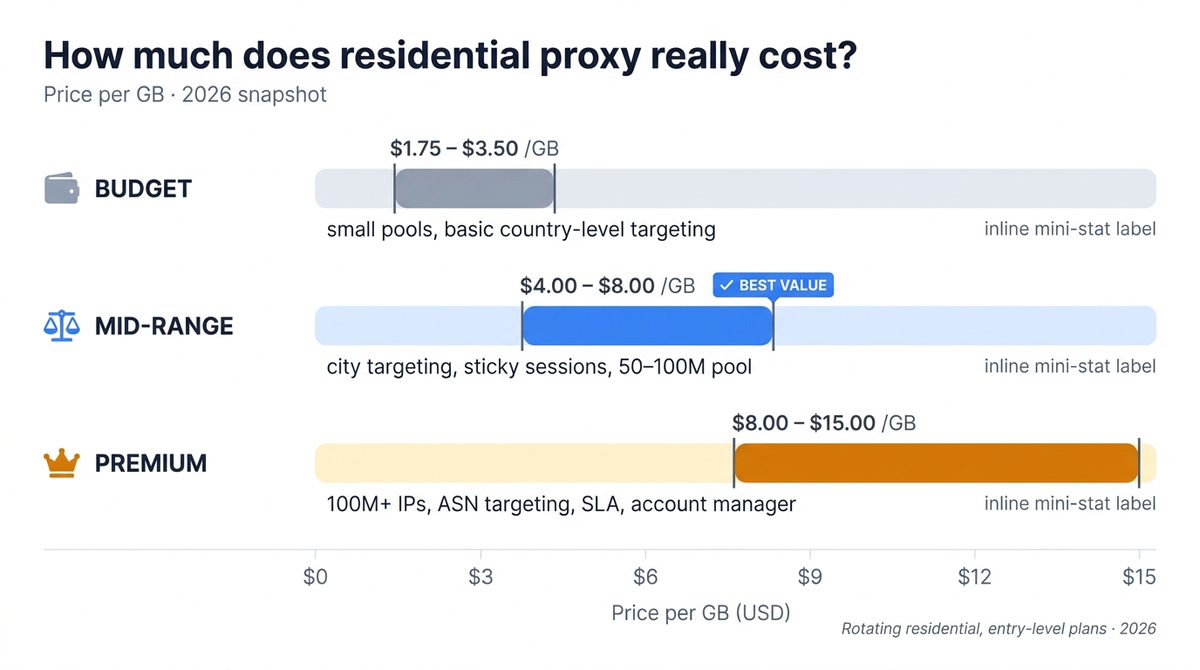
Budget tier: $1.75 – $3.50 per GB.
Smaller proxy pools, country-level targeting only, slower average response times. Fine for unprotected targets and small projects. The catch: entry plans at these prices often come with traffic that expires in 30 days. Your unused gigabytes die at the end of the month. I lost 40 GB this way once. It stung.
Mid-range: $4 – $8 per GB.
The sweet spot for most scraping work. Larger pools, city-level targeting, sticky sessions, actual human support. Swiftproxy sits in this bracket, and it’s the tier I’d point most people to: cheap enough for side projects, solid enough for production workloads. For the full picture across all three tiers, check our ranking of residential proxy providers with tested prices and success rates.
Premium: $8 – $15 per GB.
The enterprise residential proxy providers. Massive pools of 100M+ IPs, ASN targeting, dedicated account managers, SLAs. Worth it when you’re scraping millions of pages daily or your targets fight back with serious anti-bot systems. Overkill for a price aggregator checking 50,000 products a week.
The Math Nobody Does (But Should)
Here’s the trap that makes cheap proxies expensive.
You don’t pay per successful request. You pay per gigabyte of traffic, and failed requests burn traffic too. A provider with a 70% success rate on your target wastes 30% of everything you buy.
Run the numbers with me. Say you need 100 GB of successful data transfer:
- Budget provider at $2/GB with 70% success: you need ~143 GB of raw traffic. Real cost: $286.
- Mid-range provider at $5/GB with 97% success: you need ~103 GB. Real cost: $515.
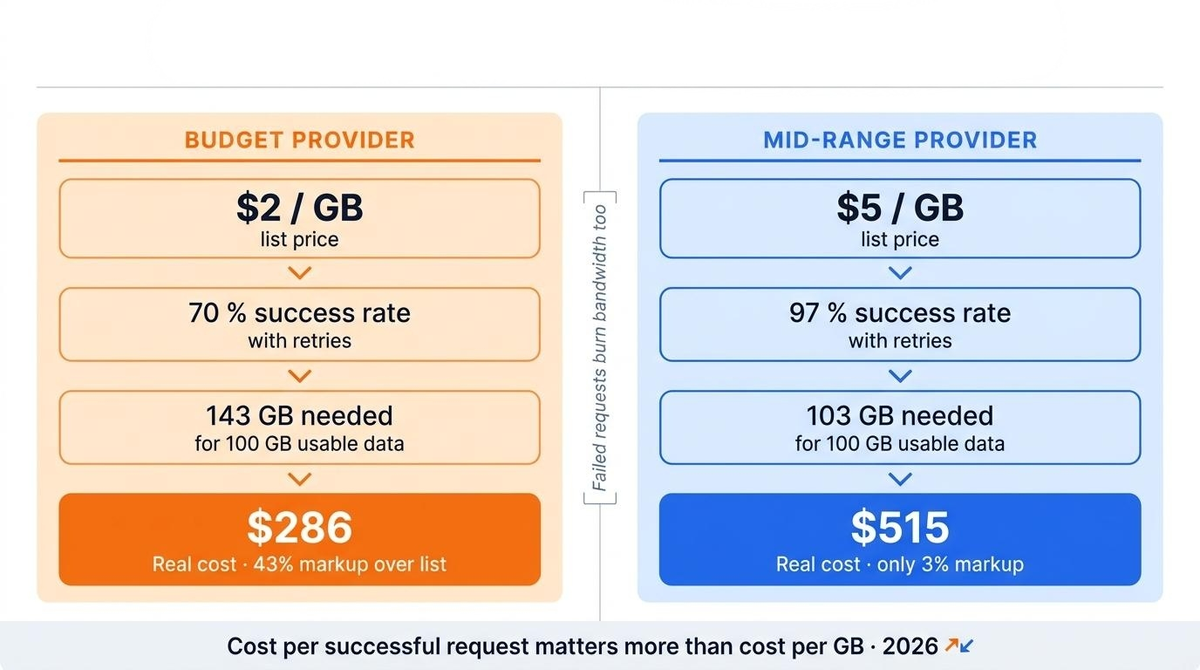
Wait, the cheap one still wins? On pure traffic cost, yes. But factor in the retries your scraper runs, the CAPTCHA solving services you bolt on at $1-3 per thousand solves, the developer hours spent babysitting failed jobs, and the slower crawl speed that delays your data pipeline. For most projects the effective cost per successful request evens out, and the mid-tier option wins on sanity.
There’s a second calculation people skip: traffic consumption per page. A modern e-commerce product page weighs 2-4 MB. Scraping 100,000 pages means 200-400 GB of bandwidth. I see people budget “$50 for proxies” for a project that physically requires $500+ of traffic at any provider. Measure your target’s page weight first. Multiply by page count. Then pick a pricing tier.
Hidden Costs That Inflate Your Bill
The per-GB rate is only the headline. Watch these:
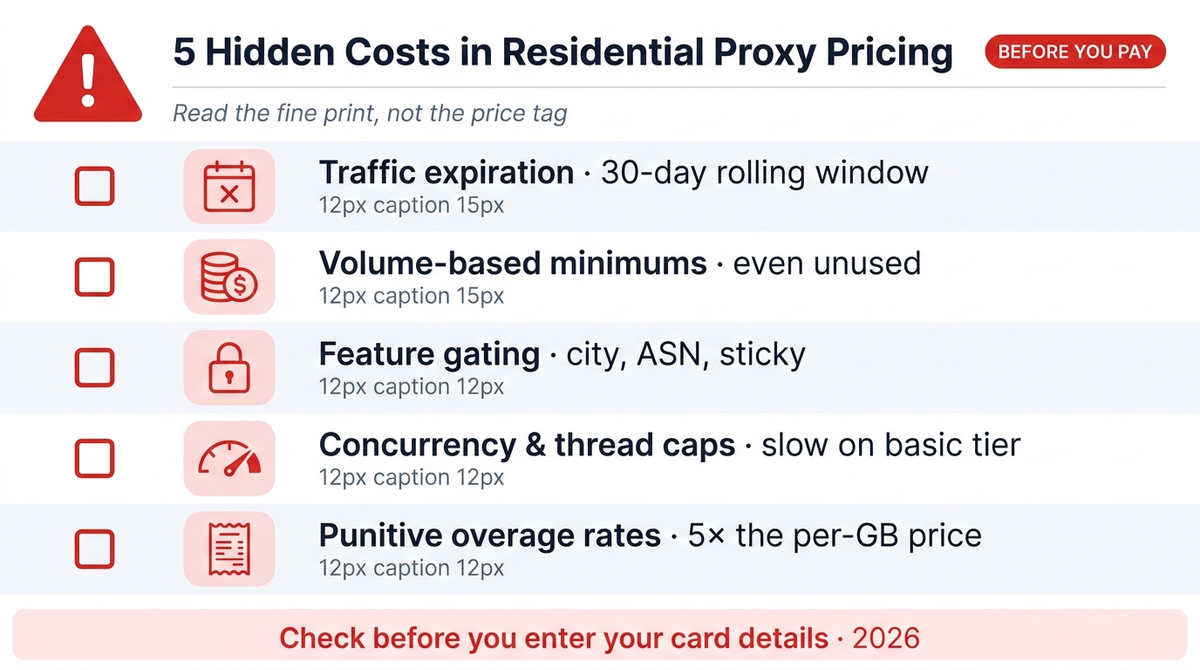
- Traffic expiration. The single most common gotcha. Monthly plans often zero out unused bandwidth. Non-expiring traffic exists, mostly at pay-as-you-go providers, and it’s worth paying slightly more per GB if your usage fluctuates.
- Minimum commitments. That “$1.75/GB” rate? It applies at 1,000+ GB. At 50 GB you’re paying $5-7. Always check the price at YOUR volume, not their marketing volume.
- Feature gating. City-level targeting, ASN filtering, or longer sticky sessions sometimes live behind higher-tier plans. Read the feature matrix, not just the price column.
- Thread and concurrency limits. Some cheap plans cap simultaneous connections. Your scraper crawls in slow motion, jobs take 3x longer, and you burn worker hours to save proxy dollars. Bad trade.
- Overage rates. Subscription plans that auto-charge for extra traffic at punitive per-GB rates. Set usage alerts the day you sign up.
How to Calculate Your Real Monthly Cost
Five minutes of arithmetic saves real money:
- Page weight. Open your target in Chrome DevTools, note the transfer size. Say 3 MB.
- Page volume. Pages per day x 30. Say 2,000 pages daily = 60,000 monthly.
- Raw traffic. 60,000 x 3 MB = 180 GB.
- Failure buffer. Divide by expected success rate. 180 / 0.95 = ~190 GB.
- Apply the rate at your volume. At $5/GB that’s $950/month. At $2.5/GB with 80% success: 225 GB x $2.5 = $562, plus CAPTCHA costs and babysitting.
Now you have a number to compare providers against, instead of comparing landing page slogans.
When Cheap Residential Proxies Make Sense (And When They Don’t)
Cheap rotating residential proxies work fine when your targets have weak protection: smaller e-commerce sites, local business directories, public data sources. Success rates stay high, and the budget tier delivers real savings.
They fall apart against Cloudflare-protected sites, major retailers, social platforms, travel aggregators. There, a quality proxy pool with clean IPs and smart rotation pays for itself in success rate alone.
Match the tier to the target. Not to your hopes about the target.
The Bottom Line
Residential proxy pricing in 2026 runs from under $2 to $15 per GB, and the sticker price is maybe half the story. Traffic expiration, volume tiers, success rates, and hidden feature gates decide what you actually pay.
The provider advertising the cheapest GB is rarely the one that costs you least.