





 Why Trust Us?
ToProxyLab has been testing proxy services since 2025. We pay for most plans ourselves, and when a provider gives us test traffic we say so in the review — free traffic buys a place in the testing queue, nothing else. Every provider goes through the same speed, uptime and fraud-score checks, and we publish the real numbers, including the bad ones. A rating cannot be bought. Learn who we are and how we review proxies.
Why Trust Us?
ToProxyLab has been testing proxy services since 2025. We pay for most plans ourselves, and when a provider gives us test traffic we say so in the review — free traffic buys a place in the testing queue, nothing else. Every provider goes through the same speed, uptime and fraud-score checks, and we publish the real numbers, including the bad ones. A rating cannot be bought. Learn who we are and how we review proxies.
I decided to write up a detailed review of Proxy6.net (mirror at px6.me). This is one of the cheapest datacenter proxy providers out there. I’ve been using them for a while now for work in the Dolphin{anty} antidetect browser, checking Google rankings, and other small tasks. I also grabbed their Armenia IPv4 proxies to set up OpenVPN. I’ll tell you straight up what I liked and where there’s room for improvement.
What is Proxy6 and What’s It Good For
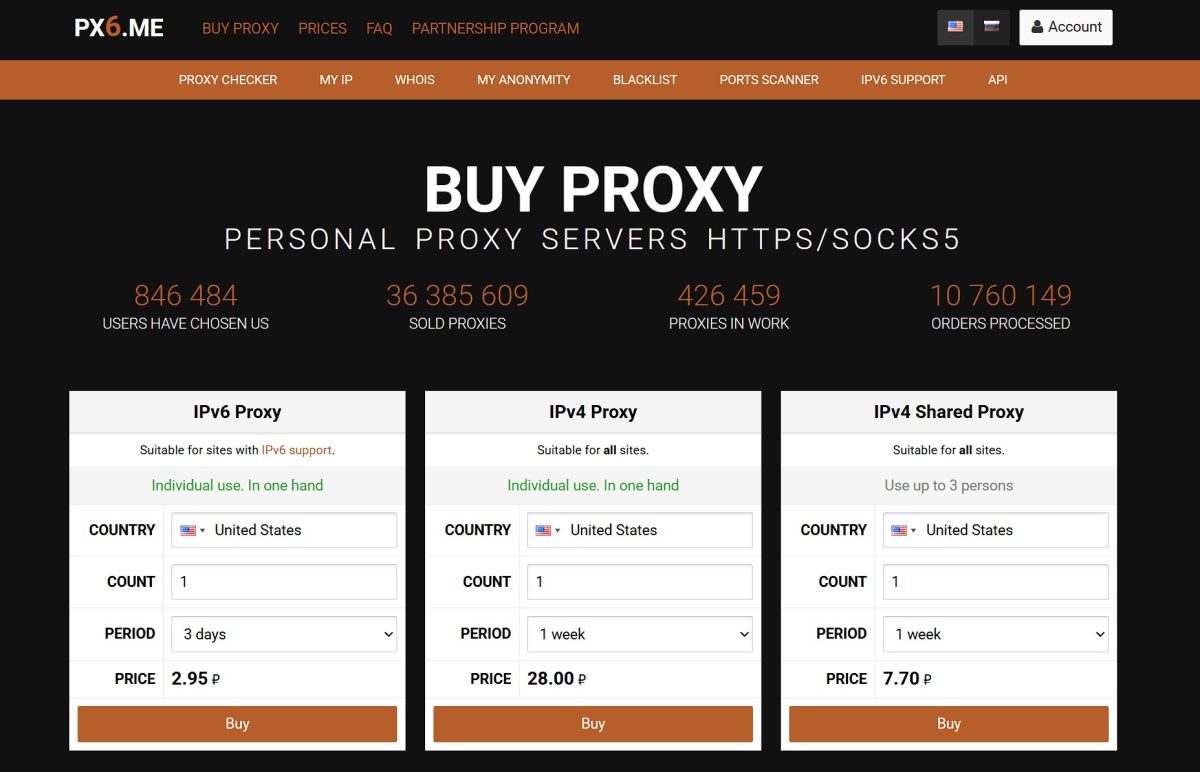
Proxy6.net is an automated service selling datacenter proxies. You won’t find residential or mobile IP addresses here like you would at Bright Data or Smartproxy. Just static addresses from data centers.
What kind of tasks it handles well:
- managing social media accounts through antidetect browsers;
- scraping search results and data collection;
- SEO rank tracking from different locations;
- affiliate marketing;
- multi-account management.
Types of proxies they sell:
- IPv6 proxies (their cheapest product, starting at 4 cents for 3 days);
- dedicated IPv4 (private, just for you);
- shared IPv4 (one IP split between three users).
The main selling point here is price. When you buy in bulk (500+ proxies), IPv6 runs just 2 cents per month. That’s about 10 times cheaper than competitors like Proxy-Seller.
The downside is pretty obvious too: datacenter proxies get flagged easily by anti-fraud systems. Sites like Netflix or betting platforms often ban these IPs by entire subnets.
Dashboard and Interface
The control panel at Proxy6 is simple and straightforward. Nothing fancy:
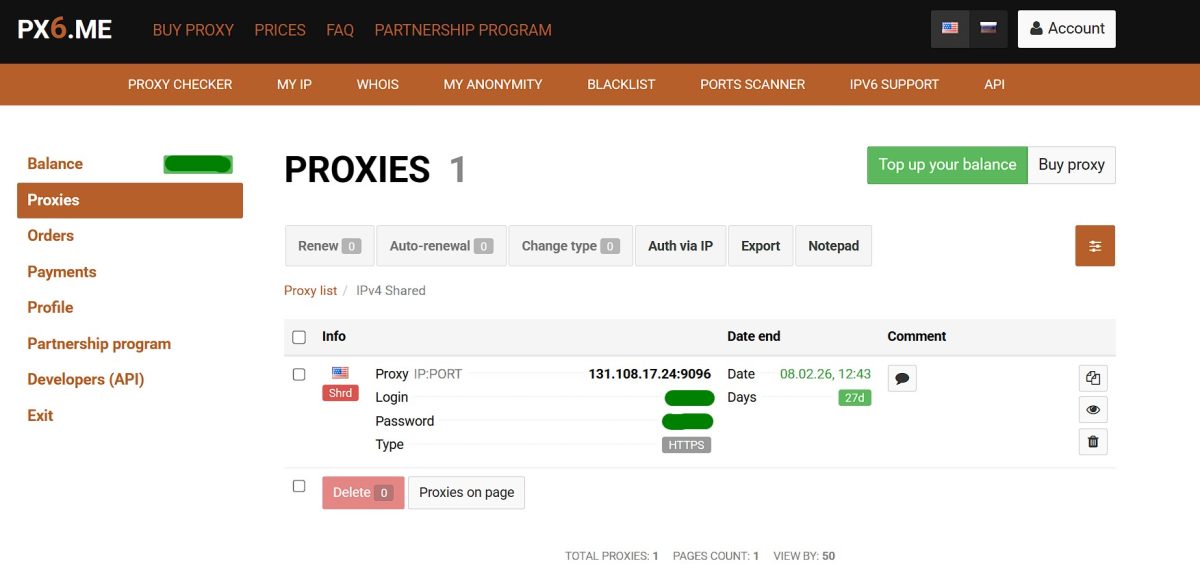
For each proxy you can see:
- address and port for connection;
- login and password;
- protocol (HTTPS or SOCKS5);
- expiration date;
- button to switch protocols without changing your IP.
There’s some handy tools built right into the panel: proxy checker, IP lookup, WHOIS, anonymity test, blacklist checker, port scanner. Nice that you don’t have to bounce around to third-party sites.
Testing Shared US IPv4
For my test I grabbed their cheapest option: Shared IPv4 US proxy. Runs 35 cents a month or 10 cents for a week. Shared means two other people might be using the same IP.
What I needed it for:
- running accounts in Dolphin{anty};
- checking Google search results for different queries;
- various small automation tasks.

They gave me a proxy with HTTPS protocol. If you need to, you can flip it to SOCKS5 with one click right in the panel. A lot of services can’t do that.
Checking Anonymity
First thing I did was check how the connection looks from the outside.
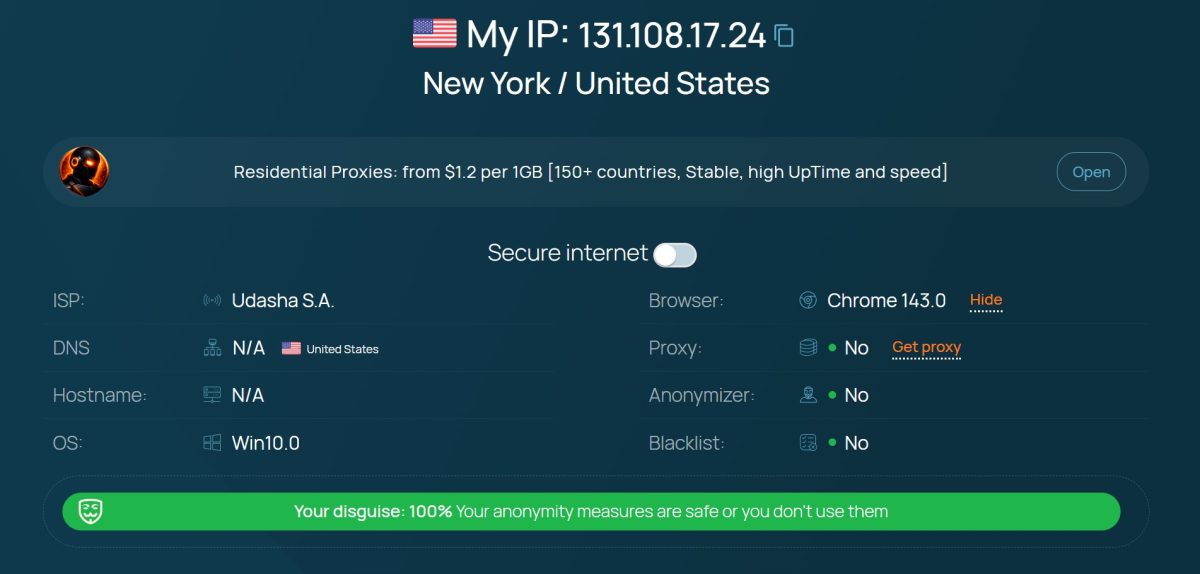
Here’s what it showed:
- IP address: 131.108.17.24;
- Location: New York, USA;
- ISP: Udasha S.A.;
- Browser detected: Chrome 143.0;
- Proxy: not detected;
- Anonymizer: not detected;
- Blacklists: clean;
- Anonymity level: 100%.
For a datacenter proxy, that’s a solid result. The system doesn’t see that I’m running through a proxy server.
Fraud Score Check
This is a big deal if you’re working with accounts. I ran it through Scamalytics.
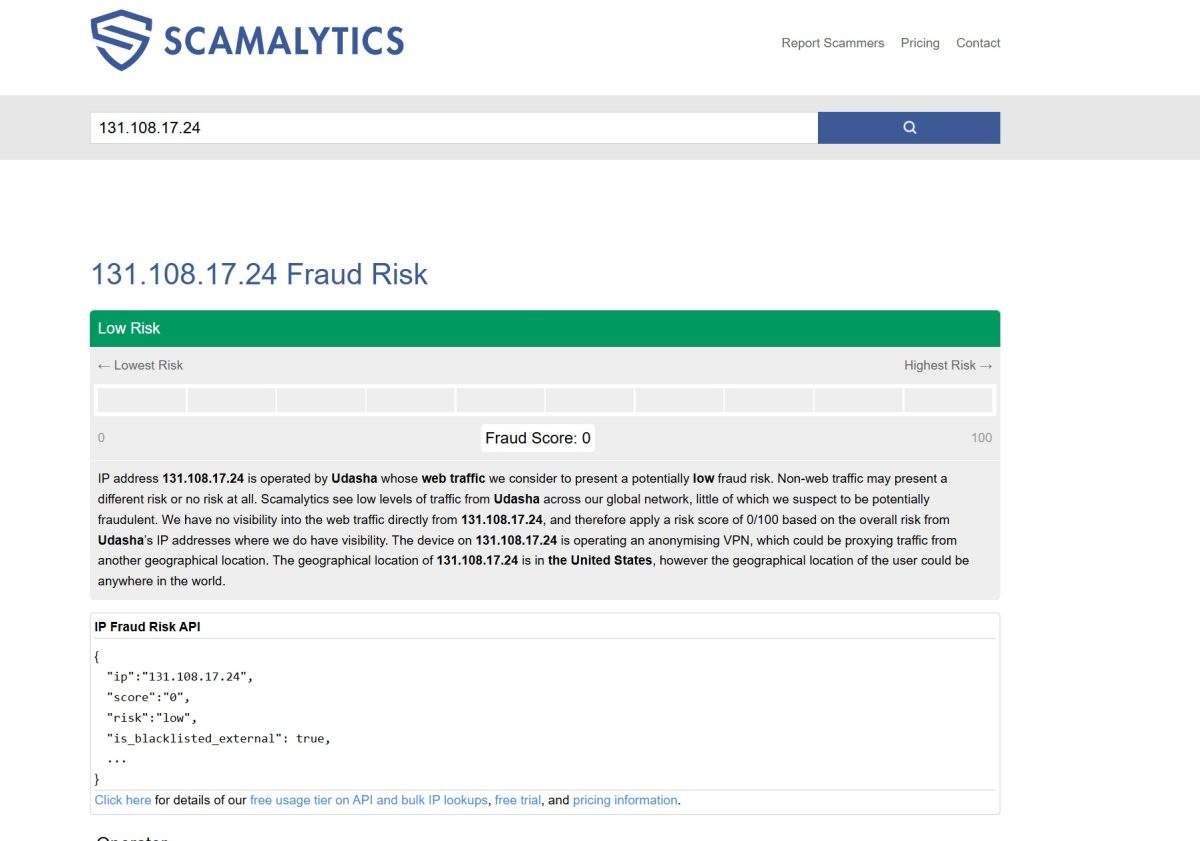
Scamalytics says the IP belongs to Udasha and traffic from it doesn’t raise any red flags. Yeah, it shows up as a potential VPN, but the risk score is still low.
For a shared proxy that two other people are using, that’s a great result. Means my IP neighbors aren’t doing anything shady.
Blacklist Check
I also looked up this address’s history.
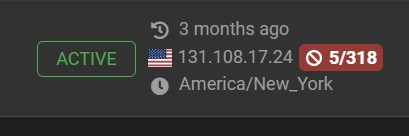
The IP showed up in only 5 out of 318 databases. Basically clean. For a shared proxy that’s been active for 3 months, that’s pretty normal.
Connection Speed
Proxy6 claims a 10 megabit per second limit for IPv4. I ran it through Speedtest.
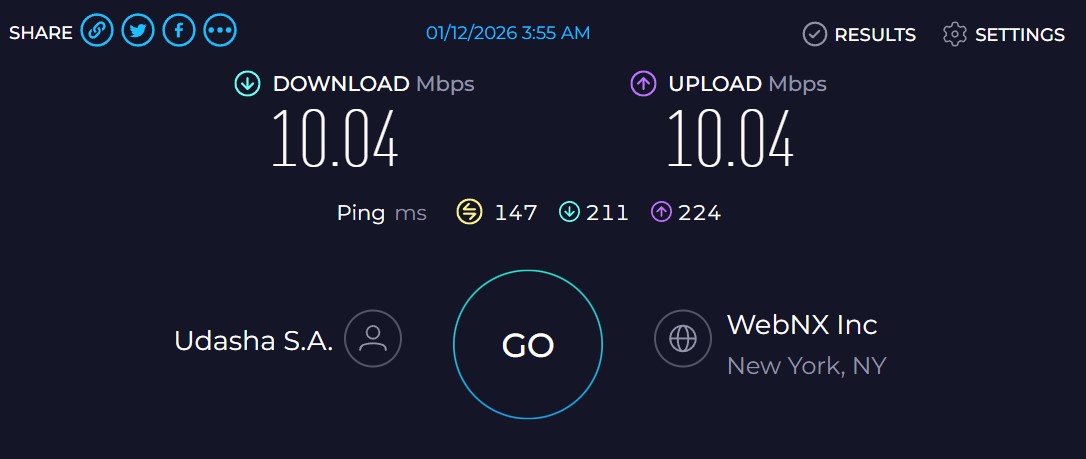
Results:
- download: 10.04 Mbps;
- upload: 10.04 Mbps;
- ping: 147 ms.
Speed is exactly what they promised. The service caps bandwidth right at the advertised level. For comparison: Proxy-Seller gives you up to 1 gigabit, ProxyLine up to 100 megabits.
For scraping and working in antidetect browsers, 10 megabits is plenty. But don’t expect to stream 4K video or download anything heavy.
Setting Up in Dolphin{anty}
Connecting the proxy to the antidetect browser takes about 30 seconds:
- Create a profile;
- In proxy settings, select HTTP;
- Enter IP, port, login, password from Proxy6 dashboard. You can copy it in this format:
[hostIPv6]:port:login:password;

- Hit check and it works.
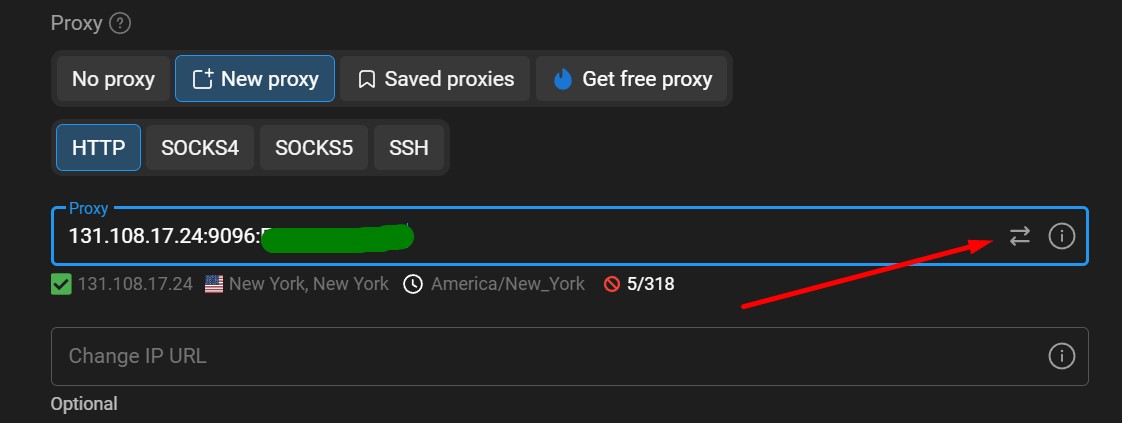
The browser correctly shows USA, New York geolocation. No WebRTC leaks if your profile is configured right.
Heads up: when using SOCKS5, make sure to enable Remote DNS in your settings. Otherwise DNS queries will go through your ISP and your anonymity goes out the window.
Armenia Proxy for OpenVPN
Different story here. I needed an Armenian IP to run an OpenVPN service. Without it, the thing just wouldn’t launch due to geo-restrictions.
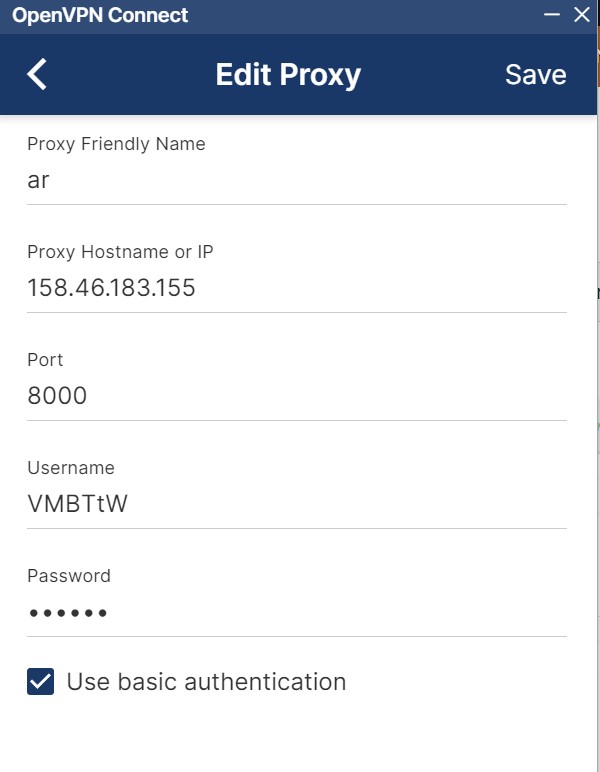
Proxy6 had Armenia IPv4 in stock. I ordered a dedicated private proxy, everything fired up and runs stable. Price is higher than popular countries like USA or Germany, but for such a niche task your options are limited anyway.
By the way, before ordering rare locations check availability through their API getcount method. Some countries like China or Cyprus might have zero IPs available.
Pricing
| Feature | Proxy6.net | Proxy-Seller | ProxyLine |
|---|---|---|---|
| IPv6 minimum | 4 cents (3 days) | from 16 cents | from 10 cents (5 days) |
| IPv4 dedicated | $1.77-4.50/month | from 75 cents (promo) | from 97 cents (5 days) |
| IPv4 shared | 35 cents/month | n/a | 67 cents/month |
| Bandwidth | 10-30 Mbps | 1 Gbps | 100 Mbps |
| Minimum term | 3 days | 1 week | 5 days |
| Residential proxies | no | yes | no |
| Mobile proxies | no | yes | no |
On IPv6 and shared IPv4 pricing, Proxy6 has no competition. But if you need speed or residential IPs, you’ll have to look elsewhere.
- rock-bottom prices, especially in bulk;
- can buy proxies for just 3 days, great for testing;
- switch between HTTPS/SOCKS5 without changing IP;
- decent API for automation;
- lots of countries, around 40 locations including rare ones;
- affiliate program pays 30% for life;
- crypto payments: Bitcoin, Ethereum, USDT, Litecoin.
- datacenter proxies only, no residential or mobile;
- speed capped at 10-30 megabits;
- refunds only within 24 hours, no refunds on shared at all;
- shared proxies can get burned by other users;
- API key passed in URL, which isn’t secure;
- API limit is just 3 requests per second.
Who Should Use Proxy6
I’d recommend it if you’re doing:
- scraping Google, social media, marketplaces;
- SMM automation, running account farms;
- SEO rank checking from different cities and countries;
- affiliate marketing on a tight budget;
- working in Dolphin{anty}, AdsPower, Multilogin and similar tools;
I wouldn’t recommend it for:
- watching videos or streaming;
- working with banks and payment systems;
- bypassing serious protection like Nike, Ticketmaster, Bet365;
- tasks where maximum anonymity is critical.
Bottom Line
Proxy6.net is a solid tool for mass automation on a shoestring budget. The service doesn’t pretend to be premium, but it delivers plenty of cheap IPs that get the job done.
My test of shared US IPv4 showed:
- fraud score 0/100 – clean IP;
- speed exactly 10 megabits, as advertised;
- 100% anonymity, proxy not detected;
- on 5 out of 318 blacklists – acceptable.
If you need tons of IPs for pennies for scraping or running accounts, Proxy6 fits the bill. For tasks where speed, anonymity, or bypassing serious anti-bot systems matter, look at Proxy-Seller with their residential addresses or Bright Data for enterprise stuff.
My rating: 4.3 out of 5. For the price, the service does what it’s supposed to, but the speed limits and lack of residential proxies keep it from scoring higher.